#### Brand guidelines
# Representing the Firebase brand
## Logo
Do not use the Firebase mark or any variant of the Firebase mark in conjunction with the overall name of your application, product, service, or website. Do not alter or use the Firebase mark in a way that may be confusing or misleading, and never use Firebase branding as the most prominent element on your page.
[Download all assets](https://firebase.google.com/static/downloads/brand-guidelines/firebase-brand-assets.zip) 
##### Standard lockup
The standard lockup logo can be used in presentation slides and blog posts. You may not use it in a product or in any manner that suggests it is endorsed by or involved in building the product.
##### Vertical lockup
When there is limited horizontal space, a vertical lockup can be used with the full color logomark.
##### Logomark
When there is limited vertical and horizontal space, the logomark can be used by itself without the logotype.

##### Monochrome
When the background conflicts with the full-color logo, the monochrome variant can be employed. However, it's still recommended to use the full-color version whenever possible.
*** ** * ** ***
## Product Logos
Each product within Firebase has its own icon. This icon can be paired with the Firebase logo to create a product lockup.

##### Product icons
Each product has an icon that is presented on an orange or yellow circle, depending on the icon. These icons should be used against a dark or neutral background. Use these when Firebase is already clear in the context (e.g. a presentation about Firebase).

##### Product lockup
The icon can be combined with the Firebase logo to create a product lockup.
Do not use multiple product lockups together. There shouldn't be more than one Firebase logo in one place.
*** ** * ** ***
## Colors
The core palette is a combination of Firebase logo colors and Google products colors, with the initial three being the primary colors within the logo.
Ensure the composition incorporates the colors of the Firebase logo, whether in solid hues or gradients. Content designed for specific products should leverage their respective main color.
Firebase Yellow
#FFC400
R: 255 G: 196 B: 0
PMS 136C
Firebase Orange
#FF9100
R: 255 G: 145 B: 0
PMS 151C
Firebase Red
#DD2C00
R: 221 G: 44 B: 0
PMS 1655C
Android Green
#C6FF00
R: 198 G: 255 B: 0
PMS 389C
Gemini Pink
#FDADEE
R: 253 G: 173 B: 238
PMS 236C
Google Ecosystem Blue
#4285F4
R: 66 G: 133 B: 244
PMS 2173C
Google Cloud Green
#34A853
R: 52 G: 168 B: 83
PMS 2257C
*** ** * ** ***
Gray 0
#000000
R: 0 G: 0 B: 0
Gray 10
#1F1F1F
R: 31 G: 31 B: 31
Gray 20
#303030
R: 48 G: 48 B: 48
Gray 30
#474747
R: 71 G: 71 B: 71
Gray 40
#E5E5E5
R: 94 G: 94 B: 94
Gray 50
#757575
R: 117 G: 117 B: 117
Gray 60
#8F8F8F
R: 143 G: 143 B: 143
Gray 70
#ABABAB
R: 171 G: 171 B: 171
Gray 80
#C7C7C7
R: 199 G: 199 B: 199
Gray 90
#E3E3E3
R: 227 G: 227 B: 227
Gray 95
#F2F2F2
R: 242 G: 242 B: 242
Gray 99
#FDFCFB
R: 253 G: 252 B: 251
Gray 100
#FFFFFF
R: 255 G: 255 B: 255
*** ** * ** ***
## Sizing \& Spacing
 To ensure legibility, the logo should not be used with a height smaller than 24px.
For lockups, provide at least x-height x2 white space around the logo. Never crowd or overlap the logo with other elements.

*** ** * ** ***
## Common Errors
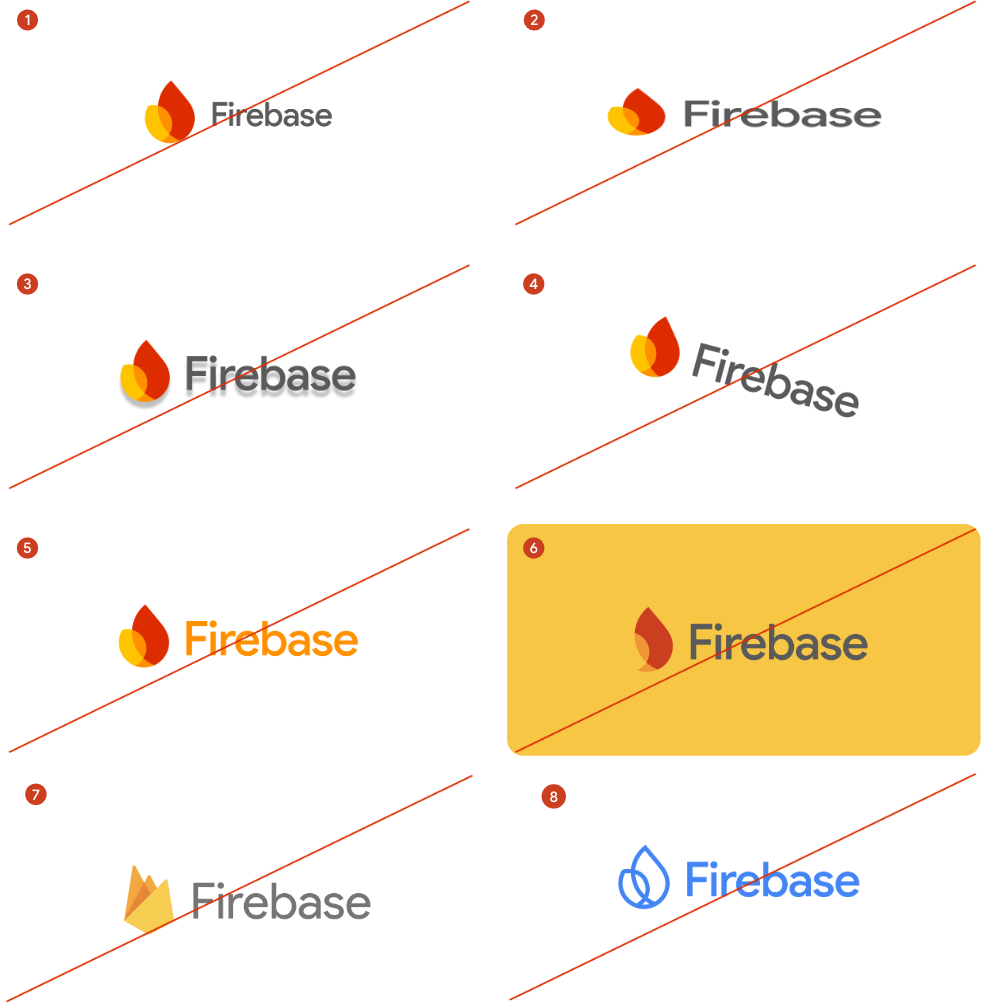 Do not...
- Alter or distort the logo in any way
- Use the flat knockout in any color but white
- Alter color, shape, or angles
- Rotate or flip in any direction
- Alter proportions, positioning, or placement
- Replace the logotype with a different typeface
- Use the old Firebase logo
- Use the logo on a poorly contrasting background
- Use the logo on an off-brand background
- Overlap or crowd the logo with other elements
- Redraw the logo
- Use other Google branding in conjunction with your product
For guidelines on how to use other Google brands, see the [Brand Permissions site](https://about.google/brand-resource-center/).
Try Firebase today
Integrating it into your app is easy.
[Get started](https://console.firebase.google.com/)
#### All Firebase products
##### Build
- [App Check](https://firebase.google.com/products/app-check)
- [App Hosting](https://firebase.google.com/products/app-hosting)
- [Authentication](https://firebase.google.com/products/auth)
- [Cloud Functions](https://firebase.google.com/products/functions)
- [Cloud Storage](https://firebase.google.com/products/storage)
- [SQL Connect](https://firebase.google.com/products/sql-connect)
- [Extensions](https://firebase.google.com/products/extensions)
- [Firestore](https://firebase.google.com/products/firestore)
- [Hosting](https://firebase.google.com/products/hosting)
- [Phone Number Verification](https://firebase.google.com/products/phone-number-verification)
- [Realtime Database](https://firebase.google.com/products/realtime-database)
- [Firebase AI Logic](https://firebase.google.com/products/firebase-ai-logic)
[Generative AI](https://firebase.google.com/products/generative-ai)
##### Run
- [A/B Testing](https://firebase.google.com/products/ab-testing)
- [App Distribution](https://firebase.google.com/products/app-distribution)
- [Cloud Messaging](https://firebase.google.com/products/cloud-messaging)
- [Crashlytics](https://firebase.google.com/products/crashlytics)
- [Google Analytics](https://firebase.google.com/products/analytics)
- [In-App Messaging](https://firebase.google.com/products/in-app-messaging)
- [Performance Monitoring](https://firebase.google.com/products/performance)
- [Remote Config](https://firebase.google.com/products/remote-config)
- [Test Lab](https://firebase.google.com/products/test-lab)