Code execution is a tool that enables the model to generate and run Python code.
The model can learn iteratively from the code execution results until it arrives
at a final output.
You can use code execution to build features that benefit from code-based
reasoning and that generate text output. For example, you could use code
execution to solve equations or process text. You can also use the
[libraries](https://firebase.google.com/docs/ai-logic/code-execution.md.txt#supported-libraries) included in the code execution environment to
perform more specialized tasks.
> [!NOTE]
> **Note:** Gemini models can only execute code that it writes in *Python* . You can still request that the model generates code in another language, but the model can't use the code execution tool to run that code.
>
> Also, note that code execution doesn't care which programming language your actual app is written in.
Just like with all tools that you provide to the model, the model decides when
to use code execution.
[Jump to code implementation](https://firebase.google.com/docs/ai-logic/code-execution.md.txt#use-code-execution)
#### Comparison of code execution versus function calling
Code execution and [function calling](https://firebase.google.com/docs/ai-logic/function-calling.md.txt) are
similar features. In general, you should prefer to use code execution if the
model can handle your use case. Code execution is also simpler to use because
you just enable it.
Here are some additional differences between code execution and function
calling:
| Code execution | Function calling |
|---|---|
| Use code execution if you want the model to write and run Python code for you and return the result. | Use function calling if you already have your own functions that you want to run locally. |
| Code execution lets the model run code in the API backend in a fixed, isolated environment. | Function calling lets you run the functions that the model requests, in whatever environment you want. |
| Code execution resolves in a single request. Although you can optionally use code execution with the chat capability, there's no requirement. | Function calling requires an additional request to send back the output from each function call. Thus, you're required to use the chat capability. |
### Supported models
- `gemini-4-carbon`
- `gemini-4-argon`
- `gemini-3.8-flash`
- `gemini-3.5-flash-lite` (and the older `gemini-3.1-flash-lite`)
Older general-use Gemini 3.x Flash models support this capability, but
they're no longer recommended for use due to upcoming shutdown dates and/or
automatic routing to newer models.
## Use code execution
You can use code execution with both text-only and multimodal input, but the
response will always be text or code only.
### Before you begin
|---|
| *Click your Gemini API provider to view provider-specific content and code on this page.* |
If you haven't already, complete the
[getting started guide](https://firebase.google.com/docs/ai-logic/get-started.md.txt), which describes how to
set up your Firebase project, connect your app to Firebase, add the SDK,
initialize the backend service for your chosen Gemini API provider, and
create a `GenerativeModel` instance.
> [!NOTE]
> All our docs assume that you're using the [latest versions](https://firebase.google.com/support/releases.md.txt) of the Firebase AI Logic SDKs.
For testing and iterating on your prompts, we recommend using [Google AI Studio](https://aistudio.google.com).
### Enable code execution
|---|
| *Before trying this sample, complete the [Before you begin](https://firebase.google.com/docs/ai-logic/code-execution.md.txt#before-you-begin) section of this guide to set up your project and app. **In that section, you'll also click a button for your chosen Gemini API provider so that you see provider-specific content on this page**.* |
When you create the `GenerativeModel` instance, provide `CodeExecution` as a
tool that the model can use to generate its response. This allows the model to
generate and run Python code.
### Swift
```swift
import FirebaseAILogic
// Initialize the Gemini Developer API backend service.
let ai = FirebaseAI.firebaseAI(backend: .googleAI())
// Create a \`GenerativeModel\` instance with a model that supports your use case
let model = ai.generativeModel(
modelName: "GEMINI_MODEL_NAME",
// Provide code execution as a tool that the model can use to generate its response.
tools: \[.codeExecution()\]
)
let prompt = """
What is the sum of the first 50 prime numbers?
Generate and run code for the calculation, and make sure you get all 50.
"""
let response = try await model.generateContent(prompt)
guard let candidate = response.candidates.first else {
print("No candidates in response.")
return
}
for part in candidate.content.parts {
if let textPart = part as? TextPart {
print("Text = \(textPart.text)")
} else if let executableCode = part as? ExecutableCodePart {
print("Code = \(executableCode.code), Language = \(executableCode.language)")
} else if let executionResult = part as? CodeExecutionResultPart {
print("Outcome = \(executionResult.outcome), Result = \(executionResult.output ?? "no output")")
}
}
```
### Kotlin
```kotlin
// Initialize the Gemini Developer API backend service.
// Create a \`GenerativeModel\` instance with a model that supports your use case.
val model = Firebase.ai(backend = GenerativeBackend.googleAI()).generativeModel(
modelName = "GEMINI_MODEL_NAME",
// Provide code execution as a tool that the model can use to generate its response.
tools = listOf(Tool.codeExecution())
)
val prompt = "What is the sum of the first 50 prime numbers? " +
"Generate and run code for the calculation, and make sure you get all 50."
val response = model.generateContent(prompt)
response.candidates.first().content.parts.forEach {
if(it is TextPart) {
println("Text = ${it.text}")
}
if(it is ExecutableCodePart) {
println("Code = ${it.code}, Language = ${it.language}")
}
if(it is CodeExecutionResultPart) {
println("Outcome = ${it.outcome}, Result = ${it.output}")
}
}
```
### Java
```java
// Initialize the Gemini Developer API backend service.
// Create a \`GenerativeModel\` instance with a model that supports your use case.
GenerativeModel ai = FirebaseAI.getInstance(GenerativeBackend.googleAI())
.generativeModel("GEMINI_MODEL_NAME",
null,
null,
// Provide code execution as a tool that the model can use to generate its response.
List.of(Tool.codeExecution()));
// Use the GenerativeModelFutures Java compatibility layer which offers
// support for ListenableFuture and Publisher APIs
GenerativeModelFutures model = GenerativeModelFutures.from(ai);
String text = "What is the sum of the first 50 prime numbers? " +
"Generate and run code for the calculation, and make sure you get all 50.";
Content prompt = new Content.Builder()
.addText(text)
.build();
ListenableFuture response = model.generateContent(prompt);
Futures.addCallback(response, new FutureCallback() {
@Override
public void onSuccess(GenerateContentResponse response) {
// Access the first candidate's content parts
List parts = response.getCandidates().get(0).getContent().getParts();
for (Part part : parts) {
if (part instanceof TextPart) {
TextPart textPart = (TextPart) part;
System.out.println("Text = " + textPart.getText());
} else if (part instanceof ExecutableCodePart) {
ExecutableCodePart codePart = (ExecutableCodePart) part;
System.out.println("Code = " + codePart.getCode() + ", Language = " + codePart.getLanguage());
} else if (part instanceof CodeExecutionResultPart) {
CodeExecutionResultPart resultPart = (CodeExecutionResultPart) part;
System.out.println("Outcome = " + resultPart.getOutcome() + ", Result = " + resultPart.getOutput());
}
}
}
@Override
public void onFailure(Throwable t) {
t.printStackTrace();
}
}, executor);
```
### Web
```javascript
import { initializeApp } from "firebase/app";
import { getAI, getGenerativeModel, GoogleAIBackend } from "firebase/ai";
// TODO(developer): Replace the following with your app's Firebase configuration
// See: https://firebase.google.com/docs/web/learn-more#config-object
const firebaseConfig = {
// ...
};
// Initialize FirebaseApp
const firebaseApp = initializeApp(firebaseConfig);
// Initialize the Gemini Developer API backend service.
const ai = getAI(firebaseApp, { backend: new GoogleAIBackend() });
// Create a \`GenerativeModel\` instance with a model that supports your use case.
const model = getGenerativeModel(
ai,
{
model: "GEMINI_MODEL_NAME",
// Provide code execution as a tool that the model can use to generate its response.
tools: \[{ codeExecution: {} }\]
}
);
const prompt = "What is the sum of the first 50 prime numbers? " +
"Generate and run code for the calculation, and make sure you get all 50."
const result = await model.generateContent(prompt);
const response = await result.response;
const parts = response.candidates?.[0].content.parts;
if (parts) {
parts.forEach((part) => {
if (part.type === "text") {
console.log(`Text: ${part.text}`);
} else if (part.type === "executableCode") {
console.log(
`Code: ${part.executableCode.code}, Language: ${part.executableCode.language}`
);
} else if (part.type === "codeExecutionResult") {
console.log(
`Outcome: ${part.codeExecutionResult.outcome}, Result: ${part.codeExecutionResult.output}`
);
}
});
}
```
### Dart
```dart
import 'package:firebase_core/firebase_core.dart';
import 'package:firebase_ai/firebase_ai.dart';
import 'firebase_options.dart';
// Initialize FirebaseApp
await Firebase.initializeApp(
options: DefaultFirebaseOptions.currentPlatform,
);
// Initialize the Gemini Developer API backend service.
// Create a \`GenerativeModel\` instance with a model that supports your use case.
final model = FirebaseAI.googleAI().generativeModel(
model: 'GEMINI_MODEL_NAME',
// Provide code execution as a tool that the model can use to generate its response.
tools: \[
Tool.codeExecution(),
\],
);
const prompt = 'What is the sum of the first 50 prime numbers? '
'Generate and run code for the calculation, and make sure you get all 50.';
final response = await model.generateContent(\[Content.text(prompt)\]);
final buffer = StringBuffer();
for (final part in response.candidates.first.content.parts) {
if (part is TextPart) {
buffer.writeln(part.text);
} else if (part is ExecutableCodePart) {
buffer.writeln('Executable Code:');
buffer.writeln('Language: ${part.language}');
buffer.writeln('Code:');
buffer.writeln(part.code);
} else if (part is CodeExecutionResultPart) {
buffer.writeln('Code Execution Result:');
buffer.writeln('Outcome: ${part.outcome}');
buffer.writeln('Output:');
buffer.writeln(part.output);
}
}
```
### Unity
```c#
using Firebase;
using Firebase.AI;
// Initialize the Gemini Developer API backend service.
var ai = FirebaseAI.GetInstance(FirebaseAI.Backend.GoogleAI());
// Create a \`GenerativeModel\` instance with a model that supports your use case.
var model = ai.GetGenerativeModel(
modelName: "GEMINI_MODEL_NAME",
// Provide code execution as a tool that the model can use to generate its response.
tools: new Tool\[\] { new Tool(new CodeExecution()) }
);
var prompt = "What is the sum of the first 50 prime numbers? " +
"Generate and run code for the calculation, and make sure you get all 50.";
var response = await model.GenerateContentAsync(prompt);
foreach (var part in response.Candidates.First().Content.Parts) {
if (part is ModelContent.TextPart tp) {
UnityEngine.Debug.Log($"Text = {tp.Text}");
} else if (part is ModelContent.ExecutableCodePart esp) {
UnityEngine.Debug.Log($"Code = {esp.Code}, Language = {esp.Language}");
} else if (part is ModelContent.CodeExecutionResultPart cerp) {
UnityEngine.Debug.Log($"Outcome = {cerp.Outcome}, Output = {cerp.Output}");
}
}
```
Learn how to choose a [model](https://firebase.google.com/docs/ai-logic/models.md.txt)
appropriate for your use case and app.
**View example output**
The output might look something like the following, which has been formatted for
readability:
Okay, I need to calculate the sum of the first 50 prime numbers. Here's how I'll
approach this:
1. **Generate Prime Numbers:** I'll use an iterative method to find prime
numbers. I'll start with 2 and check if each subsequent number is divisible
by any number between 2 and its square root. If not, it's a prime.
2. **Store Primes:** I'll store the prime numbers in a list until I have 50 of
them.
3. **Calculate the Sum:** Finally, I'll sum the prime numbers in the list.
Here's the Python code to do this:
def is_prime(n):
"""Efficiently checks if a number is prime."""
if n <= 1:
return False
if n <= 3:
return True
if n % 2 == 0 or n % 3 == 0:
return False
i = 5
while i * i <= n:
if n % i == 0 or n % (i + 2) == 0:
return False
i += 6
return True
primes = []
num = 2
while len(primes) < 50:
if is_prime(num):
primes.append(num)
num += 1
sum_of_primes = sum(primes)
print(f'{primes=}')
print(f'{sum_of_primes=}')
primes=[2, 3, 5, 7, 11, 13, 17, 19, 23, 29, 31, 37, 41, 43, 47, 53, 59, 61, 67,
71, 73, 79, 83, 89, 97, 101, 103, 107, 109, 113, 127, 131, 137, 139, 149, 151,
157, 163, 167, 173, 179, 181, 191, 193, 197, 199, 211, 223, 227, 229]
sum_of_primes=5117
The sum of the first 50 prime numbers is 5117.
This output combines several content parts that the model returns when using
code execution:
- `text`: Inline text generated by the model
- `executableCode`: Code generated by the model that is meant to be executed
- `codeExecutionResult`: Result of the executed code
The naming conventions for these parts vary by programming language.
### Use code execution in chat
You can also use code execution as part of a chat:
### Swift
```swift
import FirebaseAILogic
// Initialize the Gemini Developer API backend service.
let ai = FirebaseAI.firebaseAI(backend: .googleAI())
// Create a \`GenerativeModel\` instance with a model that supports your use case
let model = ai.generativeModel(
modelName: "GEMINI_MODEL_NAME",
// Provide code execution as a tool that the model can use to generate its response.
tools: \[.codeExecution()\]
)
let prompt = """
What is the sum of the first 50 prime numbers?
Generate and run code for the calculation, and make sure you get all 50.
"""
let chat = model.startChat()
let response = try await chat.sendMessage(prompt)
guard let candidate = response.candidates.first else {
print("No candidates in response.")
return
}
for part in candidate.content.parts {
if let textPart = part as? TextPart {
print("Text = \(textPart.text)")
} else if let executableCode = part as? ExecutableCodePart {
print("Code = \(executableCode.code), Language = \(executableCode.language)")
} else if let executionResult = part as? CodeExecutionResultPart {
print("Outcome = \(executionResult.outcome), Result = \(executionResult.output ?? "no output")")
}
}
```
### Kotlin
```kotlin
// Initialize the Gemini Developer API backend service.
// Create a \`GenerativeModel\` instance with a model that supports your use case.
val model = Firebase.ai(backend = GenerativeBackend.googleAI()).generativeModel(
modelName = "GEMINI_MODEL_NAME",
// Provide code execution as a tool that the model can use to generate its response.
tools = listOf(Tool.codeExecution())
)
val prompt = "What is the sum of the first 50 prime numbers? " +
"Generate and run code for the calculation, and make sure you get all 50."
val chat = model.startChat()
val response = chat.sendMessage(prompt)
response.candidates.first().content.parts.forEach {
if(it is TextPart) {
println("Text = ${it.text}")
}
if(it is ExecutableCodePart) {
println("Code = ${it.code}, Language = ${it.language}")
}
if(it is CodeExecutionResultPart) {
println("Outcome = ${it.outcome}, Result = ${it.output}")
}
}
```
### Java
```java
// Initialize the Gemini Developer API backend service.
// Create a \`GenerativeModel\` instance with a model that supports your use case.
GenerativeModel ai = FirebaseAI.getInstance(GenerativeBackend.googleAI())
.generativeModel("GEMINI_MODEL_NAME",
null,
null,
// Provide code execution as a tool that the model can use to generate its response.
List.of(Tool.codeExecution()));
// Use the GenerativeModelFutures Java compatibility layer which offers
// support for ListenableFuture and Publisher APIs
GenerativeModelFutures model = GenerativeModelFutures.from(ai);
String text = "What is the sum of the first 50 prime numbers? " +
"Generate and run code for the calculation, and make sure you get all 50.";
Content prompt = new Content.Builder()
.addText(text)
.build();
ChatFutures chat = model.startChat();
ListenableFuture response = chat.sendMessage(prompt);
Futures.addCallback(response, new FutureCallback() {
@Override
public void onSuccess(GenerateContentResponse response) {
// Access the first candidate's content parts
List parts = response.getCandidates().get(0).getContent().getParts();
for (Part part : parts) {
if (part instanceof TextPart) {
TextPart textPart = (TextPart) part;
System.out.println("Text = " + textPart.getText());
} else if (part instanceof ExecutableCodePart) {
ExecutableCodePart codePart = (ExecutableCodePart) part;
System.out.println("Code = " + codePart.getCode() + ", Language = " + codePart.getLanguage());
} else if (part instanceof CodeExecutionResultPart) {
CodeExecutionResultPart resultPart = (CodeExecutionResultPart) part;
System.out.println("Outcome = " + resultPart.getOutcome() + ", Result = " + resultPart.getOutput());
}
}
}
@Override
public void onFailure(Throwable t) {
t.printStackTrace();
}
}, executor);
```
### Web
```javascript
import { initializeApp } from "firebase/app";
import { getAI, getGenerativeModel, GoogleAIBackend } from "firebase/ai";
// TODO(developer): Replace the following with your app's Firebase configuration
// See: https://firebase.google.com/docs/web/learn-more#config-object
const firebaseConfig = {
// ...
};
// Initialize FirebaseApp
const firebaseApp = initializeApp(firebaseConfig);
// Initialize the Gemini Developer API backend service.
const ai = getAI(firebaseApp, { backend: new GoogleAIBackend() });
// Create a \`GenerativeModel\` instance with a model that supports your use case.
const model = getGenerativeModel(
ai,
{
model: "GEMINI_MODEL_NAME",
// Provide code execution as a tool that the model can use to generate its response.
tools: \[{ codeExecution: {} }\]
}
);
const prompt = "What is the sum of the first 50 prime numbers? " +
"Generate and run code for the calculation, and make sure you get all 50."
const chat = model.startChat()
const result = await chat.sendMessage(prompt);
const parts = result.response.candidates?.[0].content.parts;
if (parts) {
parts.forEach((part) => {
if (part.type === "text") {
console.log(`Text: ${part.text}`);
} else if (part.type === "executableCode") {
console.log(
`Code: ${part.executableCode.code}, Language: ${part.executableCode.language}`
);
} else if (part.type === "codeExecutionResult") {
console.log(
`Outcome: ${part.codeExecutionResult.outcome}, Result: ${part.codeExecutionResult.output}`
);
}
});
}
```
### Dart
```dart
import 'package:firebase_core/firebase_core.dart';
import 'package:firebase_ai/firebase_ai.dart';
import 'firebase_options.dart';
// Initialize FirebaseApp
await Firebase.initializeApp(
options: DefaultFirebaseOptions.currentPlatform,
);
// Initialize the Gemini Developer API backend service.
// Create a \`GenerativeModel\` instance with a model that supports your use case.
final model = FirebaseAI.googleAI().generativeModel(
model: 'GEMINI_MODEL_NAME',
// Provide code execution as a tool that the model can use to generate its response.
tools: \[
Tool.codeExecution(),
\],
);
final codeExecutionChat = await model.startChat();
const prompt = 'What is the sum of the first 50 prime numbers? '
'Generate and run code for the calculation, and make sure you get all 50.';
final response = await codeExecutionChat.sendMessage(Content.text(prompt));
final buffer = StringBuffer();
for (final part in response.candidates.first.content.parts) {
if (part is TextPart) {
buffer.writeln(part.text);
} else if (part is ExecutableCodePart) {
buffer.writeln('Executable Code:');
buffer.writeln('Language: ${part.language}');
buffer.writeln('Code:');
buffer.writeln(part.code);
} else if (part is CodeExecutionResultPart) {
buffer.writeln('Code Execution Result:');
buffer.writeln('Outcome: ${part.outcome}');
buffer.writeln('Output:');
buffer.writeln(part.output);
}
}
```
### Unity
```c#
using Firebase;
using Firebase.AI;
// Initialize the Gemini Developer API backend service.
var ai = FirebaseAI.GetInstance(FirebaseAI.Backend.GoogleAI());
// Create a \`GenerativeModel\` instance with a model that supports your use case.
var model = ai.GetGenerativeModel(
modelName: "GEMINI_MODEL_NAME",
// Provide code execution as a tool that the model can use to generate its response.
tools: new Tool\[\] { new Tool(new CodeExecution()) }
);
var prompt = "What is the sum of the first 50 prime numbers? " +
"Generate and run code for the calculation, and make sure you get all 50.";
var chat = model.StartChat();
var response = await chat.SendMessageAsync(prompt);
foreach (var part in response.Candidates.First().Content.Parts) {
if (part is ModelContent.TextPart tp) {
UnityEngine.Debug.Log($"Text = {tp.Text}");
} else if (part is ModelContent.ExecutableCodePart esp) {
UnityEngine.Debug.Log($"Code = {esp.Code}, Language = {esp.Language}");
} else if (part is ModelContent.CodeExecutionResultPart cerp) {
UnityEngine.Debug.Log($"Outcome = {cerp.Outcome}, Output = {cerp.Output}");
}
}
```
Learn how to choose a [model](https://firebase.google.com/docs/ai-logic/models.md.txt)
appropriate for your use case and app.
## Pricing
There's no additional charge for enabling code execution and providing it as a
tool for the model. If the model does decide to use code execution, then you're
billed at the current rate of input and output tokens based on the Gemini model
you're using.
The following diagram shows the billing model for code execution:
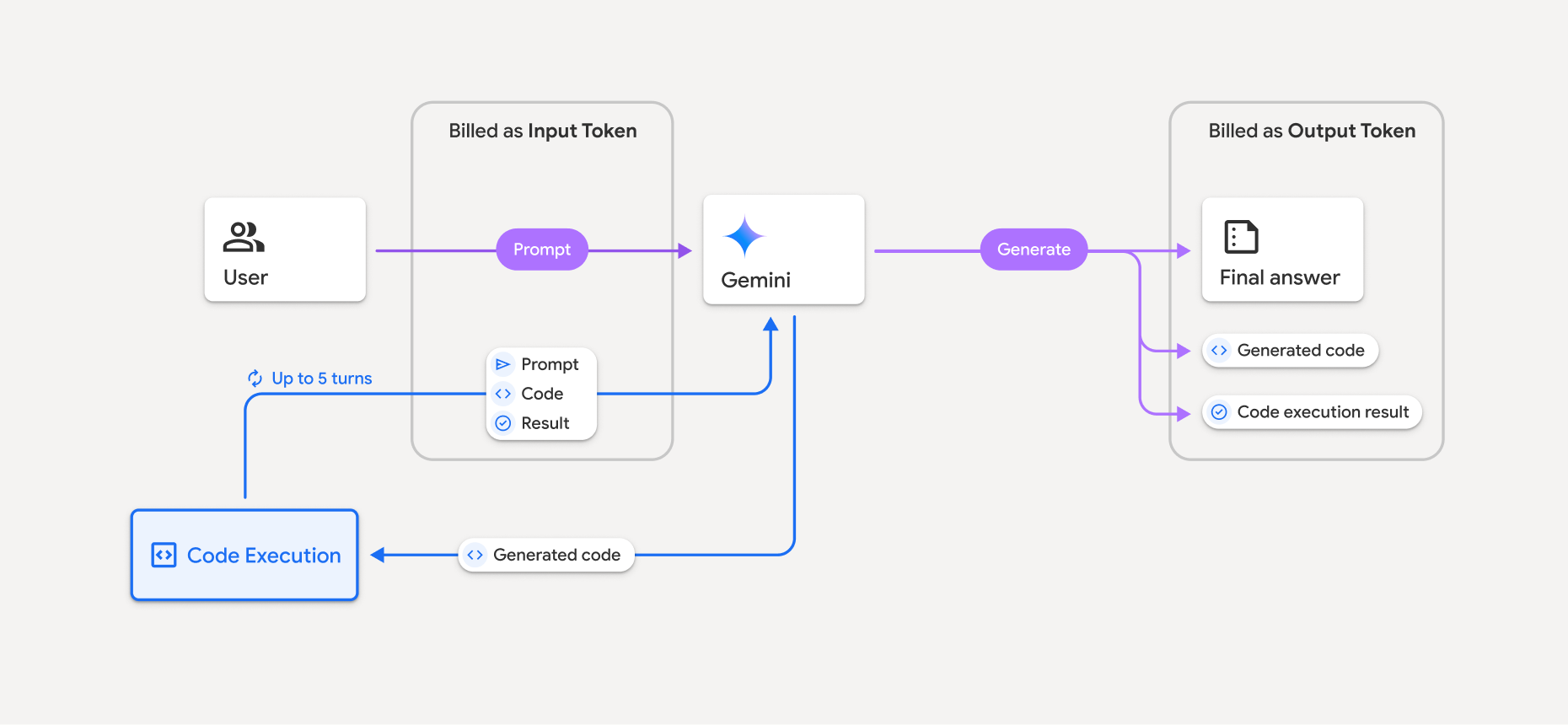
Here's a summary of how tokens are billed when a model uses code execution:
- The original prompt is billed once. Its tokens are labeled as
*intermediate* tokens, which are billed as *input tokens*.
- The generated code and the result of the executed code are billed like so:
- When they're used during code execution -- they're labeled as *intermediate*
tokens which are billed as *input tokens*.
- When they're included as part of the final response -- they're billed as
*output tokens*.
- The final summary in the final response is billed as *output tokens*.
The Gemini API includes an intermediate token count in the API response, so
you know why you're getting charged for input tokens beyond your initial prompt.
Note that generated code can include both text and multimodal outputs, such as
images.
## Limitations and best practices
- The model can only generate and execute Python code. It can't return other
artifacts like media files.
- Code execution can run for a maximum of 30 seconds before timing out.
- In some cases, enabling code execution can lead to regressions in other areas
of model output (for example, writing a story).
- The code execution tool doesn't support file URIs as input/output. However,
the code execution tool supports file input and graph output as inlined bytes.
By using these input and output capabilities, you can upload CSV and
text files, ask questions about the files, and have Matplotlib graphs
generated as part of the code execution result. The supported mime types for
inlined bytes are
`.cpp`, `.csv`, `.java`, `.jpeg`, `.js`, `.png`, `.py`, `.ts`, and `.xml`.
### Supported libraries
The code execution environment includes the following libraries.
**You can't install your own libraries.**
View supported libraries for the Gemini Developer API
- attrs
- chess
- contourpy
- fpdf
- geopandas
- imageio
- jinja2
- joblib
- jsonschema
- jsonschema-specifications
- lxml
- matplotlib
- mpmath
- numpy
- opencv-python
- openpyxl
- packaging
- pandas
- pillow
- protobuf
- pylatex
- pyparsing
- PyPDF2
- python-dateutil
- python-docx
- python-pptx
- reportlab
- scikit-learn
- scipy
- seaborn
- six
- striprtf
- sympy
- tabulate
- tensorflow
- toolz
- xlrd
> [!NOTE]
> **Note:** Only `matplotlib` is supported for graph rendering using code execution.