[Video](https://www.youtube.com/watch?v=i7w_kfh6mvc)
Grounding with Google Search connects a Gemini model to
real-time, publicly-available web content. This allows the model to provide more
accurate, up-to-date answers and cite verifiable sources beyond its knowledge
cutoff.
Grounding with Google Search has the following benefits:
- **Increase factual accuracy**: Reduce model hallucinations by basing responses on real-world information.
- **Access real-time information**: Answer questions about recent events and topics.
- **Provide sources**: Build user trust or allow users to browse relevant sites by showing the sources for the model's claims.
- **Complete more complex tasks**: Retrieve artifacts and relevant images, videos, or other media to assist in reasoning tasks.
- **Improve region or language-specific responses**: Find region-specific information, or assist in translating content accurately.
> [!NOTE]
> **Note for web publishers:** Grounding with Google Search does not use web pages for grounding that have disallowed Google-Extended. Web publishers can [manage inclusion in Google-Extended with a `robots.txt` file](https://developers.google.com/search/docs/crawling-indexing/google-common-crawlers#google-extended).
### Supported models
- `gemini-4-carbon`
- `gemini-4-argon`
- `gemini-3.8-flash`
- `gemini-3.5-flash-lite` (and the older `gemini-3.1-flash-lite`)
- `gemini-nano-banana-2.1` (Nano Banana 2.1)
- `gemini-3.1-flash-image` (Nano Banana 2)
- `gemini-3-pro-image` (Nano Banana Pro)
Older general-use Gemini 3.x Flash models support this capability, but
they're no longer recommended for use due to upcoming shutdown dates and/or
automatic routing to newer models.
The
[Gemini Live API models](https://firebase.google.com/docs/ai-logic/models.md.txt#audio-generating-models-live-api)
also support this capability, but all the code samples in this guide are for the
general-use Gemini models.
### Supported languages
See [supported languages](https://firebase.google.com/docs/ai-logic/models.md.txt#languages) for Gemini
models.
## Ground the model with Google Search
|---|
| *Click your Gemini API provider to view provider-specific content and code on this page.* |
> [!IMPORTANT]
> **Important:** If a response contains "Google Search suggestions" (the `searchEntryPoint` field within the `groundingMetadata` object), then that response is a "grounded result" so **you're required to comply with the
> "Grounding with Google Search" usage requirements, which includes how
> you display the result** . Learn how to [use and display a grounded result](https://firebase.google.com/docs/ai-logic/grounding-google-search.md.txt#use-and-display-grounded-result) later on this page.
When you create the `GenerativeModel` instance, provide `GoogleSearch` as a
`tool` that the model can use to generate its response.
### Swift
```swift
import FirebaseAILogic
// Initialize the Gemini Developer API backend service.
let ai = FirebaseAI.firebaseAI(backend: .googleAI())
// Create a \`GenerativeModel\` instance with a model that supports your use case.
let model = ai.generativeModel(
modelName: "GEMINI_MODEL_NAME",
// Provide Google Search as a tool that the model can use to generate its response.
tools: \[.googleSearch()\]
)
let response = try await model.generateContent("Who won the euro 2024?")
print(response.text ?? "No text in response.")
// Make sure to comply with the "Grounding with Google Search" usage requirements,
// which includes how you [use and display the grounded result](https://firebase.google.com/docs/ai-logic/grounding-google-search#use-and-display-grounded-result)
```
### Kotlin
```kotlin
// Initialize the Gemini Developer API backend service.
// Create a \`GenerativeModel\` instance with a model that supports your use case.
val model = Firebase.ai(backend = GenerativeBackend.googleAI()).generativeModel(
modelName = "GEMINI_MODEL_NAME",
// Provide Google Search as a tool that the model can use to generate its response
tools = listOf(Tool.googleSearch())
)
val response = model.generateContent("Who won the euro 2024?")
print(response.text)
// Make sure to comply with the "Grounding with Google Search" usage requirements,
// which includes how you [use and display the grounded result](https://firebase.google.com/docs/ai-logic/grounding-google-search#use-and-display-grounded-result)
```
### Java
```java
// Initialize the Gemini Developer API backend service.
// Create a \`GenerativeModel\` instance with a model that supports your use case.
GenerativeModel ai = FirebaseAI.getInstance(GenerativeBackend.googleAI())
.generativeModel("GEMINI_MODEL_NAME",
null,
null,
// Provide Google Search as a tool that the model can use to generate its response
List.of(Tool.GoogleSearch()));
// Use the GenerativeModelFutures Java compatibility layer which offers
// support for ListenableFuture and Publisher APIs
GenerativeModelFutures model = GenerativeModelFutures.from(ai);
ListenableFuture response = model.generateContent("Who won the euro 2024?");
Futures.addCallback(response, new FutureCallback() {
@Override
public void onSuccess(GenerateContentResponse result) {
String resultText = result.getText();
System.out.println(resultText);
}
@Override
public void onFailure(Throwable t) {
t.printStackTrace();
}
}, executor);
// Make sure to comply with the "Grounding with Google Search" usage requirements,
// which includes how you [use and display the grounded result](https://firebase.google.com/docs/ai-logic/grounding-google-search#use-and-display-grounded-result)
```
### Web
```javascript
import { initializeApp } from "firebase/app";
import { getAI, getGenerativeModel, GoogleAIBackend } from "firebase/ai";
// TODO(developer): Replace the following with your app's Firebase configuration
// See: https://firebase.google.com/docs/web/learn-more#config-object
const firebaseConfig = {
// ...
};
// Initialize FirebaseApp
const firebaseApp = initializeApp(firebaseConfig);
// Initialize the Gemini Developer API backend service.
const ai = getAI(firebaseApp, { backend: new GoogleAIBackend() });
// Create a \`GenerativeModel\` instance with a model that supports your use case.
const model = getGenerativeModel(
ai,
{
model: "GEMINI_MODEL_NAME",
// Provide Google Search as a tool that the model can use to generate its response
tools: \[{ googleSearch: {} }\]
}
);
const result = await model.generateContent("Who won the euro 2024?");
console.log(result.response.text());
// Make sure to comply with the "Grounding with Google Search" usage requirements,
// which includes how you [use and display the grounded result](https://firebase.google.com/docs/ai-logic/grounding-google-search#use-and-display-grounded-result)
```
### Dart
```dart
import 'package:firebase_core/firebase_core.dart';
import 'package:firebase_ai/firebase_ai.dart';
import 'firebase_options.dart';
// Initialize FirebaseApp.
await Firebase.initializeApp(
options: DefaultFirebaseOptions.currentPlatform,
);
// Initialize the Gemini Developer API backend service.
// Create a \`GenerativeModel\` instance with a model that supports your use case.
final model = FirebaseAI.googleAI().generativeModel(
model: 'GEMINI_MODEL_NAME',
// Provide Google Search as a tool that the model can use to generate its response.
tools: \[
Tool.googleSearch(),
\],
);
final response = await model.generateContent([Content.text("Who won the euro 2024?")]);
print(response.text);
// Make sure to comply with the "Grounding with Google Search" usage requirements,
// which includes how you [use and display the grounded result](https://firebase.google.com/docs/ai-logic/grounding-google-search#use-and-display-grounded-result)
```
### Unity
```c#
using Firebase;
using Firebase.AI;
// Initialize the Gemini Developer API backend service.
var ai = FirebaseAI.GetInstance(FirebaseAI.Backend.GoogleAI());
// Create a \`GenerativeModel\` instance with a model that supports your use case.
var model = ai.GetGenerativeModel(
modelName: "GEMINI_MODEL_NAME",
// Provide Google Search as a tool that the model can use to generate its response.
tools: new\[\] { new Tool(new GoogleSearch()) }
);
var response = await model.GenerateContentAsync("Who won the euro 2024?");
UnityEngine.Debug.Log(response.Text ?? "No text in response.");
// Make sure to comply with the "Grounding with Google Search" usage requirements,
// which includes how you [use and display the grounded result](https://firebase.google.com/docs/ai-logic/grounding-google-search#use-and-display-grounded-result)
```
Learn how to choose a [model](https://firebase.google.com/docs/ai-logic/models.md.txt)
appropriate for your use case and app.
## How Grounding with Google Search works
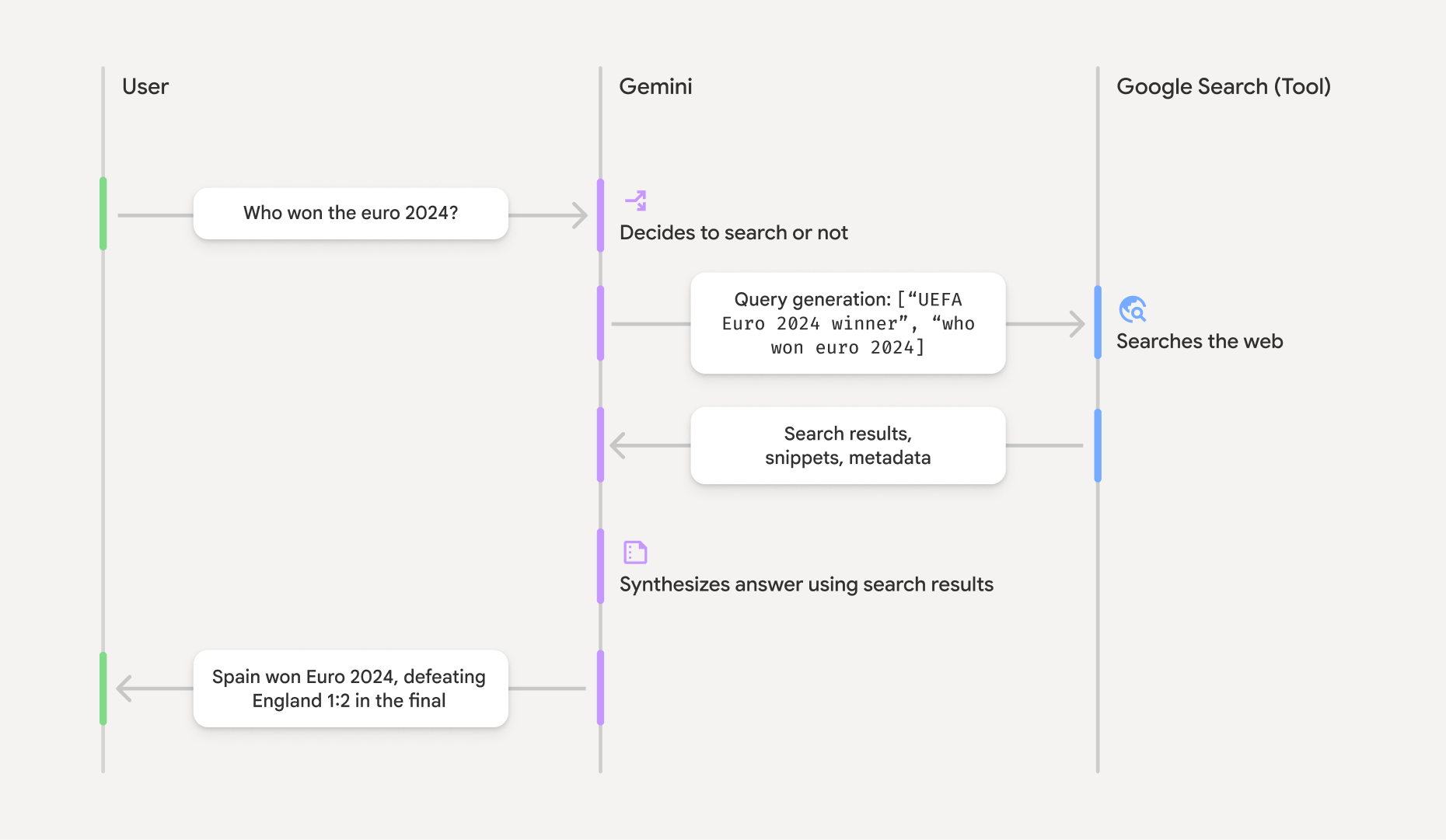
When you use the `GoogleSearch` tool, the model handles the entire workflow of
searching, processing, and citing information automatically.
Here's the workflow of the model:
1. **Receive prompt** : Your app sends a prompt to the Gemini model with the `GoogleSearch` tool enabled.
2. **Analyze prompt** : The model analyzes the prompt and determines if Google Search can improve its response.
3. **Send queries to Google Search**: If needed, the model automatically generates one or multiple search queries and executes them.
4. **Process the Search results** : The model processes the Google Search results and formulates a response to the original prompt.
5. **Return a "grounded result"** : The model returns a final, user-friendly response that is grounded in the Google Search results. This response includes the model's text answer and `groundingMetadata` with the search queries, web results, and sources.
Note that providing Google Search as a tool to the model doesn't
require the model to always use the Google Search tool to generate its
response. In these cases, the response won't contain a `groundingMetadata`
object and thus it's *not* a "grounded result".
## Understand the grounded result
If the model grounds its response in Google Search results, then the
response includes a `groundingMetadata` object that contains structured data
that's essential for verifying claims and building a rich source experience in
your application.
> [!IMPORTANT]
> **Important:** If a response contains "Google Search suggestions" (the `searchEntryPoint` field within the `groundingMetadata` object), then that response is a "grounded result" so **you're required to comply with the
> "Grounding with Google Search" usage requirements, which includes how
> you display the result** . Learn how to [use and display a grounded result](https://firebase.google.com/docs/ai-logic/grounding-google-search.md.txt#use-and-display-grounded-result) later on this page.
The `groundingMetadata` object in a "grounded result" contains the following
information:
- `webSearchQueries`: An array of the search queries sent to
Google Search. This information is useful for debugging and
understanding the model's reasoning process.
- `searchEntryPoint`: Contains the HTML and CSS to render the required
"Google Search suggestions". You're required to comply with the
"Grounding with Google Search" usage requirements for your chosen
API provider:
[Gemini Developer API](https://ai.google.dev/gemini-api/terms#grounding-with-google-search)
or Agent Platform Gemini API (formerly Vertex AI) (see
[Service Terms](https://cloud.google.com/terms/service-terms)
section within the Service Specific Terms). Learn how to
[use and display a grounded result](https://firebase.google.com/docs/ai-logic/grounding-google-search.md.txt#use-and-display-grounded-result)
later on this page.
- `groundingChunks`: An array of objects containing the web sources
(`uri` and `title`).
- `groundingSupports`: An array of chunks to connect model response
`text` to the sources in `groundingChunks`. Each chunk links a text
`segment` (defined by `startIndex` and `endIndex`) to one or more
`groundingChunkIndices`. This field helps you build inline source links.
Learn how to
[use and display a grounded result](https://firebase.google.com/docs/ai-logic/grounding-google-search.md.txt#use-and-display-grounded-result)
later on this page.
Here's an example response that includes a `groundingMetadata` object:
```json
{
"candidates": [
{
"content": {
"parts": [
{
"text": "Spain won Euro 2024, defeating England 2-1 in the final. This victory marks Spain's record fourth European Championship title."
}
],
"role": "model"
},
"groundingMetadata": {
"webSearchQueries": [
"UEFA Euro 2024 winner",
"who won euro 2024"
],
"searchEntryPoint": {
"renderedContent": ""
},
"groundingChunks": [
{"web": {"uri": "https://vertexaisearch.cloud.google.com.....", "title": "aljazeera.com"}},
{"web": {"uri": "https://vertexaisearch.cloud.google.com.....", "title": "uefa.com"}}
],
"groundingSupports": [
{
"segment": {"startIndex": 0, "endIndex": 85, "text": "Spain won Euro 2024, defeatin..."},
"groundingChunkIndices": [0]
},
{
"segment": {"startIndex": 86, "endIndex": 210, "text": "This victory marks Spain's..."},
"groundingChunkIndices": [0, 1]
}
]
}
}
]
}
```
## Use and display a grounded result
If the model uses the Google Search tool to generate a response, it
will provide a [`groundingMetadata` object](https://firebase.google.com/docs/ai-logic/grounding-google-search.md.txt#understand-grounded-result) in the
response.
**It's *required* to
[display Google Search suggestions](https://firebase.google.com/docs/ai-logic/grounding-google-search.md.txt#display-search-suggestions)
and *required* to
[display sources](https://firebase.google.com/docs/ai-logic/grounding-google-search.md.txt#display-sources).**
Beyond complying with the requirements of using the Google Search tool,
displaying this information helps you and your end users to validate responses
and adds avenues for further learning.
> [!IMPORTANT]
> **Important:** This section describes basic guidance and a *general* pattern for how to use and display a grounded result. **Make sure that you review and comply
> with the *usage and display requirements* for your chosen Gemini API
> provider** : [Gemini Developer API](https://ai.google.dev/gemini-api/terms#grounding-with-google-search) or Agent Platform Gemini API (formerly Vertex AI) (see [Service Terms](https://cloud.google.com/terms/service-terms) section within the Service Specific Terms).
### *(Required)* Display Google Search suggestions
**If a response contains "Google Search suggestions", then you're
required to comply with the "Grounding with Google Search" usage
requirements, which includes how you display Google Search
suggestions.**
The `groundingMetadata` object contains "Google Search suggestions",
specifically the `searchEntryPoint` field, which has a `renderedContent` field
that provides compliant HTML and CSS styling, which you need to implement to
display Search suggestions in your app.
Review the detailed information about the
[display and behavior requirements for Google Search suggestions](https://docs.cloud.google.com/gemini-enterprise-agent-platform/models/grounding/grounding-with-google-search#requirements)
in the Google Cloud documentation. Note that even though this detailed
guidance is in the Agent Platform Gemini API (formerly Vertex AI) documentation, the guidance is
applicable to the Gemini Developer API provider, as well.
See [example code samples](https://firebase.google.com/docs/ai-logic/grounding-google-search.md.txt#handle-grounded-result-code-samples) later in this
section.
> [!NOTE]
> **Note:** The HTML and CSS provided in the response automatically adapts to the device settings, displaying in either light or dark mode based on the preference indicated by `@media(prefers-color-scheme)`.
### *(Required)* Display sources
The `groundingMetadata` object contains structured source data, specifically
the `groundingSupports` and `groundingChunks` fields. Use this information to
link the model's statements directly to their sources within your UI (inline
and in aggregate).
See [example code samples](https://firebase.google.com/docs/ai-logic/grounding-google-search.md.txt#handle-grounded-result-code-samples) later in this
section.
### Example code samples
These code samples provide *generalized* patterns for using and displaying the
grounded result. However, it's your responsibility to make sure that your
specific implementation aligns with the compliance requirements.
### Swift
```swift
// ...
// Get the model's response
let text = response.text
// Get the grounding metadata
if let candidate = response.candidates.first,
let groundingMetadata = candidate.groundingMetadata {
// REQUIRED - display Google Search suggestions
// (renderedContent contains HTML and CSS for the search widget)
if let renderedContent = groundingMetadata.searchEntryPoint?.renderedContent {
// TODO(developer): Display Google Search suggestions using a WebView
}
// REQUIRED - display sources
let groundingChunks = groundingMetadata.groundingChunks
for chunk in groundingMetadata.groundingChunks {
if let web = chunk.web {
let title = web.title // for example, "uefa.com"
let uri = web.uri // for example, "https://vertexaisearch.cloud.google.com..."
// TODO(developer): show source in the UI
}
}
}
```
### Kotlin
```kotlin
// ...
// Get the model's response
val text = response.text
// Get the grounding metadata
val groundingMetadata = response.candidates.firstOrNull()?.groundingMetadata
// REQUIRED - display Google Search suggestions
// (renderedContent contains HTML and CSS for the search widget)
val renderedContent = groundingMetadata?.searchEntryPoint?.renderedContent
if (renderedContent != null) {
// TODO(developer): Display Google Search suggestions using a WebView
}
// REQUIRED - display sources
val groundingChunks = groundingMetadata?.groundingChunks
groundingChunks?.let { chunks ->
for (chunk in chunks) {
val title = chunk.web?.title // for example, "uefa.com"
val uri = chunk.web?.uri // for example, "https://vertexaisearch.cloud.google.com..."
// TODO(developer): show source in the UI
}
}
```
### Java
```java
// ...
Futures.addCallback(response, new FutureCallback() {
@Override
public void onSuccess(GenerateContentResponse result) {
// Get the model's response
String text = result.getText();
// Get the grounding metadata
GroundingMetadata groundingMetadata =
result.getCandidates()[0].getGroundingMetadata();
if (groundingMetadata != null) {
// REQUIRED - display Google Search suggestions
// (renderedContent contains HTML and CSS for the search widget)
String renderedContent =
groundingMetadata.getSearchEntryPoint().getRenderedContent();
if (renderedContent != null) {
// TODO(developer): Display Google Search suggestions using a WebView
}
// REQUIRED - display sources
List chunks = groundingMetadata.getGroundingChunks();
if (chunks != null) {
for(GroundingChunk chunk : chunks) {
WebGroundingChunk web = chunk.getWeb();
if (web != null) {
String title = web.getTitle(); // for example, "uefa.com"
String uri = web.getUri(); // for example, "https://vertexaisearch.cloud.google.com..."
// TODO(developer): show sources in the UI
}
}
}
}
}
@Override
public void onFailure(Throwable t) {
t.printStackTrace();
}
}, executor);
```
### Web
```javascript
// ...
// Get the model's text response
const text = result.response.text();
// Get the grounding metadata
const groundingMetadata = result.response.candidates?.[0]?.groundingMetadata;
// REQUIRED - display Google Search suggestions
// (renderedContent contains HTML and CSS for the search widget)
const renderedContent = groundingMetadata?.searchEntryPoint?.renderedContent;
if (renderedContent) {
// TODO(developer): render this HTML and CSS in the UI
}
// REQUIRED - display sources
const groundingChunks = groundingMetadata?.groundingChunks;
if (groundingChunks) {
for (const chunk of groundingChunks) {
const title = chunk.web?.title; // for example, "uefa.com"
const uri = chunk.web?.uri; // for example, "https://vertexaisearch.cloud.google.com..."
// TODO(developer): show sources in the UI
}
}
```
### Dart
```dart
// ...
// Get the model's response
final text = response.text;
// Get the grounding metadata
final groundingMetadata = response.candidates.first.groundingMetadata;
// REQUIRED - display Google Search suggestions
// (renderedContent contains HTML and CSS for the search widget)
final renderedContent = groundingMetadata?.searchEntryPoint?.renderedContent;
if (renderedContent != null) {
// TODO(developer): Display Google Search suggestions using a WebView
}
// REQUIRED - display sources
final groundingChunks = groundingMetadata?.groundingChunks;
if (groundingChunks != null) {
for (var chunk in groundingChunks) {
final title = chunk.web?.title; // for example, "uefa.com"
final uri = chunk.web?.uri; // for example, "https://vertexaisearch.cloud.google.com..."
// TODO(developer): show sources in the UI
}
}
```
### Unity
```c#
// ...
// Get the model's response.
var text = response.Text;
// Get the grounding metadata.
var groundingMetadata = response.Candidates.First().GroundingMetadata.Value;
// REQUIRED - display Google Search suggestions
// (renderedContent contains HTML and CSS for the search widget)
if (groundingMetadata.SearchEntryPoint.HasValue) {
var renderedContent = groundingMetadata.SearchEntryPoint.Value.RenderedContent;
// TODO(developer): Display Google Search suggestions using a WebView
}
// REQUIRED - display sources
foreach(GroundingChunk chunk in groundingMetadata.GroundingChunks) {
var title = chunk.Web.Value.Title; // for example, "uefa.com"
var uri = chunk.Web.Value.Uri; // for example, "https://vertexaisearch.cloud.google.com..."
// TODO(developer): show sources in the UI
}
```
### Grounded results and AI monitoring in the Firebase console
If you've enabled
[AI monitoring in the Firebase console](https://firebase.google.com/docs/ai-logic/monitoring.md.txt#ai-monitoring-in-console),
responses are stored in Cloud Logging. By default, this data has a 30-day
retention period.
It's your responsibility to ensure that this retention period, or any custom
period you set, fully aligns with your specific use case and any additional
compliance requirements for your chosen Gemini API provider:
[Gemini Developer API](https://ai.google.dev/gemini-api/terms#grounding-with-google-search)
or Agent Platform Gemini API (formerly Vertex AI) (see
[Service Terms](https://cloud.google.com/terms/service-terms)
section within the Service Specific Terms). You may need to
[adjust the retention period in Cloud Logging](https://docs.cloud.google.com/logging/docs/buckets)
to meet these requirements.
## Pricing and limits
Make sure to review pricing, model availability, and limits for Grounding with
Google Search in your chosen Gemini API provider documentation:
[Gemini Developer API](https://ai.google.dev/gemini-api/docs/pricing)
\|
[Agent Platform Gemini API (formerly Vertex AI)](https://cloud.google.com/gemini-enterprise-agent-platform/generative-ai/pricing).