### **Solution overview**
## What is ad format adoption testing?
Whether your app is hybrid-revenue or ads-revenue driven, the adoption of
different ad formats can be complicated.
Not all ad formats will suit every app, and some ad formats might perform better
depending on app properties. When implementing a new ad format, you might be
concerned about negative impact on user experience or retention, but you might
also be curious if you can increase revenue and engagement if a new ad format
is properly instrumented.
 ***Figure 1**: Optimal ad format maximizes revenue with minimal impact to churn*
To resolve these unknowns, Firebase offers tools that help you test and then
make data-driven decisions about adopting new ad formats:
- Using Firebase, you can A/B test the performance of a new ad format with a
*small subset* of users.
- You can observe the test results and review recommendations from Firebase
about whether the new ad format is performing better than the existing ad
format.
- Once you're confident that the changes will likely have a positive impact,
you can roll out the changes to more of your users with a click of a button.
## Business case and the value
On average, developers and publishers who use Google AdMob and Firebase
tools for adding a new ad format enjoy major revenue uplifts (up to 10X\*) while
keeping the retention rate stable.
\**Revenue uplift based on results from 8 large publishers in 2020.*
|---|---|
|  | [**Pomelo Games**](https://firebase.google.com/use-cases/pomelo-games) uses Firebase to increase revenue by up to 35% without losing players. |
|---|---|
|  | [**Qtonz**](https://firebase.google.com/use-cases/qtonz-mbit-music) uses Firebase to achieve 4x increase in Ads Revenue and 190% increase in . |
## Implementing the solution
To implement this solution, you can follow our step-by-step tutorial (find an
overview of this tutorial later on this page).
In this multistep tutorial, you'll learn **how to use Firebase to test a new
Google AdMob ad format for your app** . It uses a
[rewarded interstitial ad](https://support.google.com/admob/answer/9884467)
as the example test case, but you can extrapolate and use these same steps to
test out
[other ad formats](https://support.google.com/admob/answer/6128738).
This tutorial assumes that you already use AdMob in your app and that you'd
like to test whether adding *another* ad unit (with a new ad format) will have
an impact on your app's revenue or other metrics. However, if you don't already
use AdMob in your app, that's ok! The steps in this tutorial can also help
you understand if simply adding an ad unit to your app has an impact on your
app's metrics.
> [!NOTE]
> **Tip:** If there's a term that you're not familiar with, check out the [glossary](https://firebase.google.com/docs/tutorials/test-ad-format-adoption/solution-overview.md.txt#glossary) at the bottom of this page.
### Products and features used for this solution
|---|---|
| Google AdMob > [Google AdMob](https://firebase.google.com/docs/admob.md.txt) enables you to create ad unit variants that will be served within your app. When you link AdMob with Firebase, AdMob sends ad revenue information to Firebase to improve ad strategy optimization. Google Analytics > [Google Analytics](https://firebase.google.com/docs/analytics.md.txt) gives you insight into user engagement, retention, and monetization metrics like total revenue, AdMob revenue, purchase revenue, and much more. It also allows you to create user audiences and segments. | Firebase Remote Config > [Firebase Remote Config](https://firebase.google.com/docs/remote-config.md.txt) enables you to dynamically change and customize the behavior and appearance of your app for desired user segments --- *all without publishing a new version of your > app* . In this tutorial, you'll use Remote Config parameters to control whether a new ad unit is shown to your users. Firebase A/B Testing > [Firebase A/B Testing](https://firebase.google.com/docs/ab-testing.md.txt) provides the interface and infrastructure to run product and marketing experiments in your app. It takes care of distributing experiment variants to users, and then performs statistical analysis to determine if an experiment variant is outperforming the control group based on your selected key metric, such as revenue or user retention. |
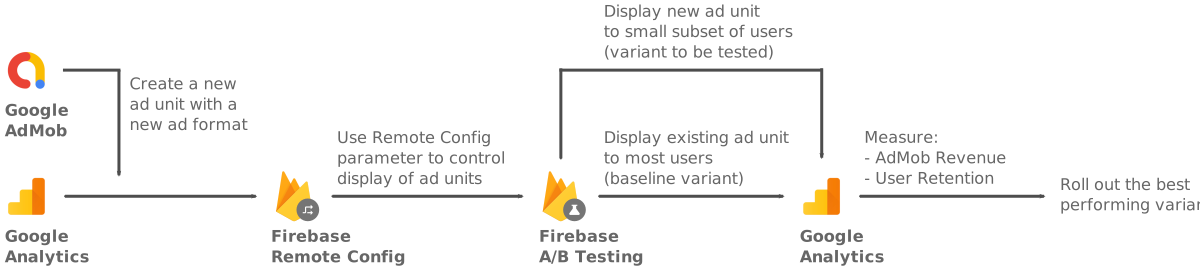

### Solution tutorial overview
[Go
directly to the step-by-step tutorial](https://firebase.google.com/docs/tutorials/test-ad-format-adoption/step-1)
1. [**Use AdMob to
create a new ad unit variant for testing**](https://firebase.google.com/docs/tutorials/test-ad-format-adoption/step-1)
1. Create a new rewarded interstitial ad unit in AdMob.
2. Implement the ad unit placement within your app's code.
2. [**Set up an A/B
test in the Firebase console**](https://firebase.google.com/docs/tutorials/test-ad-format-adoption/step-2)
1. Define testing basics, targeting, and the goals that the test will run
against.
2. Define test variants and set up the Remote Config parameter that
will control whether to show the new ad unit to users in the test.
3. [**Handle
Remote Config parameter values in your app's code**](https://firebase.google.com/docs/tutorials/test-ad-format-adoption/step-3)
1. Use the Remote Config parameter in your app.
2. Implement the logic for displaying the ad unit based on the parameter's
value.
4. [**Start the A/B
test and review the test results in the Firebase console**](https://firebase.google.com/docs/tutorials/test-ad-format-adoption/step-4)
1. After starting the test and allowing it to run for a few days or weeks,
check the Firebase console for whether the A/B test has a winning
variant based on the primary goal of the A/B test.
2. Review the impact on secondary metrics for each variant to ensure the
variants didn't cause unintended negative impacts to those metrics.
5. [**Decide whether
to roll out the new ad format**](https://firebase.google.com/docs/tutorials/test-ad-format-adoption/step-5)
1. If A/B Testing determines that the variant showing the new ad format
is the winner, you can start showing the ad format to all users targeted
in the experiment, all users of your app, or to a subset of your users.
2. If a clear winner isn't yet determined, you can either continue running
the experiment to gather more data, or end the experiment if it's
already been running for a long period with inconclusive results.
### Glossary
View a list of common terms for this solution
- **AdMob revenue** : AdMob network and open bidding revenue
- **IAP revenue**: In app purchases revenue
- **Total revenue**: Total revenue
- **Retention**: Retention as a key metric in A/B tests is tracked as 1 day,
2-3 days, 4-7 days, 8-14 days, or 15+ days user retention
- **Remote Config parameter**: The configurable parameter used to control
whether we show the new ad format or not. In this guide, it will be a boolean
value.
- **Baseline configuration** : The as-is configuration in any particular A/B test
--- also known as the control. The control usually uses the default value for
the Remote Config parameter, but it can be configured to use a new control
value if needed.
- **Variant configurations** : The variant configurations are the alternative
configurations with different Remote Config parameter values that we would
like to test against the baseline configuration.