
Overview
This document captures all the mandatory steps to on-board a carrier onto Firebase Phone Number Verification (Firebase PNV) via TS.43 phone number verifications.
Document History
December 3, 2025
Version 2.0 release.
- Clarify EAP-AKA TTL and fields.
- Clarify 1P vs. 3P requests.
- Add OAuth JWT Bearer Flow for Vanilla TS.43.
- Add audience-restricted OAuth tokens.
September 10, 2025
Version 1.0 release.
Terminology
Parties Involved
- GSMA: Association of mobile network operators that define specs including TS.43
- CAMARA: Linux open source project that defines carrier APIs in collaboration with the GSMA
- CSP: Communications Service Provider
- e.g. Mobile carriers
- Aggregators
- App-Facing Aggregator: Aggregator that allows apps to perform a
verification without the app directly interacting with the carrier
- e.g. Firebase Phone Number Verification
- Meta-Aggregator: Aggregator that supports the carrier to on-board to
an app-facing aggregator
- A meta-aggregator could be in charge of setting up the entitlement servers for the carriers and/or configuring the entitlement servers' details with the app-facing aggregators
- App-Facing Aggregator: Aggregator that allows apps to perform a
verification without the app directly interacting with the carrier
- Types of Google Traffic to Carriers
- 3P: Verifications for third party apps (i.e. Non-Google traffic)
- Firebase PNV: Firebase Phone Number Verification
- 1P: Verifications for first party apps (i.e. Google traffic)
- 3P: Verifications for third party apps (i.e. Non-Google traffic)
- Google TAM: Google Technical Account Manager, who helps on-board the carrier onto Firebase PNV
- Android Telephony: Offers phone number APIs on Android, including a platform for carriers and aggregators to provide TS.43 verifications
Verification Terms
- PNV: Phone Number Verification
- TS.43: Defines the protocol for mobile clients and servers to communicate with the carrier using HTTP
TS.43 Terms
- EAP-AKA: Authentication method defined in https://www.rfc-editor.org/rfc/rfc4187, which does not require interacting with the user
- ECS: Entitlement Configuration Server
- Entry point for the aggregator to talk to the carrier
- ODSA: On-Device Service Activation
- Refers to different operations provided by the ECS to activate services
on the device
- e.g. AcquireTemporaryToken; GetPhoneNumber
- Refers to different operations provided by the ECS to activate services
on the device
Vanilla TS.43 Terms
- Carrier Entitlement Server: aka ECS; Entitlement Configuration Server
- Carrier Auth Server: Hosts the OAuth endpoint
- CAMARA Server: aka the CAMARA API Exposure Platform
- CAMARA API Exposure Platform: Exposes CAMARA APIs to aggregators
- Consists of at least an Auth Server and an API Gateway
- It does not consist of the ECS
Carrier Entitlement Server and Firebase PNV Endpoint
Creating the Necessary Endpoints
ACTION1: The carrier implements the following endpoints, which are all accessible through the Internet. See Annex A for more detail on the implementation.
Technical Requirements
General Performance: Uptime of all endpoints shall be at least 99.99%.
Security: For security reasons, the carrier endpoints must satisfy the following requirements:
- EAP-AKA Auth Token: Bounded by carrier defined TTL.
- Temporary Token: MUST expire within 5 minutes. MUST be single use. MUST be smaller than 4 kB.
- OAuth Token
- Option A - JWT Bearer Flow: Supported by Vanilla TS.43 and CAMARA
- MUST expire within 5 minutes. MUST be single use.
- Option B - Client Credentials Flow: Supported only by Vanilla TS.43
- MUST expire within 1 hour
- Option A - JWT Bearer Flow: Supported by Vanilla TS.43 and CAMARA
API Data Quality: 100% of the contents of successful responses (i.e the MSISDN should be accurate).
Firebase PNV supports two flavours of TS.43. The main difference is how the Firebase PNV server will exchange the TempToken with the carrier.
- Vanilla TS.43: Refers to the implementation as prescribed by the TS.43 spec
- CAMARA: Refers to the implementation as prescribed by CAMARA's JWT bearer flow
Option A - Vanilla TS.43 Implementation
Requests from Android Device
- EAP-AKA Endpoint: Return an EAP-AKA auth token
- AcquireTemporaryToken Endpoint: Given the EAP-AKA auth token, return a TempToken
Requests from Firebase PNV Server
- OAuth 2.0 Endpoint
- Option A - JWT Bearer Flow: Given a JWT containing the TempToken, return a three-legged OAuth access token
- Option B - OAuth Client Credentials Flow: Given the OAuth client ID/secret, return a two-legged OAuth access token
- GetPhoneNumber Endpoint: Given the OAuth access token and the TempToken, return the corresponding phone number
Option B - CAMARA Implementation
The CAMARA implementation is similar to the vanilla TS.43 implementation, except for the endpoints to handle the requests from the Firebase PNV server. In this implementation, only the Android device communicates directly with the carrier's entitlement server. The Firebase PNV server communicates with the carrier's CAMARA NumberVerification v2 endpoint.
Requests from Android Device
- EAP-AKA Endpoint: Return an EAP-AKA auth token
- AcquireTemporaryToken Endpoint: Given an EAP-AKA auth token, return a TempToken
Requests from Firebase PNV Server
- OAuth 2.0 Endpoint
- JWT Bearer Flow: Given a JWT containing the TempToken, return a CAMARA access token (a three-legged OAuth access token)
- CAMARA NumberVerification v2 Endpoint: Given the CAMARA access token, return the corresponding phone number
On-Boarding Onto Android Telephony & Firebase PNV
Carrier Test App
ACTION2: Carrier reaches out to the Google Technical Account Manager (TAM) and the TAM will share the Firebase PNV carrier test app with the carrier. This carrier test app mimics the requests that will be sent by Firebase PNV, without involving the Firebase PNV server. This carrier test app is useful for the carrier to validate that their endpoints are working properly.
ACTION3: The carrier verifies that the above endpoints work end-to-end by using the Firebase PNV carrier test app.
Setting Up the Necessary Production Configs
Android Config - EAP-AKA / AcquireTempToken
ACTION4: Carrier defines its production config for its EAP-AKA/AcquireTempToken requests from Android Telephony
- Config:
- This carrier's Android Canonical Carrier ID
- TS.43 use_cases values:
use_case=GetPhoneNumber - Production entitlement server URL for EAP-AKA/AcquireTempToken
- Firebase's production x509 certificate's SAN and fingerprint
- SAN:
fpnv.googleapis.com - Fingerprint:
aad068c93399a22fc2b11ab58468e8cb72b8f9fc53700991799a8b764c589c7e
- SAN:
Firebase Config - Exchange TempToken for Phone
ACTION5: Firebase credentials to retrieve an OAuth token from the carrier
- OAuth Client Credentials Flow
- Carrier creates the OAuth client ID and secret for Firebase PNV's requests. Carrier then configures its OAuth endpoint to return an access token for these credentials
- OAuth JWT Bearer Flow
- Google TAM provides Google's public key, so that the carrier's OAuth endpoint can verify that the JWT was signed by Google
- The Google TAM and the carrier agree upon the OAuth client ID (see the Annex for the recommended values)
ACTION6: Carrier defines a production config for the Firebase PNV server to exchange the TempToken for a phone number
- This MNO's Android Canonical Carrier ID
- Option A - Vanilla TS.43
- OAuth
- OAuth endpoint URL
- OAuth scope (if any)
- Option 1 - Client Credentials
- OAuth client ID
- OAuth client secret
- Option 2 - JWT Bearer
- OAuth JWT's
iss
- OAuth JWT's
- GetPhoneNumber endpoint URL
- OAuth
- Option B - CAMARA
- OAuth JWT Bearer
- OAuth endpoint URL
- OAuth scope
- OAuth JWT's
iss
- NumberVerification API v2 endpoint URL
- OAuth JWT Bearer
Sharing Credentials/Configurations
Firebase Phone Number Verification
ACTION7: Carrier shares its production config from ACTION4 and ACTION6 with the Google Technical Account Manager.
- [IMPORTANT] The OAuth secret must be shared using a secure, out-of-band (no emails, no docs, etc.) mechanism with Google. This out-of-band mechanism will be agreed upon by the carrier and the Google TAM.
ACTION8: Google TAM validates that the config works end-to-end using the carrier test app. Afterwards, the Google TAM will store the OAuth credentials in a Google safe storage and update Firebase PNV's configs to exchange the TempToken for a phone number (i.e. ACTION6's configs).
Android Telephony
ACTION9: Carrier follows the "Google Open Gateway CSP Onboarding" doc (which the Google TAM will share with the carrier). Carrier or their Google TAM files a Buganizer ticket to on-board onto Android Telephony's config: https://issuetracker.google.com/issues/new?component=1861595&template=2168610. This bug will take in the production config from ACTION4.
If a meta-aggregator is setting up the Firebase PNV integration on behalf of the carrier, then a statement of consent (email, PDF, letter, etc.) from the carrier's leadership (Director+ level) must confirm their business relationship with said operator. Afterwards, the meta-aggregator can provide the carrier's config on behalf of the carrier to Android Telephony.
Annex A. Detailed Implementation
Case Sensitivity
- HTTP headers are not case sensitive.
- However, XML and JSON formats are case-sensitive. So for the request/response fields, ensure that the fields match this documentation exactly.
| Android Telephony => Carrier | |||
| OPERATION | REQUIREMENTS | Google 1P | Firebase 3P |
| Step 1 - EAP-AKA | Carrier Endpoint | Carrier Entitlement Server | |
| app_name | google-ogi |
||
| entitlement_version | 10.0 or 12.0 |
||
| app | ap2014 |
||
| VERS.validity | Bounded by carrier defined TTL | ||
| Step 2 - AcquireTempToken | Carrier Endpoint | Carrier Entitlement Server | |
| operation | GetPhoneNumber |
||
| app | ap2014 |
||
| entitlement_version | 10.0 or 12.0 |
||
| APPLICATION. TemporaryTokenExpiry |
5m
TempToken shall not be reusable
|
||
Firebase PNV Server => Carrier
|
|||
| Step 3 - OAuth Option (i) - JWT Bearer | Carrier Endpoint | Carrier Auth Server | |
| iss | google-pnv |
firebase |
|
| expires_in |
5m
OAuth token shall not be reusable.
JWT contains the TempToken, so OAuth token must have similar requirements
|
||
| Signing Key | Google 1P's Private Key |
Firebase PNV's Private Key |
|
| Google signs the JWT using its private key; carrier retrieves Google's public key from a JWKS endpoint | |||
| Step 3 - OAuth Option (ii) - Client Credentials | Carrier Endpoint | Carrier Auth Server | |
| expires_in | 1h |
||
| Step 4 - Retrieve Phone Number | Carrier Endpoint | Carrier Entitlement Server | |
| requestor_id | 9ce40bea-4c28-4788-bd13-379d5ddc5eac |
191fd7cc-f7cd-4bb4-a5d2-455ae1fb9a19 |
|
| app_name | google-pnv |
firebase |
|
| app | ap2014 |
||
| entitlement_version | 12.0 |
||
| operation | GetPhoneNumber |
||
Firebase PNV Server => Carrier
|
|||
| Step 3 - OAuth JWT Bearer | Carrier Endpoint | CAMARA Server | |
| iss | google-pnv |
firebase |
|
| expires_in |
5m
OAuth token shall not be reusable.
JWT contains the TempToken, so OAuth token must have similar requirements
|
||
| Signing Key | Google 1P's Private Key |
Firebase PNV's Private Key |
|
| Google signs the JWT using its private key; carrier retrieves Google's public key from a JWKS endpoint | |||
| Step 4 - Retrieve Phone Number | Carrier Endpoint | CAMARA Server | |
| API | /device-phone-number |
||
Android Telephony => Carrier Entitlement Server
Step 1 - EAP-AKA
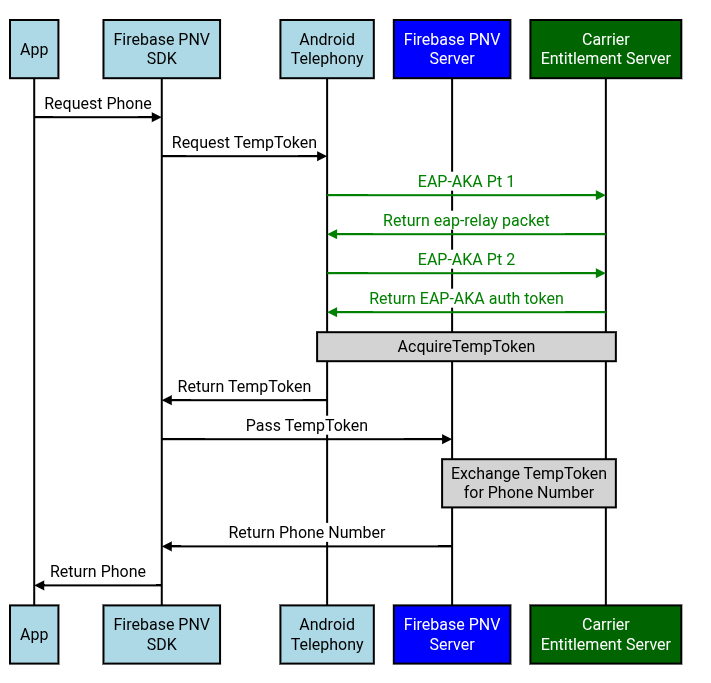
Figure 1: On the device, Android Telephony retrieves the EAP-AKA auth token from the carrier. The EAP-AKA auth token does not leave the Android Telephony module.
EAP-AKA and AcquireTempToken must be using the same Carrier Entitlement Server endpoint.
EAP-AKA Challenge
References: TS.43 v12.0 - Section 2.8.1
- "Embedded EAP-AKA Authentication by Entitlement Configuration Server".
EAP-AKA Step 1 - Authentication Challenge
EAP-AKA #1 - GET Request to ECS
The Android Telephony module sends a TS.43 EAP-AKA request to the carrier's entitlement server.
Android's Request Headers:
Accept:application/vnd.gsma.eap-relay.v1.0+json- It's a JSON format specific to GSMA, not just
application/json
- It's a JSON format specific to GSMA, not just
Android's Request Fields:
eap_id: See RCC.14 Annex C- i.e.
0<IMSI>@<realm>.mnc<MNC>.mcc<MCC>.3gppnetwork.org
- i.e.
GID1: Only specified if the entitlement version is 12.0app_name: Encoded AppName will have an MD5 hashed value of the use-case that's performing phone verification:- All app-facing aggregator requests will have an app name of
Google-OGI
- All app-facing aggregator requests will have an app name of
app: The app IDap2014represents Phone Number Informationterminal_vendor/model/sw_version: Set to an arbitrary value; Android will not guarantee that these fields contain the actual device's infovers: Configuration version; e.g. 0 or 1entitlement_version: Android Telephony will configure the entitlement version sent to the carriers based on what the carrier requests- Typically, the
entitlement_versionis 10.0 or 12.0
- Typically, the
GET ? EAP_ID=0<IMSI>@<realm>.mnc<MNC>.mcc<MCC>.3gppnetwork.org
&terminal_id=$IMEI
&GID1=$GROUP_ID_LEVEL1 // Only specified if entitlement version is 12.0
&app_name=Google-OGI
&app=ap2014
&terminal_vendor=$ARBITRARY_VALUE
&terminal_model=$ARBITRARY_VALUE
&terminal_sw_version=$ARBITRARY_VALUE
&vers=$VERS
&entitlement_version=$ENTITLEMENT_VERS

Host: $ENTITLEMENT_ENDPOINT
Accept: application/vnd.gsma.eap-relay.v1.0+json
EAP-AKA #1 - Response from ECS
ECS Response Headers:
Content-Type: Android expects that the response type matches the request's Accept header- i.e.
application/vnd.gsma.eap-relay.v1.0+json
- i.e.
ECS Response Fields:
eap-relay-packet: Contains the EAP package following RCC.14 - Section C.2
200 OK
Content-Type: application/vnd.gsma.eap-relay.v1.0+json
cookies: $COOKIE

{"eap-relay-packet": $EAP_PACKAGE_IN_BASE64_ENCODING}
EAP-AKA Step 2 - Get Auth Token
EAP-AKA #2 - POST Request to ECS
The Android Telephony module will then send back the received eap-relay-packet
to the same endpoint.
Android's Request Headers:
Accept: Android will set two Accept headers:application/vnd.gsma.eap-relay.v1.0+json: Refers to the carrier returning JSON again if the device needs to send another EAP-AKA request againtext/vnd.wap.connectivity-xml: Refers to the actual format that Android will expect that the carrier returns the EAP-AKA authentication token as
Content-Type:application/vnd.gsma.eap-relay.v1.0+json
Android's Request Fields:
eap-relay-packet: Contains the previous EAP-AKA response'seap-relay-packetbut in the EAP-Response/AKA-Challenge format following RFC 4817 - Section 9.2.
POST /?
Host: $ENTITLEMENT_ENDPOINT
Cookie: $COOKIE
User-Agent: $USER_AGENT
Accept: application/vnd.gsma.eap-relay.v1.0+json,text/vnd.wap.connectivity-xml
Content-Type: application/vnd.gsma.eap-relay.v1.0+json

{ "eap-relay-packet" : $EAP_RESPONSE/AKA_CHALLENGE }
EAP-AKA #2 - Response from ECS
After a successful EAP-AKA authentication, the carrier returns an auth token back.
ECS Response Headers:
Content-Type: Android expects that the response that matches the request's Accept header- i.e. Android expects that the response with the auth token
has the type of
text/vnd.wap.connectivity-xml - The other Accept header,
application/vnd.gsma.eap-relay.v1.0+json, is if the carrier wants Android to perform another EAP-AKA request
- i.e. Android expects that the response with the auth token
has the type of
ECS Response Fields;
TOKEN.token: Contains the auth tokenVERS.validity: Number of seconds that the response is valid- Note:
TOKEN.validitycan also contain the TTL but it is not mandatory
- Note:
200 OK
Content-Type: text/vnd.wap.connectivity-xml

<?xml version='1.0' encoding='UTF-8'?>
<wap-provisioningdoc version="1">
  <characteristic type="VERS">
    <parm name="version" value="1"/>
    <parm name="validity" value=$VALIDITY_IN_SECS/>
  </characteristic>

  <characteristic type="TOKEN">
    <parm name="token" value=$AUTH_TOKEN/>
    <parm name="validity" value=$TOKEN_LIFETIME/>
  </characteristic>
</wap-provisioningdoc>
Step 2 - AcquireTemporaryToken
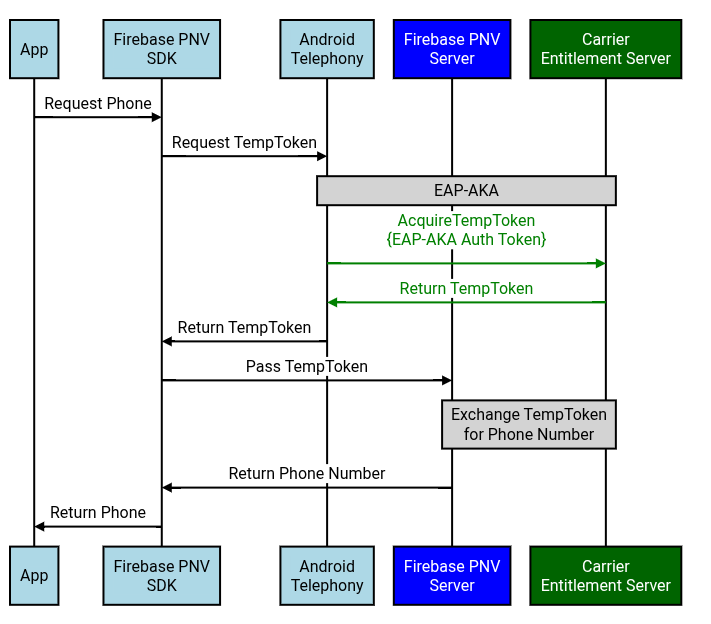
Figure 2: On the device, Android Telephony passes the previously retrieved EAP-AKA auth token to the carrier and retrieves the TempToken.
EAP-AKA and AcquireTempToken must be using the same Carrier Entitlement Server endpoint.
AcquireTemporaryToken
AcquireTempToken - GET Request to ECS
Using the auth token received from EAP-AKA, the Android client fetches the temporary token by calling the carrier's AcquireTemporaryToken endpoint. The request
- Example: TS.43 v12.0 - Section
6.4.6
- "AcquireTemporaryToken Request Example"
- AcquireTempToken has similar parameters as EAP-AKA #1, except:
- AcquireTempToken also specifies the EAP-AKA auth
token,IMSI,operationandoperation_targets - AcquireTempToken does not specify the
EAP_ID
- AcquireTempToken also specifies the EAP-AKA auth
Android's Request Headers
Accept: Android will settext/vnd.wap.connectivity-xml
Android's Request Fields
terminal_vendor/model/sw_version: Android does not guarantee that these fields contain the actual device's infooperation_targets- Firebase PNV: Operation target is
GetPhoneNumber
- Firebase PNV: Operation target is
GET /? IMSI=$IMSI
&token=$EAP_AKA_TOKEN
&terminal_id=$IMEI
&GID1=$GROUP_ID_LEVEL1 // Only specified if entitlement version is 12.0
&app_name=Google-OGI
&app=ap2014
&terminal_vendor=$ARBITRARY_VALUE
&terminal_model=$ARBITRARY_VALUE
&terminal_sw_version=$ARBITRARY_VALUE
&vers=$VERS
&entitlement_version=$ENTITLEMENT_VERS
&operation=AcquireTemporaryToken
&operation_targets=GetPhoneNumber

Host: $ENTITLEMENT_ENDPOINT
Accept: text/vnd.wap.connectivity-xml
AcquireTempToken - Response from ECS
Example: TS.43 v12.0 - Section 6.6.6
- "AcquireTemporaryToken Response Example"
ECS Response Headers
Content-Type: Android expects that the response type matches the request's Accept header- i.e.
text/vnd.wap.connectivity-xml
- i.e.
ECS Response Fields
APPLICATION.TemporaryToken:TemporaryToken that the Firebase PNV server can then exchange for a phone numberAPPLICATION.TemporaryTokenExpiry: Expiration time in YYYY-MM-DDThh:mm:ssTZD format- Google will validate that TempToken's expiration satisfies the Technical Requirements
- Note:
VERS.validityrefers to the validity of the overall response
APPLICATION.OperationResult: See TS.43 v12.0 - Section 6.5.1- Specifically, if the operation was a
SUCCESS, then return 1.
- Specifically, if the operation was a
200 OK
Content-Type: text/vnd.wap.connectivity-xml

<?xml version="1.0"?>
<wap-provisioningdoc version="1.1">
 <characteristic type="VERS"
   <parm name="version" value="1"/>
   <parm name="validity" value=$VALIDITY_IN_SECS />
 </characteristic>
 <characteristic type="TOKEN">
   <parm name="token" value=$EAP_AKA_TOKEN/>
 </characteristic>
 <characteristic type="APPLICATION">
   <parm name="AppID" value="ap2014"/>
   <parm name="TemporaryToken" value=$TEMP_TOKEN/>
   <parm name="TemporaryTokenExpiry" value=$TEMP_TOKEN_EXPIRATION/>
   <parm name="OperationTargets" value="GetPhoneNumber"/>
   <parm name="OperationResult" value="1"/>
 </characteristic>
</wap-provisioningdoc>
Firebase PNV Server => Carrier Server
Option A - Vanilla TS.43
Step 3 - OAuth
Option (i) - Vanilla TS.43 via OAuth JWT Bearer Flow
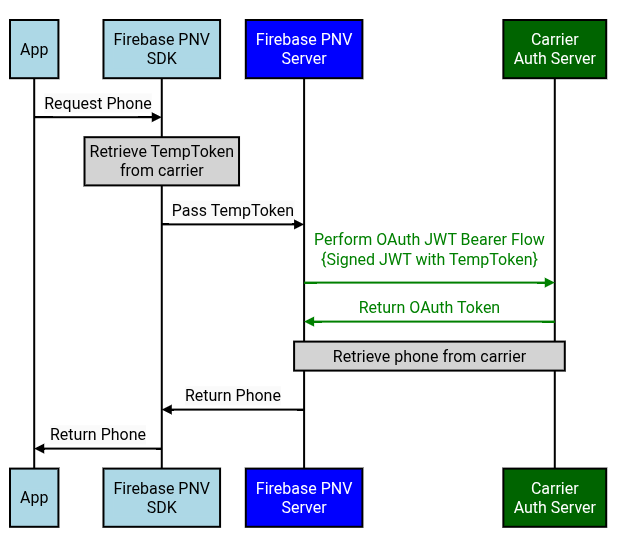
Figure A(3)(i): The device's Firebase PNV SDK passes the TempToken to the Firebase PNV server. The Firebase PNV server then retrieves the OAuth token using a signed JWT with the TempToken.
OAuth Endpoint: It's hosted by the Carrier Auth Server, which should be a different endpoint from the ECS.
OAuth - POST Request to Carrier's Auth Server
Firebase PNV Request Header:
Firebase PNV server will create a JWT with the following fields.
iss: Issuer of the JWT (aka OAuth Client ID). The recommended values are below:google-pnv: Google's 1P integrationfirebase:Firebase PNV integrationfpnv-carrier-tester-app:Carrier test app
sub: Subject of the JWT- Vanilla TS.43:
temptoken:$TEMP_TOKEN
- Vanilla TS.43:
aud: Audience; recipients that the JWT is intended for- Token endpoint URL (i.e. URL of the authorization server)
exp: Expiration time in seconds- Firebase PNV server will send an expiration duration that matches how long the OAuth access token should be valid for (see Technical Requirements)
iat: Issued at time in secondsjti: Unique identifier to avoid replay attacks- e.g. Randomly generated UUID
scope: Purpose of the request- Vanilla TS.43: To be defined by the carrier
{
  "iss": "firebase",
  "sub": $SUBJECT,
  "aud": $OAUTH_ENDPOINT,
  "exp": $EXPIRATION_TIME_IN_SECS,
  "iat": $ISSUED_AT_TIME_IN_SECS,
  "jti": $RANDOMLY_GENERATED_UUID,
  "scope": $SCOPE
}
Firebase PNV will sign the JWT using its own private key and the carrier should validate the JWT using the corresponding public key. Firebase PNV will provide the public key using a JWKS endpoint. Carriers should regularly poll this JWKS endpoint for the public key (e.g. Once per day), because Firebase PNV will rotate the public keys at a regular cadence (e.g. Once per every 30 days).
Firebase PNV's Request Headers:
Content-Type:application/x-www-form-urlencodedAccept:application/json
Firebase PNV's Request Fields:
grant_type:urn:ietf:params:oauth:grant-type:jwt-bearerassertion: The JWT created above and signed with Firebase PNV's private key- Notably, this JWT contains the TempToken
resource: Endpoint that will be used to retrieve the phone- Vanilla TS.43: GetPhoneNumber endpoint
POST /token.oauth2 HTTP/1.1
Host: as.example.com
Content-Type: application/x-www-form-urlencoded
Accept: application/json

grant_type=urn%3Aietf%3Aparams%3Aoauth%3Agrant-type%3Ajwt-bearer
&assertion=$JWT
&resource=$RETRIEVE_PHONE_ENDPOINT
OAuth Access Token - Response from Carrier
Carrier's Response Headers:
Content-Type: Firebase PNV expects that the response type matches the request's Accept header- i.e.
application/json
- i.e.
Carrier's Response Fields:
access_token: OAuth tokentoken_type:bearerexpires_in: Expiration of the OAuth access token in seconds- Google will validate that OAuth token's expiration time satisfies the Technical Requirements
scope: Purpose of the requestaud: Specifies the intended recipients of the token, so the tokens are audience-restricted- Set to the OAuth request's
resourcefield - Carrier's authorization server should ensure that the OAuth token cannot be used for another endpoint
- Set to the OAuth request's
200 OK
Content-Type: application/json

{
  "access_token": $OAUTH_TOKEN,
  "token_type": "bearer",
  "expires_in": $EXPIRATION_IN_SECS,
  "scope": $OAUTH_SCOPE,
  "aud": $OAUTH_AUDIENCE
}
Option (ii) - Vanilla TS.43 via OAuth Client Credentials Flow
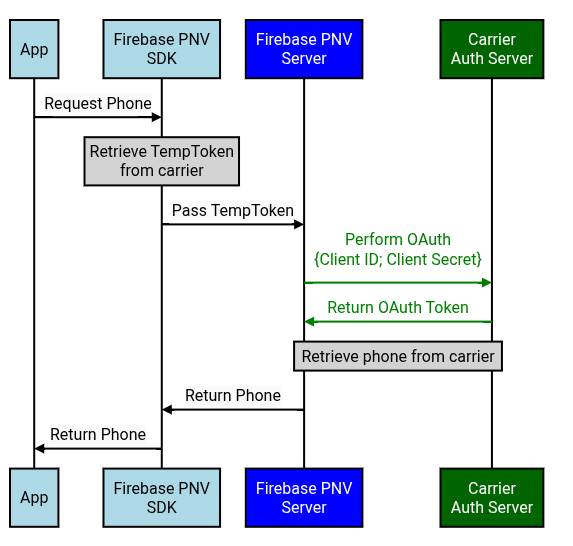
Figure A(3)(ii): The device's Firebase PNV SDK passes the TempToken to the Firebase PNV server. The Firebase PNV server then retrieves the OAuth token using Firebase PNV's OAuth client ID and secret.
OAuth Endpoint: It's hosted by the Carrier Auth Server, which should be a different endpoint from the ECS.
The carrier should follow this OAuth guide and provide the Google TAM with the necessary OAuth info (Client ID; Client Secret; OAuth server URL).
OAuth - POST Request to Carrier's Auth Server
Firebase PNV Request Headers:
Authorization: Firebase PNV will setBasic $BASE64_ENCODED_CREDENTIALS- The base64 encoded credentials are base64 encoding of the OAuth
$CLIENT_ID:$CLIENT_SECRET
- The base64 encoded credentials are base64 encoding of the OAuth
Content-Type: Firebase PNV will setapplication/x-www-form-urlencodedAccept: Firebase PNV will setapplication/json
Firebase PNV Request Fields:
grant_type:client_credentialsscope: Purpose of the requestresource: Endpoint that will be used to retrieve the phone- Vanilla TS.43: GetPhoneNumber endpoint
POST HTTP/1.1
Host: $OAUTH_ENDPOINT
Authorization: Basic $BASE64_ENCODED_CREDENTIALS
Content-Type: application/x-www-form-urlencoded
Accept: application/json

grant_type=client_credentials
&resource=$RETRIEVE_PHONE_ENDPOINT
OAuth - Response from Carrier's Auth Server
Carrier's Response Headers:
Content-Type: Firebase PNV expects that the response type matches the request's Accept header- i.e.
application/json
- i.e.
Carrier's Response Fields:
access_token: OAuth access tokentoken_type:bearerexpires_in: Expiration of the OAuth access token in seconds- Google will validate that OAuth token's expiration time satisfies the Technical Requirements
scope: Specifies the set of actions that can be performed with this OAuth tokenaud: Specifies the intended recipients of the token, so the tokens are audience-restricted- Set to the OAuth request's
resourcefield - Carrier's authorization server ensures that the OAuth token cannot be used for another endpoint
- Set to the OAuth request's
200 OK
Content-Type: application/json

{
  "access_token": $ACCESS_TOKEN,
  "token_type": "bearer",
  "expires_in": $EXPIRATION_IN_SECS,
  "scope": $OAUTH_SCOPE,
  "aud": $OAUTH_AUDIENCE
}
Step 4 - Retrieve Phone Number from Carrier
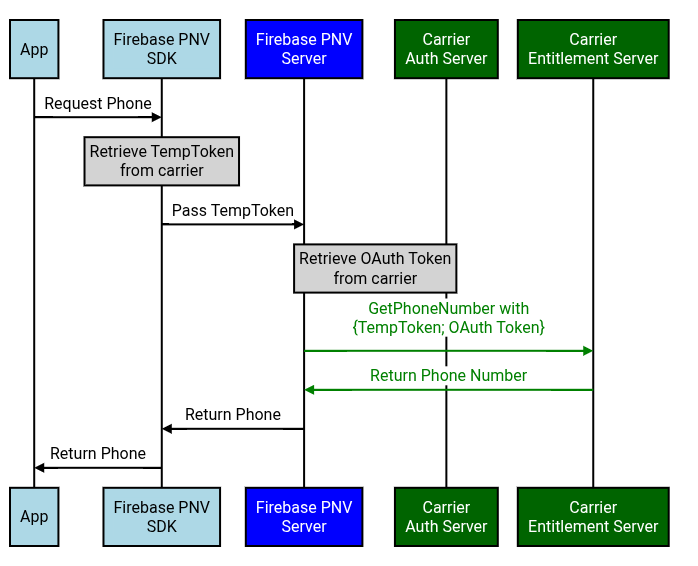
Figure A(4): Firebase PNV server then passes the TempToken and OAuth token to the carrier's GetPhoneNumber endpoint in exchange for the verified phone.
GetPhoneNumber Endpoint: It can be the entitlement server, but it doesn't have to be. The GetPhoneNumber endpoint should not be hosted by the Carrier Auth Server though.
Supported OAuth Flows: OAuth JWT bearer flow and OAuth Client Credentials flow.
GetPhoneNumber
GetPhoneNumber - POST Request to ECS
The Firebase PNV server fetches the phone number using the GetPhoneNumber Operation.
- Example: TS.43 v12.0 - Section
6.4.7
- "GetPhoneNumber Request Example"
Firebase PNV's Request Headers:
Accept:application/jsonContent-Type:application/json
Firebase PNV's Request Fields:
requestor_id: Identifies the service calling the GetPhoneNumber TS.43 operationFirebase PNV's UUID:
191fd7cc-f7cd-4bb4-a5d2-455ae1fb9a19Google 1P's UUID:
9ce40bea-4c28-4788-bd13-379d5ddc5eac
temporary_token: TemporaryToken from AcquireTempTokenaccess_token: OAuth token for Firebase PNV to authenticate with the carrierterminal_vendor/model/sw_version: Firebase PNV will be populating these fields with arbitrary valuesentitlement_version: Firebase PNV will set 12.0app: Firebase PNV will setap2014app_name- Firebase PNV:
firebasefor all Firebase PNV requests - Google 1P:
google-pnv - Note: The AcquireTempToken request will have an
app_nameofGoogle-OGI, regardless of which aggregator is used
- Firebase PNV:
operation: Firebase PNV will setGetPhoneNumber
POST /
Host: $GET_PHONE_NUMBER_ENDPOINT
Accept: application/json
User-Agent: $USER_AGENT
Content-Type: application/json

{
  "requestor_id": $REQUESTOR_ID,
  "temporary_token": $TEMPORARY_TOKEN,
  "access_token": $OAUTH_ACCESS_TOKEN,
  "terminal_id": $ARBITRARY_VALUE,
  "terminal_vendor": $ARBITRARY_VALUE,
  "terminal_model": $ARBITRARY_VALUE,
  "terminal_sw_version": $ARBITRARY_VALUE,
  "entitlement_version": $ENTITLEMENT_VERS",
  "app": "ap2014",
  "app_name": "firebase",
  "operation": "GetPhoneNumber",
  "vers": "1"
}
GetPhoneNumber - Response from ECS
Example: TS.43 v12.0 - Section 6.6.7
- "GetPhoneNumber Response Example"
Carrier's Response Headers:
Content-Type: Firebase PNV expects that the response type matches the request's Accept header- i.e.
application/json
- i.e.
Carrier's Response Fields:
ap2014.MSISDN: Firebase PNV expects the phone number to be returned in E164 format- JSON is case-sensitive, so MSISDN must be capitalized
200 OK
Content-Type: application/json

{
 "Vers": {
   "version": $RESPONSE_VERSION
   "validity": $VALIDITY_IN_SECS,
 }
 "ap2014": {
   "MSISDN": $PHONE_NUMBER
 }
}
TemporaryToken Error Codes
References from TS.43 v12.0, section 2.8.6.
The following table details the failure responses that the ECS is expected to return to the Firebase PNV Server for GetPhoneNumber requests:
| Scenario | GET/POST Response Code from ECS | Third Party Server Action |
|---|---|---|
| Invalid or missing parameters or wrong format in Request | 400 Bad Request | Retry on next user invocation / after restart of client |
| Invalid or expired Temporary Token in Request | 401 Unauthorized | If possible, trigger device to acquire a (new) valid temporary token from the ECS |
| Invalid operation in combination with temporary token | 403 Forbidden | Retry on next user invocation / after restart of client |
| Requested resource not found | 404 Not Found | Retry on next user invocation / after restart of client |
| ECS runs into an internal error during processing of request | 500 Internal Server Error | Retry on next user invocation / after restart of client |
Option B - CAMARA
Step 3 - OAuth JWT Bearer Flow
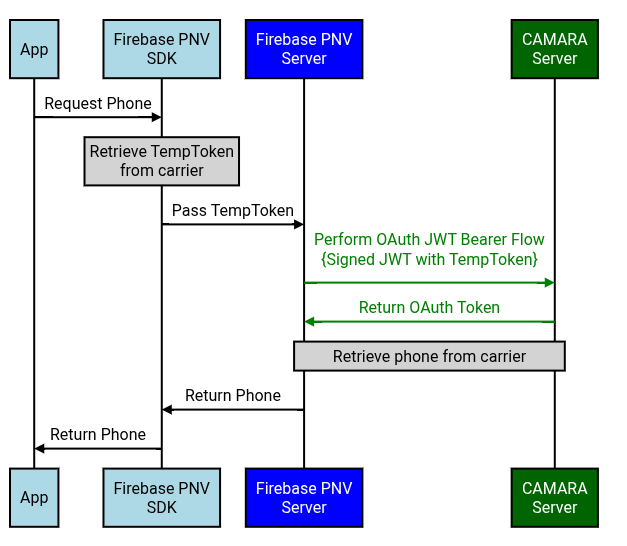
Figure B(3): The device's Firebase PNV SDK passes the TempToken to the Firebase PNV server. The Firebase PNV server then retrieves the OAuth token using a signed JWT with the TempToken.
OAuth Endpoint: It's the CAMARA Server (aka CAMARA API Exposure Platform), which is not the same as the carrier ECS.
OAuth - POST Request to CAMARA Frontend
Firebase PNV Request Header:
Firebase PNV server will create a JWT with the following fields.
iss: Issuer of the JWT (aka OAuth Client ID). The recommended values are below:google-pnv: Google's 1P integrationfirebase:Firebase PNV integrationfpnv-carrier-tester-app:Carrier test app
sub: Subject of the JWT- CAMARA:
operatortoken:$TEMP_TOKEN
- CAMARA:
aud: Audience; recipients that the JWT is intended for- Token endpoint URL (i.e. URL of the authorization server)
exp: Expiration time in seconds- Firebase PNV server will send an expiration duration that matches how long the OAuth access token should be valid for (see Technical Requirements)
iat: Issued at time in secondsjti: Unique identifier to avoid replay attacks- e.g. Randomly generated UUID
scope: Purpose of the request- CAMARA:
dpv:FraudPreventionAndDetection number-verification:device-phone-number:read
- CAMARA:
{
  "iss": "firebase",
  "sub": $SUBJECT,
  "aud": $OAUTH_ENDPOINT,
  "exp": $EXPIRATION_TIME_IN_SECS,
  "iat": $ISSUED_AT_TIME_IN_SECS,
  "jti": $RANDOMLY_GENERATED_UUID,
  "scope": $SCOPE
}
Firebase PNV will sign the JWT using its own private key and the carrier should validate the JWT using the corresponding public key. Firebase PNV will provide the public key using a JWKS endpoint. Carriers should regularly poll this JWKS endpoint for the public key (e.g. Once per day), because Firebase PNV will rotate the public keys at a regular cadence (e.g. Once per every 30 days).
Firebase PNV's Request Headers:
Content-Type:application/x-www-form-urlencodedAccept:application/json
Firebase PNV's Request Fields:
grant_type:urn:ietf:params:oauth:grant-type:jwt-bearerassertion: The JWT created above and signed with Firebase PNV's private key- Notably, this JWT contains the TempToken
resource: Endpoint that will be used to retrieve the phone- CAMARA: NumberVerification endpoint
POST /token.oauth2 HTTP/1.1
Host: as.example.com
Content-Type: application/x-www-form-urlencoded
Accept: application/json

grant_type=urn%3Aietf%3Aparams%3Aoauth%3Agrant-type%3Ajwt-bearer
&assertion=$JWT
&resource=$RETRIEVE_PHONE_ENDPOINT
OAuth Access Token - Response from Carrier
Carrier's Response Headers:
Content-Type: Firebase PNV expects that the response type matches the request's Accept header- i.e.
application/json
- i.e.
Carrier's Response Fields:
access_token: OAuth tokentoken_type:bearerexpires_in: Expiration of the OAuth access token in seconds- Google will validate that OAuth token's expiration time satisfies the Technical Requirements
scope: Purpose of the requestaud: Specifies the intended recipients of the token, so the tokens are audience-restricted- Set to the OAuth request's
resourcefield - Carrier's authorization server should ensure that the OAuth token cannot be used for another endpoint
- Set to the OAuth request's
200 OK
Content-Type: application/json

{
  "access_token": $OAUTH_TOKEN,
  "token_type": "bearer",
  "expires_in": $EXPIRATION_IN_SECS,
  "scope": $OAUTH_SCOPE,
  "aud": $OAUTH_AUDIENCE
}
Step 4 - CAMARA NumberVerification API v2
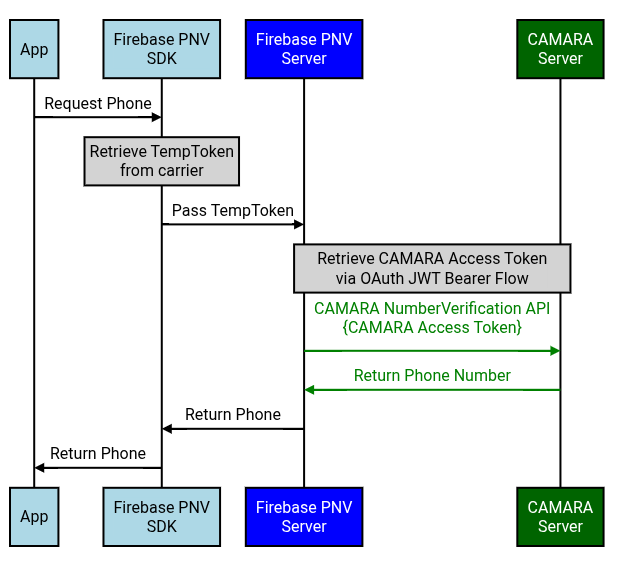
Figure B(4): Firebase PNV server then passes the CAMARA access token to the carrier's NumberVerification API in exchange for the verified phone.
NumberVerification Endpoint: It's the CAMARA Server (aka CAMARA API Exposure Platform), which is not the same as the carrier ECS.
In the CAMARA implementation, the TempToken is passed to the carrier when retrieving the CAMARA access token via the JWT bearer flow. The Firebase PNV server will then exchange that CAMARA access token by sending a GET request to the carrier's /device-phone-number endpoint.
CAMARA NumberVerification - GET Request to Carrier
Firebase PNV's Request Headers
Authorization:Bearer $CAMARA_ACCESS_TOKENAccept:application/json
GET /device-phone-number
Authorization: Bearer $CAMARA_ACCESS_TOKEN
Accept: application/json
Content-Type: application/json
CAMARA NumberVerification - Response from Carrier
Carrier's Response Headers
Content-Type: Firebase PNV expects that the response type matches the request's Accept header- i.e.
application/json
- i.e.
Carrier's Response Fields
devicePhoneNumber: Returns the phone number in E164 format
200 OK
Content-Type: application/json

{
 "devicePhoneNumber": $PHONE_NUMBER
}