

L'esecuzione di codice è uno strumento che consente al modello di generare ed eseguire codice Python. Il modello può apprendere in modo iterativo dai risultati dell'esecuzione di codice fino ad arrivare a un output finale.
Puoi utilizzare l'esecuzione di codice per creare funzionalità che traggono vantaggio dal ragionamento basato su codice e che generano output di testo. Ad esempio, potresti utilizzare l'esecuzione di codice per risolvere equazioni o elaborare testo. Puoi anche utilizzare le librerie incluse nell'ambiente di esecuzione del codice per eseguire attività più specializzate.
Come per tutti gli strumenti che fornisci al modello, è il modello a decidere quando utilizzare l'esecuzione di codice.
Vai all'implementazione del codice
Confronto tra esecuzione di codice e chiamata di funzione
L'esecuzione di codice e la chiamata di funzione sono funzionalità simili. In generale, è preferibile utilizzare l'esecuzione di codice se il modello è in grado di gestire il tuo caso d'uso. L'esecuzione di codice è anche più semplice da usare perché basta attivarla.
Ecco alcune altre differenze tra l'esecuzione di codice e la chiamata di funzione:
| Eseguire il codice | Chiamata di funzione |
|---|---|
| Utilizza l'esecuzione di codice se vuoi che il modello scriva ed esegua codice Python per te e restituisca il risultato. | Utilizza la chiamata di funzione se hai già le tue funzioni che vuoi eseguire localmente. |
| L'esecuzione di codice consente al modello di eseguire il codice nel backend dell'API in un ambiente fisso e isolato. | La chiamata di funzione ti consente di eseguire le funzioni richieste dal modello in qualsiasi ambiente tu voglia. |
| L'esecuzione del codice si risolve in una singola richiesta. Sebbene tu possa facoltativamente utilizzare l'esecuzione di codice con la funzionalità di chat, non è obbligatorio. | La chiamata di funzione richiede una richiesta aggiuntiva per restituire l'output di ogni chiamata di funzione. Pertanto, devi utilizzare la funzionalità di chat. |
Modelli supportati
gemini-4-argongemini-3.8-flash(e i modelli precedentigemini-3.7-flash,gemini-3.6-flashegemini-3.5-flash)gemini-3.5-flash-lite(e il precedentegemini-3.1-flash-lite)
Anche i modelli gemini-3.1-pro-preview e Gemini 2.5 per uso generico (deprecati) supportano questa funzionalità.
Utilizza l'esecuzione di codice
Puoi utilizzare l'esecuzione di codice con input solo di testo e multimodale, ma la risposta sarà sempre solo di testo o codice.
Prima di iniziare
|
Fai clic sul tuo provider Gemini API per visualizzare i contenuti e il codice specifici del provider in questa pagina. |
Se non l'hai già fatto, completa la guida introduttiva, che descrive come configurare il progetto Firebase, connettere l'app a Firebase, aggiungere l'SDK, inizializzare il servizio di backend per il provider Gemini API scelto e creare un'istanza GenerativeModel.
Per testare e perfezionare i prompt, ti consigliamo di utilizzare Google AI Studio.
Abilita l'esecuzione di codice
|
Prima di provare questo esempio, completa la sezione Prima di iniziare di questa guida per configurare il progetto e l'app. In questa sezione, farai anche clic su un pulsante per il provider Gemini API scelto, in modo da visualizzare i contenuti specifici del provider in questa pagina. |
Quando crei l'istanza GenerativeModel, fornisci CodeExecution come strumento che il modello può utilizzare per generare la sua risposta. In questo modo, il modello può generare ed eseguire codice Python.
Swift
import FirebaseAILogic

// Initialize the Gemini Developer API backend service.
let ai = FirebaseAI.firebaseAI(backend: .googleAI())

// Create a `GenerativeModel` instance with a model that supports your use case
let model = ai.generativeModel(
  modelName: "GEMINI_MODEL_NAME",
  // Provide code execution as a tool that the model can use to generate its response.
  tools: [.codeExecution()]
)

let prompt = """
What is the sum of the first 50 prime numbers?
Generate and run code for the calculation, and make sure you get all 50.
"""

let response = try await model.generateContent(prompt)

guard let candidate = response.candidates.first else {
  print("No candidates in response.")
  return
}
for part in candidate.content.parts {
  if let textPart = part as? TextPart {
    print("Text = \(textPart.text)")
  } else if let executableCode = part as? ExecutableCodePart {
    print("Code = \(executableCode.code), Language = \(executableCode.language)")
  } else if let executionResult = part as? CodeExecutionResultPart {
    print("Outcome = \(executionResult.outcome), Result = \(executionResult.output ?? "no output")")
  }
}
Kotlin
// Initialize the Gemini Developer API backend service.
// Create a `GenerativeModel` instance with a model that supports your use case.
val model = Firebase.ai(backend = GenerativeBackend.googleAI()).generativeModel(
    modelName = "GEMINI_MODEL_NAME",
    // Provide code execution as a tool that the model can use to generate its response.
    tools = listOf(Tool.codeExecution())
)

val prompt =  "What is the sum of the first 50 prime numbers? " +
        "Generate and run code for the calculation, and make sure you get all 50."

val response = model.generateContent(prompt)

response.candidates.first().content.parts.forEach {
    if(it is TextPart) {
        println("Text = ${it.text}")
    }
    if(it is ExecutableCodePart) {
        println("Code = ${it.code}, Language = ${it.language}")
    }
    if(it is CodeExecutionResultPart) {
       println("Outcome = ${it.outcome}, Result = ${it.output}")
    }
}
Java
// Initialize the Gemini Developer API backend service.
// Create a `GenerativeModel` instance with a model that supports your use case.
GenerativeModel ai = FirebaseAI.getInstance(GenerativeBackend.googleAI())
                .generativeModel("GEMINI_MODEL_NAME",
                        null,
                        null,
                        // Provide code execution as a tool that the model can use to generate its response.
                        List.of(Tool.codeExecution()));

// Use the GenerativeModelFutures Java compatibility layer which offers
// support for ListenableFuture and Publisher APIs
GenerativeModelFutures model = GenerativeModelFutures.from(ai);

String text = "What is the sum of the first 50 prime numbers? " +
        "Generate and run code for the calculation, and make sure you get all 50.";

Content prompt = new Content.Builder()
    .addText(text)
    .build();

ListenableFuture response = model.generateContent(prompt);

Futures.addCallback(response, new FutureCallback() {
   @Override
public void onSuccess(GenerateContentResponse response)   {
    // Access the first candidate's content parts
    List parts = response.getCandidates().get(0).getContent().getParts();
    for (Part part : parts) {
        if (part instanceof TextPart) {
            TextPart textPart = (TextPart) part;
            System.out.println("Text = " + textPart.getText());
        } else if (part instanceof ExecutableCodePart) {
            ExecutableCodePart codePart = (ExecutableCodePart) part;
            System.out.println("Code = " + codePart.getCode() + ", Language = " + codePart.getLanguage());
        } else if (part instanceof CodeExecutionResultPart) {
            CodeExecutionResultPart resultPart = (CodeExecutionResultPart) part;
            System.out.println("Outcome = " + resultPart.getOutcome() + ", Result = " + resultPart.getOutput());
        }
    }
}

    @Override
    public void onFailure(Throwable t) {
        t.printStackTrace();
    }
}, executor);
Web
import { initializeApp } from "firebase/app";
import { getAI, getGenerativeModel, GoogleAIBackend } from "firebase/ai";

// TODO(developer): Replace the following with your app's Firebase configuration
// See: https://firebase.google.com/docs/web/learn-more#config-object
const firebaseConfig = {
  // ...
};

// Initialize FirebaseApp
const firebaseApp = initializeApp(firebaseConfig);

// Initialize the Gemini Developer API backend service.
const ai = getAI(firebaseApp, { backend: new GoogleAIBackend() });

// Create a `GenerativeModel` instance with a model that supports your use case.
const model = getGenerativeModel(
  ai,
  {
    model: "GEMINI_MODEL_NAME",
    // Provide code execution as a tool that the model can use to generate its response.
    tools: [{ codeExecution: {} }]
  }
);

const prompt =  "What is the sum of the first 50 prime numbers? " +
        "Generate and run code for the calculation, and make sure you get all 50."

const result = await model.generateContent(prompt);
const response = await result.response;

const parts = response.candidates?.[0].content.parts;

if (parts) {
  parts.forEach((part) => {
    if (part.type === "text") {
      console.log(`Text: ${part.text}`);
    } else if (part.type === "executableCode") {
      console.log(
        `Code: ${part.executableCode.code}, Language: ${part.executableCode.language}`
      );
    } else if (part.type === "codeExecutionResult") {
      console.log(
        `Outcome: ${part.codeExecutionResult.outcome}, Result: ${part.codeExecutionResult.output}`
      );
    }
  });
}
Dart
import 'package:firebase_core/firebase_core.dart';
import 'package:firebase_ai/firebase_ai.dart';
import 'firebase_options.dart';

// Initialize FirebaseApp
await Firebase.initializeApp(
  options: DefaultFirebaseOptions.currentPlatform,
);

// Initialize the Gemini Developer API backend service.
// Create a `GenerativeModel` instance with a model that supports your use case.
final model = FirebaseAI.googleAI().generativeModel(
  model: 'GEMINI_MODEL_NAME',
  // Provide code execution as a tool that the model can use to generate its response.
  tools: [
    Tool.codeExecution(),
  ],
);

const prompt = 'What is the sum of the first 50 prime numbers? '
    'Generate and run code for the calculation, and make sure you get all 50.';

final response = await model.generateContent([Content.text(prompt)]);

final buffer = StringBuffer();
    for (final part in response.candidates.first.content.parts) {
      if (part is TextPart) {
        buffer.writeln(part.text);
      } else if (part is ExecutableCodePart) {
        buffer.writeln('Executable Code:');
        buffer.writeln('Language: ${part.language}');
        buffer.writeln('Code:');
        buffer.writeln(part.code);
      } else if (part is CodeExecutionResultPart) {
        buffer.writeln('Code Execution Result:');
        buffer.writeln('Outcome: ${part.outcome}');
        buffer.writeln('Output:');
        buffer.writeln(part.output);
      }
    }
Unity
using Firebase;
using Firebase.AI;

// Initialize the Gemini Developer API backend service.
var ai = FirebaseAI.GetInstance(FirebaseAI.Backend.GoogleAI());

// Create a `GenerativeModel` instance with a model that supports your use case.
var model = ai.GetGenerativeModel(
  modelName: "GEMINI_MODEL_NAME",
  // Provide code execution as a tool that the model can use to generate its response.
  tools: new Tool[] { new Tool(new CodeExecution()) }
);

var prompt = "What is the sum of the first 50 prime numbers? " +
        "Generate and run code for the calculation, and make sure you get all 50.";

var response = await model.GenerateContentAsync(prompt);

foreach (var part in response.Candidates.First().Content.Parts) {
  if (part is ModelContent.TextPart tp) {
    UnityEngine.Debug.Log($"Text = {tp.Text}");
  } else if (part is ModelContent.ExecutableCodePart esp) {
    UnityEngine.Debug.Log($"Code = {esp.Code}, Language = {esp.Language}");
  } else if (part is ModelContent.CodeExecutionResultPart cerp) {
    UnityEngine.Debug.Log($"Outcome = {cerp.Outcome}, Output = {cerp.Output}");
  }
}
Scopri come scegliere un modello adatta al tuo caso d'uso e alla tua app.
Utilizza l'esecuzione di codice nella chat
Puoi anche utilizzare l'esecuzione di codice nell'ambito di una chat:
Swift
import FirebaseAILogic

// Initialize the Gemini Developer API backend service.
let ai = FirebaseAI.firebaseAI(backend: .googleAI())

// Create a `GenerativeModel` instance with a model that supports your use case
let model = ai.generativeModel(
  modelName: "GEMINI_MODEL_NAME",
  // Provide code execution as a tool that the model can use to generate its response.
  tools: [.codeExecution()]
)

let prompt = """
What is the sum of the first 50 prime numbers?
Generate and run code for the calculation, and make sure you get all 50.
"""
let chat = model.startChat()

let response = try await chat.sendMessage(prompt)

guard let candidate = response.candidates.first else {
  print("No candidates in response.")
  return
}
for part in candidate.content.parts {
  if let textPart = part as? TextPart {
    print("Text = \(textPart.text)")
  } else if let executableCode = part as? ExecutableCodePart {
    print("Code = \(executableCode.code), Language = \(executableCode.language)")
  } else if let executionResult = part as? CodeExecutionResultPart {
    print("Outcome = \(executionResult.outcome), Result = \(executionResult.output ?? "no output")")
  }
}
Kotlin
// Initialize the Gemini Developer API backend service.
// Create a `GenerativeModel` instance with a model that supports your use case.
val model = Firebase.ai(backend = GenerativeBackend.googleAI()).generativeModel(
    modelName = "GEMINI_MODEL_NAME",
    // Provide code execution as a tool that the model can use to generate its response.
    tools = listOf(Tool.codeExecution())
)

val prompt =  "What is the sum of the first 50 prime numbers? " +
        "Generate and run code for the calculation, and make sure you get all 50."
val chat = model.startChat()
val response = chat.sendMessage(prompt)

response.candidates.first().content.parts.forEach {
    if(it is TextPart) {
        println("Text = ${it.text}")
    }
    if(it is ExecutableCodePart) {
        println("Code = ${it.code}, Language = ${it.language}")
    }
    if(it is CodeExecutionResultPart) {
       println("Outcome = ${it.outcome}, Result = ${it.output}")
    }
}
Java
// Initialize the Gemini Developer API backend service.
// Create a `GenerativeModel` instance with a model that supports your use case.
GenerativeModel ai = FirebaseAI.getInstance(GenerativeBackend.googleAI())
                .generativeModel("GEMINI_MODEL_NAME",
                        null,
                        null,
                        // Provide code execution as a tool that the model can use to generate its response.
                        List.of(Tool.codeExecution()));

// Use the GenerativeModelFutures Java compatibility layer which offers
// support for ListenableFuture and Publisher APIs
GenerativeModelFutures model = GenerativeModelFutures.from(ai);
String text = "What is the sum of the first 50 prime numbers? " +
        "Generate and run code for the calculation, and make sure you get all 50.";

Content prompt = new Content.Builder()
    .addText(text)
    .build();

ChatFutures chat = model.startChat();
ListenableFuture response = chat.sendMessage(prompt);

Futures.addCallback(response, new FutureCallback() {
   @Override
public void onSuccess(GenerateContentResponse response)   {
    // Access the first candidate's content parts
    List parts = response.getCandidates().get(0).getContent().getParts();
    for (Part part : parts) {
        if (part instanceof TextPart) {
            TextPart textPart = (TextPart) part;
            System.out.println("Text = " + textPart.getText());
        } else if (part instanceof ExecutableCodePart) {
            ExecutableCodePart codePart = (ExecutableCodePart) part;
            System.out.println("Code = " + codePart.getCode() + ", Language = " + codePart.getLanguage());
        } else if (part instanceof CodeExecutionResultPart) {
            CodeExecutionResultPart resultPart = (CodeExecutionResultPart) part;
            System.out.println("Outcome = " + resultPart.getOutcome() + ", Result = " + resultPart.getOutput());
        }
    }
}

    @Override
    public void onFailure(Throwable t) {
        t.printStackTrace();
    }
}, executor);
Web
import { initializeApp } from "firebase/app";
import { getAI, getGenerativeModel, GoogleAIBackend } from "firebase/ai";

// TODO(developer): Replace the following with your app's Firebase configuration
// See: https://firebase.google.com/docs/web/learn-more#config-object
const firebaseConfig = {
  // ...
};

// Initialize FirebaseApp
const firebaseApp = initializeApp(firebaseConfig);

// Initialize the Gemini Developer API backend service.
const ai = getAI(firebaseApp, { backend: new GoogleAIBackend() });

// Create a `GenerativeModel` instance with a model that supports your use case.
const model = getGenerativeModel(
  ai,
  {
    model: "GEMINI_MODEL_NAME",
    // Provide code execution as a tool that the model can use to generate its response.
    tools: [{ codeExecution: {} }]
  }
);

const prompt =  "What is the sum of the first 50 prime numbers? " +
        "Generate and run code for the calculation, and make sure you get all 50."
const chat = model.startChat()
const result = await chat.sendMessage(prompt);

const parts = result.response.candidates?.[0].content.parts;

if (parts) {
  parts.forEach((part) => {
    if (part.type === "text") {
      console.log(`Text: ${part.text}`);
    } else if (part.type === "executableCode") {
      console.log(
        `Code: ${part.executableCode.code}, Language: ${part.executableCode.language}`
      );
    } else if (part.type === "codeExecutionResult") {
      console.log(
        `Outcome: ${part.codeExecutionResult.outcome}, Result: ${part.codeExecutionResult.output}`
      );
    }
  });
}
Dart
import 'package:firebase_core/firebase_core.dart';
import 'package:firebase_ai/firebase_ai.dart';
import 'firebase_options.dart';

// Initialize FirebaseApp
await Firebase.initializeApp(
  options: DefaultFirebaseOptions.currentPlatform,
);

// Initialize the Gemini Developer API backend service.
// Create a `GenerativeModel` instance with a model that supports your use case.
final model = FirebaseAI.googleAI().generativeModel(
  model: 'GEMINI_MODEL_NAME',
  // Provide code execution as a tool that the model can use to generate its response.
  tools: [
    Tool.codeExecution(),
  ],
);

final codeExecutionChat = await model.startChat();

const prompt = 'What is the sum of the first 50 prime numbers? '
    'Generate and run code for the calculation, and make sure you get all 50.';
final response = await codeExecutionChat.sendMessage(Content.text(prompt));

final buffer = StringBuffer();
    for (final part in response.candidates.first.content.parts) {
      if (part is TextPart) {
        buffer.writeln(part.text);
      } else if (part is ExecutableCodePart) {
        buffer.writeln('Executable Code:');
        buffer.writeln('Language: ${part.language}');
        buffer.writeln('Code:');
        buffer.writeln(part.code);
      } else if (part is CodeExecutionResultPart) {
        buffer.writeln('Code Execution Result:');
        buffer.writeln('Outcome: ${part.outcome}');
        buffer.writeln('Output:');
        buffer.writeln(part.output);
      }
    }
Unity
using Firebase;
using Firebase.AI;

// Initialize the Gemini Developer API backend service.
var ai = FirebaseAI.GetInstance(FirebaseAI.Backend.GoogleAI());

// Create a `GenerativeModel` instance with a model that supports your use case.
var model = ai.GetGenerativeModel(
  modelName: "GEMINI_MODEL_NAME",
  // Provide code execution as a tool that the model can use to generate its response.
  tools: new Tool[] { new Tool(new CodeExecution()) }
);

var prompt = "What is the sum of the first 50 prime numbers? " +
        "Generate and run code for the calculation, and make sure you get all 50.";
var chat = model.StartChat();
var response = await chat.SendMessageAsync(prompt);

foreach (var part in response.Candidates.First().Content.Parts) {
  if (part is ModelContent.TextPart tp) {
    UnityEngine.Debug.Log($"Text = {tp.Text}");
  } else if (part is ModelContent.ExecutableCodePart esp) {
    UnityEngine.Debug.Log($"Code = {esp.Code}, Language = {esp.Language}");
  } else if (part is ModelContent.CodeExecutionResultPart cerp) {
    UnityEngine.Debug.Log($"Outcome = {cerp.Outcome}, Output = {cerp.Output}");
  }
}
Scopri come scegliere un modello adatta al tuo caso d'uso e alla tua app.
Prezzi
Non sono previsti costi aggiuntivi per l'attivazione dell'esecuzione di codice e la sua fornitura come strumento per il modello. Se il modello decide di utilizzare l'esecuzione di codice, ti verrà addebitata la tariffa corrente dei token di input e output in base al modello Gemini che stai utilizzando.
Il seguente diagramma mostra il modello di fatturazione per l'esecuzione di codice:
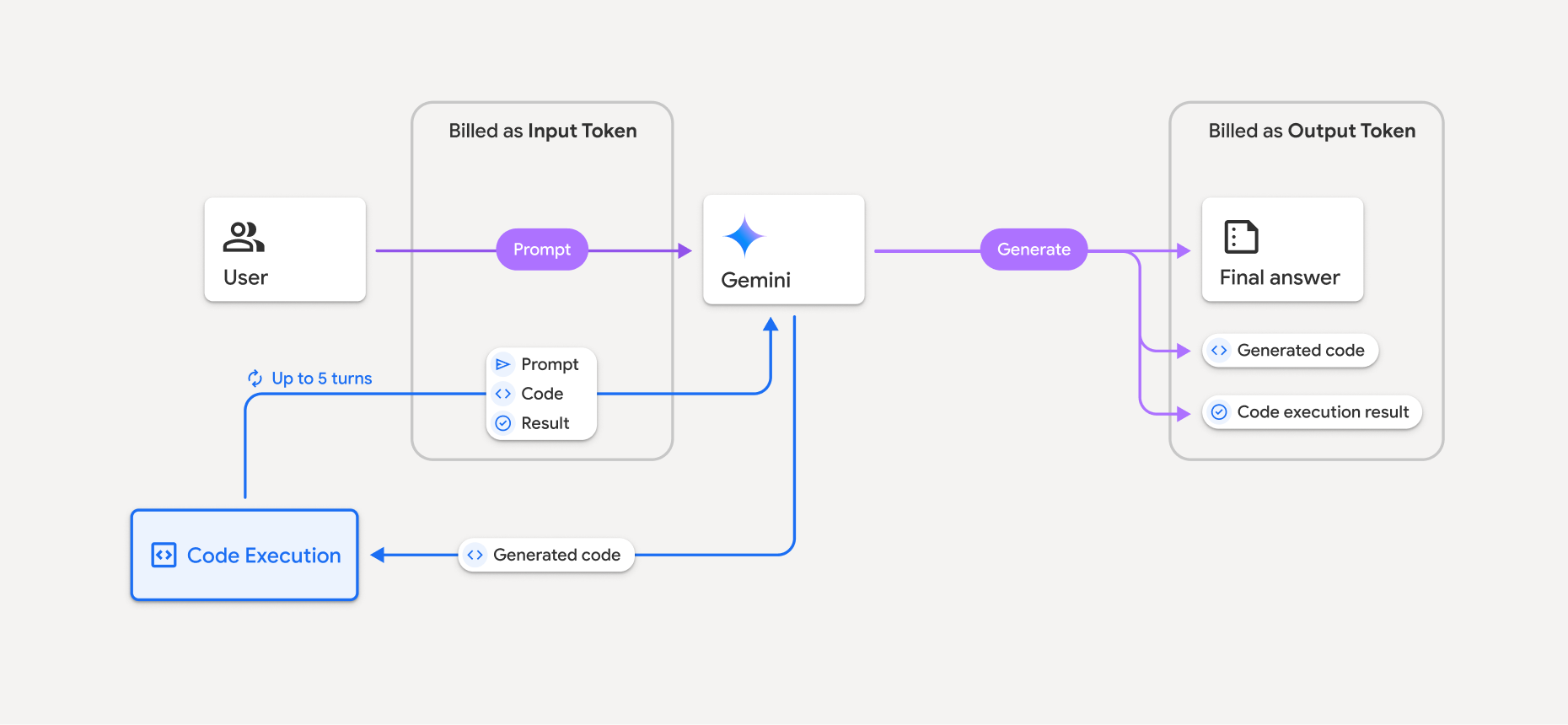
Ecco un riepilogo di come vengono fatturati i token quando un modello utilizza l'esecuzione di codice:
Il prompt originale viene fatturato una volta. I suoi token sono etichettati come token intermedi, che vengono fatturati come token di input.
Il codice generato e il risultato del codice eseguito vengono fatturati come segue:
Quando vengono utilizzati durante l'esecuzione di codice, vengono etichettati come token intermedi, che vengono fatturati come token di input.
Quando sono inclusi nella risposta finale, vengono fatturati come token di output.
Il riepilogo finale nella risposta finale viene fatturato come token di output.
Gemini API include un conteggio dei token intermedi nella risposta dell'API, in modo che tu sappia perché ti vengono addebitati i token di input oltre al prompt iniziale.
Tieni presente che il codice generato può includere sia testo che output multimodali, come le immagini.
Limitazioni e best practice
Il modello può solo generare ed eseguire codice Python. Non può restituire altri artefatti come i file multimediali.
L'esecuzione di codice può durare al massimo 30 secondi prima del timeout.
In alcuni casi, l'attivazione dell'esecuzione di codice può portare a regressioni in altre aree dell'output del modello (ad esempio, la scrittura di una storia).
Lo strumento di esecuzione del codice non supporta gli URI dei file come input/output. Tuttavia, lo strumento di esecuzione del codice supporta l'input di file e l'output di grafici come byte incorporati. Utilizzando queste funzionalità di input e output, puoi caricare file CSV e di testo, porre domande sui file e generare grafici Matplotlib come parte del risultato dell'esecuzione di codice. I tipi MIME supportati per i byte incorporati sono
.cpp,.csv,.java,.jpeg,.js,.png,.py,.tse.xml.
Librerie supportate
L'ambiente di esecuzione del codice include le seguenti librerie. Non puoi installare le tue librerie.
Invia un feedback sulla tua esperienza con Firebase AI Logic