

הרצת קוד היא כלי שמאפשר למודל ליצור ולהריץ קוד Python. המודל יכול ללמוד באופן איטרטיבי מתוצאות הרצת הקוד עד שהוא מגיע לפלט הסופי.
אתם יכולים להשתמש בהרצת קוד כדי ליצור תכונות שמפיקות תועלת מהסקת מסקנות שמבוססת על קוד, ויוצרות פלט טקסט. לדוגמה, אתם יכולים להשתמש בהרצת קוד כדי לפתור משוואות או לעבד טקסט. אתם יכולים גם להשתמש בספריות שכלולות בסביבת הרצת הקוד כדי לבצע משימות ספציפיות יותר.
כמו בכל הכלים שאתם מספקים למודל, המודל מחליט מתי להשתמש בהרצת קוד.
השוואה בין הרצת קוד לבין קריאה להפעלת פונקציות
הרצת קוד וקריאה להפעלת פונקציות הן תכונות דומות. באופן כללי, עדיף להשתמש בהרצת קוד אם המודל יכול לטפל בתרחיש לדוגמה שלכם. הרצת קוד גם פשוטה יותר לשימוש כי צריך רק להפעיל אותה.
הנה עוד כמה הבדלים בין הרצת קוד לבין קריאה לפונקציות:
| הרצת קוד | בקשה להפעלת פונקציה |
|---|---|
| אם אתם רוצים שהמודל יכתוב ויריץ קוד Python בשבילכם ויחזיר את התוצאה, אתם יכולים להשתמש בהרצת קוד. | אם כבר יש לכם פונקציות משלכם שאתם רוצים להריץ באופן מקומי, אתם יכולים להשתמש בקריאה להפעלת פונקציות. |
| הרצת קוד מאפשרת למודל להריץ קוד בקצה העורפי של ה-API בסביבה קבועה ומבודדת. | התכונה "קריאה להפעלת פונקציות" מאפשרת להריץ את הפונקציות שהמודל מבקש, בכל סביבה שרוצים. |
| הרצת הקוד מתבצעת בבקשה אחת. אפשר להשתמש בהרצת קוד עם יכולת הצ'אט, אבל לא חובה. | קריאה להפעלת פונקציות דורשת בקשה נוספת כדי לשלוח בחזרה את הפלט מכל בקשה להפעלת פונקציה. לכן, אתם צריכים להשתמש ביכולת הצ'אט. |
מודלים נתמכים
gemini-4-argon-
gemini-3.8-flash(והגרסאות הישנות יותרgemini-3.7-flash,gemini-3.6-flashו-gemini-3.5-flash) -
gemini-3.5-flash-lite(והגרסה הישנה יותרgemini-3.1-flash-lite)
גם המודלים gemini-3.1-pro-preview ו-Gemini 2.5 לשימוש כללי (שיצאו משימוש) תומכים ביכולת הזו.
שימוש בהרצת קוד
אפשר להשתמש בהרצת קוד גם עם קלט טקסט בלבד וגם עם קלט מולטי-מודאלי, אבל התשובה תמיד תהיה טקסט או קוד בלבד.
לפני שמתחילים
|
כדי לראות תוכן וקוד שספציפיים לספק, לוחצים על הספק Gemini API בדף הזה. |
אם עדיין לא עשיתם את זה, אתם צריכים לפעול לפי המדריך לתחילת הדרך, שבו מוסבר איך להגדיר את הפרויקט ב-Firebase, לקשר את האפליקציה ל-Firebase, להוסיף את ה-SDK, להפעיל את שירות הקצה העורפי של ספק ה-Gemini API שבחרתם וליצור מכונה של GenerativeModel.
כדי לבדוק את ההנחיות ולשפר אותן, מומלץ להשתמש ב-Google AI Studio.
הפעלת הרצת קוד
|
לפני שמנסים את הדוגמה הזו, צריך להשלים את השלבים בקטע לפני שמתחילים במדריך הזה כדי להגדיר את הפרויקט והאפליקציה. בקטע הזה צריך גם ללחוץ על כפתור של ספק Gemini API שבחרתם כדי לראות בדף הזה תוכן שספציפי לספק. |
כשיוצרים את המכונה של GenerativeModel, צריך לספק את CodeExecution ככלי שהמודל יכול להשתמש בו כדי ליצור את התשובה שלו. כך המודל יכול ליצור ולהריץ קוד Python.
Swift
import FirebaseAILogic

// Initialize the Gemini Developer API backend service.
let ai = FirebaseAI.firebaseAI(backend: .googleAI())

// Create a `GenerativeModel` instance with a model that supports your use case
let model = ai.generativeModel(
  modelName: "GEMINI_MODEL_NAME",
  // Provide code execution as a tool that the model can use to generate its response.
  tools: [.codeExecution()]
)

let prompt = """
What is the sum of the first 50 prime numbers?
Generate and run code for the calculation, and make sure you get all 50.
"""

let response = try await model.generateContent(prompt)

guard let candidate = response.candidates.first else {
  print("No candidates in response.")
  return
}
for part in candidate.content.parts {
  if let textPart = part as? TextPart {
    print("Text = \(textPart.text)")
  } else if let executableCode = part as? ExecutableCodePart {
    print("Code = \(executableCode.code), Language = \(executableCode.language)")
  } else if let executionResult = part as? CodeExecutionResultPart {
    print("Outcome = \(executionResult.outcome), Result = \(executionResult.output ?? "no output")")
  }
}
Kotlin
// Initialize the Gemini Developer API backend service.
// Create a `GenerativeModel` instance with a model that supports your use case.
val model = Firebase.ai(backend = GenerativeBackend.googleAI()).generativeModel(
    modelName = "GEMINI_MODEL_NAME",
    // Provide code execution as a tool that the model can use to generate its response.
    tools = listOf(Tool.codeExecution())
)

val prompt =  "What is the sum of the first 50 prime numbers? " +
        "Generate and run code for the calculation, and make sure you get all 50."

val response = model.generateContent(prompt)

response.candidates.first().content.parts.forEach {
    if(it is TextPart) {
        println("Text = ${it.text}")
    }
    if(it is ExecutableCodePart) {
        println("Code = ${it.code}, Language = ${it.language}")
    }
    if(it is CodeExecutionResultPart) {
       println("Outcome = ${it.outcome}, Result = ${it.output}")
    }
}
Java
// Initialize the Gemini Developer API backend service.
// Create a `GenerativeModel` instance with a model that supports your use case.
GenerativeModel ai = FirebaseAI.getInstance(GenerativeBackend.googleAI())
                .generativeModel("GEMINI_MODEL_NAME",
                        null,
                        null,
                        // Provide code execution as a tool that the model can use to generate its response.
                        List.of(Tool.codeExecution()));

// Use the GenerativeModelFutures Java compatibility layer which offers
// support for ListenableFuture and Publisher APIs
GenerativeModelFutures model = GenerativeModelFutures.from(ai);

String text = "What is the sum of the first 50 prime numbers? " +
        "Generate and run code for the calculation, and make sure you get all 50.";

Content prompt = new Content.Builder()
    .addText(text)
    .build();

ListenableFuture response = model.generateContent(prompt);

Futures.addCallback(response, new FutureCallback() {
   @Override
public void onSuccess(GenerateContentResponse response)   {
    // Access the first candidate's content parts
    List parts = response.getCandidates().get(0).getContent().getParts();
    for (Part part : parts) {
        if (part instanceof TextPart) {
            TextPart textPart = (TextPart) part;
            System.out.println("Text = " + textPart.getText());
        } else if (part instanceof ExecutableCodePart) {
            ExecutableCodePart codePart = (ExecutableCodePart) part;
            System.out.println("Code = " + codePart.getCode() + ", Language = " + codePart.getLanguage());
        } else if (part instanceof CodeExecutionResultPart) {
            CodeExecutionResultPart resultPart = (CodeExecutionResultPart) part;
            System.out.println("Outcome = " + resultPart.getOutcome() + ", Result = " + resultPart.getOutput());
        }
    }
}

    @Override
    public void onFailure(Throwable t) {
        t.printStackTrace();
    }
}, executor);
Web
import { initializeApp } from "firebase/app";
import { getAI, getGenerativeModel, GoogleAIBackend } from "firebase/ai";

// TODO(developer): Replace the following with your app's Firebase configuration
// See: https://firebase.google.com/docs/web/learn-more#config-object
const firebaseConfig = {
  // ...
};

// Initialize FirebaseApp
const firebaseApp = initializeApp(firebaseConfig);

// Initialize the Gemini Developer API backend service.
const ai = getAI(firebaseApp, { backend: new GoogleAIBackend() });

// Create a `GenerativeModel` instance with a model that supports your use case.
const model = getGenerativeModel(
  ai,
  {
    model: "GEMINI_MODEL_NAME",
    // Provide code execution as a tool that the model can use to generate its response.
    tools: [{ codeExecution: {} }]
  }
);

const prompt =  "What is the sum of the first 50 prime numbers? " +
        "Generate and run code for the calculation, and make sure you get all 50."

const result = await model.generateContent(prompt);
const response = await result.response;

const parts = response.candidates?.[0].content.parts;

if (parts) {
  parts.forEach((part) => {
    if (part.type === "text") {
      console.log(`Text: ${part.text}`);
    } else if (part.type === "executableCode") {
      console.log(
        `Code: ${part.executableCode.code}, Language: ${part.executableCode.language}`
      );
    } else if (part.type === "codeExecutionResult") {
      console.log(
        `Outcome: ${part.codeExecutionResult.outcome}, Result: ${part.codeExecutionResult.output}`
      );
    }
  });
}
Dart
import 'package:firebase_core/firebase_core.dart';
import 'package:firebase_ai/firebase_ai.dart';
import 'firebase_options.dart';

// Initialize FirebaseApp
await Firebase.initializeApp(
  options: DefaultFirebaseOptions.currentPlatform,
);

// Initialize the Gemini Developer API backend service.
// Create a `GenerativeModel` instance with a model that supports your use case.
final model = FirebaseAI.googleAI().generativeModel(
  model: 'GEMINI_MODEL_NAME',
  // Provide code execution as a tool that the model can use to generate its response.
  tools: [
    Tool.codeExecution(),
  ],
);

const prompt = 'What is the sum of the first 50 prime numbers? '
    'Generate and run code for the calculation, and make sure you get all 50.';

final response = await model.generateContent([Content.text(prompt)]);

final buffer = StringBuffer();
    for (final part in response.candidates.first.content.parts) {
      if (part is TextPart) {
        buffer.writeln(part.text);
      } else if (part is ExecutableCodePart) {
        buffer.writeln('Executable Code:');
        buffer.writeln('Language: ${part.language}');
        buffer.writeln('Code:');
        buffer.writeln(part.code);
      } else if (part is CodeExecutionResultPart) {
        buffer.writeln('Code Execution Result:');
        buffer.writeln('Outcome: ${part.outcome}');
        buffer.writeln('Output:');
        buffer.writeln(part.output);
      }
    }
Unity
using Firebase;
using Firebase.AI;

// Initialize the Gemini Developer API backend service.
var ai = FirebaseAI.GetInstance(FirebaseAI.Backend.GoogleAI());

// Create a `GenerativeModel` instance with a model that supports your use case.
var model = ai.GetGenerativeModel(
  modelName: "GEMINI_MODEL_NAME",
  // Provide code execution as a tool that the model can use to generate its response.
  tools: new Tool[] { new Tool(new CodeExecution()) }
);

var prompt = "What is the sum of the first 50 prime numbers? " +
        "Generate and run code for the calculation, and make sure you get all 50.";

var response = await model.GenerateContentAsync(prompt);

foreach (var part in response.Candidates.First().Content.Parts) {
  if (part is ModelContent.TextPart tp) {
    UnityEngine.Debug.Log($"Text = {tp.Text}");
  } else if (part is ModelContent.ExecutableCodePart esp) {
    UnityEngine.Debug.Log($"Code = {esp.Code}, Language = {esp.Language}");
  } else if (part is ModelContent.CodeExecutionResultPart cerp) {
    UnityEngine.Debug.Log($"Outcome = {cerp.Outcome}, Output = {cerp.Output}");
  }
}
איך בוחרים מודל שמתאימים לתרחיש לדוגמה ולאפליקציה.
איך משתמשים בהרצת קוד בשיחה
אתם יכולים להשתמש בהרצת קוד גם כחלק משיחה:
Swift
import FirebaseAILogic

// Initialize the Gemini Developer API backend service.
let ai = FirebaseAI.firebaseAI(backend: .googleAI())

// Create a `GenerativeModel` instance with a model that supports your use case
let model = ai.generativeModel(
  modelName: "GEMINI_MODEL_NAME",
  // Provide code execution as a tool that the model can use to generate its response.
  tools: [.codeExecution()]
)

let prompt = """
What is the sum of the first 50 prime numbers?
Generate and run code for the calculation, and make sure you get all 50.
"""
let chat = model.startChat()

let response = try await chat.sendMessage(prompt)

guard let candidate = response.candidates.first else {
  print("No candidates in response.")
  return
}
for part in candidate.content.parts {
  if let textPart = part as? TextPart {
    print("Text = \(textPart.text)")
  } else if let executableCode = part as? ExecutableCodePart {
    print("Code = \(executableCode.code), Language = \(executableCode.language)")
  } else if let executionResult = part as? CodeExecutionResultPart {
    print("Outcome = \(executionResult.outcome), Result = \(executionResult.output ?? "no output")")
  }
}
Kotlin
// Initialize the Gemini Developer API backend service.
// Create a `GenerativeModel` instance with a model that supports your use case.
val model = Firebase.ai(backend = GenerativeBackend.googleAI()).generativeModel(
    modelName = "GEMINI_MODEL_NAME",
    // Provide code execution as a tool that the model can use to generate its response.
    tools = listOf(Tool.codeExecution())
)

val prompt =  "What is the sum of the first 50 prime numbers? " +
        "Generate and run code for the calculation, and make sure you get all 50."
val chat = model.startChat()
val response = chat.sendMessage(prompt)

response.candidates.first().content.parts.forEach {
    if(it is TextPart) {
        println("Text = ${it.text}")
    }
    if(it is ExecutableCodePart) {
        println("Code = ${it.code}, Language = ${it.language}")
    }
    if(it is CodeExecutionResultPart) {
       println("Outcome = ${it.outcome}, Result = ${it.output}")
    }
}
Java
// Initialize the Gemini Developer API backend service.
// Create a `GenerativeModel` instance with a model that supports your use case.
GenerativeModel ai = FirebaseAI.getInstance(GenerativeBackend.googleAI())
                .generativeModel("GEMINI_MODEL_NAME",
                        null,
                        null,
                        // Provide code execution as a tool that the model can use to generate its response.
                        List.of(Tool.codeExecution()));

// Use the GenerativeModelFutures Java compatibility layer which offers
// support for ListenableFuture and Publisher APIs
GenerativeModelFutures model = GenerativeModelFutures.from(ai);
String text = "What is the sum of the first 50 prime numbers? " +
        "Generate and run code for the calculation, and make sure you get all 50.";

Content prompt = new Content.Builder()
    .addText(text)
    .build();

ChatFutures chat = model.startChat();
ListenableFuture response = chat.sendMessage(prompt);

Futures.addCallback(response, new FutureCallback() {
   @Override
public void onSuccess(GenerateContentResponse response)   {
    // Access the first candidate's content parts
    List parts = response.getCandidates().get(0).getContent().getParts();
    for (Part part : parts) {
        if (part instanceof TextPart) {
            TextPart textPart = (TextPart) part;
            System.out.println("Text = " + textPart.getText());
        } else if (part instanceof ExecutableCodePart) {
            ExecutableCodePart codePart = (ExecutableCodePart) part;
            System.out.println("Code = " + codePart.getCode() + ", Language = " + codePart.getLanguage());
        } else if (part instanceof CodeExecutionResultPart) {
            CodeExecutionResultPart resultPart = (CodeExecutionResultPart) part;
            System.out.println("Outcome = " + resultPart.getOutcome() + ", Result = " + resultPart.getOutput());
        }
    }
}

    @Override
    public void onFailure(Throwable t) {
        t.printStackTrace();
    }
}, executor);
Web
import { initializeApp } from "firebase/app";
import { getAI, getGenerativeModel, GoogleAIBackend } from "firebase/ai";

// TODO(developer): Replace the following with your app's Firebase configuration
// See: https://firebase.google.com/docs/web/learn-more#config-object
const firebaseConfig = {
  // ...
};

// Initialize FirebaseApp
const firebaseApp = initializeApp(firebaseConfig);

// Initialize the Gemini Developer API backend service.
const ai = getAI(firebaseApp, { backend: new GoogleAIBackend() });

// Create a `GenerativeModel` instance with a model that supports your use case.
const model = getGenerativeModel(
  ai,
  {
    model: "GEMINI_MODEL_NAME",
    // Provide code execution as a tool that the model can use to generate its response.
    tools: [{ codeExecution: {} }]
  }
);

const prompt =  "What is the sum of the first 50 prime numbers? " +
        "Generate and run code for the calculation, and make sure you get all 50."
const chat = model.startChat()
const result = await chat.sendMessage(prompt);

const parts = result.response.candidates?.[0].content.parts;

if (parts) {
  parts.forEach((part) => {
    if (part.type === "text") {
      console.log(`Text: ${part.text}`);
    } else if (part.type === "executableCode") {
      console.log(
        `Code: ${part.executableCode.code}, Language: ${part.executableCode.language}`
      );
    } else if (part.type === "codeExecutionResult") {
      console.log(
        `Outcome: ${part.codeExecutionResult.outcome}, Result: ${part.codeExecutionResult.output}`
      );
    }
  });
}
Dart
import 'package:firebase_core/firebase_core.dart';
import 'package:firebase_ai/firebase_ai.dart';
import 'firebase_options.dart';

// Initialize FirebaseApp
await Firebase.initializeApp(
  options: DefaultFirebaseOptions.currentPlatform,
);

// Initialize the Gemini Developer API backend service.
// Create a `GenerativeModel` instance with a model that supports your use case.
final model = FirebaseAI.googleAI().generativeModel(
  model: 'GEMINI_MODEL_NAME',
  // Provide code execution as a tool that the model can use to generate its response.
  tools: [
    Tool.codeExecution(),
  ],
);

final codeExecutionChat = await model.startChat();

const prompt = 'What is the sum of the first 50 prime numbers? '
    'Generate and run code for the calculation, and make sure you get all 50.';
final response = await codeExecutionChat.sendMessage(Content.text(prompt));

final buffer = StringBuffer();
    for (final part in response.candidates.first.content.parts) {
      if (part is TextPart) {
        buffer.writeln(part.text);
      } else if (part is ExecutableCodePart) {
        buffer.writeln('Executable Code:');
        buffer.writeln('Language: ${part.language}');
        buffer.writeln('Code:');
        buffer.writeln(part.code);
      } else if (part is CodeExecutionResultPart) {
        buffer.writeln('Code Execution Result:');
        buffer.writeln('Outcome: ${part.outcome}');
        buffer.writeln('Output:');
        buffer.writeln(part.output);
      }
    }
Unity
using Firebase;
using Firebase.AI;

// Initialize the Gemini Developer API backend service.
var ai = FirebaseAI.GetInstance(FirebaseAI.Backend.GoogleAI());

// Create a `GenerativeModel` instance with a model that supports your use case.
var model = ai.GetGenerativeModel(
  modelName: "GEMINI_MODEL_NAME",
  // Provide code execution as a tool that the model can use to generate its response.
  tools: new Tool[] { new Tool(new CodeExecution()) }
);

var prompt = "What is the sum of the first 50 prime numbers? " +
        "Generate and run code for the calculation, and make sure you get all 50.";
var chat = model.StartChat();
var response = await chat.SendMessageAsync(prompt);

foreach (var part in response.Candidates.First().Content.Parts) {
  if (part is ModelContent.TextPart tp) {
    UnityEngine.Debug.Log($"Text = {tp.Text}");
  } else if (part is ModelContent.ExecutableCodePart esp) {
    UnityEngine.Debug.Log($"Code = {esp.Code}, Language = {esp.Language}");
  } else if (part is ModelContent.CodeExecutionResultPart cerp) {
    UnityEngine.Debug.Log($"Outcome = {cerp.Outcome}, Output = {cerp.Output}");
  }
}
איך בוחרים מודל שמתאימים לתרחיש לדוגמה ולאפליקציה.
תמחור
אין עלות נוספת על הפעלת הרצת קוד ושימוש בה ככלי למודל. אם המודל מחליט להשתמש בהרצת קוד, החיוב מתבצע לפי התעריף הנוכחי של טוקנים של קלט ופלט, בהתאם למודל Gemini שבו אתם משתמשים.
בתרשים הבא מוצג מודל החיוב של הרצת קוד:
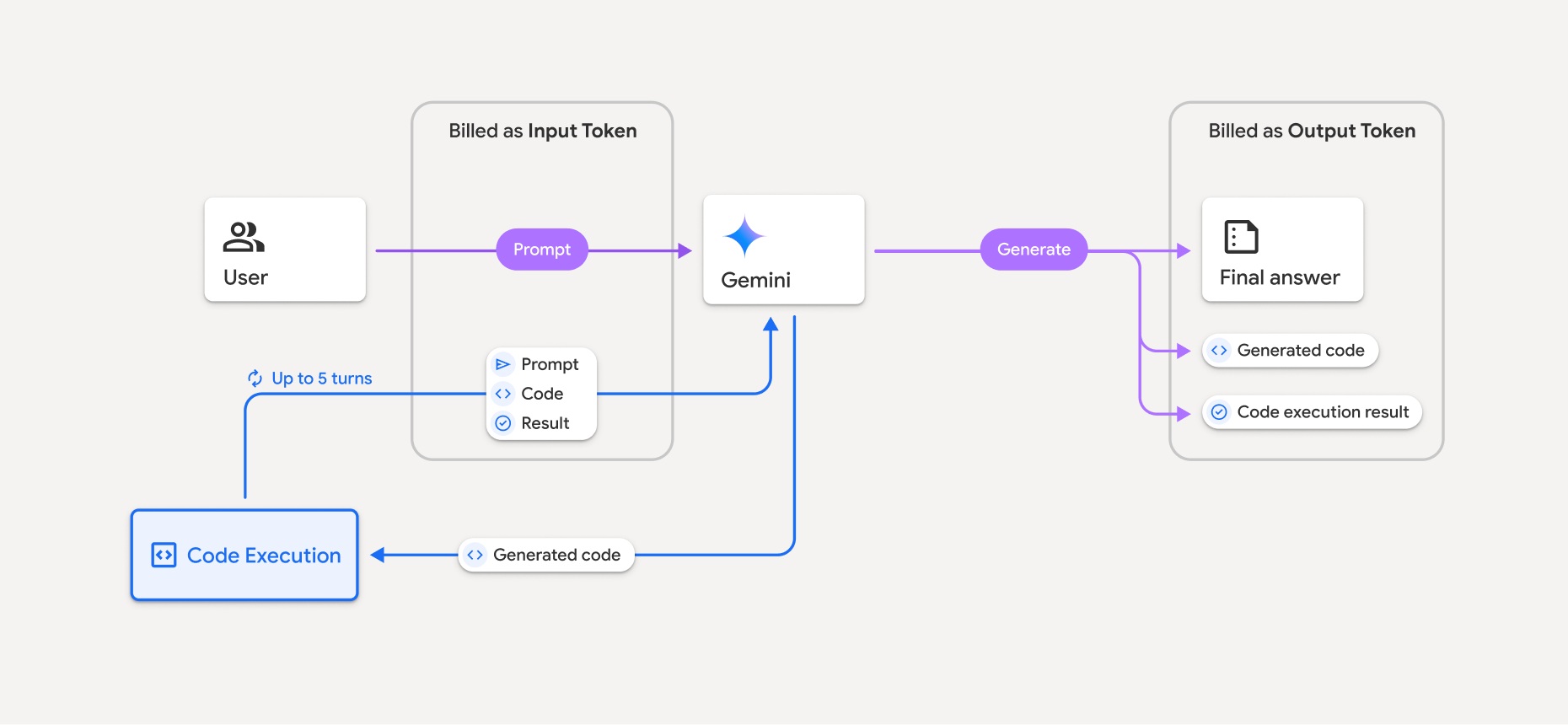
כך מתבצע החיוב על טוקנים כשהמודל משתמש בהרצת קוד:
ההנחיה המקורית מחויבת פעם אחת. הטוקנים שלו מסומנים כטוקנים של ביניים, והחיוב עליהם הוא כמו על טוקנים של קלט.
הקוד שנוצר והתוצאה של הקוד שהופעל מחויבים באופן הבא:
כשמשתמשים בהם במהלך הרצת קוד, הם מסומנים כטוקנים של ביניים ומחויבים כטוקנים של קלט.
כשהם נכללים בתשובה הסופית, הם מחויבים כטוקנים של פלט.
הסיכום הסופי בתשובה הסופית מחויב כטוקנים של פלט.
ה-Gemini API כולל ספירת טוקנים של ביניים בתגובה מה-API, כדי שתדעו למה אתם מחויבים על טוקנים של קלט מעבר להנחיה הראשונית.
חשוב לזכור שהקוד שנוצר יכול לכלול גם טקסט וגם פלט בכמה מודלים, כמו תמונות.
מגבלות ושיטות מומלצות
המודל יכול רק ליצור ולהריץ קוד Python. הוא לא יכול להחזיר פריטים אחרים כמו קובצי מדיה.
הרצת הקוד יכולה להימשך עד 30 שניות לפני שהזמן הקצוב לתפוגה נגמר.
במקרים מסוימים, הפעלת הרצת הקוד עלולה להוביל לרגרסיות בתחומים אחרים של הפלט מהמודל (לדוגמה, כתיבת סיפור).
כלי הרצת הקוד לא תומך בכתובות URI של קבצים כקלט או כפלט. עם זאת, כלי הרצת הקוד תומך בקלט של קבצים ובפלט של תרשימים כבייטים מוטבעים. באמצעות יכולות הקלט והפלט האלה, אתם יכולים להעלות קובצי CSV וטקסט, לשאול שאלות לגבי הקבצים וליצור תרשימי Matplotlib כחלק מתוצאת הרצת הקוד. סוגי ה-MIME הנתמכים לבייטים מוטבעים הם
.cpp,.csv,.java,.jpeg,.js,.png,.py,.tsו-.xml.
ספריות נתמכות
סביבת הרצת הקוד כוללת את הספריות הבאות. אי אפשר להתקין ספריות משלכם.
שליחת משוב על חוויית השימוש ב-Firebase AI Logic