

Die Codeausführung ist ein Tool, mit dem das Modell Python-Code generieren und ausführen kann. Das Modell kann iterativ aus den Ergebnissen der Codeausführung lernen, bis es eine endgültige Ausgabe erstellt hat.
Sie können die Codeausführung verwenden, um Funktionen zu erstellen, die die Vorteile codebasierter Schlussfolgerungen nutzen und Textausgaben erzeugen. Sie können die Codeausführung beispielsweise verwenden, um Gleichungen zu lösen oder Text zu verarbeiten. Sie können auch die in der Code-Ausführungsumgebung enthaltenen Bibliotheken verwenden, um speziellere Aufgaben auszuführen.
Wie bei allen Tools, die Sie dem Modell zur Verfügung stellen, entscheidet das Modell, wann die Codeausführung verwendet wird.
Zur Code-Implementierung springen
Vergleich von Code-Ausführung und Funktionsaufrufen
Code-Ausführung und Funktionsaufrufe sind ähnliche Funktionen. Im Allgemeinen sollten Sie die Codeausführung bevorzugen, wenn das Modell Ihren Anwendungsfall abdecken kann. Die Codeausführung ist auch einfacher zu verwenden, da Sie sie nur aktivieren müssen.
Hier sind einige zusätzliche Unterschiede zwischen der Codeausführung und dem Funktionsaufruf:
| Code-Ausführung | Funktionsaufrufe |
|---|---|
| Verwenden Sie die Codeausführung, wenn das Modell Python-Code für Sie schreiben und ausführen und das Ergebnis zurückgeben soll. | Verwenden Sie Funktionsaufrufe, wenn Sie bereits eigene Funktionen haben, die Sie lokal ausführen möchten. |
| Mit der Codeausführung kann das Modell Code im API-Backend in einer festen, isolierten Umgebung ausführen. | Mit Funktionsaufrufen können Sie die Funktionen, die das Modell anfordert, in einer beliebigen Umgebung ausführen. |
| Die Codeausführung wird in einer einzelnen Anfrage aufgelöst. Sie können die Codeausführung optional mit der Chatfunktion verwenden, müssen es aber nicht. | Für Funktionsaufrufe ist eine zusätzliche Anfrage erforderlich, um die Ausgabe jedes Funktionsaufrufs zurückzusenden. Daher müssen Sie die Chatfunktion verwenden. |
Unterstützte Modelle
gemini-3.1-pro-previewgemini-3.8-flash(und die älterengemini-3.7-flash,gemini-3.6-flashundgemini-3.5-flash)gemini-3.5-flash-lite(und die älteregemini-3.1-flash-lite)
Gemini 2.5-Modelle für die allgemeine Verwendung unterstützen diese Funktion, wurden aber alle eingestellt.
Code-Ausführung verwenden
Sie können die Codeausführung sowohl mit reiner Texteingabe als auch mit multimodaler Eingabe verwenden. Die Antwort besteht jedoch immer nur aus Text oder Code.
Hinweis
|
Klicken Sie auf Ihren Gemini API-Anbieter, um anbieterspezifische Inhalte und Code auf dieser Seite aufzurufen. |
Falls noch nicht geschehen, folgen Sie dem Startleitfaden. Darin wird beschrieben, wie Sie Ihr Firebase-Projekt einrichten, Ihre App mit Firebase verbinden, das SDK hinzufügen, den Backend-Dienst für den ausgewählten Gemini API-Anbieter initialisieren und eine GenerativeModel-Instanz erstellen.
Zum Testen und Iterieren von Prompts empfehlen wir die Verwendung von Google AI Studio.
Code-Ausführung aktivieren
|
Bevor Sie dieses Beispiel ausprobieren, müssen Sie den Abschnitt Vorbereitung in diesem Leitfaden durcharbeiten, um Ihr Projekt und Ihre App einzurichten. In diesem Abschnitt klicken Sie auch auf eine Schaltfläche für den von Ihnen ausgewählten Gemini API-Anbieter, damit auf dieser Seite anbieterspezifische Inhalte angezeigt werden. |
Wenn Sie die GenerativeModel-Instanz erstellen, geben Sie CodeExecution als Tool an, das das Modell zum Generieren der Antwort verwenden kann. So kann das Modell Python-Code generieren und ausführen.
Swift
import FirebaseAILogic

// Initialize the Gemini Developer API backend service.
let ai = FirebaseAI.firebaseAI(backend: .googleAI())

// Create a `GenerativeModel` instance with a model that supports your use case
let model = ai.generativeModel(
  modelName: "GEMINI_MODEL_NAME",
  // Provide code execution as a tool that the model can use to generate its response.
  tools: [.codeExecution()]
)

let prompt = """
What is the sum of the first 50 prime numbers?
Generate and run code for the calculation, and make sure you get all 50.
"""

let response = try await model.generateContent(prompt)

guard let candidate = response.candidates.first else {
  print("No candidates in response.")
  return
}
for part in candidate.content.parts {
  if let textPart = part as? TextPart {
    print("Text = \(textPart.text)")
  } else if let executableCode = part as? ExecutableCodePart {
    print("Code = \(executableCode.code), Language = \(executableCode.language)")
  } else if let executionResult = part as? CodeExecutionResultPart {
    print("Outcome = \(executionResult.outcome), Result = \(executionResult.output ?? "no output")")
  }
}
Kotlin
// Initialize the Gemini Developer API backend service.
// Create a `GenerativeModel` instance with a model that supports your use case.
val model = Firebase.ai(backend = GenerativeBackend.googleAI()).generativeModel(
    modelName = "GEMINI_MODEL_NAME",
    // Provide code execution as a tool that the model can use to generate its response.
    tools = listOf(Tool.codeExecution())
)

val prompt =  "What is the sum of the first 50 prime numbers? " +
        "Generate and run code for the calculation, and make sure you get all 50."

val response = model.generateContent(prompt)

response.candidates.first().content.parts.forEach {
    if(it is TextPart) {
        println("Text = ${it.text}")
    }
    if(it is ExecutableCodePart) {
        println("Code = ${it.code}, Language = ${it.language}")
    }
    if(it is CodeExecutionResultPart) {
       println("Outcome = ${it.outcome}, Result = ${it.output}")
    }
}
Java
// Initialize the Gemini Developer API backend service.
// Create a `GenerativeModel` instance with a model that supports your use case.
GenerativeModel ai = FirebaseAI.getInstance(GenerativeBackend.googleAI())
                .generativeModel("GEMINI_MODEL_NAME",
                        null,
                        null,
                        // Provide code execution as a tool that the model can use to generate its response.
                        List.of(Tool.codeExecution()));

// Use the GenerativeModelFutures Java compatibility layer which offers
// support for ListenableFuture and Publisher APIs
GenerativeModelFutures model = GenerativeModelFutures.from(ai);

String text = "What is the sum of the first 50 prime numbers? " +
        "Generate and run code for the calculation, and make sure you get all 50.";

Content prompt = new Content.Builder()
    .addText(text)
    .build();

ListenableFuture response = model.generateContent(prompt);

Futures.addCallback(response, new FutureCallback() {
   @Override
public void onSuccess(GenerateContentResponse response)   {
    // Access the first candidate's content parts
    List parts = response.getCandidates().get(0).getContent().getParts();
    for (Part part : parts) {
        if (part instanceof TextPart) {
            TextPart textPart = (TextPart) part;
            System.out.println("Text = " + textPart.getText());
        } else if (part instanceof ExecutableCodePart) {
            ExecutableCodePart codePart = (ExecutableCodePart) part;
            System.out.println("Code = " + codePart.getCode() + ", Language = " + codePart.getLanguage());
        } else if (part instanceof CodeExecutionResultPart) {
            CodeExecutionResultPart resultPart = (CodeExecutionResultPart) part;
            System.out.println("Outcome = " + resultPart.getOutcome() + ", Result = " + resultPart.getOutput());
        }
    }
}

    @Override
    public void onFailure(Throwable t) {
        t.printStackTrace();
    }
}, executor);
Web
import { initializeApp } from "firebase/app";
import { getAI, getGenerativeModel, GoogleAIBackend } from "firebase/ai";

// TODO(developer): Replace the following with your app's Firebase configuration
// See: https://firebase.google.com/docs/web/learn-more#config-object
const firebaseConfig = {
  // ...
};

// Initialize FirebaseApp
const firebaseApp = initializeApp(firebaseConfig);

// Initialize the Gemini Developer API backend service.
const ai = getAI(firebaseApp, { backend: new GoogleAIBackend() });

// Create a `GenerativeModel` instance with a model that supports your use case.
const model = getGenerativeModel(
  ai,
  {
    model: "GEMINI_MODEL_NAME",
    // Provide code execution as a tool that the model can use to generate its response.
    tools: [{ codeExecution: {} }]
  }
);

const prompt =  "What is the sum of the first 50 prime numbers? " +
        "Generate and run code for the calculation, and make sure you get all 50."

const result = await model.generateContent(prompt);
const response = await result.response;

const parts = response.candidates?.[0].content.parts;

if (parts) {
  parts.forEach((part) => {
    if (part.text) {
        console.log(`Text: ${part.text}`);
    } else if (part.executableCode) {
      console.log(
        `Code: ${part.executableCode.code}, Language: ${part.executableCode.language}`
      );
    } else if (part.codeExecutionResult) {
      console.log(
        `Outcome: ${part.codeExecutionResult.outcome}, Result: ${part.codeExecutionResult.output}`
      );
    }
  });
}
Dart
import 'package:firebase_core/firebase_core.dart';
import 'package:firebase_ai/firebase_ai.dart';
import 'firebase_options.dart';

// Initialize FirebaseApp
await Firebase.initializeApp(
  options: DefaultFirebaseOptions.currentPlatform,
);

// Initialize the Gemini Developer API backend service.
// Create a `GenerativeModel` instance with a model that supports your use case.
final model = FirebaseAI.googleAI().generativeModel(
  model: 'GEMINI_MODEL_NAME',
  // Provide code execution as a tool that the model can use to generate its response.
  tools: [
    Tool.codeExecution(),
  ],
);

const prompt = 'What is the sum of the first 50 prime numbers? '
    'Generate and run code for the calculation, and make sure you get all 50.';

final response = await model.generateContent([Content.text(prompt)]);

final buffer = StringBuffer();
    for (final part in response.candidates.first.content.parts) {
      if (part is TextPart) {
        buffer.writeln(part.text);
      } else if (part is ExecutableCodePart) {
        buffer.writeln('Executable Code:');
        buffer.writeln('Language: ${part.language}');
        buffer.writeln('Code:');
        buffer.writeln(part.code);
      } else if (part is CodeExecutionResultPart) {
        buffer.writeln('Code Execution Result:');
        buffer.writeln('Outcome: ${part.outcome}');
        buffer.writeln('Output:');
        buffer.writeln(part.output);
      }
    }
Einheit
using Firebase;
using Firebase.AI;

// Initialize the Gemini Developer API backend service.
var ai = FirebaseAI.GetInstance(FirebaseAI.Backend.GoogleAI());

// Create a `GenerativeModel` instance with a model that supports your use case.
var model = ai.GetGenerativeModel(
  modelName: "GEMINI_MODEL_NAME",
  // Provide code execution as a tool that the model can use to generate its response.
  tools: new Tool[] { new Tool(new CodeExecution()) }
);

var prompt = "What is the sum of the first 50 prime numbers? " +
        "Generate and run code for the calculation, and make sure you get all 50.";

var response = await model.GenerateContentAsync(prompt);

foreach (var part in response.Candidates.First().Content.Parts) {
  if (part is ModelContent.TextPart tp) {
    UnityEngine.Debug.Log($"Text = {tp.Text}");
  } else if (part is ModelContent.ExecutableCodePart esp) {
    UnityEngine.Debug.Log($"Code = {esp.Code}, Language = {esp.Language}");
  } else if (part is ModelContent.CodeExecutionResultPart cerp) {
    UnityEngine.Debug.Log($"Outcome = {cerp.Outcome}, Output = {cerp.Output}");
  }
}
Hier erfahren Sie, wie Sie ein Modell auswählen, der für Ihren Anwendungsfall und Ihre App geeignet ist.
Codeausführung in Chats verwenden
Sie können die Codeausführung auch im Rahmen eines Chats verwenden:
Swift
import FirebaseAILogic

// Initialize the Gemini Developer API backend service.
let ai = FirebaseAI.firebaseAI(backend: .googleAI())

// Create a `GenerativeModel` instance with a model that supports your use case
let model = ai.generativeModel(
  modelName: "GEMINI_MODEL_NAME",
  // Provide code execution as a tool that the model can use to generate its response.
  tools: [.codeExecution()]
)

let prompt = """
What is the sum of the first 50 prime numbers?
Generate and run code for the calculation, and make sure you get all 50.
"""
let chat = model.startChat()

let response = try await chat.sendMessage(prompt)

guard let candidate = response.candidates.first else {
  print("No candidates in response.")
  return
}
for part in candidate.content.parts {
  if let textPart = part as? TextPart {
    print("Text = \(textPart.text)")
  } else if let executableCode = part as? ExecutableCodePart {
    print("Code = \(executableCode.code), Language = \(executableCode.language)")
  } else if let executionResult = part as? CodeExecutionResultPart {
    print("Outcome = \(executionResult.outcome), Result = \(executionResult.output ?? "no output")")
  }
}
Kotlin
// Initialize the Gemini Developer API backend service.
// Create a `GenerativeModel` instance with a model that supports your use case.
val model = Firebase.ai(backend = GenerativeBackend.googleAI()).generativeModel(
    modelName = "GEMINI_MODEL_NAME",
    // Provide code execution as a tool that the model can use to generate its response.
    tools = listOf(Tool.codeExecution())
)

val prompt =  "What is the sum of the first 50 prime numbers? " +
        "Generate and run code for the calculation, and make sure you get all 50."
val chat = model.startChat()
val response = chat.sendMessage(prompt)

response.candidates.first().content.parts.forEach {
    if(it is TextPart) {
        println("Text = ${it.text}")
    }
    if(it is ExecutableCodePart) {
        println("Code = ${it.code}, Language = ${it.language}")
    }
    if(it is CodeExecutionResultPart) {
       println("Outcome = ${it.outcome}, Result = ${it.output}")
    }
}
Java
// Initialize the Gemini Developer API backend service.
// Create a `GenerativeModel` instance with a model that supports your use case.
GenerativeModel ai = FirebaseAI.getInstance(GenerativeBackend.googleAI())
                .generativeModel("GEMINI_MODEL_NAME",
                        null,
                        null,
                        // Provide code execution as a tool that the model can use to generate its response.
                        List.of(Tool.codeExecution()));

// Use the GenerativeModelFutures Java compatibility layer which offers
// support for ListenableFuture and Publisher APIs
GenerativeModelFutures model = GenerativeModelFutures.from(ai);
String text = "What is the sum of the first 50 prime numbers? " +
        "Generate and run code for the calculation, and make sure you get all 50.";

Content prompt = new Content.Builder()
    .addText(text)
    .build();

ChatFutures chat = model.startChat();
ListenableFuture response = chat.sendMessage(prompt);

Futures.addCallback(response, new FutureCallback() {
   @Override
public void onSuccess(GenerateContentResponse response)   {
    // Access the first candidate's content parts
    List parts = response.getCandidates().get(0).getContent().getParts();
    for (Part part : parts) {
        if (part instanceof TextPart) {
            TextPart textPart = (TextPart) part;
            System.out.println("Text = " + textPart.getText());
        } else if (part instanceof ExecutableCodePart) {
            ExecutableCodePart codePart = (ExecutableCodePart) part;
            System.out.println("Code = " + codePart.getCode() + ", Language = " + codePart.getLanguage());
        } else if (part instanceof CodeExecutionResultPart) {
            CodeExecutionResultPart resultPart = (CodeExecutionResultPart) part;
            System.out.println("Outcome = " + resultPart.getOutcome() + ", Result = " + resultPart.getOutput());
        }
    }
}

    @Override
    public void onFailure(Throwable t) {
        t.printStackTrace();
    }
}, executor);
Web
import { initializeApp } from "firebase/app";
import { getAI, getGenerativeModel, GoogleAIBackend } from "firebase/ai";

// TODO(developer): Replace the following with your app's Firebase configuration
// See: https://firebase.google.com/docs/web/learn-more#config-object
const firebaseConfig = {
  // ...
};

// Initialize FirebaseApp
const firebaseApp = initializeApp(firebaseConfig);

// Initialize the Gemini Developer API backend service.
const ai = getAI(firebaseApp, { backend: new GoogleAIBackend() });

// Create a `GenerativeModel` instance with a model that supports your use case.
const model = getGenerativeModel(
  ai,
  {
    model: "GEMINI_MODEL_NAME",
    // Provide code execution as a tool that the model can use to generate its response.
    tools: [{ codeExecution: {} }]
  }
);

const prompt =  "What is the sum of the first 50 prime numbers? " +
        "Generate and run code for the calculation, and make sure you get all 50."
const chat = model.startChat()
const result = await chat.sendMessage(prompt);

const parts = result.response.candidates?.[0].content.parts;

if (parts) {
  parts.forEach((part) => {
    if (part.text) {
        console.log(`Text: ${part.text}`);
    } else if (part.executableCode) {
      console.log(
        `Code: ${part.executableCode.code}, Language: ${part.executableCode.language}`
      );
    } else if (part.codeExecutionResult) {
      console.log(
        `Outcome: ${part.codeExecutionResult.outcome}, Result: ${part.codeExecutionResult.output}`
      );
    }
  });
}
Dart
import 'package:firebase_core/firebase_core.dart';
import 'package:firebase_ai/firebase_ai.dart';
import 'firebase_options.dart';

// Initialize FirebaseApp
await Firebase.initializeApp(
  options: DefaultFirebaseOptions.currentPlatform,
);

// Initialize the Gemini Developer API backend service.
// Create a `GenerativeModel` instance with a model that supports your use case.
final model = FirebaseAI.googleAI().generativeModel(
  model: 'GEMINI_MODEL_NAME',
  // Provide code execution as a tool that the model can use to generate its response.
  tools: [
    Tool.codeExecution(),
  ],
);

final codeExecutionChat = await model.startChat();

const prompt = 'What is the sum of the first 50 prime numbers? '
    'Generate and run code for the calculation, and make sure you get all 50.';
final response = await codeExecutionChat.sendMessage(Content.text(prompt));

final buffer = StringBuffer();
    for (final part in response.candidates.first.content.parts) {
      if (part is TextPart) {
        buffer.writeln(part.text);
      } else if (part is ExecutableCodePart) {
        buffer.writeln('Executable Code:');
        buffer.writeln('Language: ${part.language}');
        buffer.writeln('Code:');
        buffer.writeln(part.code);
      } else if (part is CodeExecutionResultPart) {
        buffer.writeln('Code Execution Result:');
        buffer.writeln('Outcome: ${part.outcome}');
        buffer.writeln('Output:');
        buffer.writeln(part.output);
      }
    }
Einheit
using Firebase;
using Firebase.AI;

// Initialize the Gemini Developer API backend service.
var ai = FirebaseAI.GetInstance(FirebaseAI.Backend.GoogleAI());

// Create a `GenerativeModel` instance with a model that supports your use case.
var model = ai.GetGenerativeModel(
  modelName: "GEMINI_MODEL_NAME",
  // Provide code execution as a tool that the model can use to generate its response.
  tools: new Tool[] { new Tool(new CodeExecution()) }
);

var prompt = "What is the sum of the first 50 prime numbers? " +
        "Generate and run code for the calculation, and make sure you get all 50.";
var chat = model.StartChat();
var response = await chat.SendMessageAsync(prompt);

foreach (var part in response.Candidates.First().Content.Parts) {
  if (part is ModelContent.TextPart tp) {
    UnityEngine.Debug.Log($"Text = {tp.Text}");
  } else if (part is ModelContent.ExecutableCodePart esp) {
    UnityEngine.Debug.Log($"Code = {esp.Code}, Language = {esp.Language}");
  } else if (part is ModelContent.CodeExecutionResultPart cerp) {
    UnityEngine.Debug.Log($"Outcome = {cerp.Outcome}, Output = {cerp.Output}");
  }
}
Hier erfahren Sie, wie Sie ein Modell auswählen, der für Ihren Anwendungsfall und Ihre App geeignet ist.
Preise
Für die Aktivierung der Codeausführung und die Bereitstellung als Tool für das Modell fallen keine zusätzlichen Kosten an. Wenn das Modell sich für die Codeausführung entscheidet, werden Ihnen die aktuellen Kosten für Eingabe- und Ausgabetokens basierend auf dem verwendeten Gemini-Modell in Rechnung gestellt.
Das folgende Diagramm zeigt das Abrechnungsmodell für die Codeausführung:
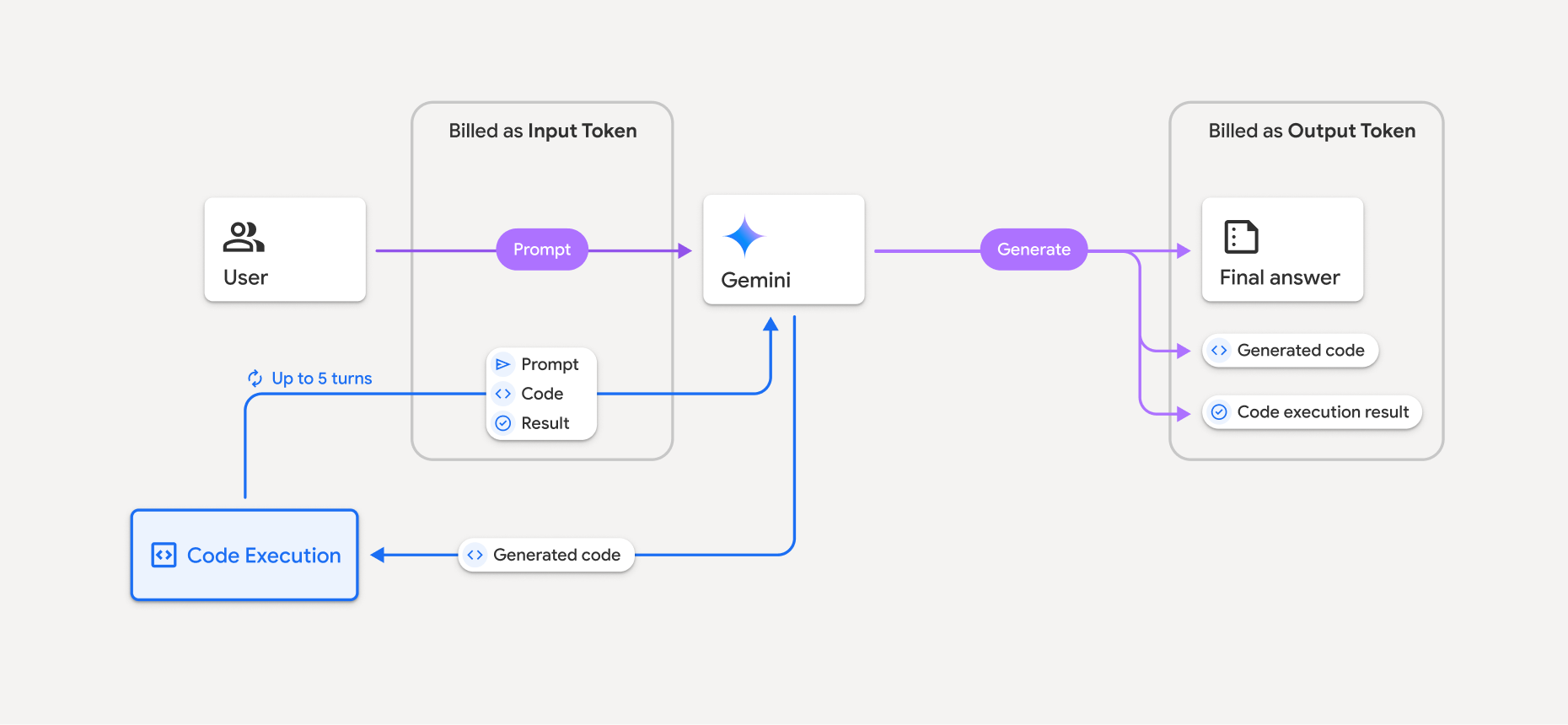
Hier finden Sie eine Zusammenfassung der Abrechnung von Tokens, wenn ein Modell die Codeausführung verwendet:
Der ursprüngliche Prompt wird einmal in Rechnung gestellt. Die entsprechenden Tokens werden als Zwischentokens gekennzeichnet und als Eingabetokens abgerechnet.
Der generierte Code und das Ergebnis des ausgeführten Codes werden so abgerechnet:
Wenn sie während der Codeausführung verwendet werden, werden sie als Zwischentokens gekennzeichnet und als Eingabetokens abgerechnet.
Wenn sie in die endgültige Antwort aufgenommen werden, werden sie als Ausgabe-Tokens abgerechnet.
Die endgültige Zusammenfassung in der endgültigen Antwort wird als Ausgabetokens abgerechnet.
Die Gemini API enthält eine Zwischenanzahl von Tokens in der API-Antwort, damit Sie wissen, warum Ihnen Eingabetokens über Ihren ursprünglichen Prompt hinaus in Rechnung gestellt werden.
Generierter Code kann sowohl Text als auch multimodale Ausgaben wie Bilder enthalten.
Beschränkungen und Best Practices
Das Modell kann nur Python-Code generieren und ausführen. Andere Artefakte wie Mediendateien können nicht zurückgegeben werden.
Die Codeausführung kann maximal 30 Sekunden dauern, bevor eine Zeitüberschreitung auftritt.
In einigen Fällen kann die Aktivierung der Codeausführung zu Regressionen in anderen Bereichen der Modellausgabe führen, z. B. beim Schreiben einer Geschichte.
Das Tool zur Code-Ausführung unterstützt keine Datei-URIs als Eingabe/Ausgabe. Das Tool zur Code-Ausführung unterstützt jedoch Dateieingaben und Grafikausgaben als Inline-Bytes. Mit diesen Ein- und Ausgabefunktionen können Sie CSV- und Textdateien hochladen, Fragen zu den Dateien stellen und Matplotlib-Diagramme als Teil des Code-Ausführungsergebnisses generieren lassen. Die unterstützten MIME-Typen für Inline-Bytes sind
.cpp,.csv,.java,.jpeg,.js,.png,.py,.tsund.xml.
Unterstützte Bibliotheken
Die Code-Ausführungsumgebung umfasst die folgenden Bibliotheken. Sie können keine eigenen Bibliotheken installieren.
Feedback zu Firebase AI Logic geben