

Выполнение кода – это инструмент, который позволяет модели генерировать и запускать код на Python. Модель может итеративно обучаться на результатах выполнения кода, пока не получит окончательный результат.
Выполнение кода позволяет создавать функции, которые используют логику на основе кода и генерируют текстовые ответы. Например, с помощью выполнения кода можно решать уравнения или обрабатывать текст. Вы также можете использовать библиотеки, включенные в среду выполнения кода, для выполнения более специализированных задач.
Как и в случае с другими инструментами, которые вы предоставляете модели, она сама решает, когда использовать выполнение кода.
Сравнение выполнения кода и вызова функций
Выполнение кода и вызов функций – похожие функции. В целом, если модель может справиться с вашей задачей, лучше использовать выполнение кода. Выполнение кода также проще в использовании, поскольку его нужно просто включить.
Вот ещё несколько различий между выполнением кода и вызовом функции:
| Выполнение кода | Вызов функций |
|---|---|
| Используйте выполнение кода, если хотите, чтобы модель написала и выполнила код Python и вернула результат. | Используйте вызов функций, если у вас уже есть собственные функции, которые вы хотите запускать локально. |
| Выполнение кода позволяет модели запускать код в серверной части API в фиксированной изолированной среде. | Вызов функций позволяет выполнять функции, запрошенные моделью, в любой среде. |
| Выполнение кода происходит в рамках одного запроса. Вы можете использовать выполнение кода в чате, но это не обязательно. | Для вызова функций требуется дополнительный запрос, чтобы вернуть выходные данные каждого вызова. Поэтому вам необходимо использовать чат. |
Поддерживаемые модели
gemini-3.1-pro-previewgemini-3.8-flash(а также более старые версииgemini-3.7-flash,gemini-3.6-flashиgemini-3.5-flash)gemini-3.5-flash-lite(и более ранние версии, напримерgemini-3.1-flash-lite)
Модели общего назначения Gemini 2.5 поддерживают эту функцию, но все они устарели.
Как использовать выполнение кода
Вы можете использовать выполнение кода как с текстовым, так и с мультимодальным вводом, но ответ всегда будет содержать только текст или код.
Подготовка
|
Нажмите на поставщика Gemini API, чтобы посмотреть контент и код, относящиеся к нему. |
Если вы ещё этого не сделали, ознакомьтесь с руководством по началу работы. В нем рассказывается, как настроить проект Firebase, подключить к нему приложение, добавить SDK, инициализировать бэкенд-службу для выбранного поставщика Gemini API и создать экземпляр GenerativeModel.
Для тестирования и доработки запросов рекомендуем использовать Google AI Studio.
Как включить выполнение кода
|
Прежде чем использовать этот пример, выполните инструкции из раздела Подготовка к работе, чтобы настроить проект и приложение. В этом разделе также есть кнопка для выбранного вами поставщика Gemini API. Нажмите ее, чтобы на этой странице отображался контент, относящийся к этому поставщику. |
При создании экземпляра GenerativeModel укажите CodeExecution в качестве инструмента, который модель может использовать для создания ответа. Это позволяет модели генерировать и выполнять код на Python.
Swift
import FirebaseAILogic

// Initialize the Gemini Developer API backend service.
let ai = FirebaseAI.firebaseAI(backend: .googleAI())

// Create a `GenerativeModel` instance with a model that supports your use case
let model = ai.generativeModel(
  modelName: "GEMINI_MODEL_NAME",
  // Provide code execution as a tool that the model can use to generate its response.
  tools: [.codeExecution()]
)

let prompt = """
What is the sum of the first 50 prime numbers?
Generate and run code for the calculation, and make sure you get all 50.
"""

let response = try await model.generateContent(prompt)

guard let candidate = response.candidates.first else {
  print("No candidates in response.")
  return
}
for part in candidate.content.parts {
  if let textPart = part as? TextPart {
    print("Text = \(textPart.text)")
  } else if let executableCode = part as? ExecutableCodePart {
    print("Code = \(executableCode.code), Language = \(executableCode.language)")
  } else if let executionResult = part as? CodeExecutionResultPart {
    print("Outcome = \(executionResult.outcome), Result = \(executionResult.output ?? "no output")")
  }
}
Kotlin
// Initialize the Gemini Developer API backend service.
// Create a `GenerativeModel` instance with a model that supports your use case.
val model = Firebase.ai(backend = GenerativeBackend.googleAI()).generativeModel(
    modelName = "GEMINI_MODEL_NAME",
    // Provide code execution as a tool that the model can use to generate its response.
    tools = listOf(Tool.codeExecution())
)

val prompt =  "What is the sum of the first 50 prime numbers? " +
        "Generate and run code for the calculation, and make sure you get all 50."

val response = model.generateContent(prompt)

response.candidates.first().content.parts.forEach {
    if(it is TextPart) {
        println("Text = ${it.text}")
    }
    if(it is ExecutableCodePart) {
        println("Code = ${it.code}, Language = ${it.language}")
    }
    if(it is CodeExecutionResultPart) {
       println("Outcome = ${it.outcome}, Result = ${it.output}")
    }
}
Java
// Initialize the Gemini Developer API backend service.
// Create a `GenerativeModel` instance with a model that supports your use case.
GenerativeModel ai = FirebaseAI.getInstance(GenerativeBackend.googleAI())
                .generativeModel("GEMINI_MODEL_NAME",
                        null,
                        null,
                        // Provide code execution as a tool that the model can use to generate its response.
                        List.of(Tool.codeExecution()));

// Use the GenerativeModelFutures Java compatibility layer which offers
// support for ListenableFuture and Publisher APIs
GenerativeModelFutures model = GenerativeModelFutures.from(ai);

String text = "What is the sum of the first 50 prime numbers? " +
        "Generate and run code for the calculation, and make sure you get all 50.";

Content prompt = new Content.Builder()
    .addText(text)
    .build();

ListenableFuture response = model.generateContent(prompt);

Futures.addCallback(response, new FutureCallback() {
   @Override
public void onSuccess(GenerateContentResponse response)   {
    // Access the first candidate's content parts
    List parts = response.getCandidates().get(0).getContent().getParts();
    for (Part part : parts) {
        if (part instanceof TextPart) {
            TextPart textPart = (TextPart) part;
            System.out.println("Text = " + textPart.getText());
        } else if (part instanceof ExecutableCodePart) {
            ExecutableCodePart codePart = (ExecutableCodePart) part;
            System.out.println("Code = " + codePart.getCode() + ", Language = " + codePart.getLanguage());
        } else if (part instanceof CodeExecutionResultPart) {
            CodeExecutionResultPart resultPart = (CodeExecutionResultPart) part;
            System.out.println("Outcome = " + resultPart.getOutcome() + ", Result = " + resultPart.getOutput());
        }
    }
}

    @Override
    public void onFailure(Throwable t) {
        t.printStackTrace();
    }
}, executor);
Web
import { initializeApp } from "firebase/app";
import { getAI, getGenerativeModel, GoogleAIBackend } from "firebase/ai";

// TODO(developer): Replace the following with your app's Firebase configuration
// See: https://firebase.google.com/docs/web/learn-more#config-object
const firebaseConfig = {
  // ...
};

// Initialize FirebaseApp
const firebaseApp = initializeApp(firebaseConfig);

// Initialize the Gemini Developer API backend service.
const ai = getAI(firebaseApp, { backend: new GoogleAIBackend() });

// Create a `GenerativeModel` instance with a model that supports your use case.
const model = getGenerativeModel(
  ai,
  {
    model: "GEMINI_MODEL_NAME",
    // Provide code execution as a tool that the model can use to generate its response.
    tools: [{ codeExecution: {} }]
  }
);

const prompt =  "What is the sum of the first 50 prime numbers? " +
        "Generate and run code for the calculation, and make sure you get all 50."

const result = await model.generateContent(prompt);
const response = await result.response;

const parts = response.candidates?.[0].content.parts;

if (parts) {
  parts.forEach((part) => {
    if (part.text) {
        console.log(`Text: ${part.text}`);
    } else if (part.executableCode) {
      console.log(
        `Code: ${part.executableCode.code}, Language: ${part.executableCode.language}`
      );
    } else if (part.codeExecutionResult) {
      console.log(
        `Outcome: ${part.codeExecutionResult.outcome}, Result: ${part.codeExecutionResult.output}`
      );
    }
  });
}
Dart
import 'package:firebase_core/firebase_core.dart';
import 'package:firebase_ai/firebase_ai.dart';
import 'firebase_options.dart';

// Initialize FirebaseApp
await Firebase.initializeApp(
  options: DefaultFirebaseOptions.currentPlatform,
);

// Initialize the Gemini Developer API backend service.
// Create a `GenerativeModel` instance with a model that supports your use case.
final model = FirebaseAI.googleAI().generativeModel(
  model: 'GEMINI_MODEL_NAME',
  // Provide code execution as a tool that the model can use to generate its response.
  tools: [
    Tool.codeExecution(),
  ],
);

const prompt = 'What is the sum of the first 50 prime numbers? '
    'Generate and run code for the calculation, and make sure you get all 50.';

final response = await model.generateContent([Content.text(prompt)]);

final buffer = StringBuffer();
    for (final part in response.candidates.first.content.parts) {
      if (part is TextPart) {
        buffer.writeln(part.text);
      } else if (part is ExecutableCodePart) {
        buffer.writeln('Executable Code:');
        buffer.writeln('Language: ${part.language}');
        buffer.writeln('Code:');
        buffer.writeln(part.code);
      } else if (part is CodeExecutionResultPart) {
        buffer.writeln('Code Execution Result:');
        buffer.writeln('Outcome: ${part.outcome}');
        buffer.writeln('Output:');
        buffer.writeln(part.output);
      }
    }
Unity
using Firebase;
using Firebase.AI;

// Initialize the Gemini Developer API backend service.
var ai = FirebaseAI.GetInstance(FirebaseAI.Backend.GoogleAI());

// Create a `GenerativeModel` instance with a model that supports your use case.
var model = ai.GetGenerativeModel(
  modelName: "GEMINI_MODEL_NAME",
  // Provide code execution as a tool that the model can use to generate its response.
  tools: new Tool[] { new Tool(new CodeExecution()) }
);

var prompt = "What is the sum of the first 50 prime numbers? " +
        "Generate and run code for the calculation, and make sure you get all 50.";

var response = await model.GenerateContentAsync(prompt);

foreach (var part in response.Candidates.First().Content.Parts) {
  if (part is ModelContent.TextPart tp) {
    UnityEngine.Debug.Log($"Text = {tp.Text}");
  } else if (part is ModelContent.ExecutableCodePart esp) {
    UnityEngine.Debug.Log($"Code = {esp.Code}, Language = {esp.Language}");
  } else if (part is ModelContent.CodeExecutionResultPart cerp) {
    UnityEngine.Debug.Log($"Outcome = {cerp.Outcome}, Output = {cerp.Output}");
  }
}
Узнайте, как выбрать модель для вашего приложения и варианта использования.
Как использовать выполнение кода в чате
Вы также можете использовать выполнение кода в чате:
Swift
import FirebaseAILogic

// Initialize the Gemini Developer API backend service.
let ai = FirebaseAI.firebaseAI(backend: .googleAI())

// Create a `GenerativeModel` instance with a model that supports your use case
let model = ai.generativeModel(
  modelName: "GEMINI_MODEL_NAME",
  // Provide code execution as a tool that the model can use to generate its response.
  tools: [.codeExecution()]
)

let prompt = """
What is the sum of the first 50 prime numbers?
Generate and run code for the calculation, and make sure you get all 50.
"""
let chat = model.startChat()

let response = try await chat.sendMessage(prompt)

guard let candidate = response.candidates.first else {
  print("No candidates in response.")
  return
}
for part in candidate.content.parts {
  if let textPart = part as? TextPart {
    print("Text = \(textPart.text)")
  } else if let executableCode = part as? ExecutableCodePart {
    print("Code = \(executableCode.code), Language = \(executableCode.language)")
  } else if let executionResult = part as? CodeExecutionResultPart {
    print("Outcome = \(executionResult.outcome), Result = \(executionResult.output ?? "no output")")
  }
}
Kotlin
// Initialize the Gemini Developer API backend service.
// Create a `GenerativeModel` instance with a model that supports your use case.
val model = Firebase.ai(backend = GenerativeBackend.googleAI()).generativeModel(
    modelName = "GEMINI_MODEL_NAME",
    // Provide code execution as a tool that the model can use to generate its response.
    tools = listOf(Tool.codeExecution())
)

val prompt =  "What is the sum of the first 50 prime numbers? " +
        "Generate and run code for the calculation, and make sure you get all 50."
val chat = model.startChat()
val response = chat.sendMessage(prompt)

response.candidates.first().content.parts.forEach {
    if(it is TextPart) {
        println("Text = ${it.text}")
    }
    if(it is ExecutableCodePart) {
        println("Code = ${it.code}, Language = ${it.language}")
    }
    if(it is CodeExecutionResultPart) {
       println("Outcome = ${it.outcome}, Result = ${it.output}")
    }
}
Java
// Initialize the Gemini Developer API backend service.
// Create a `GenerativeModel` instance with a model that supports your use case.
GenerativeModel ai = FirebaseAI.getInstance(GenerativeBackend.googleAI())
                .generativeModel("GEMINI_MODEL_NAME",
                        null,
                        null,
                        // Provide code execution as a tool that the model can use to generate its response.
                        List.of(Tool.codeExecution()));

// Use the GenerativeModelFutures Java compatibility layer which offers
// support for ListenableFuture and Publisher APIs
GenerativeModelFutures model = GenerativeModelFutures.from(ai);
String text = "What is the sum of the first 50 prime numbers? " +
        "Generate and run code for the calculation, and make sure you get all 50.";

Content prompt = new Content.Builder()
    .addText(text)
    .build();

ChatFutures chat = model.startChat();
ListenableFuture response = chat.sendMessage(prompt);

Futures.addCallback(response, new FutureCallback() {
   @Override
public void onSuccess(GenerateContentResponse response)   {
    // Access the first candidate's content parts
    List parts = response.getCandidates().get(0).getContent().getParts();
    for (Part part : parts) {
        if (part instanceof TextPart) {
            TextPart textPart = (TextPart) part;
            System.out.println("Text = " + textPart.getText());
        } else if (part instanceof ExecutableCodePart) {
            ExecutableCodePart codePart = (ExecutableCodePart) part;
            System.out.println("Code = " + codePart.getCode() + ", Language = " + codePart.getLanguage());
        } else if (part instanceof CodeExecutionResultPart) {
            CodeExecutionResultPart resultPart = (CodeExecutionResultPart) part;
            System.out.println("Outcome = " + resultPart.getOutcome() + ", Result = " + resultPart.getOutput());
        }
    }
}

    @Override
    public void onFailure(Throwable t) {
        t.printStackTrace();
    }
}, executor);
Web
import { initializeApp } from "firebase/app";
import { getAI, getGenerativeModel, GoogleAIBackend } from "firebase/ai";

// TODO(developer): Replace the following with your app's Firebase configuration
// See: https://firebase.google.com/docs/web/learn-more#config-object
const firebaseConfig = {
  // ...
};

// Initialize FirebaseApp
const firebaseApp = initializeApp(firebaseConfig);

// Initialize the Gemini Developer API backend service.
const ai = getAI(firebaseApp, { backend: new GoogleAIBackend() });

// Create a `GenerativeModel` instance with a model that supports your use case.
const model = getGenerativeModel(
  ai,
  {
    model: "GEMINI_MODEL_NAME",
    // Provide code execution as a tool that the model can use to generate its response.
    tools: [{ codeExecution: {} }]
  }
);

const prompt =  "What is the sum of the first 50 prime numbers? " +
        "Generate and run code for the calculation, and make sure you get all 50."
const chat = model.startChat()
const result = await chat.sendMessage(prompt);

const parts = result.response.candidates?.[0].content.parts;

if (parts) {
  parts.forEach((part) => {
    if (part.text) {
        console.log(`Text: ${part.text}`);
    } else if (part.executableCode) {
      console.log(
        `Code: ${part.executableCode.code}, Language: ${part.executableCode.language}`
      );
    } else if (part.codeExecutionResult) {
      console.log(
        `Outcome: ${part.codeExecutionResult.outcome}, Result: ${part.codeExecutionResult.output}`
      );
    }
  });
}
Dart
import 'package:firebase_core/firebase_core.dart';
import 'package:firebase_ai/firebase_ai.dart';
import 'firebase_options.dart';

// Initialize FirebaseApp
await Firebase.initializeApp(
  options: DefaultFirebaseOptions.currentPlatform,
);

// Initialize the Gemini Developer API backend service.
// Create a `GenerativeModel` instance with a model that supports your use case.
final model = FirebaseAI.googleAI().generativeModel(
  model: 'GEMINI_MODEL_NAME',
  // Provide code execution as a tool that the model can use to generate its response.
  tools: [
    Tool.codeExecution(),
  ],
);

final codeExecutionChat = await model.startChat();

const prompt = 'What is the sum of the first 50 prime numbers? '
    'Generate and run code for the calculation, and make sure you get all 50.';
final response = await codeExecutionChat.sendMessage(Content.text(prompt));

final buffer = StringBuffer();
    for (final part in response.candidates.first.content.parts) {
      if (part is TextPart) {
        buffer.writeln(part.text);
      } else if (part is ExecutableCodePart) {
        buffer.writeln('Executable Code:');
        buffer.writeln('Language: ${part.language}');
        buffer.writeln('Code:');
        buffer.writeln(part.code);
      } else if (part is CodeExecutionResultPart) {
        buffer.writeln('Code Execution Result:');
        buffer.writeln('Outcome: ${part.outcome}');
        buffer.writeln('Output:');
        buffer.writeln(part.output);
      }
    }
Unity
using Firebase;
using Firebase.AI;

// Initialize the Gemini Developer API backend service.
var ai = FirebaseAI.GetInstance(FirebaseAI.Backend.GoogleAI());

// Create a `GenerativeModel` instance with a model that supports your use case.
var model = ai.GetGenerativeModel(
  modelName: "GEMINI_MODEL_NAME",
  // Provide code execution as a tool that the model can use to generate its response.
  tools: new Tool[] { new Tool(new CodeExecution()) }
);

var prompt = "What is the sum of the first 50 prime numbers? " +
        "Generate and run code for the calculation, and make sure you get all 50.";
var chat = model.StartChat();
var response = await chat.SendMessageAsync(prompt);

foreach (var part in response.Candidates.First().Content.Parts) {
  if (part is ModelContent.TextPart tp) {
    UnityEngine.Debug.Log($"Text = {tp.Text}");
  } else if (part is ModelContent.ExecutableCodePart esp) {
    UnityEngine.Debug.Log($"Code = {esp.Code}, Language = {esp.Language}");
  } else if (part is ModelContent.CodeExecutionResultPart cerp) {
    UnityEngine.Debug.Log($"Outcome = {cerp.Outcome}, Output = {cerp.Output}");
  }
}
Узнайте, как выбрать модель для вашего приложения и варианта использования.
Цены
Включение выполнения кода и предоставление его в качестве инструмента для модели не требует дополнительной платы. Если модель решит выполнить код, с вас будет списана плата по текущей ставке за входные и выходные токены в зависимости от используемой модели Gemini.
На приведенной ниже схеме показана модель оплаты за выполнение кода.
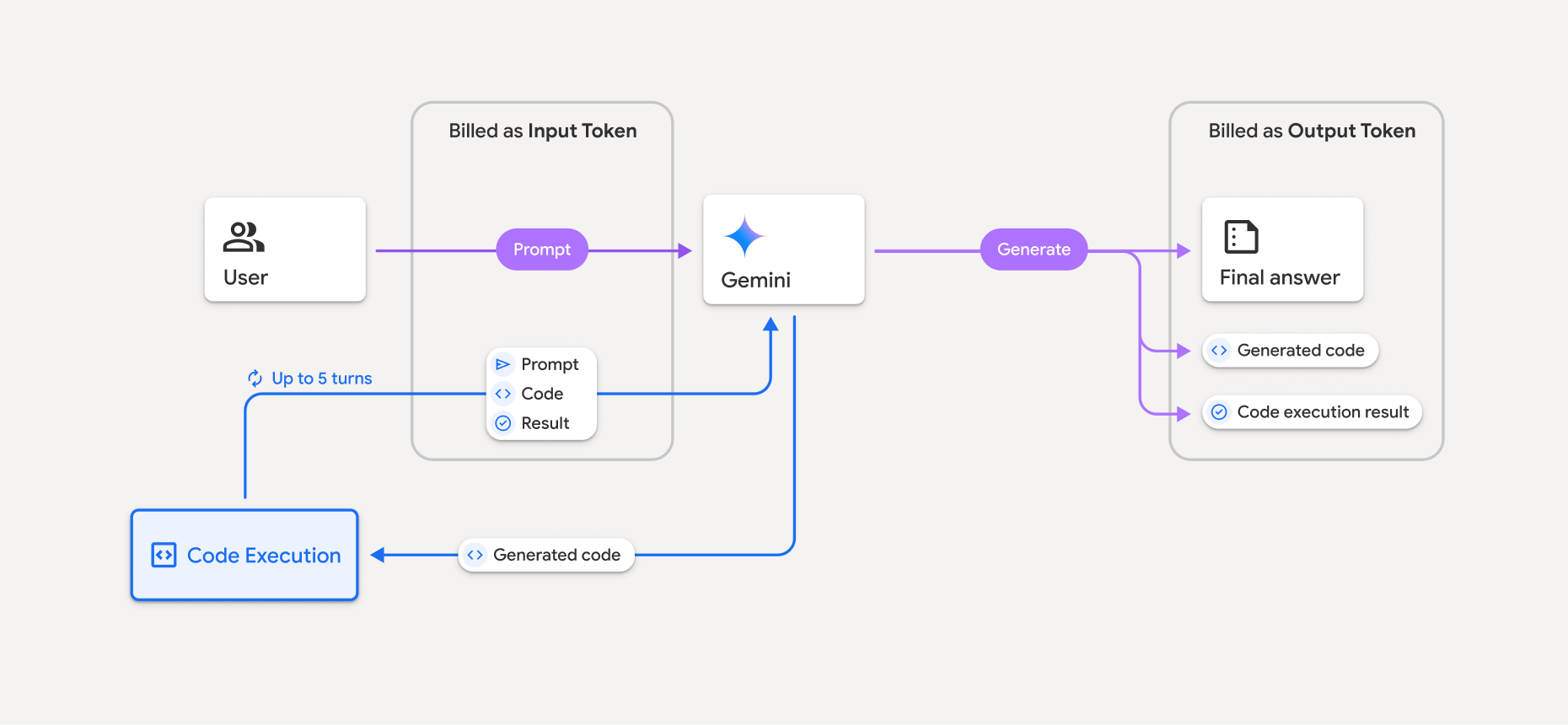
Ниже приведена сводная информация о том, как взимается плата за токены, когда модель использует выполнение кода:
За исходный запрос плата взимается один раз. Его токены помечены как промежуточные и оплачиваются как входные токены.
Сгенерированный код и результат его выполнения оплачиваются следующим образом:
Если они используются во время выполнения кода, то помечаются как промежуточные и оплачиваются как входные токены.
Если они включены в окончательный ответ, то оплачиваются как выходные токены.
Итоговая сводка в последнем ответе оплачивается как токены для вывода.
Gemini API включает в ответ API количество промежуточных токенов, чтобы вы знали, почему с вас взимается плата за входные токены, превышающие исходный запрос.
Обратите внимание, что сгенерированный код может включать как текст, так и мультимодальные выходные данные, например изображения.
Ограничения и рекомендации
Модель может только генерировать и выполнять код на Python. Другие объекты, например медиафайлы, восстановить не получится.
Время выполнения кода не может превышать 30 секунд.
В некоторых случаях включение выполнения кода может привести к регрессии в других областях выходных данных модели (например, при написании рассказа).
Инструмент выполнения кода не поддерживает URI файлов в качестве входных и выходных данных. Однако инструмент выполнения кода поддерживает ввод файлов и вывод графиков в виде встроенных байтов. Используя эти возможности ввода и вывода, вы можете загружать CSV- и текстовые файлы, задавать вопросы о них и получать графики Matplotlib в качестве результата выполнения кода. Поддерживаемые MIME-типы для встроенных байтов:
.cpp,.csv,.java,.jpeg,.js,.png,.py,.tsи.xml.
Поддерживаемые библиотеки
Среда выполнения кода включает следующие библиотеки: Установить собственные библиотеки нельзя.
Оставить отзыв о работе Firebase AI Logic