

مدلهای زایا در حل بسیاری از انواع مسائل قدرتمند هستند. بااینحال، آنها با محدودیتهایی مانند موارد زیر مواجه هستند:
- این مدلها پساز آموزش منجمد میشوند و درنتیجه دانش آنها قدیمی میشود.
- نمیتواند دادههای خارجی را پُرسمان یا اصلاح کند.
فراخوانی تابع میتواند به شما کمک کند بر برخیاز این محدودیتها غلبه کنید. گاهی اوقات به فراخوانی تابع استفاده از ابزار گفته میشود زیرا به مدل اجازه میدهد از ابزارهای خارجی مثل میانای برنامهسازی کاربردی و تابعها برای تولید پاسخ نهایی خود استفاده کند.
این راهنما به شما نشان میدهد که چگونه میتوانید راهاندازی تماس با تابع مشابه با سناریو شرحدادهشده در بخش اصلی بعدی این صفحه را پیادهسازی کنید. در سطح بالا، مراحل راهاندازی فراخوانی تابع در برنامه در اینجا آمده است:
مرحله ۱: تابعی بنویسید که بتواند اطلاعات موردنیاز مدل را برای تولید پاسخ نهاییاش ارائه دهد (برای مثال، تابع میتواند یک میانای برنامهسازی کاربردی خارجی را فراخوانی کند).
مرحله ۲: بیانیه تابعی ایجاد کنید که تابع و پارامترهای آن را توصیف کند.
مرحله ۳: درطول مقداردهی اولیه مدل، بیانیه تابع را ارائه دهید تا مدل بداند درصورت نیاز چگونه میتواند از تابع استفاده کند.
مرحله ۴: برنامه را طوری راهاندازی کنید که مدل بتواند اطلاعات لازم را برای فراخوانی تابع برنامه شما ارسال کند.
مرحله ۵: پاسخ تابع را به مدل برگردانید تا مدل بتواند پاسخ نهایی خود را تولید کند.
نمای کلی نمونه فراخوانی تابع
وقتی درخواستی به مدل ارسال میکنید، میتوانید مجموعهای از «ابزارها» (مثل توابع) را نیز به مدل ارائه دهید تا بتواند از آنها برای تولید پاسخ نهاییاش استفاده کند. برای استفاده از این توابع و فراخوانی آنها («فراخوانی تابع»)، مدل و برنامه شما باید اطلاعات را بهصورت رفتوبرگشت به یکدیگر منتقل کنند، بنابراین روش توصیهشده برای استفاده از فراخوانی تابع ازطریق میانای گپ چندنوبتی است.
تصور کنید برنامهای دارید که کاربر میتواند پیاموارهای مثل این وارد کند:
What was the weather in Boston on October 17, 2024?.
مدلهای Gemini ممکن است این اطلاعات آبوهوایی را ندانند؛ بااینحال، تصور کنید که با یک میانای برنامهسازی کاربردی سرویس آبوهوای خارجی آشنا هستید که میتواند این اطلاعات را ارائه دهد. میتوانید از فراخوانی تابع برای ارائه مسیری به مدل Gemini به آن API و اطلاعات آبوهوای آن استفاده کنید.
ابتدا تابعی fetchWeather در برنامهتان مینویسید که با این
میانای برنامهسازی کاربردی برونسازمانی فرضی تعامل دارد، که این ورودی و برونداد را دارد:
| پارامتر | نوع | الزامی | شرح |
|---|---|---|---|
| ورودی | |||
location |
شیء | بله | نام شهر و ایالتی که میخواهید آبوهوای آن را دریافت کنید. فقط از شهرهای ایالات متحده پشتیبانی میشود. همیشه باید شیء تودرتو از city و state باشد.
|
date |
تار | بله | تاریخی که باید آبوهوا برای آن واکشی شود (همیشه باید در قالب
YYYY-MM-DD باشد).
|
| خروجی | |||
temperature |
عدد صحیح | بله | دما (به فارنهایت) |
chancePrecipitation |
تار | بله | احتمال بارش (بهصورت درصد بیان میشود) |
cloudConditions |
تار | بله | وضعیت ابر (یکی از clear، partlyCloudy،
mostlyCloudy، cloudy)
|
هنگام مقداردهی اولیه مدل، به مدل میگویید که این تابع fetchWeather
وجود دارد و درصورت نیاز، چگونه میتواند برای پردازش درخواستهای ورودی استفاده شود.
به این «اعلان تابع» میگویند. مدل تابع را
مستقیماً فرا نمیخواند. درعوض، وقتی مدل درحال پردازش درخواست ورودی است، تصمیم میگیرد که آیا تابع fetchWeather میتواند به آن کمک کند به درخواست پاسخ دهد یا نه. اگر مدل تصمیم بگیرد که این تابع واقعاً میتواند مفید باشد، مدل دادههای ساختاریافتهای تولید میکند که به برنامه شما کمک میکند تابع را فراخوانی کند.
دوباره به درخواست ورودی نگاه کنید:
What was the weather in Boston on October 17, 2024?. این مدل احتمالاً تصمیم میگیرد که تابع fetchWeather میتواند به آن در تولید پاسخ کمک کند. این مدل به پارامترهای ورودی موردنیاز برای fetchWeather نگاه میکند و سپس دادههای ورودی ساختاریافتهای برای تابع تولید میکند که تقریباً به این شکل است:
{
  functionName: fetchWeather,
  location: {
    city: Boston,
    state: Massachusetts  // the model can infer the state from the prompt
  },
  date: 2024-10-17
}
مدل این دادههای ورودی ساختاریافته را به برنامه شما منتقل میکند تا برنامه شما بتواند تابع fetchWeather را فراخوانی کند. وقتی برنامه شما شرایط آبوهوایی را از
میانای برنامهسازی کاربردی دریافت میکند، اطلاعات را به مدل منتقل میکند. این اطلاعات آبوهوایی به مدل امکان میدهد پردازش نهایی خود را تکمیل کند و
پاسخ خود را به درخواست اولیه
What was the weather in Boston on October 17, 2024? تولید کند
مدل ممکن است پاسخ نهایی به زبان طبیعی مانند این ارائه دهد:
On October 17, 2024, in Boston, it was 38 degrees Fahrenheit with partly cloudy skies.
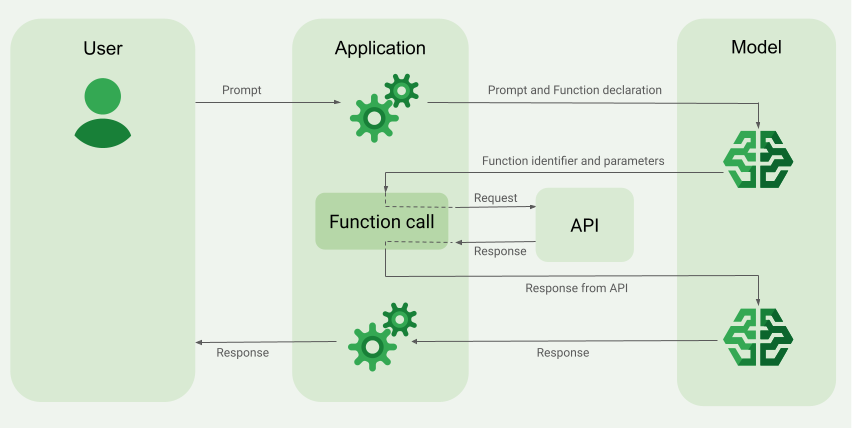
پیادهسازی فراخوانی تابع
مراحل زیر در این راهنما به شما نشان میدهد که چگونه یک تنظیم تماس تابع مشابه با گردش کار توضیحدادهشده در نمای کلی مثال فراخوانی تابع (بخش بالای این صفحه را ببینید) پیادهسازی کنید.
مدلهای پشتیبانیشده
gemini-3.1-pro-preview-
gemini-3.8-flash(وgemini-3.7-flash،gemini-3.6-flash، وgemini-3.5-flashبزرگتر) -
gemini-3.5-flash-lite(وgemini-3.1-flash-liteقدیمیتر)
مدلهای Gemini 2.5 با کاربرد عمومی از این قابلیت پشتیبانی میکنند، اما همه آنها منسوخ شدهاند.
مدلهای Gemini Live API نیز از این قابلیت پشتیبانی میکنند، اما همه نمونههای کد در این راهنما برای مدلهای Gemini با کاربرد عمومی است.
قبل از شروع
|
روی ارائهدهنده Gemini API خود کلیک کنید تا محتوا و کد مخصوص ارائهدهنده را در این صفحه مشاهده کنید. |
اگر هنوز این کار را نکردهاید،
راهنمای شروع به کار را تکمیل کنید. این راهنما نحوه
راهاندازی پروژه Firebase، متصل کردن برنامه به Firebase، افزودن کیت توسعه نرمافزار،
مقداردهی اولیه سرویس زیرینه برای ارائهدهنده Gemini API انتخابی، و
ایجاد نمونه GenerativeModel را شرح میدهد.
برای آزمایش و تکرار پیاموارههایتان، توصیه میکنیم از Google AI Studio استفاده کنید.
مرحله ۱: نوشتن تابع
تصور کنید برنامهای دارید که کاربر میتواند پیاموارهای مثل این وارد کند:
What was the weather in Boston on October 17, 2024?. Gemini
مدلها ممکن است این اطلاعات آبوهوایی را ندانند؛ بااینحال، تصور کنید که
از یک میانای برنامهسازی کاربردی سرویس آبوهوای خارجی که میتواند آن را ارائه دهد مطلع هستید. سناریو در این راهنما
به این میانای برنامهسازی کاربردی خارجی فرضی متکی است.
تابعی را در برنامهتان بنویسید که با API فرضی خارجی تعامل کند و اطلاعاتی را که مدل برای تولید درخواست نهاییاش نیاز دارد به آن ارائه دهد. در این مثال آبوهوا، این یک تابع fetchWeather خواهد بود که
فراخوانی را به این میانای برنامهسازی کاربردی خارجی فرضی انجام میدهد.
Swift
// This function calls a hypothetical external API that returns
// a collection of weather information for a given location on a given date.
func fetchWeather(city: String, state: String, date: String) -> JSONObject {

  // TODO(developer): Write a standard function that would call an external weather API.

  // For demo purposes, this hypothetical response is hardcoded here in the expected format.
  return [
    "temperature": .number(38),
    "chancePrecipitation": .string("56%"),
    "cloudConditions": .string("partlyCloudy"),
  ]
}
Kotlin
// This function calls a hypothetical external API that returns
// a collection of weather information for a given location on a given date.
// `location` is an object of the form { city: string, state: string }
data class Location(val city: String, val state: String)

suspend fun fetchWeather(location: Location, date: String): JsonObject {

    // TODO(developer): Write a standard function that would call to an external weather API.

    // For demo purposes, this hypothetical response is hardcoded here in the expected format.
    return JsonObject(mapOf(
        "temperature" to JsonPrimitive(38),
        "chancePrecipitation" to JsonPrimitive("56%"),
        "cloudConditions" to JsonPrimitive("partlyCloudy")
    ))
}
Java
// This function calls a hypothetical external API that returns
// a collection of weather information for a given location on a given date.
// `location` is an object of the form { city: string, state: string }
public JsonObject fetchWeather(Location location, String date) {

  // TODO(developer): Write a standard function that would call to an external weather API.

  // For demo purposes, this hypothetical response is hardcoded here in the expected format.
  return new JsonObject(Map.of(
        "temperature", JsonPrimitive(38),
        "chancePrecipitation", JsonPrimitive("56%"),
        "cloudConditions", JsonPrimitive("partlyCloudy")));
}
Web
// This function calls a hypothetical external API that returns
// a collection of weather information for a given location on a given date.
// `location` is an object of the form { city: string, state: string }
async function fetchWeather({ location, date }) {

  // TODO(developer): Write a standard function that would call to an external weather API.

  // For demo purposes, this hypothetical response is hardcoded here in the expected format.
  return {
    temperature: 38,
    chancePrecipitation: "56%",
    cloudConditions: "partlyCloudy",
  };
}
Dart
// This function calls a hypothetical external API that returns
// a collection of weather information for a given location on a given date.
// `location` is an object of the form { city: string, state: string }
Future<Map<String, Object?>> fetchWeather(
  Location location, String date
) async {

  // TODO(developer): Write a standard function that would call to an external weather API.

  // For demo purposes, this hypothetical response is hardcoded here in the expected format.
  final apiResponse = {
    'temperature': 38,
    'chancePrecipitation': '56%',
    'cloudConditions': 'partlyCloudy',
  };
  return apiResponse;
}
Unity
// This function calls a hypothetical external API that returns
// a collection of weather information for a given location on a given date.
System.Collections.Generic.Dictionary<string, object> FetchWeather(
    string city, string state, string date) {

  // TODO(developer): Write a standard function that would call an external weather API.

  // For demo purposes, this hypothetical response is hardcoded here in the expected format.
  return new System.Collections.Generic.Dictionary<string, object>() {
    {"temperature", 38},
    {"chancePrecipitation", "56%"},
    {"cloudConditions", "partlyCloudy"},
  };
}
مرحله ۲: ایجاد کردن بیانیه تابع
اعلان تابعی را ایجاد کنید که بعداً به مدل ارائه خواهید داد (مرحله بعدی این راهنما).
در اظهارنامهتان، تا حد امکان جزئیات بیشتری در شرحهای مربوط به تابع و پارامترهای آن ارائه دهید.
این مدل از اطلاعات موجود در بیانیه تابع برای تعیین اینکه کدام تابع را انتخاب کند و چگونه مقادیر پارامتر را برای فراخوانی واقعی تابع ارائه دهد استفاده میکند. در ادامه این صفحه، بخش رفتارها و گزینههای اضافی را ببینید تا با نحوه انتخاب تابع توسط مدل و همچنین نحوه کنترل این انتخاب آشنا شوید.
نکات زیر را درباره طرحوارهای که ارائه میکنید درنظر داشته باشید:
باید اظهارنامههای تابع را در قالب طرحوارهای که با طرحواره OpenAPI سازگار باشد ارائه دهید. Agent Platform پشتیبانی محدودی از طرحواره OpenAPI ارائه میدهد.
مشخصههای زیر پشتیبانی میشوند:
type،nullable،required،format،description،properties،items،enum.مشخصههای زیر پشتیبانی نمیشوند:
default،optional،maximum،oneOf.
بهطور پیشفرض، برای Firebase AI Logic «کیت توسعه نرمافزار»، همه فیلدها الزامی درنظر گرفته میشوند، مگر اینکه آنها را در
optionalPropertiesآرایه بهعنوان اختیاری مشخص کنید. برای این فیلدهای اختیاری، مدل میتواند فیلدها را تکمیل کند یا از آنها بگذرد. توجه داشته باشید که این رفتار با رفتار پیشفرض دو Gemini API ارائهدهنده درصورت استفاده از کیتهای توسعه نرمافزار سرور آنها یا API آنها بهطور مستقیم متفاوت است.
برای روالهای مطلوب مربوط به بیانیههای تابع، ازجمله نکتههایی برای نامها و شرحها، به روالهای مطلوب در سند Gemini Developer API.
نحوه نوشتن بیانیه تابع در اینجا آمده است:
Swift
let fetchWeatherTool = FunctionDeclaration(
  name: "fetchWeather",
  description: "Get the weather conditions for a specific city on a specific date.",
  parameters: [
    "location": .object(
      properties: [
        "city": .string(description: "The city of the location."),
        "state": .string(description: "The US state of the location."),
      ],
      description: """
      The name of the city and its state for which to get the weather. Only cities in the
      USA are supported.
      """
    ),
    "date": .string(
      description: """
      The date for which to get the weather. Date must be in the format: YYYY-MM-DD.
      """
    ),
  ]
)
Kotlin
val fetchWeatherTool = FunctionDeclaration(
    "fetchWeather",
    "Get the weather conditions for a specific city on a specific date.",
    mapOf(
        "location" to Schema.obj(
            mapOf(
                "city" to Schema.string("The city of the location."),
                "state" to Schema.string("The US state of the location."),
            ),
            description = "The name of the city and its state for which " +
                "to get the weather. Only cities in the " +
                "USA are supported."
        ),
        "date" to Schema.string("The date for which to get the weather." +
                                " Date must be in the format: YYYY-MM-DD."
        ),
    ),
)
Java
FunctionDeclaration fetchWeatherTool = new FunctionDeclaration(
        "fetchWeather",
        "Get the weather conditions for a specific city on a specific date.",
        Map.of("location",
                Schema.obj(Map.of(
                        "city", Schema.str("The city of the location."),
                        "state", Schema.str("The US state of the location."))),
                "date",
                Schema.str("The date for which to get the weather. " +
                              "Date must be in the format: YYYY-MM-DD.")),
        Collections.emptyList());
Web
const fetchWeatherTool: FunctionDeclarationsTool = {
  functionDeclarations: [
   {
      name: "fetchWeather",
      description:
        "Get the weather conditions for a specific city on a specific date",
      parameters: Schema.object({
        properties: {
          location: Schema.object({
            description:
              "The name of the city and its state for which to get " +
              "the weather. Only cities in the USA are supported.",
            properties: {
              city: Schema.string({
                description: "The city of the location."
              }),
              state: Schema.string({
                description: "The US state of the location."
              }),
            },
          }),
          date: Schema.string({
            description:
              "The date for which to get the weather. Date must be in the" +
              " format: YYYY-MM-DD.",
          }),
        },
      }),
    },
  ],
};
Dart
final fetchWeatherTool = FunctionDeclaration(
    'fetchWeather',
    'Get the weather conditions for a specific city on a specific date.',
    parameters: {
      'location': Schema.object(
        description:
          'The name of the city and its state for which to get'
          'the weather. Only cities in the USA are supported.',
        properties: {
          'city': Schema.string(
             description: 'The city of the location.'
           ),
          'state': Schema.string(
             description: 'The US state of the location.'
          ),
        },
      ),
      'date': Schema.string(
        description:
          'The date for which to get the weather. Date must be in the format: YYYY-MM-DD.'
      ),
    },
  );
Unity
var fetchWeatherTool = new Tool(new FunctionDeclaration(
  name: "fetchWeather",
  description: "Get the weather conditions for a specific city on a specific date.",
  parameters: new System.Collections.Generic.Dictionary<string, Schema>() {
    { "location", Schema.Object(
      properties: new System.Collections.Generic.Dictionary<string, Schema>() {
        { "city", Schema.String(description: "The city of the location.") },
        { "state", Schema.String(description: "The US state of the location.")}
      },
      description: "The name of the city and its state for which to get the weather. Only cities in the USA are supported."
    ) },
    { "date", Schema.String(
      description: "The date for which to get the weather. Date must be in the format: YYYY-MM-DD."
    )}
  }
));
مرحله ۳: ارائه اعلان تابع درطول مقداردهی اولیه مدل
حداکثر تعداد بیانیههای تابعی که میتوانید با درخواست ارائه دهید ۱۲۸ است. در ادامه این صفحه، بخش
رفتارها و گزینههای اضافی
را ببینید تا با نحوه انتخاب تابع توسط مدل و همچنین
نحوه کنترل این انتخاب (بااستفاده از toolConfig برای تنظیم
حالت فراخوانی تابع) آشنا شوید.
Swift
import FirebaseAILogic

// Initialize the Gemini Developer API backend service.
// Create a `GenerativeModel` instance with a model that supports your use case.
let model = FirebaseAI.firebaseAI(backend: .googleAI()).generativeModel(
  modelName: "GEMINI_MODEL_NAME",
  // Provide the function declaration to the model.
  tools: [.functionDeclarations([fetchWeatherTool])]
)
Kotlin
// Initialize the Gemini Developer API backend service.
// Create a `GenerativeModel` instance with a model that supports your use case.
val model = Firebase.ai(backend = GenerativeBackend.googleAI()).generativeModel(
    modelName = "<var>GEMINI_MODEL_NAME</var>",
    // Provide the function declaration to the model.
    tools = listOf(Tool.functionDeclarations(listOf(fetchWeatherTool)))
)
Java
// Initialize the Gemini Developer API backend service.
// Create a `GenerativeModel` instance with a model that supports your use case.
GenerativeModelFutures model = GenerativeModelFutures.from(
        FirebaseAI.getInstance(GenerativeBackend.googleAI())
                .generativeModel("<var>GEMINI_MODEL_NAME</var>",
                        null,
                        null,
                        // Provide the function declaration to the model.
                        List.of(Tool.functionDeclarations(List.of(fetchWeatherTool)))));
Web
import { initializeApp } from "firebase/app";
import { getAI, getGenerativeModel, GoogleAIBackend } from "firebase/ai";

// TODO(developer): Replace the following with your app's Firebase configuration
// See: https://firebase.google.com/docs/web/learn-more#config-object
const firebaseConfig = {
  // ...
};

// Initialize FirebaseApp
const firebaseApp = initializeApp(firebaseConfig);

// Initialize the Gemini Developer API backend service.
const firebaseAI = getAI(firebaseApp, { backend: new GoogleAIBackend() });

// Create a `GenerativeModel` instance with a model that supports your use case.
const model = getGenerativeModel(firebaseAI, {
  model: "GEMINI_MODEL_NAME",
  // Provide the function declaration to the model.
  tools: fetchWeatherTool
});
Dart
import 'package:firebase_ai/firebase_ai.dart';
import 'package:firebase_core/firebase_core.dart';
import 'firebase_options.dart';

// Initialize FirebaseApp
await Firebase.initializeApp(
  options: DefaultFirebaseOptions.currentPlatform,
);

// Initialize the Gemini Developer API backend service.
// Create a `GenerativeModel` instance with a model that supports your use case.
_functionCallModel = FirebaseAI.googleAI().generativeModel(
       model: 'GEMINI_MODEL_NAME',
       // Provide the function declaration to the model.
       tools: [
         Tool.functionDeclarations([fetchWeatherTool]),
       ],
     );
Unity
using Firebase;
using Firebase.AI;

// Initialize the Gemini Developer API backend service.
// Create a `GenerativeModel` instance with a model that supports your use case.
var model = FirebaseAI.DefaultInstance.GetGenerativeModel(
  modelName: "GEMINI_MODEL_NAME",
  // Provide the function declaration to the model.
  tools: new Tool[] { fetchWeatherTool }
);
با نحوه انتخاب مدل مناسب برای مورد استفاده و برنامه خود آشنا شوید.
مرحله ۴: برای فراخوانی کردن میانای برنامهسازی کاربردی خارجی، تابع را فراخوانی کنید
اگر مدل تصمیم بگیرد که تابع fetchWeather میتواند به آن کمک کند
پاسخ نهایی را تولید کند، برنامه شما باید بااستفاده از دادههای ورودی ساختاریافتهای که مدل ارائه کرده است،
تماس واقعی با آن تابع را برقرار کند.
ازآنجاییکه اطلاعات باید بین مدل و برنامه ردوبدل شود، روش توصیهشده برای استفاده از فراخوانی تابع ازطریق میانای گپ چندنوبتی است.
تکه کد زیر نشان میدهد که چگونه به برنامه شما گفته میشود که مدل میخواهد از تابع fetchWeather استفاده کند. همچنین نشان میدهد که مدل مقادیر پارامتر ورودی لازم را برای فراخوانی تابع (و
میانای برنامهسازی کاربردی خارجی زیربنایی آن) ارائه کرده است.
در این مثال، درخواست ورودی حاوی پیامواره
What was the weather in Boston on October 17, 2024? بود. از این پیامواره، مدل پارامترهای ورودی موردنیاز تابع fetchWeather (یعنی city، state، و date) را استنباط کرد.
Swift
let chat = model.startChat()
let prompt = "What was the weather in Boston on October 17, 2024?"

// Send the user's question (the prompt) to the model using multi-turn chat.
let response = try await chat.sendMessage(prompt)

var functionResponses = [FunctionResponsePart]()

// When the model responds with one or more function calls, invoke the function(s).
for functionCall in response.functionCalls {
  if functionCall.name == "fetchWeather" {
    // TODO(developer): Handle invalid arguments.
    guard case let .object(location) = functionCall.args["location"] else { fatalError() }
    guard case let .string(city) = location["city"] else { fatalError() }
    guard case let .string(state) = location["state"] else { fatalError() }
    guard case let .string(date) = functionCall.args["date"] else { fatalError() }

    functionResponses.append(FunctionResponsePart(
      name: functionCall.name,
      // Forward the structured input data prepared by the model
      // to the hypothetical external API.
      response: fetchWeather(city: city, state: state, date: date)
    ))
  }
  // TODO(developer): Handle other potential function calls, if any.
}
Kotlin
val prompt = "What was the weather in Boston on October 17, 2024?"
val chat = model.startChat()
// Send the user's question (the prompt) to the model using multi-turn chat.
val result = chat.sendMessage(prompt)

val functionCalls = result.functionCalls
// When the model responds with one or more function calls, invoke the function(s).
val fetchWeatherCall = functionCalls.find { it.name == "fetchWeather" }

// Forward the structured input data prepared by the model
// to the hypothetical external API.
val functionResponse = fetchWeatherCall?.let {
    // Alternatively, if your `Location` class is marked as @Serializable, you can use
    // val location = Json.decodeFromJsonElement<Location>(it.args["location"]!!)
    val location = Location(
        it.args["location"]!!.jsonObject["city"]!!.jsonPrimitive.content,
        it.args["location"]!!.jsonObject["state"]!!.jsonPrimitive.content
    )
    val date = it.args["date"]!!.jsonPrimitive.content
    fetchWeather(location, date)
}
Java
String prompt = "What was the weather in Boston on October 17, 2024?";
ChatFutures chatFutures = model.startChat();
// Send the user's question (the prompt) to the model using multi-turn chat.
ListenableFuture<GenerateContentResponse> response =
        chatFutures.sendMessage(new Content("user", List.of(new TextPart(prompt))));

ListenableFuture<JsonObject> handleFunctionCallFuture = Futures.transform(response, result -> {
    for (FunctionCallPart functionCall : result.getFunctionCalls()) {
        if (functionCall.getName().equals("fetchWeather")) {
            Map<String, JsonElement> args = functionCall.getArgs();
            JsonObject locationJsonObject =
                    JsonElementKt.getJsonObject(args.get("location"));
            String city =
                    JsonElementKt.getContentOrNull(
                            JsonElementKt.getJsonPrimitive(
                                    locationJsonObject.get("city")));
            String state =
                    JsonElementKt.getContentOrNull(
                            JsonElementKt.getJsonPrimitive(
                                    locationJsonObject.get("state")));
            Location location = new Location(city, state);

            String date = JsonElementKt.getContentOrNull(
                    JsonElementKt.getJsonPrimitive(
                            args.get("date")));
            return fetchWeather(location, date);
        }
    }
    return null;
}, Executors.newSingleThreadExecutor());
Web
const chat = model.startChat();
const prompt = "What was the weather in Boston on October 17, 2024?";

// Send the user's question (the prompt) to the model using multi-turn chat.
let result = await chat.sendMessage(prompt);
const functionCalls = result.response.functionCalls();
let functionCall;
let functionResult;
// When the model responds with one or more function calls, invoke the function(s).
if (functionCalls.length > 0) {
  for (const call of functionCalls) {
    if (call.name === "fetchWeather") {
      // Forward the structured input data prepared by the model
      // to the hypothetical external API.
      functionResult = await fetchWeather(call.args);
      functionCall = call;
    }
  }
}
Dart
final chat = _functionCallModel.startChat();
const prompt = 'What was the weather in Boston on October 17, 2024?';

// Send the user's question (the prompt) to the model using multi-turn chat.
var response = await chat.sendMessage(Content.text(prompt));

final functionCalls = response.functionCalls.toList();
// When the model responds with one or more function calls, invoke the function(s).
if (functionCalls.isNotEmpty) {
  for (final functionCall in functionCalls) {
    if (functionCall.name == 'fetchWeather') {
      Map<String, dynamic> location =
          functionCall.args['location']! as Map<String, dynamic>;
      var date = functionCall.args['date']! as String;
      var city = location['city'] as String;
      var state = location['state'] as String;
      final functionResult =
          await fetchWeather(Location(city, state), date);
      // Send the response to the model so that it can use the result to
      // generate text for the user.
      response = await functionCallChat.sendMessage(
        Content.functionResponse(functionCall.name, functionResult),
      );
    }
  }
} else {
  throw UnimplementedError(
    'Function not declared to the model: ${functionCall.name}',
  );
}
Unity
var chat = model.StartChat();
var prompt = "What was the weather in Boston on October 17, 2024?";

// Send the user's question (the prompt) to the model using multi-turn chat.
var response = await chat.SendMessageAsync(prompt);

var functionResponses = new List<ModelContent>();

foreach (var functionCall in response.FunctionCalls) {
  if (functionCall.Name == "fetchWeather") {
    // TODO(developer): Handle invalid arguments.
    var city = functionCall.Args["city"] as string;
    var state = functionCall.Args["state"] as string;
    var date = functionCall.Args["date"] as string;

    functionResponses.Add(ModelContent.FunctionResponse(
      name: functionCall.Name,
      // Forward the structured input data prepared by the model
      // to the hypothetical external API.
      response: FetchWeather(city: city, state: state, date: date)
    ));
  }
  // TODO(developer): Handle other potential function calls, if any.
}
مرحله ۵: برونداد تابع را به مدل ارائه بده تا پاسخ نهایی را تولید کند
پساز اینکه تابع fetchWeather اطلاعات آبوهوا را برگرداند، برنامه شما
باید آن را به مدل برگرداند.
سپس، مدل پردازش نهایی خود را انجام میدهد و یک پاسخ نهایی به زبان طبیعی مانند این تولید میکند:
On October 17, 2024 in Boston, it was 38 degrees Fahrenheit with partly cloudy skies.
Swift
// Send the response(s) from the function back to the model
// so that the model can use it to generate its final response.
let finalResponse = try await chat.sendMessage(
  [ModelContent(role: "user", parts: functionResponses)]
)

// Log the text response.
print(finalResponse.text ?? "No text in response.")
Kotlin
// Send the response(s) from the function back to the model
// so that the model can use it to generate its final response.
val finalResponse = chat.sendMessage(content("user") {
    part(FunctionResponsePart("fetchWeather", functionResponse!!))
})

// Log the text response.
println(finalResponse.text ?: "No text in response")
Java
ListenableFuture<GenerateContentResponse> modelResponseFuture = Futures.transformAsync(
  handleFunctionCallFuture,
  // Send the response(s) from the function back to the model
  // so that the model can use it to generate its final response.
  functionCallResult -> chatFutures.sendMessage(new Content("user",
  List.of(new FunctionResponsePart(
          "fetchWeather", functionCallResult)))),
  Executors.newSingleThreadExecutor());

Futures.addCallback(modelResponseFuture, new FutureCallback<GenerateContentResponse>() {
@Override
public void onSuccess(GenerateContentResponse result) {
  if (result.getText() != null) {
      // Log the text response.
      System.out.println(result.getText());
  }
}

@Override
public void onFailure(Throwable t) {
  // handle error
}
}, Executors.newSingleThreadExecutor());
Web
// Send the response from the function back to the model
// so that the model can use it to generate its final response.
result = await chat.sendMessage([
  {
    functionResponse: {
      name: functionCall.name, // "fetchWeather"
      response: functionResult,
    },
  },
]);
console.log(result.response.text());
Dart
// Send the response from the function back to the model
// so that the model can use it to generate its final response.
response = await chat
     .sendMessage(Content.functionResponse(functionCall.name, functionResult));
Unity
// Send the response(s) from the function back to the model
// so that the model can use it to generate its final response.
var finalResponse = await chat.SendMessageAsync(functionResponses);

// Log the text response.
UnityEngine.Debug.Log(finalResponse.Text ?? "No text in response.");
گزینهها و رفتارهای اضافی
در اینجا چند رفتار اضافی برای فراخوانی تابع وجود دارد که باید در کدتان لحاظ کنید و گزینههایی که میتوانید کنترل کنید.
ممکن است مدل بخواهد تابع یا تابع دیگری را دوباره فراخوانی کند.
اگر پاسخ یکی از فراخوانیهای تابع برای تولید پاسخ نهایی مدل کافی نباشد، مدل ممکن است فراخوانی تابع دیگری را درخواست کند یا فراخوانی تابع کاملاً متفاوتی را درخواست کند. مورد دوم فقط درصورتی میتواند اتفاق بیفتد که بیشاز یک تابع به مدل در فهرست اظهارنامه تابع خود ارائه دهید.
برنامه شما باید این امکان را داشته باشد که مدل ممکن است درخواست تماسهای عملکرد اضافی کند.
این مدل ممکن است بخواهد همزمان چندین تابع را فراخوانی کند.
میتوانید حداکثر ۱۲۸ تابع در فهرست اظهارنامه تابع خود به مدل ارائه دهید. با این اوصاف، مدل ممکن است تصمیم بگیرد که برای کمک به تولید پاسخ نهایی خود به چندین تابع نیاز دارد. و ممکن است تصمیم بگیرد برخیاز این توابع را بهطور همزمان فراخوانی کند – این کار فراخوانی تابع موازی نامیده میشود.
برنامه شما باید این امکان را داشته باشد که مدل بتواند چندین تابع را بهطور همزمان درخواست کند و برنامه شما باید همه پاسخهای توابع را به مدل برگرداند.
میتوانید کنترل کنید که مدل چگونه و آیا میتواند برای فراخوانی توابع درخواست کند یا نه.
میتوانید محدودیتهایی برای نحوه و اینکه آیا مدل باید از اعلانهای تابع ارائهشده استفاده کند یا نه، تعیین کنید. این کار حالت فراخوانی تابع نامیده میشود. چند نمونه در زیر آمده است:
بهجای اینکه به مدل اجازه دهید بین پاسخ فوری به زبان طبیعی و فراخوانی تابع انتخاب کند، میتوانید آن را مجبور کنید همیشه از فراخوانی تابع استفاده کند. این حالت فراخوانی اجباری تابع نامیده میشود.
اگر چندین بیانیه تابع ارائه دهید، میتوانید مدل را محدود کنید تا فقط از زیرمجموعهای از توابع ارائهشده استفاده کند.
این محدودیتها (یا حالتها) را با افزودن پیکربندی ابزار
(toolConfig) بههمراه پیامواره و بیانیههای تابع پیادهسازی میکنید. در پیکربندی ابزار، میتوانید یکی از حالتهای زیر را مشخص کنید. مفیدترین حالت ANY است.
| حالت | شرح |
|---|---|
AUTO |
عملکرد پیشفرض مدل. مدل تصمیم میگیرد که از فراخوانی تابع استفاده کند یا از پاسخ زبان طبیعی. |
ANY |
مدل باید از فراخوانیهای تابع («فراخوانی تابع اجباری») استفاده کند. برای محدود کردن
مدل به زیرمجموعهای از توابع، نامهای تابع مجاز را در
allowedFunctionNames مشخص کنید.
|
NONE |
مدل نباید از فراخوانیهای تابع استفاده کند. این رفتار معادل درخواست مدل بدون هیچگونه بیانیه تابع مرتبط است. |
چه کارهای دیگری میتوانید انجام دهید؟
امتحان کردن قابلیتهای دیگر
- مکالمههای چند نوبتی (گپ) بسازید.
- تولید نوشتار از پیاموارههای فقط نوشتاری.
- با پیامواره دادن با انواع مختلف فایل، مثل تصاویر، PDF، ویدیو، و صوت، نوشتار تولید کنید.
با نحوه کنترل تولید محتوا آشنا شوید
- درک طراحی پیامواره، ازجمله روالهای مطلوب، استراتژیها، و پیاموارههای نمونه.
- پیکربندی پارامترهای مدل مانند حداکثر دادهواحدهای برونداد، احتمال تکرار دادهواحدهای برونداد، و غیره.
- برای تنظیم احتمال دریافت پاسخهایی که ممکن است مضر تلقی شوند، از تنظیمات ایمنی استفاده کنید.
درباره مدلهای پشتیبانیشده بیشتر بدانید
درباره مدلهای دردسترس برای موارد استفاده مختلف و سهمیهها و قیمتگذاری آنها بیشتر بدانید.بازخورد دادن درباره تجربهتان با Firebase AI Logic