

โมเดล Generative มีประสิทธิภาพในการแก้ปัญหาหลายประเภท แต่ก็มีข้อจำกัดต่างๆ เช่น
- โดยจะหยุดนิ่งหลังจากการฝึก ซึ่งทำให้ความรู้ล้าสมัย
- แต่จะค้นหาหรือแก้ไขข้อมูลภายนอกไม่ได้
การเรียกใช้ฟังก์ชันจะช่วยให้คุณเอาชนะข้อจำกัดเหล่านี้ได้บางส่วน บางครั้งการเรียกใช้ฟังก์ชันจะเรียกว่าการใช้เครื่องมือ เนื่องจากช่วยให้โมเดลใช้เครื่องมือภายนอก เช่น API และฟังก์ชันต่างๆ เพื่อสร้างคำตอบสุดท้ายได้
คู่มือนี้แสดงวิธีใช้การตั้งค่าการเรียกใช้ฟังก์ชันที่คล้ายกับสถานการณ์ที่อธิบายไว้ในส่วนหลักถัดไปของหน้านี้ โดยภาพรวมแล้ว ขั้นตอนในการตั้งค่าการเรียกใช้ฟังก์ชันในแอปมีดังนี้
ขั้นตอนที่ 1: เขียนฟังก์ชันที่สามารถให้ข้อมูลที่โมเดลต้องการเพื่อสร้างคำตอบสุดท้าย (เช่น ฟังก์ชันสามารถเรียก API ภายนอกได้)
ขั้นตอนที่ 2: สร้างการประกาศฟังก์ชันที่อธิบายฟังก์ชันและพารามิเตอร์ของฟังก์ชัน
ขั้นตอนที่ 3: ระบุการประกาศฟังก์ชันระหว่างการเริ่มต้นโมเดลเพื่อให้โมเดลทราบวิธีใช้ฟังก์ชัน หากจำเป็น
ขั้นตอนที่ 4: ตั้งค่าแอปเพื่อให้โมเดลสามารถส่งข้อมูลที่จำเป็นสำหรับแอปเพื่อเรียกใช้ฟังก์ชันได้
ขั้นตอนที่ 5: ส่งคำตอบของฟังก์ชันกลับไปยังโมเดลเพื่อให้โมเดลสร้างคำตอบสุดท้ายได้
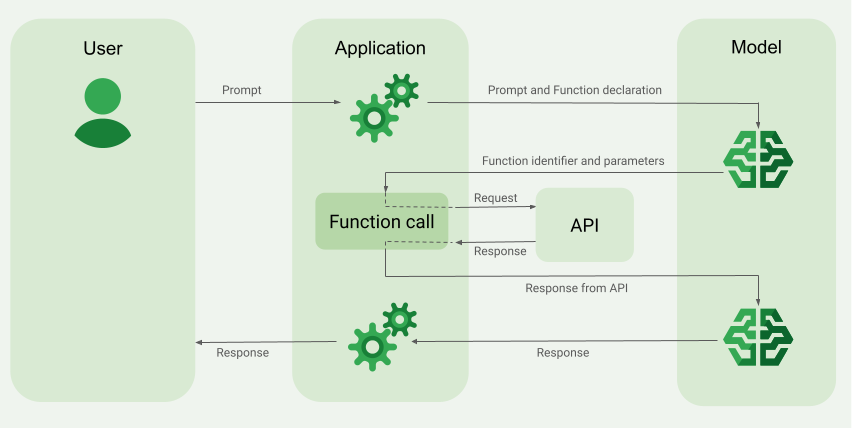
ภาพรวมของตัวอย่างการเรียกใช้ฟังก์ชัน
เมื่อส่งคำขอไปยังโมเดล คุณยังสามารถจัดเตรียมชุด "เครื่องมือ" (เช่น ฟังก์ชัน) ให้กับโมเดลเพื่อใช้สร้างคำตอบสุดท้ายได้ด้วย หากต้องการใช้ฟังก์ชันเหล่านี้และเรียกใช้ ("การเรียกใช้ฟังก์ชัน") โมเดลและแอปของคุณจะต้องส่งข้อมูลไปมาหากัน ดังนั้นวิธีที่แนะนำในการใช้การเรียกใช้ฟังก์ชันคือผ่านอินเทอร์เฟซแชทแบบหลายเทิร์น
สมมติว่าคุณมีแอปที่ผู้ใช้สามารถป้อนพรอมต์ เช่น
What was the weather in Boston on October 17, 2024?
โมเดล Gemini อาจไม่ทราบข้อมูลสภาพอากาศนี้ แต่ลองจินตนาการว่าคุณรู้จัก API บริการสภาพอากาศภายนอกที่ให้ข้อมูลนี้ได้ คุณสามารถใช้การเรียกใช้ฟังก์ชันเพื่อให้โมเดล Gemini มีเส้นทางไปยัง API ดังกล่าวและข้อมูลสภาพอากาศของ API นั้นได้
ก่อนอื่น คุณต้องเขียนฟังก์ชัน fetchWeather ในแอปที่โต้ตอบกับ API ภายนอกสมมตินี้ ซึ่งมีอินพุตและเอาต์พุตดังนี้
| พารามิเตอร์ | ประเภท | จำเป็น | คำอธิบาย |
|---|---|---|---|
| อินพุต | |||
location |
ออบเจ็กต์ | ใช่ | ชื่อเมืองและรัฐที่ต้องการดูสภาพอากาศ รองรับเฉพาะเมืองในสหรัฐอเมริกาเท่านั้น ต้องเป็นออบเจ็กต์ที่ฝังของ city และ state เสมอ
|
date |
สตริง | ใช่ | วันที่ที่จะดึงข้อมูลสภาพอากาศ (ต้องอยู่ในรูปแบบ YYYY-MM-DD เสมอ)
|
| เอาต์พุต | |||
temperature |
จำนวนเต็ม | ใช่ | อุณหภูมิ (หน่วยฟาเรนไฮต์) |
chancePrecipitation |
สตริง | ใช่ | โอกาสเกิดฝน/ลูกเห็บ/หิมะ (แสดงเป็นเปอร์เซ็นต์) |
cloudConditions |
สตริง | ใช่ | สภาพเมฆ (clear, partlyCloudy, mostlyCloudy หรือ cloudy)
|
เมื่อเริ่มต้นโมเดล คุณจะบอกโมเดลว่ามีฟังก์ชัน fetchWeather นี้อยู่และวิธีใช้ฟังก์ชันนี้เพื่อประมวลผลคำขอที่เข้ามา หากจำเป็น
ซึ่งเรียกว่า "การประกาศฟังก์ชัน" โมเดลจะไม่เรียกใช้ฟังก์ชันโดยตรง แต่ในขณะที่โมเดลกำลังประมวลผลคำขอที่เข้ามา โมเดลจะตัดสินใจว่าฟังก์ชัน fetchWeather จะช่วยตอบสนองต่อคำขอได้หรือไม่ หากโมเดลตัดสินว่าฟังก์ชันนั้นมีประโยชน์จริง โมเดลจะสร้างข้อมูลที่มีโครงสร้างซึ่งจะช่วยให้แอปของคุณเรียกใช้ฟังก์ชันดังกล่าว
ลองดูคำขอที่เข้ามาอีกครั้ง
What was the weather in Boston on October 17, 2024? โมเดลน่าจะตัดสินใจว่าฟังก์ชัน fetchWeather สามารถช่วยสร้างคำตอบได้ โมเดลจะดูว่าต้องใช้พารามิเตอร์อินพุตใดสำหรับ fetchWeather แล้วสร้างข้อมูลอินพุตที่มีโครงสร้างสำหรับฟังก์ชันซึ่งมีลักษณะคร่าวๆ ดังนี้
{
  functionName: fetchWeather,
  location: {
    city: Boston,
    state: Massachusetts  // the model can infer the state from the prompt
  },
  date: 2024-10-17
}
โมเดลจะส่งข้อมูลอินพุตที่มีโครงสร้างนี้ไปยังแอปของคุณเพื่อให้แอปเรียกใช้ฟังก์ชัน fetchWeather ได้ เมื่อแอปได้รับสภาพอากาศกลับมาจาก API แอปจะส่งข้อมูลดังกล่าวไปยังโมเดล ข้อมูลสภาพอากาศนี้ช่วยให้โมเดลประมวลผลขั้นสุดท้ายและสร้างคำตอบสำหรับคำขอเริ่มต้นที่ว่า What was the weather in Boston on October 17, 2024? ได้
โมเดลอาจให้คำตอบสุดท้ายเป็นภาษาธรรมชาติ เช่น
On October 17, 2024, in Boston, it was 38 degrees Fahrenheit with partly cloudy skies.
ใช้การเรียกใช้ฟังก์ชัน
ขั้นตอนต่อไปนี้ในคู่มือนี้จะแสดงวิธีใช้การตั้งค่าการเรียกใช้ฟังก์ชันที่คล้ายกับเวิร์กโฟลว์ที่อธิบายไว้ในภาพรวมของตัวอย่างการเรียกใช้ฟังก์ชัน (ดูส่วนบนของหน้านี้)
โมเดลที่รองรับ
gemini-4-argongemini-3.8-flash(และgemini-3.7-flash,gemini-3.6-flashและgemini-3.5-flashรุ่นเก่า)gemini-3.5-flash-lite(และgemini-3.1-flash-liteรุ่นเก่า)
โมเดล gemini-3.1-pro-preview และโมเดล Gemini 2.5 สำหรับการใช้งานทั่วไป (ซึ่งเลิกใช้งานแล้ว) ก็รองรับความสามารถนี้เช่นกัน
โมเดล Gemini Live API ก็รองรับความสามารถนี้เช่นกัน แต่ตัวอย่างโค้ดทั้งหมดในคู่มือนี้มีไว้สำหรับโมเดล Gemini ที่ใช้งานทั่วไป
ก่อนเริ่มต้น
|
คลิกผู้ให้บริการ Gemini API เพื่อดูเนื้อหาและโค้ดเฉพาะของผู้ให้บริการในหน้านี้ |
หากยังไม่ได้ดำเนินการ โปรดอ่านคู่มือเริ่มต้นใช้งานให้จบ ซึ่งจะอธิบายวิธีตั้งค่าโปรเจ็กต์ Firebase, เชื่อมต่อแอปกับ Firebase, เพิ่ม SDK, เริ่มต้นบริการแบ็กเอนด์สำหรับผู้ให้บริการ Gemini API ที่คุณเลือก และสร้างอินสแตนซ์ GenerativeModel
สำหรับการทดสอบและปรับปรุงพรอมต์ซ้ำๆ เราขอแนะนำให้ใช้ Google AI Studio
ขั้นตอนที่ 1: เขียนฟังก์ชัน
สมมติว่าคุณมีแอปที่ผู้ใช้สามารถป้อนพรอมต์ เช่น
What was the weather in Boston on October 17, 2024? โมเดล Gemini อาจไม่ทราบข้อมูลสภาพอากาศนี้ แต่ลองจินตนาการว่าคุณรู้จัก API บริการสภาพอากาศภายนอกที่สามารถให้ข้อมูลนี้ได้ สถานการณ์ในคู่มือนี้จะอิงตาม API ภายนอกสมมตินี้
เขียนฟังก์ชันในแอปที่จะโต้ตอบกับ API ภายนอกสมมติ และให้ข้อมูลที่โมเดลต้องการเพื่อสร้างคำขอสุดท้าย ในตัวอย่างสภาพอากาศนี้ จะเป็นฟังก์ชัน fetchWeather ที่เรียกใช้ API ภายนอกสมมตินี้
Swift
// This function calls a hypothetical external API that returns
// a collection of weather information for a given location on a given date.
func fetchWeather(city: String, state: String, date: String) -> JSONObject {

  // TODO(developer): Write a standard function that would call an external weather API.

  // For demo purposes, this hypothetical response is hardcoded here in the expected format.
  return [
    "temperature": .number(38),
    "chancePrecipitation": .string("56%"),
    "cloudConditions": .string("partlyCloudy"),
  ]
}
Kotlin
// This function calls a hypothetical external API that returns
// a collection of weather information for a given location on a given date.
// `location` is an object of the form { city: string, state: string }
data class Location(val city: String, val state: String)

suspend fun fetchWeather(location: Location, date: String): JsonObject {

    // TODO(developer): Write a standard function that would call to an external weather API.

    // For demo purposes, this hypothetical response is hardcoded here in the expected format.
    return JsonObject(mapOf(
        "temperature" to JsonPrimitive(38),
        "chancePrecipitation" to JsonPrimitive("56%"),
        "cloudConditions" to JsonPrimitive("partlyCloudy")
    ))
}
Java
// This function calls a hypothetical external API that returns
// a collection of weather information for a given location on a given date.
// `location` is an object of the form { city: string, state: string }
public JsonObject fetchWeather(Location location, String date) {

  // TODO(developer): Write a standard function that would call to an external weather API.

  // For demo purposes, this hypothetical response is hardcoded here in the expected format.
  return new JsonObject(Map.of(
        "temperature", JsonPrimitive(38),
        "chancePrecipitation", JsonPrimitive("56%"),
        "cloudConditions", JsonPrimitive("partlyCloudy")));
}
Web
// This function calls a hypothetical external API that returns
// a collection of weather information for a given location on a given date.
// `location` is an object of the form { city: string, state: string }
async function fetchWeather({ location, date }) {

  // TODO(developer): Write a standard function that would call to an external weather API.

  // For demo purposes, this hypothetical response is hardcoded here in the expected format.
  return {
    temperature: 38,
    chancePrecipitation: "56%",
    cloudConditions: "partlyCloudy",
  };
}
Dart
// This function calls a hypothetical external API that returns
// a collection of weather information for a given location on a given date.
// `location` is an object of the form { city: string, state: string }
Future<Map<String, Object?>> fetchWeather(
  Location location, String date
) async {

  // TODO(developer): Write a standard function that would call to an external weather API.

  // For demo purposes, this hypothetical response is hardcoded here in the expected format.
  final apiResponse = {
    'temperature': 38,
    'chancePrecipitation': '56%',
    'cloudConditions': 'partlyCloudy',
  };
  return apiResponse;
}
Unity
// This function calls a hypothetical external API that returns
// a collection of weather information for a given location on a given date.
System.Collections.Generic.Dictionary<string, object> FetchWeather(
    string city, string state, string date) {

  // TODO(developer): Write a standard function that would call an external weather API.

  // For demo purposes, this hypothetical response is hardcoded here in the expected format.
  return new System.Collections.Generic.Dictionary<string, object>() {
    {"temperature", 38},
    {"chancePrecipitation", "56%"},
    {"cloudConditions", "partlyCloudy"},
  };
}
ขั้นตอนที่ 2: สร้างการประกาศฟังก์ชัน
สร้างการประกาศฟังก์ชันที่คุณจะระบุให้กับโมเดลในภายหลัง (ขั้นตอนถัดไปของคู่มือนี้)
ในการประกาศ ให้ใส่รายละเอียดให้มากที่สุดในคำอธิบายสำหรับฟังก์ชันและพารามิเตอร์ของฟังก์ชัน
โมเดลจะใช้ข้อมูลในการประกาศฟังก์ชันเพื่อพิจารณาว่าจะเลือกฟังก์ชันใดและจะระบุค่าพารามิเตอร์สำหรับการเรียกใช้ฟังก์ชันจริงอย่างไร ดูลักษณะการทำงานและตัวเลือกเพิ่มเติมในหน้านี้เพื่อดูว่าโมเดลอาจเลือกฟังก์ชันอย่างไร รวมถึงวิธีควบคุมตัวเลือกนั้น
โปรดทราบข้อมูลต่อไปนี้เกี่ยวกับสคีมาที่คุณระบุ
คุณต้องระบุการประกาศฟังก์ชันในรูปแบบสคีมาที่เข้ากันได้กับสคีมา OpenAPI Agent Platform รองรับสคีมา OpenAPI อย่างจำกัด
แอตทริบิวต์ที่รองรับ ได้แก่
type,nullable,required,format,description,properties,items,enumแอตทริบิวต์ที่ไม่รองรับ ได้แก่
default,optional,maximum,oneOf
โดยค่าเริ่มต้น สำหรับ Firebase AI Logic SDK ระบบจะถือว่าทุกช่องเป็นช่องที่ต้องกรอก เว้นแต่คุณจะระบุว่าเป็นช่องที่ไม่บังคับในอาร์เรย์
optionalPropertiesสำหรับฟิลด์ตัวเลือกเหล่านี้ โมเดลจะป้อนข้อมูลในฟิลด์หรือข้ามฟิลด์ก็ได้ โปรดทราบว่าลักษณะการทำงานนี้ตรงกันข้ามกับลักษณะการทำงานเริ่มต้นของผู้ให้บริการ Gemini APIทั้ง 2 รายหากคุณใช้ SDK เซิร์ฟเวอร์หรือ API ของผู้ให้บริการโดยตรง
ดูแนวทางปฏิบัติแนะนำที่เกี่ยวข้องกับการประกาศฟังก์ชัน รวมถึงเคล็ดลับเกี่ยวกับชื่อและคำอธิบายได้ที่ แนวทางปฏิบัติแนะนำ ในเอกสารประกอบของ Gemini Developer API
วิธีเขียนการประกาศฟังก์ชันมีดังนี้
Swift
let fetchWeatherTool = FunctionDeclaration(
  name: "fetchWeather",
  description: "Get the weather conditions for a specific city on a specific date.",
  parameters: [
    "location": .object(
      properties: [
        "city": .string(description: "The city of the location."),
        "state": .string(description: "The US state of the location."),
      ],
      description: """
      The name of the city and its state for which to get the weather. Only cities in the
      USA are supported.
      """
    ),
    "date": .string(
      description: """
      The date for which to get the weather. Date must be in the format: YYYY-MM-DD.
      """
    ),
  ]
)
Kotlin
val fetchWeatherTool = FunctionDeclaration(
    "fetchWeather",
    "Get the weather conditions for a specific city on a specific date.",
    mapOf(
        "location" to Schema.obj(
            mapOf(
                "city" to Schema.string("The city of the location."),
                "state" to Schema.string("The US state of the location."),
            ),
            description = "The name of the city and its state for which " +
                "to get the weather. Only cities in the " +
                "USA are supported."
        ),
        "date" to Schema.string("The date for which to get the weather." +
                                " Date must be in the format: YYYY-MM-DD."
        ),
    ),
)
Java
FunctionDeclaration fetchWeatherTool = new FunctionDeclaration(
        "fetchWeather",
        "Get the weather conditions for a specific city on a specific date.",
        Map.of("location",
                Schema.obj(Map.of(
                        "city", Schema.str("The city of the location."),
                        "state", Schema.str("The US state of the location."))),
                "date",
                Schema.str("The date for which to get the weather. " +
                              "Date must be in the format: YYYY-MM-DD.")),
        Collections.emptyList());
Web
const fetchWeatherTool: FunctionDeclarationsTool = {
  functionDeclarations: [
   {
      name: "fetchWeather",
      description:
        "Get the weather conditions for a specific city on a specific date",
      parameters: Schema.object({
        properties: {
          location: Schema.object({
            description:
              "The name of the city and its state for which to get " +
              "the weather. Only cities in the USA are supported.",
            properties: {
              city: Schema.string({
                description: "The city of the location."
              }),
              state: Schema.string({
                description: "The US state of the location."
              }),
            },
          }),
          date: Schema.string({
            description:
              "The date for which to get the weather. Date must be in the" +
              " format: YYYY-MM-DD.",
          }),
        },
      }),
    },
  ],
};
Dart
final fetchWeatherTool = FunctionDeclaration(
    'fetchWeather',
    'Get the weather conditions for a specific city on a specific date.',
    parameters: {
      'location': Schema.object(
        description:
          'The name of the city and its state for which to get'
          'the weather. Only cities in the USA are supported.',
        properties: {
          'city': Schema.string(
             description: 'The city of the location.'
           ),
          'state': Schema.string(
             description: 'The US state of the location.'
          ),
        },
      ),
      'date': Schema.string(
        description:
          'The date for which to get the weather. Date must be in the format: YYYY-MM-DD.'
      ),
    },
  );
Unity
var fetchWeatherTool = new Tool(new FunctionDeclaration(
  name: "fetchWeather",
  description: "Get the weather conditions for a specific city on a specific date.",
  parameters: new System.Collections.Generic.Dictionary<string, Schema>() {
    { "location", Schema.Object(
      properties: new System.Collections.Generic.Dictionary<string, Schema>() {
        { "city", Schema.String(description: "The city of the location.") },
        { "state", Schema.String(description: "The US state of the location.")}
      },
      description: "The name of the city and its state for which to get the weather. Only cities in the USA are supported."
    ) },
    { "date", Schema.String(
      description: "The date for which to get the weather. Date must be in the format: YYYY-MM-DD."
    )}
  }
));
ขั้นตอนที่ 3: ระบุการประกาศฟังก์ชันระหว่างการเริ่มต้นโมเดล
จำนวนการประกาศฟังก์ชันสูงสุดที่คุณระบุได้ในคำขอคือ 128 รายการ ดูลักษณะการทำงานและตัวเลือกเพิ่มเติมในหน้านี้เพื่อดูว่าโมเดลอาจเลือกฟังก์ชันอย่างไร รวมถึงวิธีควบคุมตัวเลือกนั้น (โดยใช้ toolConfig เพื่อตั้งค่าโหมดการเรียกใช้ฟังก์ชัน)
Swift
import FirebaseAILogic

// Initialize the Gemini Developer API backend service.
// Create a `GenerativeModel` instance with a model that supports your use case.
let model = FirebaseAI.firebaseAI(backend: .googleAI()).generativeModel(
  modelName: "GEMINI_MODEL_NAME",
  // Provide the function declaration to the model.
  tools: [.functionDeclarations([fetchWeatherTool])]
)
Kotlin
// Initialize the Gemini Developer API backend service.
// Create a `GenerativeModel` instance with a model that supports your use case.
val model = Firebase.ai(backend = GenerativeBackend.googleAI()).generativeModel(
    modelName = "<var>GEMINI_MODEL_NAME</var>",
    // Provide the function declaration to the model.
    tools = listOf(Tool.functionDeclarations(listOf(fetchWeatherTool)))
)
Java
// Initialize the Gemini Developer API backend service.
// Create a `GenerativeModel` instance with a model that supports your use case.
GenerativeModelFutures model = GenerativeModelFutures.from(
        FirebaseAI.getInstance(GenerativeBackend.googleAI())
                .generativeModel("<var>GEMINI_MODEL_NAME</var>",
                        null,
                        null,
                        // Provide the function declaration to the model.
                        List.of(Tool.functionDeclarations(List.of(fetchWeatherTool)))));
Web
import { initializeApp } from "firebase/app";
import { getAI, getGenerativeModel, GoogleAIBackend } from "firebase/ai";

// TODO(developer): Replace the following with your app's Firebase configuration
// See: https://firebase.google.com/docs/web/learn-more#config-object
const firebaseConfig = {
  // ...
};

// Initialize FirebaseApp
const firebaseApp = initializeApp(firebaseConfig);

// Initialize the Gemini Developer API backend service.
const firebaseAI = getAI(firebaseApp, { backend: new GoogleAIBackend() });

// Create a `GenerativeModel` instance with a model that supports your use case.
const model = getGenerativeModel(firebaseAI, {
  model: "GEMINI_MODEL_NAME",
  // Provide the function declaration to the model.
  tools: fetchWeatherTool
});
Dart
import 'package:firebase_ai/firebase_ai.dart';
import 'package:firebase_core/firebase_core.dart';
import 'firebase_options.dart';

// Initialize FirebaseApp
await Firebase.initializeApp(
  options: DefaultFirebaseOptions.currentPlatform,
);

// Initialize the Gemini Developer API backend service.
// Create a `GenerativeModel` instance with a model that supports your use case.
_functionCallModel = FirebaseAI.googleAI().generativeModel(
       model: 'GEMINI_MODEL_NAME',
       // Provide the function declaration to the model.
       tools: [
         Tool.functionDeclarations([fetchWeatherTool]),
       ],
     );
Unity
using Firebase;
using Firebase.AI;

// Initialize the Gemini Developer API backend service.
// Create a `GenerativeModel` instance with a model that supports your use case.
var model = FirebaseAI.DefaultInstance.GetGenerativeModel(
  modelName: "GEMINI_MODEL_NAME",
  // Provide the function declaration to the model.
  tools: new Tool[] { fetchWeatherTool }
);
ดูวิธีเลือกโมเดล ที่เหมาะกับ Use Case และแอปของคุณ
ขั้นตอนที่ 4: เรียกใช้ฟังก์ชันเพื่อเรียก API ภายนอก
หากโมเดลตัดสินว่าฟังก์ชัน fetchWeather สามารถช่วยสร้างคำตอบสุดท้ายได้จริง แอปของคุณจะต้องเรียกใช้ฟังก์ชันนั้นจริงๆ โดยใช้ข้อมูลอินพุตที่มีโครงสร้างซึ่งโมเดลให้มา
เนื่องจากต้องมีการส่งข้อมูลไปมาระหว่างโมเดลกับแอป วิธีที่แนะนำในการใช้การเรียกใช้ฟังก์ชันคือผ่านอินเทอร์เฟซแชทแบบหลายรอบ
ข้อมูลโค้ดต่อไปนี้แสดงวิธีที่แอปได้รับแจ้งว่าโมเดลต้องการใช้ฟังก์ชัน fetchWeather นอกจากนี้ยังแสดงให้เห็นว่าโมเดลได้ระบุค่าพารามิเตอร์อินพุตที่จำเป็นสำหรับการเรียกใช้ฟังก์ชัน (และ API ภายนอกที่เกี่ยวข้อง)
ในตัวอย่างนี้ คำขอที่เข้ามามีพรอมต์
What was the weather in Boston on October 17, 2024? จากพรอมต์นี้ โมเดลจะอนุมานพารามิเตอร์อินพุตที่ฟังก์ชัน fetchWeather ต้องใช้ (นั่นคือ city, state และ date)
Swift
let chat = model.startChat()
let prompt = "What was the weather in Boston on October 17, 2024?"

// Send the user's question (the prompt) to the model using multi-turn chat.
let response = try await chat.sendMessage(prompt)

var functionResponses = [FunctionResponsePart]()

// When the model responds with one or more function calls, invoke the function(s).
for functionCall in response.functionCalls {
  if functionCall.name == "fetchWeather" {
    // TODO(developer): Handle invalid arguments.
    guard case let .object(location) = functionCall.args["location"] else { fatalError() }
    guard case let .string(city) = location["city"] else { fatalError() }
    guard case let .string(state) = location["state"] else { fatalError() }
    guard case let .string(date) = functionCall.args["date"] else { fatalError() }

    functionResponses.append(FunctionResponsePart(
      name: functionCall.name,
      // Forward the structured input data prepared by the model
      // to the hypothetical external API.
      response: fetchWeather(city: city, state: state, date: date)
    ))
  }
  // TODO(developer): Handle other potential function calls, if any.
}
Kotlin
val prompt = "What was the weather in Boston on October 17, 2024?"
val chat = model.startChat()
// Send the user's question (the prompt) to the model using multi-turn chat.
val result = chat.sendMessage(prompt)

val functionCalls = result.functionCalls
// When the model responds with one or more function calls, invoke the function(s).
val fetchWeatherCall = functionCalls.find { it.name == "fetchWeather" }

// Forward the structured input data prepared by the model
// to the hypothetical external API.
val functionResponse = fetchWeatherCall?.let {
    // Alternatively, if your `Location` class is marked as @Serializable, you can use
    // val location = Json.decodeFromJsonElement<Location>(it.args["location"]!!)
    val location = Location(
        it.args["location"]!!.jsonObject["city"]!!.jsonPrimitive.content,
        it.args["location"]!!.jsonObject["state"]!!.jsonPrimitive.content
    )
    val date = it.args["date"]!!.jsonPrimitive.content
    fetchWeather(location, date)
}
Java
String prompt = "What was the weather in Boston on October 17, 2024?";
ChatFutures chatFutures = model.startChat();
// Send the user's question (the prompt) to the model using multi-turn chat.
ListenableFuture<GenerateContentResponse> response =
        chatFutures.sendMessage(new Content("user", List.of(new TextPart(prompt))));

ListenableFuture<JsonObject> handleFunctionCallFuture = Futures.transform(response, result -> {
    for (FunctionCallPart functionCall : result.getFunctionCalls()) {
        if (functionCall.getName().equals("fetchWeather")) {
            Map<String, JsonElement> args = functionCall.getArgs();
            JsonObject locationJsonObject =
                    JsonElementKt.getJsonObject(args.get("location"));
            String city =
                    JsonElementKt.getContentOrNull(
                            JsonElementKt.getJsonPrimitive(
                                    locationJsonObject.get("city")));
            String state =
                    JsonElementKt.getContentOrNull(
                            JsonElementKt.getJsonPrimitive(
                                    locationJsonObject.get("state")));
            Location location = new Location(city, state);

            String date = JsonElementKt.getContentOrNull(
                    JsonElementKt.getJsonPrimitive(
                            args.get("date")));
            return fetchWeather(location, date);
        }
    }
    return null;
}, Executors.newSingleThreadExecutor());
Web
const chat = model.startChat();
const prompt = "What was the weather in Boston on October 17, 2024?";

// Send the user's question (the prompt) to the model using multi-turn chat.
let result = await chat.sendMessage(prompt);
const functionCalls = result.response.functionCalls();
let functionCall;
let functionResult;
// When the model responds with one or more function calls, invoke the function(s).
if (functionCalls.length > 0) {
  for (const call of functionCalls) {
    if (call.name === "fetchWeather") {
      // Forward the structured input data prepared by the model
      // to the hypothetical external API.
      functionResult = await fetchWeather(call.args);
      functionCall = call;
    }
  }
}
Dart
final chat = _functionCallModel.startChat();
const prompt = 'What was the weather in Boston on October 17, 2024?';

// Send the user's question (the prompt) to the model using multi-turn chat.
var response = await chat.sendMessage(Content.text(prompt));

final functionCalls = response.functionCalls.toList();
// When the model responds with one or more function calls, invoke the function(s).
if (functionCalls.isNotEmpty) {
  for (final functionCall in functionCalls) {
    if (functionCall.name == 'fetchWeather') {
      Map<String, dynamic> location =
          functionCall.args['location']! as Map<String, dynamic>;
      var date = functionCall.args['date']! as String;
      var city = location['city'] as String;
      var state = location['state'] as String;
      final functionResult =
          await fetchWeather(Location(city, state), date);
      // Send the response to the model so that it can use the result to
      // generate text for the user.
      response = await chat.sendMessage(
        Content.functionResponse(functionCall.name, functionResult),
      );
    }
  }
} else {
  throw UnimplementedError(
    'No function calls returned by the model',
  );
}
Unity
var chat = model.StartChat();
var prompt = "What was the weather in Boston on October 17, 2024?";

// Send the user's question (the prompt) to the model using multi-turn chat.
var response = await chat.SendMessageAsync(prompt);

var functionResponses = new List<ModelContent>();

foreach (var functionCall in response.FunctionCalls) {
  if (functionCall.Name == "fetchWeather") {
    // TODO(developer): Handle invalid arguments.
    var city = functionCall.Args["city"] as string;
    var state = functionCall.Args["state"] as string;
    var date = functionCall.Args["date"] as string;

    functionResponses.Add(ModelContent.FunctionResponse(
      name: functionCall.Name,
      // Forward the structured input data prepared by the model
      // to the hypothetical external API.
      response: FetchWeather(city: city, state: state, date: date)
    ));
  }
  // TODO(developer): Handle other potential function calls, if any.
}
ขั้นตอนที่ 5: ระบุเอาต์พุตของฟังก์ชันให้กับโมเดลเพื่อสร้างคำตอบสุดท้าย
หลังจากฟังก์ชัน fetchWeather แสดงข้อมูลสภาพอากาศแล้ว แอปของคุณจะต้องส่งข้อมูลดังกล่าวกลับไปยังโมเดล
จากนั้นโมเดลจะประมวลผลขั้นสุดท้ายและสร้างคำตอบภาษาธรรมชาติขั้นสุดท้าย เช่น
On October 17, 2024 in Boston, it was 38 degrees Fahrenheit with partly cloudy skies.
Swift
// Send the response(s) from the function back to the model
// so that the model can use it to generate its final response.
let finalResponse = try await chat.sendMessage(
  [ModelContent(role: "user", parts: functionResponses)]
)

// Log the text response.
print(finalResponse.text ?? "No text in response.")
Kotlin
// Send the response(s) from the function back to the model
// so that the model can use it to generate its final response.
val finalResponse = chat.sendMessage(content("user") {
    part(FunctionResponsePart("fetchWeather", functionResponse!!))
})

// Log the text response.
println(finalResponse.text ?: "No text in response")
Java
ListenableFuture<GenerateContentResponse> modelResponseFuture = Futures.transformAsync(
  handleFunctionCallFuture,
  // Send the response(s) from the function back to the model
  // so that the model can use it to generate its final response.
  functionCallResult -> chatFutures.sendMessage(new Content("user",
  List.of(new FunctionResponsePart(
          "fetchWeather", functionCallResult)))),
  Executors.newSingleThreadExecutor());

Futures.addCallback(modelResponseFuture, new FutureCallback<GenerateContentResponse>() {
@Override
public void onSuccess(GenerateContentResponse result) {
  if (result.getText() != null) {
      // Log the text response.
      System.out.println(result.getText());
  }
}

@Override
public void onFailure(Throwable t) {
  // handle error
}
}, Executors.newSingleThreadExecutor());
Web
// Send the response from the function back to the model
// so that the model can use it to generate its final response.
result = await chat.sendMessage([
  {
    type: "functionResponse",
    functionResponse: {
      name: functionCall.name, // "fetchWeather"
      response: functionResult,
    },
  },
]);
console.log(result.response.text());
Dart
// Send the response from the function back to the model
// so that the model can use it to generate its final response.
response = await chat
     .sendMessage(Content.functionResponse(functionCall.name, functionResult));
Unity
// Send the response(s) from the function back to the model
// so that the model can use it to generate its final response.
var finalResponse = await chat.SendMessageAsync(functionResponses);

// Log the text response.
UnityEngine.Debug.Log(finalResponse.Text ?? "No text in response.");
ลักษณะการทำงานและตัวเลือกเพิ่มเติม
ต่อไปนี้คือลักษณะการทำงานเพิ่มเติมสำหรับการเรียกใช้ฟังก์ชันที่คุณต้องรองรับในโค้ดและตัวเลือกที่คุณควบคุมได้
โมเดลอาจขอให้เรียกใช้ฟังก์ชันอีกครั้งหรือเรียกใช้ฟังก์ชันอื่น
หากการตอบกลับจากการเรียกใช้ฟังก์ชันเดียวไม่เพียงพอสำหรับโมเดลในการสร้างคำตอบสุดท้าย โมเดลอาจขอการเรียกใช้ฟังก์ชันเพิ่มเติม หรือขอให้เรียกใช้ฟังก์ชันอื่นโดยสิ้นเชิง กรณีหลังจะเกิดขึ้นได้ก็ต่อเมื่อคุณระบุฟังก์ชันมากกว่า 1 รายการให้กับโมเดลในรายการการประกาศฟังก์ชัน
แอปของคุณต้องรองรับว่าโมเดลอาจขอการเรียกใช้ฟังก์ชันเพิ่มเติม
โมเดลอาจขอให้เรียกใช้หลายฟังก์ชันพร้อมกัน
คุณสามารถระบุฟังก์ชันได้สูงสุด 128 รายการในรายการการประกาศฟังก์ชันให้กับโมเดล ด้วยเหตุนี้ โมเดลจึงอาจตัดสินใจว่าจำเป็นต้องใช้หลายฟังก์ชันเพื่อช่วยสร้างคำตอบสุดท้าย และอาจตัดสินใจเรียกใช้ฟังก์ชันเหล่านี้บางรายการพร้อมกัน ซึ่งเรียกว่าการเรียกใช้ฟังก์ชันพร้อมกัน
แอปของคุณต้องรองรับว่าโมเดลอาจขอให้เรียกใช้หลายฟังก์ชันพร้อมกัน และแอปของคุณต้องส่งคำตอบทั้งหมดจากฟังก์ชันกลับไปยังโมเดล
คุณควบคุมวิธีและสิทธิ์ของโมเดลในการขอเรียกใช้ฟังก์ชันได้
คุณสามารถกำหนดข้อจำกัดบางอย่างเกี่ยวกับวิธีและกรณีที่โมเดลควรใช้การประกาศฟังก์ชันที่ระบุ ซึ่งเรียกว่าการตั้งค่าโหมดการเรียกใช้ฟังก์ชัน ตัวอย่างเช่น
คุณสามารถบังคับให้โมเดลใช้การเรียกใช้ฟังก์ชันเสมอแทนที่จะอนุญาตให้โมเดลเลือกระหว่างคำตอบที่เป็นภาษาธรรมชาติทันทีกับการเรียกใช้ฟังก์ชัน ซึ่งเรียกว่าการเรียกใช้ฟังก์ชันแบบบังคับ
หากคุณระบุการประกาศฟังก์ชันหลายรายการ คุณสามารถจำกัดโมเดลให้ใช้เฉพาะชุดย่อยของฟังก์ชันที่ระบุได้
คุณใช้ข้อจำกัด (หรือโหมด) เหล่านี้โดยเพิ่มการกำหนดค่าเครื่องมือ (toolConfig) พร้อมกับพรอมต์และการประกาศฟังก์ชัน ในการกำหนดค่าเครื่องมือ คุณสามารถระบุโหมดใดโหมดหนึ่งต่อไปนี้ โหมดที่มีประโยชน์ที่สุดคือ ANY
| โหมด | คำอธิบาย |
|---|---|
AUTO |
ลักษณะการทำงานเริ่มต้นของโมเดล โมเดลจะตัดสินใจว่าจะใช้การเรียกใช้ฟังก์ชันหรือการตอบกลับด้วยภาษาธรรมชาติ |
ANY |
โมเดลต้องใช้การเรียกใช้ฟังก์ชัน ("การเรียกใช้ฟังก์ชันแบบบังคับ") หากต้องการจำกัดโมเดลให้ใช้ฟังก์ชันเพียงบางส่วน ให้ระบุชื่อฟังก์ชันที่อนุญาตใน allowedFunctionNames
|
NONE |
โมเดลต้องไม่ใช้การเรียกใช้ฟังก์ชัน ลักษณะการทำงานนี้เทียบเท่ากับคำขอโมเดลที่ไม่มีการประกาศฟังก์ชันที่เกี่ยวข้อง |
คุณทำอะไรได้อีกบ้าง
ลองใช้ความสามารถอื่นๆ
- สร้างการสนทนาแบบหลายรอบ (แชท)
- สร้างข้อความที่สร้างขึ้นจากพรอมต์แบบข้อความเท่านั้น
- สร้างข้อความโดยใช้พรอมต์ที่มีไฟล์ประเภทต่างๆ เช่น รูปภาพ PDF วิดีโอ และ เสียง
ดูวิธีควบคุมการสร้างเนื้อหา
- ทำความเข้าใจการออกแบบพรอมต์ ซึ่งรวมถึงแนวทางปฏิบัติแนะนำ กลยุทธ์ และตัวอย่างพรอมต์
- กำหนดค่าพารามิเตอร์โมเดล เช่น โทเค็นเอาต์พุตสูงสุด ความน่าจะเป็นของโทเค็นเอาต์พุตที่ซ้ำกัน เป็นต้น
- ใช้การตั้งค่าความปลอดภัยเพื่อปรับโอกาสในการได้รับคำตอบที่อาจถือว่าเป็นอันตราย
ดูข้อมูลเพิ่มเติมเกี่ยวกับโมเดลที่รองรับ
ดูข้อมูลเกี่ยวกับโมเดลที่พร้อมใช้งานสำหรับ Use Case ต่างๆ รวมถึงโควต้าและราคาของโมเดลเหล่านั้นแสดงความคิดเห็นเกี่ยวกับประสบการณ์การใช้งาน Firebase AI Logic