

生成モデルは、さまざまな問題の解決に効果的です。ただし、次のような制限があります。
- トレーニングが完了するとその後は更新されないため、知識が最新ではなくなります。
- 外部データのクエリや変更はできません。
関数呼び出しを使用すると、こうした制限の一部を克服できます。関数呼び出しは「ツールの使用」と呼ばれることもあります。これは、関数呼び出しによってモデルが API や関数などの外部ツールを使用して最終的なレスポンスを生成できるためです。
このガイドでは、このページの次の主要セクションで説明するシナリオと同様の関数呼び出しの設定を実装する方法について説明します。大まかに言うと、アプリで関数呼び出しを設定する手順は次のとおりです。
ステップ 1: 最終的なレスポンスの生成に必要な情報をモデルに提供できる関数を作成します(たとえば、関数は外部 API を呼び出すことができます)。
ステップ 2: 関数とそのパラメータを記述する関数宣言を作成します。
ステップ 3: モデルの初期化時に関数宣言を指定して、必要に応じてモデルが関数を使用する方法を認識できるようにします。
ステップ 4: アプリが関数を呼び出すために必要な情報をモデルが送信できるように、アプリを設定します。
ステップ 5: 関数のレスポンスをモデルに渡し、モデルが最終的なレスポンスを生成できるようにします。
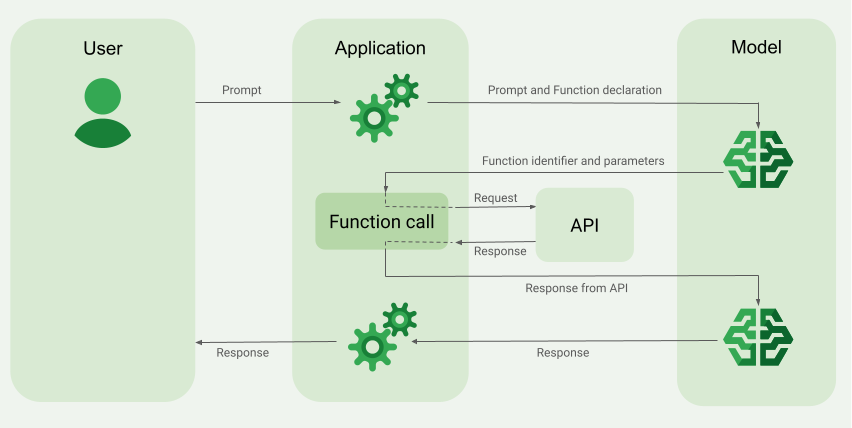
関数呼び出しの例の概要
モデルにリクエストを送信するときに、最終的なレスポンスの生成に使用できる一連の「ツール」(関数など)をモデルに提供することもできます。これらの関数を利用して呼び出す(「関数呼び出し」)には、モデルとアプリが相互に情報をやり取りする必要があります。そのため、関数呼び出しを使用する場合は、マルチターン チャット インターフェースを使用することをおすすめします。
たとえば、ユーザーが「What was the weather in Boston on October 17, 2024?」のようなプロンプトを入力できるアプリがあるとします。
Gemini モデルはこの天気情報を認識していない可能性がありますが、この情報を提供できる外部の天気サービス API を認識しているとします。関数呼び出しを使用すると、Gemini モデルにその API と天気情報へのパスを提供できます。
まず、この仮想の外部 API とやり取りする関数 fetchWeather をアプリに記述します。この API の入力と出力は次のとおりです。
| パラメータ | 型 | 必須 | 説明 |
|---|---|---|---|
| 入力 | |||
location |
オブジェクト | はい | 天気を取得する都市の名前とその州。 米国の都市のみがサポートされています。常に city と state のネストされたオブジェクトにする必要があります。 |
date |
文字列 | はい | 天気を取得する日付(常に YYYY-MM-DD 形式にする必要があります)。 |
| 出力 | |||
temperature |
Integer | はい | 温度(華氏) |
chancePrecipitation |
文字列 | はい | 降水確率(パーセントで表示) |
cloudConditions |
文字列 | はい | 雲の状態(clear、partlyCloudy、mostlyCloudy、cloudy のいずれか) |
モデルを初期化するときに、この fetchWeather 関数が存在することと、必要に応じて受信リクエストの処理にどのように使用できるかをモデルに伝えます。これは「関数宣言」と呼ばれます。モデルは関数を直接呼び出しません。代わりに、モデルは受信リクエストを処理するときに、fetchWeather 関数がリクエストへの応答に役立つかどうかを判断します。関数が実際に有用であるとモデルが判断すると、アプリが関数を呼び出すのに役立つ構造化データが生成されます。
受信リクエスト What was the weather in Boston on October 17, 2024? をもう一度確認します。モデルは、fetchWeather 関数がレスポンスの生成に役立つと判断する可能性があります。モデルは、fetchWeather に必要な入力パラメータを調べ、次のような関数の構造化入力データを生成します。
{
  functionName: fetchWeather,
  location: {
    city: Boston,
    state: Massachusetts  // the model can infer the state from the prompt
  },
  date: 2024-10-17
}
モデルはこの構造化された入力データをアプリに渡し、アプリが fetchWeather 関数を呼び出せるようにします。アプリは API から気象条件を受け取ると、その情報をモデルに渡します。この天気情報により、モデルは最終処理を完了し、What was the weather in Boston on October 17, 2024? の最初のリクエストに対するレスポンスを生成できます。
モデルは、次のような最終的な自然言語レスポンスを返すことがあります。
On October 17, 2024, in Boston, it was 38 degrees Fahrenheit with partly cloudy skies.
関数呼び出しを実装する
このガイドの次の手順では、関数呼び出しの例の概要(このページの上部を参照)で説明されているワークフローと同様の関数呼び出しの設定を実装する方法について説明します。
サポートされているモデル
gemini-4-argongemini-3.8-flash(および以前のgemini-3.7-flash、gemini-3.6-flash、gemini-3.5-flash)gemini-3.5-flash-lite(および以前のgemini-3.1-flash-lite)
gemini-3.1-pro-preview モデルと一般用途の Gemini 2.5 モデル(非推奨)もこの機能をサポートしています。
Gemini Live API モデルもこの機能をサポートしていますが、このガイドのコードサンプルはすべて、一般用途の Gemini モデルを対象としています。
始める前に
|
Gemini API プロバイダをクリックして、このページでプロバイダ固有のコンテンツとコードを表示します。 |
まだ完了していない場合は、スタートガイドに沿って、Firebase プロジェクトの設定、アプリと Firebase の連携、SDK の追加、選択した Gemini API プロバイダのバックエンド サービスの初期化、GenerativeModel インスタンスの作成を行います。
プロンプトのテストと反復処理には、Google AI Studio を使用することをおすすめします。
ステップ 1: 関数を記述する
ユーザーが「What was the weather in Boston on October 17, 2024?」のようなプロンプトを入力できるアプリがあるとします。Gemini モデルはこの気象情報を認識していない可能性がありますが、この情報を提供できる外部の気象サービス API を知っているとします。このガイドのシナリオは、この架空の外部 API に依存しています。
アプリに関数を記述します。この関数は、架空の外部 API とやり取りし、最終的なリクエストの生成に必要な情報をモデルに提供します。この天気の例では、この架空の外部 API を呼び出す fetchWeather 関数になります。
Swift
// This function calls a hypothetical external API that returns
// a collection of weather information for a given location on a given date.
func fetchWeather(city: String, state: String, date: String) -> JSONObject {

  // TODO(developer): Write a standard function that would call an external weather API.

  // For demo purposes, this hypothetical response is hardcoded here in the expected format.
  return [
    "temperature": .number(38),
    "chancePrecipitation": .string("56%"),
    "cloudConditions": .string("partlyCloudy"),
  ]
}
Kotlin
// This function calls a hypothetical external API that returns
// a collection of weather information for a given location on a given date.
// `location` is an object of the form { city: string, state: string }
data class Location(val city: String, val state: String)

suspend fun fetchWeather(location: Location, date: String): JsonObject {

    // TODO(developer): Write a standard function that would call to an external weather API.

    // For demo purposes, this hypothetical response is hardcoded here in the expected format.
    return JsonObject(mapOf(
        "temperature" to JsonPrimitive(38),
        "chancePrecipitation" to JsonPrimitive("56%"),
        "cloudConditions" to JsonPrimitive("partlyCloudy")
    ))
}
Java
// This function calls a hypothetical external API that returns
// a collection of weather information for a given location on a given date.
// `location` is an object of the form { city: string, state: string }
public JsonObject fetchWeather(Location location, String date) {

  // TODO(developer): Write a standard function that would call to an external weather API.

  // For demo purposes, this hypothetical response is hardcoded here in the expected format.
  return new JsonObject(Map.of(
        "temperature", JsonPrimitive(38),
        "chancePrecipitation", JsonPrimitive("56%"),
        "cloudConditions", JsonPrimitive("partlyCloudy")));
}
Web
// This function calls a hypothetical external API that returns
// a collection of weather information for a given location on a given date.
// `location` is an object of the form { city: string, state: string }
async function fetchWeather({ location, date }) {

  // TODO(developer): Write a standard function that would call to an external weather API.

  // For demo purposes, this hypothetical response is hardcoded here in the expected format.
  return {
    temperature: 38,
    chancePrecipitation: "56%",
    cloudConditions: "partlyCloudy",
  };
}
Dart
// This function calls a hypothetical external API that returns
// a collection of weather information for a given location on a given date.
// `location` is an object of the form { city: string, state: string }
Future<Map<String, Object?>> fetchWeather(
  Location location, String date
) async {

  // TODO(developer): Write a standard function that would call to an external weather API.

  // For demo purposes, this hypothetical response is hardcoded here in the expected format.
  final apiResponse = {
    'temperature': 38,
    'chancePrecipitation': '56%',
    'cloudConditions': 'partlyCloudy',
  };
  return apiResponse;
}
Unity
// This function calls a hypothetical external API that returns
// a collection of weather information for a given location on a given date.
System.Collections.Generic.Dictionary<string, object> FetchWeather(
    string city, string state, string date) {

  // TODO(developer): Write a standard function that would call an external weather API.

  // For demo purposes, this hypothetical response is hardcoded here in the expected format.
  return new System.Collections.Generic.Dictionary<string, object>() {
    {"temperature", 38},
    {"chancePrecipitation", "56%"},
    {"cloudConditions", "partlyCloudy"},
  };
}
ステップ 2: 関数宣言を作成する
後でモデルに提供する関数宣言を作成します(このガイドの次のステップ)。
宣言では、関数とそのパラメータの説明にできるだけ詳しい情報を含めます。
モデルは、関数宣言の情報を使用して、選択する関数と、関数の実際の呼び出しにパラメータ値を指定する方法を決定します。モデルが関数を選択する方法と、その選択を制御する方法については、このページの後半の追加の動作とオプションをご覧ください。
指定するスキーマについては、次の点に注意してください。
関数宣言は、OpenAPI スキーマと互換性のあるスキーマ形式で指定する必要があります。Agent Platform は、OpenAPI スキーマを限定的にサポートしています。
サポートされている属性は、
type、nullable、required、format、description、properties、items、enumです。属性
default、optional、maximum、oneOfはサポートされていません。
デフォルトでは、Firebase AI Logic SDK の場合、
optionalProperties配列で省略可として指定しない限り、すべてのフィールドが必須と見なされます。これらのオプション フィールドの場合、モデルはフィールドにデータを入力することも、フィールドをスキップすることもできます。これは、2 つの Gemini API プロバイダのサーバー SDK または API を直接使用する場合のデフォルトの動作とは逆になります。
名前と説明に関するヒントなど、関数宣言に関するベスト プラクティスについては、Google Cloud ドキュメントの Gemini Developer API ドキュメントのベスト プラクティス。
関数宣言の記述方法は次のとおりです。
Swift
let fetchWeatherTool = FunctionDeclaration(
  name: "fetchWeather",
  description: "Get the weather conditions for a specific city on a specific date.",
  parameters: [
    "location": .object(
      properties: [
        "city": .string(description: "The city of the location."),
        "state": .string(description: "The US state of the location."),
      ],
      description: """
      The name of the city and its state for which to get the weather. Only cities in the
      USA are supported.
      """
    ),
    "date": .string(
      description: """
      The date for which to get the weather. Date must be in the format: YYYY-MM-DD.
      """
    ),
  ]
)
Kotlin
val fetchWeatherTool = FunctionDeclaration(
    "fetchWeather",
    "Get the weather conditions for a specific city on a specific date.",
    mapOf(
        "location" to Schema.obj(
            mapOf(
                "city" to Schema.string("The city of the location."),
                "state" to Schema.string("The US state of the location."),
            ),
            description = "The name of the city and its state for which " +
                "to get the weather. Only cities in the " +
                "USA are supported."
        ),
        "date" to Schema.string("The date for which to get the weather." +
                                " Date must be in the format: YYYY-MM-DD."
        ),
    ),
)
Java
FunctionDeclaration fetchWeatherTool = new FunctionDeclaration(
        "fetchWeather",
        "Get the weather conditions for a specific city on a specific date.",
        Map.of("location",
                Schema.obj(Map.of(
                        "city", Schema.str("The city of the location."),
                        "state", Schema.str("The US state of the location."))),
                "date",
                Schema.str("The date for which to get the weather. " +
                              "Date must be in the format: YYYY-MM-DD.")),
        Collections.emptyList());
Web
const fetchWeatherTool: FunctionDeclarationsTool = {
  functionDeclarations: [
   {
      name: "fetchWeather",
      description:
        "Get the weather conditions for a specific city on a specific date",
      parameters: Schema.object({
        properties: {
          location: Schema.object({
            description:
              "The name of the city and its state for which to get " +
              "the weather. Only cities in the USA are supported.",
            properties: {
              city: Schema.string({
                description: "The city of the location."
              }),
              state: Schema.string({
                description: "The US state of the location."
              }),
            },
          }),
          date: Schema.string({
            description:
              "The date for which to get the weather. Date must be in the" +
              " format: YYYY-MM-DD.",
          }),
        },
      }),
    },
  ],
};
Dart
final fetchWeatherTool = FunctionDeclaration(
    'fetchWeather',
    'Get the weather conditions for a specific city on a specific date.',
    parameters: {
      'location': Schema.object(
        description:
          'The name of the city and its state for which to get'
          'the weather. Only cities in the USA are supported.',
        properties: {
          'city': Schema.string(
             description: 'The city of the location.'
           ),
          'state': Schema.string(
             description: 'The US state of the location.'
          ),
        },
      ),
      'date': Schema.string(
        description:
          'The date for which to get the weather. Date must be in the format: YYYY-MM-DD.'
      ),
    },
  );
Unity
var fetchWeatherTool = new Tool(new FunctionDeclaration(
  name: "fetchWeather",
  description: "Get the weather conditions for a specific city on a specific date.",
  parameters: new System.Collections.Generic.Dictionary<string, Schema>() {
    { "location", Schema.Object(
      properties: new System.Collections.Generic.Dictionary<string, Schema>() {
        { "city", Schema.String(description: "The city of the location.") },
        { "state", Schema.String(description: "The US state of the location.")}
      },
      description: "The name of the city and its state for which to get the weather. Only cities in the USA are supported."
    ) },
    { "date", Schema.String(
      description: "The date for which to get the weather. Date must be in the format: YYYY-MM-DD."
    )}
  }
));
ステップ 3: モデルの初期化時に関数宣言を指定する
リクエストで指定できる関数宣言の最大数は 128 です。モデルが関数を選択する方法と、その選択を制御する方法(toolConfig を使用して関数呼び出しモードを設定する)については、このページの後半の追加の動作とオプションをご覧ください。
Swift
import FirebaseAILogic

// Initialize the Gemini Developer API backend service.
// Create a `GenerativeModel` instance with a model that supports your use case.
let model = FirebaseAI.firebaseAI(backend: .googleAI()).generativeModel(
  modelName: "GEMINI_MODEL_NAME",
  // Provide the function declaration to the model.
  tools: [.functionDeclarations([fetchWeatherTool])]
)
Kotlin
// Initialize the Gemini Developer API backend service.
// Create a `GenerativeModel` instance with a model that supports your use case.
val model = Firebase.ai(backend = GenerativeBackend.googleAI()).generativeModel(
    modelName = "<var>GEMINI_MODEL_NAME</var>",
    // Provide the function declaration to the model.
    tools = listOf(Tool.functionDeclarations(listOf(fetchWeatherTool)))
)
Java
// Initialize the Gemini Developer API backend service.
// Create a `GenerativeModel` instance with a model that supports your use case.
GenerativeModelFutures model = GenerativeModelFutures.from(
        FirebaseAI.getInstance(GenerativeBackend.googleAI())
                .generativeModel("<var>GEMINI_MODEL_NAME</var>",
                        null,
                        null,
                        // Provide the function declaration to the model.
                        List.of(Tool.functionDeclarations(List.of(fetchWeatherTool)))));
Web
import { initializeApp } from "firebase/app";
import { getAI, getGenerativeModel, GoogleAIBackend } from "firebase/ai";

// TODO(developer): Replace the following with your app's Firebase configuration
// See: https://firebase.google.com/docs/web/learn-more#config-object
const firebaseConfig = {
  // ...
};

// Initialize FirebaseApp
const firebaseApp = initializeApp(firebaseConfig);

// Initialize the Gemini Developer API backend service.
const firebaseAI = getAI(firebaseApp, { backend: new GoogleAIBackend() });

// Create a `GenerativeModel` instance with a model that supports your use case.
const model = getGenerativeModel(firebaseAI, {
  model: "GEMINI_MODEL_NAME",
  // Provide the function declaration to the model.
  tools: fetchWeatherTool
});
Dart
import 'package:firebase_ai/firebase_ai.dart';
import 'package:firebase_core/firebase_core.dart';
import 'firebase_options.dart';

// Initialize FirebaseApp
await Firebase.initializeApp(
  options: DefaultFirebaseOptions.currentPlatform,
);

// Initialize the Gemini Developer API backend service.
// Create a `GenerativeModel` instance with a model that supports your use case.
_functionCallModel = FirebaseAI.googleAI().generativeModel(
       model: 'GEMINI_MODEL_NAME',
       // Provide the function declaration to the model.
       tools: [
         Tool.functionDeclarations([fetchWeatherTool]),
       ],
     );
Unity
using Firebase;
using Firebase.AI;

// Initialize the Gemini Developer API backend service.
// Create a `GenerativeModel` instance with a model that supports your use case.
var model = FirebaseAI.DefaultInstance.GetGenerativeModel(
  modelName: "GEMINI_MODEL_NAME",
  // Provide the function declaration to the model.
  tools: new Tool[] { fetchWeatherTool }
);
ユースケースとアプリに適したモデル を選択する方法を学習します。
ステップ 4: 関数を呼び出して外部 API を呼び出す
モデルが fetchWeather 関数が最終的なレスポンスの生成に役立つと判断した場合、アプリはモデルから提供された構造化入力データを使用して、その関数を実際に呼び出す必要があります。
モデルとアプリの間で情報をやり取りする必要があるため、関数呼び出しを使用する場合は、マルチターン チャット インターフェースを使用することをおすすめします。
次のコード スニペットは、モデルが fetchWeather 関数を使用することをアプリに通知する方法を示しています。また、モデルが関数呼び出し(およびその基盤となる外部 API)に必要な入力パラメータ値を提供していることも示しています。
この例では、受信リクエストにプロンプト What was the weather in Boston on October 17, 2024? が含まれています。このプロンプトから、モデルは fetchWeather 関数に必要な入力パラメータ(city、state、date)を推論しました。
Swift
let chat = model.startChat()
let prompt = "What was the weather in Boston on October 17, 2024?"

// Send the user's question (the prompt) to the model using multi-turn chat.
let response = try await chat.sendMessage(prompt)

var functionResponses = [FunctionResponsePart]()

// When the model responds with one or more function calls, invoke the function(s).
for functionCall in response.functionCalls {
  if functionCall.name == "fetchWeather" {
    // TODO(developer): Handle invalid arguments.
    guard case let .object(location) = functionCall.args["location"] else { fatalError() }
    guard case let .string(city) = location["city"] else { fatalError() }
    guard case let .string(state) = location["state"] else { fatalError() }
    guard case let .string(date) = functionCall.args["date"] else { fatalError() }

    functionResponses.append(FunctionResponsePart(
      name: functionCall.name,
      // Forward the structured input data prepared by the model
      // to the hypothetical external API.
      response: fetchWeather(city: city, state: state, date: date)
    ))
  }
  // TODO(developer): Handle other potential function calls, if any.
}
Kotlin
val prompt = "What was the weather in Boston on October 17, 2024?"
val chat = model.startChat()
// Send the user's question (the prompt) to the model using multi-turn chat.
val result = chat.sendMessage(prompt)

val functionCalls = result.functionCalls
// When the model responds with one or more function calls, invoke the function(s).
val fetchWeatherCall = functionCalls.find { it.name == "fetchWeather" }

// Forward the structured input data prepared by the model
// to the hypothetical external API.
val functionResponse = fetchWeatherCall?.let {
    // Alternatively, if your `Location` class is marked as @Serializable, you can use
    // val location = Json.decodeFromJsonElement<Location>(it.args["location"]!!)
    val location = Location(
        it.args["location"]!!.jsonObject["city"]!!.jsonPrimitive.content,
        it.args["location"]!!.jsonObject["state"]!!.jsonPrimitive.content
    )
    val date = it.args["date"]!!.jsonPrimitive.content
    fetchWeather(location, date)
}
Java
String prompt = "What was the weather in Boston on October 17, 2024?";
ChatFutures chatFutures = model.startChat();
// Send the user's question (the prompt) to the model using multi-turn chat.
ListenableFuture<GenerateContentResponse> response =
        chatFutures.sendMessage(new Content("user", List.of(new TextPart(prompt))));

ListenableFuture<JsonObject> handleFunctionCallFuture = Futures.transform(response, result -> {
    for (FunctionCallPart functionCall : result.getFunctionCalls()) {
        if (functionCall.getName().equals("fetchWeather")) {
            Map<String, JsonElement> args = functionCall.getArgs();
            JsonObject locationJsonObject =
                    JsonElementKt.getJsonObject(args.get("location"));
            String city =
                    JsonElementKt.getContentOrNull(
                            JsonElementKt.getJsonPrimitive(
                                    locationJsonObject.get("city")));
            String state =
                    JsonElementKt.getContentOrNull(
                            JsonElementKt.getJsonPrimitive(
                                    locationJsonObject.get("state")));
            Location location = new Location(city, state);

            String date = JsonElementKt.getContentOrNull(
                    JsonElementKt.getJsonPrimitive(
                            args.get("date")));
            return fetchWeather(location, date);
        }
    }
    return null;
}, Executors.newSingleThreadExecutor());
Web
const chat = model.startChat();
const prompt = "What was the weather in Boston on October 17, 2024?";

// Send the user's question (the prompt) to the model using multi-turn chat.
let result = await chat.sendMessage(prompt);
const functionCalls = result.response.functionCalls();
let functionCall;
let functionResult;
// When the model responds with one or more function calls, invoke the function(s).
if (functionCalls.length > 0) {
  for (const call of functionCalls) {
    if (call.name === "fetchWeather") {
      // Forward the structured input data prepared by the model
      // to the hypothetical external API.
      functionResult = await fetchWeather(call.args);
      functionCall = call;
    }
  }
}
Dart
final chat = _functionCallModel.startChat();
const prompt = 'What was the weather in Boston on October 17, 2024?';

// Send the user's question (the prompt) to the model using multi-turn chat.
var response = await chat.sendMessage(Content.text(prompt));

final functionCalls = response.functionCalls.toList();
// When the model responds with one or more function calls, invoke the function(s).
if (functionCalls.isNotEmpty) {
  for (final functionCall in functionCalls) {
    if (functionCall.name == 'fetchWeather') {
      Map<String, dynamic> location =
          functionCall.args['location']! as Map<String, dynamic>;
      var date = functionCall.args['date']! as String;
      var city = location['city'] as String;
      var state = location['state'] as String;
      final functionResult =
          await fetchWeather(Location(city, state), date);
      // Send the response to the model so that it can use the result to
      // generate text for the user.
      response = await chat.sendMessage(
        Content.functionResponse(functionCall.name, functionResult),
      );
    }
  }
} else {
  throw UnimplementedError(
    'No function calls returned by the model',
  );
}
Unity
var chat = model.StartChat();
var prompt = "What was the weather in Boston on October 17, 2024?";

// Send the user's question (the prompt) to the model using multi-turn chat.
var response = await chat.SendMessageAsync(prompt);

var functionResponses = new List<ModelContent>();

foreach (var functionCall in response.FunctionCalls) {
  if (functionCall.Name == "fetchWeather") {
    // TODO(developer): Handle invalid arguments.
    var city = functionCall.Args["city"] as string;
    var state = functionCall.Args["state"] as string;
    var date = functionCall.Args["date"] as string;

    functionResponses.Add(ModelContent.FunctionResponse(
      name: functionCall.Name,
      // Forward the structured input data prepared by the model
      // to the hypothetical external API.
      response: FetchWeather(city: city, state: state, date: date)
    ));
  }
  // TODO(developer): Handle other potential function calls, if any.
}
ステップ 5: 関数の出力をモデルに提供して最終的なレスポンスを生成する
fetchWeather 関数が天気情報を返したら、アプリはそれをモデルに返す必要があります。
次に、モデルは最終処理を行い、次のような最終的な自然言語レスポンスを生成します。
On October 17, 2024 in Boston, it was 38 degrees Fahrenheit with partly cloudy skies.
Swift
// Send the response(s) from the function back to the model
// so that the model can use it to generate its final response.
let finalResponse = try await chat.sendMessage(
  [ModelContent(role: "user", parts: functionResponses)]
)

// Log the text response.
print(finalResponse.text ?? "No text in response.")
Kotlin
// Send the response(s) from the function back to the model
// so that the model can use it to generate its final response.
val finalResponse = chat.sendMessage(content("user") {
    part(FunctionResponsePart("fetchWeather", functionResponse!!))
})

// Log the text response.
println(finalResponse.text ?: "No text in response")
Java
ListenableFuture<GenerateContentResponse> modelResponseFuture = Futures.transformAsync(
  handleFunctionCallFuture,
  // Send the response(s) from the function back to the model
  // so that the model can use it to generate its final response.
  functionCallResult -> chatFutures.sendMessage(new Content("user",
  List.of(new FunctionResponsePart(
          "fetchWeather", functionCallResult)))),
  Executors.newSingleThreadExecutor());

Futures.addCallback(modelResponseFuture, new FutureCallback<GenerateContentResponse>() {
@Override
public void onSuccess(GenerateContentResponse result) {
  if (result.getText() != null) {
      // Log the text response.
      System.out.println(result.getText());
  }
}

@Override
public void onFailure(Throwable t) {
  // handle error
}
}, Executors.newSingleThreadExecutor());
Web
// Send the response from the function back to the model
// so that the model can use it to generate its final response.
result = await chat.sendMessage([
  {
    type: "functionResponse",
    functionResponse: {
      name: functionCall.name, // "fetchWeather"
      response: functionResult,
    },
  },
]);
console.log(result.response.text());
Dart
// Send the response from the function back to the model
// so that the model can use it to generate its final response.
response = await chat
     .sendMessage(Content.functionResponse(functionCall.name, functionResult));
Unity
// Send the response(s) from the function back to the model
// so that the model can use it to generate its final response.
var finalResponse = await chat.SendMessageAsync(functionResponses);

// Log the text response.
UnityEngine.Debug.Log(finalResponse.Text ?? "No text in response.");
追加の動作とオプション
関数呼び出しのその他の動作として、コードで対応する必要があるものと、制御可能なオプションがあります。
モデルは、関数を再度呼び出すか、別の関数を呼び出すようにリクエストすることがあります。
1 つの関数呼び出しからのレスポンスがモデルの最終レスポンスを生成するのに不十分な場合、モデルは追加の関数呼び出しをリクエストするか、まったく異なる関数への呼び出しをリクエストすることがあります。後者は、関数宣言リストでモデルに複数の関数を指定した場合にのみ発生します。
アプリは、モデルが追加の関数呼び出しをリクエストする可能性があることに対応する必要があります。
モデルは、複数の関数を同時に呼び出すようにリクエストすることがあります。
関数宣言リストでは、最大 128 個の関数をモデルに提供できます。この場合、モデルは最終的なレスポンスを生成するために複数の関数が必要であると判断することがあります。また、これらの関数の一部を同時に呼び出すこともあります。これは並列関数呼び出しと呼ばれます。
アプリは、モデルが複数の関数を同時に実行するように要求する可能性があることに対応する必要があります。また、アプリは関数からのすべてのレスポンスをモデルに返す必要があります。
モデルが関数を呼び出す方法と、呼び出しをリクエストできるかどうかを制御できます。
モデルが提供された関数宣言を使用する方法と、使用するかどうかについて、いくつかの制約を課すことができます。これは、関数呼び出しモードの設定と呼ばれます。次に例を示します。
モデルに即時の自然言語によるレスポンスと関数呼び出しのどちらかを選択させるのではなく、常に関数呼び出しを使用するように強制できます。これは強制関数呼び出しと呼ばれます。
複数の関数宣言を指定する場合は、提供された関数のサブセットのみを使用するようにモデルを制限できます。
これらの制約(またはモード)を実装するには、プロンプトと関数宣言とともにツール構成(toolConfig)を追加します。ツールの構成では、次のいずれかのモードを指定できます。最も有用なモードは ANY です。
| Mode | 説明 |
|---|---|
AUTO |
デフォルトのモデル動作。関数呼び出しと自然言語によるレスポンスのどちらを使用するかは、モデルが決定します。 |
ANY |
モデルは関数呼び出しを使用する必要があります(「強制関数呼び出し」)。モデルを関数のサブセットに制限するには、allowedFunctionNames で許可される関数名を指定します。 |
NONE |
モデルは関数呼び出しを使用しません。この動作は、関連する関数宣言のないモデル リクエストと同じです。 |
Google アシスタントの機能
その他の機能を試す
- マルチターンの会話(チャット)を構築する。
- テキストのみのプロンプトからテキストを生成する。
- 画像、PDF、動画、音声など、さまざまなファイル形式でプロンプトを送信してテキストを生成します。
コンテンツ生成を制御する方法を学習する
- ベスト プラクティス、戦略、プロンプトの例など、プロンプト設計を理解する。
- 最大出力トークン、出力トークンの繰り返し確率などのモデル パラメータを構成します。
- 安全性の設定を使用して、有害と見なされる可能性のある回答が生成される可能性を調整します。
サポートされているモデルの詳細
さまざまなユースケースで使用できるモデル、割り当て、料金について確認する。Firebase AI Logic の使用感に関するフィードバックを送信する