

Генеративные модели отлично справляются с решением многих типов задач. Однако у них есть ограничения, например:
- После обучения они не обновляются, поэтому их знания устаревают.
- Они не могут запрашивать или изменять внешние данные.
Вызов функций помогает преодолеть некоторые из этих ограничений. Вызов функций иногда называют использованием инструментов, потому что он позволяет модели использовать внешние инструменты, такие как API и функции, для генерации окончательного ответа.
В этом руководстве показано, как реализовать вызов функции, аналогичный сценарию, описанному в следующем разделе этой страницы. Вот основные шаги по настройке вызова функций в вашем приложении:
Шаг 1. Напишите функцию, которая может предоставить модели информацию, необходимую для генерации окончательного ответа (например, функция может вызывать внешний API).
Шаг 2. Создайте объявление функции, в котором описывается функция и ее параметры.
Шаг 3. При инициализации модели предоставьте ей объявление функции, чтобы она знала, как ее использовать.
Шаг 4. Настройте приложение так, чтобы модель могла отправлять информацию, необходимую для вызова функции.
Шаг 5. Передайте ответ функции обратно модели, чтобы она могла сгенерировать окончательный ответ.
Перейти к реализации с помощью кода
Обзор примера вызова функции
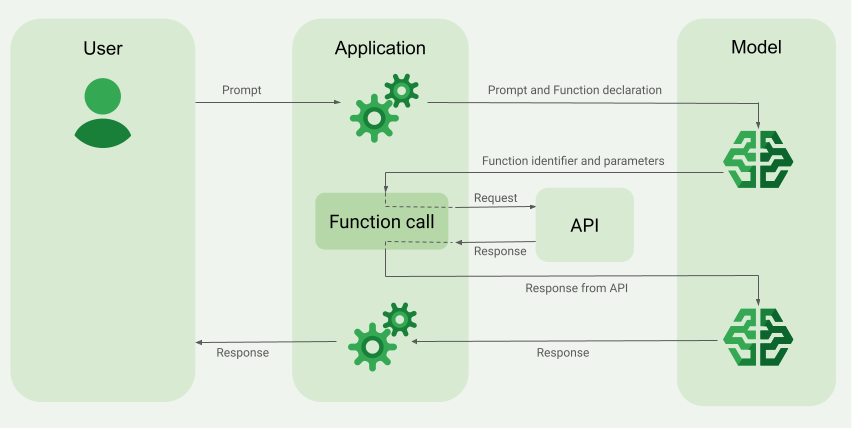
Когда вы отправляете запрос модели, вы также можете предоставить ей набор "инструментов" (например, функций), которые она может использовать для создания окончательного ответа. Чтобы использовать эти функции и вызывать их ("вызов функций"), модель и ваше приложение должны обмениваться информацией друг с другом, поэтому рекомендуемый способ использования вызова функций – через интерфейс многоэтапного чата.
Представьте, что у вас есть приложение, в котором пользователь может ввести запрос, например:
What was the weather in Boston on October 17, 2024?.
Модели Gemini могут не знать эту информацию о погоде, но представьте, что вы знаете внешний API сервиса погоды, который может ее предоставить. Вы можете использовать вызов функций, чтобы предоставить модели Gemini доступ к этому API и информации о погоде.
Сначала вы пишете в своем приложении функцию fetchWeather, которая взаимодействует с этим гипотетическим внешним API, имеющим следующие входные и выходные данные:
| Параметр | Тип | Обязательно | Описание |
|---|---|---|---|
| Запрос | |||
location |
Объект | Да | Название города и штата, для которого нужно получить прогноз погоды. Поддерживаются только города США. Всегда должен быть вложенным объектом city и state.
|
date |
Строка | Да | Дата, для которой нужно получить прогноз погоды (всегда должна быть в формате YYYY-MM-DD).
|
| Результат | |||
temperature |
Целое число | Да | Температура (в градусах Фаренгейта) |
chancePrecipitation |
Строка | Да | Вероятность осадков (в процентах). |
cloudConditions |
Строка | Да | Облачность (clear, partlyCloudy, mostlyCloudy или cloudy).
|
При инициализации модели вы сообщаете ей, что эта функция fetchWeather существует и как ее можно использовать для обработки входящих запросов, если это необходимо.
Это называется "объявление функции". Модель не вызывает функцию напрямую. Вместо этого модель, обрабатывая входящий запрос, решает, может ли функция fetchWeather помочь ей ответить на него. Если модель решает, что функция действительно может быть полезна, она генерирует структурированные данные, которые помогут вашему приложению вызвать функцию.
Посмотрите на входящий запрос:
What was the weather in Boston on October 17, 2024?. Модель, скорее всего, решит, что функция fetchWeather поможет ей сгенерировать ответ. Модель определит, какие входные параметры нужны для fetchWeather, и сгенерирует структурированные входные данные для функции, которые будут выглядеть примерно так:
{
  functionName: fetchWeather,
  location: {
    city: Boston,
    state: Massachusetts  // the model can infer the state from the prompt
  },
  date: 2024-10-17
}
Модель передает эти структурированные входные данные в приложение, чтобы оно могло вызвать функцию fetchWeather. Когда приложение получает погодные условия
обратно от API, оно передает информацию модели. Эта информация о погоде позволяет модели завершить окончательную обработку и сгенерировать ответ на первоначальный запрос What was the weather in Boston on October 17, 2024?.
Модель может предоставить окончательный ответ на естественном языке, например:
On October 17, 2024, in Boston, it was 38 degrees Fahrenheit with partly cloudy skies.
Как реализовать вызов функций
В этом руководстве показано, как настроить вызов функций, аналогичный описанному в разделе Обзор примера вызова функций в верхней части страницы.
Поддерживаемые модели
gemini-4-argongemini-3.8-flash(и более старыеgemini-3.7-flash,gemini-3.6-flashиgemini-3.5-flash)gemini-3.5-flash-lite(и более старая версияgemini-3.1-flash-lite)
Эта возможность также поддерживается в моделях gemini-3.1-pro-preview и Gemini 2.5 (которые больше не поддерживаются).
Модели Gemini Live API также поддерживают эту возможность, но все примеры кода в этом руководстве предназначены для моделей Gemini общего назначения.
Подготовка
|
Нажмите на название своего поставщика Gemini API, чтобы посмотреть контент и код, относящиеся к нему. |
Если вы ещё этого не сделали, ознакомьтесь с кратким руководством, в котором рассказывается, как настроить проект Firebase, подключить приложение к Firebase, добавить SDK, инициализировать бэкенд-службу для выбранного поставщика Gemini API и создать экземпляр GenerativeModel.
Для тестирования и доработки запросов рекомендуем использовать Google AI Studio.
Шаг 1. Напишите функцию
Представьте, что у вас есть приложение, в котором пользователь может ввести запрос, например:
What was the weather in Boston on October 17, 2024?. Модели Gemini могут не знать эту информацию о погоде, но представьте, что вы знаете о внешнем API службы погоды, который может ее предоставить. Сценарий в этом руководстве основан на этом гипотетическом внешнем API.
Напишите в приложении функцию, которая будет взаимодействовать с гипотетическим внешним API и предоставлять модели информацию, необходимую для создания окончательного запроса. В примере с погодой это будет функция fetchWeather, которая вызывает гипотетический внешний API.
Swift
// This function calls a hypothetical external API that returns
// a collection of weather information for a given location on a given date.
func fetchWeather(city: String, state: String, date: String) -> JSONObject {

  // TODO(developer): Write a standard function that would call an external weather API.

  // For demo purposes, this hypothetical response is hardcoded here in the expected format.
  return [
    "temperature": .number(38),
    "chancePrecipitation": .string("56%"),
    "cloudConditions": .string("partlyCloudy"),
  ]
}
Kotlin
// This function calls a hypothetical external API that returns
// a collection of weather information for a given location on a given date.
// `location` is an object of the form { city: string, state: string }
data class Location(val city: String, val state: String)

suspend fun fetchWeather(location: Location, date: String): JsonObject {

    // TODO(developer): Write a standard function that would call to an external weather API.

    // For demo purposes, this hypothetical response is hardcoded here in the expected format.
    return JsonObject(mapOf(
        "temperature" to JsonPrimitive(38),
        "chancePrecipitation" to JsonPrimitive("56%"),
        "cloudConditions" to JsonPrimitive("partlyCloudy")
    ))
}
Java
// This function calls a hypothetical external API that returns
// a collection of weather information for a given location on a given date.
// `location` is an object of the form { city: string, state: string }
public JsonObject fetchWeather(Location location, String date) {

  // TODO(developer): Write a standard function that would call to an external weather API.

  // For demo purposes, this hypothetical response is hardcoded here in the expected format.
  return new JsonObject(Map.of(
        "temperature", JsonPrimitive(38),
        "chancePrecipitation", JsonPrimitive("56%"),
        "cloudConditions", JsonPrimitive("partlyCloudy")));
}
Web
// This function calls a hypothetical external API that returns
// a collection of weather information for a given location on a given date.
// `location` is an object of the form { city: string, state: string }
async function fetchWeather({ location, date }) {

  // TODO(developer): Write a standard function that would call to an external weather API.

  // For demo purposes, this hypothetical response is hardcoded here in the expected format.
  return {
    temperature: 38,
    chancePrecipitation: "56%",
    cloudConditions: "partlyCloudy",
  };
}
Dart
// This function calls a hypothetical external API that returns
// a collection of weather information for a given location on a given date.
// `location` is an object of the form { city: string, state: string }
Future<Map<String, Object?>> fetchWeather(
  Location location, String date
) async {

  // TODO(developer): Write a standard function that would call to an external weather API.

  // For demo purposes, this hypothetical response is hardcoded here in the expected format.
  final apiResponse = {
    'temperature': 38,
    'chancePrecipitation': '56%',
    'cloudConditions': 'partlyCloudy',
  };
  return apiResponse;
}
Unity
// This function calls a hypothetical external API that returns
// a collection of weather information for a given location on a given date.
System.Collections.Generic.Dictionary<string, object> FetchWeather(
    string city, string state, string date) {

  // TODO(developer): Write a standard function that would call an external weather API.

  // For demo purposes, this hypothetical response is hardcoded here in the expected format.
  return new System.Collections.Generic.Dictionary<string, object>() {
    {"temperature", 38},
    {"chancePrecipitation", "56%"},
    {"cloudConditions", "partlyCloudy"},
  };
}
Шаг 2. Создайте объявление функции
Создайте объявление функции, которое вы позже предоставите модели (следующий шаг этого руководства).
В декларации укажите как можно больше подробностей в описаниях функции и ее параметров.
Модель использует информацию в объявлении функции, чтобы определить, какую функцию выбрать и как предоставить значения параметров для фактического вызова функции. О том, как модель выбирает функции и как вы можете управлять этим выбором, читайте в разделе Дополнительные варианты поведения и настройки ниже.
Обратите внимание на следующее:
Объявления функций должны быть представлены в формате, совместимом со схемой OpenAPI. Agent Platform предлагает ограниченную поддержку схемы OpenAPI.
Поддерживаются следующие атрибуты:
type,nullable,required,format,description,properties,items,enum.Не поддерживаются следующие атрибуты:
default,optional,maximum,oneOf.
По умолчанию для SDK Firebase AI Logic все поля считаются обязательными, если вы не укажете их как необязательные в массиве
optionalProperties. Модель может заполнить эти необязательные поля или пропустить их. Обратите внимание, что это противоположно режиму работы по умолчанию двух поставщиков Gemini API, если вы используете их серверные SDK или API напрямую.
Рекомендации по объявлению функций, в том числе советы по выбору названий и описаний, можно найти в разделе Рекомендации в документации Gemini Developer API.
Вот как можно написать объявление функции:
Swift
let fetchWeatherTool = FunctionDeclaration(
  name: "fetchWeather",
  description: "Get the weather conditions for a specific city on a specific date.",
  parameters: [
    "location": .object(
      properties: [
        "city": .string(description: "The city of the location."),
        "state": .string(description: "The US state of the location."),
      ],
      description: """
      The name of the city and its state for which to get the weather. Only cities in the
      USA are supported.
      """
    ),
    "date": .string(
      description: """
      The date for which to get the weather. Date must be in the format: YYYY-MM-DD.
      """
    ),
  ]
)
Kotlin
val fetchWeatherTool = FunctionDeclaration(
    "fetchWeather",
    "Get the weather conditions for a specific city on a specific date.",
    mapOf(
        "location" to Schema.obj(
            mapOf(
                "city" to Schema.string("The city of the location."),
                "state" to Schema.string("The US state of the location."),
            ),
            description = "The name of the city and its state for which " +
                "to get the weather. Only cities in the " +
                "USA are supported."
        ),
        "date" to Schema.string("The date for which to get the weather." +
                                " Date must be in the format: YYYY-MM-DD."
        ),
    ),
)
Java
FunctionDeclaration fetchWeatherTool = new FunctionDeclaration(
        "fetchWeather",
        "Get the weather conditions for a specific city on a specific date.",
        Map.of("location",
                Schema.obj(Map.of(
                        "city", Schema.str("The city of the location."),
                        "state", Schema.str("The US state of the location."))),
                "date",
                Schema.str("The date for which to get the weather. " +
                              "Date must be in the format: YYYY-MM-DD.")),
        Collections.emptyList());
Web
const fetchWeatherTool: FunctionDeclarationsTool = {
  functionDeclarations: [
   {
      name: "fetchWeather",
      description:
        "Get the weather conditions for a specific city on a specific date",
      parameters: Schema.object({
        properties: {
          location: Schema.object({
            description:
              "The name of the city and its state for which to get " +
              "the weather. Only cities in the USA are supported.",
            properties: {
              city: Schema.string({
                description: "The city of the location."
              }),
              state: Schema.string({
                description: "The US state of the location."
              }),
            },
          }),
          date: Schema.string({
            description:
              "The date for which to get the weather. Date must be in the" +
              " format: YYYY-MM-DD.",
          }),
        },
      }),
    },
  ],
};
Dart
final fetchWeatherTool = FunctionDeclaration(
    'fetchWeather',
    'Get the weather conditions for a specific city on a specific date.',
    parameters: {
      'location': Schema.object(
        description:
          'The name of the city and its state for which to get'
          'the weather. Only cities in the USA are supported.',
        properties: {
          'city': Schema.string(
             description: 'The city of the location.'
           ),
          'state': Schema.string(
             description: 'The US state of the location.'
          ),
        },
      ),
      'date': Schema.string(
        description:
          'The date for which to get the weather. Date must be in the format: YYYY-MM-DD.'
      ),
    },
  );
Unity
var fetchWeatherTool = new Tool(new FunctionDeclaration(
  name: "fetchWeather",
  description: "Get the weather conditions for a specific city on a specific date.",
  parameters: new System.Collections.Generic.Dictionary<string, Schema>() {
    { "location", Schema.Object(
      properties: new System.Collections.Generic.Dictionary<string, Schema>() {
        { "city", Schema.String(description: "The city of the location.") },
        { "state", Schema.String(description: "The US state of the location.")}
      },
      description: "The name of the city and its state for which to get the weather. Only cities in the USA are supported."
    ) },
    { "date", Schema.String(
      description: "The date for which to get the weather. Date must be in the format: YYYY-MM-DD."
    )}
  }
));
Шаг 3. Укажите объявление функции во время инициализации модели
Максимальное количество объявлений функций, которые вы можете предоставить в запросе, – 128. В разделе Дополнительные варианты поведения и настройки ниже на этой странице рассказывается, как модель выбирает функции и как вы можете управлять этим выбором (используя toolConfig, чтобы задать режим вызова функций).
Swift
import FirebaseAILogic

// Initialize the Gemini Developer API backend service.
// Create a `GenerativeModel` instance with a model that supports your use case.
let model = FirebaseAI.firebaseAI(backend: .googleAI()).generativeModel(
  modelName: "GEMINI_MODEL_NAME",
  // Provide the function declaration to the model.
  tools: [.functionDeclarations([fetchWeatherTool])]
)
Kotlin
// Initialize the Gemini Developer API backend service.
// Create a `GenerativeModel` instance with a model that supports your use case.
val model = Firebase.ai(backend = GenerativeBackend.googleAI()).generativeModel(
    modelName = "<var>GEMINI_MODEL_NAME</var>",
    // Provide the function declaration to the model.
    tools = listOf(Tool.functionDeclarations(listOf(fetchWeatherTool)))
)
Java
// Initialize the Gemini Developer API backend service.
// Create a `GenerativeModel` instance with a model that supports your use case.
GenerativeModelFutures model = GenerativeModelFutures.from(
        FirebaseAI.getInstance(GenerativeBackend.googleAI())
                .generativeModel("<var>GEMINI_MODEL_NAME</var>",
                        null,
                        null,
                        // Provide the function declaration to the model.
                        List.of(Tool.functionDeclarations(List.of(fetchWeatherTool)))));
Web
import { initializeApp } from "firebase/app";
import { getAI, getGenerativeModel, GoogleAIBackend } from "firebase/ai";

// TODO(developer): Replace the following with your app's Firebase configuration
// See: https://firebase.google.com/docs/web/learn-more#config-object
const firebaseConfig = {
  // ...
};

// Initialize FirebaseApp
const firebaseApp = initializeApp(firebaseConfig);

// Initialize the Gemini Developer API backend service.
const firebaseAI = getAI(firebaseApp, { backend: new GoogleAIBackend() });

// Create a `GenerativeModel` instance with a model that supports your use case.
const model = getGenerativeModel(firebaseAI, {
  model: "GEMINI_MODEL_NAME",
  // Provide the function declaration to the model.
  tools: fetchWeatherTool
});
Dart
import 'package:firebase_ai/firebase_ai.dart';
import 'package:firebase_core/firebase_core.dart';
import 'firebase_options.dart';

// Initialize FirebaseApp
await Firebase.initializeApp(
  options: DefaultFirebaseOptions.currentPlatform,
);

// Initialize the Gemini Developer API backend service.
// Create a `GenerativeModel` instance with a model that supports your use case.
_functionCallModel = FirebaseAI.googleAI().generativeModel(
       model: 'GEMINI_MODEL_NAME',
       // Provide the function declaration to the model.
       tools: [
         Tool.functionDeclarations([fetchWeatherTool]),
       ],
     );
Unity
using Firebase;
using Firebase.AI;

// Initialize the Gemini Developer API backend service.
// Create a `GenerativeModel` instance with a model that supports your use case.
var model = FirebaseAI.DefaultInstance.GetGenerativeModel(
  modelName: "GEMINI_MODEL_NAME",
  // Provide the function declaration to the model.
  tools: new Tool[] { fetchWeatherTool }
);
Узнайте, как выбрать модель в зависимости от вашего приложения и целей.
Шаг 4. Вызовите функцию, чтобы запустить внешний API
Если модель решит, что функция fetchWeather действительно может помочь ей сгенерировать окончательный ответ, вашему приложению необходимо выполнить фактический вызов этой функции, используя структурированные входные данные, предоставленные моделью.
Поскольку информация должна передаваться между моделью и приложением, рекомендуется использовать вызов функций через интерфейс чата с несколькими репликами.
В следующем фрагменте кода показано, как приложение узнает, что модель хочет использовать функцию fetchWeather. Это также показывает, что модель предоставила необходимые значения входных параметров для вызова функции (и ее базового внешнего API).
В этом примере входящий запрос содержал подсказку What was the weather in Boston on October 17, 2024?. На основе этого запроса модель определила входные параметры, необходимые для функции fetchWeather (city, state и date).
Swift
let chat = model.startChat()
let prompt = "What was the weather in Boston on October 17, 2024?"

// Send the user's question (the prompt) to the model using multi-turn chat.
let response = try await chat.sendMessage(prompt)

var functionResponses = [FunctionResponsePart]()

// When the model responds with one or more function calls, invoke the function(s).
for functionCall in response.functionCalls {
  if functionCall.name == "fetchWeather" {
    // TODO(developer): Handle invalid arguments.
    guard case let .object(location) = functionCall.args["location"] else { fatalError() }
    guard case let .string(city) = location["city"] else { fatalError() }
    guard case let .string(state) = location["state"] else { fatalError() }
    guard case let .string(date) = functionCall.args["date"] else { fatalError() }

    functionResponses.append(FunctionResponsePart(
      name: functionCall.name,
      // Forward the structured input data prepared by the model
      // to the hypothetical external API.
      response: fetchWeather(city: city, state: state, date: date)
    ))
  }
  // TODO(developer): Handle other potential function calls, if any.
}
Kotlin
val prompt = "What was the weather in Boston on October 17, 2024?"
val chat = model.startChat()
// Send the user's question (the prompt) to the model using multi-turn chat.
val result = chat.sendMessage(prompt)

val functionCalls = result.functionCalls
// When the model responds with one or more function calls, invoke the function(s).
val fetchWeatherCall = functionCalls.find { it.name == "fetchWeather" }

// Forward the structured input data prepared by the model
// to the hypothetical external API.
val functionResponse = fetchWeatherCall?.let {
    // Alternatively, if your `Location` class is marked as @Serializable, you can use
    // val location = Json.decodeFromJsonElement<Location>(it.args["location"]!!)
    val location = Location(
        it.args["location"]!!.jsonObject["city"]!!.jsonPrimitive.content,
        it.args["location"]!!.jsonObject["state"]!!.jsonPrimitive.content
    )
    val date = it.args["date"]!!.jsonPrimitive.content
    fetchWeather(location, date)
}
Java
String prompt = "What was the weather in Boston on October 17, 2024?";
ChatFutures chatFutures = model.startChat();
// Send the user's question (the prompt) to the model using multi-turn chat.
ListenableFuture<GenerateContentResponse> response =
        chatFutures.sendMessage(new Content("user", List.of(new TextPart(prompt))));

ListenableFuture<JsonObject> handleFunctionCallFuture = Futures.transform(response, result -> {
    for (FunctionCallPart functionCall : result.getFunctionCalls()) {
        if (functionCall.getName().equals("fetchWeather")) {
            Map<String, JsonElement> args = functionCall.getArgs();
            JsonObject locationJsonObject =
                    JsonElementKt.getJsonObject(args.get("location"));
            String city =
                    JsonElementKt.getContentOrNull(
                            JsonElementKt.getJsonPrimitive(
                                    locationJsonObject.get("city")));
            String state =
                    JsonElementKt.getContentOrNull(
                            JsonElementKt.getJsonPrimitive(
                                    locationJsonObject.get("state")));
            Location location = new Location(city, state);

            String date = JsonElementKt.getContentOrNull(
                    JsonElementKt.getJsonPrimitive(
                            args.get("date")));
            return fetchWeather(location, date);
        }
    }
    return null;
}, Executors.newSingleThreadExecutor());
Web
const chat = model.startChat();
const prompt = "What was the weather in Boston on October 17, 2024?";

// Send the user's question (the prompt) to the model using multi-turn chat.
let result = await chat.sendMessage(prompt);
const functionCalls = result.response.functionCalls();
let functionCall;
let functionResult;
// When the model responds with one or more function calls, invoke the function(s).
if (functionCalls.length > 0) {
  for (const call of functionCalls) {
    if (call.name === "fetchWeather") {
      // Forward the structured input data prepared by the model
      // to the hypothetical external API.
      functionResult = await fetchWeather(call.args);
      functionCall = call;
    }
  }
}
Dart
final chat = _functionCallModel.startChat();
const prompt = 'What was the weather in Boston on October 17, 2024?';

// Send the user's question (the prompt) to the model using multi-turn chat.
var response = await chat.sendMessage(Content.text(prompt));

final functionCalls = response.functionCalls.toList();
// When the model responds with one or more function calls, invoke the function(s).
if (functionCalls.isNotEmpty) {
  for (final functionCall in functionCalls) {
    if (functionCall.name == 'fetchWeather') {
      Map<String, dynamic> location =
          functionCall.args['location']! as Map<String, dynamic>;
      var date = functionCall.args['date']! as String;
      var city = location['city'] as String;
      var state = location['state'] as String;
      final functionResult =
          await fetchWeather(Location(city, state), date);
      // Send the response to the model so that it can use the result to
      // generate text for the user.
      response = await chat.sendMessage(
        Content.functionResponse(functionCall.name, functionResult),
      );
    }
  }
} else {
  throw UnimplementedError(
    'No function calls returned by the model',
  );
}
Unity
var chat = model.StartChat();
var prompt = "What was the weather in Boston on October 17, 2024?";

// Send the user's question (the prompt) to the model using multi-turn chat.
var response = await chat.SendMessageAsync(prompt);

var functionResponses = new List<ModelContent>();

foreach (var functionCall in response.FunctionCalls) {
  if (functionCall.Name == "fetchWeather") {
    // TODO(developer): Handle invalid arguments.
    var city = functionCall.Args["city"] as string;
    var state = functionCall.Args["state"] as string;
    var date = functionCall.Args["date"] as string;

    functionResponses.Add(ModelContent.FunctionResponse(
      name: functionCall.Name,
      // Forward the structured input data prepared by the model
      // to the hypothetical external API.
      response: FetchWeather(city: city, state: state, date: date)
    ));
  }
  // TODO(developer): Handle other potential function calls, if any.
}
Шаг 5. Передайте выходные данные функции модели, чтобы сгенерировать окончательный ответ
После того как функция fetchWeather вернет информацию о погоде, ваше приложение должно передать ее обратно в модель.
Затем модель выполняет окончательную обработку и генерирует ответ на естественном языке, например:
On October 17, 2024 in Boston, it was 38 degrees Fahrenheit with partly cloudy skies.
Swift
// Send the response(s) from the function back to the model
// so that the model can use it to generate its final response.
let finalResponse = try await chat.sendMessage(
  [ModelContent(role: "user", parts: functionResponses)]
)

// Log the text response.
print(finalResponse.text ?? "No text in response.")
Kotlin
// Send the response(s) from the function back to the model
// so that the model can use it to generate its final response.
val finalResponse = chat.sendMessage(content("user") {
    part(FunctionResponsePart("fetchWeather", functionResponse!!))
})

// Log the text response.
println(finalResponse.text ?: "No text in response")
Java
ListenableFuture<GenerateContentResponse> modelResponseFuture = Futures.transformAsync(
  handleFunctionCallFuture,
  // Send the response(s) from the function back to the model
  // so that the model can use it to generate its final response.
  functionCallResult -> chatFutures.sendMessage(new Content("user",
  List.of(new FunctionResponsePart(
          "fetchWeather", functionCallResult)))),
  Executors.newSingleThreadExecutor());

Futures.addCallback(modelResponseFuture, new FutureCallback<GenerateContentResponse>() {
@Override
public void onSuccess(GenerateContentResponse result) {
  if (result.getText() != null) {
      // Log the text response.
      System.out.println(result.getText());
  }
}

@Override
public void onFailure(Throwable t) {
  // handle error
}
}, Executors.newSingleThreadExecutor());
Web
// Send the response from the function back to the model
// so that the model can use it to generate its final response.
result = await chat.sendMessage([
  {
    type: "functionResponse",
    functionResponse: {
      name: functionCall.name, // "fetchWeather"
      response: functionResult,
    },
  },
]);
console.log(result.response.text());
Dart
// Send the response from the function back to the model
// so that the model can use it to generate its final response.
response = await chat
     .sendMessage(Content.functionResponse(functionCall.name, functionResult));
Unity
// Send the response(s) from the function back to the model
// so that the model can use it to generate its final response.
var finalResponse = await chat.SendMessageAsync(functionResponses);

// Log the text response.
UnityEngine.Debug.Log(finalResponse.Text ?? "No text in response.");
Дополнительные действия и параметры
Ниже приведены некоторые дополнительные особенности вызова функций, которые необходимо учитывать в коде, и параметры, которыми вы можете управлять.
Модель может запросить повторный вызов функции или вызов другой функции.
Если ответа от одного вызова функции недостаточно для генерации окончательного ответа, модель может запросить дополнительный вызов функции или вызов совершенно другой функции. Последнее может произойти, только если вы предоставите модели несколько функций в списке объявлений функций.
Ваше приложение должно учитывать, что модель может запрашивать дополнительные вызовы функций.
Модель может запросить вызов нескольких функций одновременно.
В списке объявлений функций для модели можно указать до 128 функций. В таком случае модель может решить, что для генерации окончательного ответа ей нужно несколько функций. Иногда модель может вызвать несколько функций одновременно. Это называется параллельным вызовом функций.
Приложение должно быть готово к тому, что модель может запросить одновременное выполнение нескольких функций, и должно вернуть модели все ответы от них.
Вы можете управлять тем, как и может ли модель запрашивать вызов функций.
Вы можете наложить некоторые ограничения на то, как и должна ли модель использовать предоставленные объявления функций. Это называется настройкой режима вызова функций. Вот несколько примеров:
Вместо того чтобы позволять модели выбирать между немедленным ответом на естественном языке и вызовом функции, вы можете заставить ее всегда использовать вызовы функций. Это называется принудительным вызовом функций.
Если вы предоставляете несколько объявлений функций, вы можете ограничить модель использованием только подмножества предоставленных функций.
Чтобы задать эти ограничения (или режимы), добавьте конфигурацию инструмента (toolConfig) вместе с запросом и объявлениями функций. В конфигурации инструмента можно указать один из следующих режимов: Наиболее полезный режим – ANY.
| Режим | Описание |
|---|---|
AUTO |
Поведение модели по умолчанию. Модель решает, использовать ли вызов функции или ответ на естественном языке. |
ANY |
Модель должна использовать вызовы функций ("принудительный вызов функций"). Чтобы ограничить модель подмножеством функций, укажите разрешенные имена функций в allowedFunctionNames.
|
NONE |
Модель не должна использовать вызовы функций. Это поведение эквивалентно запросу модели без каких-либо связанных объявлений функций. |
Что ещё ты умеешь делать?
Попробуйте другие возможности
- Создавайте пошаговые чаты.
- Генерировать текст на основе текстовых запросов.
- Генерируйте текст, используя запросы с файлами разных типов, например изображениями, PDF-документами, видео и аудио.
Как управлять созданием контента
- Узнайте, как составлять запросы, в том числе ознакомьтесь с рекомендациями, стратегиями и примерами.
- Настройте параметры модели, например максимальное количество выходных токенов, вероятность повторения выходных токенов и т. д.
- Используйте настройки безопасности, чтобы снизить вероятность получения ответов, которые могут считаться вредоносными.
Подробнее о поддерживаемых моделях
Узнайте, какие модели доступны для разных вариантов использования, а также ознакомьтесь с их квотами и ценами.Оставить отзыв о работе с Firebase AI Logic