

生成式模型能有效解決多種問題,但仍受限於以下限制:
- 訓練後即停止更新,導致知識過時。
- 無法查詢或修改外部資料。
呼叫函式可協助您克服部分限制。呼叫函式有時稱為工具使用,因為模型可使用 API 和函式等外部工具,生成最終回覆。
本指南將說明如何實作函式呼叫設定,類似於本頁下一個主要章節所述的情境。在應用程式中設定呼叫函式的大致步驟如下:
步驟 1:編寫函式,為模型提供生成最終回覆所需的資訊 (例如,函式可以呼叫外部 API)。
步驟 2:建立函式宣告,說明函式及其參數。
步驟 3:在模型初始化期間提供函式宣告,讓模型知道如何在需要時使用函式。
步驟 4:設定應用程式,讓模型能傳送必要資訊,供應用程式呼叫函式。
步驟 5:將函式的回覆傳回模型,讓模型生成最終回覆。
函式呼叫範例總覽
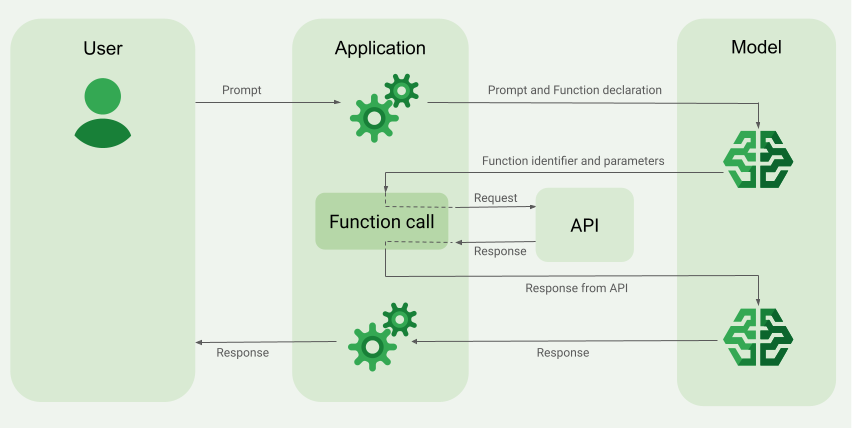
向模型傳送要求時,您也可以提供一組「工具」(例如函式),讓模型用來生成最終回覆。為了使用及呼叫這些函式 (「呼叫函式」),模型和應用程式需要來回傳遞資訊,因此建議透過多輪對話介面使用呼叫函式。
假設您有一個應用程式,使用者可以輸入提示,例如:What was the weather in Boston on October 17, 2024?。
Gemini 模型可能不知道這項天氣資訊,但假設您知道有外部天氣服務 API 可以提供這項資訊。您可以使用函式呼叫,為 Gemini 模型提供該 API 及其天氣資訊的路徑。
首先,在應用程式中編寫函式 fetchWeather,與這個假設的外部 API 互動,該 API 具有以下輸入和輸出內容:
| 參數 | 類型 | 必要 | 說明 |
|---|---|---|---|
| 輸入 | |||
location |
物件 | 是 | 要查詢天氣的城市和州名。 僅支援美國城市。一律須為 city 和 state 的巢狀物件。 |
date |
字串 | 是 | 要擷取天氣資訊的日期 (必須一律採用 YYYY-MM-DD 格式)。 |
| 輸出 | |||
temperature |
整數 | 是 | 溫度 (華氏) |
chancePrecipitation |
字串 | 是 | 降水機率 (以百分比表示) |
cloudConditions |
字串 | 是 | 雲層狀況 (clear、partlyCloudy、mostlyCloudy、cloudy 之一) |
初始化模型時,您會告知模型這個 fetchWeather 函式存在,以及如何視需要使用該函式處理傳入的要求。這稱為「函式宣告」。模型不會直接呼叫函式,而是在處理傳入的要求時,判斷 fetchWeather 函式是否能協助回覆要求。如果模型判斷函式確實有用,就會生成結構化資料,協助應用程式呼叫函式。
再次查看傳入的要求:What was the weather in Boston on October 17, 2024?。模型可能會判斷 fetchWeather 函式有助於生成回覆,模型會查看 fetchWeather 需要哪些輸入參數,然後為函式生成結構化輸入資料,大致如下:
{
  functionName: fetchWeather,
  location: {
    city: Boston,
    state: Massachusetts  // the model can infer the state from the prompt
  },
  date: 2024-10-17
}
模型會將這項結構化輸入資料傳遞至應用程式,讓應用程式呼叫 fetchWeather 函式。應用程式從 API 收到天氣狀況後,會將資訊傳遞給模型。模型會利用這項天氣資訊完成最終處理,並針對 What was the weather in Boston on October 17, 2024? 的初始要求生成回覆
模型可能會提供最終的自然語言回覆,例如:
On October 17, 2024, in Boston, it was 38 degrees Fahrenheit with partly cloudy skies.
實作呼叫函式
本指南的後續步驟將說明如何實作函式呼叫設定,類似於「函式呼叫範例總覽」一節所述的工作流程 (請參閱本頁頂端)。
支援的模型
gemini-4-argongemini-3.8-flash(以及舊版gemini-3.7-flash、gemini-3.6-flash和gemini-3.5-flash)gemini-3.5-flash-lite(以及舊版gemini-3.1-flash-lite)
gemini-3.1-pro-preview 和一般用途 Gemini 2.5 模型 (已淘汰) 也支援這項功能。
Gemini Live API 模型也支援這項功能,但本指南中的所有程式碼範例都適用於一般用途的 Gemini 模型。
事前準備
|
按一下您的Gemini API供應商,即可在這個頁面查看供應商專屬內容和程式碼。 |
如果尚未完成入門指南,請先完成。該指南說明如何設定 Firebase 專案、將應用程式連結至 Firebase、新增 SDK、為所選 Gemini API 供應商初始化後端服務,以及建立 GenerativeModel 執行個體。
如要測試及反覆調整提示,建議使用 Google AI Studio。
步驟 1:編寫函式
假設您有一個應用程式,使用者可以輸入提示,例如:What was the weather in Boston on October 17, 2024?。Gemini 模型可能不知道這項天氣資訊,但假設您知道有外部天氣服務 API 可以提供這項資訊。本指南中的情境會使用這個假設的外部 API。
在應用程式中編寫函式,與假設的外部 API 互動,並提供模型所需資訊,以便生成最終要求。在這個天氣範例中,fetchWeather 函式會呼叫這個假設的外部 API。
Swift
// This function calls a hypothetical external API that returns
// a collection of weather information for a given location on a given date.
func fetchWeather(city: String, state: String, date: String) -> JSONObject {

  // TODO(developer): Write a standard function that would call an external weather API.

  // For demo purposes, this hypothetical response is hardcoded here in the expected format.
  return [
    "temperature": .number(38),
    "chancePrecipitation": .string("56%"),
    "cloudConditions": .string("partlyCloudy"),
  ]
}
Kotlin
// This function calls a hypothetical external API that returns
// a collection of weather information for a given location on a given date.
// `location` is an object of the form { city: string, state: string }
data class Location(val city: String, val state: String)

suspend fun fetchWeather(location: Location, date: String): JsonObject {

    // TODO(developer): Write a standard function that would call to an external weather API.

    // For demo purposes, this hypothetical response is hardcoded here in the expected format.
    return JsonObject(mapOf(
        "temperature" to JsonPrimitive(38),
        "chancePrecipitation" to JsonPrimitive("56%"),
        "cloudConditions" to JsonPrimitive("partlyCloudy")
    ))
}
Java
// This function calls a hypothetical external API that returns
// a collection of weather information for a given location on a given date.
// `location` is an object of the form { city: string, state: string }
public JsonObject fetchWeather(Location location, String date) {

  // TODO(developer): Write a standard function that would call to an external weather API.

  // For demo purposes, this hypothetical response is hardcoded here in the expected format.
  return new JsonObject(Map.of(
        "temperature", JsonPrimitive(38),
        "chancePrecipitation", JsonPrimitive("56%"),
        "cloudConditions", JsonPrimitive("partlyCloudy")));
}
Web
// This function calls a hypothetical external API that returns
// a collection of weather information for a given location on a given date.
// `location` is an object of the form { city: string, state: string }
async function fetchWeather({ location, date }) {

  // TODO(developer): Write a standard function that would call to an external weather API.

  // For demo purposes, this hypothetical response is hardcoded here in the expected format.
  return {
    temperature: 38,
    chancePrecipitation: "56%",
    cloudConditions: "partlyCloudy",
  };
}
Dart
// This function calls a hypothetical external API that returns
// a collection of weather information for a given location on a given date.
// `location` is an object of the form { city: string, state: string }
Future<Map<String, Object?>> fetchWeather(
  Location location, String date
) async {

  // TODO(developer): Write a standard function that would call to an external weather API.

  // For demo purposes, this hypothetical response is hardcoded here in the expected format.
  final apiResponse = {
    'temperature': 38,
    'chancePrecipitation': '56%',
    'cloudConditions': 'partlyCloudy',
  };
  return apiResponse;
}
Unity
// This function calls a hypothetical external API that returns
// a collection of weather information for a given location on a given date.
System.Collections.Generic.Dictionary<string, object> FetchWeather(
    string city, string state, string date) {

  // TODO(developer): Write a standard function that would call an external weather API.

  // For demo purposes, this hypothetical response is hardcoded here in the expected format.
  return new System.Collections.Generic.Dictionary<string, object>() {
    {"temperature", 38},
    {"chancePrecipitation", "56%"},
    {"cloudConditions", "partlyCloudy"},
  };
}
步驟 2:建立函式宣告
建立函式宣告,稍後提供給模型 (本指南的下一個步驟)。
在宣告中,請盡可能詳細說明函式及其參數。
模型會根據函式宣告中的資訊,決定要選取哪個函式,以及如何為實際呼叫函式提供參數值。請參閱本頁後續的「其他行為和選項」一節,瞭解模型如何選擇函式,以及如何控制這項選擇。
請注意下列有關結構定義的事項:
您必須以與 OpenAPI 結構定義相容的結構定義格式提供函式宣告。Agent Platform 僅支援部分 OpenAPI 結構定義。
支援的屬性如下:
type、nullable、required、format、description、properties、items、enum。不支援下列屬性:
default、optional、maximum、oneOf。
根據預設,對於 Firebase AI Logic SDK,除非您在
optionalProperties陣列中將欄位指定為選填,否則所有欄位都會視為必填。對於這些選項欄位,模型可以填入欄位或略過。請注意,如果您直接使用這兩個 Gemini API 供應商的伺服器 SDK 或 API,這與其預設行為相反。
如需函式宣告的最佳做法,包括名稱和說明的提示,請參閱 Google Cloud 說明文件中的「 Gemini Developer API 說明文件中的最佳做法。
函式宣告的編寫方式如下:
Swift
let fetchWeatherTool = FunctionDeclaration(
  name: "fetchWeather",
  description: "Get the weather conditions for a specific city on a specific date.",
  parameters: [
    "location": .object(
      properties: [
        "city": .string(description: "The city of the location."),
        "state": .string(description: "The US state of the location."),
      ],
      description: """
      The name of the city and its state for which to get the weather. Only cities in the
      USA are supported.
      """
    ),
    "date": .string(
      description: """
      The date for which to get the weather. Date must be in the format: YYYY-MM-DD.
      """
    ),
  ]
)
Kotlin
val fetchWeatherTool = FunctionDeclaration(
    "fetchWeather",
    "Get the weather conditions for a specific city on a specific date.",
    mapOf(
        "location" to Schema.obj(
            mapOf(
                "city" to Schema.string("The city of the location."),
                "state" to Schema.string("The US state of the location."),
            ),
            description = "The name of the city and its state for which " +
                "to get the weather. Only cities in the " +
                "USA are supported."
        ),
        "date" to Schema.string("The date for which to get the weather." +
                                " Date must be in the format: YYYY-MM-DD."
        ),
    ),
)
Java
FunctionDeclaration fetchWeatherTool = new FunctionDeclaration(
        "fetchWeather",
        "Get the weather conditions for a specific city on a specific date.",
        Map.of("location",
                Schema.obj(Map.of(
                        "city", Schema.str("The city of the location."),
                        "state", Schema.str("The US state of the location."))),
                "date",
                Schema.str("The date for which to get the weather. " +
                              "Date must be in the format: YYYY-MM-DD.")),
        Collections.emptyList());
Web
const fetchWeatherTool: FunctionDeclarationsTool = {
  functionDeclarations: [
   {
      name: "fetchWeather",
      description:
        "Get the weather conditions for a specific city on a specific date",
      parameters: Schema.object({
        properties: {
          location: Schema.object({
            description:
              "The name of the city and its state for which to get " +
              "the weather. Only cities in the USA are supported.",
            properties: {
              city: Schema.string({
                description: "The city of the location."
              }),
              state: Schema.string({
                description: "The US state of the location."
              }),
            },
          }),
          date: Schema.string({
            description:
              "The date for which to get the weather. Date must be in the" +
              " format: YYYY-MM-DD.",
          }),
        },
      }),
    },
  ],
};
Dart
final fetchWeatherTool = FunctionDeclaration(
    'fetchWeather',
    'Get the weather conditions for a specific city on a specific date.',
    parameters: {
      'location': Schema.object(
        description:
          'The name of the city and its state for which to get'
          'the weather. Only cities in the USA are supported.',
        properties: {
          'city': Schema.string(
             description: 'The city of the location.'
           ),
          'state': Schema.string(
             description: 'The US state of the location.'
          ),
        },
      ),
      'date': Schema.string(
        description:
          'The date for which to get the weather. Date must be in the format: YYYY-MM-DD.'
      ),
    },
  );
Unity
var fetchWeatherTool = new Tool(new FunctionDeclaration(
  name: "fetchWeather",
  description: "Get the weather conditions for a specific city on a specific date.",
  parameters: new System.Collections.Generic.Dictionary<string, Schema>() {
    { "location", Schema.Object(
      properties: new System.Collections.Generic.Dictionary<string, Schema>() {
        { "city", Schema.String(description: "The city of the location.") },
        { "state", Schema.String(description: "The US state of the location.")}
      },
      description: "The name of the city and its state for which to get the weather. Only cities in the USA are supported."
    ) },
    { "date", Schema.String(
      description: "The date for which to get the weather. Date must be in the format: YYYY-MM-DD."
    )}
  }
));
步驟 3:在模型初始化期間提供函式宣告
要求中最多可提供 128 個函式宣告。請參閱本頁後續的「其他行為和選項」一節,瞭解模型如何選擇函式,以及如何控制該選擇 (使用 toolConfig 設定函式呼叫模式)。
Swift
import FirebaseAILogic

// Initialize the Gemini Developer API backend service.
// Create a `GenerativeModel` instance with a model that supports your use case.
let model = FirebaseAI.firebaseAI(backend: .googleAI()).generativeModel(
  modelName: "GEMINI_MODEL_NAME",
  // Provide the function declaration to the model.
  tools: [.functionDeclarations([fetchWeatherTool])]
)
Kotlin
// Initialize the Gemini Developer API backend service.
// Create a `GenerativeModel` instance with a model that supports your use case.
val model = Firebase.ai(backend = GenerativeBackend.googleAI()).generativeModel(
    modelName = "<var>GEMINI_MODEL_NAME</var>",
    // Provide the function declaration to the model.
    tools = listOf(Tool.functionDeclarations(listOf(fetchWeatherTool)))
)
Java
// Initialize the Gemini Developer API backend service.
// Create a `GenerativeModel` instance with a model that supports your use case.
GenerativeModelFutures model = GenerativeModelFutures.from(
        FirebaseAI.getInstance(GenerativeBackend.googleAI())
                .generativeModel("<var>GEMINI_MODEL_NAME</var>",
                        null,
                        null,
                        // Provide the function declaration to the model.
                        List.of(Tool.functionDeclarations(List.of(fetchWeatherTool)))));
Web
import { initializeApp } from "firebase/app";
import { getAI, getGenerativeModel, GoogleAIBackend } from "firebase/ai";

// TODO(developer): Replace the following with your app's Firebase configuration
// See: https://firebase.google.com/docs/web/learn-more#config-object
const firebaseConfig = {
  // ...
};

// Initialize FirebaseApp
const firebaseApp = initializeApp(firebaseConfig);

// Initialize the Gemini Developer API backend service.
const firebaseAI = getAI(firebaseApp, { backend: new GoogleAIBackend() });

// Create a `GenerativeModel` instance with a model that supports your use case.
const model = getGenerativeModel(firebaseAI, {
  model: "GEMINI_MODEL_NAME",
  // Provide the function declaration to the model.
  tools: fetchWeatherTool
});
Dart
import 'package:firebase_ai/firebase_ai.dart';
import 'package:firebase_core/firebase_core.dart';
import 'firebase_options.dart';

// Initialize FirebaseApp
await Firebase.initializeApp(
  options: DefaultFirebaseOptions.currentPlatform,
);

// Initialize the Gemini Developer API backend service.
// Create a `GenerativeModel` instance with a model that supports your use case.
_functionCallModel = FirebaseAI.googleAI().generativeModel(
       model: 'GEMINI_MODEL_NAME',
       // Provide the function declaration to the model.
       tools: [
         Tool.functionDeclarations([fetchWeatherTool]),
       ],
     );
Unity
using Firebase;
using Firebase.AI;

// Initialize the Gemini Developer API backend service.
// Create a `GenerativeModel` instance with a model that supports your use case.
var model = FirebaseAI.DefaultInstance.GetGenerativeModel(
  modelName: "GEMINI_MODEL_NAME",
  // Provide the function declaration to the model.
  tools: new Tool[] { fetchWeatherTool }
);
瞭解如何根據用途和應用程式,選擇模型 。
步驟 4:呼叫函式來叫用外部 API
如果模型判斷 fetchWeather 函式確實有助於生成最終回覆,應用程式就必須使用模型提供的結構化輸入資料,實際呼叫該函式。
由於資訊需要在模型和應用程式之間來回傳遞,建議透過多輪對話介面使用呼叫函式。
下列程式碼片段說明應用程式如何得知模型要使用 fetchWeather 函式。此外,模型也為函式呼叫 (及其基礎外部 API) 提供必要的輸入參數值。
在這個範例中,傳入的要求包含提示 What was the weather in Boston on October 17, 2024?。模型會根據這則提示,推論 fetchWeather 函式所需的輸入參數 (即 city、state 和 date)。
Swift
let chat = model.startChat()
let prompt = "What was the weather in Boston on October 17, 2024?"

// Send the user's question (the prompt) to the model using multi-turn chat.
let response = try await chat.sendMessage(prompt)

var functionResponses = [FunctionResponsePart]()

// When the model responds with one or more function calls, invoke the function(s).
for functionCall in response.functionCalls {
  if functionCall.name == "fetchWeather" {
    // TODO(developer): Handle invalid arguments.
    guard case let .object(location) = functionCall.args["location"] else { fatalError() }
    guard case let .string(city) = location["city"] else { fatalError() }
    guard case let .string(state) = location["state"] else { fatalError() }
    guard case let .string(date) = functionCall.args["date"] else { fatalError() }

    functionResponses.append(FunctionResponsePart(
      name: functionCall.name,
      // Forward the structured input data prepared by the model
      // to the hypothetical external API.
      response: fetchWeather(city: city, state: state, date: date)
    ))
  }
  // TODO(developer): Handle other potential function calls, if any.
}
Kotlin
val prompt = "What was the weather in Boston on October 17, 2024?"
val chat = model.startChat()
// Send the user's question (the prompt) to the model using multi-turn chat.
val result = chat.sendMessage(prompt)

val functionCalls = result.functionCalls
// When the model responds with one or more function calls, invoke the function(s).
val fetchWeatherCall = functionCalls.find { it.name == "fetchWeather" }

// Forward the structured input data prepared by the model
// to the hypothetical external API.
val functionResponse = fetchWeatherCall?.let {
    // Alternatively, if your `Location` class is marked as @Serializable, you can use
    // val location = Json.decodeFromJsonElement<Location>(it.args["location"]!!)
    val location = Location(
        it.args["location"]!!.jsonObject["city"]!!.jsonPrimitive.content,
        it.args["location"]!!.jsonObject["state"]!!.jsonPrimitive.content
    )
    val date = it.args["date"]!!.jsonPrimitive.content
    fetchWeather(location, date)
}
Java
String prompt = "What was the weather in Boston on October 17, 2024?";
ChatFutures chatFutures = model.startChat();
// Send the user's question (the prompt) to the model using multi-turn chat.
ListenableFuture<GenerateContentResponse> response =
        chatFutures.sendMessage(new Content("user", List.of(new TextPart(prompt))));

ListenableFuture<JsonObject> handleFunctionCallFuture = Futures.transform(response, result -> {
    for (FunctionCallPart functionCall : result.getFunctionCalls()) {
        if (functionCall.getName().equals("fetchWeather")) {
            Map<String, JsonElement> args = functionCall.getArgs();
            JsonObject locationJsonObject =
                    JsonElementKt.getJsonObject(args.get("location"));
            String city =
                    JsonElementKt.getContentOrNull(
                            JsonElementKt.getJsonPrimitive(
                                    locationJsonObject.get("city")));
            String state =
                    JsonElementKt.getContentOrNull(
                            JsonElementKt.getJsonPrimitive(
                                    locationJsonObject.get("state")));
            Location location = new Location(city, state);

            String date = JsonElementKt.getContentOrNull(
                    JsonElementKt.getJsonPrimitive(
                            args.get("date")));
            return fetchWeather(location, date);
        }
    }
    return null;
}, Executors.newSingleThreadExecutor());
Web
const chat = model.startChat();
const prompt = "What was the weather in Boston on October 17, 2024?";

// Send the user's question (the prompt) to the model using multi-turn chat.
let result = await chat.sendMessage(prompt);
const functionCalls = result.response.functionCalls();
let functionCall;
let functionResult;
// When the model responds with one or more function calls, invoke the function(s).
if (functionCalls.length > 0) {
  for (const call of functionCalls) {
    if (call.name === "fetchWeather") {
      // Forward the structured input data prepared by the model
      // to the hypothetical external API.
      functionResult = await fetchWeather(call.args);
      functionCall = call;
    }
  }
}
Dart
final chat = _functionCallModel.startChat();
const prompt = 'What was the weather in Boston on October 17, 2024?';

// Send the user's question (the prompt) to the model using multi-turn chat.
var response = await chat.sendMessage(Content.text(prompt));

final functionCalls = response.functionCalls.toList();
// When the model responds with one or more function calls, invoke the function(s).
if (functionCalls.isNotEmpty) {
  for (final functionCall in functionCalls) {
    if (functionCall.name == 'fetchWeather') {
      Map<String, dynamic> location =
          functionCall.args['location']! as Map<String, dynamic>;
      var date = functionCall.args['date']! as String;
      var city = location['city'] as String;
      var state = location['state'] as String;
      final functionResult =
          await fetchWeather(Location(city, state), date);
      // Send the response to the model so that it can use the result to
      // generate text for the user.
      response = await chat.sendMessage(
        Content.functionResponse(functionCall.name, functionResult),
      );
    }
  }
} else {
  throw UnimplementedError(
    'No function calls returned by the model',
  );
}
Unity
var chat = model.StartChat();
var prompt = "What was the weather in Boston on October 17, 2024?";

// Send the user's question (the prompt) to the model using multi-turn chat.
var response = await chat.SendMessageAsync(prompt);

var functionResponses = new List<ModelContent>();

foreach (var functionCall in response.FunctionCalls) {
  if (functionCall.Name == "fetchWeather") {
    // TODO(developer): Handle invalid arguments.
    var city = functionCall.Args["city"] as string;
    var state = functionCall.Args["state"] as string;
    var date = functionCall.Args["date"] as string;

    functionResponses.Add(ModelContent.FunctionResponse(
      name: functionCall.Name,
      // Forward the structured input data prepared by the model
      // to the hypothetical external API.
      response: FetchWeather(city: city, state: state, date: date)
    ));
  }
  // TODO(developer): Handle other potential function calls, if any.
}
步驟 5:將函式輸出內容提供給模型,生成最終回覆
fetchWeather 函式傳回天氣資訊後,應用程式需要將資訊傳回模型。
接著,模型會執行最終處理,並生成最終的自然語言回覆,例如:
On October 17, 2024 in Boston, it was 38 degrees Fahrenheit with partly cloudy skies.
Swift
// Send the response(s) from the function back to the model
// so that the model can use it to generate its final response.
let finalResponse = try await chat.sendMessage(
  [ModelContent(role: "user", parts: functionResponses)]
)

// Log the text response.
print(finalResponse.text ?? "No text in response.")
Kotlin
// Send the response(s) from the function back to the model
// so that the model can use it to generate its final response.
val finalResponse = chat.sendMessage(content("user") {
    part(FunctionResponsePart("fetchWeather", functionResponse!!))
})

// Log the text response.
println(finalResponse.text ?: "No text in response")
Java
ListenableFuture<GenerateContentResponse> modelResponseFuture = Futures.transformAsync(
  handleFunctionCallFuture,
  // Send the response(s) from the function back to the model
  // so that the model can use it to generate its final response.
  functionCallResult -> chatFutures.sendMessage(new Content("user",
  List.of(new FunctionResponsePart(
          "fetchWeather", functionCallResult)))),
  Executors.newSingleThreadExecutor());

Futures.addCallback(modelResponseFuture, new FutureCallback<GenerateContentResponse>() {
@Override
public void onSuccess(GenerateContentResponse result) {
  if (result.getText() != null) {
      // Log the text response.
      System.out.println(result.getText());
  }
}

@Override
public void onFailure(Throwable t) {
  // handle error
}
}, Executors.newSingleThreadExecutor());
Web
// Send the response from the function back to the model
// so that the model can use it to generate its final response.
result = await chat.sendMessage([
  {
    type: "functionResponse",
    functionResponse: {
      name: functionCall.name, // "fetchWeather"
      response: functionResult,
    },
  },
]);
console.log(result.response.text());
Dart
// Send the response from the function back to the model
// so that the model can use it to generate its final response.
response = await chat
     .sendMessage(Content.functionResponse(functionCall.name, functionResult));
Unity
// Send the response(s) from the function back to the model
// so that the model can use it to generate its final response.
var finalResponse = await chat.SendMessageAsync(functionResponses);

// Log the text response.
UnityEngine.Debug.Log(finalResponse.Text ?? "No text in response.");
其他行為和選項
以下是呼叫函式的其他行為,您需要在程式碼中處理這些行為,並控制相關選項。
模型可能會要求再次呼叫函式,或呼叫其他函式。
如果單次函式呼叫的回覆不足以讓模型生成最終回覆,模型可能會要求額外呼叫函式,或要求呼叫完全不同的函式。只有在函式宣告清單中,為模型提供多個函式時,才會發生後者。
應用程式必須能因應模型可能要求額外函式呼叫的情況。
模型可能會要求同時呼叫多個函式。
您最多可以在函式宣告清單中,向模型提供 128 個函式。因此,模型可能會決定需要多個函式,才能生成最終回覆。模型也可能決定同時呼叫其中幾項函式,這稱為平行函式呼叫。
應用程式必須能因應模型可能要求同時執行多個函式的情況,並將函式的所有回應傳回模型。
您可以控管模型是否能要求呼叫函式,以及呼叫方式。
您可以設定一些限制,規範模型是否應使用提供的函式宣告,以及使用方式。這稱為設定函式呼叫模式。例如:
您可以強制模型一律使用函式呼叫,而非讓模型選擇要立即以自然語言回覆,還是呼叫函式。這稱為強制呼叫函式。
如果提供多個函式宣告,可以限制模型只使用提供的部分函式。
如要實作這些限制 (或模式),請新增工具設定 (toolConfig),以及提示和函式宣告。在工具設定中,您可以指定下列其中一種模式。最實用的模式是 ANY。
| 眾數 | 說明 |
|---|---|
AUTO |
預設模型行為。模型會判斷要使用函式呼叫,還是自然語言回覆。 |
ANY |
模型必須使用函式呼叫 (「強制函式呼叫」)。如要限制模型只能使用部分函式,請在 allowedFunctionNames 中指定允許的函式名稱。 |
NONE |
模型不得使用函式呼叫。這項行為等同於沒有任何相關聯函式宣告的模型要求。 |
你還可以做些什麼?
試用其他功能
瞭解如何控管內容生成
您也可以使用 Google AI Studio 測試提示和模型設定,甚至取得生成的程式碼片段。
進一步瞭解支援的模型
瞭解適用於各種用途的模型,以及配額和定價。提供「Firebase AI Logic」使用體驗的意見回饋