

- 事実の正確性を高める: 実世界の情報を基に回答することで、モデルのハルシネーションを減らします。
- リアルタイムの情報にアクセスする: 最近の出来事やトピックに関する質問に答えます。
- ソースを提供する: モデルの主張のソースを表示することで、ユーザーの信頼を高めたり、関連サイトを閲覧できるようにしたりします。
- より複雑なタスクを完了する: 推論タスクを支援するために、アーティファクトと関連する画像、動画、その他のメディアを取得します。
- 地域や言語に固有の回答の精度を高める: 地域固有の情報の検索や、コンテンツの正確な翻訳をサポートできます。
サポートされているモデル
gemini-3.1-pro-previewgemini-3.8-flash(および古いgemini-3.7-flash、gemini-3.6-flash、gemini-3.5-flash)gemini-3.5-flash-lite(および以前のgemini-3.1-flash-lite)gemini-3-pro-image(別名「Nano Banana Pro」)gemini-3.1-flash-image(別名「Nano Banana 2」)
汎用 Gemini 2.5 モデルはこの機能をサポートしていますが、すべて非推奨になっています。
Gemini Live API モデルもこの機能をサポートしていますが、このガイドのサンプルコードはすべて汎用 Gemini モデル用です。
サポートされている言語
Gemini モデルについては、サポートされている言語をご覧ください。
Google Search を使用してモデルの根拠づけを行う
|
Gemini API プロバイダをクリックして、このページでプロバイダ固有のコンテンツとコードを表示します。 |
GenerativeModel インスタンスを作成するときに、モデルがレスポンスの生成に使用できる tool として GoogleSearch を指定します。
Swift
import FirebaseAILogic

// Initialize the Gemini Developer API backend service.
let ai = FirebaseAI.firebaseAI(backend: .googleAI())

// Create a `GenerativeModel` instance with a model that supports your use case.
let model = ai.generativeModel(
    modelName: "GEMINI_MODEL_NAME",
    // Provide Google Search as a tool that the model can use to generate its response.
    tools: [Tool.googleSearch()]
)

let response = try await model.generateContent("Who won the euro 2024?")
print(response.text ?? "No text in response.")

// Make sure to comply with the "Grounding with Google Search" usage requirements,
// which includes how you use and display the grounded result
Kotlin
// Initialize the Gemini Developer API backend service.
// Create a `GenerativeModel` instance with a model that supports your use case.
val model = Firebase.ai(backend = GenerativeBackend.googleAI()).generativeModel(
    modelName = "GEMINI_MODEL_NAME",
    // Provide Google Search as a tool that the model can use to generate its response
    tools = listOf(Tool.googleSearch())
)

val response = model.generateContent("Who won the euro 2024?")
print(response.text)

// Make sure to comply with the "Grounding with Google Search" usage requirements,
// which includes how you use and display the grounded result
Java
// Initialize the Gemini Developer API backend service.
// Create a `GenerativeModel` instance with a model that supports your use case.
GenerativeModel ai = FirebaseAI.getInstance(GenerativeBackend.googleAI())
                .generativeModel("GEMINI_MODEL_NAME",
                        null,
                        null,
                        // Provide Google Search as a tool that the model can use to generate its response
                        List.of(Tool.GoogleSearch()));

// Use the GenerativeModelFutures Java compatibility layer which offers
// support for ListenableFuture and Publisher APIs
GenerativeModelFutures model = GenerativeModelFutures.from(ai);

ListenableFuture response = model.generateContent("Who won the euro 2024?");
  Futures.addCallback(response, new FutureCallback() {
      @Override
      public void onSuccess(GenerateContentResponse result) {
          String resultText = result.getText();
          System.out.println(resultText);
      }

      @Override
      public void onFailure(Throwable t) {
          t.printStackTrace();
      }
  }, executor);

// Make sure to comply with the "Grounding with Google Search" usage requirements,
// which includes how you use and display the grounded result
Web
import { initializeApp } from "firebase/app";
import { getAI, getGenerativeModel, GoogleAIBackend } from "firebase/ai";

// TODO(developer): Replace the following with your app's Firebase configuration
// See: https://firebase.google.com/docs/web/learn-more#config-object
const firebaseConfig = {
  // ...
};

// Initialize FirebaseApp
const firebaseApp = initializeApp(firebaseConfig);

// Initialize the Gemini Developer API backend service.
const ai = getAI(firebaseApp, { backend: new GoogleAIBackend() });

// Create a `GenerativeModel` instance with a model that supports your use case.
const model = getGenerativeModel(
  ai,
  {
    model: "GEMINI_MODEL_NAME",
    // Provide Google Search as a tool that the model can use to generate its response
    tools: [{ googleSearch: {} }]
  }
);

const result = await model.generateContent("Who won the euro 2024?");

console.log(result.response.text());

// Make sure to comply with the "Grounding with Google Search" usage requirements,
// which includes how you use and display the grounded result
Dart
import 'package:firebase_core/firebase_core.dart';
import 'package:firebase_ai/firebase_ai.dart';
import 'firebase_options.dart';

// Initialize FirebaseApp.
await Firebase.initializeApp(
  options: DefaultFirebaseOptions.currentPlatform,
);

// Initialize the Gemini Developer API backend service.
// Create a `GenerativeModel` instance with a model that supports your use case.
final model = FirebaseAI.googleAI().generativeModel(
  model: 'GEMINI_MODEL_NAME',
  // Provide Google Search as a tool that the model can use to generate its response.
  tools: [
    Tool.googleSearch(),
  ],
);

final response = await model.generateContent([Content.text("Who won the euro 2024?")]);
print(response.text);

// Make sure to comply with the "Grounding with Google Search" usage requirements,
// which includes how you use and display the grounded result
Unity
using Firebase;
using Firebase.AI;

// Initialize the Gemini Developer API backend service.
var ai = FirebaseAI.GetInstance(FirebaseAI.Backend.GoogleAI());

// Create a `GenerativeModel` instance with a model that supports your use case.
var model = ai.GetGenerativeModel(
  modelName: "GEMINI_MODEL_NAME",
  // Provide Google Search as a tool that the model can use to generate its response.
  tools: new[] { new Tool(new GoogleSearch()) }
);

var response = await model.GenerateContentAsync("Who won the euro 2024?");
UnityEngine.Debug.Log(response.Text ?? "No text in response.");

// Make sure to comply with the "Grounding with Google Search" usage requirements,
// which includes how you use and display the grounded result
ユースケースとアプリに適したモデル を選択する方法について説明します。
Google Search を使用したグラウンディングの仕組み
GoogleSearch ツールを使用すると、モデルは情報の検索、処理、引用のワークフロー全体を自動的に処理します。
モデルのワークフローは次のとおりです。
- プロンプトを受信する: アプリが
GoogleSearchツールを有効にして Gemini モデルにプロンプトを送信します。 - プロンプトを分析する: モデルがプロンプトを分析し、
Google Search でレスポンスを改善できるかどうかを判断します。 Google Search にクエリを送信する: 必要に応じて、モデルは 1 つまたは複数の検索クエリを自動的に生成して実行します。- 検索結果を処理する: モデルは
Google Search の結果を処理し、元のプロンプトに対する回答を生成します。 - 「グラウンディングされた結果」を返す: モデルは、
Google Search の結果に基づいてグラウンディングされた、最終的なユーザー フレンドリーなレスポンスを返します。このレスポンスには、モデルのテキスト回答と、検索クエリ、ウェブ検索結果、ソースを含むgroundingMetadataが含まれます。
groundingMetadata オブジェクトが含まれないため、「グラウンディングされた結果」にはなりません。
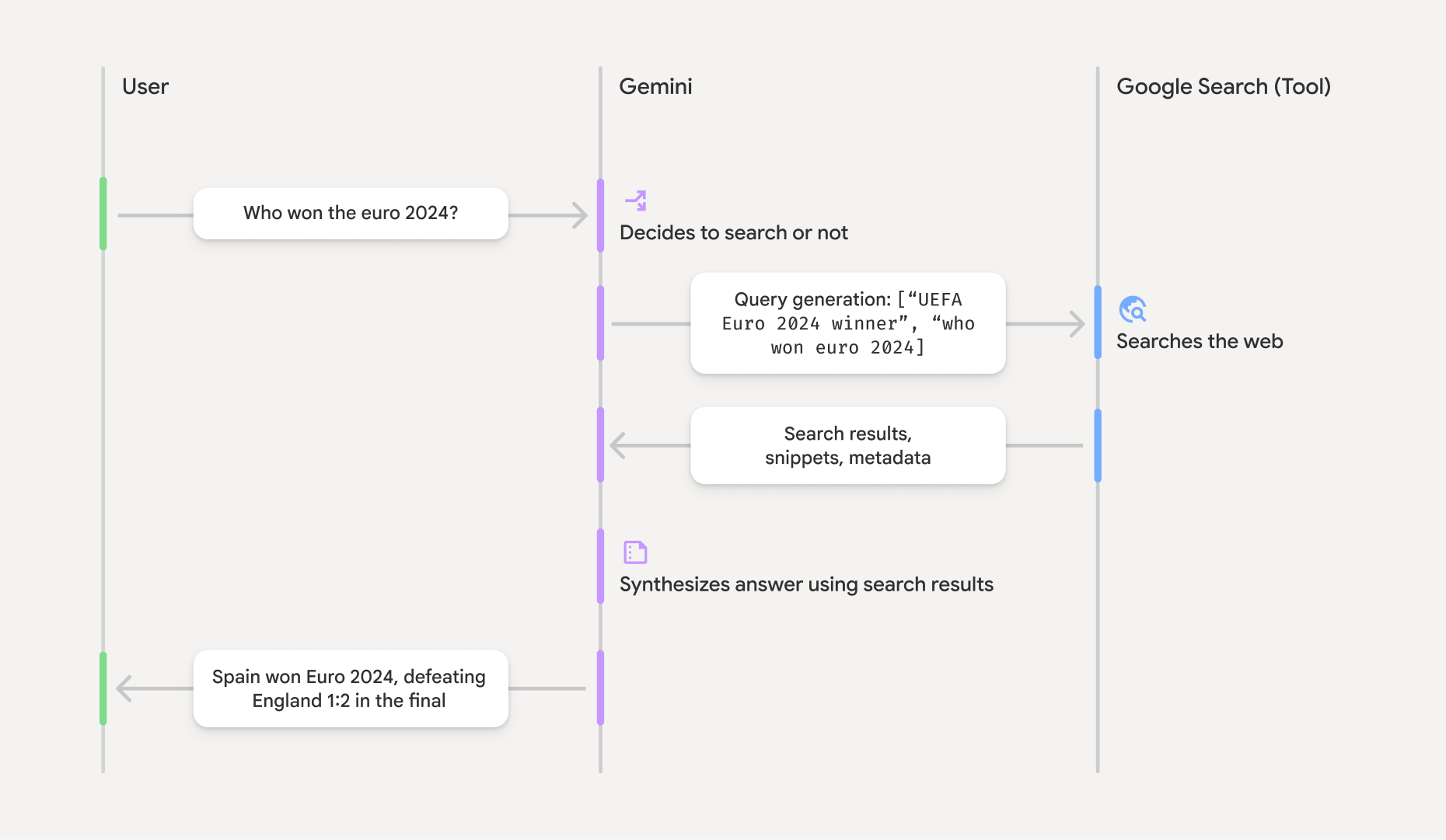
グラウンディングされた結果を理解する
モデルが groundingMetadata オブジェクトが含まれます。このオブジェクトには、クレームの検証とアプリケーションでの豊富なソース エクスペリエンスの構築に不可欠な構造化データが含まれています。
「グラウンディングされた結果」の groundingMetadata オブジェクトには、次の情報が含まれます。
webSearchQueries:Google Search に送信された検索クエリの配列。この情報は、モデルの推論プロセスのデバッグと理解に役立ちます。searchEntryPoint: 必要な「Google Search の候補」をレンダリングするための HTML と CSS が含まれています。選択した API プロバイダの「Google Search を使用したグラウンディング」の使用要件(Gemini Developer API または Agent Platform Gemini API (formerly Vertex AI)(サービス固有の規約のサービス規約のセクションを参照))を遵守する必要があります。このページの後半で、グラウンディングされた結果を使用および表示する方法について説明します。groundingChunks: ウェブソース(uriとtitle)を含むオブジェクトの配列。groundingSupports: モデルのレスポンスtextをgroundingChunksのソースに接続するチャンクの配列。各チャンクは、テキストsegment(startIndexとendIndexで定義)を 1 つ以上のgroundingChunkIndicesにリンクします。このフィールドは、インラインのソースリンクの作成に役立ちます。このページの後半で、グラウンディングされた結果を使用および表示する方法について説明します。
groundingMetadata オブジェクトを含むレスポンスの例を次に示します。
{
  "candidates": [
    {
      "content": {
        "parts": [
          {
            "text": "Spain won Euro 2024, defeating England 2-1 in the final. This victory marks Spain's record fourth European Championship title."
          }
        ],
        "role": "model"
      },
      "groundingMetadata": {
        "webSearchQueries": [
          "UEFA Euro 2024 winner",
          "who won euro 2024"
        ],
        "searchEntryPoint": {
          "renderedContent": "<!-- HTML and CSS for the search widget -->"
        },
        "groundingChunks": [
          {"web": {"uri": "https://vertexaisearch.cloud.google.com.....", "title": "aljazeera.com"}},
          {"web": {"uri": "https://vertexaisearch.cloud.google.com.....", "title": "uefa.com"}}
        ],
        "groundingSupports": [
          {
            "segment": {"startIndex": 0, "endIndex": 85, "text": "Spain won Euro 2024, defeatin..."},
            "groundingChunkIndices": [0]
          },
          {
            "segment": {"startIndex": 86, "endIndex": 210, "text": "This victory marks Spain's..."},
            "groundingChunkIndices": [0, 1]
          }
        ]
      }
    }
  ]
}
グラウンディングされた結果を使用および表示する
モデルが groundingMetadata オブジェクトが提供されます。
この情報を表示することで、
(必須) Google Search の候補を表示
回答に「
groundingMetadata オブジェクトには「searchEntryPoint フィールドが含まれています。このフィールドには、準拠する HTML と CSS のスタイルを提供する renderedContent フィールドがあります。このフィールドを実装すると、アプリで検索候補を表示できます。
Google Cloud ドキュメントで、
このセクションの後半にあるコードサンプルの例を参照してください。
(必須)表示ソース
groundingMetadata オブジェクトには、構造化されたソースデータ(具体的には groundingSupports フィールドと groundingChunks フィールド)が含まれます。この情報を使用して、モデルのステートメントを UI 内のソースに直接リンクします(インラインおよび集計)。
このセクションの後半にあるコードサンプルの例を参照してください。
コードサンプルの例
これらのコードサンプルは、グラウンディングされた結果の使用と表示に関する一般化されたパターンを提供します。ただし、お客様の責任のもとで、お客様の実装がコンプライアンス要件に準拠するようにしてください。
Swift
// ...

// Get the model's response
let text = response.text

// Get the grounding metadata
if let candidate = response.candidates.first,
   let groundingMetadata = candidate.groundingMetadata {
  // REQUIRED - display Google Search suggestions
  // (renderedContent contains HTML and CSS for the search widget)
  if let renderedContent = groundingMetadata.searchEntryPoint?.renderedContent {
    // TODO(developer): Display Google Search suggestions using a WebView
  }

  // REQUIRED - display sources
  let groundingChunks = groundingMetadata.groundingChunks
  for chunk in groundingMetadata.groundingChunks {
    if let web = chunk.web {
      let title = web.title  // for example, "uefa.com"
      let uri = web.uri  // for example, "https://vertexaisearch.cloud.google.com..."
      // TODO(developer): show source in the UI
    }
  }
}
Kotlin
// ...

// Get the model's response
val text = response.text

// Get the grounding metadata
val groundingMetadata = response.candidates.firstOrNull()?.groundingMetadata

// REQUIRED - display Google Search suggestions
// (renderedContent contains HTML and CSS for the search widget)
val renderedContent = groundingMetadata?.searchEntryPoint?.renderedContent
if (renderedContent != null) {
    // TODO(developer): Display Google Search suggestions using a WebView
}

// REQUIRED - display sources
val groundingChunks = groundingMetadata?.groundingChunks
groundingChunks?.let { chunks ->
  for (chunk in chunks) {
  	val title = chunk.web?.title  // for example, "uefa.com"
	val uri = chunk.web?.uri  // for example, "https://vertexaisearch.cloud.google.com..."
// TODO(developer): show source in the UI
  }
}
Java
// ...

Futures.addCallback(response, new FutureCallback() {
  @Override
  public void onSuccess(GenerateContentResponse result) {
  // Get the model's response
  String text = result.getText();

  // Get the grounding metadata
  GroundingMetadata groundingMetadata =
  result.getCandidates()[0].getGroundingMetadata();

  if (groundingMetadata != null) {
    // REQUIRED - display Google Search suggestions
  // (renderedContent contains HTML and CSS for the search widget)
    String renderedContent =
  groundingMetadata.getSearchEntryPoint().getRenderedContent();
    if (renderedContent != null) {
      // TODO(developer): Display Google Search suggestions using a WebView
    }

    // REQUIRED - display sources
    List chunks = groundingMetadata.getGroundingChunks();
    if (chunks != null) {
      for(GroundingChunk chunk : chunks) {
        WebGroundingChunk web = chunk.getWeb();
        if (web != null) {
          String title = web.getTitle();  // for example, "uefa.com"
          String uri = web.getUri();  // for example, "https://vertexaisearch.cloud.google.com..."
          // TODO(developer): show sources in the UI
        }
      }
    }
  }
  }

  @Override
  public void onFailure(Throwable t) {
  t.printStackTrace();
  }
  }, executor);
Web
// ...

// Get the model's text response
const text = result.response.text();

// Get the grounding metadata
const groundingMetadata = result.response.candidates?.[0]?.groundingMetadata;

// REQUIRED - display Google Search suggestions
// (renderedContent contains HTML and CSS for the search widget)
const renderedContent = groundingMetadata?.searchEntryPoint?.renderedContent;
if (renderedContent) {
  // TODO(developer): render this HTML and CSS in the UI
}

// REQUIRED - display sources
const groundingChunks = groundingMetadata?.groundingChunks;
if (groundingChunks) {
  for (const chunk of groundingChunks) {
    const title = chunk.web?.title;  // for example, "uefa.com"
    const uri = chunk.web?.uri;  // for example, "https://vertexaisearch.cloud.google.com..."
    // TODO(developer): show sources in the UI
  }
}
Dart
// ...

// Get the model's response
final text = response.text;

// Get the grounding metadata
final groundingMetadata = response.candidates.first.groundingMetadata;

// REQUIRED - display Google Search suggestions
// (renderedContent contains HTML and CSS for the search widget)
final renderedContent = groundingMetadata?.searchEntryPoint?.renderedContent;
if (renderedContent != null) {
    // TODO(developer): Display Google Search suggestions using a WebView
}

// REQUIRED - display sources
final groundingChunks = groundingMetadata?.groundingChunks;
if (groundingChunks != null) {
  for (var chunk in groundingChunks) {
    final title = chunk.web?.title;  // for example, "uefa.com"
    final uri = chunk.web?.uri;  // for example, "https://vertexaisearch.cloud.google.com..."
    // TODO(developer): show sources in the UI
  }
}
Unity
// ...

// Get the model's response.
var text = response.Text;

// Get the grounding metadata.
var groundingMetadata = response.Candidates.First().GroundingMetadata.Value;

// REQUIRED - display Google Search suggestions
// (renderedContent contains HTML and CSS for the search widget)
if (groundingMetadata.SearchEntryPoint.HasValue) {
    var renderedContent = groundingMetadata.SearchEntryPoint.Value.RenderedContent;
    // TODO(developer): Display Google Search suggestions using a WebView
}

// REQUIRED - display sources
foreach(GroundingChunk chunk in groundingMetadata.GroundingChunks) {
    var title = chunk.Web.Value.Title;  // for example, "uefa.com"
    var uri = chunk.Web.Value.Uri;  // for example, "https://vertexaisearch.cloud.google.com..."
    // TODO(developer): show sources in the UI
}
Firebase コンソールでのグラウンディングされた結果と AI モニタリング
Firebase コンソールで AI モニタリングを有効にしている場合、レスポンスは Cloud Logging に保存されます。デフォルトでは、このデータの保持期間は 30 日間です。
この保持期間または設定したカスタム期間が、特定のユースケースと、選択した Gemini API プロバイダ: Gemini Developer API または Agent Platform Gemini API (formerly Vertex AI)(サービス固有の規約のサービス規約セクションを参照)の追加のコンプライアンス要件に完全に準拠していることを確認するのは、お客様の責任です。これらの要件を満たすには、Cloud Logging で保持期間を調整する必要があります。
料金と上限
選択した Gemini API プロバイダのドキュメント(Gemini Developer API | Agent Platform Gemini API (formerly Vertex AI))で、