

Grounding dengan
Grounding dengan
- Meningkatkan akurasi faktual: Mengurangi halusinasi model dengan mendasarkan respons pada informasi dunia nyata.
- Mengakses informasi real-time: Menjawab pertanyaan tentang peristiwa dan topik terbaru.
- Berikan sumber: Bangun kepercayaan pengguna atau izinkan pengguna menjelajahi situs yang relevan dengan menampilkan sumber untuk klaim model.
- Menyelesaikan tugas yang lebih kompleks: Mengambil artefak dan gambar, video, atau media lain yang relevan untuk membantu tugas penalaran.
- Meningkatkan kualitas respons spesifik per wilayah atau bahasa: Menemukan informasi spesifik per wilayah, atau membantu menerjemahkan konten secara akurat.
Model yang didukung
gemini-3.1-pro-previewgemini-3.8-flash(dangemini-3.7-flash,gemini-3.6-flash, dangemini-3.5-flashyang lebih lama)gemini-3.5-flash-lite(dangemini-3.1-flash-liteyang lebih lama)gemini-3-pro-image(alias "Nano Banana Pro")gemini-3.1-flash-image(alias "Nano Banana 2")
Model Gemini 2.5 penggunaan umum mendukung kemampuan ini, tetapi semuanya sudah tidak digunakan lagi.
Model Gemini Live API juga mendukung kemampuan ini, tetapi semua contoh kode dalam panduan ini ditujukan untuk model Gemini penggunaan umum.
Bahasa yang didukung
Lihat bahasa yang didukung untuk model Gemini.
Menyediakan referensi untuk model dengan Google Search
|
Klik penyedia Gemini API untuk melihat konten dan kode khusus penyedia di halaman ini. |
Saat membuat instance GenerativeModel, berikan GoogleSearch sebagai
tool yang dapat digunakan model untuk membuat responsnya.
Swift
import FirebaseAILogic

// Initialize the Gemini Developer API backend service.
let ai = FirebaseAI.firebaseAI(backend: .googleAI())

// Create a `GenerativeModel` instance with a model that supports your use case.
let model = ai.generativeModel(
    modelName: "GEMINI_MODEL_NAME",
    // Provide Google Search as a tool that the model can use to generate its response.
    tools: [Tool.googleSearch()]
)

let response = try await model.generateContent("Who won the euro 2024?")
print(response.text ?? "No text in response.")

// Make sure to comply with the "Grounding with Google Search" usage requirements,
// which includes how you use and display the grounded result
Kotlin
// Initialize the Gemini Developer API backend service.
// Create a `GenerativeModel` instance with a model that supports your use case.
val model = Firebase.ai(backend = GenerativeBackend.googleAI()).generativeModel(
    modelName = "GEMINI_MODEL_NAME",
    // Provide Google Search as a tool that the model can use to generate its response
    tools = listOf(Tool.googleSearch())
)

val response = model.generateContent("Who won the euro 2024?")
print(response.text)

// Make sure to comply with the "Grounding with Google Search" usage requirements,
// which includes how you use and display the grounded result
Java
// Initialize the Gemini Developer API backend service.
// Create a `GenerativeModel` instance with a model that supports your use case.
GenerativeModel ai = FirebaseAI.getInstance(GenerativeBackend.googleAI())
                .generativeModel("GEMINI_MODEL_NAME",
                        null,
                        null,
                        // Provide Google Search as a tool that the model can use to generate its response
                        List.of(Tool.GoogleSearch()));

// Use the GenerativeModelFutures Java compatibility layer which offers
// support for ListenableFuture and Publisher APIs
GenerativeModelFutures model = GenerativeModelFutures.from(ai);

ListenableFuture response = model.generateContent("Who won the euro 2024?");
  Futures.addCallback(response, new FutureCallback() {
      @Override
      public void onSuccess(GenerateContentResponse result) {
          String resultText = result.getText();
          System.out.println(resultText);
      }

      @Override
      public void onFailure(Throwable t) {
          t.printStackTrace();
      }
  }, executor);

// Make sure to comply with the "Grounding with Google Search" usage requirements,
// which includes how you use and display the grounded result
Web
import { initializeApp } from "firebase/app";
import { getAI, getGenerativeModel, GoogleAIBackend } from "firebase/ai";

// TODO(developer): Replace the following with your app's Firebase configuration
// See: https://firebase.google.com/docs/web/learn-more#config-object
const firebaseConfig = {
  // ...
};

// Initialize FirebaseApp
const firebaseApp = initializeApp(firebaseConfig);

// Initialize the Gemini Developer API backend service.
const ai = getAI(firebaseApp, { backend: new GoogleAIBackend() });

// Create a `GenerativeModel` instance with a model that supports your use case.
const model = getGenerativeModel(
  ai,
  {
    model: "GEMINI_MODEL_NAME",
    // Provide Google Search as a tool that the model can use to generate its response
    tools: [{ googleSearch: {} }]
  }
);

const result = await model.generateContent("Who won the euro 2024?");

console.log(result.response.text());

// Make sure to comply with the "Grounding with Google Search" usage requirements,
// which includes how you use and display the grounded result
Dart
import 'package:firebase_core/firebase_core.dart';
import 'package:firebase_ai/firebase_ai.dart';
import 'firebase_options.dart';

// Initialize FirebaseApp.
await Firebase.initializeApp(
  options: DefaultFirebaseOptions.currentPlatform,
);

// Initialize the Gemini Developer API backend service.
// Create a `GenerativeModel` instance with a model that supports your use case.
final model = FirebaseAI.googleAI().generativeModel(
  model: 'GEMINI_MODEL_NAME',
  // Provide Google Search as a tool that the model can use to generate its response.
  tools: [
    Tool.googleSearch(),
  ],
);

final response = await model.generateContent([Content.text("Who won the euro 2024?")]);
print(response.text);

// Make sure to comply with the "Grounding with Google Search" usage requirements,
// which includes how you use and display the grounded result
Unity
using Firebase;
using Firebase.AI;

// Initialize the Gemini Developer API backend service.
var ai = FirebaseAI.GetInstance(FirebaseAI.Backend.GoogleAI());

// Create a `GenerativeModel` instance with a model that supports your use case.
var model = ai.GetGenerativeModel(
  modelName: "GEMINI_MODEL_NAME",
  // Provide Google Search as a tool that the model can use to generate its response.
  tools: new[] { new Tool(new GoogleSearch()) }
);

var response = await model.GenerateContentAsync("Who won the euro 2024?");
UnityEngine.Debug.Log(response.Text ?? "No text in response.");

// Make sure to comply with the "Grounding with Google Search" usage requirements,
// which includes how you use and display the grounded result
Pelajari cara memilih model yang sesuai untuk kasus penggunaan dan aplikasi Anda.
Cara kerja Perujukan dengan Google Search
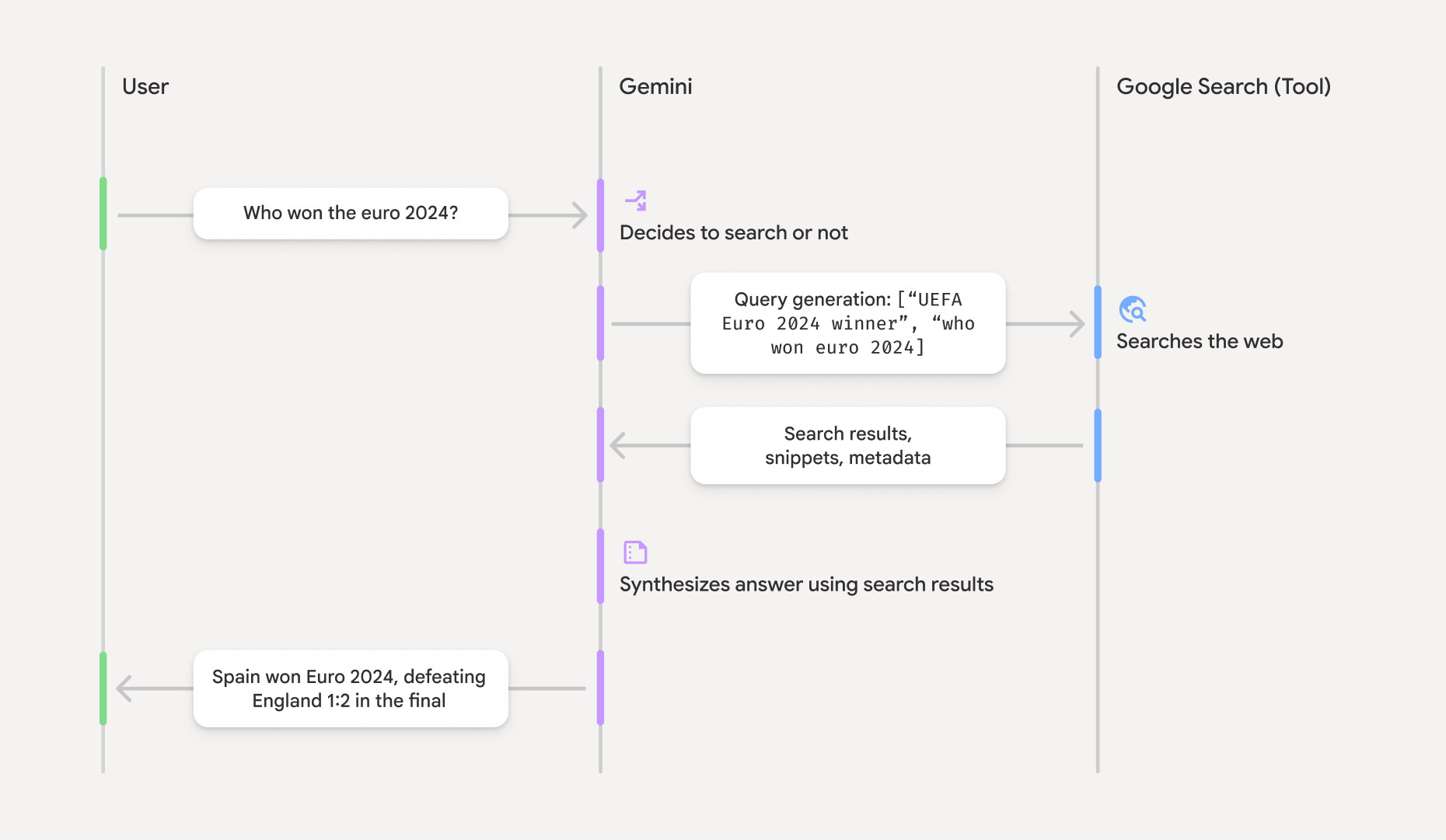
Saat Anda menggunakan alat GoogleSearch, model akan menangani seluruh alur kerja
pencarian, pemrosesan, dan kutipan informasi secara otomatis.
Berikut alur kerja model:
- Menerima perintah: Aplikasi Anda mengirimkan perintah ke model Gemini
dengan alat
GoogleSearchdiaktifkan. - Analisis perintah: Model menganalisis perintah dan menentukan apakah
Google Search dapat meningkatkan responsnya. - Mengirim kueri ke
Google Search : Jika diperlukan, model akan otomatis membuat satu atau beberapa kueri penelusuran dan menjalankannya. - Memproses hasil Penelusuran: Model memproses hasil
Google Search dan merumuskan respons terhadap perintah asli. - Menampilkan "hasil yang dirujuk": Model menampilkan respons akhir yang mudah dipahami pengguna dan dirujuk pada hasil
Google Search . Respons ini mencakup jawaban teks model dangroundingMetadatadengan kueri penelusuran, hasil web, dan sumber.
Perhatikan bahwa menyediakan groundingMetadata
dan oleh karena itu bukan "hasil yang memiliki rujukan".
Memahami hasil yang memiliki rujukan
Jika model mendasarkan responsnya pada hasil groundingMetadata yang berisi data terstruktur yang penting untuk memverifikasi klaim dan membangun pengalaman sumber yang kaya di aplikasi Anda.
Objek groundingMetadata dalam "hasil yang memiliki rujukan" berisi informasi
berikut:
webSearchQueries: Array kueri penelusuran yang dikirim keGoogle Search . Informasi ini berguna untuk men-debug dan memahami proses penalaran model.searchEntryPoint: Berisi HTML dan CSS untuk merender "saranGoogle Search " yang diperlukan. Anda diwajibkan untuk mematuhi persyaratan penggunaan "Perujukan denganGoogle Search " untuk penyedia API yang Anda pilih: Gemini Developer API atau Agent Platform Gemini API (formerly Vertex AI) (lihat bagian Persyaratan Layanan dalam Persyaratan Khusus Layanan). Pelajari cara menggunakan dan menampilkan hasil berdasar nanti di halaman ini.groundingChunks: Array objek yang berisi sumber web (uridantitle).groundingSupports: Array potongan untuk menghubungkan respons modeltextke sumber dalamgroundingChunks. Setiap bagian menautkan tekssegment(ditentukan olehstartIndexdanendIndex) ke satu atau beberapagroundingChunkIndices. Kolom ini membantu Anda membuat link sumber inline. Pelajari cara menggunakan dan menampilkan hasil berdasar nanti di halaman ini.
Berikut adalah contoh respons yang menyertakan objek groundingMetadata:
{
  "candidates": [
    {
      "content": {
        "parts": [
          {
            "text": "Spain won Euro 2024, defeating England 2-1 in the final. This victory marks Spain's record fourth European Championship title."
          }
        ],
        "role": "model"
      },
      "groundingMetadata": {
        "webSearchQueries": [
          "UEFA Euro 2024 winner",
          "who won euro 2024"
        ],
        "searchEntryPoint": {
          "renderedContent": "<!-- HTML and CSS for the search widget -->"
        },
        "groundingChunks": [
          {"web": {"uri": "https://vertexaisearch.cloud.google.com.....", "title": "aljazeera.com"}},
          {"web": {"uri": "https://vertexaisearch.cloud.google.com.....", "title": "uefa.com"}}
        ],
        "groundingSupports": [
          {
            "segment": {"startIndex": 0, "endIndex": 85, "text": "Spain won Euro 2024, defeatin..."},
            "groundingChunkIndices": [0]
          },
          {
            "segment": {"startIndex": 86, "endIndex": 210, "text": "This victory marks Spain's..."},
            "groundingChunkIndices": [0, 1]
          }
        ]
      }
    }
  ]
}
Menggunakan dan menampilkan hasil dengan perujukan
Jika model menggunakan alat groundingMetadata dalam
respons.
Wajib untuk
menampilkan saran
Selain mematuhi persyaratan penggunaan alat
(Wajib) Menampilkan saran Google Search
Jika respons berisi "saran
Objek groundingMetadata berisi "saran searchEntryPoint, yang memiliki kolom renderedContent
yang menyediakan gaya HTML dan CSS yang sesuai, yang perlu Anda terapkan untuk
menampilkan Saran penelusuran di aplikasi Anda.
Tinjau informasi mendetail tentang
persyaratan tampilan dan perilaku untuk saran
Lihat contoh kode di bagian selanjutnya dalam bagian ini.
(Wajib) Sumber tampilan
Objek groundingMetadata berisi data sumber terstruktur, khususnya
kolom groundingSupports dan groundingChunks. Gunakan informasi ini untuk
menautkan pernyataan model langsung ke sumbernya dalam UI Anda (inline
dan secara gabungan).
Lihat contoh kode di bagian selanjutnya dalam bagian ini.
Contoh kode
Contoh kode ini memberikan pola umum untuk menggunakan dan menampilkan hasil yang memiliki rujukan. Namun, Anda bertanggung jawab untuk memastikan bahwa penerapan spesifik Anda sesuai dengan persyaratan kepatuhan.
Swift
// ...

// Get the model's response
let text = response.text

// Get the grounding metadata
if let candidate = response.candidates.first,
   let groundingMetadata = candidate.groundingMetadata {
  // REQUIRED - display Google Search suggestions
  // (renderedContent contains HTML and CSS for the search widget)
  if let renderedContent = groundingMetadata.searchEntryPoint?.renderedContent {
    // TODO(developer): Display Google Search suggestions using a WebView
  }

  // REQUIRED - display sources
  let groundingChunks = groundingMetadata.groundingChunks
  for chunk in groundingMetadata.groundingChunks {
    if let web = chunk.web {
      let title = web.title  // for example, "uefa.com"
      let uri = web.uri  // for example, "https://vertexaisearch.cloud.google.com..."
      // TODO(developer): show source in the UI
    }
  }
}
Kotlin
// ...

// Get the model's response
val text = response.text

// Get the grounding metadata
val groundingMetadata = response.candidates.firstOrNull()?.groundingMetadata

// REQUIRED - display Google Search suggestions
// (renderedContent contains HTML and CSS for the search widget)
val renderedContent = groundingMetadata?.searchEntryPoint?.renderedContent
if (renderedContent != null) {
    // TODO(developer): Display Google Search suggestions using a WebView
}

// REQUIRED - display sources
val groundingChunks = groundingMetadata?.groundingChunks
groundingChunks?.let { chunks ->
  for (chunk in chunks) {
  	val title = chunk.web?.title  // for example, "uefa.com"
	val uri = chunk.web?.uri  // for example, "https://vertexaisearch.cloud.google.com..."
// TODO(developer): show source in the UI
  }
}
Java
// ...

Futures.addCallback(response, new FutureCallback() {
  @Override
  public void onSuccess(GenerateContentResponse result) {
  // Get the model's response
  String text = result.getText();

  // Get the grounding metadata
  GroundingMetadata groundingMetadata =
  result.getCandidates()[0].getGroundingMetadata();

  if (groundingMetadata != null) {
    // REQUIRED - display Google Search suggestions
  // (renderedContent contains HTML and CSS for the search widget)
    String renderedContent =
  groundingMetadata.getSearchEntryPoint().getRenderedContent();
    if (renderedContent != null) {
      // TODO(developer): Display Google Search suggestions using a WebView
    }

    // REQUIRED - display sources
    List chunks = groundingMetadata.getGroundingChunks();
    if (chunks != null) {
      for(GroundingChunk chunk : chunks) {
        WebGroundingChunk web = chunk.getWeb();
        if (web != null) {
          String title = web.getTitle();  // for example, "uefa.com"
          String uri = web.getUri();  // for example, "https://vertexaisearch.cloud.google.com..."
          // TODO(developer): show sources in the UI
        }
      }
    }
  }
  }

  @Override
  public void onFailure(Throwable t) {
  t.printStackTrace();
  }
  }, executor);
Web
// ...

// Get the model's text response
const text = result.response.text();

// Get the grounding metadata
const groundingMetadata = result.response.candidates?.[0]?.groundingMetadata;

// REQUIRED - display Google Search suggestions
// (renderedContent contains HTML and CSS for the search widget)
const renderedContent = groundingMetadata?.searchEntryPoint?.renderedContent;
if (renderedContent) {
  // TODO(developer): render this HTML and CSS in the UI
}

// REQUIRED - display sources
const groundingChunks = groundingMetadata?.groundingChunks;
if (groundingChunks) {
  for (const chunk of groundingChunks) {
    const title = chunk.web?.title;  // for example, "uefa.com"
    const uri = chunk.web?.uri;  // for example, "https://vertexaisearch.cloud.google.com..."
    // TODO(developer): show sources in the UI
  }
}
Dart
// ...

// Get the model's response
final text = response.text;

// Get the grounding metadata
final groundingMetadata = response.candidates.first.groundingMetadata;

// REQUIRED - display Google Search suggestions
// (renderedContent contains HTML and CSS for the search widget)
final renderedContent = groundingMetadata?.searchEntryPoint?.renderedContent;
if (renderedContent != null) {
    // TODO(developer): Display Google Search suggestions using a WebView
}

// REQUIRED - display sources
final groundingChunks = groundingMetadata?.groundingChunks;
if (groundingChunks != null) {
  for (var chunk in groundingChunks) {
    final title = chunk.web?.title;  // for example, "uefa.com"
    final uri = chunk.web?.uri;  // for example, "https://vertexaisearch.cloud.google.com..."
    // TODO(developer): show sources in the UI
  }
}
Unity
// ...

// Get the model's response.
var text = response.Text;

// Get the grounding metadata.
var groundingMetadata = response.Candidates.First().GroundingMetadata.Value;

// REQUIRED - display Google Search suggestions
// (renderedContent contains HTML and CSS for the search widget)
if (groundingMetadata.SearchEntryPoint.HasValue) {
    var renderedContent = groundingMetadata.SearchEntryPoint.Value.RenderedContent;
    // TODO(developer): Display Google Search suggestions using a WebView
}

// REQUIRED - display sources
foreach(GroundingChunk chunk in groundingMetadata.GroundingChunks) {
    var title = chunk.Web.Value.Title;  // for example, "uefa.com"
    var uri = chunk.Web.Value.Uri;  // for example, "https://vertexaisearch.cloud.google.com..."
    // TODO(developer): show sources in the UI
}
Hasil yang memiliki rujukan dan pemantauan AI di Firebase console
Jika Anda telah mengaktifkan pemantauan AI di Firebase console, respons akan disimpan di Cloud Logging. Secara default, data ini memiliki periode retensi 30 hari.
Anda bertanggung jawab untuk memastikan bahwa periode retensi data ini, atau periode kustom yang Anda tetapkan, sepenuhnya sesuai dengan kasus penggunaan spesifik Anda dan persyaratan kepatuhan tambahan untuk provider Gemini API yang Anda pilih: Gemini Developer API atau Agent Platform Gemini API (formerly Vertex AI) (lihat bagian Persyaratan Layanan dalam Persyaratan Khusus Layanan). Anda mungkin perlu menyesuaikan periode retensi data di Cloud Logging untuk memenuhi persyaratan ini.
Harga dan batas
Pastikan untuk meninjau harga, ketersediaan model, dan batas untuk Perujukan dengan