

কোড এক্সিকিউশন এমন একটি টুল যা মডেলকে পাইথন কোড তৈরি ও রান করতে সক্ষম করে। মডেলটি কোড এক্সিকিউশনের ফলাফল থেকে পুনরাবৃত্তিমূলকভাবে শিখতে থাকে যতক্ষণ না এটি একটি চূড়ান্ত আউটপুটে পৌঁছায়।
আপনি কোড এক্সিকিউশন ব্যবহার করে এমন ফিচার তৈরি করতে পারেন যা কোড-ভিত্তিক যুক্তির সুবিধা নেয় এবং টেক্সট আউটপুট তৈরি করে। উদাহরণস্বরূপ, আপনি সমীকরণ সমাধান করতে বা টেক্সট প্রসেস করতে কোড এক্সিকিউশন ব্যবহার করতে পারেন। এছাড়াও, আরও বিশেষায়িত কাজ সম্পাদন করার জন্য আপনি কোড এক্সিকিউশন এনভায়রনমেন্টে অন্তর্ভুক্ত লাইব্রেরিগুলো ব্যবহার করতে পারেন।
মডেলকে দেওয়া আপনার সমস্ত টুলের মতোই, মডেলই সিদ্ধান্ত নেয় কখন কোড এক্সিকিউশন ব্যবহার করতে হবে।
কোড এক্সিকিউশন বনাম ফাংশন কলিং এর তুলনা
কোড এক্সিকিউশন এবং ফাংশন কলিং একই ধরনের বৈশিষ্ট্য। সাধারণত, মডেলটি যদি আপনার ব্যবহারের ক্ষেত্রটি সামলাতে পারে, তবে আপনার কোড এক্সিকিউশন ব্যবহার করা উচিত। কোড এক্সিকিউশন ব্যবহার করাও সহজ, কারণ আপনাকে শুধু এটি সক্রিয় করতে হয়।
কোড এক্সিকিউশন এবং ফাংশন কলিংয়ের মধ্যে আরও কিছু পার্থক্য নিচে দেওয়া হলো:
| কোড এক্সিকিউশন | ফাংশন কলিং |
|---|---|
| যদি আপনি চান যে মডেলটি আপনার হয়ে পাইথন কোড লিখে ও চালিয়ে ফলাফল ফেরত দিক, তাহলে কোড এক্সিকিউশন ব্যবহার করুন। | আপনার যদি আগে থেকেই নিজস্ব ফাংশন থাকে যা আপনি স্থানীয়ভাবে চালাতে চান, তাহলে ফাংশন কলিং ব্যবহার করুন। |
| কোড এক্সিকিউশন মডেলটিকে একটি নির্দিষ্ট, বিচ্ছিন্ন পরিবেশে এপিআই ব্যাকএন্ডে কোড চালানোর সুযোগ দেয়। | ফাংশন কলিং আপনাকে মডেলের অনুরোধ করা ফাংশনগুলো আপনার পছন্দসই যেকোনো পরিবেশে চালানোর সুযোগ দেয়। |
| কোড এক্সিকিউশন একটিমাত্র রিকোয়েস্টের মাধ্যমে সম্পন্ন হয়। যদিও আপনি চাইলে চ্যাট সুবিধার সাথে কোড এক্সিকিউশন ব্যবহার করতে পারেন, তবে এর কোনো বাধ্যবাধকতা নেই। | প্রতিটি ফাংশন কলের আউটপুট ফেরত পাঠানোর জন্য একটি অতিরিক্ত অনুরোধের প্রয়োজন হয়। একারণে, আপনাকে চ্যাট সুবিধাটি ব্যবহার করতে হবে। |
সমর্থিত মডেল
-
gemini-3.1-pro-preview -
gemini-3.8-flash(এবং পুরোনোgemini-3.7-flash,gemini-3.6-flash, ওgemini-3.5-flash) -
gemini-3.5-flash-lite(এবং পুরোনোgemini-3.1-flash-lite)
সাধারণ ব্যবহারের জেমিনি ২.৫ মডেলগুলিতে এই সক্ষমতা ছিল, কিন্তু সেগুলি এখন আর ব্যবহৃত হয় না।
কোড এক্সিকিউশন ব্যবহার করুন
আপনি শুধুমাত্র টেক্সট এবং মাল্টিমোডাল উভয় ধরনের ইনপুটের সাথেই কোড এক্সিকিউশন ব্যবহার করতে পারেন, কিন্তু এর প্রতিক্রিয়া সর্বদা শুধুমাত্র টেক্সট বা কোড-ভিত্তিক হবে।
শুরু করার আগে
এই পৃষ্ঠায় প্রদানকারী-নির্দিষ্ট বিষয়বস্তু এবং কোড দেখতে আপনার জেমিনি এপিআই প্রদানকারীর উপর ক্লিক করুন। |
যদি আপনি ইতিমধ্যে তা না করে থাকেন, তাহলে ‘ গেটিং স্টার্টেড গাইড’টি সম্পূর্ণ করুন, যেখানে আপনার Firebase প্রজেক্ট সেট আপ করা, আপনার অ্যাপকে Firebase-এর সাথে সংযুক্ত করা, SDK যোগ করা, আপনার নির্বাচিত Gemini API প্রোভাইডারের জন্য ব্যাকএন্ড সার্ভিস ইনিশিয়ালাইজ করা এবং একটি GenerativeModel ইনস্ট্যান্স তৈরি করার পদ্ধতি বর্ণনা করা হয়েছে।
কোড এক্সিকিউশন সক্ষম করুন
| এই নমুনাটি চেষ্টা করার আগে, আপনার প্রজেক্ট ও অ্যাপ সেট আপ করার জন্য এই গাইডের ' শুরু করার আগে ' অংশটি সম্পূর্ণ করুন। সেই বিভাগে, আপনি আপনার নির্বাচিত জেমিনি এপিআই প্রোভাইডারের জন্য একটি বোতামেও ক্লিক করবেন, যাতে আপনি এই পৃষ্ঠায় প্রোভাইডার-নির্দিষ্ট বিষয়বস্তু দেখতে পান । |
যখন আপনি GenerativeModel ইনস্ট্যান্সটি তৈরি করবেন, তখন মডেলটির প্রতিক্রিয়া তৈরি করার জন্য একটি টুল হিসেবে CodeExecution প্রদান করুন। এটি মডেলটিকে পাইথন কোড তৈরি ও রান করার সুযোগ দেয়।
সুইফট
import FirebaseAILogic

// Initialize the Gemini Developer API backend service.
let ai = FirebaseAI.firebaseAI(backend: .googleAI())

// Create a `GenerativeModel` instance with a model that supports your use case
let model = ai.generativeModel(
  modelName: "GEMINI_MODEL_NAME",
  // Provide code execution as a tool that the model can use to generate its response.
  tools: [.codeExecution()]
)

let prompt = """
What is the sum of the first 50 prime numbers?
Generate and run code for the calculation, and make sure you get all 50.
"""

let response = try await model.generateContent(prompt)

guard let candidate = response.candidates.first else {
  print("No candidates in response.")
  return
}
for part in candidate.content.parts {
  if let textPart = part as? TextPart {
    print("Text = \(textPart.text)")
  } else if let executableCode = part as? ExecutableCodePart {
    print("Code = \(executableCode.code), Language = \(executableCode.language)")
  } else if let executionResult = part as? CodeExecutionResultPart {
    print("Outcome = \(executionResult.outcome), Result = \(executionResult.output ?? "no output")")
  }
}
Kotlin
// Initialize the Gemini Developer API backend service.
// Create a `GenerativeModel` instance with a model that supports your use case.
val model = Firebase.ai(backend = GenerativeBackend.googleAI()).generativeModel(
    modelName = "GEMINI_MODEL_NAME",
    // Provide code execution as a tool that the model can use to generate its response.
    tools = listOf(Tool.codeExecution())
)

val prompt =  "What is the sum of the first 50 prime numbers? " +
        "Generate and run code for the calculation, and make sure you get all 50."

val response = model.generateContent(prompt)

response.candidates.first().content.parts.forEach {
    if(it is TextPart) {
        println("Text = ${it.text}")
    }
    if(it is ExecutableCodePart) {
        println("Code = ${it.code}, Language = ${it.language}")
    }
    if(it is CodeExecutionResultPart) {
       println("Outcome = ${it.outcome}, Result = ${it.output}")
    }
}
Java
// Initialize the Gemini Developer API backend service.
// Create a `GenerativeModel` instance with a model that supports your use case.
GenerativeModel ai = FirebaseAI.getInstance(GenerativeBackend.googleAI())
                .generativeModel("GEMINI_MODEL_NAME",
                        null,
                        null,
                        // Provide code execution as a tool that the model can use to generate its response.
                        List.of(Tool.codeExecution()));

// Use the GenerativeModelFutures Java compatibility layer which offers
// support for ListenableFuture and Publisher APIs
GenerativeModelFutures model = GenerativeModelFutures.from(ai);

String text = "What is the sum of the first 50 prime numbers? " +
        "Generate and run code for the calculation, and make sure you get all 50.";

Content prompt = new Content.Builder()
    .addText(text)
    .build();

ListenableFuture response = model.generateContent(prompt);

Futures.addCallback(response, new FutureCallback() {
   @Override
public void onSuccess(GenerateContentResponse response)   {
    // Access the first candidate's content parts
    List parts = response.getCandidates().get(0).getContent().getParts();
    for (Part part : parts) {
        if (part instanceof TextPart) {
            TextPart textPart = (TextPart) part;
            System.out.println("Text = " + textPart.getText());
        } else if (part instanceof ExecutableCodePart) {
            ExecutableCodePart codePart = (ExecutableCodePart) part;
            System.out.println("Code = " + codePart.getCode() + ", Language = " + codePart.getLanguage());
        } else if (part instanceof CodeExecutionResultPart) {
            CodeExecutionResultPart resultPart = (CodeExecutionResultPart) part;
            System.out.println("Outcome = " + resultPart.getOutcome() + ", Result = " + resultPart.getOutput());
        }
    }
}

    @Override
    public void onFailure(Throwable t) {
        t.printStackTrace();
    }
}, executor);
Web
import { initializeApp } from "firebase/app";
import { getAI, getGenerativeModel, GoogleAIBackend } from "firebase/ai";

// TODO(developer): Replace the following with your app's Firebase configuration
// See: https://firebase.google.com/docs/web/learn-more#config-object
const firebaseConfig = {
  // ...
};

// Initialize FirebaseApp
const firebaseApp = initializeApp(firebaseConfig);

// Initialize the Gemini Developer API backend service.
const ai = getAI(firebaseApp, { backend: new GoogleAIBackend() });

// Create a `GenerativeModel` instance with a model that supports your use case.
const model = getGenerativeModel(
  ai,
  {
    model: "GEMINI_MODEL_NAME",
    // Provide code execution as a tool that the model can use to generate its response.
    tools: [{ codeExecution: {} }]
  }
);

const prompt =  "What is the sum of the first 50 prime numbers? " +
        "Generate and run code for the calculation, and make sure you get all 50."

const result = await model.generateContent(prompt);
const response = await result.response;

const parts = response.candidates?.[0].content.parts;

if (parts) {
  parts.forEach((part) => {
    if (part.text) {
        console.log(`Text: ${part.text}`);
    } else if (part.executableCode) {
      console.log(
        `Code: ${part.executableCode.code}, Language: ${part.executableCode.language}`
      );
    } else if (part.codeExecutionResult) {
      console.log(
        `Outcome: ${part.codeExecutionResult.outcome}, Result: ${part.codeExecutionResult.output}`
      );
    }
  });
}
Dart
import 'package:firebase_core/firebase_core.dart';
import 'package:firebase_ai/firebase_ai.dart';
import 'firebase_options.dart';

// Initialize FirebaseApp
await Firebase.initializeApp(
  options: DefaultFirebaseOptions.currentPlatform,
);

// Initialize the Gemini Developer API backend service.
// Create a `GenerativeModel` instance with a model that supports your use case.
final model = FirebaseAI.googleAI().generativeModel(
  model: 'GEMINI_MODEL_NAME',
  // Provide code execution as a tool that the model can use to generate its response.
  tools: [
    Tool.codeExecution(),
  ],
);

const prompt = 'What is the sum of the first 50 prime numbers? '
    'Generate and run code for the calculation, and make sure you get all 50.';

final response = await model.generateContent([Content.text(prompt)]);

final buffer = StringBuffer();
    for (final part in response.candidates.first.content.parts) {
      if (part is TextPart) {
        buffer.writeln(part.text);
      } else if (part is ExecutableCodePart) {
        buffer.writeln('Executable Code:');
        buffer.writeln('Language: ${part.language}');
        buffer.writeln('Code:');
        buffer.writeln(part.code);
      } else if (part is CodeExecutionResultPart) {
        buffer.writeln('Code Execution Result:');
        buffer.writeln('Outcome: ${part.outcome}');
        buffer.writeln('Output:');
        buffer.writeln(part.output);
      }
    }
ঐক্য
using Firebase;
using Firebase.AI;

// Initialize the Gemini Developer API backend service.
var ai = FirebaseAI.GetInstance(FirebaseAI.Backend.GoogleAI());

// Create a `GenerativeModel` instance with a model that supports your use case.
var model = ai.GetGenerativeModel(
  modelName: "GEMINI_MODEL_NAME",
  // Provide code execution as a tool that the model can use to generate its response.
  tools: new Tool[] { new Tool(new CodeExecution()) }
);

var prompt = "What is the sum of the first 50 prime numbers? " +
        "Generate and run code for the calculation, and make sure you get all 50.";

var response = await model.GenerateContentAsync(prompt);

foreach (var part in response.Candidates.First().Content.Parts) {
  if (part is ModelContent.TextPart tp) {
    UnityEngine.Debug.Log($"Text = {tp.Text}");
  } else if (part is ModelContent.ExecutableCodePart esp) {
    UnityEngine.Debug.Log($"Code = {esp.Code}, Language = {esp.Language}");
  } else if (part is ModelContent.CodeExecutionResultPart cerp) {
    UnityEngine.Debug.Log($"Outcome = {cerp.Outcome}, Output = {cerp.Output}");
  }
}
কীভাবে একটি মডেল বেছে নিতে হয় তা জানুনআপনার ব্যবহারের ক্ষেত্র এবং অ্যাপের জন্য উপযুক্ত।
আউটপুটটি দেখতে নিচের মতো হতে পারে, যা পাঠযোগ্যতার জন্য ফরম্যাট করা হয়েছে:
Okay, I need to calculate the sum of the first 50 prime numbers. Here's how I'll
approach this:

1.  **Generate Prime Numbers:** I'll use an iterative method to find prime
    numbers. I'll start with 2 and check if each subsequent number is divisible
    by any number between 2 and its square root. If not, it's a prime.
2.  **Store Primes:** I'll store the prime numbers in a list until I have 50 of
    them.
3.  **Calculate the Sum:**  Finally, I'll sum the prime numbers in the list.

Here's the Python code to do this:

def is_prime(n):
  """Efficiently checks if a number is prime."""
  if n <= 1:
    return False
  if n <= 3:
    return True
  if n % 2 == 0 or n % 3 == 0:
    return False
  i = 5
  while i * i <= n:
    if n % i == 0 or n % (i + 2) == 0:
      return False
    i += 6
  return True

primes = []
num = 2
while len(primes) < 50:
  if is_prime(num):
    primes.append(num)
  num += 1

sum_of_primes = sum(primes)
print(f'{primes=}')
print(f'{sum_of_primes=}')

primes=[2, 3, 5, 7, 11, 13, 17, 19, 23, 29, 31, 37, 41, 43, 47, 53, 59, 61, 67,
71, 73, 79, 83, 89, 97, 101, 103, 107, 109, 113, 127, 131, 137, 139, 149, 151,
157, 163, 167, 173, 179, 181, 191, 193, 197, 199, 211, 223, 227, 229]
sum_of_primes=5117

The sum of the first 50 prime numbers is 5117.
এই আউটপুটটি এমন কয়েকটি বিষয়বস্তুর অংশকে একত্রিত করে যা মডেলটি কোড এক্সিকিউশন ব্যবহার করার সময় ফেরত দেয়:
-
text: মডেল দ্বারা তৈরি ইনলাইন টেক্সট -
executableCode: মডেল দ্বারা তৈরি কোড যা কার্যকর করার জন্য নির্ধারিত। -
codeExecutionResult: সম্পাদিত কোডের ফলাফল
প্রোগ্রামিং ভাষা ভেদে এই অংশগুলোর নামকরণের রীতি ভিন্ন হয়।
চ্যাটে কোড এক্সিকিউশন ব্যবহার করুন
আপনি চ্যাটের অংশ হিসেবেও কোড এক্সিকিউশন ব্যবহার করতে পারেন:
সুইফট
import FirebaseAILogic

// Initialize the Gemini Developer API backend service.
let ai = FirebaseAI.firebaseAI(backend: .googleAI())

// Create a `GenerativeModel` instance with a model that supports your use case
let model = ai.generativeModel(
  modelName: "GEMINI_MODEL_NAME",
  // Provide code execution as a tool that the model can use to generate its response.
  tools: [.codeExecution()]
)

let prompt = """
What is the sum of the first 50 prime numbers?
Generate and run code for the calculation, and make sure you get all 50.
"""
let chat = model.startChat()

let response = try await chat.sendMessage(prompt)

guard let candidate = response.candidates.first else {
  print("No candidates in response.")
  return
}
for part in candidate.content.parts {
  if let textPart = part as? TextPart {
    print("Text = \(textPart.text)")
  } else if let executableCode = part as? ExecutableCodePart {
    print("Code = \(executableCode.code), Language = \(executableCode.language)")
  } else if let executionResult = part as? CodeExecutionResultPart {
    print("Outcome = \(executionResult.outcome), Result = \(executionResult.output ?? "no output")")
  }
}
Kotlin
// Initialize the Gemini Developer API backend service.
// Create a `GenerativeModel` instance with a model that supports your use case.
val model = Firebase.ai(backend = GenerativeBackend.googleAI()).generativeModel(
    modelName = "GEMINI_MODEL_NAME",
    // Provide code execution as a tool that the model can use to generate its response.
    tools = listOf(Tool.codeExecution())
)

val prompt =  "What is the sum of the first 50 prime numbers? " +
        "Generate and run code for the calculation, and make sure you get all 50."
val chat = model.startChat()
val response = chat.sendMessage(prompt)

response.candidates.first().content.parts.forEach {
    if(it is TextPart) {
        println("Text = ${it.text}")
    }
    if(it is ExecutableCodePart) {
        println("Code = ${it.code}, Language = ${it.language}")
    }
    if(it is CodeExecutionResultPart) {
       println("Outcome = ${it.outcome}, Result = ${it.output}")
    }
}
Java
// Initialize the Gemini Developer API backend service.
// Create a `GenerativeModel` instance with a model that supports your use case.
GenerativeModel ai = FirebaseAI.getInstance(GenerativeBackend.googleAI())
                .generativeModel("GEMINI_MODEL_NAME",
                        null,
                        null,
                        // Provide code execution as a tool that the model can use to generate its response.
                        List.of(Tool.codeExecution()));

// Use the GenerativeModelFutures Java compatibility layer which offers
// support for ListenableFuture and Publisher APIs
GenerativeModelFutures model = GenerativeModelFutures.from(ai);
String text = "What is the sum of the first 50 prime numbers? " +
        "Generate and run code for the calculation, and make sure you get all 50.";

Content prompt = new Content.Builder()
    .addText(text)
    .build();

ChatFutures chat = model.startChat();
ListenableFuture response = chat.sendMessage(prompt);

Futures.addCallback(response, new FutureCallback() {
   @Override
public void onSuccess(GenerateContentResponse response)   {
    // Access the first candidate's content parts
    List parts = response.getCandidates().get(0).getContent().getParts();
    for (Part part : parts) {
        if (part instanceof TextPart) {
            TextPart textPart = (TextPart) part;
            System.out.println("Text = " + textPart.getText());
        } else if (part instanceof ExecutableCodePart) {
            ExecutableCodePart codePart = (ExecutableCodePart) part;
            System.out.println("Code = " + codePart.getCode() + ", Language = " + codePart.getLanguage());
        } else if (part instanceof CodeExecutionResultPart) {
            CodeExecutionResultPart resultPart = (CodeExecutionResultPart) part;
            System.out.println("Outcome = " + resultPart.getOutcome() + ", Result = " + resultPart.getOutput());
        }
    }
}

    @Override
    public void onFailure(Throwable t) {
        t.printStackTrace();
    }
}, executor);
Web
import { initializeApp } from "firebase/app";
import { getAI, getGenerativeModel, GoogleAIBackend } from "firebase/ai";

// TODO(developer): Replace the following with your app's Firebase configuration
// See: https://firebase.google.com/docs/web/learn-more#config-object
const firebaseConfig = {
  // ...
};

// Initialize FirebaseApp
const firebaseApp = initializeApp(firebaseConfig);

// Initialize the Gemini Developer API backend service.
const ai = getAI(firebaseApp, { backend: new GoogleAIBackend() });

// Create a `GenerativeModel` instance with a model that supports your use case.
const model = getGenerativeModel(
  ai,
  {
    model: "GEMINI_MODEL_NAME",
    // Provide code execution as a tool that the model can use to generate its response.
    tools: [{ codeExecution: {} }]
  }
);

const prompt =  "What is the sum of the first 50 prime numbers? " +
        "Generate and run code for the calculation, and make sure you get all 50."
const chat = model.startChat()
const result = await chat.sendMessage(prompt);

const parts = result.response.candidates?.[0].content.parts;

if (parts) {
  parts.forEach((part) => {
    if (part.text) {
        console.log(`Text: ${part.text}`);
    } else if (part.executableCode) {
      console.log(
        `Code: ${part.executableCode.code}, Language: ${part.executableCode.language}`
      );
    } else if (part.codeExecutionResult) {
      console.log(
        `Outcome: ${part.codeExecutionResult.outcome}, Result: ${part.codeExecutionResult.output}`
      );
    }
  });
}
Dart
import 'package:firebase_core/firebase_core.dart';
import 'package:firebase_ai/firebase_ai.dart';
import 'firebase_options.dart';

// Initialize FirebaseApp
await Firebase.initializeApp(
  options: DefaultFirebaseOptions.currentPlatform,
);

// Initialize the Gemini Developer API backend service.
// Create a `GenerativeModel` instance with a model that supports your use case.
final model = FirebaseAI.googleAI().generativeModel(
  model: 'GEMINI_MODEL_NAME',
  // Provide code execution as a tool that the model can use to generate its response.
  tools: [
    Tool.codeExecution(),
  ],
);

final codeExecutionChat = await model.startChat();

const prompt = 'What is the sum of the first 50 prime numbers? '
    'Generate and run code for the calculation, and make sure you get all 50.';
final response = await codeExecutionChat.sendMessage(Content.text(prompt));

final buffer = StringBuffer();
    for (final part in response.candidates.first.content.parts) {
      if (part is TextPart) {
        buffer.writeln(part.text);
      } else if (part is ExecutableCodePart) {
        buffer.writeln('Executable Code:');
        buffer.writeln('Language: ${part.language}');
        buffer.writeln('Code:');
        buffer.writeln(part.code);
      } else if (part is CodeExecutionResultPart) {
        buffer.writeln('Code Execution Result:');
        buffer.writeln('Outcome: ${part.outcome}');
        buffer.writeln('Output:');
        buffer.writeln(part.output);
      }
    }
ঐক্য
using Firebase;
using Firebase.AI;

// Initialize the Gemini Developer API backend service.
var ai = FirebaseAI.GetInstance(FirebaseAI.Backend.GoogleAI());

// Create a `GenerativeModel` instance with a model that supports your use case.
var model = ai.GetGenerativeModel(
  modelName: "GEMINI_MODEL_NAME",
  // Provide code execution as a tool that the model can use to generate its response.
  tools: new Tool[] { new Tool(new CodeExecution()) }
);

var prompt = "What is the sum of the first 50 prime numbers? " +
        "Generate and run code for the calculation, and make sure you get all 50.";
var chat = model.StartChat();
var response = await chat.SendMessageAsync(prompt);

foreach (var part in response.Candidates.First().Content.Parts) {
  if (part is ModelContent.TextPart tp) {
    UnityEngine.Debug.Log($"Text = {tp.Text}");
  } else if (part is ModelContent.ExecutableCodePart esp) {
    UnityEngine.Debug.Log($"Code = {esp.Code}, Language = {esp.Language}");
  } else if (part is ModelContent.CodeExecutionResultPart cerp) {
    UnityEngine.Debug.Log($"Outcome = {cerp.Outcome}, Output = {cerp.Output}");
  }
}
কীভাবে একটি মডেল বেছে নিতে হয় তা জানুনআপনার ব্যবহারের ক্ষেত্র এবং অ্যাপের জন্য উপযুক্ত।
মূল্য নির্ধারণ
কোড এক্সিকিউশন সক্রিয় করতে এবং মডেলের জন্য একটি টুল হিসেবে এটি সরবরাহ করতে কোনো অতিরিক্ত চার্জ নেই। যদি মডেলটি কোড এক্সিকিউশন ব্যবহার করার সিদ্ধান্ত নেয়, তাহলে আপনার ব্যবহৃত জেমিনি মডেলের উপর ভিত্তি করে ইনপুট এবং আউটপুট টোকেনের বর্তমান হারে আপনাকে বিল করা হবে।
নিম্নলিখিত ডায়াগ্রামটি কোড এক্সিকিউশনের বিলিং মডেল দেখায়:
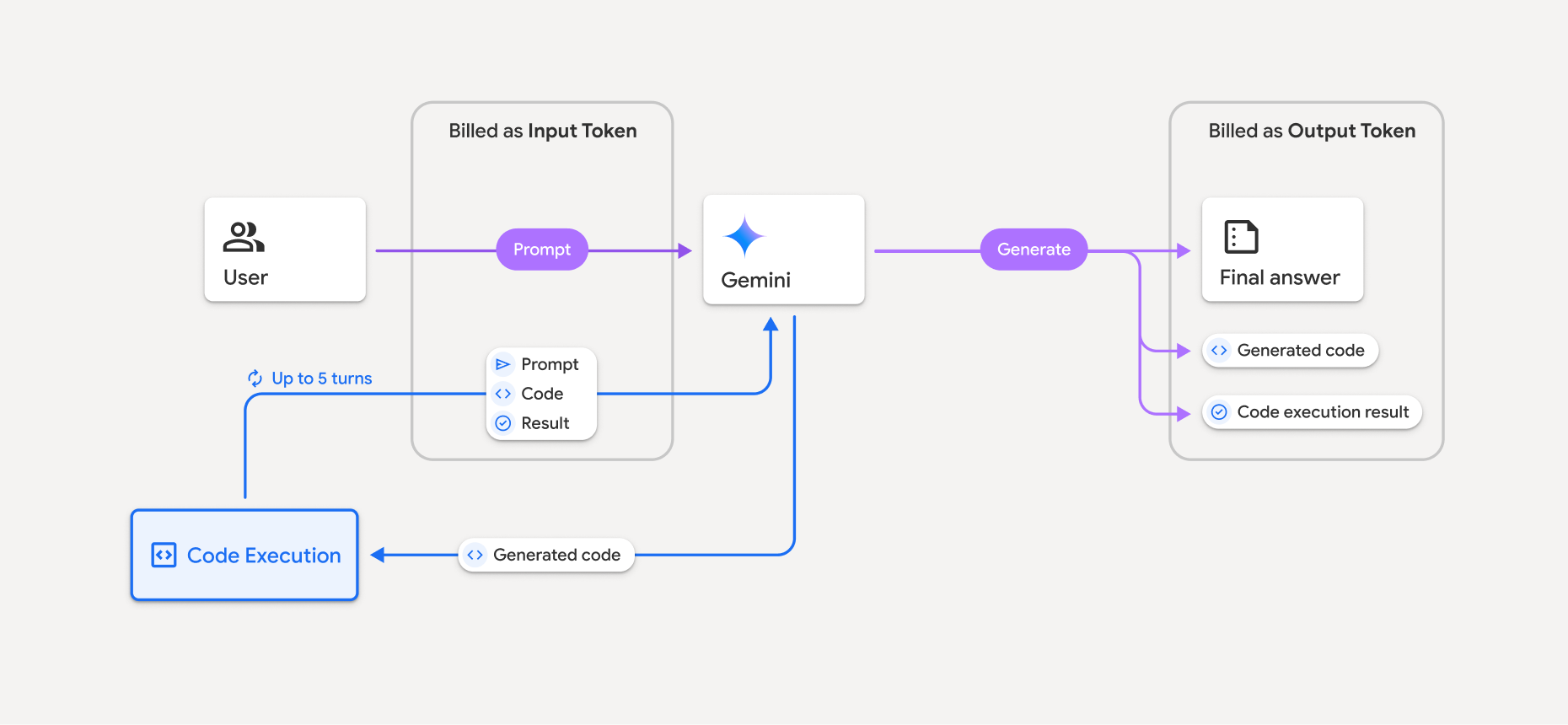
কোনো মডেল কোড এক্সিকিউশন ব্যবহার করলে টোকেনগুলোর বিল কীভাবে করা হয়, তার একটি সারসংক্ষেপ নিচে দেওয়া হলো:
মূল প্রম্পটের জন্য একবার বিল করা হয়। এর টোকেনগুলোকে মধ্যবর্তী টোকেন হিসেবে চিহ্নিত করা হয়, যেগুলোর জন্য ইনপুট টোকেন হিসেবে বিল করা হয়।
জেনারেট করা কোড এবং এক্সিকিউট করা কোডের ফলাফলের বিল নিম্নোক্তভাবে করা হয়:
যখন কোড নির্বাহের সময় এগুলো ব্যবহৃত হয়, তখন এগুলোকে ইন্টারমিডিয়েট টোকেন হিসেবে চিহ্নিত করা হয়, যেগুলোকে ইনপুট টোকেন হিসেবে গণ্য করা হয়।
যখন এগুলো চূড়ান্ত প্রতিক্রিয়ার অংশ হিসেবে অন্তর্ভুক্ত করা হয় – তখন এগুলোকে আউটপুট টোকেন হিসেবে বিল করা হয়।
চূড়ান্ত প্রতিক্রিয়ার শেষ সারসংক্ষেপকে আউটপুট টোকেন হিসেবে বিল করা হয়।
জেমিনি এপিআই তার রেসপন্সে একটি অন্তর্বর্তীকালীন টোকেন সংখ্যা অন্তর্ভুক্ত করে, ফলে আপনি জানতে পারেন যে প্রাথমিক প্রম্পটের পরেও ইনপুট টোকেনের জন্য কেন আপনার থেকে চার্জ নেওয়া হচ্ছে।
উল্লেখ্য যে, তৈরি হওয়া কোডে টেক্সট এবং ছবির মতো মাল্টিমোডাল আউটপুট উভয়ই অন্তর্ভুক্ত থাকতে পারে।
সীমাবদ্ধতা এবং সর্বোত্তম অনুশীলন
মডেলটি শুধুমাত্র পাইথন কোড তৈরি ও কার্যকর করতে পারে। এটি মিডিয়া ফাইলের মতো অন্য কোনো আর্টিফ্যাক্ট ফেরত দিতে পারে না।
টাইম আউট হওয়ার আগে কোডটি সর্বোচ্চ ৩০ সেকেন্ড পর্যন্ত চলতে পারে।
কিছু ক্ষেত্রে, কোড এক্সিকিউশন চালু করলে মডেল আউটপুটের অন্যান্য অংশে (যেমন, স্টোরি লেখা) রিগ্রেশন দেখা দিতে পারে।
কোড এক্সিকিউশন টুলটি ইনপুট/আউটপুট হিসেবে ফাইল ইউআরআই (URI) সমর্থন করে না। তবে, এটি ইনলাইনড বাইট হিসেবে ফাইল ইনপুট এবং গ্রাফ আউটপুট সমর্থন করে। এই ইনপুট এবং আউটপুট সুবিধাগুলো ব্যবহার করে, আপনি সিএসভি (CSV) এবং টেক্সট ফাইল আপলোড করতে পারেন, ফাইলগুলো সম্পর্কে প্রশ্ন করতে পারেন, এবং কোড এক্সিকিউশনের ফলাফলের অংশ হিসেবে ম্যাটপ্লটলিব (Matplotlib) গ্রাফ তৈরি করতে পারেন। ইনলাইনড বাইটের জন্য সমর্থিত মাইম টাইপগুলো হলো
.cpp,.csv,.java,.jpeg,.js,.png,.py,.ts, এবং.xml।
সমর্থিত গ্রন্থাগারগুলি
কোড এক্সিকিউশন এনভায়রনমেন্টে নিম্নলিখিত লাইব্রেরিগুলো অন্তর্ভুক্ত রয়েছে। আপনি নিজের লাইব্রেরি ইনস্টল করতে পারবেন না।
- অ্যাট্রস
- দাবা
- কনট্যুরপি
- fpdf
- জিওপান্ডাস
- ইমেজআইও
- জিনজা২
- জবলিব
- jsonschema
- jsonschema-স্পেসিফিকেশন
- lxml
- ম্যাটপ্লটলিব
- এমপিম্যাথ
- নাম্পাই
- ওপেনসিভি-পাইথন
- ওপেনপাইক্সল
- প্যাকেজিং
- পান্ডা
- বালিশ
- প্রোটোবাফ
- পাইলাটেক্স
- পাইপার্সিং
- পাইপিডিএফ২
- পাইথন-ডেটইউটিল
- পাইথন-ডক্স
- পাইথন-পিপিটিএক্স
- রিপোর্টল্যাব
- স্কিকিট-লার্ন
- সাইপি
- সমুদ্রজাত
- ছয়
- স্ট্রিপআরটিএফ
- সিম্পি
- সারণিবদ্ধ করুন
- টেনসরফ্লো
- টুলজ
- এক্সএলআরডি
- আলতেয়ার
- দাবা
- সিভি২
- ম্যাটপ্লটলিব
- এমপিমাথ
- নামপাই
- পান্ডা
- পিডিএফমাইনার
- রিপোর্টল্যাব
- সমুদ্রজাত
- Sklearn
- পরিসংখ্যান মডেল
- স্ট্রিপারটিএফ
- SymPy
- সারণিবদ্ধ করুন
Firebase AI Logic ব্যবহারের অভিজ্ঞতা সম্পর্কে মতামত দিন।