

تطبيق الرموز البرمجية هو أداة تتيح للنموذج إنشاء رموز Python وتشغيلها. يمكن للنموذج أن يتعلّم بشكل متكرّر من نتائج تنفيذ الرموز البرمجية إلى أن يصل إلى ناتج نهائي.
يمكنك استخدام ميزة "تطبيق الرموز البرمجية" لإنشاء ميزات تستفيد من التفكير المستند إلى الرموز البرمجية وتُنشئ ناتجًا نصيًا. على سبيل المثال، يمكنك استخدام ميزة "تطبيق الرموز البرمجية" لحلّ المعادلات أو معالجة النصوص. يمكنك أيضًا استخدام الـ مكتبات المضمّنة في بيئة تنفيذ الرموز البرمجية لـ إجراء مهام أكثر تخصّصًا.
كما هو الحال مع جميع الأدوات التي تقدّمها للنموذج، يقرّر النموذج متى يستخدم ميزة "تطبيق الرموز البرمجية".
الانتقال إلى تنفيذ الرموز البرمجية
مقارنة بين ميزة "تطبيق الرموز البرمجية" وميزة "استدعاء الدالة"
تتشابه ميزتا "تطبيق الرموز البرمجية" و"استدعاء الدالة" وهما ميزتان متشابهتان. بشكل عام، من الأفضل استخدام ميزة "تطبيق الرموز البرمجية" إذا كان بإمكان النموذج التعامل مع حالة الاستخدام. كما أنّ ميزة "تطبيق الرموز البرمجية" أسهل في الاستخدام لأنّك ما عليك سوى تفعيلها.
في ما يلي بعض الاختلافات الإضافية بين ميزتَي "تطبيق الرموز البرمجية" و"استدعاء الدالة":
| تطبيق الرموز البرمجية | استدعاء الدالة |
|---|---|
| استخدِم ميزة "تطبيق الرموز البرمجية" إذا كنت تريد أن يكتب النموذج رموز Python ويشغّلها نيابةً عنك ويعرض النتيجة. | استخدِم ميزة "استدعاء الدالة" إذا كانت لديك دوالّ خاصة تريد تشغيلها محليًا. |
| تتيح ميزة "تطبيق الرموز البرمجية" للنموذج تشغيل الرموز البرمجية في الخادم الخلفي لواجهة برمجة التطبيقات في بيئة ثابتة، معزولة. | تتيح لك ميزة "استدعاء الدالة" تشغيل الدوالّ التي يطلبها النموذج، في أي بيئة تريدها. |
| تؤدي ميزة "تطبيق الرموز البرمجية" إلى حلّ طلب واحد. على الرغم من أنّه يمكنك اختياريًا استخدام ميزة "تطبيق الرموز البرمجية" مع إمكانية المحادثة، ليس هناك أي شرط. | تتطلّب ميزة "استدعاء الدالة" طلبًا إضافيًا لإرسال الناتج من كل استدعاء دالة. وبالتالي، عليك استخدام إمكانية المحادثة. |
النماذج المتوافقة
gemini-3.1-pro-previewgemini-3.7-flash(والإصداران الأقدمgemini-3.6-flashوgemini-3.5-flash)gemini-3.5-flash-lite(والإصدار الأقدمgemini-3.1-flash-lite)
تتوافق نماذج Gemini 2.5 ذات الاستخدام العام مع هذه الإمكانية، ولكن تم إيقافها جميعًا.
استخدام ميزة "تطبيق الرموز البرمجية"
يمكنك استخدام ميزة "تطبيق الرموز البرمجية" مع الإدخال النصي فقط والإدخال المتعدّد الوسائط، ولكن سيكون الردّ دائمًا نصًا أو رمزًا فقط.
قبل البدء
|
انقر على موفِّر Gemini API لعرض المحتوى الخاص بالموفِّر والرموز البرمجية على هذه الصفحة. |
إذا لم يسبق لك ذلك، أكمل
دليل البدء الذي يوضّح كيفية
إعداد مشروعك على Firebase وربط تطبيقك بـ Firebase وإضافة حزمة تطوير البرامج (SDK) و
تهيئة الخدمة الخلفية لموفِّر Gemini API الذي اخترته و
إنشاء مثيل GenerativeModel.
لاختبار طلباتك وتكرارها، ننصحك باستخدام Google AI Studio.
تفعيل ميزة "تطبيق الرموز البرمجية"
|
قبل تجربة هذا المثال، أكمل قسم قبل البدء في هذا الدليل لإعداد مشروعك وتطبيقك. في هذا القسم، ستنقر أيضًا على زر لموفِّر Gemini API الذي اخترته حتى يظهر لك المحتوى الخاص بالموفِّر على هذه الصفحة. |
عند إنشاء مثيل GenerativeModel، قدِّم CodeExecution كأداة يمكن للنموذج استخدامها لإنشاء ردّه. يسمح ذلك للنموذج بإنشاء رموز Python وتشغيلها.
Swift
import FirebaseAILogic

// Initialize the Gemini Developer API backend service.
let ai = FirebaseAI.firebaseAI(backend: .googleAI())

// Create a `GenerativeModel` instance with a model that supports your use case
let model = ai.generativeModel(
  modelName: "GEMINI_MODEL_NAME",
  // Provide code execution as a tool that the model can use to generate its response.
  tools: [.codeExecution()]
)

let prompt = """
What is the sum of the first 50 prime numbers?
Generate and run code for the calculation, and make sure you get all 50.
"""

let response = try await model.generateContent(prompt)

guard let candidate = response.candidates.first else {
  print("No candidates in response.")
  return
}
for part in candidate.content.parts {
  if let textPart = part as? TextPart {
    print("Text = \(textPart.text)")
  } else if let executableCode = part as? ExecutableCodePart {
    print("Code = \(executableCode.code), Language = \(executableCode.language)")
  } else if let executionResult = part as? CodeExecutionResultPart {
    print("Outcome = \(executionResult.outcome), Result = \(executionResult.output ?? "no output")")
  }
}
Kotlin
// Initialize the Gemini Developer API backend service.
// Create a `GenerativeModel` instance with a model that supports your use case.
val model = Firebase.ai(backend = GenerativeBackend.googleAI()).generativeModel(
    modelName = "GEMINI_MODEL_NAME",
    // Provide code execution as a tool that the model can use to generate its response.
    tools = listOf(Tool.codeExecution())
)

val prompt =  "What is the sum of the first 50 prime numbers? " +
        "Generate and run code for the calculation, and make sure you get all 50."

val response = model.generateContent(prompt)

response.candidates.first().content.parts.forEach {
    if(it is TextPart) {
        println("Text = ${it.text}")
    }
    if(it is ExecutableCodePart) {
        println("Code = ${it.code}, Language = ${it.language}")
    }
    if(it is CodeExecutionResultPart) {
       println("Outcome = ${it.outcome}, Result = ${it.output}")
    }
}
Java
// Initialize the Gemini Developer API backend service.
// Create a `GenerativeModel` instance with a model that supports your use case.
GenerativeModel ai = FirebaseAI.getInstance(GenerativeBackend.googleAI())
                .generativeModel("GEMINI_MODEL_NAME",
                        null,
                        null,
                        // Provide code execution as a tool that the model can use to generate its response.
                        List.of(Tool.codeExecution()));

// Use the GenerativeModelFutures Java compatibility layer which offers
// support for ListenableFuture and Publisher APIs
GenerativeModelFutures model = GenerativeModelFutures.from(ai);

String text = "What is the sum of the first 50 prime numbers? " +
        "Generate and run code for the calculation, and make sure you get all 50.";

Content prompt = new Content.Builder()
    .addText(text)
    .build();

ListenableFuture response = model.generateContent(prompt);

Futures.addCallback(response, new FutureCallback() {
   @Override
public void onSuccess(GenerateContentResponse response)   {
    // Access the first candidate's content parts
    List parts = response.getCandidates().get(0).getContent().getParts();
    for (Part part : parts) {
        if (part instanceof TextPart) {
            TextPart textPart = (TextPart) part;
            System.out.println("Text = " + textPart.getText());
        } else if (part instanceof ExecutableCodePart) {
            ExecutableCodePart codePart = (ExecutableCodePart) part;
            System.out.println("Code = " + codePart.getCode() + ", Language = " + codePart.getLanguage());
        } else if (part instanceof CodeExecutionResultPart) {
            CodeExecutionResultPart resultPart = (CodeExecutionResultPart) part;
            System.out.println("Outcome = " + resultPart.getOutcome() + ", Result = " + resultPart.getOutput());
        }
    }
}

    @Override
    public void onFailure(Throwable t) {
        t.printStackTrace();
    }
}, executor);
Web
import { initializeApp } from "firebase/app";
import { getAI, getGenerativeModel, GoogleAIBackend } from "firebase/ai";

// TODO(developer): Replace the following with your app's Firebase configuration
// See: https://firebase.google.com/docs/web/learn-more#config-object
const firebaseConfig = {
  // ...
};

// Initialize FirebaseApp
const firebaseApp = initializeApp(firebaseConfig);

// Initialize the Gemini Developer API backend service.
const ai = getAI(firebaseApp, { backend: new GoogleAIBackend() });

// Create a `GenerativeModel` instance with a model that supports your use case.
const model = getGenerativeModel(
  ai,
  {
    model: "GEMINI_MODEL_NAME",
    // Provide code execution as a tool that the model can use to generate its response.
    tools: [{ codeExecution: {} }]
  }
);

const prompt =  "What is the sum of the first 50 prime numbers? " +
        "Generate and run code for the calculation, and make sure you get all 50."

const result = await model.generateContent(prompt);
const response = await result.response;

const parts = response.candidates?.[0].content.parts;

if (parts) {
  parts.forEach((part) => {
    if (part.text) {
        console.log(`Text: ${part.text}`);
    } else if (part.executableCode) {
      console.log(
        `Code: ${part.executableCode.code}, Language: ${part.executableCode.language}`
      );
    } else if (part.codeExecutionResult) {
      console.log(
        `Outcome: ${part.codeExecutionResult.outcome}, Result: ${part.codeExecutionResult.output}`
      );
    }
  });
}
Dart
import 'package:firebase_core/firebase_core.dart';
import 'package:firebase_ai/firebase_ai.dart';
import 'firebase_options.dart';

// Initialize FirebaseApp
await Firebase.initializeApp(
  options: DefaultFirebaseOptions.currentPlatform,
);

// Initialize the Gemini Developer API backend service.
// Create a `GenerativeModel` instance with a model that supports your use case.
final model = FirebaseAI.googleAI().generativeModel(
  model: 'GEMINI_MODEL_NAME',
  // Provide code execution as a tool that the model can use to generate its response.
  tools: [
    Tool.codeExecution(),
  ],
);

const prompt = 'What is the sum of the first 50 prime numbers? '
    'Generate and run code for the calculation, and make sure you get all 50.';

final response = await model.generateContent([Content.text(prompt)]);

final buffer = StringBuffer();
    for (final part in response.candidates.first.content.parts) {
      if (part is TextPart) {
        buffer.writeln(part.text);
      } else if (part is ExecutableCodePart) {
        buffer.writeln('Executable Code:');
        buffer.writeln('Language: ${part.language}');
        buffer.writeln('Code:');
        buffer.writeln(part.code);
      } else if (part is CodeExecutionResultPart) {
        buffer.writeln('Code Execution Result:');
        buffer.writeln('Outcome: ${part.outcome}');
        buffer.writeln('Output:');
        buffer.writeln(part.output);
      }
    }
Unity
using Firebase;
using Firebase.AI;

// Initialize the Gemini Developer API backend service.
var ai = FirebaseAI.GetInstance(FirebaseAI.Backend.GoogleAI());

// Create a `GenerativeModel` instance with a model that supports your use case.
var model = ai.GetGenerativeModel(
  modelName: "GEMINI_MODEL_NAME",
  // Provide code execution as a tool that the model can use to generate its response.
  tools: new Tool[] { new Tool(new CodeExecution()) }
);

var prompt = "What is the sum of the first 50 prime numbers? " +
        "Generate and run code for the calculation, and make sure you get all 50.";

var response = await model.GenerateContentAsync(prompt);

foreach (var part in response.Candidates.First().Content.Parts) {
  if (part is ModelContent.TextPart tp) {
    UnityEngine.Debug.Log($"Text = {tp.Text}");
  } else if (part is ModelContent.ExecutableCodePart esp) {
    UnityEngine.Debug.Log($"Code = {esp.Code}, Language = {esp.Language}");
  } else if (part is ModelContent.CodeExecutionResultPart cerp) {
    UnityEngine.Debug.Log($"Outcome = {cerp.Outcome}, Output = {cerp.Output}");
  }
}
كيفية اختيار نموذج اختياري مناسبَين لحالة الاستخدام والتطبيق
استخدام ميزة "تطبيق الرموز البرمجية" في المحادثة
يمكنك أيضًا استخدام ميزة "تطبيق الرموز البرمجية" كجزء من المحادثة:
Swift
import FirebaseAILogic

// Initialize the Gemini Developer API backend service.
let ai = FirebaseAI.firebaseAI(backend: .googleAI())

// Create a `GenerativeModel` instance with a model that supports your use case
let model = ai.generativeModel(
  modelName: "GEMINI_MODEL_NAME",
  // Provide code execution as a tool that the model can use to generate its response.
  tools: [.codeExecution()]
)

let prompt = """
What is the sum of the first 50 prime numbers?
Generate and run code for the calculation, and make sure you get all 50.
"""
let chat = model.startChat()

let response = try await chat.sendMessage(prompt)

guard let candidate = response.candidates.first else {
  print("No candidates in response.")
  return
}
for part in candidate.content.parts {
  if let textPart = part as? TextPart {
    print("Text = \(textPart.text)")
  } else if let executableCode = part as? ExecutableCodePart {
    print("Code = \(executableCode.code), Language = \(executableCode.language)")
  } else if let executionResult = part as? CodeExecutionResultPart {
    print("Outcome = \(executionResult.outcome), Result = \(executionResult.output ?? "no output")")
  }
}
Kotlin
// Initialize the Gemini Developer API backend service.
// Create a `GenerativeModel` instance with a model that supports your use case.
val model = Firebase.ai(backend = GenerativeBackend.googleAI()).generativeModel(
    modelName = "GEMINI_MODEL_NAME",
    // Provide code execution as a tool that the model can use to generate its response.
    tools = listOf(Tool.codeExecution())
)

val prompt =  "What is the sum of the first 50 prime numbers? " +
        "Generate and run code for the calculation, and make sure you get all 50."
val chat = model.startChat()
val response = chat.sendMessage(prompt)

response.candidates.first().content.parts.forEach {
    if(it is TextPart) {
        println("Text = ${it.text}")
    }
    if(it is ExecutableCodePart) {
        println("Code = ${it.code}, Language = ${it.language}")
    }
    if(it is CodeExecutionResultPart) {
       println("Outcome = ${it.outcome}, Result = ${it.output}")
    }
}
Java
// Initialize the Gemini Developer API backend service.
// Create a `GenerativeModel` instance with a model that supports your use case.
GenerativeModel ai = FirebaseAI.getInstance(GenerativeBackend.googleAI())
                .generativeModel("GEMINI_MODEL_NAME",
                        null,
                        null,
                        // Provide code execution as a tool that the model can use to generate its response.
                        List.of(Tool.codeExecution()));

// Use the GenerativeModelFutures Java compatibility layer which offers
// support for ListenableFuture and Publisher APIs
GenerativeModelFutures model = GenerativeModelFutures.from(ai);
String text = "What is the sum of the first 50 prime numbers? " +
        "Generate and run code for the calculation, and make sure you get all 50.";

Content prompt = new Content.Builder()
    .addText(text)
    .build();

ChatFutures chat = model.startChat();
ListenableFuture response = chat.sendMessage(prompt);

Futures.addCallback(response, new FutureCallback() {
   @Override
public void onSuccess(GenerateContentResponse response)   {
    // Access the first candidate's content parts
    List parts = response.getCandidates().get(0).getContent().getParts();
    for (Part part : parts) {
        if (part instanceof TextPart) {
            TextPart textPart = (TextPart) part;
            System.out.println("Text = " + textPart.getText());
        } else if (part instanceof ExecutableCodePart) {
            ExecutableCodePart codePart = (ExecutableCodePart) part;
            System.out.println("Code = " + codePart.getCode() + ", Language = " + codePart.getLanguage());
        } else if (part instanceof CodeExecutionResultPart) {
            CodeExecutionResultPart resultPart = (CodeExecutionResultPart) part;
            System.out.println("Outcome = " + resultPart.getOutcome() + ", Result = " + resultPart.getOutput());
        }
    }
}

    @Override
    public void onFailure(Throwable t) {
        t.printStackTrace();
    }
}, executor);
Web
import { initializeApp } from "firebase/app";
import { getAI, getGenerativeModel, GoogleAIBackend } from "firebase/ai";

// TODO(developer): Replace the following with your app's Firebase configuration
// See: https://firebase.google.com/docs/web/learn-more#config-object
const firebaseConfig = {
  // ...
};

// Initialize FirebaseApp
const firebaseApp = initializeApp(firebaseConfig);

// Initialize the Gemini Developer API backend service.
const ai = getAI(firebaseApp, { backend: new GoogleAIBackend() });

// Create a `GenerativeModel` instance with a model that supports your use case.
const model = getGenerativeModel(
  ai,
  {
    model: "GEMINI_MODEL_NAME",
    // Provide code execution as a tool that the model can use to generate its response.
    tools: [{ codeExecution: {} }]
  }
);

const prompt =  "What is the sum of the first 50 prime numbers? " +
        "Generate and run code for the calculation, and make sure you get all 50."
const chat = model.startChat()
const result = await chat.sendMessage(prompt);

const parts = result.response.candidates?.[0].content.parts;

if (parts) {
  parts.forEach((part) => {
    if (part.text) {
        console.log(`Text: ${part.text}`);
    } else if (part.executableCode) {
      console.log(
        `Code: ${part.executableCode.code}, Language: ${part.executableCode.language}`
      );
    } else if (part.codeExecutionResult) {
      console.log(
        `Outcome: ${part.codeExecutionResult.outcome}, Result: ${part.codeExecutionResult.output}`
      );
    }
  });
}
Dart
import 'package:firebase_core/firebase_core.dart';
import 'package:firebase_ai/firebase_ai.dart';
import 'firebase_options.dart';

// Initialize FirebaseApp
await Firebase.initializeApp(
  options: DefaultFirebaseOptions.currentPlatform,
);

// Initialize the Gemini Developer API backend service.
// Create a `GenerativeModel` instance with a model that supports your use case.
final model = FirebaseAI.googleAI().generativeModel(
  model: 'GEMINI_MODEL_NAME',
  // Provide code execution as a tool that the model can use to generate its response.
  tools: [
    Tool.codeExecution(),
  ],
);

final codeExecutionChat = await model.startChat();

const prompt = 'What is the sum of the first 50 prime numbers? '
    'Generate and run code for the calculation, and make sure you get all 50.';
final response = await codeExecutionChat.sendMessage(Content.text(prompt));

final buffer = StringBuffer();
    for (final part in response.candidates.first.content.parts) {
      if (part is TextPart) {
        buffer.writeln(part.text);
      } else if (part is ExecutableCodePart) {
        buffer.writeln('Executable Code:');
        buffer.writeln('Language: ${part.language}');
        buffer.writeln('Code:');
        buffer.writeln(part.code);
      } else if (part is CodeExecutionResultPart) {
        buffer.writeln('Code Execution Result:');
        buffer.writeln('Outcome: ${part.outcome}');
        buffer.writeln('Output:');
        buffer.writeln(part.output);
      }
    }
Unity
using Firebase;
using Firebase.AI;

// Initialize the Gemini Developer API backend service.
var ai = FirebaseAI.GetInstance(FirebaseAI.Backend.GoogleAI());

// Create a `GenerativeModel` instance with a model that supports your use case.
var model = ai.GetGenerativeModel(
  modelName: "GEMINI_MODEL_NAME",
  // Provide code execution as a tool that the model can use to generate its response.
  tools: new Tool[] { new Tool(new CodeExecution()) }
);

var prompt = "What is the sum of the first 50 prime numbers? " +
        "Generate and run code for the calculation, and make sure you get all 50.";
var chat = model.StartChat();
var response = await chat.SendMessageAsync(prompt);

foreach (var part in response.Candidates.First().Content.Parts) {
  if (part is ModelContent.TextPart tp) {
    UnityEngine.Debug.Log($"Text = {tp.Text}");
  } else if (part is ModelContent.ExecutableCodePart esp) {
    UnityEngine.Debug.Log($"Code = {esp.Code}, Language = {esp.Language}");
  } else if (part is ModelContent.CodeExecutionResultPart cerp) {
    UnityEngine.Debug.Log($"Outcome = {cerp.Outcome}, Output = {cerp.Output}");
  }
}
كيفية اختيار نموذج اختياري مناسبَين لحالة الاستخدام والتطبيق
الأسعار
لن يتم تحصيل أي رسوم إضافية مقابل تفعيل ميزة "تطبيق الرموز البرمجية" وتقديمها كأداة للنموذج. إذا قرّر النموذج استخدام ميزة "تطبيق الرموز البرمجية"، سيتم تحصيل رسوم منك بالسعر الحالي للرموز المميّزة للإدخال والإخراج استنادًا إلى نموذج Gemini الذي تستخدمه.
يوضّح المخطط التالي نموذج الفوترة لميزة "تطبيق الرموز البرمجية":
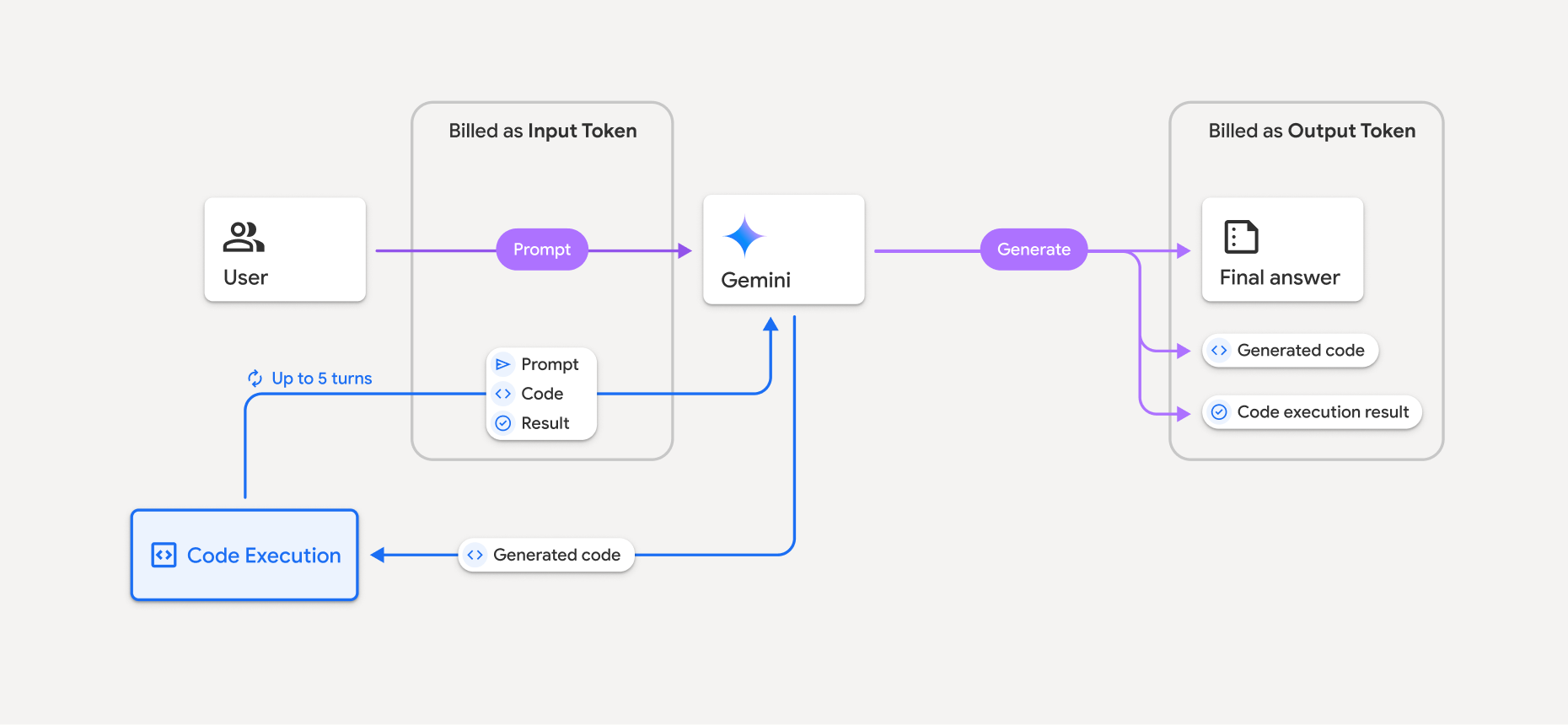
في ما يلي ملخّص عن كيفية تحصيل الرسوم من الرموز المميّزة عندما يستخدم النموذج ميزة "تطبيق الرموز البرمجية":
يتم تحصيل رسوم الطلب الأصلي مرة واحدة. يتم تصنيف الرموز المميّزة على أنّها رموز مميّزة متوسطة، ويتم تحصيل رسومها على أنّها رموز مميّزة للإدخال.
يتم تحصيل رسوم الرمز الذي تم إنشاؤه ونتيجة الرمز الذي تم تنفيذه على النحو التالي:
عند استخدامها أثناء تنفيذ الرموز البرمجية، يتم تصنيفها على أنّها رموز مميّزة متوسطة يتم تحصيل رسومها على أنّها رموز مميّزة للإدخال.
عند تضمينها كجزء من الردّ النهائي، يتم تحصيل رسومها على أنّها رموز مميّزة للإخراج.
يتم تحصيل رسوم الملخّص النهائي في الردّ النهائي على أنّه رموز مميّزة للإخراج.
يتضمّن Gemini API عدد الرموز المميّزة المتوسطة في الردّ من واجهة برمجة التطبيقات، لذا ستعرف سبب تحصيل رسوم منك مقابل الرموز المميّزة للإدخال بعد طلبك الأولي.
يُرجى العِلم أنّ الرمز الذي تم إنشاؤه يمكن أن يتضمّن كلاً من النصوص والناتج المتعدّد الوسائط، مثل الصور.
القيود وأفضل الممارسات
لا يمكن للنموذج إلا إنشاء رموز Python وتنفيذها. ولا يمكنه عرض مواد عرض أخرى، مثل ملفات الوسائط.
يمكن أن يستغرق تنفيذ الرموز البرمجية 30 ثانية كحد أقصى قبل أن تنتهي المهلة.
في بعض الحالات، يمكن أن يؤدي تفعيل ميزة تطبيق الرموز البرمجية إلى حدوث تراجع في جوانب أخرى من مخرجات النموذج (على سبيل المثال، كتابة قصة).
لا تتيح أداة "تطبيق الرموز البرمجية" عناوين URI للملفات كإدخال أو إخراج. ومع ذلك، تتيح أداة "تطبيق الرموز البرمجية" إدخال الملفات وإخراج الرسم البياني كبايت مضمّنة. باستخدام إمكانات الإدخال والإخراج هذه، يمكنك تحميل ملفات CSV وملفات نصية وطرح أسئلة حول الملفات وإنشاء رسومات بيانية باستخدام Matplotlib كجزء من نتيجة تنفيذ الرموز البرمجية. أنواع MIME المتوافقة مع البايت المضمّنة هي
.cppو.csvو.javaو.jpegو.jsو.pngو.pyو.tsو.xml.
المكتبات المتوافقة
تتضمّن بيئة تنفيذ الرموز البرمجية المكتبات التالية. لا يمكنك تثبيت مكتباتك الخاصة.
تقديم ملاحظات حول تجربتك مع Firebase AI Logic