

اجرای کد ابزاری است که مدل را قادر میسازد کد Python تولید و اجرا کند. مدل میتواند بهطور تکراری از نتایج اجرای کد یاد بگیرد تا به برونداد نهایی برسد.
میتوانید از اجرای کد برای ساختن ویژگیهایی استفاده کنید که از استدلال مبتنی بر کد بهره میبرند و برونداد نوشتاری تولید میکنند. برای مثال، میتوانید از اجرای کد برای حل کردن معادلات یا پردازش نوشتار استفاده کنید. همچنین میتوانید از کتابخانههای موجود در محیط اجرای کد برای انجام کارهای تخصصیتر استفاده کنید.
همانند همه ابزارهایی که دراختیار مدل قرار میدهید، مدل تصمیم میگیرد که چه زمانی از اجرای کد استفاده کند.
مقایسه اجرای کد با فراخوانی تابع
اجرای کد و فراخوانی تابع ویژگیهای مشابهی هستند. بهطورکلی، اگر مدل بتواند از عهده مورد استفاده شما برآید، بهتر است از اجرای کد استفاده کنید. استفاده از «اجرای کد» نیز سادهتر است زیرا فقط آن را فعال میکنید.
در اینجا چند تفاوت دیگر بین اجرای کد و فراخوانی تابع آورده شده است:
| اجرای کد | فراخوانی تابع |
|---|---|
| اگر میخواهید مدل برای شما کد پایتون بنویسد و اجرا کند و نتیجه را برگرداند، از اجرای کد استفاده کنید. | اگر ازقبل توابع خودتان را دارید که میخواهید بهصورت محلی اجرا کنید، از فراخوانی تابع استفاده کنید. |
| اجرای کد به مدل اجازه میدهد کد را در زیرینه API در محیطی ثابت و مجزا اجرا کند. | فراخوانی تابع به شما امکان میدهد توابعی را که مدل درخواست میکند در هر محیطی که میخواهید اجرا کنید. |
| اجرای کد در یک درخواست حل میشود. اگرچه میتوانید بهطور اختیاری از اجرای کد با قابلیت گپ استفاده کنید، اما الزامی وجود ندارد. | برای فراخوانی تابع، باید درخواست اضافهای برای ارسال برونداد هر فراخوانی تابع ارسال شود. بنابراین، ملزم هستید از قابلیت گپ استفاده کنید. |
مدلهای پشتیبانیشده
gemini-4-argon-
gemini-3.8-flash(و مدلهای قدیمیترgemini-3.7-flash،gemini-3.6-flash، وgemini-3.5-flash) -
gemini-3.5-flash-lite(وgemini-3.1-flash-liteقدیمیتر)
مدلهای gemini-3.1-pro-preview و Gemini 2.5 با کاربرد عمومی (که
منسوخ شدهاند) نیز از این قابلیت پشتیبانی میکنند.
استفاده از اجرای کد
میتوانید از اجرای کد با ورودیهای فقط نوشتاری و چندحالته استفاده کنید، اما پاسخ همیشه فقط نوشتار یا کد خواهد بود.
قبل از شروع
|
روی ارائهدهنده Gemini API خود کلیک کنید تا محتوا و کد مخصوص ارائهدهنده را در این صفحه مشاهده کنید. |
اگر قبلاً این کار را نکردهاید،
راهنمای شروع به کار را تکمیل کنید که نحوه
راهاندازی پروژه Firebase، اتصال برنامه به Firebase، افزودن کیت توسعه نرمافزار،
مقداردهی اولیه سرویس پسبست برای ارائهدهنده Gemini API انتخابی، و
ایجاد نمونه GenerativeModel را شرح میدهد.
برای آزمایش و تکرار کردن پیاموارههایتان، توصیه میکنیم از Google AI Studio استفاده کنید.
فعال کردن اجرای کد
|
قبلاز امتحان کردن این نمونه، بخش
قبلاز شروع این راهنما را تکمیل کنید
تا پروژه و برنامهتان را راهاندازی کنید. در آن بخش، روی دکمهای برای ارائهدهنده انتخابیتان Gemini API نیز کلیک خواهید کرد تا محتوای مختص ارائهدهنده را در این صفحه ببینید. |
وقتی نمونه GenerativeModel را ایجاد میکنید، CodeExecution را بهعنوان ابزاری که مدل میتواند برای تولید پاسخ خود استفاده کند ارائه دهید. این کار به مدل اجازه میدهد کد Python تولید و اجرا کند.
Swift
import FirebaseAILogic

// Initialize the Gemini Developer API backend service.
let ai = FirebaseAI.firebaseAI(backend: .googleAI())

// Create a `GenerativeModel` instance with a model that supports your use case
let model = ai.generativeModel(
  modelName: "GEMINI_MODEL_NAME",
  // Provide code execution as a tool that the model can use to generate its response.
  tools: [.codeExecution()]
)

let prompt = """
What is the sum of the first 50 prime numbers?
Generate and run code for the calculation, and make sure you get all 50.
"""

let response = try await model.generateContent(prompt)

guard let candidate = response.candidates.first else {
  print("No candidates in response.")
  return
}
for part in candidate.content.parts {
  if let textPart = part as? TextPart {
    print("Text = \(textPart.text)")
  } else if let executableCode = part as? ExecutableCodePart {
    print("Code = \(executableCode.code), Language = \(executableCode.language)")
  } else if let executionResult = part as? CodeExecutionResultPart {
    print("Outcome = \(executionResult.outcome), Result = \(executionResult.output ?? "no output")")
  }
}
Kotlin
// Initialize the Gemini Developer API backend service.
// Create a `GenerativeModel` instance with a model that supports your use case.
val model = Firebase.ai(backend = GenerativeBackend.googleAI()).generativeModel(
    modelName = "GEMINI_MODEL_NAME",
    // Provide code execution as a tool that the model can use to generate its response.
    tools = listOf(Tool.codeExecution())
)

val prompt =  "What is the sum of the first 50 prime numbers? " +
        "Generate and run code for the calculation, and make sure you get all 50."

val response = model.generateContent(prompt)

response.candidates.first().content.parts.forEach {
    if(it is TextPart) {
        println("Text = ${it.text}")
    }
    if(it is ExecutableCodePart) {
        println("Code = ${it.code}, Language = ${it.language}")
    }
    if(it is CodeExecutionResultPart) {
       println("Outcome = ${it.outcome}, Result = ${it.output}")
    }
}
Java
// Initialize the Gemini Developer API backend service.
// Create a `GenerativeModel` instance with a model that supports your use case.
GenerativeModel ai = FirebaseAI.getInstance(GenerativeBackend.googleAI())
                .generativeModel("GEMINI_MODEL_NAME",
                        null,
                        null,
                        // Provide code execution as a tool that the model can use to generate its response.
                        List.of(Tool.codeExecution()));

// Use the GenerativeModelFutures Java compatibility layer which offers
// support for ListenableFuture and Publisher APIs
GenerativeModelFutures model = GenerativeModelFutures.from(ai);

String text = "What is the sum of the first 50 prime numbers? " +
        "Generate and run code for the calculation, and make sure you get all 50.";

Content prompt = new Content.Builder()
    .addText(text)
    .build();

ListenableFuture response = model.generateContent(prompt);

Futures.addCallback(response, new FutureCallback() {
   @Override
public void onSuccess(GenerateContentResponse response)   {
    // Access the first candidate's content parts
    List parts = response.getCandidates().get(0).getContent().getParts();
    for (Part part : parts) {
        if (part instanceof TextPart) {
            TextPart textPart = (TextPart) part;
            System.out.println("Text = " + textPart.getText());
        } else if (part instanceof ExecutableCodePart) {
            ExecutableCodePart codePart = (ExecutableCodePart) part;
            System.out.println("Code = " + codePart.getCode() + ", Language = " + codePart.getLanguage());
        } else if (part instanceof CodeExecutionResultPart) {
            CodeExecutionResultPart resultPart = (CodeExecutionResultPart) part;
            System.out.println("Outcome = " + resultPart.getOutcome() + ", Result = " + resultPart.getOutput());
        }
    }
}

    @Override
    public void onFailure(Throwable t) {
        t.printStackTrace();
    }
}, executor);
Web
import { initializeApp } from "firebase/app";
import { getAI, getGenerativeModel, GoogleAIBackend } from "firebase/ai";

// TODO(developer): Replace the following with your app's Firebase configuration
// See: https://firebase.google.com/docs/web/learn-more#config-object
const firebaseConfig = {
  // ...
};

// Initialize FirebaseApp
const firebaseApp = initializeApp(firebaseConfig);

// Initialize the Gemini Developer API backend service.
const ai = getAI(firebaseApp, { backend: new GoogleAIBackend() });

// Create a `GenerativeModel` instance with a model that supports your use case.
const model = getGenerativeModel(
  ai,
  {
    model: "GEMINI_MODEL_NAME",
    // Provide code execution as a tool that the model can use to generate its response.
    tools: [{ codeExecution: {} }]
  }
);

const prompt =  "What is the sum of the first 50 prime numbers? " +
        "Generate and run code for the calculation, and make sure you get all 50."

const result = await model.generateContent(prompt);
const response = await result.response;

const parts = response.candidates?.[0].content.parts;

if (parts) {
  parts.forEach((part) => {
    if (part.type === "text") {
      console.log(`Text: ${part.text}`);
    } else if (part.type === "executableCode") {
      console.log(
        `Code: ${part.executableCode.code}, Language: ${part.executableCode.language}`
      );
    } else if (part.type === "codeExecutionResult") {
      console.log(
        `Outcome: ${part.codeExecutionResult.outcome}, Result: ${part.codeExecutionResult.output}`
      );
    }
  });
}
Dart
import 'package:firebase_core/firebase_core.dart';
import 'package:firebase_ai/firebase_ai.dart';
import 'firebase_options.dart';

// Initialize FirebaseApp
await Firebase.initializeApp(
  options: DefaultFirebaseOptions.currentPlatform,
);

// Initialize the Gemini Developer API backend service.
// Create a `GenerativeModel` instance with a model that supports your use case.
final model = FirebaseAI.googleAI().generativeModel(
  model: 'GEMINI_MODEL_NAME',
  // Provide code execution as a tool that the model can use to generate its response.
  tools: [
    Tool.codeExecution(),
  ],
);

const prompt = 'What is the sum of the first 50 prime numbers? '
    'Generate and run code for the calculation, and make sure you get all 50.';

final response = await model.generateContent([Content.text(prompt)]);

final buffer = StringBuffer();
    for (final part in response.candidates.first.content.parts) {
      if (part is TextPart) {
        buffer.writeln(part.text);
      } else if (part is ExecutableCodePart) {
        buffer.writeln('Executable Code:');
        buffer.writeln('Language: ${part.language}');
        buffer.writeln('Code:');
        buffer.writeln(part.code);
      } else if (part is CodeExecutionResultPart) {
        buffer.writeln('Code Execution Result:');
        buffer.writeln('Outcome: ${part.outcome}');
        buffer.writeln('Output:');
        buffer.writeln(part.output);
      }
    }
Unity
using Firebase;
using Firebase.AI;

// Initialize the Gemini Developer API backend service.
var ai = FirebaseAI.GetInstance(FirebaseAI.Backend.GoogleAI());

// Create a `GenerativeModel` instance with a model that supports your use case.
var model = ai.GetGenerativeModel(
  modelName: "GEMINI_MODEL_NAME",
  // Provide code execution as a tool that the model can use to generate its response.
  tools: new Tool[] { new Tool(new CodeExecution()) }
);

var prompt = "What is the sum of the first 50 prime numbers? " +
        "Generate and run code for the calculation, and make sure you get all 50.";

var response = await model.GenerateContentAsync(prompt);

foreach (var part in response.Candidates.First().Content.Parts) {
  if (part is ModelContent.TextPart tp) {
    UnityEngine.Debug.Log($"Text = {tp.Text}");
  } else if (part is ModelContent.ExecutableCodePart esp) {
    UnityEngine.Debug.Log($"Code = {esp.Code}, Language = {esp.Language}");
  } else if (part is ModelContent.CodeExecutionResultPart cerp) {
    UnityEngine.Debug.Log($"Outcome = {cerp.Outcome}, Output = {cerp.Output}");
  }
}
با نحوه انتخاب مدل مناسب برای مورد استفاده و برنامه خود آشنا شوید.
استفاده از اجرای کد در گپ
همچنین میتوانید از اجرای کد بهعنوان بخشی از گپ استفاده کنید:
Swift
import FirebaseAILogic

// Initialize the Gemini Developer API backend service.
let ai = FirebaseAI.firebaseAI(backend: .googleAI())

// Create a `GenerativeModel` instance with a model that supports your use case
let model = ai.generativeModel(
  modelName: "GEMINI_MODEL_NAME",
  // Provide code execution as a tool that the model can use to generate its response.
  tools: [.codeExecution()]
)

let prompt = """
What is the sum of the first 50 prime numbers?
Generate and run code for the calculation, and make sure you get all 50.
"""
let chat = model.startChat()

let response = try await chat.sendMessage(prompt)

guard let candidate = response.candidates.first else {
  print("No candidates in response.")
  return
}
for part in candidate.content.parts {
  if let textPart = part as? TextPart {
    print("Text = \(textPart.text)")
  } else if let executableCode = part as? ExecutableCodePart {
    print("Code = \(executableCode.code), Language = \(executableCode.language)")
  } else if let executionResult = part as? CodeExecutionResultPart {
    print("Outcome = \(executionResult.outcome), Result = \(executionResult.output ?? "no output")")
  }
}
Kotlin
// Initialize the Gemini Developer API backend service.
// Create a `GenerativeModel` instance with a model that supports your use case.
val model = Firebase.ai(backend = GenerativeBackend.googleAI()).generativeModel(
    modelName = "GEMINI_MODEL_NAME",
    // Provide code execution as a tool that the model can use to generate its response.
    tools = listOf(Tool.codeExecution())
)

val prompt =  "What is the sum of the first 50 prime numbers? " +
        "Generate and run code for the calculation, and make sure you get all 50."
val chat = model.startChat()
val response = chat.sendMessage(prompt)

response.candidates.first().content.parts.forEach {
    if(it is TextPart) {
        println("Text = ${it.text}")
    }
    if(it is ExecutableCodePart) {
        println("Code = ${it.code}, Language = ${it.language}")
    }
    if(it is CodeExecutionResultPart) {
       println("Outcome = ${it.outcome}, Result = ${it.output}")
    }
}
Java
// Initialize the Gemini Developer API backend service.
// Create a `GenerativeModel` instance with a model that supports your use case.
GenerativeModel ai = FirebaseAI.getInstance(GenerativeBackend.googleAI())
                .generativeModel("GEMINI_MODEL_NAME",
                        null,
                        null,
                        // Provide code execution as a tool that the model can use to generate its response.
                        List.of(Tool.codeExecution()));

// Use the GenerativeModelFutures Java compatibility layer which offers
// support for ListenableFuture and Publisher APIs
GenerativeModelFutures model = GenerativeModelFutures.from(ai);
String text = "What is the sum of the first 50 prime numbers? " +
        "Generate and run code for the calculation, and make sure you get all 50.";

Content prompt = new Content.Builder()
    .addText(text)
    .build();

ChatFutures chat = model.startChat();
ListenableFuture response = chat.sendMessage(prompt);

Futures.addCallback(response, new FutureCallback() {
   @Override
public void onSuccess(GenerateContentResponse response)   {
    // Access the first candidate's content parts
    List parts = response.getCandidates().get(0).getContent().getParts();
    for (Part part : parts) {
        if (part instanceof TextPart) {
            TextPart textPart = (TextPart) part;
            System.out.println("Text = " + textPart.getText());
        } else if (part instanceof ExecutableCodePart) {
            ExecutableCodePart codePart = (ExecutableCodePart) part;
            System.out.println("Code = " + codePart.getCode() + ", Language = " + codePart.getLanguage());
        } else if (part instanceof CodeExecutionResultPart) {
            CodeExecutionResultPart resultPart = (CodeExecutionResultPart) part;
            System.out.println("Outcome = " + resultPart.getOutcome() + ", Result = " + resultPart.getOutput());
        }
    }
}

    @Override
    public void onFailure(Throwable t) {
        t.printStackTrace();
    }
}, executor);
Web
import { initializeApp } from "firebase/app";
import { getAI, getGenerativeModel, GoogleAIBackend } from "firebase/ai";

// TODO(developer): Replace the following with your app's Firebase configuration
// See: https://firebase.google.com/docs/web/learn-more#config-object
const firebaseConfig = {
  // ...
};

// Initialize FirebaseApp
const firebaseApp = initializeApp(firebaseConfig);

// Initialize the Gemini Developer API backend service.
const ai = getAI(firebaseApp, { backend: new GoogleAIBackend() });

// Create a `GenerativeModel` instance with a model that supports your use case.
const model = getGenerativeModel(
  ai,
  {
    model: "GEMINI_MODEL_NAME",
    // Provide code execution as a tool that the model can use to generate its response.
    tools: [{ codeExecution: {} }]
  }
);

const prompt =  "What is the sum of the first 50 prime numbers? " +
        "Generate and run code for the calculation, and make sure you get all 50."
const chat = model.startChat()
const result = await chat.sendMessage(prompt);

const parts = result.response.candidates?.[0].content.parts;

if (parts) {
  parts.forEach((part) => {
    if (part.type === "text") {
      console.log(`Text: ${part.text}`);
    } else if (part.type === "executableCode") {
      console.log(
        `Code: ${part.executableCode.code}, Language: ${part.executableCode.language}`
      );
    } else if (part.type === "codeExecutionResult") {
      console.log(
        `Outcome: ${part.codeExecutionResult.outcome}, Result: ${part.codeExecutionResult.output}`
      );
    }
  });
}
Dart
import 'package:firebase_core/firebase_core.dart';
import 'package:firebase_ai/firebase_ai.dart';
import 'firebase_options.dart';

// Initialize FirebaseApp
await Firebase.initializeApp(
  options: DefaultFirebaseOptions.currentPlatform,
);

// Initialize the Gemini Developer API backend service.
// Create a `GenerativeModel` instance with a model that supports your use case.
final model = FirebaseAI.googleAI().generativeModel(
  model: 'GEMINI_MODEL_NAME',
  // Provide code execution as a tool that the model can use to generate its response.
  tools: [
    Tool.codeExecution(),
  ],
);

final codeExecutionChat = await model.startChat();

const prompt = 'What is the sum of the first 50 prime numbers? '
    'Generate and run code for the calculation, and make sure you get all 50.';
final response = await codeExecutionChat.sendMessage(Content.text(prompt));

final buffer = StringBuffer();
    for (final part in response.candidates.first.content.parts) {
      if (part is TextPart) {
        buffer.writeln(part.text);
      } else if (part is ExecutableCodePart) {
        buffer.writeln('Executable Code:');
        buffer.writeln('Language: ${part.language}');
        buffer.writeln('Code:');
        buffer.writeln(part.code);
      } else if (part is CodeExecutionResultPart) {
        buffer.writeln('Code Execution Result:');
        buffer.writeln('Outcome: ${part.outcome}');
        buffer.writeln('Output:');
        buffer.writeln(part.output);
      }
    }
Unity
using Firebase;
using Firebase.AI;

// Initialize the Gemini Developer API backend service.
var ai = FirebaseAI.GetInstance(FirebaseAI.Backend.GoogleAI());

// Create a `GenerativeModel` instance with a model that supports your use case.
var model = ai.GetGenerativeModel(
  modelName: "GEMINI_MODEL_NAME",
  // Provide code execution as a tool that the model can use to generate its response.
  tools: new Tool[] { new Tool(new CodeExecution()) }
);

var prompt = "What is the sum of the first 50 prime numbers? " +
        "Generate and run code for the calculation, and make sure you get all 50.";
var chat = model.StartChat();
var response = await chat.SendMessageAsync(prompt);

foreach (var part in response.Candidates.First().Content.Parts) {
  if (part is ModelContent.TextPart tp) {
    UnityEngine.Debug.Log($"Text = {tp.Text}");
  } else if (part is ModelContent.ExecutableCodePart esp) {
    UnityEngine.Debug.Log($"Code = {esp.Code}, Language = {esp.Language}");
  } else if (part is ModelContent.CodeExecutionResultPart cerp) {
    UnityEngine.Debug.Log($"Outcome = {cerp.Outcome}, Output = {cerp.Output}");
  }
}
با نحوه انتخاب مدل مناسب برای مورد استفاده و برنامه خود آشنا شوید.
قیمتگذاری
برای فعال کردن اجرای کد و ارائه آن بهعنوان ابزاری برای مدل، هزینه اضافی دریافت نمیشود. اگر مدل تصمیم بگیرد از اجرای کد استفاده کند، هزینه آن براساس نرخ فعلی برای هر کد ورودی و خروجی و براساس مدل Gemini که استفاده میکنید محاسبه میشود.
نمودار زیر مدل صدور صورتحساب برای اجرای کد را نشان میدهد:
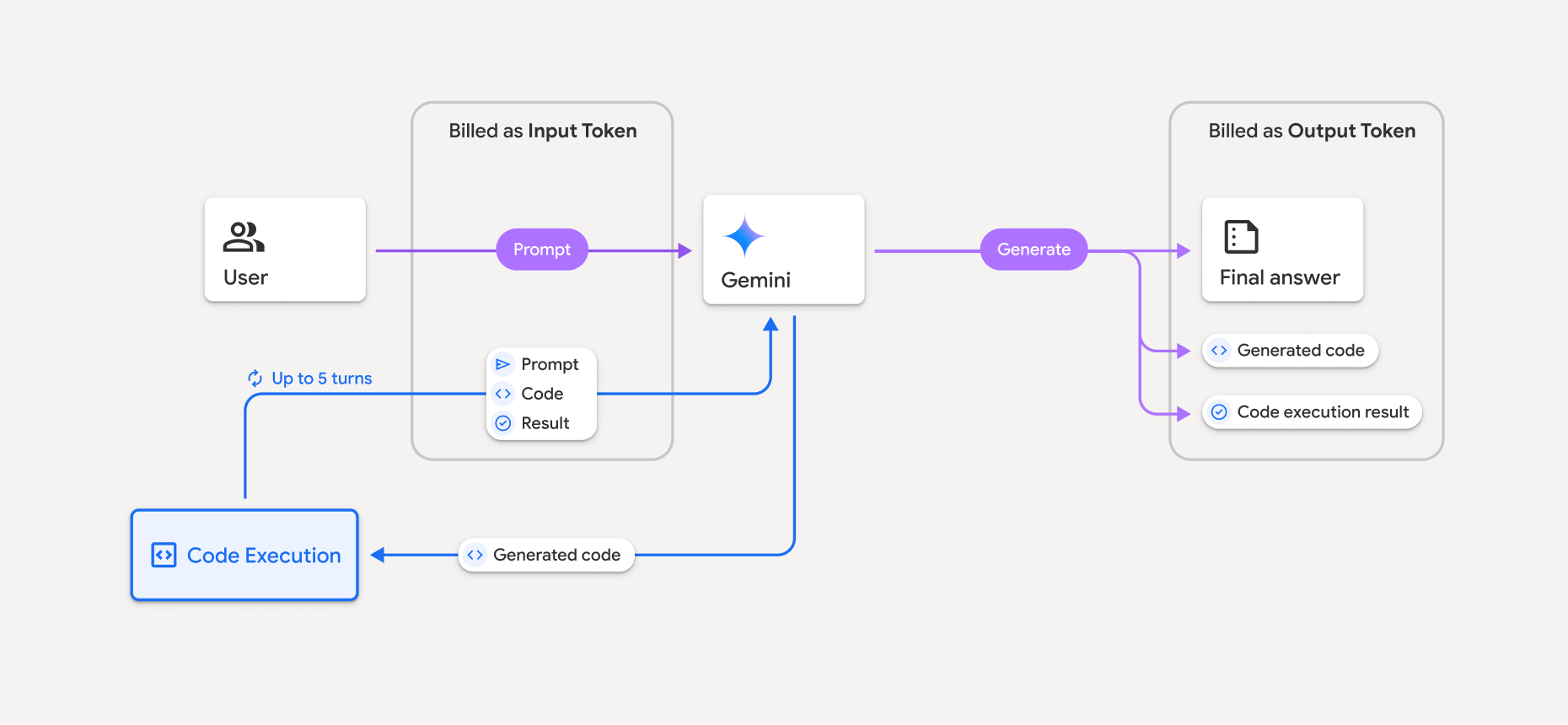
در اینجا خلاصهای از نحوه صورتحساب توکنها زمانی که یک مدل از اجرای کد استفاده میکند آورده شده است:
صورتحساب پیامواره اصلی یکبار صادر میشود. دادهواحدهای آن بهعنوان دادهواحدهای میانی برچسبگذاری میشوند که بهعنوان دادهواحدهای ورودی صورتحساب میشوند.
هزینه کد تولیدشده و نتیجه کد اجراشده به این صورت محاسبه میشود:
وقتی از آنها درطول اجرای کد استفاده میشود، بهعنوان دادهواحدهای میانی برچسبگذاری میشوند که بهعنوان دادهواحدهای ورودی صورتحساب میشوند.
وقتی بهعنوان بخشی از پاسخ نهایی گنجانده میشوند – بهعنوان تعداد نشانهای برونداد صورتحساب میشوند.
خلاصه نهایی در پاسخ نهایی بهعنوان نشانههای برونداد صورتحساب میشود.
Gemini API تعداد نشانهای واسطه را در پاسخ API اضافه میکند تا بدانید چرا برای نشانهای ورودی فراتر از پیامواره اولیه از شما هزینه کسر میشود.
توجه داشته باشید که کد تولیدشده میتواند شامل نوشتار و بروندادهای چندوجهی، مانند تصاویر باشد.
محدودیتها و روالهای مطلوب
این مدل فقط میتواند کد Python تولید و اجرا کند. نمیتواند مصنوعات دیگر مثل فایلهای رسانهای را برگرداند.
اجرای کد میتواند حداکثر ۳۰ ثانیه قبلاز اتمام مهلت اجرا شود.
در برخی موارد، فعال کردن اجرای کد میتواند منجر به پسرفت در سایر زمینههای برونداد مدل شود (برای مثال، نوشتن داستان).
ابزار اجرای کد از شناسه منبع یکسان فایل بهعنوان ورودی/خروجی پشتیبانی نمیکند. بااینحال، ابزار اجرای کد از ورودی فایل و خروجی نمودار بهعنوان بایتهای درونخطی پشتیبانی میکند. بااستفاده از این قابلیتهای ورودی و خروجی، میتوانید فایلهای CSV و نوشتاری را بارگذاری کنید، درباره فایلها سؤال بپرسید، و نمودارهای Matplotlib را بهعنوان بخشی از نتیجه اجرای کد تولید کنید. انواع MIME پشتیبانیشده برای بایتهای درونخطی عبارتاند از
.cpp،.csv،.java،.jpeg،.js،.png،.py،.ts، و.xml.
کتابخانههای پشتیبانیشده
محیط اجرای کد شامل کتابخانههای زیر است. نمیتوانید کتابخانههای خودتان را نصب کنید.
درباره تجربهتان با Firebase AI Logic بازخورد ارائه دهید