

जनरेटिव मॉडल, कई तरह की समस्याओं को हल करने में काफ़ी असरदार होते हैं. हालांकि, इस पर कुछ पाबंदियां लागू होती हैं, जैसे:
- ट्रेनिंग के बाद, इन्हें फ़्रीज़ कर दिया जाता है. इस वजह से, इनमें मौजूद जानकारी पुरानी हो जाती है.
- वे बाहरी डेटा पर क्वेरी नहीं कर सकते या उसमें बदलाव नहीं कर सकते.
फ़ंक्शन कॉलिंग की मदद से, इनमें से कुछ सीमाओं को पार किया जा सकता है. फ़ंक्शन कॉलिंग को कभी-कभी टूल का इस्तेमाल भी कहा जाता है. ऐसा इसलिए, क्योंकि इसकी मदद से मॉडल, एपीआई और फ़ंक्शन जैसे बाहरी टूल का इस्तेमाल करके अपना फ़ाइनल जवाब जनरेट कर सकता है.
इस गाइड में, फ़ंक्शन कॉल सेटअप को लागू करने का तरीका बताया गया है. यह सेटअप, इस पेज के अगले मुख्य सेक्शन में बताई गई स्थिति से मिलता-जुलता है. अपने ऐप्लिकेशन में फ़ंक्शन कॉलिंग की सुविधा सेट अप करने के लिए, यह तरीका अपनाएं:
पहला चरण: ऐसा फ़ंक्शन लिखें जो मॉडल को वह जानकारी दे सके जिसकी ज़रूरत उसे अपना फ़ाइनल जवाब जनरेट करने के लिए होती है. उदाहरण के लिए, फ़ंक्शन किसी बाहरी एपीआई को कॉल कर सकता है.
दूसरा चरण: फ़ंक्शन और उसके पैरामीटर के बारे में बताने वाला फ़ंक्शन डिक्लेरेशन बनाएं.
तीसरा चरण: मॉडल को शुरू करते समय, फ़ंक्शन डिक्लेरेशन उपलब्ध कराएं, ताकि मॉडल को पता चल सके कि ज़रूरत पड़ने पर फ़ंक्शन का इस्तेमाल कैसे किया जा सकता है.
चौथा चरण: अपने ऐप्लिकेशन को सेट अप करें, ताकि मॉडल आपके ऐप्लिकेशन को फ़ंक्शन को कॉल करने के लिए ज़रूरी जानकारी भेज सके.
पांचवां चरण: फ़ंक्शन के रिस्पॉन्स को मॉडल को वापस भेजें, ताकि मॉडल अपना फ़ाइनल रिस्पॉन्स जनरेट कर सके.
कोड लागू करने के तरीके पर जाएं
फ़ंक्शन कॉलिंग के उदाहरण की खास जानकारी
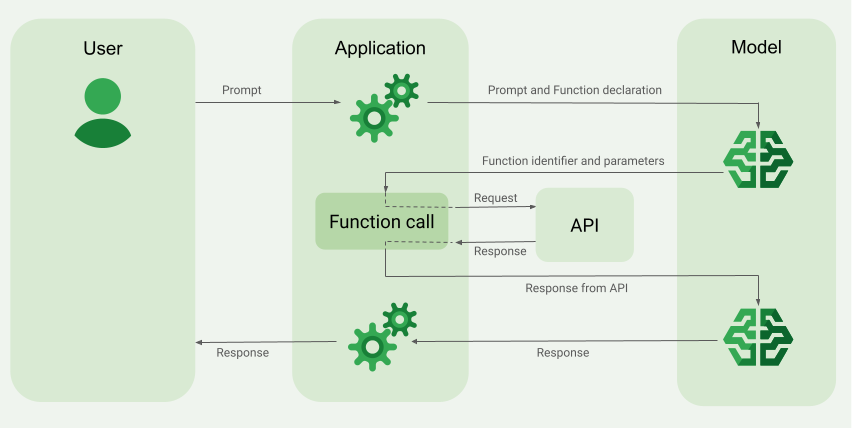
मॉडल को अनुरोध भेजते समय, उसे "टूल" (जैसे कि फ़ंक्शन) का सेट भी दिया जा सकता है. मॉडल इनका इस्तेमाल करके, अपना फ़ाइनल जवाब जनरेट कर सकता है. इन फ़ंक्शन का इस्तेमाल करने और उन्हें कॉल करने ("फ़ंक्शन कॉलिंग") के लिए, मॉडल और आपके ऐप्लिकेशन को एक-दूसरे के साथ जानकारी शेयर करनी होगी. इसलिए, फ़ंक्शन कॉलिंग का इस्तेमाल करने के लिए, मल्टी-टर्न चैट इंटरफ़ेस का इस्तेमाल करने का सुझाव दिया जाता है.
मान लें कि आपके पास एक ऐप्लिकेशन है, जिसमें कोई उपयोगकर्ता इस तरह का प्रॉम्प्ट डाल सकता है:
What was the weather in Boston on October 17, 2024?.
ऐसा हो सकता है कि Gemini मॉडल को मौसम की यह जानकारी न हो. हालांकि, मान लें कि आपको मौसम की जानकारी देने वाली किसी बाहरी सेवा के एपीआई के बारे में पता है, जो यह जानकारी दे सकता है. फ़ंक्शन कॉलिंग का इस्तेमाल करके, Gemini मॉडल को उस एपीआई और मौसम की जानकारी का पाथ दिया जा सकता है.
सबसे पहले, अपने ऐप्लिकेशन में एक फ़ंक्शन fetchWeather लिखें, जो इस काल्पनिक बाहरी एपीआई के साथ इंटरैक्ट करता हो. इसमें यह इनपुट और आउटपुट होता है:
| पैरामीटर | टाइप | ज़रूरी | ब्यौरा |
|---|---|---|---|
| इनपुट | |||
location |
ऑब्जेक्ट | हां | उस शहर और राज्य का नाम जिसके मौसम की जानकारी चाहिए. सिर्फ़ अमेरिका के शहरों के लिए उपलब्ध है. यह हमेशा city और state का नेस्ट किया गया ऑब्जेक्ट होना चाहिए.
|
date |
स्ट्रिंग | हां | वह तारीख जिसके लिए मौसम की जानकारी फ़ेच करनी है. यह हमेशा YYYY-MM-DD फ़ॉर्मैट में होनी चाहिए.
|
| आउटपुट | |||
temperature |
पूर्णांक | हां | तापमान (फ़ैरनहाइट में) |
chancePrecipitation |
स्ट्रिंग | हां | बारिश या बर्फ़बारी होने की संभावना (प्रतिशत में) |
cloudConditions |
स्ट्रिंग | हां | बादल की स्थिति (clear, partlyCloudy,
mostlyCloudy, cloudy में से कोई एक)
|
मॉडल को शुरू करते समय, आपको मॉडल को बताना होगा कि यह fetchWeather फ़ंक्शन मौजूद है. साथ ही, ज़रूरत पड़ने पर, आने वाले अनुरोधों को प्रोसेस करने के लिए इसका इस्तेमाल कैसे किया जा सकता है.
इसे "फ़ंक्शन डिक्लेरेशन" कहा जाता है. मॉडल, फ़ंक्शन को सीधे कॉल नहीं करता. इसके बजाय, मॉडल को जब कोई अनुरोध मिलता है, तो वह यह तय करता है कि अनुरोध का जवाब देने के लिए, fetchWeather फ़ंक्शन का इस्तेमाल किया जा सकता है या नहीं. अगर मॉडल को लगता है कि फ़ंक्शन वाकई काम का हो सकता है, तो वह स्ट्रक्चर्ड डेटा जनरेट करता है. इससे आपके ऐप्लिकेशन को फ़ंक्शन को कॉल करने में मदद मिलेगी.
इनकमिंग अनुरोध को फिर से देखें:
What was the weather in Boston on October 17, 2024?. मॉडल यह तय कर सकता है कि fetchWeather फ़ंक्शन, जवाब जनरेट करने में उसकी मदद कर सकता है. मॉडल यह देखेगा कि fetchWeather के लिए किन इनपुट पैरामीटर की ज़रूरत है. इसके बाद, वह फ़ंक्शन के लिए स्ट्रक्चर्ड इनपुट डेटा जनरेट करेगा, जो कुछ इस तरह दिखेगा:
{
  functionName: fetchWeather,
  location: {
    city: Boston,
    state: Massachusetts  // the model can infer the state from the prompt
  },
  date: 2024-10-17
}
मॉडल, इस स्ट्रक्चर्ड इनपुट डेटा को आपके ऐप्लिकेशन को पास करता है, ताकि आपका ऐप्लिकेशन fetchWeather फ़ंक्शन को कॉल कर सके. जब आपके ऐप्लिकेशन को एपीआई से मौसम की जानकारी मिलती है, तो वह इस जानकारी को मॉडल को भेजता है. मौसम की इस जानकारी की मदद से, मॉडल अपनी फ़ाइनल प्रोसेसिंग पूरी कर पाता है और What was the weather in Boston on October 17, 2024? के शुरुआती अनुरोध का जवाब जनरेट कर पाता है
मॉडल, नैचुरल लैंग्वेज में इस तरह का जवाब दे सकता है:
On October 17, 2024, in Boston, it was 38 degrees Fahrenheit with partly cloudy skies.
फ़ंक्शन कॉलिंग की सुविधा लागू करना
इस गाइड में दिए गए चरणों से, फ़ंक्शन कॉल सेटअप को लागू करने का तरीका पता चलता है. यह सेटअप, फ़ंक्शन कॉलिंग के उदाहरण की खास जानकारी (इस पेज का सबसे ऊपर वाला सेक्शन देखें) में बताए गए वर्कफ़्लो जैसा ही है.
इस्तेमाल किए जा सकने वाले मॉडल
gemini-4-argongemini-3.8-flash(और पुरानेgemini-3.7-flash,gemini-3.6-flash, औरgemini-3.5-flash)gemini-3.5-flash-lite(औरgemini-3.1-flash-liteका पुराना वर्शन)
gemini-3.1-pro-preview और सामान्य इस्तेमाल के लिए उपलब्ध Gemini 2.5 मॉडल (जो अब काम नहीं करते) में भी यह सुविधा काम करती है.
Gemini Live API मॉडल भी इस सुविधा के साथ काम करते हैं. हालांकि, इस गाइड में दिए गए सभी कोड सैंपल, सामान्य इस्तेमाल के लिए उपलब्ध Gemini मॉडल के लिए हैं.
शुरू करने से पहले
|
इस पेज पर, Gemini API की सेवा देने वाली कंपनी के हिसाब से कॉन्टेंट और कोड देखने के लिए, सेवा देने वाली कंपनी के नाम पर क्लिक करें. |
अगर आपने अब तक ऐसा नहीं किया है, तो शुरुआती निर्देश पढ़ें. इसमें Firebase प्रोजेक्ट सेट अप करने, अपने ऐप्लिकेशन को Firebase से कनेक्ट करने, और SDK टूल जोड़ने का तरीका बताया गया है. साथ ही, इसमें अपनी पसंद के Gemini API प्रोवाइडर के लिए बैकएंड सेवा को शुरू करने और GenerativeModel इंस्टेंस बनाने का तरीका भी बताया गया है.
अपने प्रॉम्प्ट को टेस्ट करने और उनमें बदलाव करने के लिए, हमारा सुझाव है कि आप Google AI Studio का इस्तेमाल करें.
पहला चरण: फ़ंक्शन लिखना
मान लें कि आपके पास एक ऐप्लिकेशन है, जिसमें कोई उपयोगकर्ता इस तरह का प्रॉम्प्ट डाल सकता है:
What was the weather in Boston on October 17, 2024?. ऐसा हो सकता है कि Gemini
मॉडल को मौसम की यह जानकारी न हो. हालांकि, मान लें कि आपको मौसम की जानकारी देने वाली किसी बाहरी सेवा के एपीआई के बारे में पता है, जो यह जानकारी दे सकता है. इस गाइड में दिया गया उदाहरण, इस काल्पनिक बाहरी एपीआई पर आधारित है.
अपने ऐप्लिकेशन में ऐसा फ़ंक्शन लिखें जो काल्पनिक बाहरी एपीआई के साथ इंटरैक्ट करेगा. साथ ही, मॉडल को वह जानकारी देगा जो उसे अपना फ़ाइनल अनुरोध जनरेट करने के लिए चाहिए. मौसम के इस उदाहरण में, fetchWeather फ़ंक्शन का इस्तेमाल किया जाएगा. यह फ़ंक्शन, इस काल्पनिक बाहरी एपीआई को कॉल करेगा.
Swift
// This function calls a hypothetical external API that returns
// a collection of weather information for a given location on a given date.
func fetchWeather(city: String, state: String, date: String) -> JSONObject {

  // TODO(developer): Write a standard function that would call an external weather API.

  // For demo purposes, this hypothetical response is hardcoded here in the expected format.
  return [
    "temperature": .number(38),
    "chancePrecipitation": .string("56%"),
    "cloudConditions": .string("partlyCloudy"),
  ]
}
Kotlin
// This function calls a hypothetical external API that returns
// a collection of weather information for a given location on a given date.
// `location` is an object of the form { city: string, state: string }
data class Location(val city: String, val state: String)

suspend fun fetchWeather(location: Location, date: String): JsonObject {

    // TODO(developer): Write a standard function that would call to an external weather API.

    // For demo purposes, this hypothetical response is hardcoded here in the expected format.
    return JsonObject(mapOf(
        "temperature" to JsonPrimitive(38),
        "chancePrecipitation" to JsonPrimitive("56%"),
        "cloudConditions" to JsonPrimitive("partlyCloudy")
    ))
}
Java
// This function calls a hypothetical external API that returns
// a collection of weather information for a given location on a given date.
// `location` is an object of the form { city: string, state: string }
public JsonObject fetchWeather(Location location, String date) {

  // TODO(developer): Write a standard function that would call to an external weather API.

  // For demo purposes, this hypothetical response is hardcoded here in the expected format.
  return new JsonObject(Map.of(
        "temperature", JsonPrimitive(38),
        "chancePrecipitation", JsonPrimitive("56%"),
        "cloudConditions", JsonPrimitive("partlyCloudy")));
}
Web
// This function calls a hypothetical external API that returns
// a collection of weather information for a given location on a given date.
// `location` is an object of the form { city: string, state: string }
async function fetchWeather({ location, date }) {

  // TODO(developer): Write a standard function that would call to an external weather API.

  // For demo purposes, this hypothetical response is hardcoded here in the expected format.
  return {
    temperature: 38,
    chancePrecipitation: "56%",
    cloudConditions: "partlyCloudy",
  };
}
Dart
// This function calls a hypothetical external API that returns
// a collection of weather information for a given location on a given date.
// `location` is an object of the form { city: string, state: string }
Future<Map<String, Object?>> fetchWeather(
  Location location, String date
) async {

  // TODO(developer): Write a standard function that would call to an external weather API.

  // For demo purposes, this hypothetical response is hardcoded here in the expected format.
  final apiResponse = {
    'temperature': 38,
    'chancePrecipitation': '56%',
    'cloudConditions': 'partlyCloudy',
  };
  return apiResponse;
}
Unity
// This function calls a hypothetical external API that returns
// a collection of weather information for a given location on a given date.
System.Collections.Generic.Dictionary<string, object> FetchWeather(
    string city, string state, string date) {

  // TODO(developer): Write a standard function that would call an external weather API.

  // For demo purposes, this hypothetical response is hardcoded here in the expected format.
  return new System.Collections.Generic.Dictionary<string, object>() {
    {"temperature", 38},
    {"chancePrecipitation", "56%"},
    {"cloudConditions", "partlyCloudy"},
  };
}
दूसरा चरण: फ़ंक्शन डिक्लेरेशन बनाना
फ़ंक्शन डिक्लेरेशन बनाएं, जिसे बाद में मॉडल को उपलब्ध कराया जाएगा (इस गाइड का अगला चरण).
अपने एलान में, फ़ंक्शन और उसके पैरामीटर के ब्यौरे में ज़्यादा से ज़्यादा जानकारी शामिल करें.
मॉडल, फ़ंक्शन डिक्लेरेशन में मौजूद जानकारी का इस्तेमाल करके यह तय करता है कि कौनसा फ़ंक्शन चुनना है. साथ ही, यह भी तय करता है कि फ़ंक्शन को असल कॉल के लिए पैरामीटर वैल्यू कैसे देनी हैं. इस पेज पर आगे जाकर, अन्य व्यवहार और विकल्प देखें. इससे आपको पता चलेगा कि मॉडल, फ़ंक्शन में से कैसे चुन सकता है. साथ ही, यह भी पता चलेगा कि उस विकल्प को कैसे कंट्रोल किया जा सकता है.
आपके दिए गए स्कीमा के बारे में यहां दी गई बातों का ध्यान रखें:
आपको फ़ंक्शन के एलान, ऐसे स्कीमा फ़ॉर्मैट में देने होंगे जो OpenAPI स्कीमा के साथ काम करता हो. Agent Platform, OpenAPI स्कीमा के साथ सीमित तौर पर काम करता है.
इन एट्रिब्यूट का इस्तेमाल किया जा सकता है:
type,nullable,required,format,description,properties,items,enum.इन एट्रिब्यूट का इस्तेमाल नहीं किया जा सकता:
default,optional,maximum,oneOf.
डिफ़ॉल्ट रूप से, Firebase AI Logic SDK टूल के लिए सभी फ़ील्ड ज़रूरी माने जाते हैं. हालांकि, अगर आपने उन्हें
optionalPropertiesकलेक्शन में 'ज़रूरी नहीं' के तौर पर सेट किया है, तो ऐसा नहीं होगा. इन वैकल्पिक फ़ील्ड के लिए, मॉडल फ़ील्ड भर सकता है या उन्हें छोड़ सकता है. ध्यान दें कि अगर आप इन दोनों Gemini API प्रोवाइडर के सर्वर एसडीके या उनके एपीआई का सीधे तौर पर इस्तेमाल करते हैं, तो यह उनके डिफ़ॉल्ट ऐक्शन और सेटिंग के उलट होगा.
फ़ंक्शन के एलान से जुड़े सबसे सही तरीकों के बारे में जानने के लिए, Gemini Developer API के दस्तावेज़ में दिए गए सबसे सही तरीके.
फ़ंक्शन डिक्लेरेशन लिखने का तरीका यहां बताया गया है:
Swift
let fetchWeatherTool = FunctionDeclaration(
  name: "fetchWeather",
  description: "Get the weather conditions for a specific city on a specific date.",
  parameters: [
    "location": .object(
      properties: [
        "city": .string(description: "The city of the location."),
        "state": .string(description: "The US state of the location."),
      ],
      description: """
      The name of the city and its state for which to get the weather. Only cities in the
      USA are supported.
      """
    ),
    "date": .string(
      description: """
      The date for which to get the weather. Date must be in the format: YYYY-MM-DD.
      """
    ),
  ]
)
Kotlin
val fetchWeatherTool = FunctionDeclaration(
    "fetchWeather",
    "Get the weather conditions for a specific city on a specific date.",
    mapOf(
        "location" to Schema.obj(
            mapOf(
                "city" to Schema.string("The city of the location."),
                "state" to Schema.string("The US state of the location."),
            ),
            description = "The name of the city and its state for which " +
                "to get the weather. Only cities in the " +
                "USA are supported."
        ),
        "date" to Schema.string("The date for which to get the weather." +
                                " Date must be in the format: YYYY-MM-DD."
        ),
    ),
)
Java
FunctionDeclaration fetchWeatherTool = new FunctionDeclaration(
        "fetchWeather",
        "Get the weather conditions for a specific city on a specific date.",
        Map.of("location",
                Schema.obj(Map.of(
                        "city", Schema.str("The city of the location."),
                        "state", Schema.str("The US state of the location."))),
                "date",
                Schema.str("The date for which to get the weather. " +
                              "Date must be in the format: YYYY-MM-DD.")),
        Collections.emptyList());
Web
const fetchWeatherTool: FunctionDeclarationsTool = {
  functionDeclarations: [
   {
      name: "fetchWeather",
      description:
        "Get the weather conditions for a specific city on a specific date",
      parameters: Schema.object({
        properties: {
          location: Schema.object({
            description:
              "The name of the city and its state for which to get " +
              "the weather. Only cities in the USA are supported.",
            properties: {
              city: Schema.string({
                description: "The city of the location."
              }),
              state: Schema.string({
                description: "The US state of the location."
              }),
            },
          }),
          date: Schema.string({
            description:
              "The date for which to get the weather. Date must be in the" +
              " format: YYYY-MM-DD.",
          }),
        },
      }),
    },
  ],
};
Dart
final fetchWeatherTool = FunctionDeclaration(
    'fetchWeather',
    'Get the weather conditions for a specific city on a specific date.',
    parameters: {
      'location': Schema.object(
        description:
          'The name of the city and its state for which to get'
          'the weather. Only cities in the USA are supported.',
        properties: {
          'city': Schema.string(
             description: 'The city of the location.'
           ),
          'state': Schema.string(
             description: 'The US state of the location.'
          ),
        },
      ),
      'date': Schema.string(
        description:
          'The date for which to get the weather. Date must be in the format: YYYY-MM-DD.'
      ),
    },
  );
Unity
var fetchWeatherTool = new Tool(new FunctionDeclaration(
  name: "fetchWeather",
  description: "Get the weather conditions for a specific city on a specific date.",
  parameters: new System.Collections.Generic.Dictionary<string, Schema>() {
    { "location", Schema.Object(
      properties: new System.Collections.Generic.Dictionary<string, Schema>() {
        { "city", Schema.String(description: "The city of the location.") },
        { "state", Schema.String(description: "The US state of the location.")}
      },
      description: "The name of the city and its state for which to get the weather. Only cities in the USA are supported."
    ) },
    { "date", Schema.String(
      description: "The date for which to get the weather. Date must be in the format: YYYY-MM-DD."
    )}
  }
));
तीसरा चरण: मॉडल को शुरू करने के दौरान, फ़ंक्शन डिक्लेरेशन उपलब्ध कराना
अनुरोध के साथ ज़्यादा से ज़्यादा 128 फ़ंक्शन डिक्लेरेशन दिए जा सकते हैं. इस पेज पर आगे जाकर, अन्य व्यवहार और विकल्प देखें. इससे आपको पता चलेगा कि मॉडल, फ़ंक्शन के बीच कैसे चुन सकता है. साथ ही, यह भी पता चलेगा कि उस विकल्प को कैसे कंट्रोल किया जा सकता है. इसके लिए, toolConfig का इस्तेमाल करके फ़ंक्शन कॉलिंग मोड सेट करें.
Swift
import FirebaseAILogic

// Initialize the Gemini Developer API backend service.
// Create a `GenerativeModel` instance with a model that supports your use case.
let model = FirebaseAI.firebaseAI(backend: .googleAI()).generativeModel(
  modelName: "GEMINI_MODEL_NAME",
  // Provide the function declaration to the model.
  tools: [.functionDeclarations([fetchWeatherTool])]
)
Kotlin
// Initialize the Gemini Developer API backend service.
// Create a `GenerativeModel` instance with a model that supports your use case.
val model = Firebase.ai(backend = GenerativeBackend.googleAI()).generativeModel(
    modelName = "<var>GEMINI_MODEL_NAME</var>",
    // Provide the function declaration to the model.
    tools = listOf(Tool.functionDeclarations(listOf(fetchWeatherTool)))
)
Java
// Initialize the Gemini Developer API backend service.
// Create a `GenerativeModel` instance with a model that supports your use case.
GenerativeModelFutures model = GenerativeModelFutures.from(
        FirebaseAI.getInstance(GenerativeBackend.googleAI())
                .generativeModel("<var>GEMINI_MODEL_NAME</var>",
                        null,
                        null,
                        // Provide the function declaration to the model.
                        List.of(Tool.functionDeclarations(List.of(fetchWeatherTool)))));
Web
import { initializeApp } from "firebase/app";
import { getAI, getGenerativeModel, GoogleAIBackend } from "firebase/ai";

// TODO(developer): Replace the following with your app's Firebase configuration
// See: https://firebase.google.com/docs/web/learn-more#config-object
const firebaseConfig = {
  // ...
};

// Initialize FirebaseApp
const firebaseApp = initializeApp(firebaseConfig);

// Initialize the Gemini Developer API backend service.
const firebaseAI = getAI(firebaseApp, { backend: new GoogleAIBackend() });

// Create a `GenerativeModel` instance with a model that supports your use case.
const model = getGenerativeModel(firebaseAI, {
  model: "GEMINI_MODEL_NAME",
  // Provide the function declaration to the model.
  tools: fetchWeatherTool
});
Dart
import 'package:firebase_ai/firebase_ai.dart';
import 'package:firebase_core/firebase_core.dart';
import 'firebase_options.dart';

// Initialize FirebaseApp
await Firebase.initializeApp(
  options: DefaultFirebaseOptions.currentPlatform,
);

// Initialize the Gemini Developer API backend service.
// Create a `GenerativeModel` instance with a model that supports your use case.
_functionCallModel = FirebaseAI.googleAI().generativeModel(
       model: 'GEMINI_MODEL_NAME',
       // Provide the function declaration to the model.
       tools: [
         Tool.functionDeclarations([fetchWeatherTool]),
       ],
     );
Unity
using Firebase;
using Firebase.AI;

// Initialize the Gemini Developer API backend service.
// Create a `GenerativeModel` instance with a model that supports your use case.
var model = FirebaseAI.DefaultInstance.GetGenerativeModel(
  modelName: "GEMINI_MODEL_NAME",
  // Provide the function declaration to the model.
  tools: new Tool[] { fetchWeatherTool }
);
अपने इस्तेमाल के उदाहरण और ऐप्लिकेशन के हिसाब से, मॉडल चुनने का तरीका जानें.भी चुनी जा सकती है.
चौथा चरण: बाहरी एपीआई को शुरू करने के लिए फ़ंक्शन को कॉल करना
अगर मॉडल को लगता है कि fetchWeather फ़ंक्शन की मदद से फ़ाइनल जवाब जनरेट किया जा सकता है, तो आपके ऐप्लिकेशन को उस फ़ंक्शन को कॉल करना होगा. इसके लिए, मॉडल से मिले स्ट्रक्चर्ड इनपुट डेटा का इस्तेमाल करना होगा.
मॉडल और ऐप्लिकेशन के बीच जानकारी को आगे-पीछे भेजने की ज़रूरत होती है. इसलिए, फ़ंक्शन कॉलिंग का इस्तेमाल करने के लिए, मल्टी-टर्न चैट इंटरफ़ेस का इस्तेमाल करने का सुझाव दिया जाता है.
नीचे दिए गए कोड स्निपेट से पता चलता है कि आपके ऐप्लिकेशन को कैसे बताया जाता है कि मॉडल को fetchWeather फ़ंक्शन का इस्तेमाल करना है. इससे यह भी पता चलता है कि मॉडल ने फ़ंक्शन कॉल (और इसके साथ काम करने वाले बाहरी एपीआई) के लिए, ज़रूरी इनपुट पैरामीटर वैल्यू उपलब्ध कराई हैं.
इस उदाहरण में, आने वाले अनुरोध में What was the weather in Boston on October 17, 2024? प्रॉम्प्ट शामिल था. इस प्रॉम्प्ट से, मॉडल ने उन इनपुट पैरामीटर का अनुमान लगाया जिनकी ज़रूरत fetchWeather फ़ंक्शन को होती है. जैसे, city, state, और date.
Swift
let chat = model.startChat()
let prompt = "What was the weather in Boston on October 17, 2024?"

// Send the user's question (the prompt) to the model using multi-turn chat.
let response = try await chat.sendMessage(prompt)

var functionResponses = [FunctionResponsePart]()

// When the model responds with one or more function calls, invoke the function(s).
for functionCall in response.functionCalls {
  if functionCall.name == "fetchWeather" {
    // TODO(developer): Handle invalid arguments.
    guard case let .object(location) = functionCall.args["location"] else { fatalError() }
    guard case let .string(city) = location["city"] else { fatalError() }
    guard case let .string(state) = location["state"] else { fatalError() }
    guard case let .string(date) = functionCall.args["date"] else { fatalError() }

    functionResponses.append(FunctionResponsePart(
      name: functionCall.name,
      // Forward the structured input data prepared by the model
      // to the hypothetical external API.
      response: fetchWeather(city: city, state: state, date: date)
    ))
  }
  // TODO(developer): Handle other potential function calls, if any.
}
Kotlin
val prompt = "What was the weather in Boston on October 17, 2024?"
val chat = model.startChat()
// Send the user's question (the prompt) to the model using multi-turn chat.
val result = chat.sendMessage(prompt)

val functionCalls = result.functionCalls
// When the model responds with one or more function calls, invoke the function(s).
val fetchWeatherCall = functionCalls.find { it.name == "fetchWeather" }

// Forward the structured input data prepared by the model
// to the hypothetical external API.
val functionResponse = fetchWeatherCall?.let {
    // Alternatively, if your `Location` class is marked as @Serializable, you can use
    // val location = Json.decodeFromJsonElement<Location>(it.args["location"]!!)
    val location = Location(
        it.args["location"]!!.jsonObject["city"]!!.jsonPrimitive.content,
        it.args["location"]!!.jsonObject["state"]!!.jsonPrimitive.content
    )
    val date = it.args["date"]!!.jsonPrimitive.content
    fetchWeather(location, date)
}
Java
String prompt = "What was the weather in Boston on October 17, 2024?";
ChatFutures chatFutures = model.startChat();
// Send the user's question (the prompt) to the model using multi-turn chat.
ListenableFuture<GenerateContentResponse> response =
        chatFutures.sendMessage(new Content("user", List.of(new TextPart(prompt))));

ListenableFuture<JsonObject> handleFunctionCallFuture = Futures.transform(response, result -> {
    for (FunctionCallPart functionCall : result.getFunctionCalls()) {
        if (functionCall.getName().equals("fetchWeather")) {
            Map<String, JsonElement> args = functionCall.getArgs();
            JsonObject locationJsonObject =
                    JsonElementKt.getJsonObject(args.get("location"));
            String city =
                    JsonElementKt.getContentOrNull(
                            JsonElementKt.getJsonPrimitive(
                                    locationJsonObject.get("city")));
            String state =
                    JsonElementKt.getContentOrNull(
                            JsonElementKt.getJsonPrimitive(
                                    locationJsonObject.get("state")));
            Location location = new Location(city, state);

            String date = JsonElementKt.getContentOrNull(
                    JsonElementKt.getJsonPrimitive(
                            args.get("date")));
            return fetchWeather(location, date);
        }
    }
    return null;
}, Executors.newSingleThreadExecutor());
Web
const chat = model.startChat();
const prompt = "What was the weather in Boston on October 17, 2024?";

// Send the user's question (the prompt) to the model using multi-turn chat.
let result = await chat.sendMessage(prompt);
const functionCalls = result.response.functionCalls();
let functionCall;
let functionResult;
// When the model responds with one or more function calls, invoke the function(s).
if (functionCalls.length > 0) {
  for (const call of functionCalls) {
    if (call.name === "fetchWeather") {
      // Forward the structured input data prepared by the model
      // to the hypothetical external API.
      functionResult = await fetchWeather(call.args);
      functionCall = call;
    }
  }
}
Dart
final chat = _functionCallModel.startChat();
const prompt = 'What was the weather in Boston on October 17, 2024?';

// Send the user's question (the prompt) to the model using multi-turn chat.
var response = await chat.sendMessage(Content.text(prompt));

final functionCalls = response.functionCalls.toList();
// When the model responds with one or more function calls, invoke the function(s).
if (functionCalls.isNotEmpty) {
  for (final functionCall in functionCalls) {
    if (functionCall.name == 'fetchWeather') {
      Map<String, dynamic> location =
          functionCall.args['location']! as Map<String, dynamic>;
      var date = functionCall.args['date']! as String;
      var city = location['city'] as String;
      var state = location['state'] as String;
      final functionResult =
          await fetchWeather(Location(city, state), date);
      // Send the response to the model so that it can use the result to
      // generate text for the user.
      response = await chat.sendMessage(
        Content.functionResponse(functionCall.name, functionResult),
      );
    }
  }
} else {
  throw UnimplementedError(
    'No function calls returned by the model',
  );
}
Unity
var chat = model.StartChat();
var prompt = "What was the weather in Boston on October 17, 2024?";

// Send the user's question (the prompt) to the model using multi-turn chat.
var response = await chat.SendMessageAsync(prompt);

var functionResponses = new List<ModelContent>();

foreach (var functionCall in response.FunctionCalls) {
  if (functionCall.Name == "fetchWeather") {
    // TODO(developer): Handle invalid arguments.
    var city = functionCall.Args["city"] as string;
    var state = functionCall.Args["state"] as string;
    var date = functionCall.Args["date"] as string;

    functionResponses.Add(ModelContent.FunctionResponse(
      name: functionCall.Name,
      // Forward the structured input data prepared by the model
      // to the hypothetical external API.
      response: FetchWeather(city: city, state: state, date: date)
    ));
  }
  // TODO(developer): Handle other potential function calls, if any.
}
पांचवां चरण: फ़ाइनल जवाब जनरेट करने के लिए, मॉडल को फ़ंक्शन का आउटपुट दें
fetchWeather फ़ंक्शन से मौसम की जानकारी मिलने के बाद, आपके ऐप्लिकेशन को उसे मॉडल को वापस भेजना होगा.
इसके बाद, मॉडल अपनी आखिरी प्रोसेसिंग करता है और नैचुरल लैंग्वेज में जवाब जनरेट करता है. जैसे:
On October 17, 2024 in Boston, it was 38 degrees Fahrenheit with partly cloudy skies.
Swift
// Send the response(s) from the function back to the model
// so that the model can use it to generate its final response.
let finalResponse = try await chat.sendMessage(
  [ModelContent(role: "user", parts: functionResponses)]
)

// Log the text response.
print(finalResponse.text ?? "No text in response.")
Kotlin
// Send the response(s) from the function back to the model
// so that the model can use it to generate its final response.
val finalResponse = chat.sendMessage(content("user") {
    part(FunctionResponsePart("fetchWeather", functionResponse!!))
})

// Log the text response.
println(finalResponse.text ?: "No text in response")
Java
ListenableFuture<GenerateContentResponse> modelResponseFuture = Futures.transformAsync(
  handleFunctionCallFuture,
  // Send the response(s) from the function back to the model
  // so that the model can use it to generate its final response.
  functionCallResult -> chatFutures.sendMessage(new Content("user",
  List.of(new FunctionResponsePart(
          "fetchWeather", functionCallResult)))),
  Executors.newSingleThreadExecutor());

Futures.addCallback(modelResponseFuture, new FutureCallback<GenerateContentResponse>() {
@Override
public void onSuccess(GenerateContentResponse result) {
  if (result.getText() != null) {
      // Log the text response.
      System.out.println(result.getText());
  }
}

@Override
public void onFailure(Throwable t) {
  // handle error
}
}, Executors.newSingleThreadExecutor());
Web
// Send the response from the function back to the model
// so that the model can use it to generate its final response.
result = await chat.sendMessage([
  {
    type: "functionResponse",
    functionResponse: {
      name: functionCall.name, // "fetchWeather"
      response: functionResult,
    },
  },
]);
console.log(result.response.text());
Dart
// Send the response from the function back to the model
// so that the model can use it to generate its final response.
response = await chat
     .sendMessage(Content.functionResponse(functionCall.name, functionResult));
Unity
// Send the response(s) from the function back to the model
// so that the model can use it to generate its final response.
var finalResponse = await chat.SendMessageAsync(functionResponses);

// Log the text response.
UnityEngine.Debug.Log(finalResponse.Text ?? "No text in response.");
अन्य व्यवहार और विकल्प
फ़ंक्शन कॉलिंग के लिए, यहां कुछ और व्यवहार दिए गए हैं जिन्हें आपको अपने कोड में शामिल करना होगा. साथ ही, यहां कुछ ऐसे विकल्प दिए गए हैं जिन्हें कंट्रोल किया जा सकता है.
मॉडल, किसी फ़ंक्शन को फिर से कॉल करने या किसी दूसरे फ़ंक्शन को कॉल करने के लिए कह सकता है.
अगर मॉडल को अपना फ़ाइनल जवाब जनरेट करने के लिए, किसी फ़ंक्शन कॉल से मिला जवाब काफ़ी नहीं लगता है, तो वह अतिरिक्त फ़ंक्शन कॉल या किसी बिलकुल अलग फ़ंक्शन को कॉल करने के लिए कह सकता है. ऐसा सिर्फ़ तब हो सकता है, जब फ़ंक्शन डिक्लेरेशन की सूची में, मॉडल को एक से ज़्यादा फ़ंक्शन दिए जाएं.
आपके ऐप्लिकेशन को इस बात का ध्यान रखना चाहिए कि मॉडल, अतिरिक्त फ़ंक्शन कॉल के लिए कह सकता है.
मॉडल, एक ही समय पर कई फ़ंक्शन को कॉल करने के लिए कह सकता है.
मॉडल को फ़ंक्शन डिक्लेरेशन की सूची में, ज़्यादा से ज़्यादा 128 फ़ंक्शन दिए जा सकते हैं. इस वजह से, मॉडल यह तय कर सकता है कि उसे अपना फ़ाइनल जवाब जनरेट करने के लिए, कई फ़ंक्शन की ज़रूरत है. साथ ही, यह इनमें से कुछ फ़ंक्शन को एक साथ कॉल करने का फ़ैसला ले सकता है. इसे पैरलल फ़ंक्शन कॉलिंग कहा जाता है.
आपके ऐप्लिकेशन को यह ध्यान रखना होगा कि मॉडल, एक ही समय पर कई फ़ंक्शन चलाने के लिए कह सकता है. साथ ही, आपके ऐप्लिकेशन को फ़ंक्शन से मिले सभी जवाबों को मॉडल को वापस भेजना होगा.
आपके पास यह कंट्रोल करने का विकल्प होता है कि मॉडल, फ़ंक्शन को कॉल करने के लिए कैसे और कब कह सकता है.
मॉडल को दिए गए फ़ंक्शन डिक्लेरेशन का इस्तेमाल कैसे करना चाहिए और कब करना चाहिए, इस पर कुछ पाबंदियां लगाई जा सकती हैं. इसे फ़ंक्शन कॉलिंग मोड सेट करना कहते हैं. यहां कुछ उदाहरण दिए गए हैं:
मॉडल को नैचुरल लैंग्वेज में तुरंत जवाब देने और फ़ंक्शन कॉल के बीच चुनने की अनुमति देने के बजाय, उसे हमेशा फ़ंक्शन कॉल का इस्तेमाल करने के लिए मजबूर किया जा सकता है. इसे फ़ोर्स्ड फ़ंक्शन कॉलिंग कहा जाता है.
अगर आपने एक से ज़्यादा फ़ंक्शन डिक्लेरेशन दिए हैं, तो मॉडल को सिर्फ़ दिए गए फ़ंक्शन के सबसेट का इस्तेमाल करने के लिए सीमित किया जा सकता है.
इन पाबंदियों (या मोड) को लागू करने के लिए, प्रॉम्प्ट और फ़ंक्शन के एलान के साथ-साथ टूल कॉन्फ़िगरेशन (toolConfig) जोड़ें. टूल के कॉन्फ़िगरेशन में, इनमें से कोई एक मोड चुना जा सकता है. सबसे ज़्यादा काम का मोड ANY है.
| मोड | ब्यौरा |
|---|---|
AUTO |
मॉडल का डिफ़ॉल्ट व्यवहार. मॉडल यह तय करता है कि फ़ंक्शन कॉल का इस्तेमाल करना है या नैचुरल लैंग्वेज में जवाब देना है. |
ANY |
मॉडल को फ़ंक्शन कॉल ("फ़ोर्स्ड फ़ंक्शन कॉलिंग") का इस्तेमाल करना चाहिए. अगर आपको मॉडल को फ़ंक्शन के सबसेट तक सीमित करना है, तो allowedFunctionNames में उन फ़ंक्शन के नाम डालें जिन्हें इस्तेमाल करने की अनुमति देनी है.
|
NONE |
मॉडल को फ़ंक्शन कॉल का इस्तेमाल नहीं करना चाहिए. यह व्यवहार, बिना किसी फ़ंक्शन एलान के मॉडल अनुरोध के बराबर है. |
तुम और क्या कर सकती हो?
अन्य सुविधाएं आज़माना
- सिलसिलेवार बातचीत (चैट) की सुविधा बनाएं.
- सिर्फ़ टेक्स्ट वाले प्रॉम्प्ट से टेक्स्ट जनरेट करना.
- अलग-अलग फ़ाइल टाइप का इस्तेमाल करके टेक्स्ट जनरेट करना. जैसे, इमेज, PDF, वीडियो, और ऑडियो.
कॉन्टेंट जनरेट करने की सुविधा को कंट्रोल करने का तरीका जानें
- प्रॉम्प्ट डिज़ाइन करने के बारे में जानें. इसमें सबसे सही तरीके, रणनीतियां, और प्रॉम्प्ट के उदाहरण शामिल हैं.
- मॉडल के पैरामीटर कॉन्फ़िगर करें. जैसे, ज़्यादा से ज़्यादा आउटपुट टोकन, बार-बार मिलने वाले आउटपुट टोकन की संभावना वगैरह.
- सुरक्षा सेटिंग का इस्तेमाल करें, ताकि नुकसान पहुंचाने वाले जवाब मिलने की संभावना को कम किया जा सके.
इस्तेमाल किए जा सकने वाले मॉडल के बारे में ज़्यादा जानें
अलग-अलग कामों के लिए उपलब्ध मॉडल, उनके कोटा, और कीमत के बारे में जानें.Firebase AI Logic के साथ अपने अनुभव के बारे में सुझाव/राय देना या शिकायत करना