

- 事実に基づく精度を向上させる: Google のデータベースにある 2 億 5,000 万以上の実在する場所やビジネスに基づいて回答を生成することで、モデルのハルシネーションを減らします。
- リアルタイム情報にアクセスする: 現在の営業時間や EV 充電スタンドのリアルタイム ステータスなど、ライブデータを使用して質問に回答します。
- ソースを提供する: モデルのロケーション ベースの主張のすぐ横に
Google Maps の場所のソースとリンクを表示することで、ユーザーの信頼を構築します。
サポートされているモデル
gemini-4-argongemini-3.8-flash(および以前のgemini-3.7-flash、gemini-3.6-flash、gemini-3.5-flash)gemini-3.5-flash-lite(および以前のgemini-3.1-flash-lite)
gemini-3.1-pro-preview モデルと一般用途の Gemini 2.5 モデル(非推奨)もこの機能をサポートしています。
サポートされている言語
Gemini モデルでサポートされている言語をご覧ください。
Google Maps でモデルをグラウンディングする
|
Gemini API プロバイダをクリックして、このページでプロバイダ固有のコンテンツとコードを表示します。 |
GenerativeModel インスタンスを作成するときに、モデルがレスポンスの生成に使用できる tool として GoogleMaps を指定します。
Swift
import CoreLocation
import FirebaseAILogic
// Initialize the Gemini Developer API backend service.
let ai = FirebaseAI.firebaseAI(backend: .googleAI())
// Example: Coordinates for New York City
let latAndLong = CLLocationCoordinate2D(latitude: 40.7128, longitude: -74.0060)
// (Optional) Define a RetrievalConfig to configure the Grounding with Google Maps tool.
// You can optionally provide a location's coordinates and/or a language code
// for more relevant and personalized Google Maps results.
let retrievalConfig = RetrievalConfig(
location: latAndLong,
// Example: Language code for English (US).
languageCode: "en-US"
)
// Wrap the RetrievalConfig inside a ToolConfig.
let toolConfig = ToolConfig(retrievalConfig: retrievalConfig)
// Create a `GenerativeModel` instance with a model that supports your use case.
let model = ai.generativeModel(
modelName: "GEMINI_MODEL_NAME",
// Provide Google Maps as a tool that the model can use to generate its response.
tools: [.googleMaps()],
// Add the configuration for the Grounding with Google Maps tool
// (if this optional config was defined above).
toolConfig: toolConfig
)
let response = try await model.generateContent("restaurants near me?")
print(response.text ?? "No text in response.")
// Make sure to comply with the "Grounding with Google Maps " usage requirements,
// which includes how you meet service usage requirements
Kotlin
// (Optional) Define a RetrievalConfig to configure the Grounding with Google Maps tool.
// You can optionally provide a location's coordinates and/or a language code
// for more relevant and personalized Google Maps results.
val retrievalConfig = RetrievalConfig(
// Example: Coordinates for New York City
latLng = LatLng(latitude = 40.7128, longitude = -74.0060),
// Example: Language code for English (US)
languageCode = "en-US"
)
// Wrap the RetrievalConfig inside a ToolConfig.
val toolConfig = ToolConfig(
retrievalConfig = retrievalConfig
)
// Initialize the Gemini Developer API backend service.
// Create a `GenerativeModel` instance with a model that supports your use case.
val model = Firebase.ai(backend = GenerativeBackend.googleAI()).generativeModel(
modelName = "GEMINI_MODEL_NAME",
// Add the configuration for the Grounding with Google Maps tool
// (if this optional config was defined above).
toolConfig = toolConfig,
// Provide Google Maps as a tool that the model can use to generate its response.
tools = listOf(Tool.googleMaps())
)
val response = model.generateContent("restaurants near me?")
print(response.text)
// Make sure to comply with the "Grounding with Google Maps " usage requirements,
// which includes how you meet service usage requirements
Java
// (Optional) Define a ToolConfig to configure the Grounding with Google Maps tool.
// You can optionally provide a location's coordinates and/or a language code
// for more relevant and personalized Google Maps results.
ToolConfig toolConfig = new ToolConfig(
null,
new RetrievalConfig(
// Example: Coordinates for New York City.
new LatLng(40.7128, -74.0060),
// Example: Language code for English (US).
"en-US"
)
);
// Initialize the Gemini Developer API backend service.
// Create a `GenerativeModel` instance with a model that supports your use case.
GenerativeModel ai = FirebaseAI.getInstance(GenerativeBackend.googleAI())
.generativeModel("GEMINI_MODEL_NAME",
null,
null,
// Provide Google Maps as a tool that the model can use to generate its response.
List.of(Tool.googleMaps()),
// Add the configuration for the Grounding with Google Maps tool
// (if this optional config was defined above).
toolConfig);
// Use the GenerativeModelFutures Java compatibility layer which offers
// support for ListenableFuture and Publisher APIs.
GenerativeModelFutures model = GenerativeModelFutures.from(ai);
ListenableFuture response = model.generateContent("restaurants near me?");
Futures.addCallback(response, new FutureCallback() {
@Override
public void onSuccess(GenerateContentResponse result) {
String resultText = result.getText();
System.out.println(resultText);
}
@Override
public void onFailure(Throwable t) {
t.printStackTrace();
}
}, executor);
// Make sure to comply with the "Grounding with Google Maps " usage requirements,
// which includes how you meet service usage requirements
Web
import { initializeApp } from "firebase/app";
import { getAI, getGenerativeModel, GoogleAIBackend } from "firebase/ai";
// TODO(developer): Replace the following with your app's Firebase configuration
// See: https://firebase.google.com/docs/web/learn-more#config-object
const firebaseConfig = {
// ...
};
// Initialize FirebaseApp
const firebaseApp = initializeApp(firebaseConfig);
// Initialize the Gemini Developer API backend service.
const ai = getAI(firebaseApp, { backend: new GoogleAIBackend() });
// (Optional) Define a toolConfig to configure the Grounding with Google Maps tool.
// You can optionally provide a location's coordinates and/or a language code
// for more relevant and personalized Google Maps results.
const toolConfig = {
retrievalConfig: {
// Example: Coordinates for New York City
latLng: {
latitude: 40.7128,
longitude: -74.0060
},
// Example: Language code for English (US)
languageCode: 'en-US'
}
};
// Create a `GenerativeModel` instance with a model that supports your use case
const model = getGenerativeModel(
ai,
{
model: "GEMINI_MODEL_NAME",
// Provide Google Maps as a tool that the model can use to generate its response.
tools: [ { googleMaps: {} } ],
// Add the configuration for the Grounding with Google Maps tool
// (if this optional config was defined above).
toolConfig
}
);
const result = await model.generateContent("restaurants near me?");
console.log(result.response.text());
// Make sure to comply with the "Grounding with Google Maps " usage requirements,
// which includes how you meet service usage requirements
Dart
import 'package:firebase_core/firebase_core.dart';
import 'package:firebase_ai/firebase_ai.dart';
import 'firebase_options.dart';
// Initialize FirebaseApp.
await Firebase.initializeApp(
options: DefaultFirebaseOptions.currentPlatform,
);
// (Optional) Define a ToolConfig to configure the Grounding with Google Maps tool.
// You can optionally provide a location's coordinates and/or a language code
// for more relevant and personalized Google Maps results.
final toolConfig = ToolConfig(
retrievalConfig: RetrievalConfig(
// Example: Coordinates for New York City.
latLng: LatLng(latitude: 40.712728, longitude: -74.006015),
// Example: Language code for English (US).
languageCode: 'en-US',
),
);
// Initialize the Gemini Developer API backend service.
// Create a `GenerativeModel` instance with a model that supports your use case.
final model = FirebaseAI.googleAI().generativeModel(
model: 'GEMINI_MODEL_NAME',
// Provide Google Maps as a tool that the model can use to generate its response.
tools: [
Tool.googleMaps(),
],
// Add the configuration for the Grounding with Google Maps tool
// (if this optional config was defined above).
toolConfig: toolConfig,
);
final response = await model.generateContent([Content.text("restaurants near me?")]);
print(response.text);
// Make sure to comply with the "Grounding with Google Maps " usage requirements,
// which includes how you meet service usage requirements
Unity
using Firebase;
using Firebase.AI;
// Initialize the Gemini Developer API backend service.
var ai = FirebaseAI.GetInstance(FirebaseAI.Backend.GoogleAI());
// Example: Coordinates for New York City
var latLng = new LatLng(40.7128, -74.0060);
// (Optional) Define a RetrievalConfig to configure the Grounding with Google Maps tool.
// You can optionally provide a location's coordinates and/or a language code
// for more relevant and personalized Google Maps results.
var retrievalConfig = new RetrievalConfig(latLng, languageCode: "en");
// Wrap the RetrievalConfig inside a ToolConfig.
var toolConfig = new ToolConfig(retrievalConfig: retrievalConfig);
// Create a `GenerativeModel` instance with a model that supports your use case.
var model = ai.GetGenerativeModel(
modelName: "GEMINI_MODEL_NAME",
// Provide Google Maps as a tool that the model can use to generate its response.
tools: new[] { new Tool(new GoogleMaps()) },
// Add the configuration for the Grounding with Google Maps tool
// (if this optional config was defined above).
toolConfig: toolConfig
);
var response = await model.GenerateContentAsync("restaurants near me?");
UnityEngine.Debug.Log(response.Text ?? "No text in response.");
// Make sure to comply with the "Grounding with Google Maps " usage requirements,
// which includes how you meet service usage requirements
ユースケースとアプリに適したモデル を選択する方法を学習します。
結果を改善するためのベスト プラクティスとヒント
このセクションでは、
一般的なおすすめの方法
必要な場合にのみツールを提供する: パフォーマンスと費用を最適化するには、ユースケースに明確な地理的コンテキストがある場合にのみ、モデルに
Google Maps ツールによるグラウンディングへのアクセスを提供します。ユーザーの位置情報を提供する: 最も関連性が高く、パーソナライズされた回答を得るには(ユーザーの位置情報がわかっている場合)、
Google Maps を使用したグラウンディング ツールの構成にユーザーの位置情報(latLngを介した緯度と経度を使用)を含めます。エンドユーザーに通知する:
Google Maps データがクエリの回答に使用されていることをエンドユーザーに明確に通知します。Google Maps のソースをエンドユーザーに提供することは、Google Maps によるグラウンディング ツールのサービス使用要件です。
プロンプトで場所のプロパティを使用する
このセクションでは、場所の説明に使用され、
場所のプロパティの例
このリストは、モデルがレスポンスの生成に使用できる場所に関するプロパティのアルファベット順のサンプルです。
- 住所
- ピックアップ
- デビットカード
- 距離
- 無料駐車場
- 生演奏が楽しめるお店
- 子供向けメニュー
- 営業時間
- お支払い方法(現金、クレジット カードなど)
- 場所に関する回答
- ペット OK
- ビールを出すお店
- ベジタリアン料理の提供
- 車椅子対応
- Wi-Fi
場所の回答は、ユーザーのクチコミから得られた情報に基づいて、
場所のプロパティを使用するプロンプトの例
次の例では、さまざまな種類の場所に関するプロンプトで場所のプロパティを使用しています。
家族での夕食を計画する: レストランが家族連れに適しているかどうか、便利なサービスを提供しているかどうかを判断します。
- プロンプトの例: 「イタリアン プレイス」は子供連れでも大丈夫ですか?テイクアウトはできますか?評価はどのくらいですか?
友人のアクセシビリティを確認する: 場所が特定のアクセシビリティ要件を満たしているかどうかを判断します。
- プロンプトの例: 車椅子対応の入り口があるレストランを探して。
夜食を食べられる場所を探す: 特定の時間に特定の食事を提供する営業中の店舗を探します。
- プロンプトの例: 「Burger Joint」は今営業していますか?ディナーは提供していますか? 金曜日の営業時間は何時から何時までですか?
クライアントとコーヒーを飲む: 設備、提供内容、支払いオプションに基づいて、仕事の打ち合わせに適したカフェかどうかを評価します。
- プロンプトの例: 「カフェ セントラル」に Wi-Fi はありますか?コーヒーは飲めますか? 価格帯とクレジット カードの利用可否を教えてください。
Google Maps を使用したグラウンディングの仕組み
モデルに GoogleMaps ツールを提供すると、モデルは情報の検索、処理、引用のワークフロー全体を自動的に処理します。
モデルのワークフローは次のとおりです。
プロンプトを受信する: アプリは、
GoogleMapsツールを有効にして Gemini モデルにプロンプトを送信します。プロンプトを分析する: モデルはプロンプトを分析し、
Google Maps が回答を改善できるかどうかを判断します。たとえば、プロンプトに地理的なコンテキスト(「近くのコーヒー ショップ」、「サンフランシスコの美術館」など)が含まれているかどうかを判断します。ツールを呼び出す: モデルは、地理的なインテントを認識し、
Google Maps ツールでグラウンディングを呼び出します。Google Maps にクエリを送信する:Google Maps を使用したグラウンディング サービスは、関連情報(場所、レビュー、写真、住所、営業時間など)をGoogle Maps にクエリします。必要に応じて、ツールの構成(またはプロンプトに直接)に緯度と経度を含めることで、より関連性の高い、パーソナライズされた
Google Maps の結果を取得できます。このツールはテキスト検索ツールであり、Google Maps での検索と同様に動作します。ローカルクエリ(「近くの」)では座標が使用されますが、特定のクエリやローカル以外のクエリは、明示的な位置情報の影響を受けにくいです。Google Maps の結果を処理する: モデルはGoogle Maps の結果を処理し、元のプロンプトに対するレスポンスを作成します。Google Maps のグラウンディングされた結果を返す: モデルは、Google Maps の結果に基づいて、ユーザー フレンドリーな最終的なレスポンスを返します。このレスポンスの内容は、次のとおりです。- モデルのテキスト回答。
Google Maps の結果とソースを含むgroundingMetadataオブジェクト。
groundingMetadata オブジェクトは含まれないため、
グラウンディングされた結果を理解する
モデルが groundingMetadata オブジェクトが含まれます。このオブジェクトには、アプリケーションで主張を検証し、豊富なソース エクスペリエンスを構築するために不可欠な構造化データが含まれています。
groundingMetadata オブジェクトには、次の情報が含まれています。
groundingChunks:mapsソース(uri、placeId、title)を含むオブジェクトの配列。groundingSupports: モデル レスポンスtextをgroundingChunksのソースに接続するチャンクの配列。各チャンクは、テキストsegment(startIndexとendIndexで定義)を 1 つ以上のgroundingChunkIndicesにリンクします。このフィールドは、インライン ソースリンクの作成に役立ちます。このページの後半で、サービスの使用要件を満たす方法を学習します。
groundingMetadata オブジェクトを含むレスポンスの例を次に示します。
{
  "candidates": [
    {
      "content": {
        "parts": [
          {
            "text": "CanteenM is an American restaurant with..."
          }
        ],
        "role": "model"
      },
      "groundingMetadata": {
        "groundingChunks": [
          {
            "maps": {
              "uri": "https://maps.google.com/?cid=13100894621228039586",
              "title": "Heaven on 7th Marketplace",
              "placeId": "places/ChIJ0-zA1vBZwokRon0fGj-6z7U"
            }
          }
        ],
        "groundingSupports": [
          {
            "segment": {
              "startIndex": 0,
              "endIndex": 79,
              "text": "CanteenM is an American restaurant with a 4.6-star rating and is open 24 hours."
            },
            "groundingChunkIndices": [0]
          }
        ]
      }
    }
  ]
}
サービスの使用要件
このセクションでは、選択した Gemini API プロバイダ(Gemini Developer API または Agent Platform Gemini API (formerly Vertex AI)。サービス固有規約のサービス規約セクションを参照)の
Google Maps のソースについてユーザーに通知する
groundingChunks で提供されます。次のメタデータも返されます。
- ソースの URI
- タイトル
- ID
アプリで
Google Maps のソースは、ソースがサポートする生成コンテンツの直後に示す必要があります。この生成されたコンテンツは、Google Maps によるグラウンディングの結果ともいいます。Google Maps のソースは、1 回のユーザー操作で表示できる必要があります。
Swift
// ...

// Get the model's response
let text = response.text

// Get the grounding metadata
if let candidate = response.candidates.first,
   let groundingMetadata = candidate.groundingMetadata {

  // Get sources
  let groundingChunks = groundingMetadata.groundingChunks
  for chunk in groundingChunks {
    if let maps = chunk.maps {
      let title = maps.title  // for example, "Heaven on 7th Marketplace"
      let url = maps.url  // for example, "https://maps.google.com/?cid=13100894621228039586"
      let placeID = maps.placeID  // for example, "places/ChIJ0-zA1vBZwokRon0fGj-6z7U"
      // TODO(developer): show source in the UI
    }
  }
}
Kotlin
// ...

// Get the model's response
val text = response.text

// Get the grounding metadata
val groundingMetadata = response.candidates.firstOrNull()?.groundingMetadata

// Get sources
val groundingChunks = groundingMetadata?.groundingChunks
groundingChunks?.let { chunks ->
  for (chunk in chunks) {
    val title = chunk.maps?.title  // for example, "Heaven on 7th Marketplace"
    val uri = chunk.maps?.uri  // for example, "https://maps.google.com/?cid=13100894621228039586"
    val placeId = chunk.maps?.placeId  // for example, "places/ChIJ0-zA1vBZwokRon0fGj-6z7U"
    // TODO(developer): show source in the UI
  }
}
Java
// ...

Futures.addCallback(response, new FutureCallback() {
  @Override
  public void onSuccess(GenerateContentResponse result) {
    // Get the model's response
    String text = result.getText();

    // Get the grounding metadata
    GroundingMetadata groundingMetadata =
        result.getCandidates()[0].getGroundingMetadata();

    if (groundingMetadata != null) {
      // Get sources
      List chunks = groundingMetadata.getGroundingChunks();
      if (chunks != null) {
        for(GroundingChunk chunk : chunks) {
          GoogleMapsGroundingChunk maps = chunk.getMaps();
          if (maps != null) {
            String title = maps.getTitle();  // for example, "Heaven on 7th Marketplace"
            String uri = maps.getUri();  // for example, "https://maps.google.com/?cid=13100894621228039586"
            String placeId = maps.getPlaceId();  // for example, "places/ChIJ0-zA1vBZwokRon0fGj-6z7U"
            // TODO(developer): show sources in the UI
          }
        }
      }
    }
  }

  @Override
  public void onFailure(Throwable t) {
    t.printStackTrace();
  }
}, executor);
Web
// ...

// Get the model's text response
const text = result.response.text();

// Get the grounding metadata
const groundingMetadata = result.response.candidates?.[0]?.groundingMetadata;

// Get sources
const groundingChunks = groundingMetadata?.groundingChunks;
if (groundingChunks) {
  for (const chunk of groundingChunks) {
    const title = chunk.maps?.title;  // for example, "Heaven on 7th Marketplace"
    const uri = chunk.maps?.uri;  // for example, "https://maps.google.com/?cid=13100894621228039586"
    const placeId = chunk.maps?.placeId;  // for example, "places/ChIJ0-zA1vBZwokRon0fGj-6z7U"
    // TODO(developer): show sources in the UI
  }
}
Dart
// ...

// Get the model's response
final text = response.text;

// Get the grounding metadata
final groundingMetadata = response.candidates.first.groundingMetadata;

// Get sources
final groundingChunks = groundingMetadata?.groundingChunks;
if (groundingChunks != null) {
  for (var chunk in groundingChunks) {
    final title = chunk.maps?.title;  // for example, "Heaven on 7th Marketplace"
    final uri = chunk.maps?.uri;  // for example, "https://maps.google.com/?cid=13100894621228039586"
    final placeId = chunk.maps?.placeId;  // for example, "places/ChIJ0-zA1vBZwokRon0fGj-6z7U"
    // TODO(developer): show sources in the UI
  }
}
Unity
// ...

// Get the model's response.
var text = response.Text;

// Get the grounding metadata.
var groundingMetadata = response.Candidates.First().GroundingMetadata;

// Get sources.
if (groundingMetadata != null) {
  foreach(GroundingChunk chunk in groundingMetadata?.GroundingChunks) {
    if (chunk.Maps != null) {
      var title = chunk.Maps?.Title;  // for example, "Heaven on 7th Marketplace"
      var uri = chunk.Maps?.Uri;  // for example, "https://maps.google.com/?cid=13100894621228039586"
      var placeId = chunk.Maps?.PlaceId;  // for example, "places/ChIJ0-zA1vBZwokRon0fGj-6z7U"
      // TODO(developer): show sources in the UI
    }
  }
}
Google Maps へのリンクを含む Google Maps のソースを表示する
groundingChunks の各ソースについて、次の要件に沿ってリンクのプレビューを生成する必要があります。
Google Maps テキスト アトリビューション ガイドラインに沿って、各ソースをGoogle Maps に帰属させます。- レスポンスで提供されたソースのタイトルを表示します。
- レスポンスの
uriを使用してソースにリンクします。

ソースのビューは折りたたむことができます。
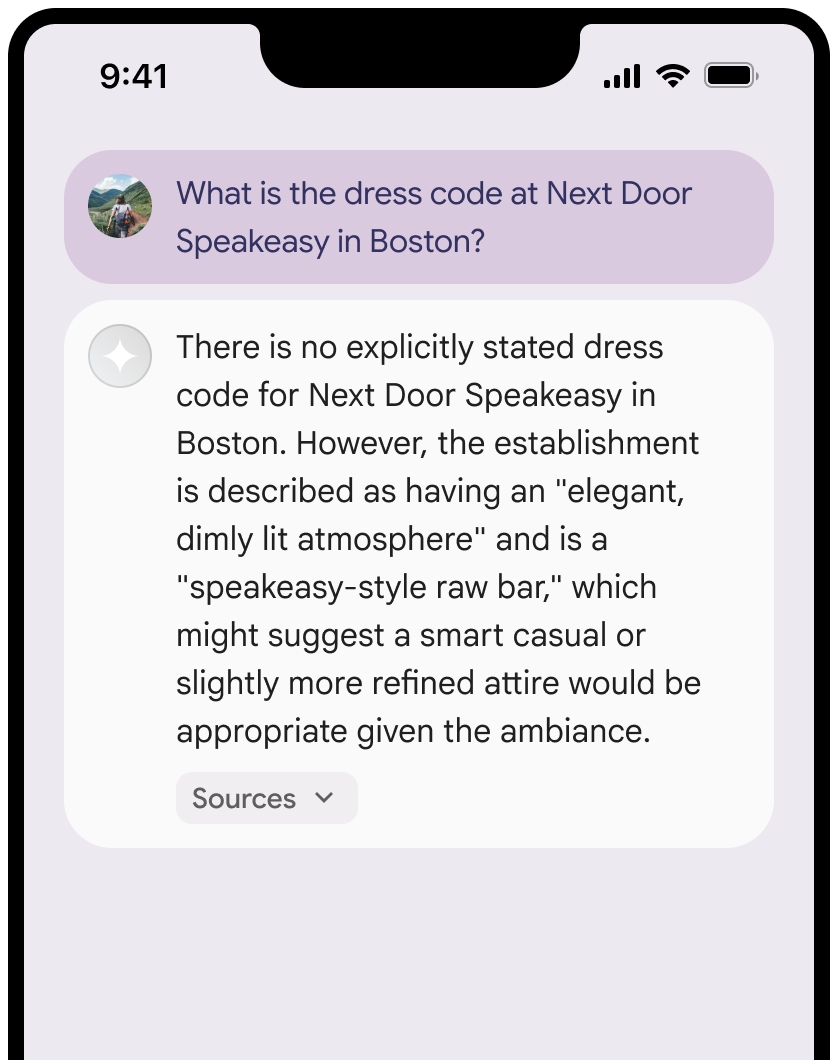
必要に応じて、次のような追加コンテンツでリンクのプレビューを強化できます。
Google Maps テキスト アトリビューションの前に挿入されたGoogle Maps ファビコン。- ソース URL(
og:image)の写真。
Google Maps テキスト アトリビューションのガイドライン
テキスト内でソースを
テキスト
Google Mapsは変更しないでください。Google Mapsの文字の大小は変更しないでください。Google Mapsというテキストを複数行に折り返さないでください。Google Mapsというテキストを他の言語にローカライズしないでください。- HTML 属性
translate="no"を使用して、ブラウザがテキストGoogle Mapsを翻訳しないようにします。
次の表の説明に従って、テキスト
Google Mapsのスタイルを設定します。プロパティ スタイル フォント ファミリー Roboto。フォントの読み込みは任意です。 代替フォント ファミリー プロダクトですでに使用されている Sans Serif の本文フォント、またはデフォルトのシステム フォントを呼び出すための Sans-Serif フォント スタイル 標準 フォントの太さ 400 フォントの色 白、黒(#1F1F1F)、グレー(#5E5E5E)。 背景に対してアクセシビリティの高い(4.5:1)コントラストを維持します。 フォントサイズ 最小フォントサイズ: 12sp
最大フォントサイズ: 16sp
sp について詳しくは、マテリアル デザインのウェブサイトでフォントサイズの単位をご覧ください。間隔 標準
CSS の例
次の CSS は、白または明るい背景に適切なタイポグラフィ スタイルと色でテキスト Google Maps をレンダリングします。
@import url('https://fonts.googleapis.com/css2?family=Roboto&display=swap');

.GMP-attribution {
  font-family: Roboto, Sans-Serif;
  font-style: normal;
  font-weight: 400;
  font-size: 1rem;
  letter-spacing: normal;
  white-space: nowrap;
  color: #5e5e5e;
}
プレイス ID のキャッシュ保存
placeId
Google マップによるグラウンディングの利用規約に定められているキャッシュ保存の制限は、このデータには適用されません。
禁止される行為と地域
緊急対応サービスなどの高リスクな活動に
Google Maps によるグラウンディングを使用しない。禁止されている地域で
Google Maps によるグラウンディングを提供するアプリケーションを配布または販売することはできません。詳しくは、Google Maps Platform で禁止されている地域をご覧ください。禁止地域のリストは随時更新される可能性があります。
Firebase コンソールでのグラウンディングされた結果と AI モニタリング
Firebase コンソールで AI モニタリングを有効にしている場合、レスポンスは Cloud Logging に保存されます。デフォルトでは、このデータの保持期間は 30 日です。
この保持期間または設定したカスタム期間が、特定のユースケースと、選択した Gemini API プロバイダ(Gemini Developer API または Agent Platform Gemini API (formerly Vertex AI)。サービス固有の利用規約のサービス利用規約セクションをご覧ください)の追加のコンプライアンス要件に完全に準拠していることを確認するのは、お客様の責任です。これらの要件を満たすには、Cloud Logging の保持期間を調整する必要がある場合があります。
料金とレート制限
選択した Gemini API プロバイダのドキュメント(Gemini Developer API | Agent Platform Gemini API (formerly Vertex AI))で、