

Grounding dengan
Grounding dengan
- Meningkatkan akurasi faktual: Kurangi halusinasi model dengan mendasarkan respons pada database Google yang berisi lebih dari 250 juta tempat dan bisnis di dunia nyata.
- Mengakses informasi real-time: Menjawab pertanyaan menggunakan data live, seperti jam buka bisnis saat ini dan status real-time Stasiun Pengisian Kendaraan Listrik Umum.
- Menyediakan sumber: Bangun kepercayaan pengguna dengan menampilkan sumber dan link tempat
Google Maps langsung bersama klaim berbasis lokasi model.
Model yang didukung
gemini-4-argongemini-3.8-flash(dangemini-3.7-flash,gemini-3.6-flash, dangemini-3.5-flashyang lebih lama)gemini-3.5-flash-lite(dangemini-3.1-flash-liteyang lebih lama)
Model gemini-3.1-pro-preview dan Gemini 2.5 penggunaan umum (yang tidak digunakan lagi) juga mendukung kemampuan ini.
Bahasa yang didukung
Lihat bahasa yang didukung untuk model Gemini.
Grounding model dengan Google Maps
|
Klik penyedia Gemini API untuk melihat konten dan kode khusus penyedia di halaman ini. |
Saat Anda membuat instance GenerativeModel, berikan GoogleMaps sebagai tool
yang dapat digunakan model untuk menghasilkan responsnya.
Swift
import CoreLocation
import FirebaseAILogic
// Initialize the Gemini Developer API backend service.
let ai = FirebaseAI.firebaseAI(backend: .googleAI())
// Example: Coordinates for New York City
let latAndLong = CLLocationCoordinate2D(latitude: 40.7128, longitude: -74.0060)
// (Optional) Define a RetrievalConfig to configure the Grounding with Google Maps tool.
// You can optionally provide a location's coordinates and/or a language code
// for more relevant and personalized Google Maps results.
let retrievalConfig = RetrievalConfig(
location: latAndLong,
// Example: Language code for English (US).
languageCode: "en-US"
)
// Wrap the RetrievalConfig inside a ToolConfig.
let toolConfig = ToolConfig(retrievalConfig: retrievalConfig)
// Create a `GenerativeModel` instance with a model that supports your use case.
let model = ai.generativeModel(
modelName: "GEMINI_MODEL_NAME",
// Provide Google Maps as a tool that the model can use to generate its response.
tools: [.googleMaps()],
// Add the configuration for the Grounding with Google Maps tool
// (if this optional config was defined above).
toolConfig: toolConfig
)
let response = try await model.generateContent("restaurants near me?")
print(response.text ?? "No text in response.")
// Make sure to comply with the "Grounding with Google Maps " usage requirements,
// which includes how you meet service usage requirements
Kotlin
// (Optional) Define a RetrievalConfig to configure the Grounding with Google Maps tool.
// You can optionally provide a location's coordinates and/or a language code
// for more relevant and personalized Google Maps results.
val retrievalConfig = RetrievalConfig(
// Example: Coordinates for New York City
latLng = LatLng(latitude = 40.7128, longitude = -74.0060),
// Example: Language code for English (US)
languageCode = "en-US"
)
// Wrap the RetrievalConfig inside a ToolConfig.
val toolConfig = ToolConfig(
retrievalConfig = retrievalConfig
)
// Initialize the Gemini Developer API backend service.
// Create a `GenerativeModel` instance with a model that supports your use case.
val model = Firebase.ai(backend = GenerativeBackend.googleAI()).generativeModel(
modelName = "GEMINI_MODEL_NAME",
// Add the configuration for the Grounding with Google Maps tool
// (if this optional config was defined above).
toolConfig = toolConfig,
// Provide Google Maps as a tool that the model can use to generate its response.
tools = listOf(Tool.googleMaps())
)
val response = model.generateContent("restaurants near me?")
print(response.text)
// Make sure to comply with the "Grounding with Google Maps " usage requirements,
// which includes how you meet service usage requirements
Java
// (Optional) Define a ToolConfig to configure the Grounding with Google Maps tool.
// You can optionally provide a location's coordinates and/or a language code
// for more relevant and personalized Google Maps results.
ToolConfig toolConfig = new ToolConfig(
null,
new RetrievalConfig(
// Example: Coordinates for New York City.
new LatLng(40.7128, -74.0060),
// Example: Language code for English (US).
"en-US"
)
);
// Initialize the Gemini Developer API backend service.
// Create a `GenerativeModel` instance with a model that supports your use case.
GenerativeModel ai = FirebaseAI.getInstance(GenerativeBackend.googleAI())
.generativeModel("GEMINI_MODEL_NAME",
null,
null,
// Provide Google Maps as a tool that the model can use to generate its response.
List.of(Tool.googleMaps()),
// Add the configuration for the Grounding with Google Maps tool
// (if this optional config was defined above).
toolConfig);
// Use the GenerativeModelFutures Java compatibility layer which offers
// support for ListenableFuture and Publisher APIs.
GenerativeModelFutures model = GenerativeModelFutures.from(ai);
ListenableFuture response = model.generateContent("restaurants near me?");
Futures.addCallback(response, new FutureCallback() {
@Override
public void onSuccess(GenerateContentResponse result) {
String resultText = result.getText();
System.out.println(resultText);
}
@Override
public void onFailure(Throwable t) {
t.printStackTrace();
}
}, executor);
// Make sure to comply with the "Grounding with Google Maps " usage requirements,
// which includes how you meet service usage requirements
Web
import { initializeApp } from "firebase/app";
import { getAI, getGenerativeModel, GoogleAIBackend } from "firebase/ai";
// TODO(developer): Replace the following with your app's Firebase configuration
// See: https://firebase.google.com/docs/web/learn-more#config-object
const firebaseConfig = {
// ...
};
// Initialize FirebaseApp
const firebaseApp = initializeApp(firebaseConfig);
// Initialize the Gemini Developer API backend service.
const ai = getAI(firebaseApp, { backend: new GoogleAIBackend() });
// (Optional) Define a toolConfig to configure the Grounding with Google Maps tool.
// You can optionally provide a location's coordinates and/or a language code
// for more relevant and personalized Google Maps results.
const toolConfig = {
retrievalConfig: {
// Example: Coordinates for New York City
latLng: {
latitude: 40.7128,
longitude: -74.0060
},
// Example: Language code for English (US)
languageCode: 'en-US'
}
};
// Create a `GenerativeModel` instance with a model that supports your use case
const model = getGenerativeModel(
ai,
{
model: "GEMINI_MODEL_NAME",
// Provide Google Maps as a tool that the model can use to generate its response.
tools: [ { googleMaps: {} } ],
// Add the configuration for the Grounding with Google Maps tool
// (if this optional config was defined above).
toolConfig
}
);
const result = await model.generateContent("restaurants near me?");
console.log(result.response.text());
// Make sure to comply with the "Grounding with Google Maps " usage requirements,
// which includes how you meet service usage requirements
Dart
import 'package:firebase_core/firebase_core.dart';
import 'package:firebase_ai/firebase_ai.dart';
import 'firebase_options.dart';
// Initialize FirebaseApp.
await Firebase.initializeApp(
options: DefaultFirebaseOptions.currentPlatform,
);
// (Optional) Define a ToolConfig to configure the Grounding with Google Maps tool.
// You can optionally provide a location's coordinates and/or a language code
// for more relevant and personalized Google Maps results.
final toolConfig = ToolConfig(
retrievalConfig: RetrievalConfig(
// Example: Coordinates for New York City.
latLng: LatLng(latitude: 40.712728, longitude: -74.006015),
// Example: Language code for English (US).
languageCode: 'en-US',
),
);
// Initialize the Gemini Developer API backend service.
// Create a `GenerativeModel` instance with a model that supports your use case.
final model = FirebaseAI.googleAI().generativeModel(
model: 'GEMINI_MODEL_NAME',
// Provide Google Maps as a tool that the model can use to generate its response.
tools: [
Tool.googleMaps(),
],
// Add the configuration for the Grounding with Google Maps tool
// (if this optional config was defined above).
toolConfig: toolConfig,
);
final response = await model.generateContent([Content.text("restaurants near me?")]);
print(response.text);
// Make sure to comply with the "Grounding with Google Maps " usage requirements,
// which includes how you meet service usage requirements
Unity
using Firebase;
using Firebase.AI;
// Initialize the Gemini Developer API backend service.
var ai = FirebaseAI.GetInstance(FirebaseAI.Backend.GoogleAI());
// Example: Coordinates for New York City
var latLng = new LatLng(40.7128, -74.0060);
// (Optional) Define a RetrievalConfig to configure the Grounding with Google Maps tool.
// You can optionally provide a location's coordinates and/or a language code
// for more relevant and personalized Google Maps results.
var retrievalConfig = new RetrievalConfig(latLng, languageCode: "en");
// Wrap the RetrievalConfig inside a ToolConfig.
var toolConfig = new ToolConfig(retrievalConfig: retrievalConfig);
// Create a `GenerativeModel` instance with a model that supports your use case.
var model = ai.GetGenerativeModel(
modelName: "GEMINI_MODEL_NAME",
// Provide Google Maps as a tool that the model can use to generate its response.
tools: new[] { new Tool(new GoogleMaps()) },
// Add the configuration for the Grounding with Google Maps tool
// (if this optional config was defined above).
toolConfig: toolConfig
);
var response = await model.GenerateContentAsync("restaurants near me?");
UnityEngine.Debug.Log(response.Text ?? "No text in response.");
// Make sure to comply with the "Grounding with Google Maps " usage requirements,
// which includes how you meet service usage requirements
Pelajari cara memilih model yang sesuai untuk kasus penggunaan dan aplikasi Anda.
Praktik terbaik dan tips untuk meningkatkan hasil
Bagian ini menjelaskan beberapa praktik terbaik umum untuk menggunakan Grounding dengan
Praktik terbaik umum
Hanya sediakan alat saat diperlukan: Untuk mengoptimalkan performa dan biaya, berikan akses ke alat Grounding dengan
Google Maps kepada model hanya jika kasus penggunaan memiliki konteks geografis yang jelas.Berikan lokasi pengguna: Untuk respons yang paling relevan dan dipersonalisasi (dan jika lokasi pengguna diketahui), sertakan lokasi pengguna (menggunakan lintang dan bujur melalui
latLng) dalam konfigurasi alat Grounding denganGoogle Maps .Beri tahu pengguna akhir: Beri tahu pengguna akhir Anda dengan jelas bahwa data
Google Maps sedang digunakan untuk menjawab kueri mereka. Menyediakan sumber dariGoogle Maps kepada pengguna akhir adalah persyaratan penggunaan layanan untuk alat Grounding denganGoogle Maps .
Menggunakan properti tempat dalam perintah
Bagian ini mencantumkan properti tempat yang digunakan untuk mendeskripsikan lokasi
dan digunakan oleh Grounding dengan
Contoh properti tempat
Daftar ini memberikan contoh properti tentang tempat yang diurutkan menurut abjad yang dapat digunakan oleh model Anda untuk menghasilkan respons.
- Alamat
- Ambil di tepi jalan
- Kartu debit
- Jarak
- Tempat parkir gratis
- Musik live
- Menu untuk anak-anak
- Jam buka
- Opsi pembayaran (seperti tunai atau kartu kredit)
- Jawaban terkait tempat
- Boleh bawa hewan peliharaan
- Menyajikan bir
- Menyajikan makanan vegetarian
- Dapat diakses pengguna kursi roda
- Wi-Fi
Jawaban tempat adalah respons dari Grounding dengan
Contoh perintah yang menggunakan properti tempat
Contoh berikut menggunakan
properti tempat
dalam perintah tentang berbagai jenis tempat. Grounding dengan
Merencanakan makan malam keluarga: Tentukan apakah restoran cocok untuk keluarga dan apakah restoran menawarkan layanan yang nyaman.
- Contoh perintah: Apakah "The Italian Place" cocok untuk anak-anak, dan apakah mereka menawarkan layanan pesan bawa pulang? Berapa ratingnya?
Memeriksa aksesibilitas untuk teman: Menentukan apakah lokasi memenuhi kebutuhan aksesibilitas tertentu.
- Contoh perintah: Saya perlu restoran yang memiliki pintu masuk yang dapat diakses kursi roda.
Menemukan lokasi untuk camilan larut malam: Menemukan tempat buka yang menyajikan makanan tertentu pada waktu tertentu.
- Contoh perintah: Apakah "Burger Joint" buka sekarang? Apakah tempat ini menyajikan makan malam? Jam berapa mereka buka pada hari Jumat?
Bertemu klien untuk minum kopi: Menilai kesesuaian kafe untuk pertemuan bisnis berdasarkan fasilitas, penawaran, dan opsi pembayaran.
- Contoh perintah: Apakah "Cafe Central" memiliki Wi-Fi? Apakah tempat ini menyajikan kopi? Berapa tingkat harganya, dan apakah mereka menerima kartu kredit?
Perhatikan bahwa informasi dalam
Cara kerja Grounding dengan Google Maps
Saat Anda menyediakan alat GoogleMaps untuk model, model akan menangani
seluruh alur kerja penelusuran, pemrosesan, dan pengutipan informasi secara otomatis.
Berikut adalah alur kerja model:
Menerima perintah: Aplikasi Anda mengirimkan perintah ke model Gemini dengan alat
GoogleMapsdiaktifkan.Menganalisis perintah: Model menganalisis perintah dan menentukan apakah
Google Maps dapat meningkatkan responsnya, misalnya, jika perintah berisi konteks geografis (seperti "kedai kopi di dekat saya", "museum di San Francisco").Memanggil alat: Model, yang mengenali niat geografis, memanggil alat Grounding dengan
Google Maps .Mengirim kueri ke
Google Maps : Layanan Grounding denganGoogle Maps mengirim kueri keGoogle Maps untuk mendapatkan informasi yang relevan (misalnya, tempat, ulasan, foto, alamat, jam buka).Anda dapat menyertakan lintang dan bujur dalam konfigurasi alat (atau bahkan langsung dalam perintah) untuk mendapatkan hasil
Google Maps yang lebih relevan dan dipersonalisasi. Alat ini adalah alat penelusuran tekstual dan berperilaku mirip dengan penelusuran diGoogle Maps , yaitu kueri lokal ("di dekat saya") akan menggunakan koordinat, sedangkan kueri spesifik atau non-lokal kemungkinan tidak akan dipengaruhi oleh lokasi eksplisit.Memproses hasil
Google Maps : Model memproses hasilGoogle Maps dan merumuskan respons terhadap perintah awal.Menampilkan Hasil yang Di-grounding
Google Maps : Model menampilkan respons akhir yang mudah digunakan dan di-grounding dalam hasilGoogle Maps . Respons ini menyertakan:- Jawaban teks model.
- Objek
groundingMetadatadengan hasil dan sumberGoogle Maps .
Perhatikan bahwa menyediakan groundingMetadata sehingga
bukan Hasil Grounding
Memahami hasil yang di-grounding
Jika model mendasarkan responsnya pada hasil groundingMetadata yang berisi data terstruktur yang
penting untuk memverifikasi klaim dan membangun pengalaman sumber yang kaya dalam
aplikasi Anda.
Objek groundingMetadata dalam Hasil Grounding
groundingChunks: Array objek yang berisi sumbermaps(uri,placeId, dantitle).groundingSupports: Array potongan untuk menghubungkan respons modeltextke sumber digroundingChunksSetiap potongan menautkan tekssegment(ditentukan olehstartIndexdanendIndex) ke satu atau beberapagroundingChunkIndices. Kolom ini membantu Anda membuat link sumber inline. Pelajari cara memenuhi persyaratan penggunaan layanan di bagian berikutnya halaman ini.
Berikut adalah contoh respons yang menyertakan objek groundingMetadata:
{
  "candidates": [
    {
      "content": {
        "parts": [
          {
            "text": "CanteenM is an American restaurant with..."
          }
        ],
        "role": "model"
      },
      "groundingMetadata": {
        "groundingChunks": [
          {
            "maps": {
              "uri": "https://maps.google.com/?cid=13100894621228039586",
              "title": "Heaven on 7th Marketplace",
              "placeId": "places/ChIJ0-zA1vBZwokRon0fGj-6z7U"
            }
          }
        ],
        "groundingSupports": [
          {
            "segment": {
              "startIndex": 0,
              "endIndex": 79,
              "text": "CanteenM is an American restaurant with a 4.6-star rating and is open 24 hours."
            },
            "groundingChunkIndices": [0]
          }
        ]
      }
    }
  ]
}
Persyaratan penggunaan layanan
Bagian ini menjelaskan persyaratan penggunaan layanan untuk Grounding dengan
Memberi tahu pengguna tentang sumber Google Maps
Dengan setiap groundingChunks yang mendukung setiap respons. Metadata berikut juga ditampilkan:
- URI sumber
- title
- ID
Di aplikasi Anda, saat menampilkan hasil dari Grounding dengan
Sumber
Google Maps harus segera mengikuti konten yang dihasilkan yang didukung oleh sumber tersebut. Konten yang dihasilkan ini juga disebut sebagai Hasil BerbasisGoogle Maps .Sumber
Google Maps harus dapat dilihat dalam satu interaksi pengguna.
Berikut cara mendapatkan nilai untuk menampilkan sumber dari
Swift
// ...

// Get the model's response
let text = response.text

// Get the grounding metadata
if let candidate = response.candidates.first,
   let groundingMetadata = candidate.groundingMetadata {

  // Get sources
  let groundingChunks = groundingMetadata.groundingChunks
  for chunk in groundingChunks {
    if let maps = chunk.maps {
      let title = maps.title  // for example, "Heaven on 7th Marketplace"
      let url = maps.url  // for example, "https://maps.google.com/?cid=13100894621228039586"
      let placeID = maps.placeID  // for example, "places/ChIJ0-zA1vBZwokRon0fGj-6z7U"
      // TODO(developer): show source in the UI
    }
  }
}
Kotlin
// ...

// Get the model's response
val text = response.text

// Get the grounding metadata
val groundingMetadata = response.candidates.firstOrNull()?.groundingMetadata

// Get sources
val groundingChunks = groundingMetadata?.groundingChunks
groundingChunks?.let { chunks ->
  for (chunk in chunks) {
    val title = chunk.maps?.title  // for example, "Heaven on 7th Marketplace"
    val uri = chunk.maps?.uri  // for example, "https://maps.google.com/?cid=13100894621228039586"
    val placeId = chunk.maps?.placeId  // for example, "places/ChIJ0-zA1vBZwokRon0fGj-6z7U"
    // TODO(developer): show source in the UI
  }
}
Java
// ...

Futures.addCallback(response, new FutureCallback() {
  @Override
  public void onSuccess(GenerateContentResponse result) {
    // Get the model's response
    String text = result.getText();

    // Get the grounding metadata
    GroundingMetadata groundingMetadata =
        result.getCandidates()[0].getGroundingMetadata();

    if (groundingMetadata != null) {
      // Get sources
      List chunks = groundingMetadata.getGroundingChunks();
      if (chunks != null) {
        for(GroundingChunk chunk : chunks) {
          GoogleMapsGroundingChunk maps = chunk.getMaps();
          if (maps != null) {
            String title = maps.getTitle();  // for example, "Heaven on 7th Marketplace"
            String uri = maps.getUri();  // for example, "https://maps.google.com/?cid=13100894621228039586"
            String placeId = maps.getPlaceId();  // for example, "places/ChIJ0-zA1vBZwokRon0fGj-6z7U"
            // TODO(developer): show sources in the UI
          }
        }
      }
    }
  }

  @Override
  public void onFailure(Throwable t) {
    t.printStackTrace();
  }
}, executor);
Web
// ...

// Get the model's text response
const text = result.response.text();

// Get the grounding metadata
const groundingMetadata = result.response.candidates?.[0]?.groundingMetadata;

// Get sources
const groundingChunks = groundingMetadata?.groundingChunks;
if (groundingChunks) {
  for (const chunk of groundingChunks) {
    const title = chunk.maps?.title;  // for example, "Heaven on 7th Marketplace"
    const uri = chunk.maps?.uri;  // for example, "https://maps.google.com/?cid=13100894621228039586"
    const placeId = chunk.maps?.placeId;  // for example, "places/ChIJ0-zA1vBZwokRon0fGj-6z7U"
    // TODO(developer): show sources in the UI
  }
}
Dart
// ...

// Get the model's response
final text = response.text;

// Get the grounding metadata
final groundingMetadata = response.candidates.first.groundingMetadata;

// Get sources
final groundingChunks = groundingMetadata?.groundingChunks;
if (groundingChunks != null) {
  for (var chunk in groundingChunks) {
    final title = chunk.maps?.title;  // for example, "Heaven on 7th Marketplace"
    final uri = chunk.maps?.uri;  // for example, "https://maps.google.com/?cid=13100894621228039586"
    final placeId = chunk.maps?.placeId;  // for example, "places/ChIJ0-zA1vBZwokRon0fGj-6z7U"
    // TODO(developer): show sources in the UI
  }
}
Unity
// ...

// Get the model's response.
var text = response.Text;

// Get the grounding metadata.
var groundingMetadata = response.Candidates.First().GroundingMetadata;

// Get sources.
if (groundingMetadata != null) {
  foreach(GroundingChunk chunk in groundingMetadata?.GroundingChunks) {
    if (chunk.Maps != null) {
      var title = chunk.Maps?.Title;  // for example, "Heaven on 7th Marketplace"
      var uri = chunk.Maps?.Uri;  // for example, "https://maps.google.com/?cid=13100894621228039586"
      var placeId = chunk.Maps?.PlaceId;  // for example, "places/ChIJ0-zA1vBZwokRon0fGj-6z7U"
      // TODO(developer): show sources in the UI
    }
  }
}
Menampilkan Google Maps sumber dengan Google Maps link
Untuk setiap sumber di groundingChunks,
pratinjau link harus dibuat sesuai dengan persyaratan berikut:
- Atribusikan setiap sumber ke
Google Maps dengan mengikuti panduan atribusi teksGoogle Maps . - Menampilkan judul sumber yang diberikan dalam respons.
- Tautkan ke sumber menggunakan
uridari respons.
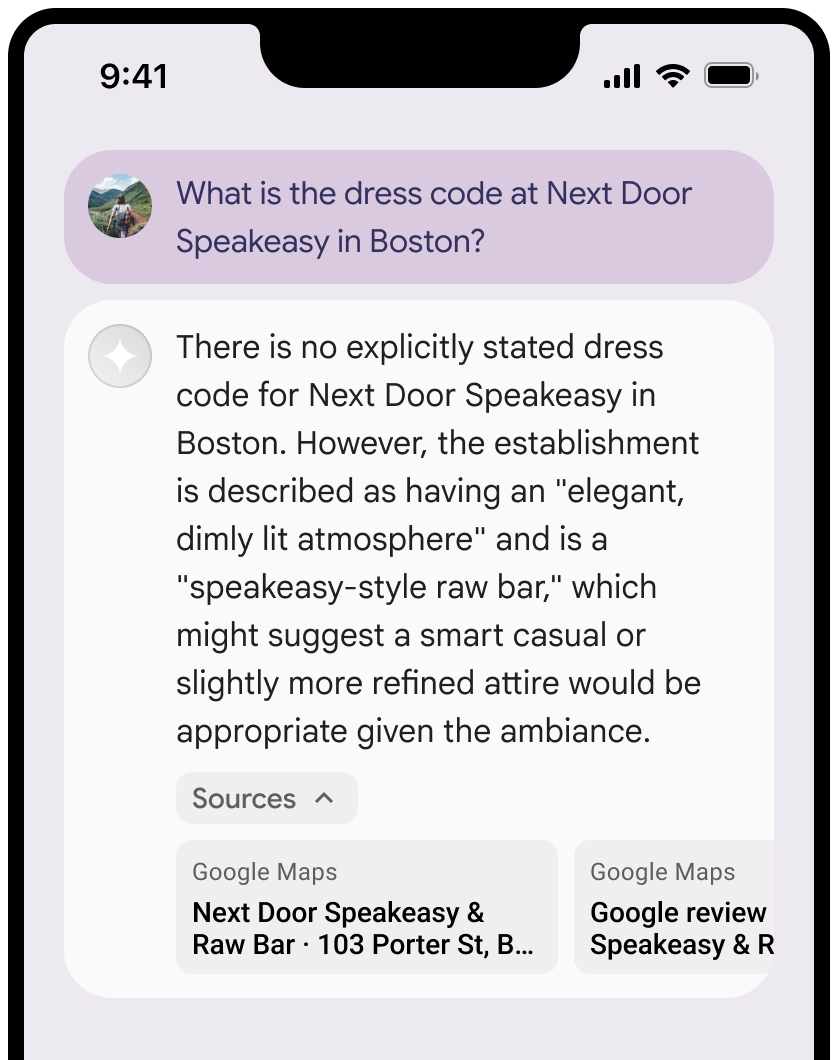
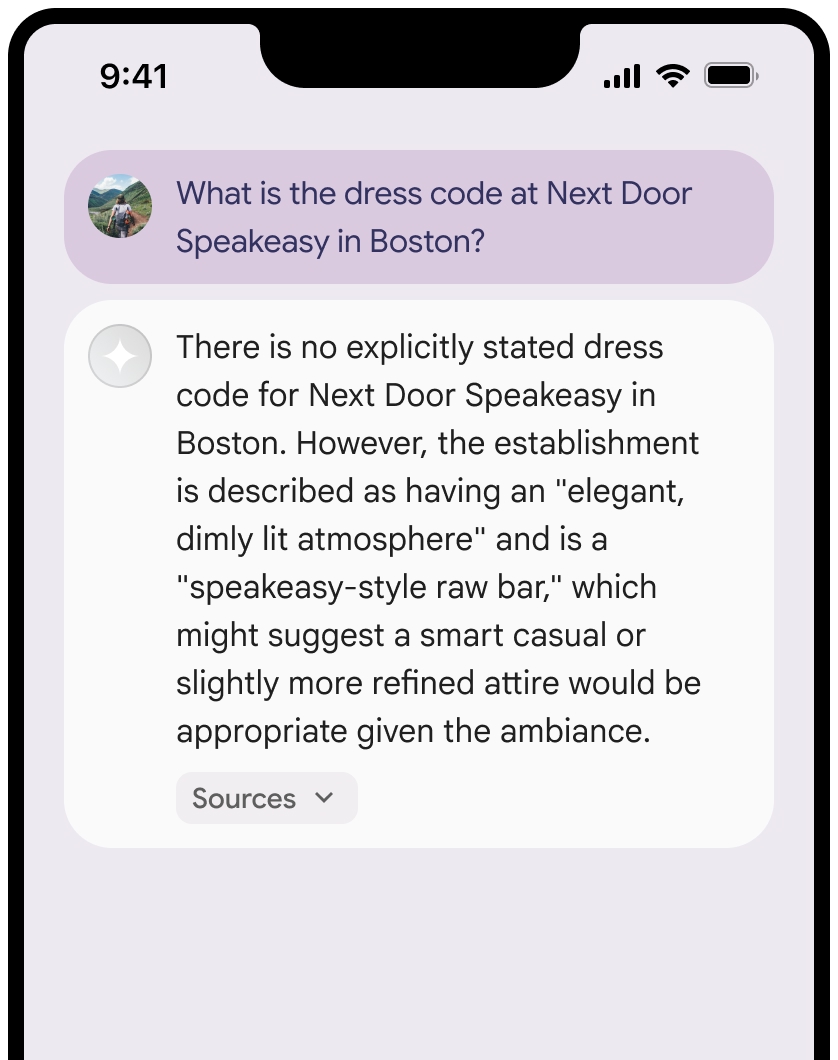
Anda dapat menciutkan tampilan sumber.
Jika ingin, Anda dapat meningkatkan kualitas pratinjau link dengan konten tambahan, seperti:
- Favicon
Google Maps disisipkan sebelum atribusi teksGoogle Maps . - Foto dari URL sumber (
og:image).
Untuk mengetahui informasi selengkapnya tentang beberapa penyedia data
Google Maps panduan atribusi teks
Saat Anda mengatribusikan sumber ke
Jangan ubah teks
Google Mapsdengan cara apa pun:- Jangan ubah kapitalisasi teks
Google Maps. - Jangan rapikan teks
Google Mapsmenjadi beberapa baris. - Jangan lokalkan teks
Google Mapske bahasa lain. - Cegah browser menerjemahkan teks
Google Mapsdengan menggunakan atribut HTMLtranslate="no".
- Jangan ubah kapitalisasi teks
Atur gaya teks
Google Mapsseperti yang dijelaskan dalam tabel berikut:Properti Gaya Jenis font Roboto. Pemuatan font bersifat opsional. Jenis font pengganti Font isi sans serif apa pun yang sudah digunakan dalam produk Anda atau "Sans-Serif" untuk memanggil font sistem default Gaya font Normal Ketebalan font 400 Warna font Putih, hitam (#1F1F1F), atau abu-abu (#5E5E5E). Pertahankan kontras yang mudah diakses (4,5:1) dengan latar belakang. Ukuran font Ukuran font minimum: 12sp
Ukuran font maksimum: 16sp
Untuk mempelajari sp, lihat Unit ukuran font di situs Desain Material.Spasi Normal
Contoh CSS
CSS berikut merender teks Google Maps dengan gaya dan warna tipografi yang sesuai di latar belakang putih atau terang.
@import url('https://fonts.googleapis.com/css2?family=Roboto&display=swap');

.GMP-attribution {
  font-family: Roboto, Sans-Serif;
  font-style: normal;
  font-weight: 400;
  font-size: 1rem;
  letter-spacing: normal;
  white-space: nowrap;
  color: #5e5e5e;
}
Menyimpan ID tempat dalam cache
placeId
Batasan terhadap penyimpanan dalam cache dalam Persyaratan Grounding dengan Google Maps tidak berlaku untuk data ini.
Aktivitas dan wilayah yang dilarang
Grounding dengan
Anda tidak akan menggunakan Grounding dengan
Google Maps untuk aktivitas berisiko tinggi, termasuk layanan tanggap darurat.Anda tidak akan mendistribusikan atau memasarkan aplikasi yang menawarkan Grounding dengan
Google Maps di Wilayah Terlarang. Untuk mengetahui informasi selengkapnya, lihat Wilayah yang Dilarang Google Maps Platform. Daftar Wilayah Terlarang dapat diperbarui dari waktu ke waktu.
Hasil yang di-grounding dan pemantauan AI di Firebase console
Jika Anda telah mengaktifkan pemantauan AI di Firebase console, respons akan disimpan di Cloud Logging. Secara default, data ini memiliki periode retensi 30 hari.
Anda bertanggung jawab untuk memastikan bahwa periode retensi ini, atau periode kustom apa pun yang Anda tetapkan, sepenuhnya selaras dengan kasus penggunaan spesifik Anda dan persyaratan kepatuhan tambahan apa pun untuk penyedia Gemini API yang Anda pilih: Gemini Developer API atau Agent Platform Gemini API (formerly Vertex AI) (lihat bagian Persyaratan Layanan dalam Persyaratan Khusus Layanan). Anda mungkin perlu menyesuaikan periode retensi di Cloud Logging untuk memenuhi persyaratan ini.
Harga dan pembatasan kapasitas
Harga grounding dengan
Pastikan untuk meninjau detail tentang harga, ketersediaan model, dan batasan untuk
Grounding dengan