

透過
使用
- 提高事實準確度:根據 Google 超過 2.5 億筆的真實地點和商家資料庫生成回覆,減少模型幻覺。
- 存取即時資訊:使用即時資料回答問題,例如目前的營業時間和電動車充電站的即時狀態。
- 提供來源:在模型的位置資訊相關聲明旁直接顯示
Google Maps 地點來源和連結,建立使用者信任感。
支援的模型
gemini-3.1-pro-previewgemini-3.8-flash(以及舊版gemini-3.7-flash、gemini-3.6-flash和gemini-3.5-flash)gemini-3.5-flash-lite(和舊版gemini-3.1-flash-lite)
一般用途 Gemini 2.5 模型支援這項功能,但都已淘汰。
支援的語言
如要查看 Gemini 模型支援的語言,請參閱這篇文章。
使用 Google Maps 讓模型根據特定資訊生成內容
|
按一下 Gemini API 供應商,即可在這個頁面查看供應商專屬內容和程式碼。 |
建立 GenerativeModel 執行個體時,請提供 GoogleMaps 做為 tool,模型可使用該執行個體生成回覆。
Swift
import FirebaseAILogic
// Initialize the Gemini Developer API backend service.
let ai = FirebaseAI.firebaseAI(backend: .googleAI())
// Example: Coordinates for New York City
let latAndLong = CLLocationCoordinate2D(latitude: 40.7128, longitude: -74.0060)
// (Optional) Define a RetrievalConfig to configure the Grounding with Google Maps tool.
// You can optionally provide a location's coordinates and/or a language code
// for more relevant and personalized Google Maps results.
let retrievalConfig = RetrievalConfig(
location: latAndLong,
// Example: Language code for English (US).
languageCode: "en-US"
)
// Wrap the RetrievalConfig inside a ToolConfig.
let toolConfig = ToolConfig(retrievalConfig: retrievalConfig)
// Create a `GenerativeModel` instance with a model that supports your use case.
let model = ai.generativeModel(
modelName: "GEMINI_MODEL_NAME",
// Provide Google Maps as a tool that the model can use to generate its response.
tools: [Tool.googleMaps()],
// Add the configuration for the Grounding with Google Maps tool
// (if this optional config was defined above).
toolConfig: toolConfig
)
let response = try await model.generateContent("restaurants near me?")
print(response.text ?? "No text in response.")
// Make sure to comply with the "Grounding with Google Maps " usage requirements,
// which includes how you meet service usage requirements
Kotlin
// (Optional) Define a RetrievalConfig to configure the Grounding with Google Maps tool.
// You can optionally provide a location's coordinates and/or a language code
// for more relevant and personalized Google Maps results.
val retrievalConfig = RetrievalConfig(
// Example: Coordinates for New York City
latLng = LatLng(latitude = 40.7128, longitude = -74.0060),
// Example: Language code for English (US)
languageCode = "en-US"
)
// Wrap the RetrievalConfig inside a ToolConfig.
val toolConfig = ToolConfig(
retrievalConfig = retrievalConfig
)
// Initialize the Gemini Developer API backend service.
// Create a `GenerativeModel` instance with a model that supports your use case.
val model = Firebase.ai(backend = GenerativeBackend.googleAI()).generativeModel(
modelName = "GEMINI_MODEL_NAME",
// Add the configuration for the Grounding with Google Maps tool
// (if this optional config was defined above).
toolConfig = toolConfig,
// Provide Google Maps as a tool that the model can use to generate its response.
tools = listOf(Tool.googleMaps())
)
val response = model.generateContent("restaurants near me?")
print(response.text)
// Make sure to comply with the "Grounding with Google Maps " usage requirements,
// which includes how you meet service usage requirements
Java
// (Optional) Define a ToolConfig to configure the Grounding with Google Maps tool.
// You can optionally provide a location's coordinates and/or a language code
// for more relevant and personalized Google Maps results.
ToolConfig toolConfig = new ToolConfig(
null,
new RetrievalConfig(
// Example: Coordinates for New York City.
new LatLng(40.7128, -74.0060),
// Example: Language code for English (US).
"en-US"
)
);
// Initialize the Gemini Developer API backend service.
// Create a `GenerativeModel` instance with a model that supports your use case.
GenerativeModel ai = FirebaseAI.getInstance(GenerativeBackend.googleAI())
.generativeModel("GEMINI_MODEL_NAME",
null,
null,
// Provide Google Maps as a tool that the model can use to generate its response.
List.of(Tool.googleMaps()),
// Add the configuration for the Grounding with Google Maps tool
// (if this optional config was defined above).
toolConfig);
// Use the GenerativeModelFutures Java compatibility layer which offers
// support for ListenableFuture and Publisher APIs.
GenerativeModelFutures model = GenerativeModelFutures.from(ai);
ListenableFuture response = model.generateContent("restaurants near me?");
Futures.addCallback(response, new FutureCallback() {
@Override
public void onSuccess(GenerateContentResponse result) {
String resultText = result.getText();
System.out.println(resultText);
}
@Override
public void onFailure(Throwable t) {
t.printStackTrace();
}
}, executor);
// Make sure to comply with the "Grounding with Google Maps " usage requirements,
// which includes how you meet service usage requirements
Web
import { initializeApp } from "firebase/app";
import { getAI, getGenerativeModel, GoogleAIBackend } from "firebase/ai";
// TODO(developer): Replace the following with your app's Firebase configuration
// See: https://firebase.google.com/docs/web/learn-more#config-object
const firebaseConfig = {
// ...
};
// Initialize FirebaseApp
const firebaseApp = initializeApp(firebaseConfig);
// Initialize the Gemini Developer API backend service.
const ai = getAI(firebaseApp, { backend: new GoogleAIBackend() });
// (Optional) Define a toolConfig to configure the Grounding with Google Maps tool.
// You can optionally provide a location's coordinates and/or a language code
// for more relevant and personalized Google Maps results.
const toolConfig = {
retrievalConfig: {
// Example: Coordinates for New York City
latLng: {
latitude: 40.7128,
longitude: -74.0060
},
// Example: Language code for English (US)
languageCode: 'en-US'
}
};
// Create a `GenerativeModel` instance with a model that supports your use case
const model = getGenerativeModel(
ai,
{
model: "GEMINI_MODEL_NAME",
// Provide Google Maps as a tool that the model can use to generate its response.
tools: [ { googleMaps: {} } ],
// Add the configuration for the Grounding with Google Maps tool
// (if this optional config was defined above).
toolConfig
}
);
const result = await model.generateContent("restaurants near me?");
console.log(result.response.text());
// Make sure to comply with the "Grounding with Google Maps " usage requirements,
// which includes how you meet service usage requirements
Dart
import 'package:firebase_core/firebase_core.dart';
import 'package:firebase_ai/firebase_ai.dart';
import 'firebase_options.dart';
// Initialize FirebaseApp.
await Firebase.initializeApp(
options: DefaultFirebaseOptions.currentPlatform,
);
// (Optional) Define a ToolConfig to configure the Grounding with Google Maps tool.
// You can optionally provide a location's coordinates and/or a language code
// for more relevant and personalized Google Maps results.
final toolConfig = ToolConfig(
retrievalConfig: RetrievalConfig(
// Example: Coordinates for New York City.
latLng: LatLng(latitude: 40.712728, longitude: -74.006015),
// Example: Language code for English (US).
languageCode: 'en-US',
),
);
// Initialize the Gemini Developer API backend service.
// Create a `GenerativeModel` instance with a model that supports your use case.
final model = FirebaseAI.googleAI().generativeModel(
model: 'GEMINI_MODEL_NAME',
// Provide Google Maps as a tool that the model can use to generate its response.
tools: [
Tool.googleMaps(),
],
// Add the configuration for the Grounding with Google Maps tool
// (if this optional config was defined above).
toolConfig: toolConfig,
);
final response = await model.generateContent([Content.text("restaurants near me?")]);
print(response.text);
// Make sure to comply with the "Grounding with Google Maps " usage requirements,
// which includes how you meet service usage requirements
Unity
using Firebase;
using Firebase.AI;
// Initialize the Gemini Developer API backend service.
var ai = FirebaseAI.GetInstance(FirebaseAI.Backend.GoogleAI());
// Example: Coordinates for New York City
var latLng = new LatLng(40.7128, -74.0060);
// (Optional) Define a RetrievalConfig to configure the Grounding with Google Maps tool.
// You can optionally provide a location's coordinates and/or a language code
// for more relevant and personalized Google Maps results.
var retrievalConfig = new RetrievalConfig(latLng, languageCode: "en");
// Wrap the RetrievalConfig inside a ToolConfig.
var toolConfig = new ToolConfig(retrievalConfig: retrievalConfig);
// Create a `GenerativeModel` instance with a model that supports your use case.
var model = ai.GetGenerativeModel(
modelName: "GEMINI_MODEL_NAME",
// Provide Google Maps as a tool that the model can use to generate its response.
tools: new[] { new Tool(new GoogleMaps()) },
// Add the configuration for the Grounding with Google Maps tool
// (if this optional config was defined above).
toolConfig: toolConfig
);
var response = await model.GenerateContentAsync("restaurants near me?");
UnityEngine.Debug.Log(response.Text ?? "No text in response.");
// Make sure to comply with the "Grounding with Google Maps " usage requirements,
// which includes how you meet service usage requirements
瞭解如何選擇適合應用程式和用途的模型, 。
改善成效的最佳做法和訣竅
本節說明搭配
常見的最佳做法
只在需要時提供工具:為提升效能和成本效益,只有在用途有明確的地理區域脈絡時,才提供模型存取「以
Google Maps 為基礎」工具的權限。提供使用者位置資訊:如要取得最相關的個人化回覆 (且知道使用者位置),請在「Grounding with
Google Maps 」工具設定中加入使用者位置資訊 (使用經緯度,透過latLng)。告知使用者:清楚告知使用者系統會使用
Google Maps 資料回答他們的問題。向使用者提供Google Maps 來源是「運用Google Maps 建立基準」工具的服務使用規定。
在提示中使用地點屬性
本節列出地點屬性,這些屬性用於描述地點,並由 Grounding with
地點屬性範例
這份清單提供地點屬性的字母排序範例,模型可使用這些屬性生成回覆。
- 地址
- 店外取貨
- 簽帳金融卡
- 距離
- 免費停車位
- 提供現場音樂演奏
- 兒童菜單
- 服務時間
- 付款方式 (例如現金或信用卡)
- 有關地點的回答
- 寵物友善
- 供應啤酒
- 供應素食
- 有無障礙設施
- Wifi
地點答案是 Grounding with
使用地點屬性的提示詞範例
以下範例會在不同類型地點的提示中使用地點屬性。
規劃家庭聚餐:判斷餐廳是否適合家庭聚餐,以及餐廳是否提供便利的服務。
- 範例提示:「『The Italian Place』適合帶孩子前往嗎?他們提供外帶服務嗎?他們的評分是多少?
為朋友查看無障礙設施:判斷地點是否符合特定無障礙需求。
- 範例提示詞:我需要有輪椅無障礙入口的餐廳。
尋找宵夜地點:尋找在特定時間供應特定餐點的營業場所。
- 提示範例:「Burger Joint」現在營業嗎?他們提供晚餐嗎? 星期五的營業時間是?
與客戶在咖啡廳會面:根據咖啡廳的設施、供應品項和付款方式,評估是否適合進行商務會議。
- 範例提示:「Cafe Central」有提供 Wi-Fi 嗎?是否供應咖啡? 價位如何?是否接受信用卡?
請注意,
Google Maps 的運作方式
提供 GoogleMaps 工具給模型後,模型就會自動處理搜尋、處理及引用資訊的整個工作流程。
以下是模型的工作流程:
接收提示:應用程式會傳送提示至 Gemini 模型,並啟用
GoogleMaps工具。分析提示:模型會分析提示,判斷是否可透過
Google Maps 提升回覆品質,例如提示是否包含地理位置資訊 (如「我附近的咖啡廳」、「舊金山的博物館」)。叫用工具:模型辨識出地理位置意圖後,會叫用「Grounding with
Google Maps 」工具。將查詢傳送至
Google Maps :使用Google Maps 服務查詢Google Maps 相關資訊 (例如地點、評論、相片、地址、營業時間)。您也可以選擇在工具的設定中加入經緯度 (甚至直接在提示中加入),以取得更相關的個人化
Google Maps 結果。這項工具是文字搜尋工具,運作方式與在Google Maps 上搜尋類似,也就是說,系統會使用座標處理「附近」等區域查詢,而特定或非區域查詢則不太可能受到明確位置的影響。處理
Google Maps 結果:模型會處理Google Maps 結果,並根據原始提示擬定回覆。傳回
Google Maps 有根據的結果:模型會根據Google Maps 結果,傳回最終的容易使用回覆。這則回覆包含:- 模型的文字答案。
- 含有
Google Maps 結果和來源的groundingMetadata物件。
請注意,將 groundingMetadata 物件,因此不是
瞭解基礎結果
如果模型的回覆內容是根據groundingMetadata 物件,內含結構化資料,有助於驗證聲明,並在應用程式中打造豐富的來源體驗。
groundingMetadata 物件包含下列資訊:
groundingChunks:物件陣列,內含maps來源 (uri、placeId和title)。groundingSupports:連結模型回應text與groundingChunks中來源的區塊陣列。每個區塊都會將文字segment(由startIndex和endIndex定義) 連結至一或多個groundingChunkIndices。這個欄位有助於建立內嵌來源連結。 請參閱本頁後續內容,瞭解如何符合服務使用規定。
以下是包含 groundingMetadata 物件的回應範例:
{
  "candidates": [
    {
      "content": {
        "parts": [
          {
            "text": "CanteenM is an American restaurant with..."
          }
        ],
        "role": "model"
      },
      "groundingMetadata": {
        "groundingChunks": [
          {
            "maps": {
              "uri": "https://maps.google.com/?cid=13100894621228039586",
              "title": "Heaven on 7th Marketplace",
              "placeId": "places/ChIJ0-zA1vBZwokRon0fGj-6z7U"
            }
          }
        ],
        "groundingSupports": [
          {
            "segment": {
              "startIndex": 0,
              "endIndex": 79,
              "text": "CanteenM is an American restaurant with a 4.6-star rating and is open 24 hours."
            },
            "groundingChunkIndices": [0]
          }
        ]
      }
    }
  ]
}
服務使用規定
本節說明使用 Grounding with
告知使用者 Google Maps 來源
每則groundingChunks來源,系統也會傳回下列中繼資料:
- 來源 URI
- title
- ID
在應用程式中,使用
Google Maps 來源必須緊接在來源支援的生成內容之後。這類生成內容也稱為Google Maps 基礎結果。Google Maps 來源必須在一次使用者互動中顯示。
以下說明如何從
Swift
// ...

// Get the model's response
let text = response.text

// Get the grounding metadata
if let candidate = response.candidates.first,
   let groundingMetadata = candidate.groundingMetadata {

  // Get sources
  let groundingChunks = groundingMetadata.groundingChunks
  for chunk in groundingChunks {
    if let maps = chunk.maps {
      let title = maps.title  // for example, "Heaven on 7th Marketplace"
      let url = maps.url  // for example, "https://maps.google.com/?cid=13100894621228039586"
      let placeId = maps.placeId  // for example, "places/ChIJ0-zA1vBZwokRon0fGj-6z7U"
      // TODO(developer): show source in the UI
    }
  }
}
Kotlin
// ...

// Get the model's response
val text = response.text

// Get the grounding metadata
val groundingMetadata = response.candidates.firstOrNull()?.groundingMetadata

// Get sources
val groundingChunks = groundingMetadata?.groundingChunks
groundingChunks?.let { chunks ->
  for (chunk in chunks) {
    val title = chunk.maps?.title  // for example, "Heaven on 7th Marketplace"
    val uri = chunk.maps?.uri  // for example, "https://maps.google.com/?cid=13100894621228039586"
    val placeId = chunk.maps?.placeId  // for example, "places/ChIJ0-zA1vBZwokRon0fGj-6z7U"
    // TODO(developer): show source in the UI
  }
}
Java
// ...

Futures.addCallback(response, new FutureCallback() {
  @Override
  public void onSuccess(GenerateContentResponse result) {
    // Get the model's response
    String text = result.getText();

    // Get the grounding metadata
    GroundingMetadata groundingMetadata =
        result.getCandidates()[0].getGroundingMetadata();

    if (groundingMetadata != null) {
      // Get sources
      List chunks = groundingMetadata.getGroundingChunks();
      if (chunks != null) {
        for(GroundingChunk chunk : chunks) {
          GoogleMapsGroundingChunk maps = chunk.getMaps();
          if (maps != null) {
            String title = maps.getTitle();  // for example, "Heaven on 7th Marketplace"
            String uri = maps.getUri();  // for example, "https://maps.google.com/?cid=13100894621228039586"
            String placeId = maps.getPlaceId();  // for example, "places/ChIJ0-zA1vBZwokRon0fGj-6z7U"
            // TODO(developer): show sources in the UI
          }
        }
      }
    }
  }

  @Override
  public void onFailure(Throwable t) {
    t.printStackTrace();
  }
}, executor);
Web
// ...

// Get the model's text response
const text = result.response.text();

// Get the grounding metadata
const groundingMetadata = result.response.candidates?.[0]?.groundingMetadata;

// Get sources
const groundingChunks = groundingMetadata?.groundingChunks;
if (groundingChunks) {
  for (const chunk of groundingChunks) {
    const title = chunk.maps?.title;  // for example, "Heaven on 7th Marketplace"
    const uri = chunk.maps?.uri;  // for example, "https://maps.google.com/?cid=13100894621228039586"
    const placeId = chunk.maps?.placeId;  // for example, "places/ChIJ0-zA1vBZwokRon0fGj-6z7U"
    // TODO(developer): show sources in the UI
  }
}
Dart
// ...

// Get the model's response
final text = response.text;

// Get the grounding metadata
final groundingMetadata = response.candidates.first.groundingMetadata;

// Get sources
final groundingChunks = groundingMetadata?.groundingChunks;
if (groundingChunks != null) {
  for (var chunk in groundingChunks) {
    final title = chunk.maps?.title;  // for example, "Heaven on 7th Marketplace"
    final uri = chunk.maps?.uri;  // for example, "https://maps.google.com/?cid=13100894621228039586"
    final placeId = chunk.maps?.placeId;  // for example, "places/ChIJ0-zA1vBZwokRon0fGj-6z7U"
    // TODO(developer): show sources in the UI
  }
}
Unity
// ...

// Get the model's response.
var text = response.Text;

// Get the grounding metadata.
var groundingMetadata = response.Candidates.First().GroundingMetadata;

// Get sources.
if (groundingMetadata != null) {
  foreach(GroundingChunk chunk in groundingMetadata?.GroundingChunks) {
    if (chunk.Maps != null) {
      var title = chunk.Maps?.Title;  // for example, "Heaven on 7th Marketplace"
      var uri = chunk.Maps?.Uri;  // for example, "https://maps.google.com/?cid=13100894621228039586"
      var placeId = chunk.Maps?.PlaceId;  // for example, "places/ChIJ0-zA1vBZwokRon0fGj-6z7U"
      // TODO(developer): show sources in the UI
    }
  }
}
顯示 Google Maps 個來源和 Google Maps 個連結
針對 groundingChunks 中的每個來源,必須按照下列規定產生連結預覽畫面:
- 請按照
Google Maps 文字歸因規範,將每個來源歸因至Google Maps 。 - 顯示回覆中提供的來源標題。
- 使用回覆中的
uri連結至來源。
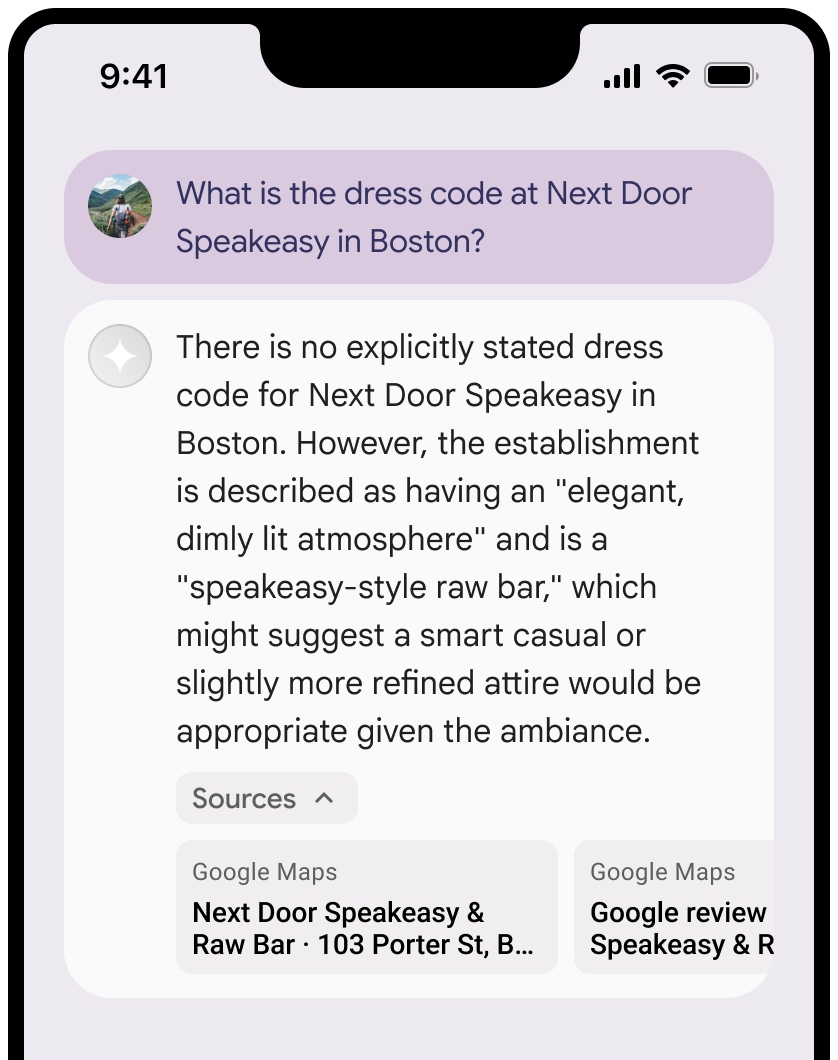
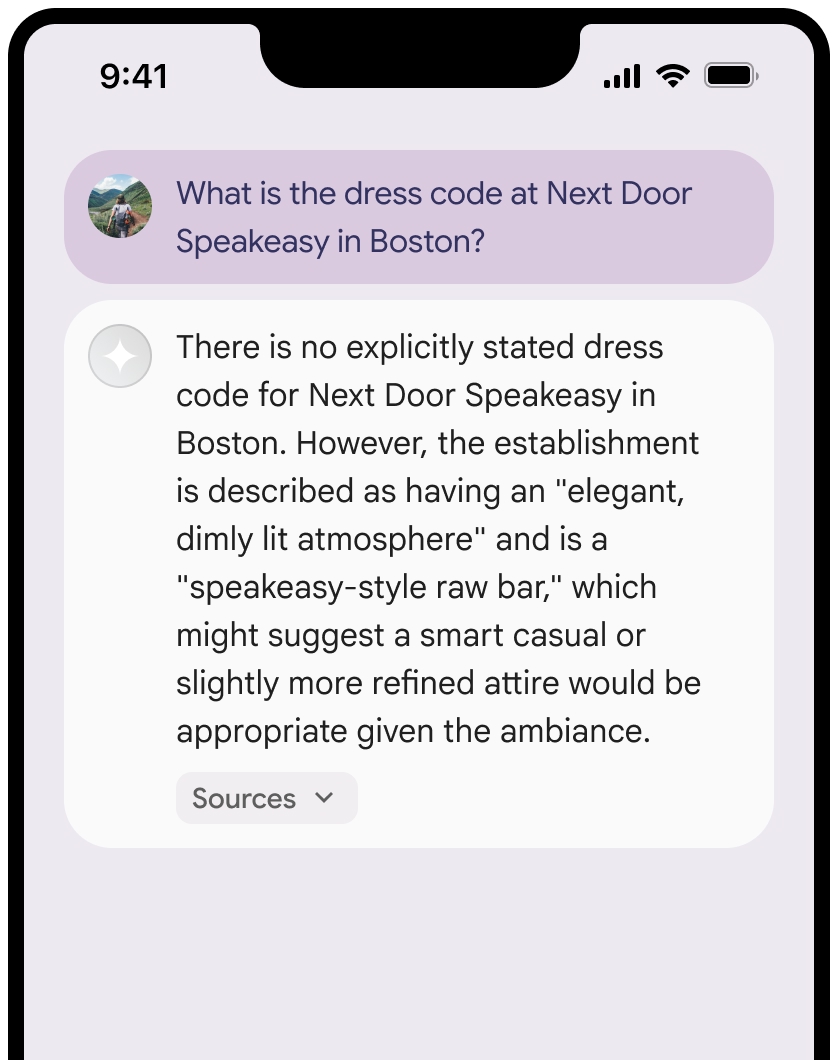
你可以收合來源檢視畫面。
你也可以視需要新增其他內容,例如:
Google Maps 網站圖示 插入Google Maps 文字出處之前。- 來源網址 (
og:image) 中的相片。
如要進一步瞭解部分
Google Maps 文字出處規範
在文字中將來源歸給
請勿以任何方式修改
Google Maps中的文字:- 請勿變更文字
Google Maps的大小寫。 - 請勿將文字
Google Maps換行。 - 請勿將文字
Google Maps本地化為其他語言。 - 如要禁止瀏覽器翻譯文字
Google Maps,請使用 HTML 屬性translate="no"。
- 請勿變更文字
按照下表說明,為文字
Google Maps設定樣式:屬性 樣式 字型系列 Roboto。你可以選擇是否載入字型。 備用字型系列 產品中已使用的任何 Sans Serif 內文字型,或「Sans-Serif」來叫用預設系統字型 字型樣式 正常 字型粗細 400 字型顏色 白色、黑色 (#1F1F1F) 或灰色 (#5E5E5E)。 與背景維持無障礙 (4.5:1) 對比度。 字型大小 字型大小下限:12sp
字型大小上限:16sp
如要瞭解 sp,請參閱 Material Design 網站上的「字型大小單位」。間距 正常
CSS 範例
下列 CSS 會在白色或淺色背景上,以適當的排版樣式和顏色顯示 Google Maps 文字。
@import url('https://fonts.googleapis.com/css2?family=Roboto&display=swap');

.GMP-attribution {
  font-family: Roboto, Sans-Serif;
  font-style: normal;
  font-weight: 400;
  font-size: 1rem;
  letter-spacing: normal;
  white-space: nowrap;
  color: #5e5e5e;
}
快取地點 ID
placeId
《利用 Google 地圖建立基準條款》中針對快取的限制不適用於這類資料。
禁止的活動和地區
為維護安全可靠的平台,
請勿將「
Google Maps 」與「Grounding」功能用於高風險活動,包括緊急應變服務。您不會在禁止發行國家/地區發行或行銷提供 Grounding 功能的應用程式,且不會在禁止發行國家/地區使用
Google Maps 。詳情請參閱「Google Maps Platform 禁止地域」一文。禁止發布內容的地區清單可能會不時更新。
Firebase 控制台中的基礎結果和 AI 監控
如果您已在 Firebase 控制台中啟用 AI 監控, 系統會將回覆內容儲存在 Cloud Logging。根據預設,這類資料的保留期限為 30 天。
您有責任確保這個保留期限或您設定的任何自訂期限,完全符合您的特定用途和所選Gemini API供應商的任何其他法規遵循規定: Gemini Developer API 或 Agent Platform Gemini API (formerly Vertex AI) (請參閱「服務專屬條款」中的「服務條款」一節)。您可能需要調整 Cloud Logging 的保留期限,才能符合這些規定。
價格和頻率限制
請務必查看所選Gemini API供應商的