

הארקה באמצעות
היתרונות של ביסוס על
- שיפור הדיוק העובדתי: כדי להפחית את ההזיות של המודל, התשובות מבוססות על מסד הנתונים של Google שכולל יותר מ-250 מיליון מקומות ועסקים בעולם האמיתי.
- גישה למידע בזמן אמת: אפשר לענות על שאלות באמצעות נתונים בזמן אמת, כמו שעות הפעילות הנוכחיות של העסק והסטטוס בזמן אמת של תחנות טעינה לרכבים חשמליים.
- לספק מקורות: כדי לבנות את אמון המשתמשים, כדאי להציג
Google Maps מקורות מידע על מקומות וקישורים ישירות לצד הטענות של המודל שמבוססות על מיקום.
מודלים נתמכים
gemini-3.1-pro-preview-
gemini-3.8-flash(וגרסאות ישנות יותר:gemini-3.7-flash,gemini-3.6-flashו-gemini-3.5-flash) -
gemini-3.5-flash-lite(וגםgemini-3.1-flash-lite)
מודלים של Gemini 2.5 לשימוש כללי תומכים ביכולת הזו, אבל כולם הוצאו משימוש.
שפות נתמכות
כאן מפורטות השפות הנתמכות במודלים של Gemini.
הארקה של המודל באמצעות Google Maps
|
לוחצים על הספק Gemini API כדי לראות בדף הזה תוכן וקוד שספציפיים לספק. |
כשיוצרים את מופע GenerativeModel, מספקים את GoogleMaps כtool
שהמודל יכול להשתמש בו כדי ליצור את התשובה.
Swift
import FirebaseAILogic
// Initialize the Gemini Developer API backend service.
let ai = FirebaseAI.firebaseAI(backend: .googleAI())
// Example: Coordinates for New York City
let latAndLong = CLLocationCoordinate2D(latitude: 40.7128, longitude: -74.0060)
// (Optional) Define a RetrievalConfig to configure the Grounding with Google Maps tool.
// You can optionally provide a location's coordinates and/or a language code
// for more relevant and personalized Google Maps results.
let retrievalConfig = RetrievalConfig(
location: latAndLong,
// Example: Language code for English (US).
languageCode: "en-US"
)
// Wrap the RetrievalConfig inside a ToolConfig.
let toolConfig = ToolConfig(retrievalConfig: retrievalConfig)
// Create a `GenerativeModel` instance with a model that supports your use case.
let model = ai.generativeModel(
modelName: "GEMINI_MODEL_NAME",
// Provide Google Maps as a tool that the model can use to generate its response.
tools: [Tool.googleMaps()],
// Add the configuration for the Grounding with Google Maps tool
// (if this optional config was defined above).
toolConfig: toolConfig
)
let response = try await model.generateContent("restaurants near me?")
print(response.text ?? "No text in response.")
// Make sure to comply with the "Grounding with Google Maps " usage requirements,
// which includes how you meet service usage requirements
Kotlin
// (Optional) Define a RetrievalConfig to configure the Grounding with Google Maps tool.
// You can optionally provide a location's coordinates and/or a language code
// for more relevant and personalized Google Maps results.
val retrievalConfig = RetrievalConfig(
// Example: Coordinates for New York City
latLng = LatLng(latitude = 40.7128, longitude = -74.0060),
// Example: Language code for English (US)
languageCode = "en-US"
)
// Wrap the RetrievalConfig inside a ToolConfig.
val toolConfig = ToolConfig(
retrievalConfig = retrievalConfig
)
// Initialize the Gemini Developer API backend service.
// Create a `GenerativeModel` instance with a model that supports your use case.
val model = Firebase.ai(backend = GenerativeBackend.googleAI()).generativeModel(
modelName = "GEMINI_MODEL_NAME",
// Add the configuration for the Grounding with Google Maps tool
// (if this optional config was defined above).
toolConfig = toolConfig,
// Provide Google Maps as a tool that the model can use to generate its response.
tools = listOf(Tool.googleMaps())
)
val response = model.generateContent("restaurants near me?")
print(response.text)
// Make sure to comply with the "Grounding with Google Maps " usage requirements,
// which includes how you meet service usage requirements
Java
// (Optional) Define a ToolConfig to configure the Grounding with Google Maps tool.
// You can optionally provide a location's coordinates and/or a language code
// for more relevant and personalized Google Maps results.
ToolConfig toolConfig = new ToolConfig(
null,
new RetrievalConfig(
// Example: Coordinates for New York City.
new LatLng(40.7128, -74.0060),
// Example: Language code for English (US).
"en-US"
)
);
// Initialize the Gemini Developer API backend service.
// Create a `GenerativeModel` instance with a model that supports your use case.
GenerativeModel ai = FirebaseAI.getInstance(GenerativeBackend.googleAI())
.generativeModel("GEMINI_MODEL_NAME",
null,
null,
// Provide Google Maps as a tool that the model can use to generate its response.
List.of(Tool.googleMaps()),
// Add the configuration for the Grounding with Google Maps tool
// (if this optional config was defined above).
toolConfig);
// Use the GenerativeModelFutures Java compatibility layer which offers
// support for ListenableFuture and Publisher APIs.
GenerativeModelFutures model = GenerativeModelFutures.from(ai);
ListenableFuture response = model.generateContent("restaurants near me?");
Futures.addCallback(response, new FutureCallback() {
@Override
public void onSuccess(GenerateContentResponse result) {
String resultText = result.getText();
System.out.println(resultText);
}
@Override
public void onFailure(Throwable t) {
t.printStackTrace();
}
}, executor);
// Make sure to comply with the "Grounding with Google Maps " usage requirements,
// which includes how you meet service usage requirements
Web
import { initializeApp } from "firebase/app";
import { getAI, getGenerativeModel, GoogleAIBackend } from "firebase/ai";
// TODO(developer): Replace the following with your app's Firebase configuration
// See: https://firebase.google.com/docs/web/learn-more#config-object
const firebaseConfig = {
// ...
};
// Initialize FirebaseApp
const firebaseApp = initializeApp(firebaseConfig);
// Initialize the Gemini Developer API backend service.
const ai = getAI(firebaseApp, { backend: new GoogleAIBackend() });
// (Optional) Define a toolConfig to configure the Grounding with Google Maps tool.
// You can optionally provide a location's coordinates and/or a language code
// for more relevant and personalized Google Maps results.
const toolConfig = {
retrievalConfig: {
// Example: Coordinates for New York City
latLng: {
latitude: 40.7128,
longitude: -74.0060
},
// Example: Language code for English (US)
languageCode: 'en-US'
}
};
// Create a `GenerativeModel` instance with a model that supports your use case
const model = getGenerativeModel(
ai,
{
model: "GEMINI_MODEL_NAME",
// Provide Google Maps as a tool that the model can use to generate its response.
tools: [ { googleMaps: {} } ],
// Add the configuration for the Grounding with Google Maps tool
// (if this optional config was defined above).
toolConfig
}
);
const result = await model.generateContent("restaurants near me?");
console.log(result.response.text());
// Make sure to comply with the "Grounding with Google Maps " usage requirements,
// which includes how you meet service usage requirements
Dart
import 'package:firebase_core/firebase_core.dart';
import 'package:firebase_ai/firebase_ai.dart';
import 'firebase_options.dart';
// Initialize FirebaseApp.
await Firebase.initializeApp(
options: DefaultFirebaseOptions.currentPlatform,
);
// (Optional) Define a ToolConfig to configure the Grounding with Google Maps tool.
// You can optionally provide a location's coordinates and/or a language code
// for more relevant and personalized Google Maps results.
final toolConfig = ToolConfig(
retrievalConfig: RetrievalConfig(
// Example: Coordinates for New York City.
latLng: LatLng(latitude: 40.712728, longitude: -74.006015),
// Example: Language code for English (US).
languageCode: 'en-US',
),
);
// Initialize the Gemini Developer API backend service.
// Create a `GenerativeModel` instance with a model that supports your use case.
final model = FirebaseAI.googleAI().generativeModel(
model: 'GEMINI_MODEL_NAME',
// Provide Google Maps as a tool that the model can use to generate its response.
tools: [
Tool.googleMaps(),
],
// Add the configuration for the Grounding with Google Maps tool
// (if this optional config was defined above).
toolConfig: toolConfig,
);
final response = await model.generateContent([Content.text("restaurants near me?")]);
print(response.text);
// Make sure to comply with the "Grounding with Google Maps " usage requirements,
// which includes how you meet service usage requirements
Unity
using Firebase;
using Firebase.AI;
// Initialize the Gemini Developer API backend service.
var ai = FirebaseAI.GetInstance(FirebaseAI.Backend.GoogleAI());
// Example: Coordinates for New York City
var latLng = new LatLng(40.7128, -74.0060);
// (Optional) Define a RetrievalConfig to configure the Grounding with Google Maps tool.
// You can optionally provide a location's coordinates and/or a language code
// for more relevant and personalized Google Maps results.
var retrievalConfig = new RetrievalConfig(latLng, languageCode: "en");
// Wrap the RetrievalConfig inside a ToolConfig.
var toolConfig = new ToolConfig(retrievalConfig: retrievalConfig);
// Create a `GenerativeModel` instance with a model that supports your use case.
var model = ai.GetGenerativeModel(
modelName: "GEMINI_MODEL_NAME",
// Provide Google Maps as a tool that the model can use to generate its response.
tools: new[] { new Tool(new GoogleMaps()) },
// Add the configuration for the Grounding with Google Maps tool
// (if this optional config was defined above).
toolConfig: toolConfig
);
var response = await model.GenerateContentAsync("restaurants near me?");
UnityEngine.Debug.Log(response.Text ?? "No text in response.");
// Make sure to comply with the "Grounding with Google Maps " usage requirements,
// which includes how you meet service usage requirements
כאן מוסבר איך לבחור מודל
שיטות מומלצות וטיפים לשיפור התוצאות
בקטע הזה מפורטות כמה שיטות מומלצות כלליות לשימוש ב-Grounding עם
המלצות כלליות
מספקים את הכלי רק כשצריך: כדי לבצע אופטימיזציה של הביצועים והעלויות, צריך לתת למודל גישה לכלי Grounding with
Google Maps רק כשמקרה השימוש כולל הקשר גיאוגרפי ברור.ציון מיקום המשתמש: כדי לקבל תשובות רלוונטיות ומותאמות אישית (וכשהמיקום של המשתמש ידוע), צריך לכלול את המיקום של המשתמש (באמצעות קו רוחב וקו אורך דרך
latLng) בהגדרת הכלי Grounding עםGoogle Maps .הודעה למשתמשי הקצה: צריך להודיע למשתמשי הקצה בצורה ברורה שנתוני
Google Maps משמשים למענה על השאילתות שלהם. אספקת המקורות מ-Google Maps למשתמשי קצה היא דרישה לשימוש בשירות בכלי Grounding withGoogle Maps .
שימוש במאפייני מקום בהנחיות
בקטע הזה מפורטים מאפייני מקום שמשמשים לתיאור מיקומים ומשמשים את Grounding עם
מאפיינים לדוגמה של מקומות
הרשימה הזו כוללת דוגמאות של מאפיינים של מקומות, שניתן להשתמש בהם כדי ליצור תשובות באמצעות המודל. הדוגמאות מסודרות לפי סדר אלפביתי.
- כתובת
- איסוף מדלת העסק
- כרטיס חיוב מיידי
- מרחק
- מגרש חניה בחינם
- מוזיקה חיה
- תפריט לילדים
- שעות פתיחה
- אפשרויות תשלום (למשל מזומן או כרטיס אשראי)
- תשובות לשאלות על מקומות
- ידידותי לחיות מחמד
- מגישים בירה
- מגישים במקום אוכל צמחוני
- יש נגישות לכיסא גלגלים
- Wifi
תשובות לשאלות על מקומות הן תשובות שנוצרות על ידי Grounding עם
פרומפטים לדוגמה שמשתמשים במאפייני מקום
בדוגמאות הבאות נעשה שימוש במאפייני מקום בהנחיות לגבי סוגים שונים של מקומות. ההארקה ב-
תכנון ארוחת ערב משפחתית: בודקים אם מסעדה מתאימה למשפחה ואם היא מציעה שירות נוח.
- הנחיה לדוגמה: האם מסעדת 'המקום האיטלקי' מתאימה לילדים, והאם אפשר לקחת ממנה אוכל? מה הדירוג שלהם?
בדיקת הנגישות עבור חבר או חברה: אפשר לבדוק אם המקום עונה על צורכי נגישות ספציפיים.
- פרומפט לדוגמה: אני צריך מסעדה עם כניסה נגישה לכיסאות גלגלים.
למצוא מקום לנשנוש בשעת לילה מאוחרת: למצוא מקום פתוח שמגיש ארוחה מסוימת בשעה מסוימת.
- הנחיה לדוגמה: האם מסעדת "Burger Joint" פתוחה עכשיו? האם מגישים במקום הזה ארוחות ערב? מהן שעות הפתיחה שלהם ביום שישי?
פגישה עם לקוח בבית קפה: הערכת ההתאמה של בית קפה לפגישה עסקית על סמך השירותים, המוצרים ואפשרויות התשלום.
- פרומפט לדוגמה: יש Wi-Fi ב-Cafe Central? האם מגישים במקום הזה קפה? מה רמת המחירים שלהם, והאם הם מקבלים כרטיסי אשראי?
שימו לב: המידע ב
איך ההארקה עם Google Maps פועלת
כשמספקים למודל את כלי GoogleMaps, המודל מטפל בכל תהליך העבודה של חיפוש, עיבוד וציטוט מידע באופן אוטומטי.
תהליך העבודה של המודל:
קבלת הנחיה: האפליקציה שולחת הנחיה למודל Gemini עם הכלי
GoogleMapsמופעל.ניתוח ההנחיה: המודל מנתח את ההנחיה וקובע אם
Google Maps יכול לשפר את התשובה, למשל אם ההנחיה מכילה הקשר גיאוגרפי (כמו "בתי קפה בקרבת מקום", "מוזיאונים בסן פרנסיסקו").הפעלת הכלי: המודל, שמזהה את הכוונה הגיאוגרפית, מפעיל את הכלי
Google Maps Grounding.שליחת שאילתות אל
Google Maps : השירות Grounding withGoogle Maps שולח שאילתות אלGoogle Maps כדי לקבל מידע רלוונטי (לדוגמה, מקומות, ביקורות, תמונות, כתובות, שעות פתיחה).אפשר גם לכלול את קווי הרוחב והאורך בהגדרות של הכלי (או אפילו ישירות בהנחיה) כדי לקבל תוצאות רלוונטיות ומותאמות אישית יותר.
Google Maps הכלי הוא כלי לחיפוש טקסטואלי, והוא פועל באופן דומה לחיפוש ב-Google Maps . כלומר, בשאילתות מקומיות (למשל, 'בסביבתי') נעשה שימוש בקואורדינטות, אבל בשאילתות ספציפיות או לא מקומיות, סביר להניח שהמיקום המפורש לא ישפיע על התוצאות.עיבוד התוצאות של
Google Maps : המודל מעבד את התוצאות שלGoogle Maps ומנסח תשובה להנחיה המקורית.מחזיר
Google Maps תוצאה מבוססת: המודל מחזיר תשובה סופית וידידותית למשתמש שמבוססת עלGoogle Maps התוצאות. התשובה הזו כוללת:- תשובת הטקסט של המודל.
- אובייקט
groundingMetadataעם התוצאות והמקורותGoogle Maps .
חשוב לדעת שאם מספקים את groundingMetadata ולכן היא לא
הסבר על התוצאה המבוססת על מקורות מידע
אם המודל מבסס את התשובה שלו על groundingMetadata שמכיל נתונים מובְנים שחיוניים לאימות טענות ולבניית חוויית מקור עשירה באפליקציה.
אובייקט groundingMetadata ב
-
groundingChunks: מערך של אובייקטים שמכילים את מקורותmaps(uri,placeIdו-title). -
groundingSupports: מערך של מקטעים לחיבור התגובה של המודלtextלמקורות ב-groundingChunks. כל מקטע מקשר טקסטsegment(מוגדר על ידיstartIndexו-endIndex) לgroundingChunkIndicesאחד או יותר. השדה הזה עוזר לכם ליצור קישורים למקורות בתוך הטקסט. בהמשך הדף מוסבר איך לעמוד בדרישות השימוש בשירות.
זוהי דוגמה לתשובה שכוללת אובייקט groundingMetadata:
{
  "candidates": [
    {
      "content": {
        "parts": [
          {
            "text": "CanteenM is an American restaurant with..."
          }
        ],
        "role": "model"
      },
      "groundingMetadata": {
        "groundingChunks": [
          {
            "maps": {
              "uri": "https://maps.google.com/?cid=13100894621228039586",
              "title": "Heaven on 7th Marketplace",
              "placeId": "places/ChIJ0-zA1vBZwokRon0fGj-6z7U"
            }
          }
        ],
        "groundingSupports": [
          {
            "segment": {
              "startIndex": 0,
              "endIndex": 79,
              "text": "CanteenM is an American restaurant with a 4.6-star rating and is open 24 hours."
            },
            "groundingChunkIndices": [0]
          }
        ]
      }
    }
  ]
}
דרישות לשימוש בשירות
בקטע הזה מפורטים דרישות השימוש בשירותי Grounding עם
הודעה למשתמשים על מקורות Google Maps
לכל groundingChunks שתומכים בכל תשובה. מוחזרים גם המטא-נתונים הבאים:
- URI במקור
- כותרת
- מזהה
כשמציגים תוצאות מ-Grounding עם
מקורות
Google Maps חייבים להופיע מיד אחרי התוכן שנוצר שהמקורות תומכים בו. התוכן שנוצר נקרא גםGoogle Maps תוצאה מבוססת.המשתמש צריך להיות מסוגל לראות את המקורות של
Google Maps במהלך אינטראקציה אחת.
כך מקבלים ערכים להצגת מקורות מתוך
Swift
// ...

// Get the model's response
let text = response.text

// Get the grounding metadata
if let candidate = response.candidates.first,
   let groundingMetadata = candidate.groundingMetadata {

  // Get sources
  let groundingChunks = groundingMetadata.groundingChunks
  for chunk in groundingChunks {
    if let maps = chunk.maps {
      let title = maps.title  // for example, "Heaven on 7th Marketplace"
      let url = maps.url  // for example, "https://maps.google.com/?cid=13100894621228039586"
      let placeId = maps.placeId  // for example, "places/ChIJ0-zA1vBZwokRon0fGj-6z7U"
      // TODO(developer): show source in the UI
    }
  }
}
Kotlin
// ...

// Get the model's response
val text = response.text

// Get the grounding metadata
val groundingMetadata = response.candidates.firstOrNull()?.groundingMetadata

// Get sources
val groundingChunks = groundingMetadata?.groundingChunks
groundingChunks?.let { chunks ->
  for (chunk in chunks) {
    val title = chunk.maps?.title  // for example, "Heaven on 7th Marketplace"
    val uri = chunk.maps?.uri  // for example, "https://maps.google.com/?cid=13100894621228039586"
    val placeId = chunk.maps?.placeId  // for example, "places/ChIJ0-zA1vBZwokRon0fGj-6z7U"
    // TODO(developer): show source in the UI
  }
}
Java
// ...

Futures.addCallback(response, new FutureCallback() {
  @Override
  public void onSuccess(GenerateContentResponse result) {
    // Get the model's response
    String text = result.getText();

    // Get the grounding metadata
    GroundingMetadata groundingMetadata =
        result.getCandidates()[0].getGroundingMetadata();

    if (groundingMetadata != null) {
      // Get sources
      List chunks = groundingMetadata.getGroundingChunks();
      if (chunks != null) {
        for(GroundingChunk chunk : chunks) {
          GoogleMapsGroundingChunk maps = chunk.getMaps();
          if (maps != null) {
            String title = maps.getTitle();  // for example, "Heaven on 7th Marketplace"
            String uri = maps.getUri();  // for example, "https://maps.google.com/?cid=13100894621228039586"
            String placeId = maps.getPlaceId();  // for example, "places/ChIJ0-zA1vBZwokRon0fGj-6z7U"
            // TODO(developer): show sources in the UI
          }
        }
      }
    }
  }

  @Override
  public void onFailure(Throwable t) {
    t.printStackTrace();
  }
}, executor);
Web
// ...

// Get the model's text response
const text = result.response.text();

// Get the grounding metadata
const groundingMetadata = result.response.candidates?.[0]?.groundingMetadata;

// Get sources
const groundingChunks = groundingMetadata?.groundingChunks;
if (groundingChunks) {
  for (const chunk of groundingChunks) {
    const title = chunk.maps?.title;  // for example, "Heaven on 7th Marketplace"
    const uri = chunk.maps?.uri;  // for example, "https://maps.google.com/?cid=13100894621228039586"
    const placeId = chunk.maps?.placeId;  // for example, "places/ChIJ0-zA1vBZwokRon0fGj-6z7U"
    // TODO(developer): show sources in the UI
  }
}
Dart
// ...

// Get the model's response
final text = response.text;

// Get the grounding metadata
final groundingMetadata = response.candidates.first.groundingMetadata;

// Get sources
final groundingChunks = groundingMetadata?.groundingChunks;
if (groundingChunks != null) {
  for (var chunk in groundingChunks) {
    final title = chunk.maps?.title;  // for example, "Heaven on 7th Marketplace"
    final uri = chunk.maps?.uri;  // for example, "https://maps.google.com/?cid=13100894621228039586"
    final placeId = chunk.maps?.placeId;  // for example, "places/ChIJ0-zA1vBZwokRon0fGj-6z7U"
    // TODO(developer): show sources in the UI
  }
}
Unity
// ...

// Get the model's response.
var text = response.Text;

// Get the grounding metadata.
var groundingMetadata = response.Candidates.First().GroundingMetadata;

// Get sources.
if (groundingMetadata != null) {
  foreach(GroundingChunk chunk in groundingMetadata?.GroundingChunks) {
    if (chunk.Maps != null) {
      var title = chunk.Maps?.Title;  // for example, "Heaven on 7th Marketplace"
      var uri = chunk.Maps?.Uri;  // for example, "https://maps.google.com/?cid=13100894621228039586"
      var placeId = chunk.Maps?.PlaceId;  // for example, "places/ChIJ0-zA1vBZwokRon0fGj-6z7U"
      // TODO(developer): show sources in the UI
    }
  }
}
הצגת Google Maps מקורות עם Google Maps קישורים
לכל מקור ב-groundingChunks, צריך ליצור תצוגה מקדימה של קישור בהתאם לדרישות הבאות:
- צריך לשייך כל מקור לערך
Google Maps בהתאםGoogle Maps להנחיות לשיוך מקורות לטקסט. - הצגת שם המקור שצוין בתשובה.
- אפשר לקשר למקור באמצעות
uriמהתשובה.
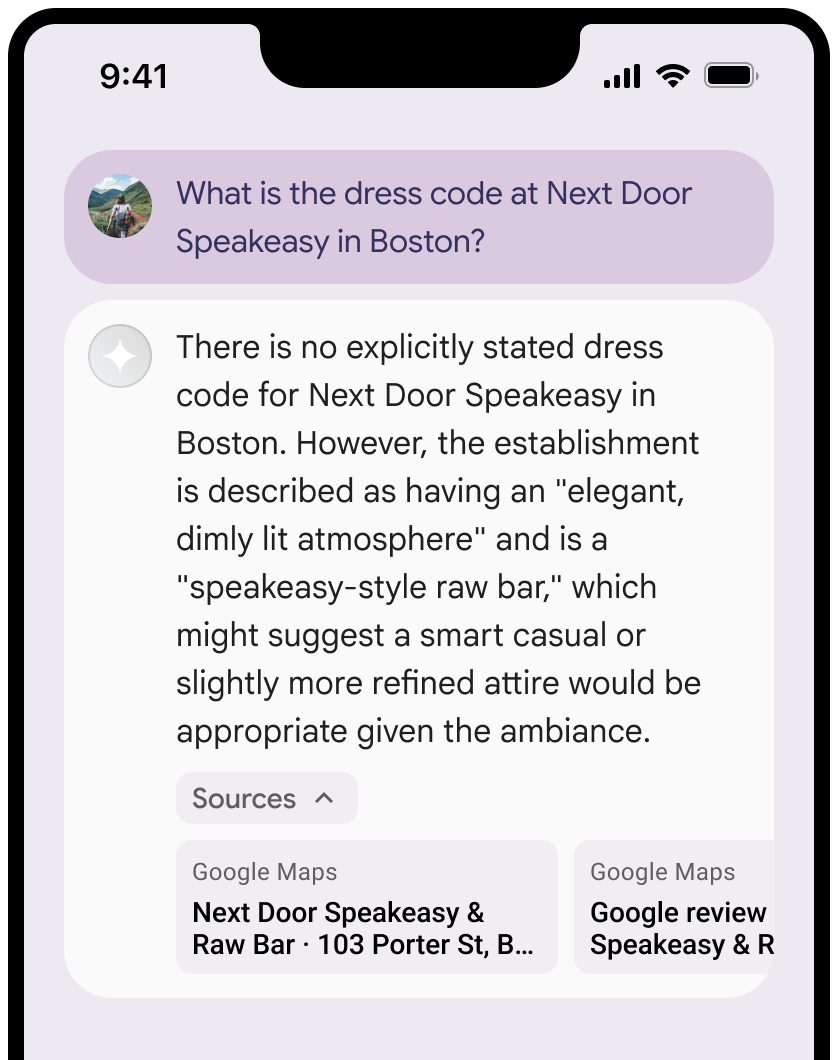
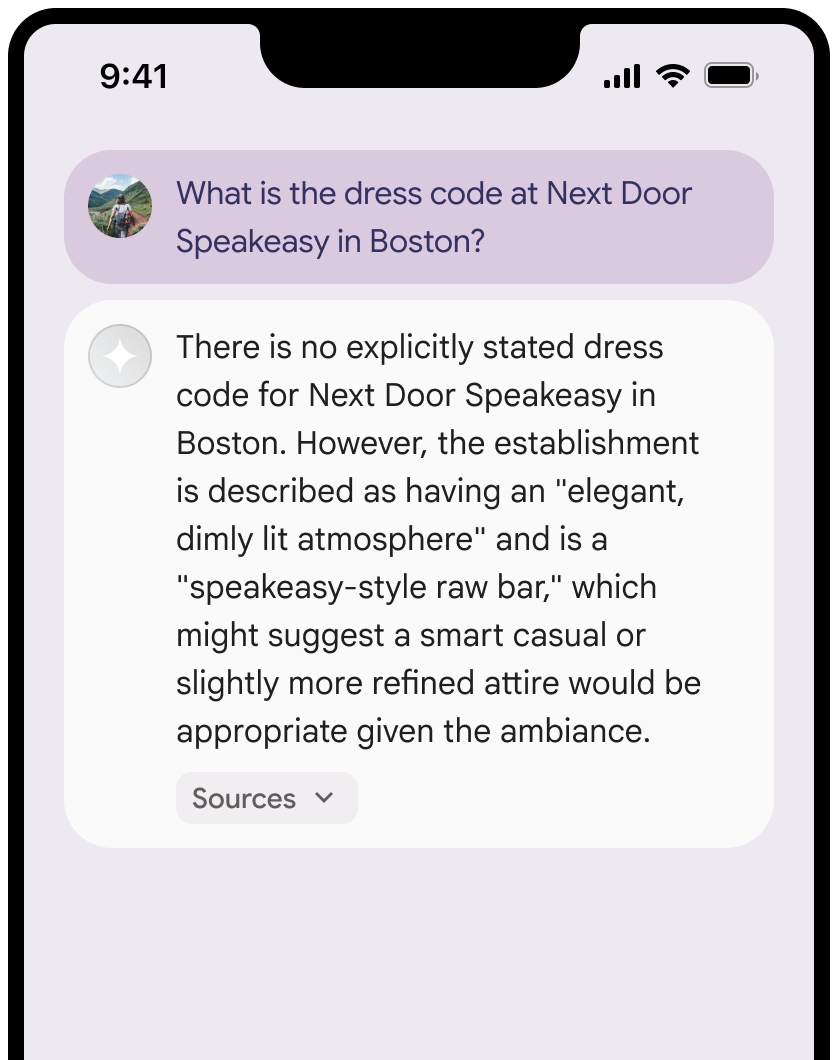
אפשר לכווץ את התצוגה של המקורות.
אפשר להוסיף לתצוגה המקדימה של הקישור תוכן נוסף, כמו:
- סמל אתר
Google Maps מוכנס לפני הטקסט של ייחוסGoogle Maps . - תמונה מכתובת ה-URL של המקור (
og:image).
מידע נוסף על חלק מספקי הנתונים של
Google Maps הנחיות לניסוח טקסטים לציון קרדיט
כשמציינים את המקורות של
אל תשנו את הטקסט
Google Mapsבשום צורה:- אל תשנו את האותיות הרישיות בטקסט
Google Maps. - לא להעביר את הטקסט
Google Mapsלכמה שורות. - אל תבצעו לוקליזציה של הטקסט
Google Mapsלשפה אחרת. - כדי למנוע מדפדפנים לתרגם את הטקסט
Google Maps, צריך להשתמש במאפיין ה-HTMLtranslate="no".
- אל תשנו את האותיות הרישיות בטקסט
מעצבים את הטקסט
Google Mapsכמו שמתואר בטבלה הבאה:נכס סגנון משפחת גופנים Roboto. טעינת הגופן היא אופציונלית. משפחת גופנים חלופית כל גופן sans serif שמשמש כבר במוצר או Sans-Serif כדי להפעיל את גופן המערכת שמוגדר כברירת מחדל סגנון הגופן רגיל עובי הגופן 400 צבע גופן לבן, שחור (#1F1F1F) או אפור (#5E5E5E). לשמור על ניגודיות נגישה (4.5:1) ביחס לרקע. גודל הגופן גודל הגופן המינימלי: 12sp
גודל הגופן המקסימלי: 16sp
מידע נוסף על sp זמין במאמר על יחידות של גודל גופן באתר Material Design.ריווח רגיל
דוגמה ל-CSS
קוד ה-CSS הבא מציג את הטקסט Google Maps עם הסגנון הטיפוגרפי והצבע המתאימים על רקע לבן או בהיר.
@import url('https://fonts.googleapis.com/css2?family=Roboto&display=swap');

.GMP-attribution {
  font-family: Roboto, Sans-Serif;
  font-style: normal;
  font-weight: 400;
  font-size: 1rem;
  letter-spacing: normal;
  white-space: nowrap;
  color: #5e5e5e;
}
שמירת מזהה מקום במטמון
placeId
ההגבלות נגד שמירה במטמון שמפורטות בתנאים של עיגון בעזרת מפות Google לא חלות על הנתונים האלה.
פעילות אסורה ואזורים אסורים
כדי לשמור על בטיחות הפלטפורמה ועל מהימנותה, יש הגבלות נוספות על תוכן ופעילויות מסוימים ב-
לא תשתמשו ב-Grounding עם
Google Maps לפעילויות בסיכון גבוה, כולל שירותי תגובה למקרי חירום.לא תפיצו או תשווקו את האפליקציה שלכם שמציעה Grounding עם
Google Maps בטריטוריה אסורה. מידע נוסף זמין במאמר בנושא אזורים אסורים ב-Google Maps Platform. רשימת הטריטוריות האסורות עשויה להתעדכן מעת לעת.
תוצאות מעוגנות בנתונים ומעקב אחרי שימוש בתכונות AI במסוף Firebase
אם הפעלתם מעקב אחרי שימוש בתכונות AI במסוף Firebase, התשובות נשמרות ב-Cloud Logging. כברירת מחדל, הנתונים האלה נשמרים למשך 30 יום.
באחריותכם לוודא שתקופת השמירה הזו, או כל תקופה מותאמת אישית שתגדירו, תואמת באופן מלא לתרחיש השימוש הספציפי שלכם ולכל דרישות התאימות הנוספות של ספק Gemini APIGemini Developer API או Agent Platform Gemini API (formerly Vertex AI) (ראו את הקטע תנאי השירות בתנאים הספציפיים לשירות). יכול להיות שתצטרכו לשנות את תקופת השמירה ב-Cloud Logging כדי לעמוד בדרישות האלה.
תמחור והגבלות על קצב יצירת הבקשות
ההארקה עם תמחור של
חשוב לעיין בפרטים על התמחור, הזמינות של המודלים והמגבלות של ההארקה באמצעות