

如果啟用「以
使用
- 提高事實查核準確度:根據真實資訊生成回覆,減少模型幻覺。
- 取得即時資訊:回答近期事件和主題相關問題。
- 提供來源:顯示模型聲明的來源,建立使用者信任感,或允許使用者瀏覽相關網站。
- 完成更複雜的工作:擷取構件和相關圖片、影片或其他媒體,協助完成推論工作。
- 改善特定區域或語言的回覆:尋找特定區域的資訊,或協助準確翻譯內容。
支援的模型
gemini-3.1-pro-previewgemini-3.8-flash(以及舊版gemini-3.7-flash、gemini-3.6-flash和gemini-3.5-flash)gemini-3.5-flash-lite(和舊版gemini-3.1-flash-lite)gemini-3-pro-image(又稱「Nano Banana Pro」)gemini-3.1-flash-image(又稱「Nano Banana 2」)
一般用途的 Gemini 2.5模型支援這項功能,但都已淘汰。
Gemini Live API 模型也支援這項功能,但本指南中的所有程式碼範例都適用於一般用途的 Gemini 模型。
支援的語言
如要瞭解 Gemini 模型支援的語言,請參閱這篇文章。
使用 Google Search 讓模型根據事實
|
按一下 Gemini API 供應商,即可在這個頁面查看供應商專屬內容和程式碼。 |
建立 GenerativeModel 執行個體時,請提供 GoogleSearch 做為模型可用於生成回覆的 tool。
Swift
import FirebaseAILogic

// Initialize the Gemini Developer API backend service.
let ai = FirebaseAI.firebaseAI(backend: .googleAI())

// Create a `GenerativeModel` instance with a model that supports your use case.
let model = ai.generativeModel(
    modelName: "GEMINI_MODEL_NAME",
    // Provide Google Search as a tool that the model can use to generate its response.
    tools: [Tool.googleSearch()]
)

let response = try await model.generateContent("Who won the euro 2024?")
print(response.text ?? "No text in response.")

// Make sure to comply with the "Grounding with Google Search" usage requirements,
// which includes how you use and display the grounded result
Kotlin
// Initialize the Gemini Developer API backend service.
// Create a `GenerativeModel` instance with a model that supports your use case.
val model = Firebase.ai(backend = GenerativeBackend.googleAI()).generativeModel(
    modelName = "GEMINI_MODEL_NAME",
    // Provide Google Search as a tool that the model can use to generate its response
    tools = listOf(Tool.googleSearch())
)

val response = model.generateContent("Who won the euro 2024?")
print(response.text)

// Make sure to comply with the "Grounding with Google Search" usage requirements,
// which includes how you use and display the grounded result
Java
// Initialize the Gemini Developer API backend service.
// Create a `GenerativeModel` instance with a model that supports your use case.
GenerativeModel ai = FirebaseAI.getInstance(GenerativeBackend.googleAI())
                .generativeModel("GEMINI_MODEL_NAME",
                        null,
                        null,
                        // Provide Google Search as a tool that the model can use to generate its response
                        List.of(Tool.GoogleSearch()));

// Use the GenerativeModelFutures Java compatibility layer which offers
// support for ListenableFuture and Publisher APIs
GenerativeModelFutures model = GenerativeModelFutures.from(ai);

ListenableFuture response = model.generateContent("Who won the euro 2024?");
  Futures.addCallback(response, new FutureCallback() {
      @Override
      public void onSuccess(GenerateContentResponse result) {
          String resultText = result.getText();
          System.out.println(resultText);
      }

      @Override
      public void onFailure(Throwable t) {
          t.printStackTrace();
      }
  }, executor);

// Make sure to comply with the "Grounding with Google Search" usage requirements,
// which includes how you use and display the grounded result
Web
import { initializeApp } from "firebase/app";
import { getAI, getGenerativeModel, GoogleAIBackend } from "firebase/ai";

// TODO(developer): Replace the following with your app's Firebase configuration
// See: https://firebase.google.com/docs/web/learn-more#config-object
const firebaseConfig = {
  // ...
};

// Initialize FirebaseApp
const firebaseApp = initializeApp(firebaseConfig);

// Initialize the Gemini Developer API backend service.
const ai = getAI(firebaseApp, { backend: new GoogleAIBackend() });

// Create a `GenerativeModel` instance with a model that supports your use case.
const model = getGenerativeModel(
  ai,
  {
    model: "GEMINI_MODEL_NAME",
    // Provide Google Search as a tool that the model can use to generate its response
    tools: [{ googleSearch: {} }]
  }
);

const result = await model.generateContent("Who won the euro 2024?");

console.log(result.response.text());

// Make sure to comply with the "Grounding with Google Search" usage requirements,
// which includes how you use and display the grounded result
Dart
import 'package:firebase_core/firebase_core.dart';
import 'package:firebase_ai/firebase_ai.dart';
import 'firebase_options.dart';

// Initialize FirebaseApp.
await Firebase.initializeApp(
  options: DefaultFirebaseOptions.currentPlatform,
);

// Initialize the Gemini Developer API backend service.
// Create a `GenerativeModel` instance with a model that supports your use case.
final model = FirebaseAI.googleAI().generativeModel(
  model: 'GEMINI_MODEL_NAME',
  // Provide Google Search as a tool that the model can use to generate its response.
  tools: [
    Tool.googleSearch(),
  ],
);

final response = await model.generateContent([Content.text("Who won the euro 2024?")]);
print(response.text);

// Make sure to comply with the "Grounding with Google Search" usage requirements,
// which includes how you use and display the grounded result
Unity
using Firebase;
using Firebase.AI;

// Initialize the Gemini Developer API backend service.
var ai = FirebaseAI.GetInstance(FirebaseAI.Backend.GoogleAI());

// Create a `GenerativeModel` instance with a model that supports your use case.
var model = ai.GetGenerativeModel(
  modelName: "GEMINI_MODEL_NAME",
  // Provide Google Search as a tool that the model can use to generate its response.
  tools: new[] { new Tool(new GoogleSearch()) }
);

var response = await model.GenerateContentAsync("Who won the euro 2024?");
UnityEngine.Debug.Log(response.Text ?? "No text in response.");

// Make sure to comply with the "Grounding with Google Search" usage requirements,
// which includes how you use and display the grounded result
瞭解如何選擇適合用途和應用程式的模型, 。
Google Search 的運作方式
使用 GoogleSearch 工具時,模型會自動處理搜尋、處理及引用資訊的整個工作流程。
以下是模型的運作流程:
- 接收提示:應用程式會將提示傳送至 Gemini 模型,並啟用
GoogleSearch工具。 - 分析提示:模型會分析提示,判斷是否能透過
Google Search 改善回覆。 - 將查詢傳送至
Google Search :如有需要,模型會自動生成一或多個搜尋查詢並執行。 - 處理搜尋結果:模型會處理
Google Search 結果,並根據原始提示生成回覆。 - 傳回「與來源連結的結果」:模型會根據
Google Search 結果,傳回最終的易讀回覆。這項回應包含模型的文字答案和groundingMetadata,其中列出搜尋查詢、網頁結果和來源。
請注意,提供 groundingMetadata 物件,因此不是「根據事實的結果」。
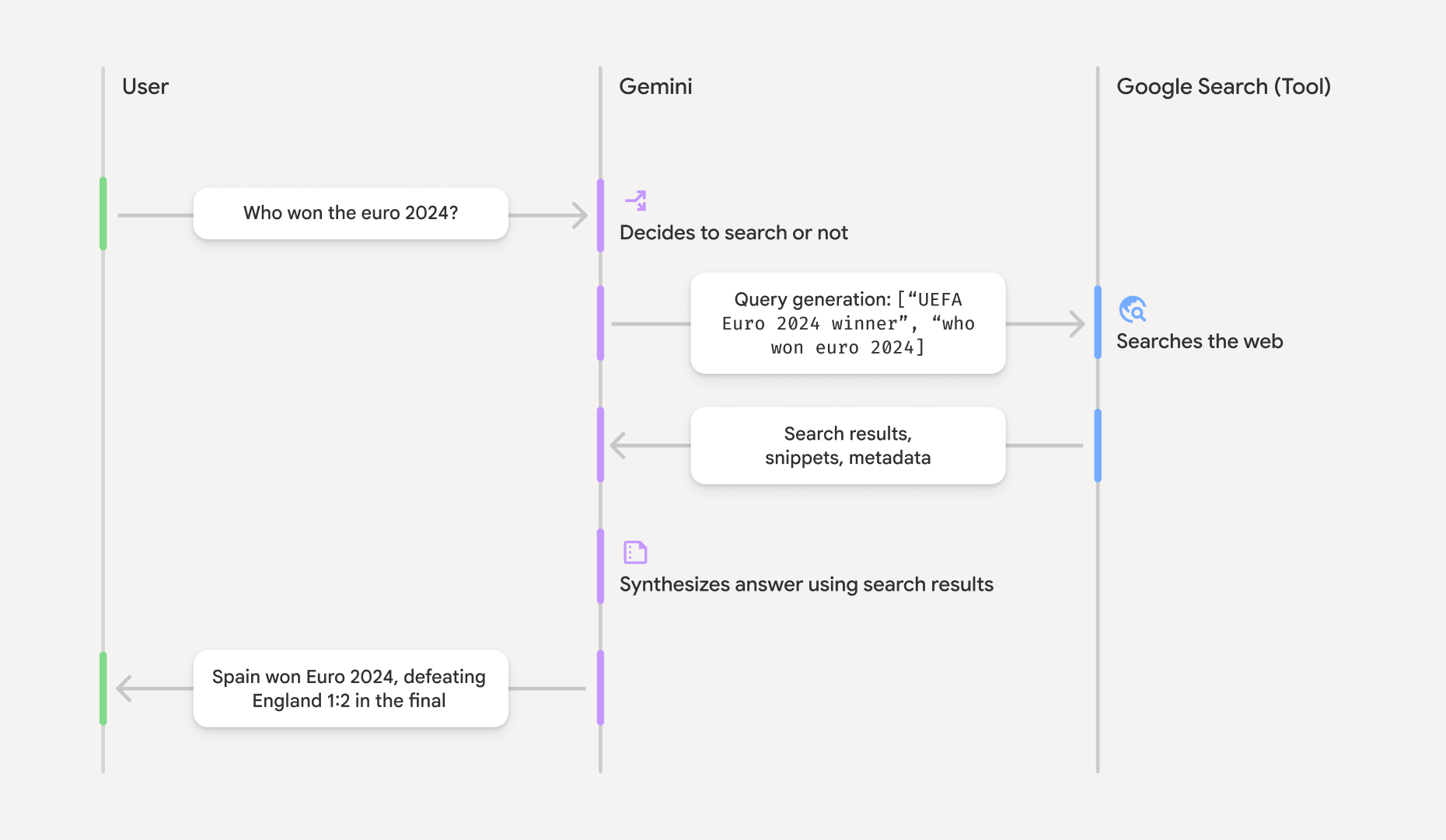
瞭解基礎結果
如果模型根據groundingMetadata 物件,其中含有驗證聲明和在應用程式中建構豐富來源體驗所需的結構化資料。
「基礎結果」中的 groundingMetadata 物件包含下列資訊:
webSearchQueries:傳送至Google Search 的搜尋查詢陣列。這項資訊有助於偵錯,並瞭解模型的推理過程。searchEntryPoint:包含 HTML 和 CSS,可轉譯必要的「Google Search 建議」。您必須遵守所選 API 供應商的「以Google Search 為基礎」使用規定:Gemini Developer API 或 Agent Platform Gemini API (formerly Vertex AI) (請參閱《服務專屬條款》中的「服務條款」一節)。如要瞭解如何使用及顯示有根據的結果,請參閱本頁後續內容。groundingChunks:包含網頁來源 (uri和title) 的物件陣列。groundingSupports:連結模型回應text與groundingChunks中來源的區塊陣列。每個區塊都會將文字segment(由startIndex和endIndex定義) 連結至一或多個groundingChunkIndices。這個欄位可協助您建立內嵌來源連結。 如要瞭解如何使用及顯示有根據的結果,請參閱本頁後續內容。
以下是包含 groundingMetadata 物件的回應範例:
{
  "candidates": [
    {
      "content": {
        "parts": [
          {
            "text": "Spain won Euro 2024, defeating England 2-1 in the final. This victory marks Spain's record fourth European Championship title."
          }
        ],
        "role": "model"
      },
      "groundingMetadata": {
        "webSearchQueries": [
          "UEFA Euro 2024 winner",
          "who won euro 2024"
        ],
        "searchEntryPoint": {
          "renderedContent": "<!-- HTML and CSS for the search widget -->"
        },
        "groundingChunks": [
          {"web": {"uri": "https://vertexaisearch.cloud.google.com.....", "title": "aljazeera.com"}},
          {"web": {"uri": "https://vertexaisearch.cloud.google.com.....", "title": "uefa.com"}}
        ],
        "groundingSupports": [
          {
            "segment": {"startIndex": 0, "endIndex": 85, "text": "Spain won Euro 2024, defeatin..."},
            "groundingChunkIndices": [0]
          },
          {
            "segment": {"startIndex": 86, "endIndex": 210, "text": "This victory marks Spain's..."},
            "groundingChunkIndices": [0, 1]
          }
        ]
      }
    }
  ]
}
使用及顯示基礎結果
如果模型使用 groundingMetadata 物件。
必須顯示建議
除了遵守使用
(必填) 顯示 Google Search 建議
如果回覆包含「
groundingMetadata 物件包含「searchEntryPoint 欄位,其中有 renderedContent 欄位提供符合規定的 HTML 和 CSS 樣式,您必須實作這些樣式,才能在應用程式中顯示搜尋建議。
請參閱 Google Cloud 說明文件,詳細瞭解
請參閱本節稍後的程式碼範例。
(必填) 多媒體廣告活動資料來源
groundingMetadata 物件包含結構化來源資料,特別是 groundingSupports 和 groundingChunks 欄位。使用這項資訊,直接在 UI 中將模型陳述內容連結至來源 (內嵌和彙整)。
請參閱本節稍後的程式碼範例。
程式碼範例
這些程式碼範例提供一般化模式,用於使用及顯示基礎結果。不過,您有責任確保具體實作方式符合法規遵循規定。
Swift
// ...

// Get the model's response
let text = response.text

// Get the grounding metadata
if let candidate = response.candidates.first,
   let groundingMetadata = candidate.groundingMetadata {
  // REQUIRED - display Google Search suggestions
  // (renderedContent contains HTML and CSS for the search widget)
  if let renderedContent = groundingMetadata.searchEntryPoint?.renderedContent {
    // TODO(developer): Display Google Search suggestions using a WebView
  }

  // REQUIRED - display sources
  let groundingChunks = groundingMetadata.groundingChunks
  for chunk in groundingMetadata.groundingChunks {
    if let web = chunk.web {
      let title = web.title  // for example, "uefa.com"
      let uri = web.uri  // for example, "https://vertexaisearch.cloud.google.com..."
      // TODO(developer): show source in the UI
    }
  }
}
Kotlin
// ...

// Get the model's response
val text = response.text

// Get the grounding metadata
val groundingMetadata = response.candidates.firstOrNull()?.groundingMetadata

// REQUIRED - display Google Search suggestions
// (renderedContent contains HTML and CSS for the search widget)
val renderedContent = groundingMetadata?.searchEntryPoint?.renderedContent
if (renderedContent != null) {
    // TODO(developer): Display Google Search suggestions using a WebView
}

// REQUIRED - display sources
val groundingChunks = groundingMetadata?.groundingChunks
groundingChunks?.let { chunks ->
  for (chunk in chunks) {
  	val title = chunk.web?.title  // for example, "uefa.com"
	val uri = chunk.web?.uri  // for example, "https://vertexaisearch.cloud.google.com..."
// TODO(developer): show source in the UI
  }
}
Java
// ...

Futures.addCallback(response, new FutureCallback() {
  @Override
  public void onSuccess(GenerateContentResponse result) {
  // Get the model's response
  String text = result.getText();

  // Get the grounding metadata
  GroundingMetadata groundingMetadata =
  result.getCandidates()[0].getGroundingMetadata();

  if (groundingMetadata != null) {
    // REQUIRED - display Google Search suggestions
  // (renderedContent contains HTML and CSS for the search widget)
    String renderedContent =
  groundingMetadata.getSearchEntryPoint().getRenderedContent();
    if (renderedContent != null) {
      // TODO(developer): Display Google Search suggestions using a WebView
    }

    // REQUIRED - display sources
    List chunks = groundingMetadata.getGroundingChunks();
    if (chunks != null) {
      for(GroundingChunk chunk : chunks) {
        WebGroundingChunk web = chunk.getWeb();
        if (web != null) {
          String title = web.getTitle();  // for example, "uefa.com"
          String uri = web.getUri();  // for example, "https://vertexaisearch.cloud.google.com..."
          // TODO(developer): show sources in the UI
        }
      }
    }
  }
  }

  @Override
  public void onFailure(Throwable t) {
  t.printStackTrace();
  }
  }, executor);
Web
// ...

// Get the model's text response
const text = result.response.text();

// Get the grounding metadata
const groundingMetadata = result.response.candidates?.[0]?.groundingMetadata;

// REQUIRED - display Google Search suggestions
// (renderedContent contains HTML and CSS for the search widget)
const renderedContent = groundingMetadata?.searchEntryPoint?.renderedContent;
if (renderedContent) {
  // TODO(developer): render this HTML and CSS in the UI
}

// REQUIRED - display sources
const groundingChunks = groundingMetadata?.groundingChunks;
if (groundingChunks) {
  for (const chunk of groundingChunks) {
    const title = chunk.web?.title;  // for example, "uefa.com"
    const uri = chunk.web?.uri;  // for example, "https://vertexaisearch.cloud.google.com..."
    // TODO(developer): show sources in the UI
  }
}
Dart
// ...

// Get the model's response
final text = response.text;

// Get the grounding metadata
final groundingMetadata = response.candidates.first.groundingMetadata;

// REQUIRED - display Google Search suggestions
// (renderedContent contains HTML and CSS for the search widget)
final renderedContent = groundingMetadata?.searchEntryPoint?.renderedContent;
if (renderedContent != null) {
    // TODO(developer): Display Google Search suggestions using a WebView
}

// REQUIRED - display sources
final groundingChunks = groundingMetadata?.groundingChunks;
if (groundingChunks != null) {
  for (var chunk in groundingChunks) {
    final title = chunk.web?.title;  // for example, "uefa.com"
    final uri = chunk.web?.uri;  // for example, "https://vertexaisearch.cloud.google.com..."
    // TODO(developer): show sources in the UI
  }
}
Unity
// ...

// Get the model's response.
var text = response.Text;

// Get the grounding metadata.
var groundingMetadata = response.Candidates.First().GroundingMetadata.Value;

// REQUIRED - display Google Search suggestions
// (renderedContent contains HTML and CSS for the search widget)
if (groundingMetadata.SearchEntryPoint.HasValue) {
    var renderedContent = groundingMetadata.SearchEntryPoint.Value.RenderedContent;
    // TODO(developer): Display Google Search suggestions using a WebView
}

// REQUIRED - display sources
foreach(GroundingChunk chunk in groundingMetadata.GroundingChunks) {
    var title = chunk.Web.Value.Title;  // for example, "uefa.com"
    var uri = chunk.Web.Value.Uri;  // for example, "https://vertexaisearch.cloud.google.com..."
    // TODO(developer): show sources in the UI
}
Firebase 控制台中的基礎結果和 AI 監控
如果您已在 Firebase 控制台中啟用 AI 監控, 系統會將回覆內容儲存在 Cloud Logging。根據預設,這類資料的保留期限為 30 天。
您有責任確保這個保留期限或您設定的任何自訂期限,完全符合您的特定用途和所選Gemini API供應商的任何其他法規遵循規定: Gemini Developer API 或 Agent Platform Gemini API (formerly Vertex AI) (請參閱「服務專屬條款」中的「服務條款」一節)。您可能需要在Cloud Logging中調整保留期限,才能符合這些規定。
定價與限制
請務必查看所選Gemini API供應商的說明文件,瞭解 Grounding with