

- 事実の正確性を高める: 回答を実世界の情報に基づいて生成することで、モデルのハルシネーションを減らします。
- リアルタイムの情報にアクセスする: 最近の出来事 やトピックに関する質問に回答します。
- 情報源を提供する: モデルの主張の出典を示すことで、ユーザーの信頼を得たり、関連サイトを 閲覧できるようにしたりします。
- より複雑なタスクを完了する: 推論タスクを支援するために、アーティファクトや関連する画像、 動画、その他のメディアを取得します。
- 地域や言語に固有の回答を改善する: 地域固有の 情報を検索したり、コンテンツの正確な翻訳をサポートしたりします。
サポートされているモデル
gemini-4-argongemini-3.8-flash(および古いgemini-3.7-flash、gemini-3.6-flash、gemini-3.5-flash)gemini-3.5-flash-lite(および古いgemini-3.1-flash-lite)gemini-3-pro-image(別名「Nano Banana Pro」)gemini-3.1-flash-image(別名「Nano Banana 2」)
gemini-3.1-pro-preview モデルと汎用 Gemini 2.5 モデル(
非推奨)もこの機能をサポートしています。
Gemini Live API モデル もこの機能をサポートしていますが、このガイドのコードサンプルはすべて 汎用 Gemini モデル用です。
サポートされている言語
対応言語については、Gemini モデルをご覧ください。
Google Search でモデルをグラウンディングする
|
Gemini API プロバイダをクリックして、このページでプロバイダ固有のコンテンツとコードを表示します。 |
GenerativeModel インスタンスを作成するときに、モデルが回答の生成に使用できる tool として GoogleSearch を指定します。
Swift
import FirebaseAILogic

// Initialize the Gemini Developer API backend service.
let ai = FirebaseAI.firebaseAI(backend: .googleAI())

// Create a `GenerativeModel` instance with a model that supports your use case.
let model = ai.generativeModel(
    modelName: "GEMINI_MODEL_NAME",
    // Provide Google Search as a tool that the model can use to generate its response.
    tools: [.googleSearch()]
)

let response = try await model.generateContent("Who won the euro 2024?")
print(response.text ?? "No text in response.")

// Make sure to comply with the "Grounding with Google Search" usage requirements,
// which includes how you use and display the grounded result
Kotlin
// Initialize the Gemini Developer API backend service.
// Create a `GenerativeModel` instance with a model that supports your use case.
val model = Firebase.ai(backend = GenerativeBackend.googleAI()).generativeModel(
    modelName = "GEMINI_MODEL_NAME",
    // Provide Google Search as a tool that the model can use to generate its response
    tools = listOf(Tool.googleSearch())
)

val response = model.generateContent("Who won the euro 2024?")
print(response.text)

// Make sure to comply with the "Grounding with Google Search" usage requirements,
// which includes how you use and display the grounded result
Java
// Initialize the Gemini Developer API backend service.
// Create a `GenerativeModel` instance with a model that supports your use case.
GenerativeModel ai = FirebaseAI.getInstance(GenerativeBackend.googleAI())
                .generativeModel("GEMINI_MODEL_NAME",
                        null,
                        null,
                        // Provide Google Search as a tool that the model can use to generate its response
                        List.of(Tool.GoogleSearch()));

// Use the GenerativeModelFutures Java compatibility layer which offers
// support for ListenableFuture and Publisher APIs
GenerativeModelFutures model = GenerativeModelFutures.from(ai);

ListenableFuture response = model.generateContent("Who won the euro 2024?");
  Futures.addCallback(response, new FutureCallback() {
      @Override
      public void onSuccess(GenerateContentResponse result) {
          String resultText = result.getText();
          System.out.println(resultText);
      }

      @Override
      public void onFailure(Throwable t) {
          t.printStackTrace();
      }
  }, executor);

// Make sure to comply with the "Grounding with Google Search" usage requirements,
// which includes how you use and display the grounded result
Web
import { initializeApp } from "firebase/app";
import { getAI, getGenerativeModel, GoogleAIBackend } from "firebase/ai";

// TODO(developer): Replace the following with your app's Firebase configuration
// See: https://firebase.google.com/docs/web/learn-more#config-object
const firebaseConfig = {
  // ...
};

// Initialize FirebaseApp
const firebaseApp = initializeApp(firebaseConfig);

// Initialize the Gemini Developer API backend service.
const ai = getAI(firebaseApp, { backend: new GoogleAIBackend() });

// Create a `GenerativeModel` instance with a model that supports your use case.
const model = getGenerativeModel(
  ai,
  {
    model: "GEMINI_MODEL_NAME",
    // Provide Google Search as a tool that the model can use to generate its response
    tools: [{ googleSearch: {} }]
  }
);

const result = await model.generateContent("Who won the euro 2024?");

console.log(result.response.text());

// Make sure to comply with the "Grounding with Google Search" usage requirements,
// which includes how you use and display the grounded result
Dart
import 'package:firebase_core/firebase_core.dart';
import 'package:firebase_ai/firebase_ai.dart';
import 'firebase_options.dart';

// Initialize FirebaseApp.
await Firebase.initializeApp(
  options: DefaultFirebaseOptions.currentPlatform,
);

// Initialize the Gemini Developer API backend service.
// Create a `GenerativeModel` instance with a model that supports your use case.
final model = FirebaseAI.googleAI().generativeModel(
  model: 'GEMINI_MODEL_NAME',
  // Provide Google Search as a tool that the model can use to generate its response.
  tools: [
    Tool.googleSearch(),
  ],
);

final response = await model.generateContent([Content.text("Who won the euro 2024?")]);
print(response.text);

// Make sure to comply with the "Grounding with Google Search" usage requirements,
// which includes how you use and display the grounded result
Unity
using Firebase;
using Firebase.AI;

// Initialize the Gemini Developer API backend service.
var ai = FirebaseAI.GetInstance(FirebaseAI.Backend.GoogleAI());

// Create a `GenerativeModel` instance with a model that supports your use case.
var model = ai.GetGenerativeModel(
  modelName: "GEMINI_MODEL_NAME",
  // Provide Google Search as a tool that the model can use to generate its response.
  tools: new[] { new Tool(new GoogleSearch()) }
);

var response = await model.GenerateContentAsync("Who won the euro 2024?");
UnityEngine.Debug.Log(response.Text ?? "No text in response.");

// Make sure to comply with the "Grounding with Google Search" usage requirements,
// which includes how you use and display the grounded result
ユースケースとアプリに適したモデル を選択する方法をご覧ください。
グラウンディングGoogle Search の仕組み
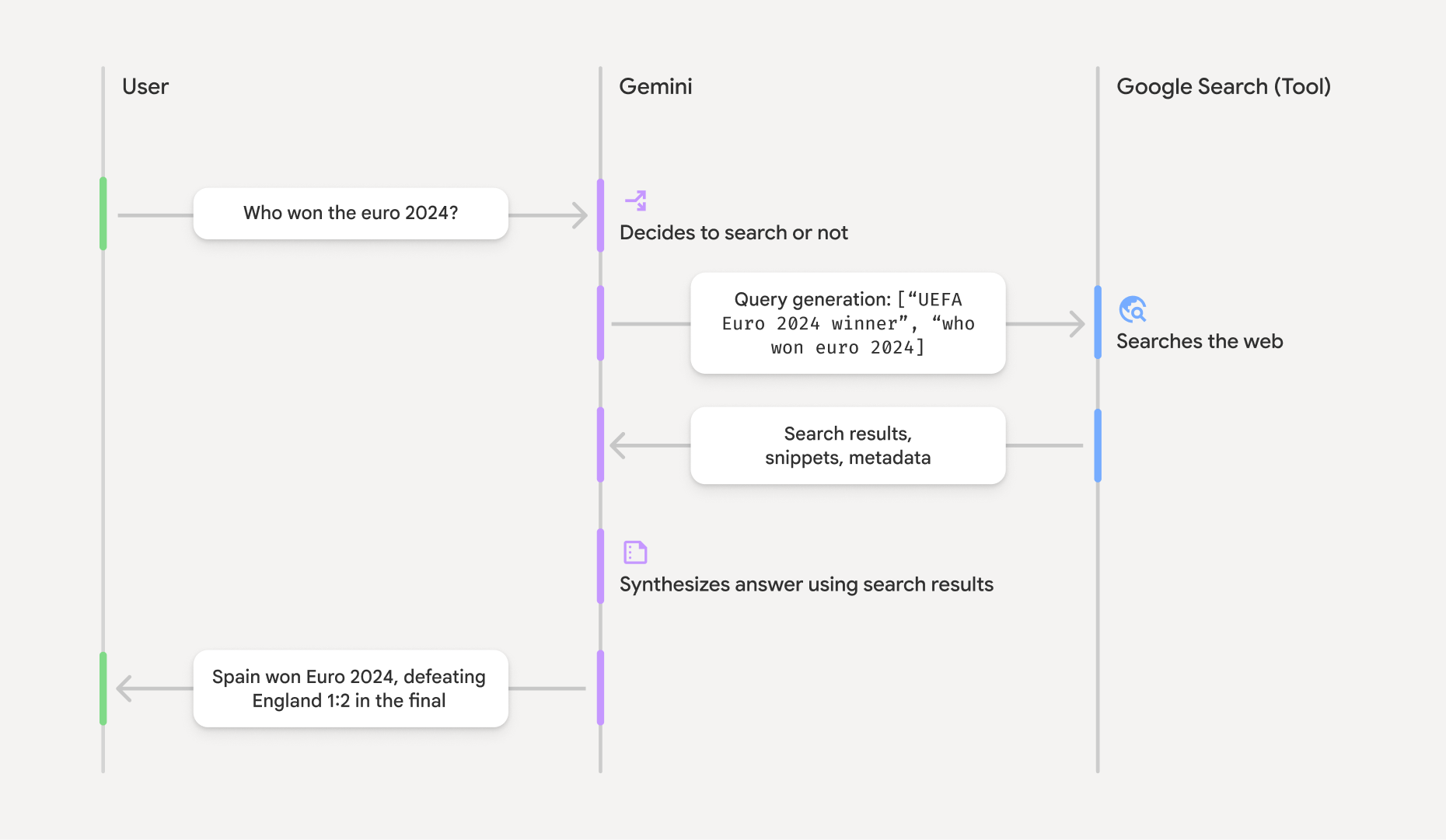
GoogleSearch ツールを使用すると、モデルは情報の検索、処理、引用のワークフロー全体を自動的に処理します。
モデルのワークフローは次のとおりです。
- プロンプトを受け取る: アプリは、Gemini モデル
に、
GoogleSearchツールが有効になっているプロンプトを送信します。 - プロンプトを分析する: モデルはプロンプトを分析し、
Google Search で回答を改善できるかどうかを判断します。 - Google 検索にクエリを送信する
Google Search : 必要に応じて、モデルは 1 つ以上の検索クエリを自動的に生成して実行します。 - 検索結果を処理する: モデルは
Google Search の結果を処理し、元の プロンプトに対する回答を作成します。 - 「グラウンディングされた結果」を返す: モデルは、
Google Search の結果に基づいてグラウンディングされた、最終的なユーザー フレンドリーな 回答を返します。この回答には、モデルのテキスト回答と、検索クエリ、ウェブ検索結果、情報源を含むgroundingMetadataが含まれます。
groundingMetadata オブジェクトは含まれないため、「グラウンディングされた結果」にはなりません。
グラウンディングされた結果について
モデルが groundingMetadata オブジェクトが含まれます。このオブジェクトには、主張の検証やアプリでの豊富な情報源エクスペリエンスの構築に不可欠な構造化データ
が含まれています。
「グラウンディングされた結果」の groundingMetadata オブジェクトには、次の情報が含まれます。
webSearchQueries:Google Search に送信された検索クエリの配列。この情報は、デバッグやモデルの推論プロセスの把握に役立ちます。searchEntryPoint: 必要な 「Google Search 候補」をレンダリングするための HTML と CSS が含まれています。選択した API プロバイダ(Gemini Developer API または Agent Platform Gemini API (formerly Vertex AI))の "Google Search によるグラウンディング"の使用要件を遵守する必要があります(サービス固有の規約の サービス規約 セクションをご覧ください)。グラウンディングされた結果の 使用方法と表示方法 については、このページの後半をご覧ください。groundingChunks: ウェブソース(uriとtitle)を含むオブジェクトの配列。groundingSupports: モデルの回答textをgroundingChunksの情報源に接続するチャンクの配列。各チャンクは、テキストsegment(startIndexとendIndexで定義)を 1 つ以上のgroundingChunkIndicesにリンクします。このフィールドは、インラインの情報源リンクの作成に役立ちます。 グラウンディングされた結果の 使用方法と表示方法 については、このページの後半をご覧ください。
groundingMetadata オブジェクトを含むレスポンスの例を次に示します。
{
  "candidates": [
    {
      "content": {
        "parts": [
          {
            "text": "Spain won Euro 2024, defeating England 2-1 in the final. This victory marks Spain's record fourth European Championship title."
          }
        ],
        "role": "model"
      },
      "groundingMetadata": {
        "webSearchQueries": [
          "UEFA Euro 2024 winner",
          "who won euro 2024"
        ],
        "searchEntryPoint": {
          "renderedContent": "<!-- HTML and CSS for the search widget -->"
        },
        "groundingChunks": [
          {"web": {"uri": "https://vertexaisearch.cloud.google.com.....", "title": "aljazeera.com"}},
          {"web": {"uri": "https://vertexaisearch.cloud.google.com.....", "title": "uefa.com"}}
        ],
        "groundingSupports": [
          {
            "segment": {"startIndex": 0, "endIndex": 85, "text": "Spain won Euro 2024, defeatin..."},
            "groundingChunkIndices": [0]
          },
          {
            "segment": {"startIndex": 86, "endIndex": 210, "text": "This victory marks Spain's..."},
            "groundingChunkIndices": [0, 1]
          }
        ]
      }
    }
  ]
}
グラウンディングされた結果を使用、表示する
モデルが groundingMetadata オブジェクトが提供されます。
Google 検索の候補
(必須) Google Search の候補を表示する
回答に「
groundingMetadata オブジェクトには「searchEntryPoint フィールドに renderedContent フィールドが含まれています。このフィールドには、準拠する HTML と CSS のスタイルが指定されています。これを実装すると、アプリで検索候補を表示できます。
この セクションの後半で、コードサンプルの例をご覧ください。
@media(prefers-color-scheme)(必須)情報源を表示する
groundingMetadata オブジェクトには、構造化された情報源データ(具体的には groundingSupports フィールドと groundingChunks フィールド)が含まれています。この情報を使用して、モデルのステートメントを UI 内の情報源に直接リンクします(インラインと集計)。
この セクションの後半で、コードサンプルの例をご覧ください。
コードサンプルの例
これらのコードサンプルは、グラウンディングされた結果の使用と表示に関する一般的なパターンを示しています。 ただし、特定の実装がコンプライアンス要件に準拠していることを確認するのは、お客様の責任となります。
Swift
// ...

// Get the model's response
let text = response.text

// Get the grounding metadata
if let candidate = response.candidates.first,
   let groundingMetadata = candidate.groundingMetadata {
  // REQUIRED - display Google Search suggestions
  // (renderedContent contains HTML and CSS for the search widget)
  if let renderedContent = groundingMetadata.searchEntryPoint?.renderedContent {
    // TODO(developer): Display Google Search suggestions using a WebView
  }

  // REQUIRED - display sources
  let groundingChunks = groundingMetadata.groundingChunks
  for chunk in groundingMetadata.groundingChunks {
    if let web = chunk.web {
      let title = web.title  // for example, "uefa.com"
      let uri = web.uri  // for example, "https://vertexaisearch.cloud.google.com..."
      // TODO(developer): show source in the UI
    }
  }
}
Kotlin
// ...

// Get the model's response
val text = response.text

// Get the grounding metadata
val groundingMetadata = response.candidates.firstOrNull()?.groundingMetadata

// REQUIRED - display Google Search suggestions
// (renderedContent contains HTML and CSS for the search widget)
val renderedContent = groundingMetadata?.searchEntryPoint?.renderedContent
if (renderedContent != null) {
    // TODO(developer): Display Google Search suggestions using a WebView
}

// REQUIRED - display sources
val groundingChunks = groundingMetadata?.groundingChunks
groundingChunks?.let { chunks ->
  for (chunk in chunks) {
  	val title = chunk.web?.title  // for example, "uefa.com"
	val uri = chunk.web?.uri  // for example, "https://vertexaisearch.cloud.google.com..."
// TODO(developer): show source in the UI
  }
}
Java
// ...

Futures.addCallback(response, new FutureCallback() {
  @Override
  public void onSuccess(GenerateContentResponse result) {
  // Get the model's response
  String text = result.getText();

  // Get the grounding metadata
  GroundingMetadata groundingMetadata =
  result.getCandidates()[0].getGroundingMetadata();

  if (groundingMetadata != null) {
    // REQUIRED - display Google Search suggestions
  // (renderedContent contains HTML and CSS for the search widget)
    String renderedContent =
  groundingMetadata.getSearchEntryPoint().getRenderedContent();
    if (renderedContent != null) {
      // TODO(developer): Display Google Search suggestions using a WebView
    }

    // REQUIRED - display sources
    List chunks = groundingMetadata.getGroundingChunks();
    if (chunks != null) {
      for(GroundingChunk chunk : chunks) {
        WebGroundingChunk web = chunk.getWeb();
        if (web != null) {
          String title = web.getTitle();  // for example, "uefa.com"
          String uri = web.getUri();  // for example, "https://vertexaisearch.cloud.google.com..."
          // TODO(developer): show sources in the UI
        }
      }
    }
  }
  }

  @Override
  public void onFailure(Throwable t) {
  t.printStackTrace();
  }
  }, executor);
Web
// ...

// Get the model's text response
const text = result.response.text();

// Get the grounding metadata
const groundingMetadata = result.response.candidates?.[0]?.groundingMetadata;

// REQUIRED - display Google Search suggestions
// (renderedContent contains HTML and CSS for the search widget)
const renderedContent = groundingMetadata?.searchEntryPoint?.renderedContent;
if (renderedContent) {
  // TODO(developer): render this HTML and CSS in the UI
}

// REQUIRED - display sources
const groundingChunks = groundingMetadata?.groundingChunks;
if (groundingChunks) {
  for (const chunk of groundingChunks) {
    const title = chunk.web?.title;  // for example, "uefa.com"
    const uri = chunk.web?.uri;  // for example, "https://vertexaisearch.cloud.google.com..."
    // TODO(developer): show sources in the UI
  }
}
Dart
// ...

// Get the model's response
final text = response.text;

// Get the grounding metadata
final groundingMetadata = response.candidates.first.groundingMetadata;

// REQUIRED - display Google Search suggestions
// (renderedContent contains HTML and CSS for the search widget)
final renderedContent = groundingMetadata?.searchEntryPoint?.renderedContent;
if (renderedContent != null) {
    // TODO(developer): Display Google Search suggestions using a WebView
}

// REQUIRED - display sources
final groundingChunks = groundingMetadata?.groundingChunks;
if (groundingChunks != null) {
  for (var chunk in groundingChunks) {
    final title = chunk.web?.title;  // for example, "uefa.com"
    final uri = chunk.web?.uri;  // for example, "https://vertexaisearch.cloud.google.com..."
    // TODO(developer): show sources in the UI
  }
}
Unity
// ...

// Get the model's response.
var text = response.Text;

// Get the grounding metadata.
var groundingMetadata = response.Candidates.First().GroundingMetadata.Value;

// REQUIRED - display Google Search suggestions
// (renderedContent contains HTML and CSS for the search widget)
if (groundingMetadata.SearchEntryPoint.HasValue) {
    var renderedContent = groundingMetadata.SearchEntryPoint.Value.RenderedContent;
    // TODO(developer): Display Google Search suggestions using a WebView
}

// REQUIRED - display sources
foreach(GroundingChunk chunk in groundingMetadata.GroundingChunks) {
    var title = chunk.Web.Value.Title;  // for example, "uefa.com"
    var uri = chunk.Web.Value.Uri;  // for example, "https://vertexaisearch.cloud.google.com..."
    // TODO(developer): show sources in the UI
}
Firebase コンソールでのグラウンディングされた結果と AI モニタリング
Firebase コンソールで AI モニタリングを有効にしている場合、レスポンスは Cloud Logging に保存されます。FirebaseCloud Loggingデフォルトでは、このデータの保持期間は 30 日間です。
この保持期間、または設定したカスタム 期間が、特定のユースケースと、選択した Gemini API プロバイダ(Gemini Developer API または Agent Platform Gemini API (formerly Vertex AI))の追加の コンプライアンス要件(サービス固有の規約の サービス規約 セクションをご覧ください)に完全に準拠していることを確認するのは、お客様の責任となります。これらの要件を満たすには、 の保持期間を調整する必要があります。Cloud Logging
料金と上限
選択したGemini APIプロバイダのドキュメント(
Gemini Developer API
|
Agent Platform Gemini API (formerly Vertex AI))で、