

تتيح ميزة "تحديد المصدر من خلال
يوفّر استخدام
- زيادة الدقة الواقعية: تقليل حالات الهلوسة في النموذج من خلال استناد الردود إلى معلومات واقعية
- الوصول إلى معلومات في الوقت الفعلي: الإجابة عن أسئلة حول الأحداث والمواضيع الحديثة
- توفير المصادر: يمكنك تعزيز ثقة المستخدمين أو السماح لهم بتصفّح المواقع الإلكترونية ذات الصلة من خلال عرض مصادر المعلومات التي يقدّمها النموذج.
- إكمال مهام أكثر تعقيدًا: استرداد عناصر وصور وفيديوهات ووسائط أخرى ذات صلة للمساعدة في مهام الاستدلال
- تحسين الردود الخاصة بمنطقة أو لغة معيّنة: العثور على معلومات خاصة بمنطقة معيّنة أو المساعدة في ترجمة المحتوى بدقة
النماذج المتوافقة
gemini-3.1-pro-preview-
gemini-3.8-flash(والإصدارات الأقدمgemini-3.7-flashوgemini-3.6-flashوgemini-3.5-flash) -
gemini-3.5-flash-lite(والإصدار الأقدمgemini-3.1-flash-lite) -
gemini-3-pro-image(المعروف أيضًا باسم "Nano Banana Pro") gemini-3.1-flash-image(المعروفة أيضًا باسم "Nano Banana 2")
تتيح نماذج Gemini 2.5 ذات الاستخدام العام هذه الإمكانية، ولكن تم إيقافها نهائيًا.
تتوافق نماذج Gemini Live API أيضًا مع هذه الإمكانية، ولكن جميع عينات التعليمات البرمجية الواردة في هذا الدليل مخصّصة لنماذج Gemini العامة الاستخدام.
اللغات المتاحة
اطّلِع على اللغات المتاحة في Gemini النماذج.
تأسيس النموذج باستخدام Google Search
|
انقر على مزوّد Gemini API لعرض المحتوى والرمز الخاصين بالمزوّد على هذه الصفحة. |
عند إنشاء مثيل GenerativeModel، قدِّم GoogleSearch كـ tool يمكن للنموذج استخدامه لإنشاء الردّ.
Swift
import FirebaseAILogic

// Initialize the Gemini Developer API backend service.
let ai = FirebaseAI.firebaseAI(backend: .googleAI())

// Create a `GenerativeModel` instance with a model that supports your use case.
let model = ai.generativeModel(
    modelName: "GEMINI_MODEL_NAME",
    // Provide Google Search as a tool that the model can use to generate its response.
    tools: [Tool.googleSearch()]
)

let response = try await model.generateContent("Who won the euro 2024?")
print(response.text ?? "No text in response.")

// Make sure to comply with the "Grounding with Google Search" usage requirements,
// which includes how you use and display the grounded result
Kotlin
// Initialize the Gemini Developer API backend service.
// Create a `GenerativeModel` instance with a model that supports your use case.
val model = Firebase.ai(backend = GenerativeBackend.googleAI()).generativeModel(
    modelName = "GEMINI_MODEL_NAME",
    // Provide Google Search as a tool that the model can use to generate its response
    tools = listOf(Tool.googleSearch())
)

val response = model.generateContent("Who won the euro 2024?")
print(response.text)

// Make sure to comply with the "Grounding with Google Search" usage requirements,
// which includes how you use and display the grounded result
Java
// Initialize the Gemini Developer API backend service.
// Create a `GenerativeModel` instance with a model that supports your use case.
GenerativeModel ai = FirebaseAI.getInstance(GenerativeBackend.googleAI())
                .generativeModel("GEMINI_MODEL_NAME",
                        null,
                        null,
                        // Provide Google Search as a tool that the model can use to generate its response
                        List.of(Tool.GoogleSearch()));

// Use the GenerativeModelFutures Java compatibility layer which offers
// support for ListenableFuture and Publisher APIs
GenerativeModelFutures model = GenerativeModelFutures.from(ai);

ListenableFuture response = model.generateContent("Who won the euro 2024?");
  Futures.addCallback(response, new FutureCallback() {
      @Override
      public void onSuccess(GenerateContentResponse result) {
          String resultText = result.getText();
          System.out.println(resultText);
      }

      @Override
      public void onFailure(Throwable t) {
          t.printStackTrace();
      }
  }, executor);

// Make sure to comply with the "Grounding with Google Search" usage requirements,
// which includes how you use and display the grounded result
Web
import { initializeApp } from "firebase/app";
import { getAI, getGenerativeModel, GoogleAIBackend } from "firebase/ai";

// TODO(developer): Replace the following with your app's Firebase configuration
// See: https://firebase.google.com/docs/web/learn-more#config-object
const firebaseConfig = {
  // ...
};

// Initialize FirebaseApp
const firebaseApp = initializeApp(firebaseConfig);

// Initialize the Gemini Developer API backend service.
const ai = getAI(firebaseApp, { backend: new GoogleAIBackend() });

// Create a `GenerativeModel` instance with a model that supports your use case.
const model = getGenerativeModel(
  ai,
  {
    model: "GEMINI_MODEL_NAME",
    // Provide Google Search as a tool that the model can use to generate its response
    tools: [{ googleSearch: {} }]
  }
);

const result = await model.generateContent("Who won the euro 2024?");

console.log(result.response.text());

// Make sure to comply with the "Grounding with Google Search" usage requirements,
// which includes how you use and display the grounded result
Dart
import 'package:firebase_core/firebase_core.dart';
import 'package:firebase_ai/firebase_ai.dart';
import 'firebase_options.dart';

// Initialize FirebaseApp.
await Firebase.initializeApp(
  options: DefaultFirebaseOptions.currentPlatform,
);

// Initialize the Gemini Developer API backend service.
// Create a `GenerativeModel` instance with a model that supports your use case.
final model = FirebaseAI.googleAI().generativeModel(
  model: 'GEMINI_MODEL_NAME',
  // Provide Google Search as a tool that the model can use to generate its response.
  tools: [
    Tool.googleSearch(),
  ],
);

final response = await model.generateContent([Content.text("Who won the euro 2024?")]);
print(response.text);

// Make sure to comply with the "Grounding with Google Search" usage requirements,
// which includes how you use and display the grounded result
Unity
using Firebase;
using Firebase.AI;

// Initialize the Gemini Developer API backend service.
var ai = FirebaseAI.GetInstance(FirebaseAI.Backend.GoogleAI());

// Create a `GenerativeModel` instance with a model that supports your use case.
var model = ai.GetGenerativeModel(
  modelName: "GEMINI_MODEL_NAME",
  // Provide Google Search as a tool that the model can use to generate its response.
  tools: new[] { new Tool(new GoogleSearch()) }
);

var response = await model.GenerateContentAsync("Who won the euro 2024?");
UnityEngine.Debug.Log(response.Text ?? "No text in response.");

// Make sure to comply with the "Grounding with Google Search" usage requirements,
// which includes how you use and display the grounded result
تعرَّف على كيفية اختيار نموذج مناسبَين لحالة الاستخدام والتطبيق.
طريقة عمل ميزة Grounding with Google Search
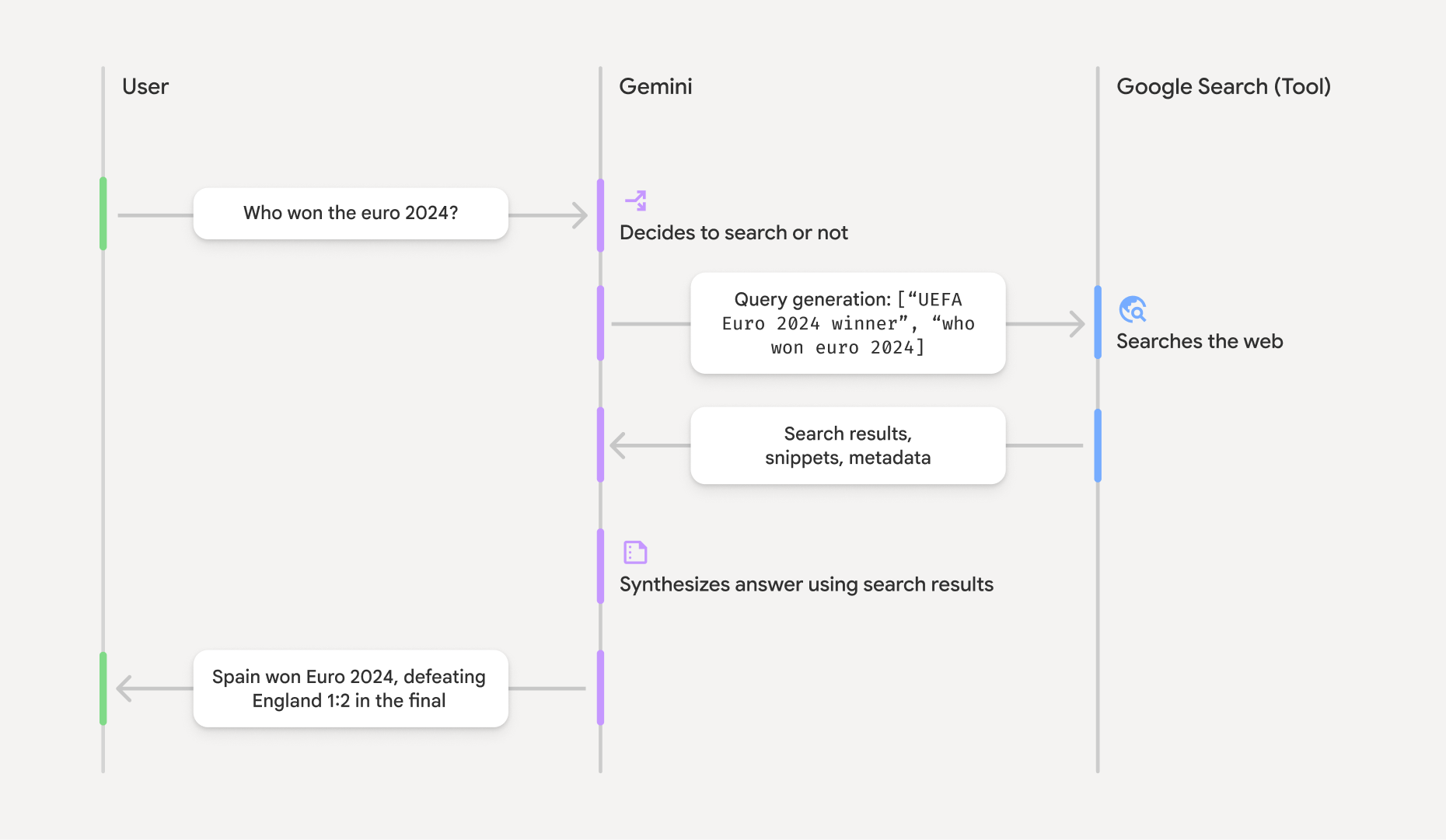
عند استخدام أداة GoogleSearch، يتعامل النموذج تلقائيًا مع سير العمل الكامل الخاص بالبحث عن المعلومات ومعالجتها والاقتباس منها.
في ما يلي سير عمل النموذج:
- تلقّي الطلب: يرسل تطبيقك طلبًا إلى نموذج Gemini مع تفعيل أداة
GoogleSearch. - تحليل الطلب: يحلّل النموذج الطلب ويحدّد ما إذا كان بإمكانه
Google Search تحسين رده. - إرسال طلبات البحث إلى
Google Search : إذا لزم الأمر، ينشئ النموذج تلقائيًا طلب بحث واحدًا أو أكثر وينفّذها. - معالجة نتائج البحث: يعالج النموذج نتائج
Google Search ويصيغ ردًا على الطلب الأصلي. - عرض "نتيجة مستندة إلى معلومات موثوقة": يعرض النموذج ردًا نهائيًا سهل الاستخدام
يستند إلى نتائج
Google Search . يتضمّن هذا الرد الإجابة النصية التي قدّمها النموذج وgroundingMetadataمع طلبات البحث ونتائج من الويب والمصادر.
يُرجى العِلم أنّ توفير groundingMetadata، وبالتالي لن تكون "نتيجة مستندة إلى مصادر".
فهم النتيجة المحددة المصدر
إذا استند النموذج في رده إلى نتائج groundingMetadata يحتوي على بيانات منظَّمة أساسية للتحقّق من صحة الادعاءات وإنشاء تجربة مصدر غني في تطبيقك.
يتضمّن العنصر groundingMetadata في "نتيجة مستندة إلى معلومات موثوقة" المعلومات التالية:
webSearchQueries: صفيف من طلبات البحث التي تم إرسالها إلىGoogle Search . هذه المعلومات مفيدة لتصحيح الأخطاء وفهم عملية الاستدلال التي يتّبعها النموذج.
searchEntryPoint: يحتوي على HTML وCSS لعرض "اقتراحاتGoogle Search " المطلوبة. عليك الالتزام بمتطلبات الاستخدام الخاصة بميزة "الاستناد إلىGoogle Search " لمزوّد واجهة برمجة التطبيقات الذي اخترته: Gemini Developer API أو Agent Platform Gemini API (formerly Vertex AI) (يُرجى الاطّلاع على قسم بنود الخدمة ضمن البنود الخاصة بالخدمة). تعرَّف على كيفية استخدام نتيجة مستندة إلى مصادر وعرضها لاحقًا في هذه الصفحة.groundingChunks: مصفوفة من العناصر التي تحتوي على مصادر الويب (uriوtitle).groundingSupports: مصفوفة من الأجزاء لربط ردّ النموذجtextبالمصادر فيgroundingChunksيربط كل جزء نصًاsegment(محدّدًا بواسطةstartIndexوendIndex) بواحد أو أكثر منgroundingChunkIndices. يساعدك هذا الحقل في إنشاء روابط المصدر المضمّنة. تعرَّف على كيفية استخدام نتيجة مستندة إلى مصادر وعرضها لاحقًا في هذه الصفحة.
إليك مثال على استجابة تتضمّن عنصر groundingMetadata:
{
  "candidates": [
    {
      "content": {
        "parts": [
          {
            "text": "Spain won Euro 2024, defeating England 2-1 in the final. This victory marks Spain's record fourth European Championship title."
          }
        ],
        "role": "model"
      },
      "groundingMetadata": {
        "webSearchQueries": [
          "UEFA Euro 2024 winner",
          "who won euro 2024"
        ],
        "searchEntryPoint": {
          "renderedContent": "<!-- HTML and CSS for the search widget -->"
        },
        "groundingChunks": [
          {"web": {"uri": "https://vertexaisearch.cloud.google.com.....", "title": "aljazeera.com"}},
          {"web": {"uri": "https://vertexaisearch.cloud.google.com.....", "title": "uefa.com"}}
        ],
        "groundingSupports": [
          {
            "segment": {"startIndex": 0, "endIndex": 85, "text": "Spain won Euro 2024, defeatin..."},
            "groundingChunkIndices": [0]
          },
          {
            "segment": {"startIndex": 86, "endIndex": 210, "text": "This victory marks Spain's..."},
            "groundingChunkIndices": [0, 1]
          }
        ]
      }
    }
  ]
}
استخدام نتيجة محددة المصدر وعرضها
إذا كان النموذج يستخدم أداة groundingMetadata في الردّ.
يجب عرض
اقتراحات
بالإضافة إلى الامتثال لمتطلبات استخدام أداة
(مطلوب) اقتراحات Google Search على الشبكة الإعلانية
إذا كانت الاستجابة تتضمّن "اقتراحات
يحتوي العنصر groundingMetadata على "اقتراحات searchEntryPoint الذي يتضمّن الحقل renderedContent الذي يوفّر تنسيق HTML وCSS متوافقًا، وعليك تنفيذه لعرض اقتراحات البحث في تطبيقك.
راجِع المعلومات التفصيلية حول
متطلبات العرض والسلوك لاقتراحات
يمكنك الاطّلاع على أمثلة على عيّنات التعليمات البرمجية في وقت لاحق من هذا القسم.
(مطلوب) عرض المصادر
يحتوي العنصر groundingMetadata على بيانات المصدر المنظَّمة، وتحديدًا الحقلَين groundingSupports وgroundingChunks. استخدِم هذه المعلومات لربط عبارات النموذج مباشرةً بمصادرها ضمن واجهة المستخدم (بشكل مضمّن ومجمّع).
يمكنك الاطّلاع على أمثلة على عيّنات التعليمات البرمجية في وقت لاحق من هذا القسم.
أمثلة على عيّنات التعليمات البرمجية
تقدّم عيّنات التعليمات البرمجية هذه أنماطًا معمَّمة لاستخدام النتيجة المستندة إلى معلومات موثوقة وعرضها. ومع ذلك، تقع على عاتقك مسؤولية التأكّد من أنّ طريقة التنفيذ المحدّدة تتوافق مع متطلبات الامتثال.
Swift
// ...

// Get the model's response
let text = response.text

// Get the grounding metadata
if let candidate = response.candidates.first,
   let groundingMetadata = candidate.groundingMetadata {
  // REQUIRED - display Google Search suggestions
  // (renderedContent contains HTML and CSS for the search widget)
  if let renderedContent = groundingMetadata.searchEntryPoint?.renderedContent {
    // TODO(developer): Display Google Search suggestions using a WebView
  }

  // REQUIRED - display sources
  let groundingChunks = groundingMetadata.groundingChunks
  for chunk in groundingMetadata.groundingChunks {
    if let web = chunk.web {
      let title = web.title  // for example, "uefa.com"
      let uri = web.uri  // for example, "https://vertexaisearch.cloud.google.com..."
      // TODO(developer): show source in the UI
    }
  }
}
Kotlin
// ...

// Get the model's response
val text = response.text

// Get the grounding metadata
val groundingMetadata = response.candidates.firstOrNull()?.groundingMetadata

// REQUIRED - display Google Search suggestions
// (renderedContent contains HTML and CSS for the search widget)
val renderedContent = groundingMetadata?.searchEntryPoint?.renderedContent
if (renderedContent != null) {
    // TODO(developer): Display Google Search suggestions using a WebView
}

// REQUIRED - display sources
val groundingChunks = groundingMetadata?.groundingChunks
groundingChunks?.let { chunks ->
  for (chunk in chunks) {
  	val title = chunk.web?.title  // for example, "uefa.com"
	val uri = chunk.web?.uri  // for example, "https://vertexaisearch.cloud.google.com..."
// TODO(developer): show source in the UI
  }
}
Java
// ...

Futures.addCallback(response, new FutureCallback() {
  @Override
  public void onSuccess(GenerateContentResponse result) {
  // Get the model's response
  String text = result.getText();

  // Get the grounding metadata
  GroundingMetadata groundingMetadata =
  result.getCandidates()[0].getGroundingMetadata();

  if (groundingMetadata != null) {
    // REQUIRED - display Google Search suggestions
  // (renderedContent contains HTML and CSS for the search widget)
    String renderedContent =
  groundingMetadata.getSearchEntryPoint().getRenderedContent();
    if (renderedContent != null) {
      // TODO(developer): Display Google Search suggestions using a WebView
    }

    // REQUIRED - display sources
    List chunks = groundingMetadata.getGroundingChunks();
    if (chunks != null) {
      for(GroundingChunk chunk : chunks) {
        WebGroundingChunk web = chunk.getWeb();
        if (web != null) {
          String title = web.getTitle();  // for example, "uefa.com"
          String uri = web.getUri();  // for example, "https://vertexaisearch.cloud.google.com..."
          // TODO(developer): show sources in the UI
        }
      }
    }
  }
  }

  @Override
  public void onFailure(Throwable t) {
  t.printStackTrace();
  }
  }, executor);
Web
// ...

// Get the model's text response
const text = result.response.text();

// Get the grounding metadata
const groundingMetadata = result.response.candidates?.[0]?.groundingMetadata;

// REQUIRED - display Google Search suggestions
// (renderedContent contains HTML and CSS for the search widget)
const renderedContent = groundingMetadata?.searchEntryPoint?.renderedContent;
if (renderedContent) {
  // TODO(developer): render this HTML and CSS in the UI
}

// REQUIRED - display sources
const groundingChunks = groundingMetadata?.groundingChunks;
if (groundingChunks) {
  for (const chunk of groundingChunks) {
    const title = chunk.web?.title;  // for example, "uefa.com"
    const uri = chunk.web?.uri;  // for example, "https://vertexaisearch.cloud.google.com..."
    // TODO(developer): show sources in the UI
  }
}
Dart
// ...

// Get the model's response
final text = response.text;

// Get the grounding metadata
final groundingMetadata = response.candidates.first.groundingMetadata;

// REQUIRED - display Google Search suggestions
// (renderedContent contains HTML and CSS for the search widget)
final renderedContent = groundingMetadata?.searchEntryPoint?.renderedContent;
if (renderedContent != null) {
    // TODO(developer): Display Google Search suggestions using a WebView
}

// REQUIRED - display sources
final groundingChunks = groundingMetadata?.groundingChunks;
if (groundingChunks != null) {
  for (var chunk in groundingChunks) {
    final title = chunk.web?.title;  // for example, "uefa.com"
    final uri = chunk.web?.uri;  // for example, "https://vertexaisearch.cloud.google.com..."
    // TODO(developer): show sources in the UI
  }
}
Unity
// ...

// Get the model's response.
var text = response.Text;

// Get the grounding metadata.
var groundingMetadata = response.Candidates.First().GroundingMetadata.Value;

// REQUIRED - display Google Search suggestions
// (renderedContent contains HTML and CSS for the search widget)
if (groundingMetadata.SearchEntryPoint.HasValue) {
    var renderedContent = groundingMetadata.SearchEntryPoint.Value.RenderedContent;
    // TODO(developer): Display Google Search suggestions using a WebView
}

// REQUIRED - display sources
foreach(GroundingChunk chunk in groundingMetadata.GroundingChunks) {
    var title = chunk.Web.Value.Title;  // for example, "uefa.com"
    var uri = chunk.Web.Value.Uri;  // for example, "https://vertexaisearch.cloud.google.com..."
    // TODO(developer): show sources in the UI
}
النتائج المستندة إلى مصادر موثوقة وتتبّع استخدام الذكاء الاصطناعي في وحدة تحكّم Firebase
إذا فعّلت ميزة تتبّع استخدام الذكاء الاصطناعي في Firebase، سيتم تخزين الردود في Cloud Logging. تتوفّر هذه البيانات تلقائيًا لفترة احتفاظ تبلغ 30 يومًا.
وتقع على عاتقك مسؤولية التأكّد من أنّ فترة الاحتفاظ هذه، أو أي فترة مخصّصة تحدّدها، تتوافق تمامًا مع حالة الاستخدام المحدّدة وأي متطلبات إضافية للامتثال لدى مقدّم خدمة Gemini API الذي اخترته: Gemini Developer API أو Agent Platform Gemini API (formerly Vertex AI) (راجِع القسم بنود الخدمة ضمن بنود الخدمة الخاصة بالمنتج). قد تحتاج إلى تعديل فترة الاحتفاظ بالبيانات في Cloud Logging لاستيفاء هذه المتطلبات.
الأسعار والحدود
احرص على مراجعة الأسعار ومدى توفّر النموذج والحدود القصوى لـ "الاستناد إلى بيانات خارجية" باستخدام