

- तथ्यों का सही होना बढ़ाना: मॉडल के ग़लत या गुमराह करने वाली जानकारी देने की समस्या को कम करना. इसके लिए, जवाबों को असल दुनिया की जानकारी के आधार पर तैयार करना.
- रीयल-टाइम में जानकारी ऐक्सेस करना: हाल ही के इवेंट और विषयों के बारे में सवालों के जवाब देना.
- सोर्स उपलब्ध कराएं: मॉडल के दावों के सोर्स दिखाकर, उपयोगकर्ताओं का भरोसा बढ़ाएं या उन्हें काम की साइटें ब्राउज़ करने की अनुमति दें.
- ज़्यादा जटिल टास्क पूरे करना: तर्क से जुड़े टास्क में मदद करने के लिए, आर्टफ़ैक्ट और काम की इमेज, वीडियो या अन्य मीडिया को वापस पाना.
- किसी इलाके या भाषा के हिसाब से जवाबों को बेहतर बनाना: किसी इलाके के हिसाब से जानकारी ढूँढना या कॉन्टेंट का सटीक अनुवाद करने में मदद करना.
इस्तेमाल किए जा सकने वाले मॉडल
gemini-4-argongemini-3.8-flash(और पुरानेgemini-3.7-flash,gemini-3.6-flash, औरgemini-3.5-flash)gemini-3.5-flash-lite(और पुरानाgemini-3.1-flash-lite)gemini-3-pro-image(इसे "Nano Banana Pro" भी कहा जाता है)gemini-3.1-flash-image(इसे "Nano Banana 2" भी कहा जाता है)
gemini-3.1-pro-preview और सामान्य इस्तेमाल के लिए उपलब्ध Gemini 2.5 मॉडल (जो अब काम नहीं करते) में भी यह सुविधा काम करती है.
Gemini Live API मॉडल भी इस सुविधा के साथ काम करते हैं. हालांकि, इस गाइड में दिए गए सभी कोड सैंपल, सामान्य इस्तेमाल के लिए उपलब्ध Gemini मॉडल के लिए हैं.
यह सुविधा इन भाषाओं में काम करती है
Gemini मॉडल के लिए, इस्तेमाल की जा सकने वाली भाषाएँ देखें.
Google Search की मदद से मॉडल को ग्राउंड करना
|
इस पेज पर, सेवा देने वाली कंपनी के हिसाब से कॉन्टेंट और कोड देखने के लिए, Gemini API पर क्लिक करें. |
GenerativeModel इंस्टेंस बनाते समय, GoogleSearch को tool के तौर पर दें, ताकि मॉडल इसका इस्तेमाल करके जवाब जनरेट कर सके.
Swift
import FirebaseAILogic

// Initialize the Gemini Developer API backend service.
let ai = FirebaseAI.firebaseAI(backend: .googleAI())

// Create a `GenerativeModel` instance with a model that supports your use case.
let model = ai.generativeModel(
    modelName: "GEMINI_MODEL_NAME",
    // Provide Google Search as a tool that the model can use to generate its response.
    tools: [.googleSearch()]
)

let response = try await model.generateContent("Who won the euro 2024?")
print(response.text ?? "No text in response.")

// Make sure to comply with the "Grounding with Google Search" usage requirements,
// which includes how you use and display the grounded result
Kotlin
// Initialize the Gemini Developer API backend service.
// Create a `GenerativeModel` instance with a model that supports your use case.
val model = Firebase.ai(backend = GenerativeBackend.googleAI()).generativeModel(
    modelName = "GEMINI_MODEL_NAME",
    // Provide Google Search as a tool that the model can use to generate its response
    tools = listOf(Tool.googleSearch())
)

val response = model.generateContent("Who won the euro 2024?")
print(response.text)

// Make sure to comply with the "Grounding with Google Search" usage requirements,
// which includes how you use and display the grounded result
Java
// Initialize the Gemini Developer API backend service.
// Create a `GenerativeModel` instance with a model that supports your use case.
GenerativeModel ai = FirebaseAI.getInstance(GenerativeBackend.googleAI())
                .generativeModel("GEMINI_MODEL_NAME",
                        null,
                        null,
                        // Provide Google Search as a tool that the model can use to generate its response
                        List.of(Tool.GoogleSearch()));

// Use the GenerativeModelFutures Java compatibility layer which offers
// support for ListenableFuture and Publisher APIs
GenerativeModelFutures model = GenerativeModelFutures.from(ai);

ListenableFuture response = model.generateContent("Who won the euro 2024?");
  Futures.addCallback(response, new FutureCallback() {
      @Override
      public void onSuccess(GenerateContentResponse result) {
          String resultText = result.getText();
          System.out.println(resultText);
      }

      @Override
      public void onFailure(Throwable t) {
          t.printStackTrace();
      }
  }, executor);

// Make sure to comply with the "Grounding with Google Search" usage requirements,
// which includes how you use and display the grounded result
Web
import { initializeApp } from "firebase/app";
import { getAI, getGenerativeModel, GoogleAIBackend } from "firebase/ai";

// TODO(developer): Replace the following with your app's Firebase configuration
// See: https://firebase.google.com/docs/web/learn-more#config-object
const firebaseConfig = {
  // ...
};

// Initialize FirebaseApp
const firebaseApp = initializeApp(firebaseConfig);

// Initialize the Gemini Developer API backend service.
const ai = getAI(firebaseApp, { backend: new GoogleAIBackend() });

// Create a `GenerativeModel` instance with a model that supports your use case.
const model = getGenerativeModel(
  ai,
  {
    model: "GEMINI_MODEL_NAME",
    // Provide Google Search as a tool that the model can use to generate its response
    tools: [{ googleSearch: {} }]
  }
);

const result = await model.generateContent("Who won the euro 2024?");

console.log(result.response.text());

// Make sure to comply with the "Grounding with Google Search" usage requirements,
// which includes how you use and display the grounded result
Dart
import 'package:firebase_core/firebase_core.dart';
import 'package:firebase_ai/firebase_ai.dart';
import 'firebase_options.dart';

// Initialize FirebaseApp.
await Firebase.initializeApp(
  options: DefaultFirebaseOptions.currentPlatform,
);

// Initialize the Gemini Developer API backend service.
// Create a `GenerativeModel` instance with a model that supports your use case.
final model = FirebaseAI.googleAI().generativeModel(
  model: 'GEMINI_MODEL_NAME',
  // Provide Google Search as a tool that the model can use to generate its response.
  tools: [
    Tool.googleSearch(),
  ],
);

final response = await model.generateContent([Content.text("Who won the euro 2024?")]);
print(response.text);

// Make sure to comply with the "Grounding with Google Search" usage requirements,
// which includes how you use and display the grounded result
Unity
using Firebase;
using Firebase.AI;

// Initialize the Gemini Developer API backend service.
var ai = FirebaseAI.GetInstance(FirebaseAI.Backend.GoogleAI());

// Create a `GenerativeModel` instance with a model that supports your use case.
var model = ai.GetGenerativeModel(
  modelName: "GEMINI_MODEL_NAME",
  // Provide Google Search as a tool that the model can use to generate its response.
  tools: new[] { new Tool(new GoogleSearch()) }
);

var response = await model.GenerateContentAsync("Who won the euro 2024?");
UnityEngine.Debug.Log(response.Text ?? "No text in response.");

// Make sure to comply with the "Grounding with Google Search" usage requirements,
// which includes how you use and display the grounded result
अपने इस्तेमाल के उदाहरण और ऐप्लिकेशन के हिसाब से, मॉडल चुनने का तरीका जानें.भी चुनी जा सकती है.
Google Search से जानकारी लेने की सुविधा कैसे काम करती है
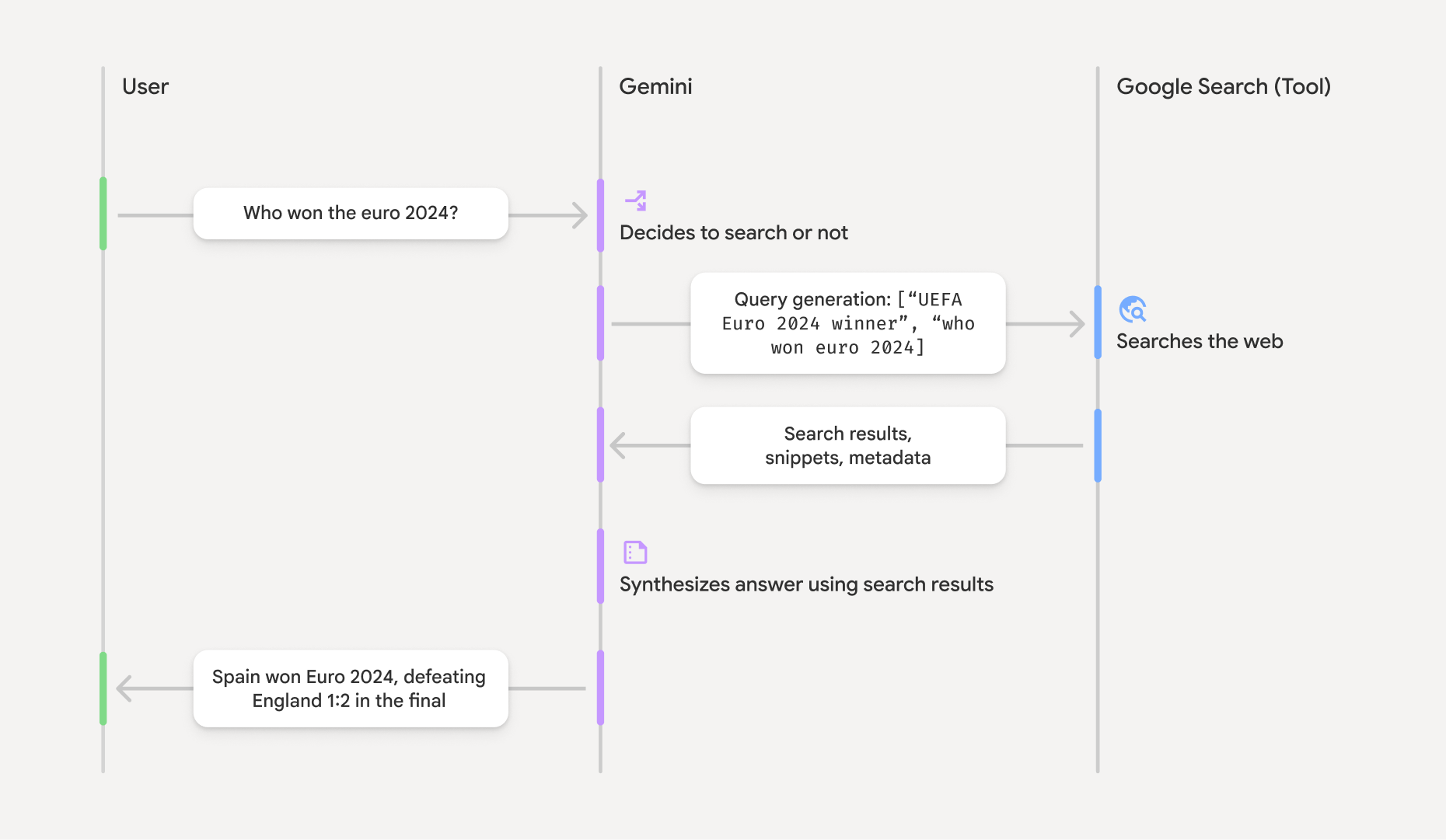
GoogleSearch टूल का इस्तेमाल करने पर, मॉडल जानकारी खोजने, उसे प्रोसेस करने, और उसका हवाला देने के पूरे वर्कफ़्लो को अपने-आप मैनेज करता है.
यहां मॉडल के वर्कफ़्लो के बारे में बताया गया है:
- प्रॉम्प्ट पाना: आपका ऐप्लिकेशन, Gemini मॉडल को प्रॉम्प्ट भेजता है. इसके लिए,
GoogleSearchटूल चालू होना चाहिए. - प्रॉम्प्ट का विश्लेषण करना: मॉडल, प्रॉम्प्ट का विश्लेषण करता है और यह तय करता है कि क्या
Google Search अपने जवाब को बेहतर बना सकता है. Google Search को क्वेरी भेजें: ज़रूरत पड़ने पर, मॉडल अपने-आप एक या उससे ज़्यादा सर्च क्वेरी जनरेट करता है और उन्हें लागू करता है.- खोज के नतीजों को प्रोसेस करना: मॉडल,
Google Search नतीजों को प्रोसेस करता है और ओरिजनल प्रॉम्प्ट के लिए जवाब तैयार करता है. - "तथ्यों पर आधारित नतीजा" दिखाना: मॉडल, उपयोगकर्ता के लिए आसान और तथ्यों पर आधारित आखिरी जवाब दिखाता है. यह जवाब,
Google Search के नतीजों पर आधारित होता है. इस जवाब में, मॉडल का टेक्स्ट फ़ॉर्मैट में दिया गया जवाब औरgroundingMetadataशामिल है. इसमें सर्च क्वेरी, वेब के नतीजे, और सोर्स भी शामिल हैं.
ध्यान दें कि मॉडल को टूल के तौर पर groundingMetadata
ऑब्जेक्ट शामिल नहीं होगा. इसलिए, यह "सोर्स से जुड़ा नतीजा" नहीं होगा.
भरोसेमंद स्रोतों से मिले जवाब को समझना
अगर मॉडल, groundingMetadata ऑब्जेक्ट शामिल होता है. इसमें स्ट्रक्चर्ड डेटा होता है. यह डेटा, दावों की पुष्टि करने और आपके ऐप्लिकेशन में सोर्स का बेहतर अनुभव देने के लिए ज़रूरी है.
"ग्राउंडेड रिज़ल्ट" में मौजूद groundingMetadata ऑब्जेक्ट में यह जानकारी शामिल होती है:
webSearchQueries:Google Search को भेजी गई सर्च क्वेरी का ऐरे. यह जानकारी, डीबग करने और मॉडल के तर्क देने की प्रोसेस को समझने के लिए मददगार होती है.searchEntryPoint: इसमें "Google Search सुझाव" दिखाने के लिए ज़रूरी एचटीएमएल और सीएसएस शामिल होती है. आपको चुने गए एपीआई उपलब्ध कराने वाली कंपनी के लिए, "Google Search से जानकारी लेना" सुविधा के इस्तेमाल से जुड़ी ज़रूरी शर्तों का पालन करना होगा: Gemini Developer API या Agent Platform Gemini API (formerly Vertex AI) (सेवा की खास शर्तों में मौजूद, सेवा की शर्तें सेक्शन देखें). इस पेज पर आगे जाकर, ग्राउंडेड नतीजे को इस्तेमाल करने और दिखाने का तरीका जानें.groundingChunks: वेब सोर्स (uriऔरtitle) वाले ऑब्जेक्ट का कलेक्शन.groundingSupports: चंक का कलेक्शन, जो मॉडल के जवाबtextकोgroundingChunksमें मौजूद सोर्स से कनेक्ट करता है. हर चंक, किसी टेक्स्टsegment(startIndexऔरendIndexसे तय किया गया) को एक या उससे ज़्यादाgroundingChunkIndicesसे लिंक करता है. इस फ़ील्ड की मदद से, सोर्स के इनलाइन लिंक बनाए जा सकते हैं. इस पेज पर, भरोसेमंद सोर्स से मिली जानकारी का इस्तेमाल करके जवाब जनरेट करने और उसे दिखाने का तरीका जानें.
यहां जवाब का एक उदाहरण दिया गया है, जिसमें groundingMetadata ऑब्जेक्ट शामिल है:
{
  "candidates": [
    {
      "content": {
        "parts": [
          {
            "text": "Spain won Euro 2024, defeating England 2-1 in the final. This victory marks Spain's record fourth European Championship title."
          }
        ],
        "role": "model"
      },
      "groundingMetadata": {
        "webSearchQueries": [
          "UEFA Euro 2024 winner",
          "who won euro 2024"
        ],
        "searchEntryPoint": {
          "renderedContent": "<!-- HTML and CSS for the search widget -->"
        },
        "groundingChunks": [
          {"web": {"uri": "https://vertexaisearch.cloud.google.com.....", "title": "aljazeera.com"}},
          {"web": {"uri": "https://vertexaisearch.cloud.google.com.....", "title": "uefa.com"}}
        ],
        "groundingSupports": [
          {
            "segment": {"startIndex": 0, "endIndex": 85, "text": "Spain won Euro 2024, defeatin..."},
            "groundingChunkIndices": [0]
          },
          {
            "segment": {"startIndex": 86, "endIndex": 210, "text": "This victory marks Spain's..."},
            "groundingChunkIndices": [0, 1]
          }
        ]
      }
    }
  ]
}
भरोसेमंद सोर्स से मिली जानकारी का इस्तेमाल करना और उसे दिखाना
अगर मॉडल जवाब जनरेट करने के लिए groundingMetadata ऑब्जेक्ट उपलब्ध कराएगा.
(ज़रूरी है) Google Search सुझाव दिखाएं
अगर किसी जवाब में "
groundingMetadata ऑब्जेक्ट में "searchEntryPoint फ़ील्ड में renderedContent फ़ील्ड होता है. इससे, नीतियों का पालन करने वाली एचटीएमएल और सीएसएस स्टाइलिंग मिलती है. आपको अपने ऐप्लिकेशन में खोज से जुड़े सुझाव दिखाने के लिए, इसे लागू करना होगा.
इस सेक्शन में आगे, कोड सैंपल के उदाहरण देखें.
(ज़रूरी है) डिसप्ले सोर्स
groundingMetadata ऑब्जेक्ट में स्ट्रक्चर्ड सोर्स डेटा होता है. खास तौर पर, groundingSupports और groundingChunks फ़ील्ड. इस जानकारी का इस्तेमाल करके, मॉडल के जवाबों को सीधे तौर पर अपने यूज़र इंटरफ़ेस (यूआई) में मौजूद उनके सोर्स से लिंक करें. ऐसा इनलाइन और एग्रीगेट तौर पर किया जा सकता है.
इस सेक्शन में बाद में, उदाहरण के तौर पर दिए गए कोड सैंपल देखें.
कोड सैंपल के उदाहरण
इन कोड सैंपल में, भरोसेमंद स्रोतों से मिली जानकारी के आधार पर जनरेट किए गए जवाब को इस्तेमाल करने और दिखाने के लिए, सामान्य पैटर्न दिए गए हैं. हालांकि, यह पक्का करना आपकी ज़िम्मेदारी है कि आपके खास तौर पर लागू किए गए तरीके, कानूनी समझौते की शर्तों के मुताबिक हों.
Swift
// ...

// Get the model's response
let text = response.text

// Get the grounding metadata
if let candidate = response.candidates.first,
   let groundingMetadata = candidate.groundingMetadata {
  // REQUIRED - display Google Search suggestions
  // (renderedContent contains HTML and CSS for the search widget)
  if let renderedContent = groundingMetadata.searchEntryPoint?.renderedContent {
    // TODO(developer): Display Google Search suggestions using a WebView
  }

  // REQUIRED - display sources
  let groundingChunks = groundingMetadata.groundingChunks
  for chunk in groundingMetadata.groundingChunks {
    if let web = chunk.web {
      let title = web.title  // for example, "uefa.com"
      let uri = web.uri  // for example, "https://vertexaisearch.cloud.google.com..."
      // TODO(developer): show source in the UI
    }
  }
}
Kotlin
// ...

// Get the model's response
val text = response.text

// Get the grounding metadata
val groundingMetadata = response.candidates.firstOrNull()?.groundingMetadata

// REQUIRED - display Google Search suggestions
// (renderedContent contains HTML and CSS for the search widget)
val renderedContent = groundingMetadata?.searchEntryPoint?.renderedContent
if (renderedContent != null) {
    // TODO(developer): Display Google Search suggestions using a WebView
}

// REQUIRED - display sources
val groundingChunks = groundingMetadata?.groundingChunks
groundingChunks?.let { chunks ->
  for (chunk in chunks) {
  	val title = chunk.web?.title  // for example, "uefa.com"
	val uri = chunk.web?.uri  // for example, "https://vertexaisearch.cloud.google.com..."
// TODO(developer): show source in the UI
  }
}
Java
// ...

Futures.addCallback(response, new FutureCallback() {
  @Override
  public void onSuccess(GenerateContentResponse result) {
  // Get the model's response
  String text = result.getText();

  // Get the grounding metadata
  GroundingMetadata groundingMetadata =
  result.getCandidates()[0].getGroundingMetadata();

  if (groundingMetadata != null) {
    // REQUIRED - display Google Search suggestions
  // (renderedContent contains HTML and CSS for the search widget)
    String renderedContent =
  groundingMetadata.getSearchEntryPoint().getRenderedContent();
    if (renderedContent != null) {
      // TODO(developer): Display Google Search suggestions using a WebView
    }

    // REQUIRED - display sources
    List chunks = groundingMetadata.getGroundingChunks();
    if (chunks != null) {
      for(GroundingChunk chunk : chunks) {
        WebGroundingChunk web = chunk.getWeb();
        if (web != null) {
          String title = web.getTitle();  // for example, "uefa.com"
          String uri = web.getUri();  // for example, "https://vertexaisearch.cloud.google.com..."
          // TODO(developer): show sources in the UI
        }
      }
    }
  }
  }

  @Override
  public void onFailure(Throwable t) {
  t.printStackTrace();
  }
  }, executor);
Web
// ...

// Get the model's text response
const text = result.response.text();

// Get the grounding metadata
const groundingMetadata = result.response.candidates?.[0]?.groundingMetadata;

// REQUIRED - display Google Search suggestions
// (renderedContent contains HTML and CSS for the search widget)
const renderedContent = groundingMetadata?.searchEntryPoint?.renderedContent;
if (renderedContent) {
  // TODO(developer): render this HTML and CSS in the UI
}

// REQUIRED - display sources
const groundingChunks = groundingMetadata?.groundingChunks;
if (groundingChunks) {
  for (const chunk of groundingChunks) {
    const title = chunk.web?.title;  // for example, "uefa.com"
    const uri = chunk.web?.uri;  // for example, "https://vertexaisearch.cloud.google.com..."
    // TODO(developer): show sources in the UI
  }
}
Dart
// ...

// Get the model's response
final text = response.text;

// Get the grounding metadata
final groundingMetadata = response.candidates.first.groundingMetadata;

// REQUIRED - display Google Search suggestions
// (renderedContent contains HTML and CSS for the search widget)
final renderedContent = groundingMetadata?.searchEntryPoint?.renderedContent;
if (renderedContent != null) {
    // TODO(developer): Display Google Search suggestions using a WebView
}

// REQUIRED - display sources
final groundingChunks = groundingMetadata?.groundingChunks;
if (groundingChunks != null) {
  for (var chunk in groundingChunks) {
    final title = chunk.web?.title;  // for example, "uefa.com"
    final uri = chunk.web?.uri;  // for example, "https://vertexaisearch.cloud.google.com..."
    // TODO(developer): show sources in the UI
  }
}
Unity
// ...

// Get the model's response.
var text = response.Text;

// Get the grounding metadata.
var groundingMetadata = response.Candidates.First().GroundingMetadata.Value;

// REQUIRED - display Google Search suggestions
// (renderedContent contains HTML and CSS for the search widget)
if (groundingMetadata.SearchEntryPoint.HasValue) {
    var renderedContent = groundingMetadata.SearchEntryPoint.Value.RenderedContent;
    // TODO(developer): Display Google Search suggestions using a WebView
}

// REQUIRED - display sources
foreach(GroundingChunk chunk in groundingMetadata.GroundingChunks) {
    var title = chunk.Web.Value.Title;  // for example, "uefa.com"
    var uri = chunk.Web.Value.Uri;  // for example, "https://vertexaisearch.cloud.google.com..."
    // TODO(developer): show sources in the UI
}
Firebase कंसोल में, भरोसेमंद सोर्स से मिले नतीजे और एआई मॉनिटरिंग की सुविधा
अगर आपने Firebase कंसोल में एआई मॉनिटरिंग की सुविधा चालू की है, तो जवाब Cloud Logging में सेव किए जाते हैं. डिफ़ॉल्ट रूप से, इस डेटा को 30 दिनों तक सेव रखा जाता है.
यह पक्का करना आपकी ज़िम्मेदारी है कि डेटा को बनाए रखने की यह अवधि या आपकी ओर से सेट की गई कोई भी कस्टम अवधि, इस्तेमाल के आपके खास उदाहरण और Gemini API सेवा देने वाली कंपनी के लिए, अनुपालन से जुड़ी किसी भी अतिरिक्त ज़रूरी शर्त के मुताबिक हो: Gemini Developer API या Agent Platform Gemini API (formerly Vertex AI) (सेवा की खास शर्तों में सेवा की शर्तें सेक्शन देखें). इन शर्तों को पूरा करने के लिए, आपको Cloud Logging में डेटा बनाए रखने की अवधि में बदलाव करना पड़ सकता है.
कीमत और सीमाएं
आपने Gemini API की सेवा देने वाली जिस कंपनी को चुना है उसके दस्तावेज़ में,