

Tính năng Bám sát nguồn bằng
Việc tiếp đất bằng
- Tăng độ chính xác về thông tin thực tế: Giảm tình trạng ảo tưởng của mô hình bằng cách dựa vào thông tin thực tế để đưa ra câu trả lời.
- Truy cập thông tin theo thời gian thực: Trả lời các câu hỏi về các sự kiện và chủ đề gần đây.
- Cung cấp nguồn: Tạo dựng niềm tin của người dùng hoặc cho phép người dùng duyệt xem các trang web có liên quan bằng cách cho thấy nguồn của các tuyên bố của mô hình.
- Hoàn thành các nhiệm vụ phức tạp hơn: Truy xuất các hiện vật và hình ảnh, video hoặc nội dung nghe nhìn khác có liên quan để hỗ trợ các nhiệm vụ suy luận.
- Cải thiện câu trả lời theo khu vực hoặc ngôn ngữ cụ thể: Tìm thông tin theo khu vực cụ thể hoặc hỗ trợ dịch nội dung một cách chính xác.
Mô hình được hỗ trợ
gemini-3.1-pro-previewgemini-3.8-flash(và các phiên bản cũ hơngemini-3.7-flash,gemini-3.6-flashvàgemini-3.5-flash)gemini-3.5-flash-lite(vàgemini-3.1-flash-litecũ hơn)gemini-3-pro-image(còn gọi là "Nano Banana Pro")gemini-3.1-flash-image(còn gọi là "Nano Banana 2")
Các mô hình Gemini 2.5 dùng cho mục đích chung đều hỗ trợ tính năng này, nhưng tất cả đều không được dùng nữa.
Các mô hình Gemini Live API cũng hỗ trợ tính năng này, nhưng tất cả các mẫu mã trong hướng dẫn này đều dành cho các mô hình Gemini dùng chung.
Ngôn ngữ được hỗ trợ
Xem các ngôn ngữ được hỗ trợ cho các mô hình Gemini.
Cung cấp thông tin cơ sở cho mô hình bằng Google Search
|
Nhấp vào nhà cung cấp Gemini API để xem nội dung và mã dành riêng cho nhà cung cấp trên trang này. |
Khi bạn tạo thực thể GenerativeModel, hãy cung cấp GoogleSearch làm tool mà mô hình có thể dùng để tạo câu trả lời.
Swift
import FirebaseAILogic

// Initialize the Gemini Developer API backend service.
let ai = FirebaseAI.firebaseAI(backend: .googleAI())

// Create a `GenerativeModel` instance with a model that supports your use case.
let model = ai.generativeModel(
    modelName: "GEMINI_MODEL_NAME",
    // Provide Google Search as a tool that the model can use to generate its response.
    tools: [Tool.googleSearch()]
)

let response = try await model.generateContent("Who won the euro 2024?")
print(response.text ?? "No text in response.")

// Make sure to comply with the "Grounding with Google Search" usage requirements,
// which includes how you use and display the grounded result
Kotlin
// Initialize the Gemini Developer API backend service.
// Create a `GenerativeModel` instance with a model that supports your use case.
val model = Firebase.ai(backend = GenerativeBackend.googleAI()).generativeModel(
    modelName = "GEMINI_MODEL_NAME",
    // Provide Google Search as a tool that the model can use to generate its response
    tools = listOf(Tool.googleSearch())
)

val response = model.generateContent("Who won the euro 2024?")
print(response.text)

// Make sure to comply with the "Grounding with Google Search" usage requirements,
// which includes how you use and display the grounded result
Java
// Initialize the Gemini Developer API backend service.
// Create a `GenerativeModel` instance with a model that supports your use case.
GenerativeModel ai = FirebaseAI.getInstance(GenerativeBackend.googleAI())
                .generativeModel("GEMINI_MODEL_NAME",
                        null,
                        null,
                        // Provide Google Search as a tool that the model can use to generate its response
                        List.of(Tool.GoogleSearch()));

// Use the GenerativeModelFutures Java compatibility layer which offers
// support for ListenableFuture and Publisher APIs
GenerativeModelFutures model = GenerativeModelFutures.from(ai);

ListenableFuture response = model.generateContent("Who won the euro 2024?");
  Futures.addCallback(response, new FutureCallback() {
      @Override
      public void onSuccess(GenerateContentResponse result) {
          String resultText = result.getText();
          System.out.println(resultText);
      }

      @Override
      public void onFailure(Throwable t) {
          t.printStackTrace();
      }
  }, executor);

// Make sure to comply with the "Grounding with Google Search" usage requirements,
// which includes how you use and display the grounded result
Web
import { initializeApp } from "firebase/app";
import { getAI, getGenerativeModel, GoogleAIBackend } from "firebase/ai";

// TODO(developer): Replace the following with your app's Firebase configuration
// See: https://firebase.google.com/docs/web/learn-more#config-object
const firebaseConfig = {
  // ...
};

// Initialize FirebaseApp
const firebaseApp = initializeApp(firebaseConfig);

// Initialize the Gemini Developer API backend service.
const ai = getAI(firebaseApp, { backend: new GoogleAIBackend() });

// Create a `GenerativeModel` instance with a model that supports your use case.
const model = getGenerativeModel(
  ai,
  {
    model: "GEMINI_MODEL_NAME",
    // Provide Google Search as a tool that the model can use to generate its response
    tools: [{ googleSearch: {} }]
  }
);

const result = await model.generateContent("Who won the euro 2024?");

console.log(result.response.text());

// Make sure to comply with the "Grounding with Google Search" usage requirements,
// which includes how you use and display the grounded result
Dart
import 'package:firebase_core/firebase_core.dart';
import 'package:firebase_ai/firebase_ai.dart';
import 'firebase_options.dart';

// Initialize FirebaseApp.
await Firebase.initializeApp(
  options: DefaultFirebaseOptions.currentPlatform,
);

// Initialize the Gemini Developer API backend service.
// Create a `GenerativeModel` instance with a model that supports your use case.
final model = FirebaseAI.googleAI().generativeModel(
  model: 'GEMINI_MODEL_NAME',
  // Provide Google Search as a tool that the model can use to generate its response.
  tools: [
    Tool.googleSearch(),
  ],
);

final response = await model.generateContent([Content.text("Who won the euro 2024?")]);
print(response.text);

// Make sure to comply with the "Grounding with Google Search" usage requirements,
// which includes how you use and display the grounded result
Unity
using Firebase;
using Firebase.AI;

// Initialize the Gemini Developer API backend service.
var ai = FirebaseAI.GetInstance(FirebaseAI.Backend.GoogleAI());

// Create a `GenerativeModel` instance with a model that supports your use case.
var model = ai.GetGenerativeModel(
  modelName: "GEMINI_MODEL_NAME",
  // Provide Google Search as a tool that the model can use to generate its response.
  tools: new[] { new Tool(new GoogleSearch()) }
);

var response = await model.GenerateContentAsync("Who won the euro 2024?");
UnityEngine.Debug.Log(response.Text ?? "No text in response.");

// Make sure to comply with the "Grounding with Google Search" usage requirements,
// which includes how you use and display the grounded result
Tìm hiểu cách chọn một mô hình phù hợp với trường hợp sử dụng và ứng dụng của bạn.
Cách hoạt động của tính năng Grounding với Google Search
Khi bạn sử dụng công cụ GoogleSearch, mô hình sẽ tự động xử lý toàn bộ quy trình tìm kiếm, xử lý và trích dẫn thông tin.
Sau đây là quy trình làm việc của mô hình:
- Nhận lời nhắc: Ứng dụng của bạn gửi lời nhắc đến mô hình Gemini khi công cụ
GoogleSearchđược bật. - Phân tích câu lệnh: Mô hình phân tích câu lệnh và xác định xem
Google Search có thể cải thiện câu trả lời hay không. - Gửi truy vấn đến
Google Search : Nếu cần, mô hình sẽ tự động tạo một hoặc nhiều cụm từ tìm kiếm và thực thi các cụm từ đó. - Xử lý kết quả tìm kiếm: Mô hình xử lý kết quả
Google Search và đưa ra câu trả lời cho câu lệnh ban đầu. - Trả về "kết quả có căn cứ": Mô hình trả về một câu trả lời cuối cùng, thân thiện với người dùng và có căn cứ dựa trên kết quả
Google Search . Phản hồi này bao gồm câu trả lời bằng văn bản của mô hình vàgroundingMetadatacùng với các cụm từ tìm kiếm, kết quả trên web và nguồn.
Xin lưu ý rằng việc cung cấp groundingMetadata và do đó, đây không phải là "kết quả có căn cứ".
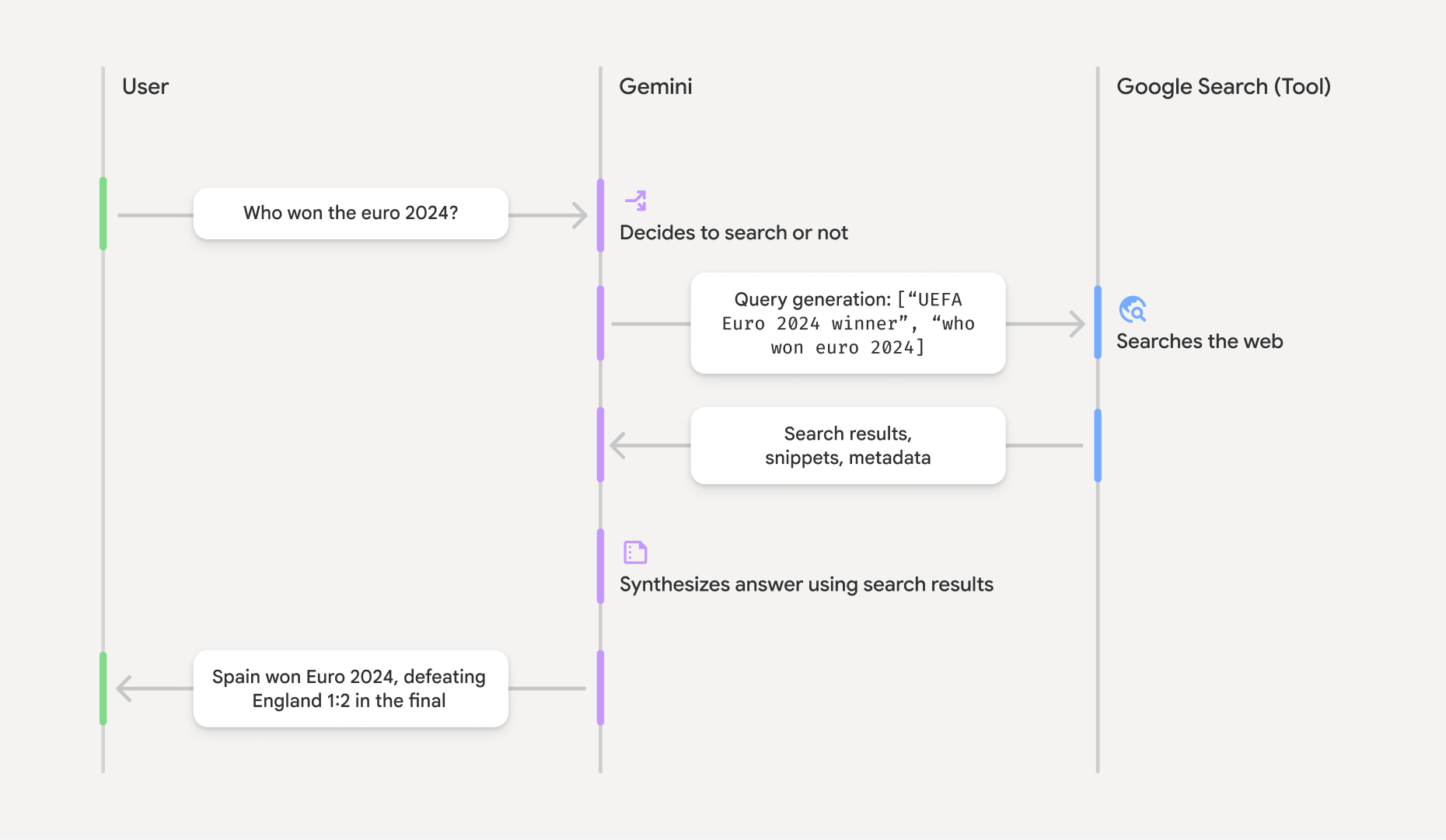
Tìm hiểu kết quả có căn cứ
Nếu mô hình dựa vào kết quả groundingMetadata chứa dữ liệu có cấu trúc cần thiết để xác minh các tuyên bố và tạo trải nghiệm nguồn phong phú trong ứng dụng của bạn.
Đối tượng groundingMetadata trong "kết quả có căn cứ" chứa thông tin sau:
webSearchQueries: Một mảng gồm các cụm từ tìm kiếm được gửi đếnGoogle Search . Thông tin này hữu ích cho việc gỡ lỗi và tìm hiểu quy trình suy luận của mô hình.searchEntryPoint: Chứa HTML và CSS để hiển thị "Google Search đề xuất" bắt buộc. Bạn phải tuân thủ các yêu cầu về việc sử dụng "Căn cứ vàoGoogle Search " đối với nhà cung cấp API mà bạn chọn: Gemini Developer API hoặc Agent Platform Gemini API (formerly Vertex AI) (xem phần Điều khoản dịch vụ trong Điều khoản cụ thể của dịch vụ). Tìm hiểu cách sử dụng và hiển thị kết quả có căn cứ ở phần sau của trang này.groundingChunks: Một mảng các đối tượng chứa các nguồn trên web (urivàtitle).groundingSupports: Một mảng các đoạn để kết nối phản hồi của mô hìnhtextvới các nguồn tronggroundingChunks. Mỗi đoạn liên kết một văn bảnsegment(dostartIndexvàendIndexxác định) với một hoặc nhiềugroundingChunkIndices. Trường này giúp bạn tạo đường liên kết nguồn nội tuyến. Tìm hiểu cách sử dụng và hiển thị kết quả có căn cứ ở phần sau của trang này.
Sau đây là một ví dụ về phản hồi có chứa đối tượng groundingMetadata:
{
  "candidates": [
    {
      "content": {
        "parts": [
          {
            "text": "Spain won Euro 2024, defeating England 2-1 in the final. This victory marks Spain's record fourth European Championship title."
          }
        ],
        "role": "model"
      },
      "groundingMetadata": {
        "webSearchQueries": [
          "UEFA Euro 2024 winner",
          "who won euro 2024"
        ],
        "searchEntryPoint": {
          "renderedContent": "<!-- HTML and CSS for the search widget -->"
        },
        "groundingChunks": [
          {"web": {"uri": "https://vertexaisearch.cloud.google.com.....", "title": "aljazeera.com"}},
          {"web": {"uri": "https://vertexaisearch.cloud.google.com.....", "title": "uefa.com"}}
        ],
        "groundingSupports": [
          {
            "segment": {"startIndex": 0, "endIndex": 85, "text": "Spain won Euro 2024, defeatin..."},
            "groundingChunkIndices": [0]
          },
          {
            "segment": {"startIndex": 86, "endIndex": 210, "text": "This victory marks Spain's..."},
            "groundingChunkIndices": [0, 1]
          }
        ]
      }
    }
  ]
}
Sử dụng và hiển thị kết quả có căn cứ
Nếu dùng công cụ groundingMetadata trong câu trả lời.
Bạn bắt buộc phải hiển thị các đề xuất
Ngoài việc tuân thủ các yêu cầu khi sử dụng công cụ
(Bắt buộc) Hiển thị Google Search đề xuất
Nếu một câu trả lời chứa "
Đối tượng groundingMetadata chứa "searchEntryPoint. Trường này có trường renderedContent cung cấp kiểu HTML và CSS tuân thủ. Bạn cần triển khai kiểu này để hiển thị cụm từ tìm kiếm được đề xuất trong ứng dụng của mình.
Xem thông tin chi tiết về các yêu cầu về cách hiển thị và hành vi đối với đề xuất
Hãy xem các mã mẫu ở phần sau trong phần này.
(Bắt buộc) Hiển thị nguồn
Đối tượng groundingMetadata chứa dữ liệu nguồn có cấu trúc, cụ thể là các trường groundingSupports và groundingChunks. Sử dụng thông tin này để liên kết trực tiếp các câu của mô hình với nguồn của chúng trong giao diện người dùng (nội tuyến và tổng hợp).
Hãy xem các mã mẫu ở phần sau trong phần này.
Mã mẫu ví dụ
Các mẫu mã này cung cấp các mẫu khái quát để sử dụng và hiển thị kết quả có căn cứ. Tuy nhiên, bạn có trách nhiệm đảm bảo rằng việc triển khai cụ thể của bạn tuân thủ các yêu cầu về việc tuân thủ.
Swift
// ...

// Get the model's response
let text = response.text

// Get the grounding metadata
if let candidate = response.candidates.first,
   let groundingMetadata = candidate.groundingMetadata {
  // REQUIRED - display Google Search suggestions
  // (renderedContent contains HTML and CSS for the search widget)
  if let renderedContent = groundingMetadata.searchEntryPoint?.renderedContent {
    // TODO(developer): Display Google Search suggestions using a WebView
  }

  // REQUIRED - display sources
  let groundingChunks = groundingMetadata.groundingChunks
  for chunk in groundingMetadata.groundingChunks {
    if let web = chunk.web {
      let title = web.title  // for example, "uefa.com"
      let uri = web.uri  // for example, "https://vertexaisearch.cloud.google.com..."
      // TODO(developer): show source in the UI
    }
  }
}
Kotlin
// ...

// Get the model's response
val text = response.text

// Get the grounding metadata
val groundingMetadata = response.candidates.firstOrNull()?.groundingMetadata

// REQUIRED - display Google Search suggestions
// (renderedContent contains HTML and CSS for the search widget)
val renderedContent = groundingMetadata?.searchEntryPoint?.renderedContent
if (renderedContent != null) {
    // TODO(developer): Display Google Search suggestions using a WebView
}

// REQUIRED - display sources
val groundingChunks = groundingMetadata?.groundingChunks
groundingChunks?.let { chunks ->
  for (chunk in chunks) {
  	val title = chunk.web?.title  // for example, "uefa.com"
	val uri = chunk.web?.uri  // for example, "https://vertexaisearch.cloud.google.com..."
// TODO(developer): show source in the UI
  }
}
Java
// ...

Futures.addCallback(response, new FutureCallback() {
  @Override
  public void onSuccess(GenerateContentResponse result) {
  // Get the model's response
  String text = result.getText();

  // Get the grounding metadata
  GroundingMetadata groundingMetadata =
  result.getCandidates()[0].getGroundingMetadata();

  if (groundingMetadata != null) {
    // REQUIRED - display Google Search suggestions
  // (renderedContent contains HTML and CSS for the search widget)
    String renderedContent =
  groundingMetadata.getSearchEntryPoint().getRenderedContent();
    if (renderedContent != null) {
      // TODO(developer): Display Google Search suggestions using a WebView
    }

    // REQUIRED - display sources
    List chunks = groundingMetadata.getGroundingChunks();
    if (chunks != null) {
      for(GroundingChunk chunk : chunks) {
        WebGroundingChunk web = chunk.getWeb();
        if (web != null) {
          String title = web.getTitle();  // for example, "uefa.com"
          String uri = web.getUri();  // for example, "https://vertexaisearch.cloud.google.com..."
          // TODO(developer): show sources in the UI
        }
      }
    }
  }
  }

  @Override
  public void onFailure(Throwable t) {
  t.printStackTrace();
  }
  }, executor);
Web
// ...

// Get the model's text response
const text = result.response.text();

// Get the grounding metadata
const groundingMetadata = result.response.candidates?.[0]?.groundingMetadata;

// REQUIRED - display Google Search suggestions
// (renderedContent contains HTML and CSS for the search widget)
const renderedContent = groundingMetadata?.searchEntryPoint?.renderedContent;
if (renderedContent) {
  // TODO(developer): render this HTML and CSS in the UI
}

// REQUIRED - display sources
const groundingChunks = groundingMetadata?.groundingChunks;
if (groundingChunks) {
  for (const chunk of groundingChunks) {
    const title = chunk.web?.title;  // for example, "uefa.com"
    const uri = chunk.web?.uri;  // for example, "https://vertexaisearch.cloud.google.com..."
    // TODO(developer): show sources in the UI
  }
}
Dart
// ...

// Get the model's response
final text = response.text;

// Get the grounding metadata
final groundingMetadata = response.candidates.first.groundingMetadata;

// REQUIRED - display Google Search suggestions
// (renderedContent contains HTML and CSS for the search widget)
final renderedContent = groundingMetadata?.searchEntryPoint?.renderedContent;
if (renderedContent != null) {
    // TODO(developer): Display Google Search suggestions using a WebView
}

// REQUIRED - display sources
final groundingChunks = groundingMetadata?.groundingChunks;
if (groundingChunks != null) {
  for (var chunk in groundingChunks) {
    final title = chunk.web?.title;  // for example, "uefa.com"
    final uri = chunk.web?.uri;  // for example, "https://vertexaisearch.cloud.google.com..."
    // TODO(developer): show sources in the UI
  }
}
Unity
// ...

// Get the model's response.
var text = response.Text;

// Get the grounding metadata.
var groundingMetadata = response.Candidates.First().GroundingMetadata.Value;

// REQUIRED - display Google Search suggestions
// (renderedContent contains HTML and CSS for the search widget)
if (groundingMetadata.SearchEntryPoint.HasValue) {
    var renderedContent = groundingMetadata.SearchEntryPoint.Value.RenderedContent;
    // TODO(developer): Display Google Search suggestions using a WebView
}

// REQUIRED - display sources
foreach(GroundingChunk chunk in groundingMetadata.GroundingChunks) {
    var title = chunk.Web.Value.Title;  // for example, "uefa.com"
    var uri = chunk.Web.Value.Uri;  // for example, "https://vertexaisearch.cloud.google.com..."
    // TODO(developer): show sources in the UI
}
Kết quả dựa trên thông tin thực tế và hoạt động giám sát bằng AI trong bảng điều khiển Firebase
Nếu bạn đã bật tính năng giám sát bằng AI trong bảng điều khiển Firebase, thì các câu trả lời sẽ được lưu trữ trong Cloud Logging. Theo mặc định, dữ liệu này có thời gian lưu giữ là 30 ngày.
Bạn có trách nhiệm đảm bảo rằng khoảng thời gian lưu giữ này hoặc bất kỳ khoảng thời gian tuỳ chỉnh nào mà bạn đặt hoàn toàn phù hợp với trường hợp sử dụng cụ thể của bạn và mọi yêu cầu bổ sung về việc tuân thủ đối với nhà cung cấp Gemini API mà bạn chọn: Gemini Developer API hoặc Agent Platform Gemini API (formerly Vertex AI) (xem phần Điều khoản dịch vụ trong Điều khoản cụ thể về dịch vụ). Bạn có thể cần điều chỉnh khoảng thời gian lưu giữ trong Cloud Logging để đáp ứng những yêu cầu này.
Giá và giới hạn
Hãy nhớ xem xét mức giá, phạm vi cung cấp mô hình và hạn mức đối với tính năng Nền tảng kiến thức bằng