

- तथ्यों की सटीक जानकारी देना: असल दुनिया की जानकारी के आधार पर जवाब देकर, मॉडल के गलत जवाब देने की समस्या को कम करना.
- रीयल-टाइम में जानकारी पाना: हाल के इवेंट और विषयों के बारे में सवालों के जवाब देना.
- सोर्स की जानकारी देना: मॉडल के दावों के सोर्स दिखाकर, उपयोगकर्ताओं का भरोसा जीतना या उपयोगकर्ताओं को काम की साइटें ब्राउज़ करने की अनुमति देना.
- ज़्यादा मुश्किल टास्क पूरे करना: गहराई से विश्लेषण वाले टास्क में मदद करने के लिए, आर्टफ़ैक्ट और काम की इमेज, वीडियो या अन्य मीडिया को वापस पाना.
- इलाके या भाषा के हिसाब से बेहतर जवाब देना: इलाके के हिसाब से जानकारी ढूंढना या कॉन्टेंट का सटीक अनुवाद करने में मदद करना.
इस्तेमाल किए जा सकने वाले मॉडल
gemini-3.1-pro-previewgemini-3.7-flash(और पुरानेgemini-3.6-flashऔरgemini-3.5-flash)gemini-3.5-flash-lite(और पुरानाgemini-3.1-flash-lite)gemini-3-pro-image(इसे "Nano Banana Pro" भी कहा जाता है)gemini-3.1-flash-image(इसे "Nano Banana 2" भी कहा जाता है)
आम तौर पर इस्तेमाल किए जाने वाले Gemini 2.5 मॉडल, इस सुविधा के साथ काम करते हैं. हालांकि, इन सभी मॉडल को बंद कर दिया गया है.
यह सुविधा इन भाषाओं में काम करती है
मॉडल के लिए, इस्तेमाल की जा सकने वाली Gemini भाषाएं देखें.
Google Search से सटीक जानकारी पाने की सुविधा का इस्तेमाल करना
|
इस पेज पर, अपने Gemini API प्रोवाइडर के हिसाब से कॉन्टेंट और कोड देखने के लिए, प्रोवाइडर के नाम पर क्लिक करें. |
GenerativeModel इंस्टेंस बनाते समय, GoogleSearch को tool के तौर पर शामिल करें, ताकि मॉडल इसका इस्तेमाल करके जवाब जनरेट कर सके.
Swift
import FirebaseAILogic

// Initialize the Gemini Developer API backend service.
let ai = FirebaseAI.firebaseAI(backend: .googleAI())

// Create a `GenerativeModel` instance with a model that supports your use case.
let model = ai.generativeModel(
    modelName: "GEMINI_MODEL_NAME",
    // Provide Google Search as a tool that the model can use to generate its response.
    tools: [Tool.googleSearch()]
)

let response = try await model.generateContent("Who won the euro 2024?")
print(response.text ?? "No text in response.")

// Make sure to comply with the "Grounding with Google Search" usage requirements,
// which includes how you use and display the grounded result
Kotlin
// Initialize the Gemini Developer API backend service.
// Create a `GenerativeModel` instance with a model that supports your use case.
val model = Firebase.ai(backend = GenerativeBackend.googleAI()).generativeModel(
    modelName = "GEMINI_MODEL_NAME",
    // Provide Google Search as a tool that the model can use to generate its response
    tools = listOf(Tool.googleSearch())
)

val response = model.generateContent("Who won the euro 2024?")
print(response.text)

// Make sure to comply with the "Grounding with Google Search" usage requirements,
// which includes how you use and display the grounded result
Java
// Initialize the Gemini Developer API backend service.
// Create a `GenerativeModel` instance with a model that supports your use case.
GenerativeModel ai = FirebaseAI.getInstance(GenerativeBackend.googleAI())
                .generativeModel("GEMINI_MODEL_NAME",
                        null,
                        null,
                        // Provide Google Search as a tool that the model can use to generate its response
                        List.of(Tool.GoogleSearch()));

// Use the GenerativeModelFutures Java compatibility layer which offers
// support for ListenableFuture and Publisher APIs
GenerativeModelFutures model = GenerativeModelFutures.from(ai);

ListenableFuture response = model.generateContent("Who won the euro 2024?");
  Futures.addCallback(response, new FutureCallback() {
      @Override
      public void onSuccess(GenerateContentResponse result) {
          String resultText = result.getText();
          System.out.println(resultText);
      }

      @Override
      public void onFailure(Throwable t) {
          t.printStackTrace();
      }
  }, executor);

// Make sure to comply with the "Grounding with Google Search" usage requirements,
// which includes how you use and display the grounded result
Web
import { initializeApp } from "firebase/app";
import { getAI, getGenerativeModel, GoogleAIBackend } from "firebase/ai";

// TODO(developer): Replace the following with your app's Firebase configuration
// See: https://firebase.google.com/docs/web/learn-more#config-object
const firebaseConfig = {
  // ...
};

// Initialize FirebaseApp
const firebaseApp = initializeApp(firebaseConfig);

// Initialize the Gemini Developer API backend service.
const ai = getAI(firebaseApp, { backend: new GoogleAIBackend() });

// Create a `GenerativeModel` instance with a model that supports your use case.
const model = getGenerativeModel(
  ai,
  {
    model: "GEMINI_MODEL_NAME",
    // Provide Google Search as a tool that the model can use to generate its response
    tools: [{ googleSearch: {} }]
  }
);

const result = await model.generateContent("Who won the euro 2024?");

console.log(result.response.text());

// Make sure to comply with the "Grounding with Google Search" usage requirements,
// which includes how you use and display the grounded result
Dart
import 'package:firebase_core/firebase_core.dart';
import 'package:firebase_ai/firebase_ai.dart';
import 'firebase_options.dart';

// Initialize FirebaseApp.
await Firebase.initializeApp(
  options: DefaultFirebaseOptions.currentPlatform,
);

// Initialize the Gemini Developer API backend service.
// Create a `GenerativeModel` instance with a model that supports your use case.
final model = FirebaseAI.googleAI().generativeModel(
  model: 'GEMINI_MODEL_NAME',
  // Provide Google Search as a tool that the model can use to generate its response.
  tools: [
    Tool.googleSearch(),
  ],
);

final response = await model.generateContent([Content.text("Who won the euro 2024?")]);
print(response.text);

// Make sure to comply with the "Grounding with Google Search" usage requirements,
// which includes how you use and display the grounded result
Unity
using Firebase;
using Firebase.AI;

// Initialize the Gemini Developer API backend service.
var ai = FirebaseAI.GetInstance(FirebaseAI.Backend.GoogleAI());

// Create a `GenerativeModel` instance with a model that supports your use case.
var model = ai.GetGenerativeModel(
  modelName: "GEMINI_MODEL_NAME",
  // Provide Google Search as a tool that the model can use to generate its response.
  tools: new[] { new Tool(new GoogleSearch()) }
);

var response = await model.GenerateContentAsync("Who won the euro 2024?");
UnityEngine.Debug.Log(response.Text ?? "No text in response.");

// Make sure to comply with the "Grounding with Google Search" usage requirements,
// which includes how you use and display the grounded result
अपने इस्तेमाल के उदाहरण और ऐप्लिकेशन के लिए, मॉडल चुनने का तरीका जानें. इसके अलावा, यह भी जानें कि मॉडल की जगह चुनना ज़रूरी है या नहीं.
Google Search के साथ सटीक जानकारी पाने की सुविधा कैसे काम करती है
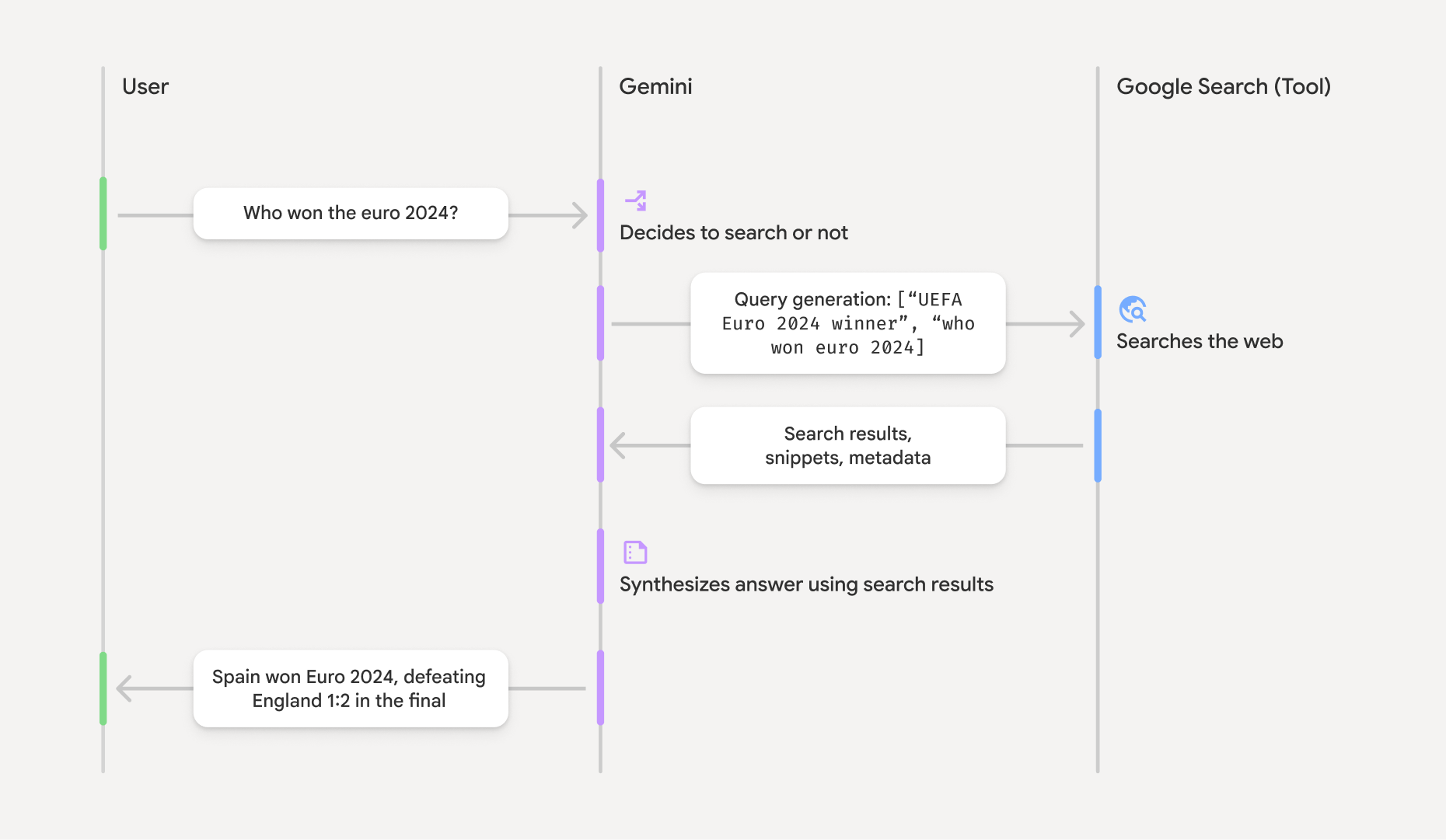
GoogleSearch टूल का इस्तेमाल करने पर, मॉडल, जानकारी खोजने, उसे प्रोसेस करने, और सोर्स की जानकारी देने का पूरा वर्कफ़्लो अपने-आप मैनेज करता है.
मॉडल का वर्कफ़्लो यहां दिया गया है:
- प्रॉम्प्ट पाना: आपका ऐप्लिकेशन, Gemini मॉडल
को
GoogleSearchटूल चालू करके एक प्रॉम्प्ट भेजता है. - प्रॉम्प्ट का विश्लेषण करना: मॉडल, प्रॉम्प्ट का विश्लेषण करता है और यह तय करता है कि
Google Search की मदद से, जवाब को बेहतर बनाया जा सकता है या नहीं. - क्वेरी को
Google Search भेजना: अगर ज़रूरत होती है, तो मॉडल अपने-आप एक या एक से ज़्यादा खोज क्वेरी जनरेट करता है और उन्हें एक्ज़ीक्यूट करता है. - खोज के नतीजों को प्रोसेस करना: मॉडल,
Google Search नतीजों को प्रोसेस करता है और ओरिजनल प्रॉम्प्ट का जवाब तैयार करता है. - "Google Search से सटीक जानकारी पाने की सुविधा का इस्तेमाल करके मिला नतीजा" दिखाना: मॉडल,
Google Search नतीजों के आधार पर, उपयोगकर्ता के लिए एक आसान और सटीक जवाब दिखाता है. इस जवाब में, मॉडल का टेक्स्ट जवाब औरgroundingMetadataशामिल होता है. इसमें खोज क्वेरी, वेब नतीजे, और सोर्स की जानकारी होती है.
ध्यान दें कि मॉडल को groundingMetadata ऑब्जेक्ट शामिल नहीं होगा. इसलिए, यह "Google Search से सटीक जानकारी पाने की सुविधा का इस्तेमाल करके मिला नतीजा" नहीं है.
Google Search से सटीक जानकारी पाने की सुविधा का इस्तेमाल करके मिले नतीजे को समझना
अगर मॉडल, groundingMetadata ऑब्जेक्ट शामिल होता है. इसमें स्ट्रक्चर्ड डेटा होता है.
यह डेटा, दावों की पुष्टि करने और
आपके ऐप्लिकेशन में सोर्स की जानकारी को बेहतर बनाने के लिए ज़रूरी है.
"Google Search से सटीक जानकारी पाने की सुविधा का इस्तेमाल करके मिले नतीजे" में मौजूद groundingMetadata ऑब्जेक्ट में यह जानकारी शामिल होती है:
webSearchQueries: को भेजी गई खोज क्वेरी का कलेक्शनGoogle Search . यह जानकारी, डीबग करने और मॉडल की तर्क करने की प्रोसेस को समझने के लिए काम की है.searchEntryPoint: इसमें ज़रूरी "Google Search सुझाव" दिखाने के लिए, एचटीएमएल और सीएसएस शामिल होता है. आपको अपने चुने गए एपीआई प्रोवाइडर: Gemini Developer API या Agent Platform Gemini API (formerly Vertex AI) के लिए, "Google Search से सटीक जानकारी पाने की सुविधा" के इस्तेमाल से जुड़ी ज़रूरी शर्तों का पालन करना होगा. इसके लिए, सेवा की शर्तें सेक्शन में, सेवा की खास शर्तें देखें. इस पेज पर, Google Search से सटीक जानकारी पाने की सुविधा का इस्तेमाल करके मिले नतीजे को इस्तेमाल करने और दिखाने का तरीका जानें.groundingChunks: वेब सोर्स (uriऔरtitle) वाले ऑब्जेक्ट का कलेक्शन.groundingSupports: मॉडल के जवाबtextकोgroundingChunksमें मौजूद सोर्स से कनेक्ट करने के लिए, कलेक्शन. हर कलेक्शन, टेक्स्टsegment(जिसेstartIndexऔरendIndexसे तय किया जाता है) को एक या एक से ज़्यादाgroundingChunkIndicesसे लिंक करता है. इस फ़ील्ड की मदद से, इनलाइन सोर्स लिंक बनाए जा सकते हैं. इस पेज पर, Google Search से सटीक जानकारी पाने की सुविधा का इस्तेमाल करके मिले नतीजे को इस्तेमाल करने और दिखाने का तरीका जानें.
यहां एक जवाब का उदाहरण दिया गया है, जिसमें groundingMetadata ऑब्जेक्ट शामिल है:
{
  "candidates": [
    {
      "content": {
        "parts": [
          {
            "text": "Spain won Euro 2024, defeating England 2-1 in the final. This victory marks Spain's record fourth European Championship title."
          }
        ],
        "role": "model"
      },
      "groundingMetadata": {
        "webSearchQueries": [
          "UEFA Euro 2024 winner",
          "who won euro 2024"
        ],
        "searchEntryPoint": {
          "renderedContent": "<!-- HTML and CSS for the search widget -->"
        },
        "groundingChunks": [
          {"web": {"uri": "https://vertexaisearch.cloud.google.com.....", "title": "aljazeera.com"}},
          {"web": {"uri": "https://vertexaisearch.cloud.google.com.....", "title": "uefa.com"}}
        ],
        "groundingSupports": [
          {
            "segment": {"startIndex": 0, "endIndex": 85, "text": "Spain won Euro 2024, defeatin..."},
            "groundingChunkIndices": [0]
          },
          {
            "segment": {"startIndex": 86, "endIndex": 210, "text": "This victory marks Spain's..."},
            "groundingChunkIndices": [0, 1]
          }
        ]
      }
    }
  ]
}
Google Search से सटीक जानकारी पाने की सुविधा का इस्तेमाल करके मिले नतीजे को इस्तेमाल करना और दिखाना
अगर मॉडल, जवाब जनरेट करने के लिए groundingMetadata ऑब्जेक्ट उपलब्ध कराएगा.
Google Search के सुझाव
(ज़रूरी) Google Search सुझाव दिखाना
अगर किसी जवाब में "
`groundingMetadata` ऑब्जेक्ट में "searchEntryPoint` फ़ील्ड में `renderedContent` फ़ील्ड होता है. इसमें, एचटीएमएल और सीएसएस स्टाइलिंग शामिल होती है, जो ज़रूरी शर्तों के मुताबिक होती है. आपको अपने ऐप्लिकेशन में खोज के सुझाव दिखाने के लिए, इसे लागू करना होगा.
Google Cloudदस्तावेज़ में,
इस सेक्शन में, कोड के सैंपल के उदाहरण देखें.
(ज़रूरी) सोर्स दिखाना
groundingMetadata ऑब्जेक्ट में, सोर्स का स्ट्रक्चर्ड डेटा शामिल होता है. खास तौर पर, groundingSupports और groundingChunks फ़ील्ड शामिल होते हैं. इस जानकारी का इस्तेमाल करके, मॉडल के स्टेटमेंट को सीधे अपने यूज़र इंटरफ़ेस (यूआई) में मौजूद सोर्स से लिंक करें. इसके लिए, इनलाइन और एग्रीगेट का इस्तेमाल करें.
इस सेक्शन में, कोड के सैंपल के उदाहरण देखें.
कोड के सैंपल के उदाहरण
इन कोड के सैंपल में, Google Search से सटीक जानकारी पाने की सुविधा का इस्तेमाल करके मिले नतीजे को इस्तेमाल करने और दिखाने के लिए, सामान्य पैटर्न दिए गए हैं. हालांकि, यह पक्का करना आपकी ज़िम्मेदारी है कि आपका खास तौर पर लागू किया गया पैटर्न, ज़रूरी शर्तों के मुताबिक हो.
Swift
// ...

// Get the model's response
let text = response.text

// Get the grounding metadata
if let candidate = response.candidates.first,
   let groundingMetadata = candidate.groundingMetadata {
  // REQUIRED - display Google Search suggestions
  // (renderedContent contains HTML and CSS for the search widget)
  if let renderedContent = groundingMetadata.searchEntryPoint?.renderedContent {
    // TODO(developer): Display Google Search suggestions using a WebView
  }

  // REQUIRED - display sources
  let groundingChunks = groundingMetadata.groundingChunks
  for chunk in groundingMetadata.groundingChunks {
    if let web = chunk.web {
      let title = web.title  // for example, "uefa.com"
      let uri = web.uri  // for example, "https://vertexaisearch.cloud.google.com..."
      // TODO(developer): show source in the UI
    }
  }
}
Kotlin
// ...

// Get the model's response
val text = response.text

// Get the grounding metadata
val groundingMetadata = response.candidates.firstOrNull()?.groundingMetadata

// REQUIRED - display Google Search suggestions
// (renderedContent contains HTML and CSS for the search widget)
val renderedContent = groundingMetadata?.searchEntryPoint?.renderedContent
if (renderedContent != null) {
    // TODO(developer): Display Google Search suggestions using a WebView
}

// REQUIRED - display sources
val groundingChunks = groundingMetadata?.groundingChunks
groundingChunks?.let { chunks ->
  for (chunk in chunks) {
  	val title = chunk.web?.title  // for example, "uefa.com"
	val uri = chunk.web?.uri  // for example, "https://vertexaisearch.cloud.google.com..."
// TODO(developer): show source in the UI
  }
}
Java
// ...

Futures.addCallback(response, new FutureCallback() {
  @Override
  public void onSuccess(GenerateContentResponse result) {
  // Get the model's response
  String text = result.getText();

  // Get the grounding metadata
  GroundingMetadata groundingMetadata =
  result.getCandidates()[0].getGroundingMetadata();

  if (groundingMetadata != null) {
    // REQUIRED - display Google Search suggestions
  // (renderedContent contains HTML and CSS for the search widget)
    String renderedContent =
  groundingMetadata.getSearchEntryPoint().getRenderedContent();
    if (renderedContent != null) {
      // TODO(developer): Display Google Search suggestions using a WebView
    }

    // REQUIRED - display sources
    List chunks = groundingMetadata.getGroundingChunks();
    if (chunks != null) {
      for(GroundingChunk chunk : chunks) {
        WebGroundingChunk web = chunk.getWeb();
        if (web != null) {
          String title = web.getTitle();  // for example, "uefa.com"
          String uri = web.getUri();  // for example, "https://vertexaisearch.cloud.google.com..."
          // TODO(developer): show sources in the UI
        }
      }
    }
  }
  }

  @Override
  public void onFailure(Throwable t) {
  t.printStackTrace();
  }
  }, executor);
Web
// ...

// Get the model's text response
const text = result.response.text();

// Get the grounding metadata
const groundingMetadata = result.response.candidates?.[0]?.groundingMetadata;

// REQUIRED - display Google Search suggestions
// (renderedContent contains HTML and CSS for the search widget)
const renderedContent = groundingMetadata?.searchEntryPoint?.renderedContent;
if (renderedContent) {
  // TODO(developer): render this HTML and CSS in the UI
}

// REQUIRED - display sources
const groundingChunks = groundingMetadata?.groundingChunks;
if (groundingChunks) {
  for (const chunk of groundingChunks) {
    const title = chunk.web?.title;  // for example, "uefa.com"
    const uri = chunk.web?.uri;  // for example, "https://vertexaisearch.cloud.google.com..."
    // TODO(developer): show sources in the UI
  }
}
Dart
// ...

// Get the model's response
final text = response.text;

// Get the grounding metadata
final groundingMetadata = response.candidates.first.groundingMetadata;

// REQUIRED - display Google Search suggestions
// (renderedContent contains HTML and CSS for the search widget)
final renderedContent = groundingMetadata?.searchEntryPoint?.renderedContent;
if (renderedContent != null) {
    // TODO(developer): Display Google Search suggestions using a WebView
}

// REQUIRED - display sources
final groundingChunks = groundingMetadata?.groundingChunks;
if (groundingChunks != null) {
  for (var chunk in groundingChunks) {
    final title = chunk.web?.title;  // for example, "uefa.com"
    final uri = chunk.web?.uri;  // for example, "https://vertexaisearch.cloud.google.com..."
    // TODO(developer): show sources in the UI
  }
}
Unity
// ...

// Get the model's response.
var text = response.Text;

// Get the grounding metadata.
var groundingMetadata = response.Candidates.First().GroundingMetadata.Value;

// REQUIRED - display Google Search suggestions
// (renderedContent contains HTML and CSS for the search widget)
if (groundingMetadata.SearchEntryPoint.HasValue) {
    var renderedContent = groundingMetadata.SearchEntryPoint.Value.RenderedContent;
    // TODO(developer): Display Google Search suggestions using a WebView
}

// REQUIRED - display sources
foreach(GroundingChunk chunk in groundingMetadata.GroundingChunks) {
    var title = chunk.Web.Value.Title;  // for example, "uefa.com"
    var uri = chunk.Web.Value.Uri;  // for example, "https://vertexaisearch.cloud.google.com..."
    // TODO(developer): show sources in the UI
}
Firebase console में, Google Search से सटीक जानकारी पाने की सुविधा का इस्तेमाल करके मिले नतीजे और एआई मॉनिटरिंग की सुविधा
अगर आपने एआई मॉनिटरिंग की सुविधा Firebase console में चालू की है, तो जवाब Cloud Logging में सेव किए जाते हैं. डिफ़ॉल्ट रूप से, इस डेटा को 30 दिनों तक सेव रखा जाता है.
यह पक्का करना आपकी ज़िम्मेदारी है कि डेटा को सेव रखने की यह अवधि या आपके सेट की गई कोई भी कस्टम अवधि, आपके इस्तेमाल के उदाहरण और आपके चुने गए Gemini API प्रोवाइडर: Gemini Developer API या Agent Platform Gemini API (formerly Vertex AI) के लिए, ज़रूरी शर्तों के मुताबिक हो. इसके लिए, सेवा की खास शर्तों में, सेवा की शर्तें सेक्शन देखें. इन ज़रूरी शर्तों को पूरा करने के लिए, आपको डेटा को सेव रखने की अवधि में Cloud Logging बदलाव करना पड़ सकता है.
कीमत और सीमाएं
अपने चुने गए Gemini API प्रोवाइडर के दस्तावेज़ में,