

- তথ্যগত নির্ভুলতা বৃদ্ধি করুন : বাস্তব জগতের তথ্যের উপর ভিত্তি করে প্রতিক্রিয়া তৈরি করে মডেলের বিভ্রম হ্রাস করুন।
- রিয়েল-টাইম তথ্য জানুন : সাম্প্রতিক ঘটনা ও বিষয় সম্পর্কে প্রশ্নের উত্তর দিন।
- উৎস প্রদান করুন : মডেলের দাবির উৎসগুলো দেখিয়ে ব্যবহারকারীর আস্থা তৈরি করুন অথবা তাদেরকে প্রাসঙ্গিক সাইটগুলো ব্রাউজ করার সুযোগ দিন।
- আরও জটিল কাজ সম্পন্ন করুন : যুক্তিমূলক কাজে সহায়তার জন্য প্রত্নবস্তু এবং প্রাসঙ্গিক ছবি, ভিডিও বা অন্যান্য মিডিয়া সংগ্রহ করুন।
- অঞ্চল বা ভাষা-ভিত্তিক প্রতিক্রিয়া উন্নত করুন : অঞ্চল-ভিত্তিক তথ্য খুঁজুন, অথবা বিষয়বস্তু নির্ভুলভাবে অনুবাদ করতে সহায়তা করুন।
সমর্থিত মডেল
-
gemini-3.1-pro-preview -
gemini-3.8-flash(এবং পুরোনোgemini-3.7-flash,gemini-3.6-flash, ওgemini-3.5-flash) -
gemini-3.5-flash-lite(এবং পুরোনোgemini-3.1-flash-lite) -
gemini-3-pro-image(ওরফে "ন্যানো বানানা প্রো") -
gemini-3.1-flash-image(ওরফে "ন্যানো বানানা ২")
সাধারণ ব্যবহারের জেমিনি ২.৫ মডেলগুলিতে এই সক্ষমতা ছিল, কিন্তু সেগুলি এখন আর ব্যবহৃত হয় না।
Gemini Live API মডেলগুলোও এই সক্ষমতা সমর্থন করে, কিন্তু এই গাইডের সমস্ত কোড নমুনা সাধারণ ব্যবহারের জেমিনি মডেলগুলোর জন্য।
সমর্থিত ভাষা
জেমিনি মডেলগুলির জন্য সমর্থিত ভাষাগুলি দেখুন।
Google Search মাধ্যমে মডেলটির ভিত্তি স্থাপন করুন।
এই পৃষ্ঠায় প্রদানকারী-নির্দিষ্ট বিষয়বস্তু এবং কোড দেখতে আপনার জেমিনি এপিআই প্রদানকারীর উপর ক্লিক করুন। |
যখন আপনি GenerativeModel ইনস্ট্যান্সটি তৈরি করবেন, তখন মডেলটির প্রতিক্রিয়া তৈরি করার জন্য একটি tool হিসেবে GoogleSearch প্রদান করুন।
সুইফট
import FirebaseAILogic

// Initialize the Gemini Developer API backend service.
let ai = FirebaseAI.firebaseAI(backend: .googleAI())

// Create a `GenerativeModel` instance with a model that supports your use case.
let model = ai.generativeModel(
    modelName: "GEMINI_MODEL_NAME",
    // Provide Google Search as a tool that the model can use to generate its response.
    tools: [Tool.googleSearch()]
)

let response = try await model.generateContent("Who won the euro 2024?")
print(response.text ?? "No text in response.")

// Make sure to comply with the "Grounding with Google Search" usage requirements,
// which includes how you use and display the grounded result
Kotlin
// Initialize the Gemini Developer API backend service.
// Create a `GenerativeModel` instance with a model that supports your use case.
val model = Firebase.ai(backend = GenerativeBackend.googleAI()).generativeModel(
    modelName = "GEMINI_MODEL_NAME",
    // Provide Google Search as a tool that the model can use to generate its response
    tools = listOf(Tool.googleSearch())
)

val response = model.generateContent("Who won the euro 2024?")
print(response.text)

// Make sure to comply with the "Grounding with Google Search" usage requirements,
// which includes how you use and display the grounded result
Java
// Initialize the Gemini Developer API backend service.
// Create a `GenerativeModel` instance with a model that supports your use case.
GenerativeModel ai = FirebaseAI.getInstance(GenerativeBackend.googleAI())
                .generativeModel("GEMINI_MODEL_NAME",
                        null,
                        null,
                        // Provide Google Search as a tool that the model can use to generate its response
                        List.of(Tool.GoogleSearch()));

// Use the GenerativeModelFutures Java compatibility layer which offers
// support for ListenableFuture and Publisher APIs
GenerativeModelFutures model = GenerativeModelFutures.from(ai);

ListenableFuture response = model.generateContent("Who won the euro 2024?");
  Futures.addCallback(response, new FutureCallback() {
      @Override
      public void onSuccess(GenerateContentResponse result) {
          String resultText = result.getText();
          System.out.println(resultText);
      }

      @Override
      public void onFailure(Throwable t) {
          t.printStackTrace();
      }
  }, executor);

// Make sure to comply with the "Grounding with Google Search" usage requirements,
// which includes how you use and display the grounded result
Web
import { initializeApp } from "firebase/app";
import { getAI, getGenerativeModel, GoogleAIBackend } from "firebase/ai";

// TODO(developer): Replace the following with your app's Firebase configuration
// See: https://firebase.google.com/docs/web/learn-more#config-object
const firebaseConfig = {
  // ...
};

// Initialize FirebaseApp
const firebaseApp = initializeApp(firebaseConfig);

// Initialize the Gemini Developer API backend service.
const ai = getAI(firebaseApp, { backend: new GoogleAIBackend() });

// Create a `GenerativeModel` instance with a model that supports your use case.
const model = getGenerativeModel(
  ai,
  {
    model: "GEMINI_MODEL_NAME",
    // Provide Google Search as a tool that the model can use to generate its response
    tools: [{ googleSearch: {} }]
  }
);

const result = await model.generateContent("Who won the euro 2024?");

console.log(result.response.text());

// Make sure to comply with the "Grounding with Google Search" usage requirements,
// which includes how you use and display the grounded result
Dart
import 'package:firebase_core/firebase_core.dart';
import 'package:firebase_ai/firebase_ai.dart';
import 'firebase_options.dart';

// Initialize FirebaseApp.
await Firebase.initializeApp(
  options: DefaultFirebaseOptions.currentPlatform,
);

// Initialize the Gemini Developer API backend service.
// Create a `GenerativeModel` instance with a model that supports your use case.
final model = FirebaseAI.googleAI().generativeModel(
  model: 'GEMINI_MODEL_NAME',
  // Provide Google Search as a tool that the model can use to generate its response.
  tools: [
    Tool.googleSearch(),
  ],
);

final response = await model.generateContent([Content.text("Who won the euro 2024?")]);
print(response.text);

// Make sure to comply with the "Grounding with Google Search" usage requirements,
// which includes how you use and display the grounded result
ঐক্য
using Firebase;
using Firebase.AI;

// Initialize the Gemini Developer API backend service.
var ai = FirebaseAI.GetInstance(FirebaseAI.Backend.GoogleAI());

// Create a `GenerativeModel` instance with a model that supports your use case.
var model = ai.GetGenerativeModel(
  modelName: "GEMINI_MODEL_NAME",
  // Provide Google Search as a tool that the model can use to generate its response.
  tools: new[] { new Tool(new GoogleSearch()) }
);

var response = await model.GenerateContentAsync("Who won the euro 2024?");
UnityEngine.Debug.Log(response.Text ?? "No text in response.");

// Make sure to comply with the "Grounding with Google Search" usage requirements,
// which includes how you use and display the grounded result
কীভাবে একটি মডেল বেছে নিতে হয় তা জানুনআপনার ব্যবহারের ক্ষেত্র এবং অ্যাপের জন্য উপযুক্ত।
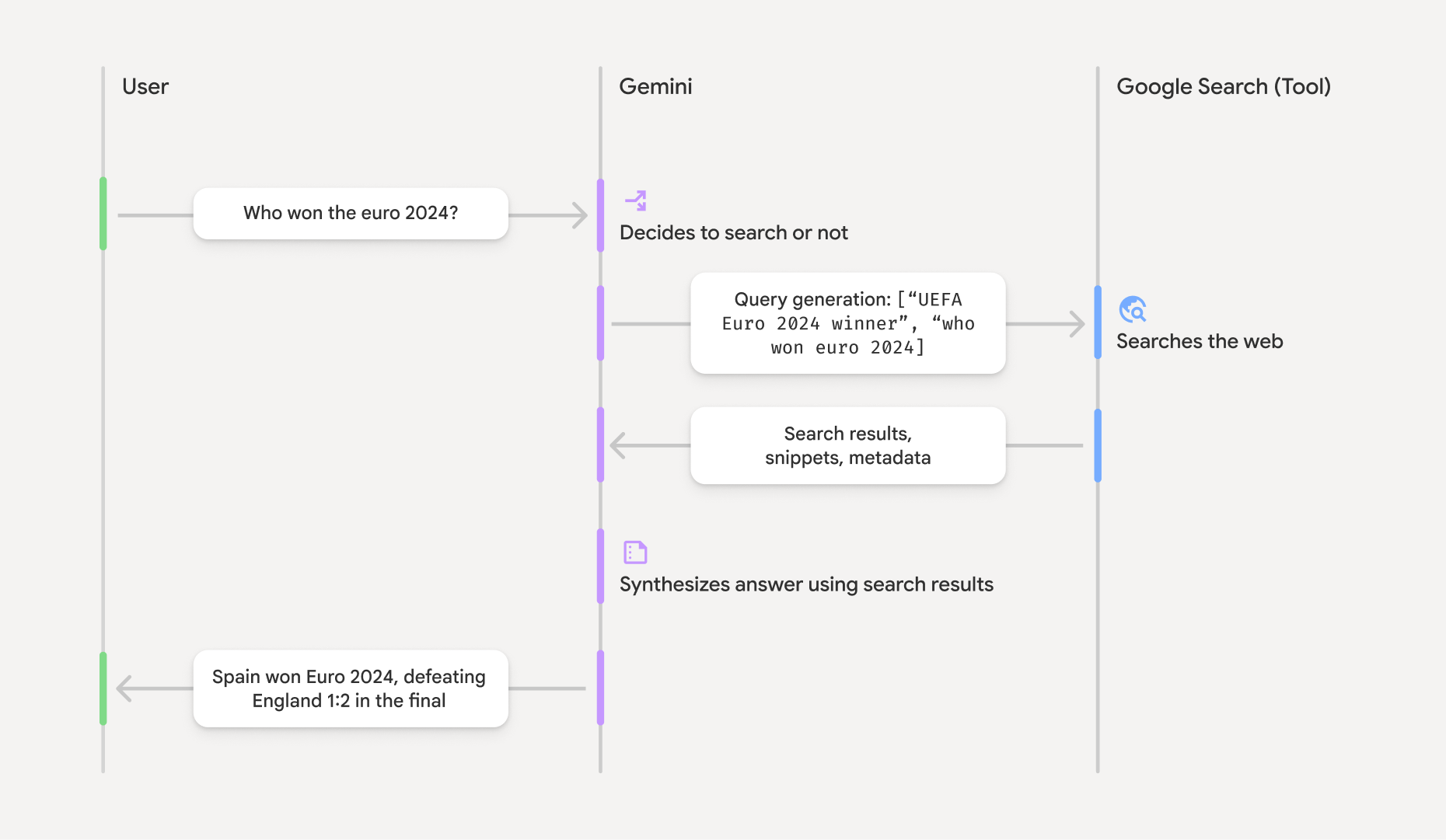
Google Search সাথে গ্রাউন্ডিং কীভাবে কাজ করে
আপনি যখন GoogleSearch টুলটি ব্যবহার করেন, তখন মডেলটি স্বয়ংক্রিয়ভাবে তথ্য অনুসন্ধান, প্রক্রিয়াকরণ এবং উদ্ধৃত করার সম্পূর্ণ কার্যপ্রবাহটি পরিচালনা করে।
মডেলটির কার্যপ্রবাহ নিচে দেওয়া হলো:
- প্রম্পট গ্রহণ করুন : আপনার অ্যাপটি
GoogleSearchটুল সক্রিয় থাকা জেমিনি মডেলে একটি প্রম্পট পাঠায়। - প্রম্পট বিশ্লেষণ : মডেলটি প্রম্পটটি বিশ্লেষণ করে এবং
Google Search তার প্রতিক্রিয়া উন্নত করতে পারে কিনা তা নির্ধারণ করে। -
Google Search কোয়েরি পাঠান : প্রয়োজনে, মডেলটি স্বয়ংক্রিয়ভাবে এক বা একাধিক সার্চ কোয়েরি তৈরি করে এবং সেগুলো কার্যকর করে। - অনুসন্ধানের ফলাফল প্রক্রিয়াকরণ : মডেলটি
Google Search ফলাফলগুলো প্রক্রিয়াকরণ করে এবং মূল অনুরোধের একটি প্রতিক্রিয়া তৈরি করে। - একটি 'ভিত্তিযুক্ত ফলাফল' ফেরত দিন : মডেলটি একটি চূড়ান্ত, ব্যবহারকারী-বান্ধব প্রতিক্রিয়া প্রদান করে যা
Google Search ফলাফলের উপর ভিত্তি করে তৈরি। এই প্রতিক্রিয়ায় মডেলের টেক্সট উত্তর এবং সার্চ কোয়েরি, ওয়েব ফলাফল ও উৎসসহgroundingMetadataঅন্তর্ভুক্ত থাকে।
উল্লেখ্য যে, মডেলে একটি টুল হিসেবে groundingMetadata অবজেক্ট থাকবে না এবং তাই এটি একটি "গ্রাউন্ডেড রেজাল্ট" নয় ।
বাস্তব ফলাফলটি বুঝুন
যদি মডেলটি groundingMetadata অবজেক্ট অন্তর্ভুক্ত থাকে। এই অবজেক্টটিতে এমন কাঠামোগত ডেটা থাকে যা দাবি যাচাই করতে এবং আপনার অ্যাপ্লিকেশনে একটি সমৃদ্ধ উৎস অভিজ্ঞতা তৈরি করার জন্য অপরিহার্য।
একটি 'গ্রাউন্ডেড রেজাল্ট'-এর মধ্যে থাকা groundingMetadata অবজেক্টটিতে নিম্নলিখিত তথ্য থাকে:
webSearchQueries:Google Search পাঠানো সার্চ কোয়েরিগুলোর একটি অ্যারে। এই তথ্য ডিবাগিং এবং মডেলের যুক্তি প্রক্রিয়া বোঝার জন্য দরকারি।searchEntryPoint: প্রয়োজনীয় "Google Search সাজেশন" রেন্ডার করার জন্য HTML এবং CSS ধারণ করে। আপনার নির্বাচিত API প্রোভাইডার— Gemini Developer API অথবা Agent Platform Gemini API (পূর্বে Vertex AI)— এর জন্য আপনাকে "Grounding withGoogle Search " ব্যবহারের শর্তাবলী মেনে চলতে হবে (সার্ভিস স্পেসিফিক টার্মস-এর মধ্যে সার্ভিস টার্মস সেকশনটি দেখুন)। এই পৃষ্ঠার পরবর্তী অংশে জানুন কীভাবে একটি গ্রাউন্ডেড রেজাল্ট ব্যবহার ও প্রদর্শন করতে হয়।groundingChunks: ওয়েব উৎসগুলো (uriএবংtitle) ধারণকারী অবজেক্টের একটি অ্যারে।groundingSupports: মডেল রেসপন্সtextgroundingChunksএর সোর্সগুলোর সাথে সংযুক্ত করার জন্য চাঙ্কগুলোর একটি অ্যারে। প্রতিটি চাঙ্ক একটি টেক্সটsegment(যাstartIndexএবংendIndexদ্বারা সংজ্ঞায়িত) এক বা একাধিকgroundingChunkIndicesএর সাথে লিঙ্ক করে। এই ফিল্ডটি আপনাকে ইনলাইন সোর্স লিঙ্ক তৈরি করতে সাহায্য করে। এই পৃষ্ঠার পরবর্তী অংশে জানুন কীভাবে একটি গ্রাউন্ডেড রেজাল্ট ব্যবহার ও প্রদর্শন করতে হয় ।
এখানে একটি উদাহরণ প্রতিক্রিয়া দেওয়া হল, যাতে একটি groundingMetadata অবজেক্ট অন্তর্ভুক্ত রয়েছে:
{
  "candidates": [
    {
      "content": {
        "parts": [
          {
            "text": "Spain won Euro 2024, defeating England 2-1 in the final. This victory marks Spain's record fourth European Championship title."
          }
        ],
        "role": "model"
      },
      "groundingMetadata": {
        "webSearchQueries": [
          "UEFA Euro 2024 winner",
          "who won euro 2024"
        ],
        "searchEntryPoint": {
          "renderedContent": "<!-- HTML and CSS for the search widget -->"
        },
        "groundingChunks": [
          {"web": {"uri": "https://vertexaisearch.cloud.google.com.....", "title": "aljazeera.com"}},
          {"web": {"uri": "https://vertexaisearch.cloud.google.com.....", "title": "uefa.com"}}
        ],
        "groundingSupports": [
          {
            "segment": {"startIndex": 0, "endIndex": 85, "text": "Spain won Euro 2024, defeatin..."},
            "groundingChunkIndices": [0]
          },
          {
            "segment": {"startIndex": 86, "endIndex": 210, "text": "This victory marks Spain's..."},
            "groundingChunkIndices": [0, 1]
          }
        ]
      }
    }
  ]
}
একটি ভিত্তিযুক্ত ফলাফল ব্যবহার করুন এবং প্রদর্শন করুন
মডেলটি যদি কোনো প্রতিক্রিয়া তৈরি করতে groundingMetadata অবজেক্ট প্রদান করবে।
(আবশ্যক) Google Search পরামর্শ প্রদর্শন করুন
যদি কোনো উত্তরে "
groundingMetadata অবজেক্টটিতে " searchEntryPoint ফিল্ডটিতে, যার মধ্যে একটি renderedContent ফিল্ড রয়েছে যা সঙ্গতিপূর্ণ HTML এবং CSS স্টাইলিং প্রদান করে, যা আপনার অ্যাপে সার্চ সাজেশন প্রদর্শন করার জন্য প্রয়োগ করতে হবে।
Google Cloud ডকুমেন্টেশনে
এই বিভাগের পরবর্তী অংশে উদাহরণ কোডের নমুনা দেখুন।
(প্রয়োজনীয়) উৎসসমূহ প্রদর্শন করুন
groundingMetadata অবজেক্টটিতে কাঠামোগত উৎস ডেটা থাকে, বিশেষত groundingSupports এবং groundingChunks ফিল্ডগুলো। আপনার UI-এর মধ্যে (ইনলাইন এবং অ্যাগ্রিগেটে) মডেলের স্টেটমেন্টগুলোকে সরাসরি তাদের উৎসের সাথে লিঙ্ক করতে এই তথ্য ব্যবহার করুন।
এই বিভাগের পরবর্তী অংশে উদাহরণ কোডের নমুনা দেখুন।
উদাহরণ কোড নমুনা
এই কোড নমুনাগুলো গ্রাউন্ডেড ফলাফল ব্যবহার ও প্রদর্শনের জন্য সাধারণ প্যাটার্ন প্রদান করে। তবে, আপনার নির্দিষ্ট বাস্তবায়ন যেন কমপ্লায়েন্সের প্রয়োজনীয়তাগুলোর সাথে সামঞ্জস্যপূর্ণ হয়, তা নিশ্চিত করার দায়িত্ব আপনার।
সুইফট
// ...

// Get the model's response
let text = response.text

// Get the grounding metadata
if let candidate = response.candidates.first,
   let groundingMetadata = candidate.groundingMetadata {
  // REQUIRED - display Google Search suggestions
  // (renderedContent contains HTML and CSS for the search widget)
  if let renderedContent = groundingMetadata.searchEntryPoint?.renderedContent {
    // TODO(developer): Display Google Search suggestions using a WebView
  }

  // REQUIRED - display sources
  let groundingChunks = groundingMetadata.groundingChunks
  for chunk in groundingMetadata.groundingChunks {
    if let web = chunk.web {
      let title = web.title  // for example, "uefa.com"
      let uri = web.uri  // for example, "https://vertexaisearch.cloud.google.com..."
      // TODO(developer): show source in the UI
    }
  }
}
Kotlin
// ...

// Get the model's response
val text = response.text

// Get the grounding metadata
val groundingMetadata = response.candidates.firstOrNull()?.groundingMetadata

// REQUIRED - display Google Search suggestions
// (renderedContent contains HTML and CSS for the search widget)
val renderedContent = groundingMetadata?.searchEntryPoint?.renderedContent
if (renderedContent != null) {
    // TODO(developer): Display Google Search suggestions using a WebView
}

// REQUIRED - display sources
val groundingChunks = groundingMetadata?.groundingChunks
groundingChunks?.let { chunks ->
  for (chunk in chunks) {
  	val title = chunk.web?.title  // for example, "uefa.com"
	val uri = chunk.web?.uri  // for example, "https://vertexaisearch.cloud.google.com..."
// TODO(developer): show source in the UI
  }
}
Java
// ...

Futures.addCallback(response, new FutureCallback() {
  @Override
  public void onSuccess(GenerateContentResponse result) {
  // Get the model's response
  String text = result.getText();

  // Get the grounding metadata
  GroundingMetadata groundingMetadata =
  result.getCandidates()[0].getGroundingMetadata();

  if (groundingMetadata != null) {
    // REQUIRED - display Google Search suggestions
  // (renderedContent contains HTML and CSS for the search widget)
    String renderedContent =
  groundingMetadata.getSearchEntryPoint().getRenderedContent();
    if (renderedContent != null) {
      // TODO(developer): Display Google Search suggestions using a WebView
    }

    // REQUIRED - display sources
    List chunks = groundingMetadata.getGroundingChunks();
    if (chunks != null) {
      for(GroundingChunk chunk : chunks) {
        WebGroundingChunk web = chunk.getWeb();
        if (web != null) {
          String title = web.getTitle();  // for example, "uefa.com"
          String uri = web.getUri();  // for example, "https://vertexaisearch.cloud.google.com..."
          // TODO(developer): show sources in the UI
        }
      }
    }
  }
  }

  @Override
  public void onFailure(Throwable t) {
  t.printStackTrace();
  }
  }, executor);
Web
// ...

// Get the model's text response
const text = result.response.text();

// Get the grounding metadata
const groundingMetadata = result.response.candidates?.[0]?.groundingMetadata;

// REQUIRED - display Google Search suggestions
// (renderedContent contains HTML and CSS for the search widget)
const renderedContent = groundingMetadata?.searchEntryPoint?.renderedContent;
if (renderedContent) {
  // TODO(developer): render this HTML and CSS in the UI
}

// REQUIRED - display sources
const groundingChunks = groundingMetadata?.groundingChunks;
if (groundingChunks) {
  for (const chunk of groundingChunks) {
    const title = chunk.web?.title;  // for example, "uefa.com"
    const uri = chunk.web?.uri;  // for example, "https://vertexaisearch.cloud.google.com..."
    // TODO(developer): show sources in the UI
  }
}
Dart
// ...

// Get the model's response
final text = response.text;

// Get the grounding metadata
final groundingMetadata = response.candidates.first.groundingMetadata;

// REQUIRED - display Google Search suggestions
// (renderedContent contains HTML and CSS for the search widget)
final renderedContent = groundingMetadata?.searchEntryPoint?.renderedContent;
if (renderedContent != null) {
    // TODO(developer): Display Google Search suggestions using a WebView
}

// REQUIRED - display sources
final groundingChunks = groundingMetadata?.groundingChunks;
if (groundingChunks != null) {
  for (var chunk in groundingChunks) {
    final title = chunk.web?.title;  // for example, "uefa.com"
    final uri = chunk.web?.uri;  // for example, "https://vertexaisearch.cloud.google.com..."
    // TODO(developer): show sources in the UI
  }
}
ঐক্য
// ...

// Get the model's response.
var text = response.Text;

// Get the grounding metadata.
var groundingMetadata = response.Candidates.First().GroundingMetadata.Value;

// REQUIRED - display Google Search suggestions
// (renderedContent contains HTML and CSS for the search widget)
if (groundingMetadata.SearchEntryPoint.HasValue) {
    var renderedContent = groundingMetadata.SearchEntryPoint.Value.RenderedContent;
    // TODO(developer): Display Google Search suggestions using a WebView
}

// REQUIRED - display sources
foreach(GroundingChunk chunk in groundingMetadata.GroundingChunks) {
    var title = chunk.Web.Value.Title;  // for example, "uefa.com"
    var uri = chunk.Web.Value.Uri;  // for example, "https://vertexaisearch.cloud.google.com..."
    // TODO(developer): show sources in the UI
}
Firebase কনসোলে বাস্তব ফলাফল এবং এআই পর্যবেক্ষণ
আপনি যদি Firebase কনসোলে AI মনিটরিং চালু করে থাকেন, তাহলে প্রাপ্ত প্রতিক্রিয়াগুলো Cloud Logging -এ সংরক্ষিত হয়। ডিফল্টরূপে, এই ডেটা ৩০ দিনের জন্য সংরক্ষিত থাকে।
এই ডেটা সংরক্ষণের সময়কাল, অথবা আপনার সেট করা যেকোনো কাস্টম সময়কাল, যেন আপনার নির্দিষ্ট ব্যবহারের ক্ষেত্র এবং আপনার নির্বাচিত Gemini API প্রদানকারী— Gemini Developer API বা Agent Platform Gemini API (পূর্বে Vertex AI)— এর জন্য প্রযোজ্য যেকোনো অতিরিক্ত কমপ্লায়েন্স প্রয়োজনীয়তার সাথে সম্পূর্ণরূপে সামঞ্জস্যপূর্ণ হয়, তা নিশ্চিত করা আপনার দায়িত্ব (পরিষেবা-নির্দিষ্ট শর্তাবলীর মধ্যে পরিষেবা শর্তাবলী বিভাগটি দেখুন)। এই প্রয়োজনীয়তাগুলো পূরণের জন্য আপনাকে Cloud Logging -এ ডেটা সংরক্ষণের সময়কাল সমন্বয় করতে হতে পারে।
মূল্য নির্ধারণ এবং সীমা
আপনার নির্বাচিত Gemini API প্রদানকারীর ডকুমেন্টেশনে ( Gemini Developer API |Agent Platform Gemini API (পূর্বের Vertex AI)) Grounding with
- তথ্যগত নির্ভুলতা বৃদ্ধি করুন : বাস্তব জগতের তথ্যের উপর ভিত্তি করে প্রতিক্রিয়া তৈরি করে মডেলের বিভ্রম হ্রাস করুন।
- রিয়েল-টাইম তথ্য জানুন : সাম্প্রতিক ঘটনা ও বিষয় সম্পর্কে প্রশ্নের উত্তর দিন।
- উৎস প্রদান করুন : মডেলের দাবির উৎসগুলো দেখিয়ে ব্যবহারকারীর আস্থা তৈরি করুন অথবা তাদেরকে প্রাসঙ্গিক সাইটগুলো ব্রাউজ করার সুযোগ দিন।
- আরও জটিল কাজ সম্পন্ন করুন : যুক্তিমূলক কাজে সহায়তার জন্য প্রত্নবস্তু এবং প্রাসঙ্গিক ছবি, ভিডিও বা অন্যান্য মিডিয়া সংগ্রহ করুন।
- অঞ্চল বা ভাষা-ভিত্তিক প্রতিক্রিয়া উন্নত করুন : অঞ্চল-ভিত্তিক তথ্য খুঁজুন, অথবা বিষয়বস্তু নির্ভুলভাবে অনুবাদ করতে সহায়তা করুন।
সমর্থিত মডেল
-
gemini-3.1-pro-preview -
gemini-3.8-flash(এবং পুরোনোgemini-3.7-flash,gemini-3.6-flash, ওgemini-3.5-flash) -
gemini-3.5-flash-lite(এবং পুরোনোgemini-3.1-flash-lite) -
gemini-3-pro-image(ওরফে "ন্যানো বানানা প্রো") -
gemini-3.1-flash-image(ওরফে "ন্যানো বানানা ২")
সাধারণ ব্যবহারের জেমিনি ২.৫ মডেলগুলিতে এই সক্ষমতা ছিল, কিন্তু সেগুলি এখন আর ব্যবহৃত হয় না।
Gemini Live API মডেলগুলোও এই সক্ষমতা সমর্থন করে, কিন্তু এই গাইডের সমস্ত কোড নমুনা সাধারণ ব্যবহারের জেমিনি মডেলগুলোর জন্য।
সমর্থিত ভাষা
জেমিনি মডেলগুলির জন্য সমর্থিত ভাষাগুলি দেখুন।
Google Search মাধ্যমে মডেলটির ভিত্তি স্থাপন করুন।
এই পৃষ্ঠায় প্রদানকারী-নির্দিষ্ট বিষয়বস্তু এবং কোড দেখতে আপনার জেমিনি এপিআই প্রদানকারীর উপর ক্লিক করুন। |
যখন আপনি GenerativeModel ইনস্ট্যান্সটি তৈরি করবেন, তখন মডেলটির প্রতিক্রিয়া তৈরি করার জন্য একটি tool হিসেবে GoogleSearch প্রদান করুন।
সুইফট
import FirebaseAILogic

// Initialize the Gemini Developer API backend service.
let ai = FirebaseAI.firebaseAI(backend: .googleAI())

// Create a `GenerativeModel` instance with a model that supports your use case.
let model = ai.generativeModel(
    modelName: "GEMINI_MODEL_NAME",
    // Provide Google Search as a tool that the model can use to generate its response.
    tools: [Tool.googleSearch()]
)

let response = try await model.generateContent("Who won the euro 2024?")
print(response.text ?? "No text in response.")

// Make sure to comply with the "Grounding with Google Search" usage requirements,
// which includes how you use and display the grounded result
Kotlin
// Initialize the Gemini Developer API backend service.
// Create a `GenerativeModel` instance with a model that supports your use case.
val model = Firebase.ai(backend = GenerativeBackend.googleAI()).generativeModel(
    modelName = "GEMINI_MODEL_NAME",
    // Provide Google Search as a tool that the model can use to generate its response
    tools = listOf(Tool.googleSearch())
)

val response = model.generateContent("Who won the euro 2024?")
print(response.text)

// Make sure to comply with the "Grounding with Google Search" usage requirements,
// which includes how you use and display the grounded result
Java
// Initialize the Gemini Developer API backend service.
// Create a `GenerativeModel` instance with a model that supports your use case.
GenerativeModel ai = FirebaseAI.getInstance(GenerativeBackend.googleAI())
                .generativeModel("GEMINI_MODEL_NAME",
                        null,
                        null,
                        // Provide Google Search as a tool that the model can use to generate its response
                        List.of(Tool.GoogleSearch()));

// Use the GenerativeModelFutures Java compatibility layer which offers
// support for ListenableFuture and Publisher APIs
GenerativeModelFutures model = GenerativeModelFutures.from(ai);

ListenableFuture response = model.generateContent("Who won the euro 2024?");
  Futures.addCallback(response, new FutureCallback() {
      @Override
      public void onSuccess(GenerateContentResponse result) {
          String resultText = result.getText();
          System.out.println(resultText);
      }

      @Override
      public void onFailure(Throwable t) {
          t.printStackTrace();
      }
  }, executor);

// Make sure to comply with the "Grounding with Google Search" usage requirements,
// which includes how you use and display the grounded result
Web
import { initializeApp } from "firebase/app";
import { getAI, getGenerativeModel, GoogleAIBackend } from "firebase/ai";

// TODO(developer): Replace the following with your app's Firebase configuration
// See: https://firebase.google.com/docs/web/learn-more#config-object
const firebaseConfig = {
  // ...
};

// Initialize FirebaseApp
const firebaseApp = initializeApp(firebaseConfig);

// Initialize the Gemini Developer API backend service.
const ai = getAI(firebaseApp, { backend: new GoogleAIBackend() });

// Create a `GenerativeModel` instance with a model that supports your use case.
const model = getGenerativeModel(
  ai,
  {
    model: "GEMINI_MODEL_NAME",
    // Provide Google Search as a tool that the model can use to generate its response
    tools: [{ googleSearch: {} }]
  }
);

const result = await model.generateContent("Who won the euro 2024?");

console.log(result.response.text());

// Make sure to comply with the "Grounding with Google Search" usage requirements,
// which includes how you use and display the grounded result
Dart
import 'package:firebase_core/firebase_core.dart';
import 'package:firebase_ai/firebase_ai.dart';
import 'firebase_options.dart';

// Initialize FirebaseApp.
await Firebase.initializeApp(
  options: DefaultFirebaseOptions.currentPlatform,
);

// Initialize the Gemini Developer API backend service.
// Create a `GenerativeModel` instance with a model that supports your use case.
final model = FirebaseAI.googleAI().generativeModel(
  model: 'GEMINI_MODEL_NAME',
  // Provide Google Search as a tool that the model can use to generate its response.
  tools: [
    Tool.googleSearch(),
  ],
);

final response = await model.generateContent([Content.text("Who won the euro 2024?")]);
print(response.text);

// Make sure to comply with the "Grounding with Google Search" usage requirements,
// which includes how you use and display the grounded result
ঐক্য
using Firebase;
using Firebase.AI;

// Initialize the Gemini Developer API backend service.
var ai = FirebaseAI.GetInstance(FirebaseAI.Backend.GoogleAI());

// Create a `GenerativeModel` instance with a model that supports your use case.
var model = ai.GetGenerativeModel(
  modelName: "GEMINI_MODEL_NAME",
  // Provide Google Search as a tool that the model can use to generate its response.
  tools: new[] { new Tool(new GoogleSearch()) }
);

var response = await model.GenerateContentAsync("Who won the euro 2024?");
UnityEngine.Debug.Log(response.Text ?? "No text in response.");

// Make sure to comply with the "Grounding with Google Search" usage requirements,
// which includes how you use and display the grounded result
কীভাবে একটি মডেল বেছে নিতে হয় তা জানুনআপনার ব্যবহারের ক্ষেত্র এবং অ্যাপের জন্য উপযুক্ত।
Google Search সাথে গ্রাউন্ডিং কীভাবে কাজ করে
আপনি যখন GoogleSearch টুলটি ব্যবহার করেন, তখন মডেলটি স্বয়ংক্রিয়ভাবে তথ্য অনুসন্ধান, প্রক্রিয়াকরণ এবং উদ্ধৃত করার সম্পূর্ণ কার্যপ্রবাহটি পরিচালনা করে।
মডেলটির কার্যপ্রবাহ নিচে দেওয়া হলো:
- প্রম্পট গ্রহণ করুন : আপনার অ্যাপটি
GoogleSearchটুল সক্রিয় থাকা জেমিনি মডেলে একটি প্রম্পট পাঠায়। - প্রম্পট বিশ্লেষণ : মডেলটি প্রম্পটটি বিশ্লেষণ করে এবং
Google Search তার প্রতিক্রিয়া উন্নত করতে পারে কিনা তা নির্ধারণ করে। -
Google Search কোয়েরি পাঠান : প্রয়োজনে, মডেলটি স্বয়ংক্রিয়ভাবে এক বা একাধিক সার্চ কোয়েরি তৈরি করে এবং সেগুলো কার্যকর করে। - অনুসন্ধানের ফলাফল প্রক্রিয়াকরণ : মডেলটি
Google Search ফলাফলগুলো প্রক্রিয়াকরণ করে এবং মূল অনুরোধের একটি প্রতিক্রিয়া তৈরি করে। - একটি 'ভিত্তিযুক্ত ফলাফল' ফেরত দিন : মডেলটি একটি চূড়ান্ত, ব্যবহারকারী-বান্ধব প্রতিক্রিয়া প্রদান করে যা
Google Search ফলাফলের উপর ভিত্তি করে তৈরি। এই প্রতিক্রিয়ায় মডেলের টেক্সট উত্তর এবং সার্চ কোয়েরি, ওয়েব ফলাফল ও উৎসসহgroundingMetadataঅন্তর্ভুক্ত থাকে।
উল্লেখ্য যে, মডেলে একটি টুল হিসেবে groundingMetadata অবজেক্ট থাকবে না এবং তাই এটি একটি "গ্রাউন্ডেড রেজাল্ট" নয় ।
বাস্তব ফলাফলটি বুঝুন
যদি মডেলটি groundingMetadata অবজেক্ট অন্তর্ভুক্ত থাকে। এই অবজেক্টটিতে এমন কাঠামোগত ডেটা থাকে যা দাবি যাচাই করতে এবং আপনার অ্যাপ্লিকেশনে একটি সমৃদ্ধ উৎস অভিজ্ঞতা তৈরি করার জন্য অপরিহার্য।
একটি 'গ্রাউন্ডেড রেজাল্ট'-এর মধ্যে থাকা groundingMetadata অবজেক্টটিতে নিম্নলিখিত তথ্য থাকে:
webSearchQueries:Google Search পাঠানো সার্চ কোয়েরিগুলোর একটি অ্যারে। এই তথ্য ডিবাগিং এবং মডেলের যুক্তি প্রক্রিয়া বোঝার জন্য দরকারি।searchEntryPoint: প্রয়োজনীয় "Google Search সাজেশন" রেন্ডার করার জন্য HTML এবং CSS ধারণ করে। আপনার নির্বাচিত API প্রোভাইডার— Gemini Developer API অথবা Agent Platform Gemini API (পূর্বে Vertex AI)— এর জন্য আপনাকে "Grounding withGoogle Search " ব্যবহারের শর্তাবলী মেনে চলতে হবে (সার্ভিস স্পেসিফিক টার্মস-এর মধ্যে সার্ভিস টার্মস সেকশনটি দেখুন)। এই পৃষ্ঠার পরবর্তী অংশে জানুন কীভাবে একটি গ্রাউন্ডেড রেজাল্ট ব্যবহার ও প্রদর্শন করতে হয়।groundingChunks: ওয়েব উৎসগুলো (uriএবংtitle) ধারণকারী অবজেক্টের একটি অ্যারে।groundingSupports: মডেল রেসপন্সtextgroundingChunksএর সোর্সগুলোর সাথে সংযুক্ত করার জন্য চাঙ্কগুলোর একটি অ্যারে। প্রতিটি চাঙ্ক একটি টেক্সটsegment(যাstartIndexএবংendIndexদ্বারা সংজ্ঞায়িত) এক বা একাধিকgroundingChunkIndicesএর সাথে লিঙ্ক করে। এই ফিল্ডটি আপনাকে ইনলাইন সোর্স লিঙ্ক তৈরি করতে সাহায্য করে। এই পৃষ্ঠার পরবর্তী অংশে জানুন কীভাবে একটি গ্রাউন্ডেড রেজাল্ট ব্যবহার ও প্রদর্শন করতে হয় ।
এখানে একটি উদাহরণ প্রতিক্রিয়া দেওয়া হল, যাতে একটি groundingMetadata অবজেক্ট অন্তর্ভুক্ত রয়েছে:
{
  "candidates": [
    {
      "content": {
        "parts": [
          {
            "text": "Spain won Euro 2024, defeating England 2-1 in the final. This victory marks Spain's record fourth European Championship title."
          }
        ],
        "role": "model"
      },
      "groundingMetadata": {
        "webSearchQueries": [
          "UEFA Euro 2024 winner",
          "who won euro 2024"
        ],
        "searchEntryPoint": {
          "renderedContent": "<!-- HTML and CSS for the search widget -->"
        },
        "groundingChunks": [
          {"web": {"uri": "https://vertexaisearch.cloud.google.com.....", "title": "aljazeera.com"}},
          {"web": {"uri": "https://vertexaisearch.cloud.google.com.....", "title": "uefa.com"}}
        ],
        "groundingSupports": [
          {
            "segment": {"startIndex": 0, "endIndex": 85, "text": "Spain won Euro 2024, defeatin..."},
            "groundingChunkIndices": [0]
          },
          {
            "segment": {"startIndex": 86, "endIndex": 210, "text": "This victory marks Spain's..."},
            "groundingChunkIndices": [0, 1]
          }
        ]
      }
    }
  ]
}
একটি ভিত্তিযুক্ত ফলাফল ব্যবহার করুন এবং প্রদর্শন করুন
মডেলটি যদি কোনো প্রতিক্রিয়া তৈরি করতে groundingMetadata অবজেক্ট প্রদান করবে।
(আবশ্যক) Google Search পরামর্শ প্রদর্শন করুন
যদি কোনো উত্তরে "
groundingMetadata অবজেক্টটিতে " searchEntryPoint ফিল্ডটিতে, যার মধ্যে একটি renderedContent ফিল্ড রয়েছে যা সঙ্গতিপূর্ণ HTML এবং CSS স্টাইলিং প্রদান করে, যা আপনার অ্যাপে সার্চ সাজেশন প্রদর্শন করার জন্য প্রয়োগ করতে হবে।
Google Cloud ডকুমেন্টেশনে
এই বিভাগের পরবর্তী অংশে উদাহরণ কোডের নমুনা দেখুন।
(প্রয়োজনীয়) উৎসসমূহ প্রদর্শন করুন
groundingMetadata অবজেক্টটিতে কাঠামোগত উৎস ডেটা থাকে, বিশেষত groundingSupports এবং groundingChunks ফিল্ডগুলো। আপনার UI-এর মধ্যে (ইনলাইন এবং অ্যাগ্রিগেটে) মডেলের স্টেটমেন্টগুলোকে সরাসরি তাদের উৎসের সাথে লিঙ্ক করতে এই তথ্য ব্যবহার করুন।
এই বিভাগের পরবর্তী অংশে উদাহরণ কোডের নমুনা দেখুন।
উদাহরণ কোড নমুনা
এই কোড নমুনাগুলো গ্রাউন্ডেড ফলাফল ব্যবহার ও প্রদর্শনের জন্য সাধারণ প্যাটার্ন প্রদান করে। তবে, আপনার নির্দিষ্ট বাস্তবায়ন যেন কমপ্লায়েন্সের প্রয়োজনীয়তাগুলোর সাথে সামঞ্জস্যপূর্ণ হয়, তা নিশ্চিত করার দায়িত্ব আপনার।
সুইফট
// ...

// Get the model's response
let text = response.text

// Get the grounding metadata
if let candidate = response.candidates.first,
   let groundingMetadata = candidate.groundingMetadata {
  // REQUIRED - display Google Search suggestions
  // (renderedContent contains HTML and CSS for the search widget)
  if let renderedContent = groundingMetadata.searchEntryPoint?.renderedContent {
    // TODO(developer): Display Google Search suggestions using a WebView
  }

  // REQUIRED - display sources
  let groundingChunks = groundingMetadata.groundingChunks
  for chunk in groundingMetadata.groundingChunks {
    if let web = chunk.web {
      let title = web.title  // for example, "uefa.com"
      let uri = web.uri  // for example, "https://vertexaisearch.cloud.google.com..."
      // TODO(developer): show source in the UI
    }
  }
}
Kotlin
// ...

// Get the model's response
val text = response.text

// Get the grounding metadata
val groundingMetadata = response.candidates.firstOrNull()?.groundingMetadata

// REQUIRED - display Google Search suggestions
// (renderedContent contains HTML and CSS for the search widget)
val renderedContent = groundingMetadata?.searchEntryPoint?.renderedContent
if (renderedContent != null) {
    // TODO(developer): Display Google Search suggestions using a WebView
}

// REQUIRED - display sources
val groundingChunks = groundingMetadata?.groundingChunks
groundingChunks?.let { chunks ->
  for (chunk in chunks) {
  	val title = chunk.web?.title  // for example, "uefa.com"
	val uri = chunk.web?.uri  // for example, "https://vertexaisearch.cloud.google.com..."
// TODO(developer): show source in the UI
  }
}
Java
// ...

Futures.addCallback(response, new FutureCallback() {
  @Override
  public void onSuccess(GenerateContentResponse result) {
  // Get the model's response
  String text = result.getText();

  // Get the grounding metadata
  GroundingMetadata groundingMetadata =
  result.getCandidates()[0].getGroundingMetadata();

  if (groundingMetadata != null) {
    // REQUIRED - display Google Search suggestions
  // (renderedContent contains HTML and CSS for the search widget)
    String renderedContent =
  groundingMetadata.getSearchEntryPoint().getRenderedContent();
    if (renderedContent != null) {
      // TODO(developer): Display Google Search suggestions using a WebView
    }

    // REQUIRED - display sources
    List chunks = groundingMetadata.getGroundingChunks();
    if (chunks != null) {
      for(GroundingChunk chunk : chunks) {
        WebGroundingChunk web = chunk.getWeb();
        if (web != null) {
          String title = web.getTitle();  // for example, "uefa.com"
          String uri = web.getUri();  // for example, "https://vertexaisearch.cloud.google.com..."
          // TODO(developer): show sources in the UI
        }
      }
    }
  }
  }

  @Override
  public void onFailure(Throwable t) {
  t.printStackTrace();
  }
  }, executor);
Web
// ...

// Get the model's text response
const text = result.response.text();

// Get the grounding metadata
const groundingMetadata = result.response.candidates?.[0]?.groundingMetadata;

// REQUIRED - display Google Search suggestions
// (renderedContent contains HTML and CSS for the search widget)
const renderedContent = groundingMetadata?.searchEntryPoint?.renderedContent;
if (renderedContent) {
  // TODO(developer): render this HTML and CSS in the UI
}

// REQUIRED - display sources
const groundingChunks = groundingMetadata?.groundingChunks;
if (groundingChunks) {
  for (const chunk of groundingChunks) {
    const title = chunk.web?.title;  // for example, "uefa.com"
    const uri = chunk.web?.uri;  // for example, "https://vertexaisearch.cloud.google.com..."
    // TODO(developer): show sources in the UI
  }
}
Dart
// ...

// Get the model's response
final text = response.text;

// Get the grounding metadata
final groundingMetadata = response.candidates.first.groundingMetadata;

// REQUIRED - display Google Search suggestions
// (renderedContent contains HTML and CSS for the search widget)
final renderedContent = groundingMetadata?.searchEntryPoint?.renderedContent;
if (renderedContent != null) {
    // TODO(developer): Display Google Search suggestions using a WebView
}

// REQUIRED - display sources
final groundingChunks = groundingMetadata?.groundingChunks;
if (groundingChunks != null) {
  for (var chunk in groundingChunks) {
    final title = chunk.web?.title;  // for example, "uefa.com"
    final uri = chunk.web?.uri;  // for example, "https://vertexaisearch.cloud.google.com..."
    // TODO(developer): show sources in the UI
  }
}
ঐক্য
// ...

// Get the model's response.
var text = response.Text;

// Get the grounding metadata.
var groundingMetadata = response.Candidates.First().GroundingMetadata.Value;

// REQUIRED - display Google Search suggestions
// (renderedContent contains HTML and CSS for the search widget)
if (groundingMetadata.SearchEntryPoint.HasValue) {
    var renderedContent = groundingMetadata.SearchEntryPoint.Value.RenderedContent;
    // TODO(developer): Display Google Search suggestions using a WebView
}

// REQUIRED - display sources
foreach(GroundingChunk chunk in groundingMetadata.GroundingChunks) {
    var title = chunk.Web.Value.Title;  // for example, "uefa.com"
    var uri = chunk.Web.Value.Uri;  // for example, "https://vertexaisearch.cloud.google.com..."
    // TODO(developer): show sources in the UI
}
Firebase কনসোলে বাস্তব ফলাফল এবং এআই পর্যবেক্ষণ
আপনি যদি Firebase কনসোলে AI মনিটরিং চালু করে থাকেন, তাহলে প্রাপ্ত প্রতিক্রিয়াগুলো Cloud Logging -এ সংরক্ষিত হয়। ডিফল্টরূপে, এই ডেটা ৩০ দিনের জন্য সংরক্ষিত থাকে।
এই ডেটা সংরক্ষণের সময়কাল, অথবা আপনার সেট করা যেকোনো কাস্টম সময়কাল, যেন আপনার নির্দিষ্ট ব্যবহারের ক্ষেত্র এবং আপনার নির্বাচিত Gemini API প্রদানকারী— Gemini Developer API বা Agent Platform Gemini API (পূর্বে Vertex AI)— এর জন্য প্রযোজ্য যেকোনো অতিরিক্ত কমপ্লায়েন্স প্রয়োজনীয়তার সাথে সম্পূর্ণরূপে সামঞ্জস্যপূর্ণ হয়, তা নিশ্চিত করা আপনার দায়িত্ব (পরিষেবা-নির্দিষ্ট শর্তাবলীর মধ্যে পরিষেবা শর্তাবলী বিভাগটি দেখুন)। এই প্রয়োজনীয়তাগুলো পূরণের জন্য আপনাকে Cloud Logging -এ ডেটা সংরক্ষণের সময়কাল সমন্বয় করতে হতে পারে।
মূল্য নির্ধারণ এবং সীমা
আপনার নির্বাচিত Gemini API প্রদানকারীর ডকুমেন্টেশনে ( Gemini Developer API |Agent Platform Gemini API (পূর্বের Vertex AI)) Grounding with
- তথ্যগত নির্ভুলতা বৃদ্ধি করুন : বাস্তব জগতের তথ্যের উপর ভিত্তি করে প্রতিক্রিয়া তৈরি করে মডেলের বিভ্রম হ্রাস করুন।
- রিয়েল-টাইম তথ্য জানুন : সাম্প্রতিক ঘটনা ও বিষয় সম্পর্কে প্রশ্নের উত্তর দিন।
- উৎস প্রদান করুন : মডেলের দাবির উৎসগুলো দেখিয়ে ব্যবহারকারীর আস্থা তৈরি করুন অথবা তাদেরকে প্রাসঙ্গিক সাইটগুলো ব্রাউজ করার সুযোগ দিন।
- আরও জটিল কাজ সম্পন্ন করুন : যুক্তিমূলক কাজে সহায়তার জন্য প্রত্নবস্তু এবং প্রাসঙ্গিক ছবি, ভিডিও বা অন্যান্য মিডিয়া সংগ্রহ করুন।
- অঞ্চল বা ভাষা-ভিত্তিক প্রতিক্রিয়া উন্নত করুন : অঞ্চল-ভিত্তিক তথ্য খুঁজুন, অথবা বিষয়বস্তু নির্ভুলভাবে অনুবাদ করতে সহায়তা করুন।
সমর্থিত মডেল
-
gemini-3.1-pro-preview -
gemini-3.8-flash(এবং পুরোনোgemini-3.7-flash,gemini-3.6-flash, ওgemini-3.5-flash) -
gemini-3.5-flash-lite(এবং পুরোনোgemini-3.1-flash-lite) -
gemini-3-pro-image(ওরফে "ন্যানো বানানা প্রো") -
gemini-3.1-flash-image(ওরফে "ন্যানো বানানা ২")
সাধারণ ব্যবহারের জেমিনি ২.৫ মডেলগুলিতে এই সক্ষমতা ছিল, কিন্তু সেগুলি এখন আর ব্যবহৃত হয় না।
Gemini Live API মডেলগুলোও এই সক্ষমতা সমর্থন করে, কিন্তু এই গাইডের সমস্ত কোড নমুনা সাধারণ ব্যবহারের জেমিনি মডেলগুলোর জন্য।
সমর্থিত ভাষা
জেমিনি মডেলগুলির জন্য সমর্থিত ভাষাগুলি দেখুন।
Google Search মাধ্যমে মডেলটির ভিত্তি স্থাপন করুন।
এই পৃষ্ঠায় প্রদানকারী-নির্দিষ্ট বিষয়বস্তু এবং কোড দেখতে আপনার জেমিনি এপিআই প্রদানকারীর উপর ক্লিক করুন। |
যখন আপনি GenerativeModel ইনস্ট্যান্সটি তৈরি করবেন, তখন মডেলটির প্রতিক্রিয়া তৈরি করার জন্য একটি tool হিসেবে GoogleSearch প্রদান করুন।
সুইফট
import FirebaseAILogic

// Initialize the Gemini Developer API backend service.
let ai = FirebaseAI.firebaseAI(backend: .googleAI())

// Create a `GenerativeModel` instance with a model that supports your use case.
let model = ai.generativeModel(
    modelName: "GEMINI_MODEL_NAME",
    // Provide Google Search as a tool that the model can use to generate its response.
    tools: [Tool.googleSearch()]
)

let response = try await model.generateContent("Who won the euro 2024?")
print(response.text ?? "No text in response.")

// Make sure to comply with the "Grounding with Google Search" usage requirements,
// which includes how you use and display the grounded result
Kotlin
// Initialize the Gemini Developer API backend service.
// Create a `GenerativeModel` instance with a model that supports your use case.
val model = Firebase.ai(backend = GenerativeBackend.googleAI()).generativeModel(
    modelName = "GEMINI_MODEL_NAME",
    // Provide Google Search as a tool that the model can use to generate its response
    tools = listOf(Tool.googleSearch())
)

val response = model.generateContent("Who won the euro 2024?")
print(response.text)

// Make sure to comply with the "Grounding with Google Search" usage requirements,
// which includes how you use and display the grounded result
Java
// Initialize the Gemini Developer API backend service.
// Create a `GenerativeModel` instance with a model that supports your use case.
GenerativeModel ai = FirebaseAI.getInstance(GenerativeBackend.googleAI())
                .generativeModel("GEMINI_MODEL_NAME",
                        null,
                        null,
                        // Provide Google Search as a tool that the model can use to generate its response
                        List.of(Tool.GoogleSearch()));

// Use the GenerativeModelFutures Java compatibility layer which offers
// support for ListenableFuture and Publisher APIs
GenerativeModelFutures model = GenerativeModelFutures.from(ai);

ListenableFuture response = model.generateContent("Who won the euro 2024?");
  Futures.addCallback(response, new FutureCallback() {
      @Override
      public void onSuccess(GenerateContentResponse result) {
          String resultText = result.getText();
          System.out.println(resultText);
      }

      @Override
      public void onFailure(Throwable t) {
          t.printStackTrace();
      }
  }, executor);

// Make sure to comply with the "Grounding with Google Search" usage requirements,
// which includes how you use and display the grounded result
Web
import { initializeApp } from "firebase/app";
import { getAI, getGenerativeModel, GoogleAIBackend } from "firebase/ai";

// TODO(developer): Replace the following with your app's Firebase configuration
// See: https://firebase.google.com/docs/web/learn-more#config-object
const firebaseConfig = {
  // ...
};

// Initialize FirebaseApp
const firebaseApp = initializeApp(firebaseConfig);

// Initialize the Gemini Developer API backend service.
const ai = getAI(firebaseApp, { backend: new GoogleAIBackend() });

// Create a `GenerativeModel` instance with a model that supports your use case.
const model = getGenerativeModel(
  ai,
  {
    model: "GEMINI_MODEL_NAME",
    // Provide Google Search as a tool that the model can use to generate its response
    tools: [{ googleSearch: {} }]
  }
);

const result = await model.generateContent("Who won the euro 2024?");

console.log(result.response.text());

// Make sure to comply with the "Grounding with Google Search" usage requirements,
// which includes how you use and display the grounded result
Dart
import 'package:firebase_core/firebase_core.dart';
import 'package:firebase_ai/firebase_ai.dart';
import 'firebase_options.dart';

// Initialize FirebaseApp.
await Firebase.initializeApp(
  options: DefaultFirebaseOptions.currentPlatform,
);

// Initialize the Gemini Developer API backend service.
// Create a `GenerativeModel` instance with a model that supports your use case.
final model = FirebaseAI.googleAI().generativeModel(
  model: 'GEMINI_MODEL_NAME',
  // Provide Google Search as a tool that the model can use to generate its response.
  tools: [
    Tool.googleSearch(),
  ],
);

final response = await model.generateContent([Content.text("Who won the euro 2024?")]);
print(response.text);

// Make sure to comply with the "Grounding with Google Search" usage requirements,
// which includes how you use and display the grounded result
ঐক্য
using Firebase;
using Firebase.AI;

// Initialize the Gemini Developer API backend service.
var ai = FirebaseAI.GetInstance(FirebaseAI.Backend.GoogleAI());

// Create a `GenerativeModel` instance with a model that supports your use case.
var model = ai.GetGenerativeModel(
  modelName: "GEMINI_MODEL_NAME",
  // Provide Google Search as a tool that the model can use to generate its response.
  tools: new[] { new Tool(new GoogleSearch()) }
);

var response = await model.GenerateContentAsync("Who won the euro 2024?");
UnityEngine.Debug.Log(response.Text ?? "No text in response.");

// Make sure to comply with the "Grounding with Google Search" usage requirements,
// which includes how you use and display the grounded result
কীভাবে একটি মডেল বেছে নিতে হয় তা জানুনআপনার ব্যবহারের ক্ষেত্র এবং অ্যাপের জন্য উপযুক্ত।
Google Search সাথে গ্রাউন্ডিং কীভাবে কাজ করে
আপনি যখন GoogleSearch টুলটি ব্যবহার করেন, তখন মডেলটি স্বয়ংক্রিয়ভাবে তথ্য অনুসন্ধান, প্রক্রিয়াকরণ এবং উদ্ধৃত করার সম্পূর্ণ কার্যপ্রবাহটি পরিচালনা করে।
মডেলটির কার্যপ্রবাহ নিচে দেওয়া হলো:
- প্রম্পট গ্রহণ করুন : আপনার অ্যাপটি
GoogleSearchটুল সক্রিয় থাকা জেমিনি মডেলে একটি প্রম্পট পাঠায়। - প্রম্পট বিশ্লেষণ : মডেলটি প্রম্পটটি বিশ্লেষণ করে এবং
Google Search তার প্রতিক্রিয়া উন্নত করতে পারে কিনা তা নির্ধারণ করে। -
Google Search কোয়েরি পাঠান : প্রয়োজনে, মডেলটি স্বয়ংক্রিয়ভাবে এক বা একাধিক সার্চ কোয়েরি তৈরি করে এবং সেগুলো কার্যকর করে। - অনুসন্ধানের ফলাফল প্রক্রিয়াকরণ : মডেলটি
Google Search ফলাফলগুলো প্রক্রিয়াকরণ করে এবং মূল অনুরোধের একটি প্রতিক্রিয়া তৈরি করে। - একটি 'ভিত্তিযুক্ত ফলাফল' ফেরত দিন : মডেলটি একটি চূড়ান্ত, ব্যবহারকারী-বান্ধব প্রতিক্রিয়া প্রদান করে যা
Google Search ফলাফলের উপর ভিত্তি করে তৈরি। এই প্রতিক্রিয়ায় মডেলের টেক্সট উত্তর এবং সার্চ কোয়েরি, ওয়েব ফলাফল ও উৎসসহgroundingMetadataঅন্তর্ভুক্ত থাকে।
উল্লেখ্য যে, মডেলে একটি টুল হিসেবে groundingMetadata অবজেক্ট থাকবে না এবং তাই এটি একটি "গ্রাউন্ডেড রেজাল্ট" নয় ।
বাস্তব ফলাফলটি বুঝুন
যদি মডেলটি groundingMetadata অবজেক্ট অন্তর্ভুক্ত থাকে। এই অবজেক্টটিতে এমন কাঠামোগত ডেটা থাকে যা দাবি যাচাই করতে এবং আপনার অ্যাপ্লিকেশনে একটি সমৃদ্ধ উৎস অভিজ্ঞতা তৈরি করার জন্য অপরিহার্য।
একটি 'গ্রাউন্ডেড রেজাল্ট'-এর মধ্যে থাকা groundingMetadata অবজেক্টটিতে নিম্নলিখিত তথ্য থাকে:
webSearchQueries:Google Search পাঠানো সার্চ কোয়েরিগুলোর একটি অ্যারে। এই তথ্য ডিবাগিং এবং মডেলের যুক্তি প্রক্রিয়া বোঝার জন্য দরকারি।searchEntryPoint: প্রয়োজনীয় "Google Search সাজেশন" রেন্ডার করার জন্য HTML এবং CSS ধারণ করে। আপনার নির্বাচিত API প্রোভাইডার— Gemini Developer API অথবা Agent Platform Gemini API (পূর্বে Vertex AI)— এর জন্য আপনাকে "Grounding withGoogle Search " ব্যবহারের শর্তাবলী মেনে চলতে হবে (সার্ভিস স্পেসিফিক টার্মস-এর মধ্যে সার্ভিস টার্মস সেকশনটি দেখুন)। এই পৃষ্ঠার পরবর্তী অংশে জানুন কীভাবে একটি গ্রাউন্ডেড রেজাল্ট ব্যবহার ও প্রদর্শন করতে হয়।groundingChunks: ওয়েব উৎসগুলো (uriএবংtitle) ধারণকারী অবজেক্টের একটি অ্যারে।groundingSupports: মডেল রেসপন্সtextgroundingChunksএর সোর্সগুলোর সাথে সংযুক্ত করার জন্য চাঙ্কগুলোর একটি অ্যারে। প্রতিটি চাঙ্ক একটি টেক্সটsegment(যাstartIndexএবংendIndexদ্বারা সংজ্ঞায়িত) এক বা একাধিকgroundingChunkIndicesএর সাথে লিঙ্ক করে। এই ফিল্ডটি আপনাকে ইনলাইন সোর্স লিঙ্ক তৈরি করতে সাহায্য করে। এই পৃষ্ঠার পরবর্তী অংশে জানুন কীভাবে একটি গ্রাউন্ডেড রেজাল্ট ব্যবহার ও প্রদর্শন করতে হয় ।
এখানে একটি উদাহরণ প্রতিক্রিয়া দেওয়া হল, যাতে একটি groundingMetadata অবজেক্ট অন্তর্ভুক্ত রয়েছে:
{
  "candidates": [
    {
      "content": {
        "parts": [
          {
            "text": "Spain won Euro 2024, defeating England 2-1 in the final. This victory marks Spain's record fourth European Championship title."
          }
        ],
        "role": "model"
      },
      "groundingMetadata": {
        "webSearchQueries": [
          "UEFA Euro 2024 winner",
          "who won euro 2024"
        ],
        "searchEntryPoint": {
          "renderedContent": "<!-- HTML and CSS for the search widget -->"
        },
        "groundingChunks": [
          {"web": {"uri": "https://vertexaisearch.cloud.google.com.....", "title": "aljazeera.com"}},
          {"web": {"uri": "https://vertexaisearch.cloud.google.com.....", "title": "uefa.com"}}
        ],
        "groundingSupports": [
          {
            "segment": {"startIndex": 0, "endIndex": 85, "text": "Spain won Euro 2024, defeatin..."},
            "groundingChunkIndices": [0]
          },
          {
            "segment": {"startIndex": 86, "endIndex": 210, "text": "This victory marks Spain's..."},
            "groundingChunkIndices": [0, 1]
          }
        ]
      }
    }
  ]
}
একটি ভিত্তিযুক্ত ফলাফল ব্যবহার করুন এবং প্রদর্শন করুন
মডেলটি যদি কোনো প্রতিক্রিয়া তৈরি করতে groundingMetadata অবজেক্ট প্রদান করবে।
(আবশ্যক) Google Search পরামর্শ প্রদর্শন করুন
যদি কোনো উত্তরে "
groundingMetadata অবজেক্টটিতে " searchEntryPoint ফিল্ডটিতে, যার মধ্যে একটি renderedContent ফিল্ড রয়েছে যা সঙ্গতিপূর্ণ HTML এবং CSS স্টাইলিং প্রদান করে, যা আপনার অ্যাপে সার্চ সাজেশন প্রদর্শন করার জন্য প্রয়োগ করতে হবে।
Google Cloud ডকুমেন্টেশনে
এই বিভাগের পরবর্তী অংশে উদাহরণ কোডের নমুনা দেখুন।
(প্রয়োজনীয়) উৎসসমূহ প্রদর্শন করুন
groundingMetadata অবজেক্টটিতে কাঠামোগত উৎস ডেটা থাকে, বিশেষত groundingSupports এবং groundingChunks ফিল্ডগুলো। আপনার UI-এর মধ্যে (ইনলাইন এবং অ্যাগ্রিগেটে) মডেলের স্টেটমেন্টগুলোকে সরাসরি তাদের উৎসের সাথে লিঙ্ক করতে এই তথ্য ব্যবহার করুন।
এই বিভাগের পরবর্তী অংশে উদাহরণ কোডের নমুনা দেখুন।
উদাহরণ কোড নমুনা
এই কোড নমুনাগুলো গ্রাউন্ডেড ফলাফল ব্যবহার ও প্রদর্শনের জন্য সাধারণ প্যাটার্ন প্রদান করে। তবে, আপনার নির্দিষ্ট বাস্তবায়ন যেন কমপ্লায়েন্সের প্রয়োজনীয়তাগুলোর সাথে সামঞ্জস্যপূর্ণ হয়, তা নিশ্চিত করার দায়িত্ব আপনার।
সুইফট
// ...

// Get the model's response
let text = response.text

// Get the grounding metadata
if let candidate = response.candidates.first,
   let groundingMetadata = candidate.groundingMetadata {
  // REQUIRED - display Google Search suggestions
  // (renderedContent contains HTML and CSS for the search widget)
  if let renderedContent = groundingMetadata.searchEntryPoint?.renderedContent {
    // TODO(developer): Display Google Search suggestions using a WebView
  }

  // REQUIRED - display sources
  let groundingChunks = groundingMetadata.groundingChunks
  for chunk in groundingMetadata.groundingChunks {
    if let web = chunk.web {
      let title = web.title  // for example, "uefa.com"
      let uri = web.uri  // for example, "https://vertexaisearch.cloud.google.com..."
      // TODO(developer): show source in the UI
    }
  }
}
Kotlin
// ...

// Get the model's response
val text = response.text

// Get the grounding metadata
val groundingMetadata = response.candidates.firstOrNull()?.groundingMetadata

// REQUIRED - display Google Search suggestions
// (renderedContent contains HTML and CSS for the search widget)
val renderedContent = groundingMetadata?.searchEntryPoint?.renderedContent
if (renderedContent != null) {
    // TODO(developer): Display Google Search suggestions using a WebView
}

// REQUIRED - display sources
val groundingChunks = groundingMetadata?.groundingChunks
groundingChunks?.let { chunks ->
  for (chunk in chunks) {
  	val title = chunk.web?.title  // for example, "uefa.com"
	val uri = chunk.web?.uri  // for example, "https://vertexaisearch.cloud.google.com..."
// TODO(developer): show source in the UI
  }
}
Java
// ...

Futures.addCallback(response, new FutureCallback() {
  @Override
  public void onSuccess(GenerateContentResponse result) {
  // Get the model's response
  String text = result.getText();

  // Get the grounding metadata
  GroundingMetadata groundingMetadata =
  result.getCandidates()[0].getGroundingMetadata();

  if (groundingMetadata != null) {
    // REQUIRED - display Google Search suggestions
  // (renderedContent contains HTML and CSS for the search widget)
    String renderedContent =
  groundingMetadata.getSearchEntryPoint().getRenderedContent();
    if (renderedContent != null) {
      // TODO(developer): Display Google Search suggestions using a WebView
    }

    // REQUIRED - display sources
    List chunks = groundingMetadata.getGroundingChunks();
    if (chunks != null) {
      for(GroundingChunk chunk : chunks) {
        WebGroundingChunk web = chunk.getWeb();
        if (web != null) {
          String title = web.getTitle();  // for example, "uefa.com"
          String uri = web.getUri();  // for example, "https://vertexaisearch.cloud.google.com..."
          // TODO(developer): show sources in the UI
        }
      }
    }
  }
  }

  @Override
  public void onFailure(Throwable t) {
  t.printStackTrace();
  }
  }, executor);
Web
// ...

// Get the model's text response
const text = result.response.text();

// Get the grounding metadata
const groundingMetadata = result.response.candidates?.[0]?.groundingMetadata;

// REQUIRED - display Google Search suggestions
// (renderedContent contains HTML and CSS for the search widget)
const renderedContent = groundingMetadata?.searchEntryPoint?.renderedContent;
if (renderedContent) {
  // TODO(developer): render this HTML and CSS in the UI
}

// REQUIRED - display sources
const groundingChunks = groundingMetadata?.groundingChunks;
if (groundingChunks) {
  for (const chunk of groundingChunks) {
    const title = chunk.web?.title;  // for example, "uefa.com"
    const uri = chunk.web?.uri;  // for example, "https://vertexaisearch.cloud.google.com..."
    // TODO(developer): show sources in the UI
  }
}
Dart
// ...

// Get the model's response
final text = response.text;

// Get the grounding metadata
final groundingMetadata = response.candidates.first.groundingMetadata;

// REQUIRED - display Google Search suggestions
// (renderedContent contains HTML and CSS for the search widget)
final renderedContent = groundingMetadata?.searchEntryPoint?.renderedContent;
if (renderedContent != null) {
    // TODO(developer): Display Google Search suggestions using a WebView
}

// REQUIRED - display sources
final groundingChunks = groundingMetadata?.groundingChunks;
if (groundingChunks != null) {
  for (var chunk in groundingChunks) {
    final title = chunk.web?.title;  // for example, "uefa.com"
    final uri = chunk.web?.uri;  // for example, "https://vertexaisearch.cloud.google.com..."
    // TODO(developer): show sources in the UI
  }
}
ঐক্য
// ...

// Get the model's response.
var text = response.Text;

// Get the grounding metadata.
var groundingMetadata = response.Candidates.First().GroundingMetadata.Value;

// REQUIRED - display Google Search suggestions
// (renderedContent contains HTML and CSS for the search widget)
if (groundingMetadata.SearchEntryPoint.HasValue) {
    var renderedContent = groundingMetadata.SearchEntryPoint.Value.RenderedContent;
    // TODO(developer): Display Google Search suggestions using a WebView
}

// REQUIRED - display sources
foreach(GroundingChunk chunk in groundingMetadata.GroundingChunks) {
    var title = chunk.Web.Value.Title;  // for example, "uefa.com"
    var uri = chunk.Web.Value.Uri;  // for example, "https://vertexaisearch.cloud.google.com..."
    // TODO(developer): show sources in the UI
}
Firebase কনসোলে বাস্তব ফলাফল এবং এআই পর্যবেক্ষণ
আপনি যদি Firebase কনসোলে AI মনিটরিং চালু করে থাকেন, তাহলে প্রাপ্ত প্রতিক্রিয়াগুলো Cloud Logging -এ সংরক্ষিত হয়। ডিফল্টরূপে, এই ডেটা ৩০ দিনের জন্য সংরক্ষিত থাকে।
এই ডেটা সংরক্ষণের সময়কাল, অথবা আপনার সেট করা যেকোনো কাস্টম সময়কাল, যেন আপনার নির্দিষ্ট ব্যবহারের ক্ষেত্র এবং আপনার নির্বাচিত Gemini API প্রদানকারী— Gemini Developer API বা Agent Platform Gemini API (পূর্বে Vertex AI)— এর জন্য প্রযোজ্য যেকোনো অতিরিক্ত কমপ্লায়েন্স প্রয়োজনীয়তার সাথে সম্পূর্ণরূপে সামঞ্জস্যপূর্ণ হয়, তা নিশ্চিত করা আপনার দায়িত্ব (পরিষেবা-নির্দিষ্ট শর্তাবলীর মধ্যে পরিষেবা শর্তাবলী বিভাগটি দেখুন)। এই প্রয়োজনীয়তাগুলো পূরণের জন্য আপনাকে Cloud Logging -এ ডেটা সংরক্ষণের সময়কাল সমন্বয় করতে হতে পারে।
মূল্য নির্ধারণ এবং সীমা
আপনার নির্বাচিত Gemini API প্রদানকারীর ডকুমেন্টেশনে ( Gemini Developer API |Agent Platform Gemini API (পূর্বের Vertex AI)) Grounding with
- তথ্যগত নির্ভুলতা বৃদ্ধি করুন : বাস্তব জগতের তথ্যের উপর ভিত্তি করে প্রতিক্রিয়া তৈরি করে মডেলের বিভ্রম হ্রাস করুন।
- রিয়েল-টাইম তথ্য জানুন : সাম্প্রতিক ঘটনা ও বিষয় সম্পর্কে প্রশ্নের উত্তর দিন।
- উৎস প্রদান করুন : মডেলের দাবির উৎসগুলো দেখিয়ে ব্যবহারকারীর আস্থা তৈরি করুন অথবা তাদেরকে প্রাসঙ্গিক সাইটগুলো ব্রাউজ করার সুযোগ দিন।
- আরও জটিল কাজ সম্পন্ন করুন : যুক্তিমূলক কাজে সহায়তার জন্য প্রত্নবস্তু এবং প্রাসঙ্গিক ছবি, ভিডিও বা অন্যান্য মিডিয়া সংগ্রহ করুন।
- অঞ্চল বা ভাষা-ভিত্তিক প্রতিক্রিয়া উন্নত করুন : অঞ্চল-ভিত্তিক তথ্য খুঁজুন, অথবা বিষয়বস্তু নির্ভুলভাবে অনুবাদ করতে সহায়তা করুন।
সমর্থিত মডেল
-
gemini-3.1-pro-preview -
gemini-3.8-flash(এবং পুরোনোgemini-3.7-flash,gemini-3.6-flash, ওgemini-3.5-flash) -
gemini-3.5-flash-lite(এবং পুরোনোgemini-3.1-flash-lite) -
gemini-3-pro-image(ওরফে "ন্যানো বানানা প্রো") -
gemini-3.1-flash-image(ওরফে "ন্যানো বানানা ২")
সাধারণ ব্যবহারের জেমিনি ২.৫ মডেলগুলিতে এই সক্ষমতা ছিল, কিন্তু সেগুলি এখন আর ব্যবহৃত হয় না।
Gemini Live API মডেলগুলোও এই সক্ষমতা সমর্থন করে, কিন্তু এই গাইডের সমস্ত কোড নমুনা সাধারণ ব্যবহারের জেমিনি মডেলগুলোর জন্য।
সমর্থিত ভাষা
জেমিনি মডেলগুলির জন্য সমর্থিত ভাষাগুলি দেখুন।
Google Search মাধ্যমে মডেলটির ভিত্তি স্থাপন করুন।
এই পৃষ্ঠায় প্রদানকারী-নির্দিষ্ট বিষয়বস্তু এবং কোড দেখতে আপনার জেমিনি এপিআই প্রদানকারীর উপর ক্লিক করুন। |
যখন আপনি GenerativeModel ইনস্ট্যান্সটি তৈরি করবেন, তখন মডেলটির প্রতিক্রিয়া তৈরি করার জন্য একটি tool হিসেবে GoogleSearch প্রদান করুন।
সুইফট
import FirebaseAILogic

// Initialize the Gemini Developer API backend service.
let ai = FirebaseAI.firebaseAI(backend: .googleAI())

// Create a `GenerativeModel` instance with a model that supports your use case.
let model = ai.generativeModel(
    modelName: "GEMINI_MODEL_NAME",
    // Provide Google Search as a tool that the model can use to generate its response.
    tools: [Tool.googleSearch()]
)

let response = try await model.generateContent("Who won the euro 2024?")
print(response.text ?? "No text in response.")

// Make sure to comply with the "Grounding with Google Search" usage requirements,
// which includes how you use and display the grounded result
Kotlin
// Initialize the Gemini Developer API backend service.
// Create a `GenerativeModel` instance with a model that supports your use case.
val model = Firebase.ai(backend = GenerativeBackend.googleAI()).generativeModel(
    modelName = "GEMINI_MODEL_NAME",
    // Provide Google Search as a tool that the model can use to generate its response
    tools = listOf(Tool.googleSearch())
)

val response = model.generateContent("Who won the euro 2024?")
print(response.text)

// Make sure to comply with the "Grounding with Google Search" usage requirements,
// which includes how you use and display the grounded result
Java
// Initialize the Gemini Developer API backend service.
// Create a `GenerativeModel` instance with a model that supports your use case.
GenerativeModel ai = FirebaseAI.getInstance(GenerativeBackend.googleAI())
                .generativeModel("GEMINI_MODEL_NAME",
                        null,
                        null,
                        // Provide Google Search as a tool that the model can use to generate its response
                        List.of(Tool.GoogleSearch()));

// Use the GenerativeModelFutures Java compatibility layer which offers
// support for ListenableFuture and Publisher APIs
GenerativeModelFutures model = GenerativeModelFutures.from(ai);

ListenableFuture response = model.generateContent("Who won the euro 2024?");
  Futures.addCallback(response, new FutureCallback() {
      @Override
      public void onSuccess(GenerateContentResponse result) {
          String resultText = result.getText();
          System.out.println(resultText);
      }

      @Override
      public void onFailure(Throwable t) {
          t.printStackTrace();
      }
  }, executor);

// Make sure to comply with the "Grounding with Google Search" usage requirements,
// which includes how you use and display the grounded result
Web
import { initializeApp } from "firebase/app";
import { getAI, getGenerativeModel, GoogleAIBackend } from "firebase/ai";

// TODO(developer): Replace the following with your app's Firebase configuration
// See: https://firebase.google.com/docs/web/learn-more#config-object
const firebaseConfig = {
  // ...
};

// Initialize FirebaseApp
const firebaseApp = initializeApp(firebaseConfig);

// Initialize the Gemini Developer API backend service.
const ai = getAI(firebaseApp, { backend: new GoogleAIBackend() });

// Create a `GenerativeModel` instance with a model that supports your use case.
const model = getGenerativeModel(
  ai,
  {
    model: "GEMINI_MODEL_NAME",
    // Provide Google Search as a tool that the model can use to generate its response
    tools: [{ googleSearch: {} }]
  }
);

const result = await model.generateContent("Who won the euro 2024?");

console.log(result.response.text());

// Make sure to comply with the "Grounding with Google Search" usage requirements,
// which includes how you use and display the grounded result
Dart
import 'package:firebase_core/firebase_core.dart';
import 'package:firebase_ai/firebase_ai.dart';
import 'firebase_options.dart';

// Initialize FirebaseApp.
await Firebase.initializeApp(
  options: DefaultFirebaseOptions.currentPlatform,
);

// Initialize the Gemini Developer API backend service.
// Create a `GenerativeModel` instance with a model that supports your use case.
final model = FirebaseAI.googleAI().generativeModel(
  model: 'GEMINI_MODEL_NAME',
  // Provide Google Search as a tool that the model can use to generate its response.
  tools: [
    Tool.googleSearch(),
  ],
);

final response = await model.generateContent([Content.text("Who won the euro 2024?")]);
print(response.text);

// Make sure to comply with the "Grounding with Google Search" usage requirements,
// which includes how you use and display the grounded result
ঐক্য
using Firebase;
using Firebase.AI;

// Initialize the Gemini Developer API backend service.
var ai = FirebaseAI.GetInstance(FirebaseAI.Backend.GoogleAI());

// Create a `GenerativeModel` instance with a model that supports your use case.
var model = ai.GetGenerativeModel(
  modelName: "GEMINI_MODEL_NAME",
  // Provide Google Search as a tool that the model can use to generate its response.
  tools: new[] { new Tool(new GoogleSearch()) }
);

var response = await model.GenerateContentAsync("Who won the euro 2024?");
UnityEngine.Debug.Log(response.Text ?? "No text in response.");

// Make sure to comply with the "Grounding with Google Search" usage requirements,
// which includes how you use and display the grounded result
কীভাবে একটি মডেল বেছে নিতে হয় তা জানুনআপনার ব্যবহারের ক্ষেত্র এবং অ্যাপের জন্য উপযুক্ত।
Google Search সাথে গ্রাউন্ডিং কীভাবে কাজ করে
আপনি যখন GoogleSearch টুলটি ব্যবহার করেন, তখন মডেলটি স্বয়ংক্রিয়ভাবে তথ্য অনুসন্ধান, প্রক্রিয়াকরণ এবং উদ্ধৃত করার সম্পূর্ণ কার্যপ্রবাহটি পরিচালনা করে।
মডেলটির কার্যপ্রবাহ নিচে দেওয়া হলো:
- প্রম্পট গ্রহণ করুন : আপনার অ্যাপটি
GoogleSearchটুল সক্রিয় থাকা জেমিনি মডেলে একটি প্রম্পট পাঠায়। - প্রম্পট বিশ্লেষণ : মডেলটি প্রম্পটটি বিশ্লেষণ করে এবং
Google Search তার প্রতিক্রিয়া উন্নত করতে পারে কিনা তা নির্ধারণ করে। -
Google Search কোয়েরি পাঠান : প্রয়োজনে, মডেলটি স্বয়ংক্রিয়ভাবে এক বা একাধিক সার্চ কোয়েরি তৈরি করে এবং সেগুলো কার্যকর করে। - অনুসন্ধানের ফলাফল প্রক্রিয়াকরণ : মডেলটি
Google Search ফলাফলগুলো প্রক্রিয়াকরণ করে এবং মূল অনুরোধের একটি প্রতিক্রিয়া তৈরি করে। - একটি 'ভিত্তিযুক্ত ফলাফল' ফেরত দিন : মডেলটি একটি চূড়ান্ত, ব্যবহারকারী-বান্ধব প্রতিক্রিয়া প্রদান করে যা
Google Search ফলাফলের উপর ভিত্তি করে তৈরি। এই প্রতিক্রিয়ায় মডেলের টেক্সট উত্তর এবং সার্চ কোয়েরি, ওয়েব ফলাফল ও উৎসসহgroundingMetadataঅন্তর্ভুক্ত থাকে।
উল্লেখ্য যে, মডেলে একটি টুল হিসেবে groundingMetadata অবজেক্ট থাকবে না এবং তাই এটি একটি "গ্রাউন্ডেড রেজাল্ট" নয় ।
বাস্তব ফলাফলটি বুঝুন
যদি মডেলটি groundingMetadata অবজেক্ট অন্তর্ভুক্ত থাকে। এই অবজেক্টটিতে এমন কাঠামোগত ডেটা থাকে যা দাবি যাচাই করতে এবং আপনার অ্যাপ্লিকেশনে একটি সমৃদ্ধ উৎস অভিজ্ঞতা তৈরি করার জন্য অপরিহার্য।
একটি 'গ্রাউন্ডেড রেজাল্ট'-এর মধ্যে থাকা groundingMetadata অবজেক্টটিতে নিম্নলিখিত তথ্য থাকে:
webSearchQueries:Google Search পাঠানো সার্চ কোয়েরিগুলোর একটি অ্যারে। এই তথ্য ডিবাগিং এবং মডেলের যুক্তি প্রক্রিয়া বোঝার জন্য দরকারি।searchEntryPoint: Contains the HTML and CSS to render the required "Google Search suggestions". You're required to comply with the "Grounding withGoogle Search " usage requirements for your chosen API provider: Gemini Developer API or Agent Platform Gemini API (formerly Vertex AI) (see Service Terms section within the Service Specific Terms). Learn how to use and display a grounded result later on this page.groundingChunks: An array of objects containing the web sources (uriandtitle).groundingSupports: An array of chunks to connect model responsetextto the sources ingroundingChunks. Each chunk links a textsegment(defined bystartIndexandendIndex) to one or moregroundingChunkIndices. This field helps you build inline source links. Learn how to use and display a grounded result later on this page.
Here's an example response that includes a groundingMetadata object:
{
  "candidates": [
    {
      "content": {
        "parts": [
          {
            "text": "Spain won Euro 2024, defeating England 2-1 in the final. This victory marks Spain's record fourth European Championship title."
          }
        ],
        "role": "model"
      },
      "groundingMetadata": {
        "webSearchQueries": [
          "UEFA Euro 2024 winner",
          "who won euro 2024"
        ],
        "searchEntryPoint": {
          "renderedContent": "<!-- HTML and CSS for the search widget -->"
        },
        "groundingChunks": [
          {"web": {"uri": "https://vertexaisearch.cloud.google.com.....", "title": "aljazeera.com"}},
          {"web": {"uri": "https://vertexaisearch.cloud.google.com.....", "title": "uefa.com"}}
        ],
        "groundingSupports": [
          {
            "segment": {"startIndex": 0, "endIndex": 85, "text": "Spain won Euro 2024, defeatin..."},
            "groundingChunkIndices": [0]
          },
          {
            "segment": {"startIndex": 86, "endIndex": 210, "text": "This victory marks Spain's..."},
            "groundingChunkIndices": [0, 1]
          }
        ]
      }
    }
  ]
}
Use and display a grounded result
If the model uses the groundingMetadata object in the response.
It's required to display
Beyond complying with the requirements of using the
(Required) Display Google Search suggestions
If a response contains "
The groundingMetadata object contains " searchEntryPoint field, which has a renderedContent field that provides compliant HTML and CSS styling, which you need to implement to display Search suggestions in your app.
Review the detailed information about the display and behavior requirements for
See example code samples later in this section.
(Required) Display sources
The groundingMetadata object contains structured source data, specifically the groundingSupports and groundingChunks fields. Use this information to link the model's statements directly to their sources within your UI (inline and in aggregate).
See example code samples later in this section.
Example code samples
These code samples provide generalized patterns for using and displaying the grounded result. However, it's your responsibility to make sure that your specific implementation aligns with the compliance requirements.
সুইফট
// ...

// Get the model's response
let text = response.text

// Get the grounding metadata
if let candidate = response.candidates.first,
   let groundingMetadata = candidate.groundingMetadata {
  // REQUIRED - display Google Search suggestions
  // (renderedContent contains HTML and CSS for the search widget)
  if let renderedContent = groundingMetadata.searchEntryPoint?.renderedContent {
    // TODO(developer): Display Google Search suggestions using a WebView
  }

  // REQUIRED - display sources
  let groundingChunks = groundingMetadata.groundingChunks
  for chunk in groundingMetadata.groundingChunks {
    if let web = chunk.web {
      let title = web.title  // for example, "uefa.com"
      let uri = web.uri  // for example, "https://vertexaisearch.cloud.google.com..."
      // TODO(developer): show source in the UI
    }
  }
}
Kotlin
// ...

// Get the model's response
val text = response.text

// Get the grounding metadata
val groundingMetadata = response.candidates.firstOrNull()?.groundingMetadata

// REQUIRED - display Google Search suggestions
// (renderedContent contains HTML and CSS for the search widget)
val renderedContent = groundingMetadata?.searchEntryPoint?.renderedContent
if (renderedContent != null) {
    // TODO(developer): Display Google Search suggestions using a WebView
}

// REQUIRED - display sources
val groundingChunks = groundingMetadata?.groundingChunks
groundingChunks?.let { chunks ->
  for (chunk in chunks) {
  	val title = chunk.web?.title  // for example, "uefa.com"
	val uri = chunk.web?.uri  // for example, "https://vertexaisearch.cloud.google.com..."
// TODO(developer): show source in the UI
  }
}
Java
// ...

Futures.addCallback(response, new FutureCallback() {
  @Override
  public void onSuccess(GenerateContentResponse result) {
  // Get the model's response
  String text = result.getText();

  // Get the grounding metadata
  GroundingMetadata groundingMetadata =
  result.getCandidates()[0].getGroundingMetadata();

  if (groundingMetadata != null) {
    // REQUIRED - display Google Search suggestions
  // (renderedContent contains HTML and CSS for the search widget)
    String renderedContent =
  groundingMetadata.getSearchEntryPoint().getRenderedContent();
    if (renderedContent != null) {
      // TODO(developer): Display Google Search suggestions using a WebView
    }

    // REQUIRED - display sources
    List chunks = groundingMetadata.getGroundingChunks();
    if (chunks != null) {
      for(GroundingChunk chunk : chunks) {
        WebGroundingChunk web = chunk.getWeb();
        if (web != null) {
          String title = web.getTitle();  // for example, "uefa.com"
          String uri = web.getUri();  // for example, "https://vertexaisearch.cloud.google.com..."
          // TODO(developer): show sources in the UI
        }
      }
    }
  }
  }

  @Override
  public void onFailure(Throwable t) {
  t.printStackTrace();
  }
  }, executor);
Web
// ...

// Get the model's text response
const text = result.response.text();

// Get the grounding metadata
const groundingMetadata = result.response.candidates?.[0]?.groundingMetadata;

// REQUIRED - display Google Search suggestions
// (renderedContent contains HTML and CSS for the search widget)
const renderedContent = groundingMetadata?.searchEntryPoint?.renderedContent;
if (renderedContent) {
  // TODO(developer): render this HTML and CSS in the UI
}

// REQUIRED - display sources
const groundingChunks = groundingMetadata?.groundingChunks;
if (groundingChunks) {
  for (const chunk of groundingChunks) {
    const title = chunk.web?.title;  // for example, "uefa.com"
    const uri = chunk.web?.uri;  // for example, "https://vertexaisearch.cloud.google.com..."
    // TODO(developer): show sources in the UI
  }
}
Dart
// ...

// Get the model's response
final text = response.text;

// Get the grounding metadata
final groundingMetadata = response.candidates.first.groundingMetadata;

// REQUIRED - display Google Search suggestions
// (renderedContent contains HTML and CSS for the search widget)
final renderedContent = groundingMetadata?.searchEntryPoint?.renderedContent;
if (renderedContent != null) {
    // TODO(developer): Display Google Search suggestions using a WebView
}

// REQUIRED - display sources
final groundingChunks = groundingMetadata?.groundingChunks;
if (groundingChunks != null) {
  for (var chunk in groundingChunks) {
    final title = chunk.web?.title;  // for example, "uefa.com"
    final uri = chunk.web?.uri;  // for example, "https://vertexaisearch.cloud.google.com..."
    // TODO(developer): show sources in the UI
  }
}
ঐক্য
// ...

// Get the model's response.
var text = response.Text;

// Get the grounding metadata.
var groundingMetadata = response.Candidates.First().GroundingMetadata.Value;

// REQUIRED - display Google Search suggestions
// (renderedContent contains HTML and CSS for the search widget)
if (groundingMetadata.SearchEntryPoint.HasValue) {
    var renderedContent = groundingMetadata.SearchEntryPoint.Value.RenderedContent;
    // TODO(developer): Display Google Search suggestions using a WebView
}

// REQUIRED - display sources
foreach(GroundingChunk chunk in groundingMetadata.GroundingChunks) {
    var title = chunk.Web.Value.Title;  // for example, "uefa.com"
    var uri = chunk.Web.Value.Uri;  // for example, "https://vertexaisearch.cloud.google.com..."
    // TODO(developer): show sources in the UI
}
Grounded results and AI monitoring in the Firebase console
If you've enabled AI monitoring in the Firebase console , responses are stored in Cloud Logging . By default, this data has a 30-day retention period.
It's your responsibility to ensure that this retention period, or any custom period you set, fully aligns with your specific use case and any additional compliance requirements for your chosen Gemini API provider: Gemini Developer API or Agent Platform Gemini API (formerly Vertex AI) (see Service Terms section within the Service Specific Terms). You may need to adjust the retention period in Cloud Logging to meet these requirements.
Pricing and limits
Make sure to review pricing, model availability, and limits for Grounding with