

Il grounding con
Il grounding con
- Aumenta l'accuratezza oggettiva: riduci le allucinazioni del modello basando le risposte su informazioni reali.
- Accedere a informazioni in tempo reale: rispondere a domande su eventi e argomenti recenti.
- Fornisci le fonti: conquista la fiducia degli utenti o consenti loro di navigare su siti pertinenti mostrando le fonti delle affermazioni del modello.
- Completare attività più complesse: recuperare artefatti e immagini, video o altri contenuti multimediali pertinenti per facilitare le attività di ragionamento.
- Migliorare le risposte specifiche per regione o lingua: trova informazioni specifiche per regione o aiuta a tradurre i contenuti in modo accurato.
Modelli supportati
gemini-4-argongemini-3.8-flash(e i modelli precedentigemini-3.7-flash,gemini-3.6-flashegemini-3.5-flash)gemini-3.5-flash-lite(e il precedentegemini-3.1-flash-lite)gemini-nano-banana-2.1(Nano Banana 2.1)gemini-3.1-flash-image(Nano Banana 2)gemini-3-pro-image(Nano Banana Pro)
Anche i modelli gemini-3.1-pro-preview e Gemini 2.5 per uso generico (deprecati) supportano questa funzionalità.
Anche i modelli Gemini Live API supportano questa funzionalità, ma tutti gli esempi di codice in questa guida sono relativi ai modelli Gemini di uso generico.
Lingue supportate
Consulta le lingue supportate per i modelli Gemini.
Fonda il modello con Google Search
|
Fai clic sul tuo provider Gemini API per visualizzare i contenuti e il codice specifici del provider in questa pagina. |
Quando crei l'istanza GenerativeModel, fornisci GoogleSearch come tool che il modello può utilizzare per generare la sua risposta.
Swift
import FirebaseAILogic

// Initialize the Gemini Developer API backend service.
let ai = FirebaseAI.firebaseAI(backend: .googleAI())

// Create a `GenerativeModel` instance with a model that supports your use case.
let model = ai.generativeModel(
    modelName: "GEMINI_MODEL_NAME",
    // Provide Google Search as a tool that the model can use to generate its response.
    tools: [.googleSearch()]
)

let response = try await model.generateContent("Who won the euro 2024?")
print(response.text ?? "No text in response.")

// Make sure to comply with the "Grounding with Google Search" usage requirements,
// which includes how you use and display the grounded result
Kotlin
// Initialize the Gemini Developer API backend service.
// Create a `GenerativeModel` instance with a model that supports your use case.
val model = Firebase.ai(backend = GenerativeBackend.googleAI()).generativeModel(
    modelName = "GEMINI_MODEL_NAME",
    // Provide Google Search as a tool that the model can use to generate its response
    tools = listOf(Tool.googleSearch())
)

val response = model.generateContent("Who won the euro 2024?")
print(response.text)

// Make sure to comply with the "Grounding with Google Search" usage requirements,
// which includes how you use and display the grounded result
Java
// Initialize the Gemini Developer API backend service.
// Create a `GenerativeModel` instance with a model that supports your use case.
GenerativeModel ai = FirebaseAI.getInstance(GenerativeBackend.googleAI())
                .generativeModel("GEMINI_MODEL_NAME",
                        null,
                        null,
                        // Provide Google Search as a tool that the model can use to generate its response
                        List.of(Tool.GoogleSearch()));

// Use the GenerativeModelFutures Java compatibility layer which offers
// support for ListenableFuture and Publisher APIs
GenerativeModelFutures model = GenerativeModelFutures.from(ai);

ListenableFuture response = model.generateContent("Who won the euro 2024?");
  Futures.addCallback(response, new FutureCallback() {
      @Override
      public void onSuccess(GenerateContentResponse result) {
          String resultText = result.getText();
          System.out.println(resultText);
      }

      @Override
      public void onFailure(Throwable t) {
          t.printStackTrace();
      }
  }, executor);

// Make sure to comply with the "Grounding with Google Search" usage requirements,
// which includes how you use and display the grounded result
Web
import { initializeApp } from "firebase/app";
import { getAI, getGenerativeModel, GoogleAIBackend } from "firebase/ai";

// TODO(developer): Replace the following with your app's Firebase configuration
// See: https://firebase.google.com/docs/web/learn-more#config-object
const firebaseConfig = {
  // ...
};

// Initialize FirebaseApp
const firebaseApp = initializeApp(firebaseConfig);

// Initialize the Gemini Developer API backend service.
const ai = getAI(firebaseApp, { backend: new GoogleAIBackend() });

// Create a `GenerativeModel` instance with a model that supports your use case.
const model = getGenerativeModel(
  ai,
  {
    model: "GEMINI_MODEL_NAME",
    // Provide Google Search as a tool that the model can use to generate its response
    tools: [{ googleSearch: {} }]
  }
);

const result = await model.generateContent("Who won the euro 2024?");

console.log(result.response.text());

// Make sure to comply with the "Grounding with Google Search" usage requirements,
// which includes how you use and display the grounded result
Dart
import 'package:firebase_core/firebase_core.dart';
import 'package:firebase_ai/firebase_ai.dart';
import 'firebase_options.dart';

// Initialize FirebaseApp.
await Firebase.initializeApp(
  options: DefaultFirebaseOptions.currentPlatform,
);

// Initialize the Gemini Developer API backend service.
// Create a `GenerativeModel` instance with a model that supports your use case.
final model = FirebaseAI.googleAI().generativeModel(
  model: 'GEMINI_MODEL_NAME',
  // Provide Google Search as a tool that the model can use to generate its response.
  tools: [
    Tool.googleSearch(),
  ],
);

final response = await model.generateContent([Content.text("Who won the euro 2024?")]);
print(response.text);

// Make sure to comply with the "Grounding with Google Search" usage requirements,
// which includes how you use and display the grounded result
Unity
using Firebase;
using Firebase.AI;

// Initialize the Gemini Developer API backend service.
var ai = FirebaseAI.GetInstance(FirebaseAI.Backend.GoogleAI());

// Create a `GenerativeModel` instance with a model that supports your use case.
var model = ai.GetGenerativeModel(
  modelName: "GEMINI_MODEL_NAME",
  // Provide Google Search as a tool that the model can use to generate its response.
  tools: new[] { new Tool(new GoogleSearch()) }
);

var response = await model.GenerateContentAsync("Who won the euro 2024?");
UnityEngine.Debug.Log(response.Text ?? "No text in response.");

// Make sure to comply with the "Grounding with Google Search" usage requirements,
// which includes how you use and display the grounded result
Scopri come scegliere un modello adatta al tuo caso d'uso e alla tua app.
Come funziona il grounding con Google Search
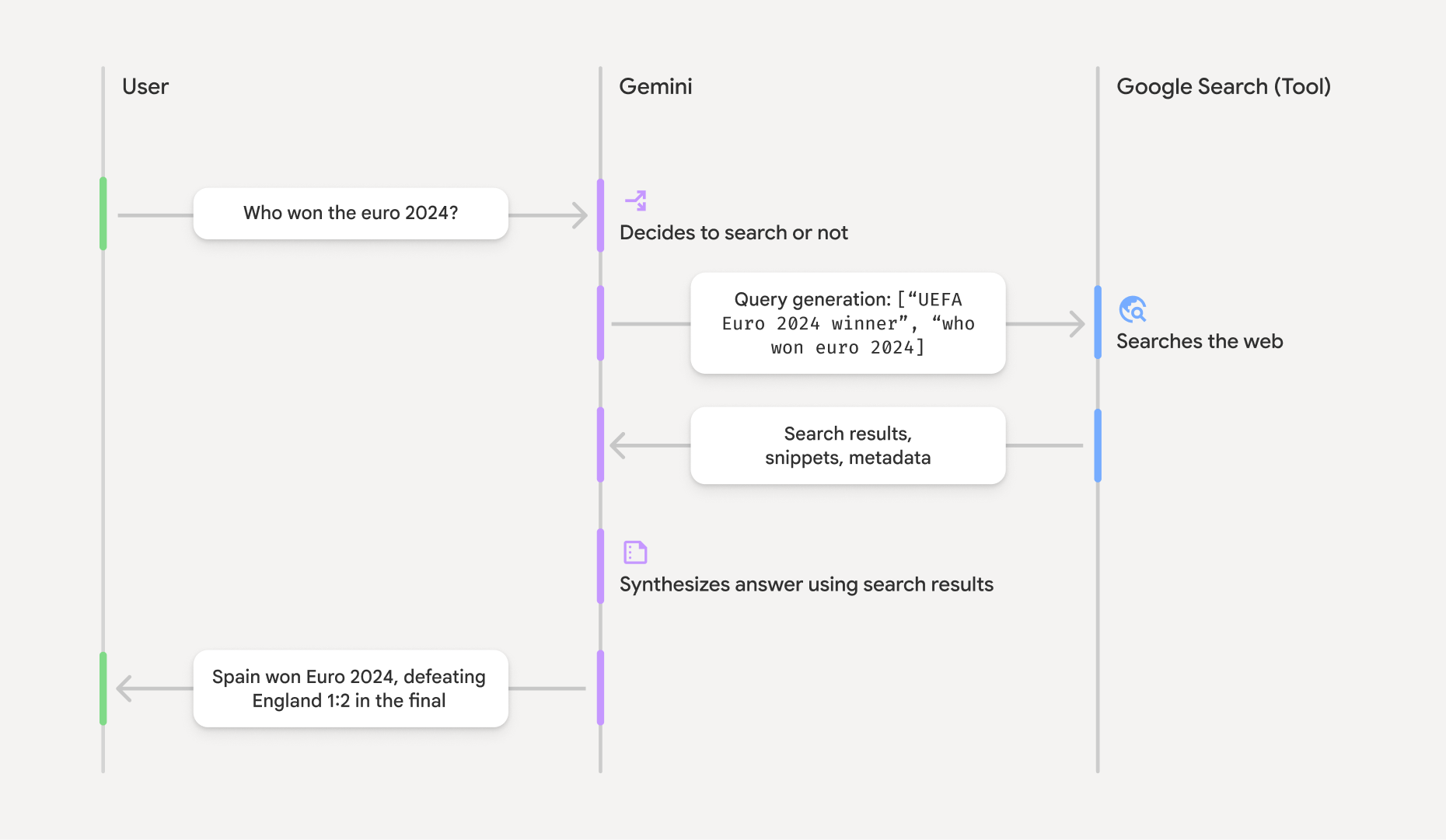
Quando utilizzi lo strumento GoogleSearch, il modello gestisce automaticamente l'intero flusso di lavoro di ricerca, elaborazione e citazione delle informazioni.
Ecco il flusso di lavoro del modello:
- Ricezione del prompt: l'app invia un prompt al modello Gemini con lo strumento
GoogleSearchabilitato. - Analisi del prompt: il modello analizza il prompt e determina se
Google Search può migliorare la sua risposta. - Invia query a
Google Search : se necessario, il modello genera ed esegue automaticamente una o più query di ricerca. - Elaborazione dei risultati di ricerca: il modello elabora i risultati di
Google Search e formula una risposta al prompt originale. - Restituzione di un "risultato fondato": il modello restituisce una risposta finale facile da usare, basata sui risultati di
Google Search . Questa risposta include la risposta di testo del modello egroundingMetadatacon le query di ricerca, i risultati web e le fonti.
Tieni presente che fornire groundingMetadata e, pertanto, non è un "risultato con grounding".
Comprendi il risultato basato sui dati
Se il modello fonda la sua risposta sui risultati di groundingMetadata che contiene dati strutturati essenziali per verificare le affermazioni e creare un'esperienza con fonti completa nella tua applicazione.
L'oggetto groundingMetadata in un "risultato con grounding" contiene le seguenti informazioni:
webSearchQueries: un array delle query di ricerca inviate aGoogle Search . Queste informazioni sono utili per il debug e per comprendere il processo di ragionamento del modello.searchEntryPoint: contiene l'HTML e il CSS per eseguire il rendering dei "suggerimenti diGoogle Search " richiesti. Devi rispettare i requisiti di utilizzo di "Grounding conGoogle Search " per il provider API scelto: Gemini Developer API o Agent Platform Gemini API (formerly Vertex AI) (consulta la sezione Termini di servizio nei Termini specifici dei servizi). Scopri come utilizzare e visualizzare un risultato con grounding più avanti in questa pagina.groundingChunks: un array di oggetti contenenti le fonti web (urietitle).groundingSupports: un array di chunk per collegare la risposta del modellotextalle fonti ingroundingChunks. Ogni segmento collega un testosegment(definito dastartIndexeendIndex) a uno o piùgroundingChunkIndices. Questo campo ti aiuta a creare link alle fonti in linea. Scopri come utilizzare e visualizzare un risultato con grounding più avanti in questa pagina.
Ecco un esempio di risposta che include un oggetto groundingMetadata:
{
  "candidates": [
    {
      "content": {
        "parts": [
          {
            "text": "Spain won Euro 2024, defeating England 2-1 in the final. This victory marks Spain's record fourth European Championship title."
          }
        ],
        "role": "model"
      },
      "groundingMetadata": {
        "webSearchQueries": [
          "UEFA Euro 2024 winner",
          "who won euro 2024"
        ],
        "searchEntryPoint": {
          "renderedContent": "<!-- HTML and CSS for the search widget -->"
        },
        "groundingChunks": [
          {"web": {"uri": "https://vertexaisearch.cloud.google.com.....", "title": "aljazeera.com"}},
          {"web": {"uri": "https://vertexaisearch.cloud.google.com.....", "title": "uefa.com"}}
        ],
        "groundingSupports": [
          {
            "segment": {"startIndex": 0, "endIndex": 85, "text": "Spain won Euro 2024, defeatin..."},
            "groundingChunkIndices": [0]
          },
          {
            "segment": {"startIndex": 86, "endIndex": 210, "text": "This victory marks Spain's..."},
            "groundingChunkIndices": [0, 1]
          }
        ]
      }
    }
  ]
}
Utilizza e visualizza un risultato con grounding
Se il modello utilizza lo strumento groundingMetadata nella risposta.
È obbligatorio
mostrare i suggerimenti di
Oltre a rispettare i requisiti per l'utilizzo dello strumento
(Obbligatorio) Visualizza Google Search suggerimenti
Se una risposta contiene "Suggerimenti di
L'oggetto groundingMetadata contiene "searchEntryPoint, che ha un campo renderedContent che fornisce uno stile HTML e CSS conforme, che devi implementare per mostrare i suggerimenti di ricerca nella tua app.
Esamina le informazioni dettagliate sui requisiti di visualizzazione e comportamento per i suggerimenti di
Consulta gli esempi di codice più avanti in questa sezione.
(Obbligatorio) Origini display
L'oggetto groundingMetadata contiene dati di origine strutturati, in particolare i campi groundingSupports e groundingChunks. Utilizza queste informazioni per collegare le affermazioni del modello direttamente alle relative fonti all'interno della tua UI (in linea e in forma aggregata).
Consulta gli esempi di codice più avanti in questa sezione.
Esempi di codice
Questi esempi di codice forniscono pattern generalizzati per l'utilizzo e la visualizzazione del risultato con grounding. Tuttavia, è tua responsabilità assicurarti che la tua implementazione specifica sia in linea con i requisiti di conformità.
Swift
// ...

// Get the model's response
let text = response.text

// Get the grounding metadata
if let candidate = response.candidates.first,
   let groundingMetadata = candidate.groundingMetadata {
  // REQUIRED - display Google Search suggestions
  // (renderedContent contains HTML and CSS for the search widget)
  if let renderedContent = groundingMetadata.searchEntryPoint?.renderedContent {
    // TODO(developer): Display Google Search suggestions using a WebView
  }

  // REQUIRED - display sources
  let groundingChunks = groundingMetadata.groundingChunks
  for chunk in groundingMetadata.groundingChunks {
    if let web = chunk.web {
      let title = web.title  // for example, "uefa.com"
      let uri = web.uri  // for example, "https://vertexaisearch.cloud.google.com..."
      // TODO(developer): show source in the UI
    }
  }
}
Kotlin
// ...

// Get the model's response
val text = response.text

// Get the grounding metadata
val groundingMetadata = response.candidates.firstOrNull()?.groundingMetadata

// REQUIRED - display Google Search suggestions
// (renderedContent contains HTML and CSS for the search widget)
val renderedContent = groundingMetadata?.searchEntryPoint?.renderedContent
if (renderedContent != null) {
    // TODO(developer): Display Google Search suggestions using a WebView
}

// REQUIRED - display sources
val groundingChunks = groundingMetadata?.groundingChunks
groundingChunks?.let { chunks ->
  for (chunk in chunks) {
  	val title = chunk.web?.title  // for example, "uefa.com"
	val uri = chunk.web?.uri  // for example, "https://vertexaisearch.cloud.google.com..."
// TODO(developer): show source in the UI
  }
}
Java
// ...

Futures.addCallback(response, new FutureCallback() {
  @Override
  public void onSuccess(GenerateContentResponse result) {
  // Get the model's response
  String text = result.getText();

  // Get the grounding metadata
  GroundingMetadata groundingMetadata =
  result.getCandidates()[0].getGroundingMetadata();

  if (groundingMetadata != null) {
    // REQUIRED - display Google Search suggestions
  // (renderedContent contains HTML and CSS for the search widget)
    String renderedContent =
  groundingMetadata.getSearchEntryPoint().getRenderedContent();
    if (renderedContent != null) {
      // TODO(developer): Display Google Search suggestions using a WebView
    }

    // REQUIRED - display sources
    List chunks = groundingMetadata.getGroundingChunks();
    if (chunks != null) {
      for(GroundingChunk chunk : chunks) {
        WebGroundingChunk web = chunk.getWeb();
        if (web != null) {
          String title = web.getTitle();  // for example, "uefa.com"
          String uri = web.getUri();  // for example, "https://vertexaisearch.cloud.google.com..."
          // TODO(developer): show sources in the UI
        }
      }
    }
  }
  }

  @Override
  public void onFailure(Throwable t) {
  t.printStackTrace();
  }
  }, executor);
Web
// ...

// Get the model's text response
const text = result.response.text();

// Get the grounding metadata
const groundingMetadata = result.response.candidates?.[0]?.groundingMetadata;

// REQUIRED - display Google Search suggestions
// (renderedContent contains HTML and CSS for the search widget)
const renderedContent = groundingMetadata?.searchEntryPoint?.renderedContent;
if (renderedContent) {
  // TODO(developer): render this HTML and CSS in the UI
}

// REQUIRED - display sources
const groundingChunks = groundingMetadata?.groundingChunks;
if (groundingChunks) {
  for (const chunk of groundingChunks) {
    const title = chunk.web?.title;  // for example, "uefa.com"
    const uri = chunk.web?.uri;  // for example, "https://vertexaisearch.cloud.google.com..."
    // TODO(developer): show sources in the UI
  }
}
Dart
// ...

// Get the model's response
final text = response.text;

// Get the grounding metadata
final groundingMetadata = response.candidates.first.groundingMetadata;

// REQUIRED - display Google Search suggestions
// (renderedContent contains HTML and CSS for the search widget)
final renderedContent = groundingMetadata?.searchEntryPoint?.renderedContent;
if (renderedContent != null) {
    // TODO(developer): Display Google Search suggestions using a WebView
}

// REQUIRED - display sources
final groundingChunks = groundingMetadata?.groundingChunks;
if (groundingChunks != null) {
  for (var chunk in groundingChunks) {
    final title = chunk.web?.title;  // for example, "uefa.com"
    final uri = chunk.web?.uri;  // for example, "https://vertexaisearch.cloud.google.com..."
    // TODO(developer): show sources in the UI
  }
}
Unity
// ...

// Get the model's response.
var text = response.Text;

// Get the grounding metadata.
var groundingMetadata = response.Candidates.First().GroundingMetadata.Value;

// REQUIRED - display Google Search suggestions
// (renderedContent contains HTML and CSS for the search widget)
if (groundingMetadata.SearchEntryPoint.HasValue) {
    var renderedContent = groundingMetadata.SearchEntryPoint.Value.RenderedContent;
    // TODO(developer): Display Google Search suggestions using a WebView
}

// REQUIRED - display sources
foreach(GroundingChunk chunk in groundingMetadata.GroundingChunks) {
    var title = chunk.Web.Value.Title;  // for example, "uefa.com"
    var uri = chunk.Web.Value.Uri;  // for example, "https://vertexaisearch.cloud.google.com..."
    // TODO(developer): show sources in the UI
}
Risultati basati su dati reali e monitoraggio AI nella console Firebase
Se hai attivato il monitoraggio AI nella console Firebase, le risposte vengono archiviate in Cloud Logging. Per impostazione predefinita, questi dati hanno un periodo di conservazione di 30 giorni.
È tua responsabilità assicurarti che questo periodo di conservazione o qualsiasi periodo personalizzato che imposti sia pienamente in linea con il tuo caso d'uso specifico e con eventuali requisiti di conformità aggiuntivi per il provider Gemini API scelto: Gemini Developer API o Agent Platform Gemini API (formerly Vertex AI) (consulta la sezione Termini di servizio all'interno dei Termini specifici dei servizi). Per soddisfare questi requisiti, potresti dover modificare il periodo di conservazione in Cloud Logging.
Prezzi e limiti
Assicurati di esaminare i prezzi, la disponibilità dei modelli e i limiti per il grounding con