

การอ้างอิงข้อมูลใน
การอ้างอิงข้อมูลใน
- เพิ่มความถูกต้องของข้อเท็จจริง: ลดอาการหลอนของโมเดลโดยอิงคำตอบจากข้อมูลในโลกแห่งความเป็นจริง
- เข้าถึงข้อมูลแบบเรียลไทม์: ตอบคำถามเกี่ยวกับเหตุการณ์และหัวข้อล่าสุด
- ระบุแหล่งที่มา: สร้างความไว้วางใจให้แก่ผู้ใช้หรืออนุญาตให้ผู้ใช้เรียกดูเว็บไซต์ที่เกี่ยวข้องโดยแสดงแหล่งที่มาของการอ้างสิทธิ์ของโมเดล
- ทำงานที่ซับซ้อนมากขึ้น: ดึงอาร์ติแฟกต์และรูปภาพ วิดีโอ หรือสื่ออื่นๆ ที่เกี่ยวข้องเพื่อช่วยในการให้เหตุผล
- ปรับปรุงคำตอบเฉพาะภูมิภาคหรือภาษา: ค้นหาข้อมูลเฉพาะภูมิภาค หรือช่วยแปลเนื้อหาอย่างถูกต้อง
โมเดลที่รองรับ
gemini-4-argongemini-3.8-flash(และgemini-3.7-flash,gemini-3.6-flashและgemini-3.5-flashรุ่นเก่า)gemini-3.5-flash-lite(และgemini-3.1-flash-liteรุ่นเก่า)gemini-nano-banana-2.1(Nano Banana 2.1)gemini-3.1-flash-image(Nano Banana 2)gemini-3-pro-image(Nano Banana Pro)
โมเดล gemini-3.1-pro-preview และโมเดล Gemini 2.5 สำหรับการใช้งานทั่วไป (ซึ่งเลิกใช้งานแล้ว) ก็รองรับความสามารถนี้เช่นกัน
โมเดล Gemini Live API ก็รองรับความสามารถนี้เช่นกัน แต่ตัวอย่างโค้ดทั้งหมดในคู่มือนี้มีไว้สำหรับโมเดล Gemini ที่ใช้งานทั่วไป
ภาษาที่สนับสนุน
ดูภาษาที่รองรับสำหรับโมเดล Gemini
อ้างอิงข้อมูลในโมเดลด้วย Google Search
|
คลิกผู้ให้บริการ Gemini API เพื่อดูเนื้อหาและโค้ดเฉพาะของผู้ให้บริการในหน้านี้ |
เมื่อสร้างอินสแตนซ์ GenerativeModel ให้ระบุ GoogleSearch เป็น tool ที่โมเดลสามารถใช้เพื่อสร้างคำตอบได้
Swift
import FirebaseAILogic

// Initialize the Gemini Developer API backend service.
let ai = FirebaseAI.firebaseAI(backend: .googleAI())

// Create a `GenerativeModel` instance with a model that supports your use case.
let model = ai.generativeModel(
    modelName: "GEMINI_MODEL_NAME",
    // Provide Google Search as a tool that the model can use to generate its response.
    tools: [.googleSearch()]
)

let response = try await model.generateContent("Who won the euro 2024?")
print(response.text ?? "No text in response.")

// Make sure to comply with the "Grounding with Google Search" usage requirements,
// which includes how you use and display the grounded result
Kotlin
// Initialize the Gemini Developer API backend service.
// Create a `GenerativeModel` instance with a model that supports your use case.
val model = Firebase.ai(backend = GenerativeBackend.googleAI()).generativeModel(
    modelName = "GEMINI_MODEL_NAME",
    // Provide Google Search as a tool that the model can use to generate its response
    tools = listOf(Tool.googleSearch())
)

val response = model.generateContent("Who won the euro 2024?")
print(response.text)

// Make sure to comply with the "Grounding with Google Search" usage requirements,
// which includes how you use and display the grounded result
Java
// Initialize the Gemini Developer API backend service.
// Create a `GenerativeModel` instance with a model that supports your use case.
GenerativeModel ai = FirebaseAI.getInstance(GenerativeBackend.googleAI())
                .generativeModel("GEMINI_MODEL_NAME",
                        null,
                        null,
                        // Provide Google Search as a tool that the model can use to generate its response
                        List.of(Tool.GoogleSearch()));

// Use the GenerativeModelFutures Java compatibility layer which offers
// support for ListenableFuture and Publisher APIs
GenerativeModelFutures model = GenerativeModelFutures.from(ai);

ListenableFuture response = model.generateContent("Who won the euro 2024?");
  Futures.addCallback(response, new FutureCallback() {
      @Override
      public void onSuccess(GenerateContentResponse result) {
          String resultText = result.getText();
          System.out.println(resultText);
      }

      @Override
      public void onFailure(Throwable t) {
          t.printStackTrace();
      }
  }, executor);

// Make sure to comply with the "Grounding with Google Search" usage requirements,
// which includes how you use and display the grounded result
Web
import { initializeApp } from "firebase/app";
import { getAI, getGenerativeModel, GoogleAIBackend } from "firebase/ai";

// TODO(developer): Replace the following with your app's Firebase configuration
// See: https://firebase.google.com/docs/web/learn-more#config-object
const firebaseConfig = {
  // ...
};

// Initialize FirebaseApp
const firebaseApp = initializeApp(firebaseConfig);

// Initialize the Gemini Developer API backend service.
const ai = getAI(firebaseApp, { backend: new GoogleAIBackend() });

// Create a `GenerativeModel` instance with a model that supports your use case.
const model = getGenerativeModel(
  ai,
  {
    model: "GEMINI_MODEL_NAME",
    // Provide Google Search as a tool that the model can use to generate its response
    tools: [{ googleSearch: {} }]
  }
);

const result = await model.generateContent("Who won the euro 2024?");

console.log(result.response.text());

// Make sure to comply with the "Grounding with Google Search" usage requirements,
// which includes how you use and display the grounded result
Dart
import 'package:firebase_core/firebase_core.dart';
import 'package:firebase_ai/firebase_ai.dart';
import 'firebase_options.dart';

// Initialize FirebaseApp.
await Firebase.initializeApp(
  options: DefaultFirebaseOptions.currentPlatform,
);

// Initialize the Gemini Developer API backend service.
// Create a `GenerativeModel` instance with a model that supports your use case.
final model = FirebaseAI.googleAI().generativeModel(
  model: 'GEMINI_MODEL_NAME',
  // Provide Google Search as a tool that the model can use to generate its response.
  tools: [
    Tool.googleSearch(),
  ],
);

final response = await model.generateContent([Content.text("Who won the euro 2024?")]);
print(response.text);

// Make sure to comply with the "Grounding with Google Search" usage requirements,
// which includes how you use and display the grounded result
Unity
using Firebase;
using Firebase.AI;

// Initialize the Gemini Developer API backend service.
var ai = FirebaseAI.GetInstance(FirebaseAI.Backend.GoogleAI());

// Create a `GenerativeModel` instance with a model that supports your use case.
var model = ai.GetGenerativeModel(
  modelName: "GEMINI_MODEL_NAME",
  // Provide Google Search as a tool that the model can use to generate its response.
  tools: new[] { new Tool(new GoogleSearch()) }
);

var response = await model.GenerateContentAsync("Who won the euro 2024?");
UnityEngine.Debug.Log(response.Text ?? "No text in response.");

// Make sure to comply with the "Grounding with Google Search" usage requirements,
// which includes how you use and display the grounded result
ดูวิธีเลือกโมเดล ที่เหมาะกับ Use Case และแอปของคุณ
วิธีการทำงานของการอ้างอิงข้อมูลใน Google Search
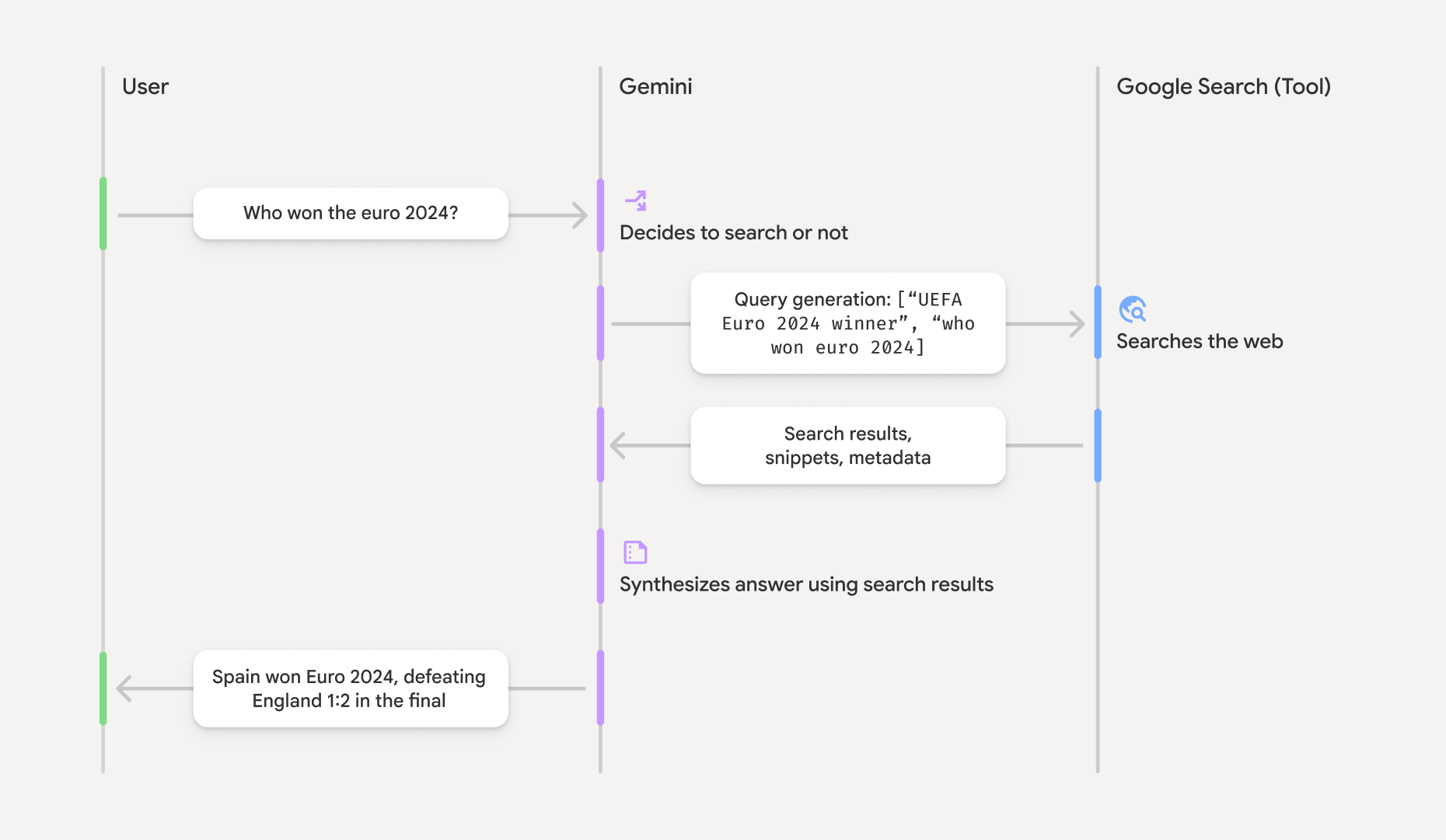
เมื่อคุณใช้เครื่องมือ GoogleSearch โมเดลจะจัดการเวิร์กโฟลว์ทั้งหมดของการค้นหา ประมวลผล และอ้างอิงข้อมูลโดยอัตโนมัติ
ขั้นตอนการทำงานของโมเดลมีดังนี้
- รับพรอมต์: แอปของคุณส่งพรอมต์ไปยังโมเดล Gemini โดยเปิดใช้เครื่องมือ
GoogleSearchไว้ - วิเคราะห์พรอมต์: โมเดลจะวิเคราะห์พรอมต์และพิจารณาว่า
Google Search สามารถปรับปรุงคำตอบได้หรือไม่ - ส่งคำค้นหาไปยัง
Google Search : หากจำเป็น โมเดลจะสร้างคำค้นหาอย่างน้อย 1 รายการและดำเนินการโดยอัตโนมัติ - ประมวลผลผลการค้นหา: โมเดลจะประมวลผลผลการค้นหา
Google Search รายการและกำหนดคำตอบสำหรับพรอมต์เดิม - แสดงผล "ผลลัพธ์ที่อิงตามข้อมูล": โมเดลจะแสดงคำตอบสุดท้ายที่ใช้ง่ายซึ่งอิงตามผลลัพธ์ของ
Google Search คำตอบนี้ประกอบด้วยคำตอบแบบข้อความของโมเดลและgroundingMetadataพร้อมคำค้นหา ผลลัพธ์จากเว็บ และแหล่งที่มา
โปรดทราบว่าการระบุ groundingMetadata จึงไม่ใช่ "ผลลัพธ์ที่มีการอ้างอิง"
ทำความเข้าใจผลลัพธ์ที่อิงตามข้อมูลที่เชื่อถือได้
หากโมเดลอิงคำตอบตามผลการค้นหาของ groundingMetadata ซึ่งมี Structured Data ที่จำเป็นสำหรับการยืนยันคำกล่าวอ้างและสร้างประสบการณ์การใช้งานแหล่งข้อมูลที่สมบูรณ์ในแอปพลิเคชันของคุณ
ออบเจ็กต์ groundingMetadata ใน "ผลลัพธ์ที่อิงตามข้อมูล" มีข้อมูลต่อไปนี้
webSearchQueries: อาร์เรย์ของคำค้นหาที่ส่งไปยังGoogle Search ข้อมูลนี้มีประโยชน์สำหรับการแก้ไขข้อบกพร่องและทำความเข้าใจกระบวนการให้เหตุผลของโมเดลsearchEntryPoint: มี HTML และ CSS เพื่อแสดงผล "คำแนะนำGoogle Search " ที่จำเป็น คุณต้องปฏิบัติตามข้อกำหนดการใช้งาน "การอ้างอิงข้อมูลด้วยGoogle Search " สำหรับผู้ให้บริการ API ที่คุณเลือก ซึ่งได้แก่ Gemini Developer API หรือ Agent Platform Gemini API (formerly Vertex AI) (ดูส่วนข้อกำหนดในการให้บริการภายในข้อกำหนดเฉพาะของบริการ) ดูวิธีใช้และแสดงผลลัพธ์ที่อิงตามข้อมูลในหน้านี้groundingChunks: อาร์เรย์ของออบเจ็กต์ที่มีแหล่งที่มาบนเว็บ (uriและtitle)groundingSupports: อาร์เรย์ของกลุ่มข้อมูลเพื่อเชื่อมต่อคำตอบของโมเดลtextกับแหล่งข้อมูลในgroundingChunksแต่ละกลุ่มจะลิงก์ข้อความsegment(กำหนดโดยstartIndexและendIndex) กับgroundingChunkIndicesอย่างน้อย 1 รายการ ช่องนี้ช่วยให้คุณสร้างลิงก์แหล่งที่มาในบรรทัดได้ ดูวิธีใช้และแสดงผลลัพธ์ที่อิงตามข้อมูลในหน้านี้
ต่อไปนี้คือตัวอย่างการตอบกลับที่มีออบเจ็กต์ groundingMetadata
{
  "candidates": [
    {
      "content": {
        "parts": [
          {
            "text": "Spain won Euro 2024, defeating England 2-1 in the final. This victory marks Spain's record fourth European Championship title."
          }
        ],
        "role": "model"
      },
      "groundingMetadata": {
        "webSearchQueries": [
          "UEFA Euro 2024 winner",
          "who won euro 2024"
        ],
        "searchEntryPoint": {
          "renderedContent": "<!-- HTML and CSS for the search widget -->"
        },
        "groundingChunks": [
          {"web": {"uri": "https://vertexaisearch.cloud.google.com.....", "title": "aljazeera.com"}},
          {"web": {"uri": "https://vertexaisearch.cloud.google.com.....", "title": "uefa.com"}}
        ],
        "groundingSupports": [
          {
            "segment": {"startIndex": 0, "endIndex": 85, "text": "Spain won Euro 2024, defeatin..."},
            "groundingChunkIndices": [0]
          },
          {
            "segment": {"startIndex": 86, "endIndex": 210, "text": "This victory marks Spain's..."},
            "groundingChunkIndices": [0, 1]
          }
        ]
      }
    }
  ]
}
ใช้และแสดงผลลัพธ์ที่อิงตามข้อมูลที่เชื่อถือได้
หากโมเดลใช้เครื่องมือ groundingMetadata ในคำตอบ
ต้องแสดงคำแนะนำ
นอกเหนือจากการปฏิบัติตามข้อกำหนดในการใช้เครื่องมือ
(ต้องระบุ) แสดงคำแนะนำ Google Search รายการ
หากคำตอบมี "คำแนะนำจาก
ออบเจ็กต์ groundingMetadata มี "คำแนะนำ searchEntryPoint ซึ่งมีช่อง renderedContent ที่ให้การจัดรูปแบบ HTML และ CSS ที่เป็นไปตามข้อกำหนด ซึ่งคุณต้องใช้เพื่อแสดงการแนะนำการค้นหาในแอป
ดูข้อมูลโดยละเอียดเกี่ยวกับข้อกำหนดด้านการแสดงผลและลักษณะการทำงานสำหรับคำแนะนำของ
ดูตัวอย่างโค้ดในส่วนนี้
(ต้องระบุ) แหล่งที่มาของ Display
ออบเจ็กต์ groundingMetadata มีข้อมูลแหล่งที่มาที่มีโครงสร้าง โดยเฉพาะฟิลด์ groundingSupports และ groundingChunks ใช้ข้อมูลนี้เพื่อลิงก์คำสั่งของโมเดลกับแหล่งที่มาโดยตรงภายใน UI (แบบแทรกในบรรทัดและแบบรวม)
ดูตัวอย่างโค้ดในส่วนนี้
ตัวอย่างโค้ด
ตัวอย่างโค้ดเหล่านี้แสดงรูปแบบทั่วไปสำหรับการใช้และการแสดงผลลัพธ์ที่อิงตามข้อมูลจริง อย่างไรก็ตาม คุณมีหน้าที่ตรวจสอบว่าการติดตั้งใช้งานเฉพาะของคุณสอดคล้องกับข้อกำหนดด้านการปฏิบัติตามข้อกำหนด
Swift
// ...

// Get the model's response
let text = response.text

// Get the grounding metadata
if let candidate = response.candidates.first,
   let groundingMetadata = candidate.groundingMetadata {
  // REQUIRED - display Google Search suggestions
  // (renderedContent contains HTML and CSS for the search widget)
  if let renderedContent = groundingMetadata.searchEntryPoint?.renderedContent {
    // TODO(developer): Display Google Search suggestions using a WebView
  }

  // REQUIRED - display sources
  let groundingChunks = groundingMetadata.groundingChunks
  for chunk in groundingMetadata.groundingChunks {
    if let web = chunk.web {
      let title = web.title  // for example, "uefa.com"
      let uri = web.uri  // for example, "https://vertexaisearch.cloud.google.com..."
      // TODO(developer): show source in the UI
    }
  }
}
Kotlin
// ...

// Get the model's response
val text = response.text

// Get the grounding metadata
val groundingMetadata = response.candidates.firstOrNull()?.groundingMetadata

// REQUIRED - display Google Search suggestions
// (renderedContent contains HTML and CSS for the search widget)
val renderedContent = groundingMetadata?.searchEntryPoint?.renderedContent
if (renderedContent != null) {
    // TODO(developer): Display Google Search suggestions using a WebView
}

// REQUIRED - display sources
val groundingChunks = groundingMetadata?.groundingChunks
groundingChunks?.let { chunks ->
  for (chunk in chunks) {
  	val title = chunk.web?.title  // for example, "uefa.com"
	val uri = chunk.web?.uri  // for example, "https://vertexaisearch.cloud.google.com..."
// TODO(developer): show source in the UI
  }
}
Java
// ...

Futures.addCallback(response, new FutureCallback() {
  @Override
  public void onSuccess(GenerateContentResponse result) {
  // Get the model's response
  String text = result.getText();

  // Get the grounding metadata
  GroundingMetadata groundingMetadata =
  result.getCandidates()[0].getGroundingMetadata();

  if (groundingMetadata != null) {
    // REQUIRED - display Google Search suggestions
  // (renderedContent contains HTML and CSS for the search widget)
    String renderedContent =
  groundingMetadata.getSearchEntryPoint().getRenderedContent();
    if (renderedContent != null) {
      // TODO(developer): Display Google Search suggestions using a WebView
    }

    // REQUIRED - display sources
    List chunks = groundingMetadata.getGroundingChunks();
    if (chunks != null) {
      for(GroundingChunk chunk : chunks) {
        WebGroundingChunk web = chunk.getWeb();
        if (web != null) {
          String title = web.getTitle();  // for example, "uefa.com"
          String uri = web.getUri();  // for example, "https://vertexaisearch.cloud.google.com..."
          // TODO(developer): show sources in the UI
        }
      }
    }
  }
  }

  @Override
  public void onFailure(Throwable t) {
  t.printStackTrace();
  }
  }, executor);
Web
// ...

// Get the model's text response
const text = result.response.text();

// Get the grounding metadata
const groundingMetadata = result.response.candidates?.[0]?.groundingMetadata;

// REQUIRED - display Google Search suggestions
// (renderedContent contains HTML and CSS for the search widget)
const renderedContent = groundingMetadata?.searchEntryPoint?.renderedContent;
if (renderedContent) {
  // TODO(developer): render this HTML and CSS in the UI
}

// REQUIRED - display sources
const groundingChunks = groundingMetadata?.groundingChunks;
if (groundingChunks) {
  for (const chunk of groundingChunks) {
    const title = chunk.web?.title;  // for example, "uefa.com"
    const uri = chunk.web?.uri;  // for example, "https://vertexaisearch.cloud.google.com..."
    // TODO(developer): show sources in the UI
  }
}
Dart
// ...

// Get the model's response
final text = response.text;

// Get the grounding metadata
final groundingMetadata = response.candidates.first.groundingMetadata;

// REQUIRED - display Google Search suggestions
// (renderedContent contains HTML and CSS for the search widget)
final renderedContent = groundingMetadata?.searchEntryPoint?.renderedContent;
if (renderedContent != null) {
    // TODO(developer): Display Google Search suggestions using a WebView
}

// REQUIRED - display sources
final groundingChunks = groundingMetadata?.groundingChunks;
if (groundingChunks != null) {
  for (var chunk in groundingChunks) {
    final title = chunk.web?.title;  // for example, "uefa.com"
    final uri = chunk.web?.uri;  // for example, "https://vertexaisearch.cloud.google.com..."
    // TODO(developer): show sources in the UI
  }
}
Unity
// ...

// Get the model's response.
var text = response.Text;

// Get the grounding metadata.
var groundingMetadata = response.Candidates.First().GroundingMetadata.Value;

// REQUIRED - display Google Search suggestions
// (renderedContent contains HTML and CSS for the search widget)
if (groundingMetadata.SearchEntryPoint.HasValue) {
    var renderedContent = groundingMetadata.SearchEntryPoint.Value.RenderedContent;
    // TODO(developer): Display Google Search suggestions using a WebView
}

// REQUIRED - display sources
foreach(GroundingChunk chunk in groundingMetadata.GroundingChunks) {
    var title = chunk.Web.Value.Title;  // for example, "uefa.com"
    var uri = chunk.Web.Value.Uri;  // for example, "https://vertexaisearch.cloud.google.com..."
    // TODO(developer): show sources in the UI
}
ผลลัพธ์ที่อิงตามข้อมูลและการตรวจสอบ AI ในคอนโซล Firebase
หากคุณเปิดใช้การตรวจสอบ AI ในคอนโซล Firebase ระบบจะจัดเก็บคำตอบไว้ใน Cloud Logging โดยค่าเริ่มต้น ข้อมูลนี้จะมีระยะเวลาเก็บรักษา 30 วัน
คุณมีหน้าที่รับผิดชอบในการตรวจสอบว่าระยะเวลาเก็บรักษานี้หรือระยะเวลาที่กำหนดเองที่คุณตั้งค่าไว้สอดคล้องกับกรณีการใช้งานที่เฉพาะเจาะจงของคุณและข้อกำหนดด้านการปฏิบัติตามข้อกำหนดเพิ่มเติมสำหรับผู้ให้บริการ Gemini API ที่คุณเลือกอย่างเต็มที่ ซึ่งได้แก่ Gemini Developer API หรือ Agent Platform Gemini API (formerly Vertex AI) (ดูส่วนข้อกำหนดในการให้บริการภายในข้อกำหนดเฉพาะบริการ) คุณอาจต้องปรับระยะเวลาเก็บรักษาใน Cloud Logging เพื่อให้เป็นไปตามข้อกำหนดเหล่านี้
ราคาและขีดจำกัด
อย่าลืมตรวจสอบราคา ความพร้อมใช้งานของโมเดล และขีดจำกัดสำหรับการอ้างอิงข้อมูลในโลกความจริงด้วย