

La fundamentación con
La fundamentación con
- Aumentar la precisión fáctica: Reduce las alucinaciones del modelo basando las respuestas en información del mundo real.
- Acceder a información en tiempo real: Responder preguntas sobre eventos y temas recientes
- Proporciona fuentes: Genera confianza en los usuarios o permíteles explorar sitios relevantes mostrando las fuentes de las afirmaciones del modelo.
- Completar tareas más complejas: Recuperar artefactos e imágenes, videos o contenido multimedia relevantes para ayudar en las tareas de razonamiento
- Mejorar las respuestas específicas para cada región o idioma: Encontrar información específica para cada región o ayudar a traducir contenido con precisión
Modelos compatibles
gemini-3.1-pro-previewgemini-3.8-flash(y los modelos anterioresgemini-3.7-flash,gemini-3.6-flashygemini-3.5-flash)gemini-3.5-flash-lite(y el anteriorgemini-3.1-flash-lite)gemini-3-pro-image(también conocido como "Nano Banana Pro")gemini-3.1-flash-image(también conocido como "Nano Banana 2")
Los modelos Gemini 2.5 de uso general admiten esta capacidad, pero todos dejaron de estar disponibles.
Los modelos Gemini Live API también admiten esta capacidad, pero todas las muestras de código de esta guía son para los modelos Gemini de uso general.
Lenguajes compatibles
Consulta los idiomas admitidos para los modelos Gemini.
Fundamenta el modelo con Google Search
|
Haz clic en tu proveedor de Gemini API para ver el contenido y el código específicos del proveedor en esta página. |
Cuando crees la instancia GenerativeModel, proporciona GoogleSearch como un tool que el modelo pueda usar para generar su respuesta.
Swift
import FirebaseAILogic

// Initialize the Gemini Developer API backend service.
let ai = FirebaseAI.firebaseAI(backend: .googleAI())

// Create a `GenerativeModel` instance with a model that supports your use case.
let model = ai.generativeModel(
    modelName: "GEMINI_MODEL_NAME",
    // Provide Google Search as a tool that the model can use to generate its response.
    tools: [Tool.googleSearch()]
)

let response = try await model.generateContent("Who won the euro 2024?")
print(response.text ?? "No text in response.")

// Make sure to comply with the "Grounding with Google Search" usage requirements,
// which includes how you use and display the grounded result
Kotlin
// Initialize the Gemini Developer API backend service.
// Create a `GenerativeModel` instance with a model that supports your use case.
val model = Firebase.ai(backend = GenerativeBackend.googleAI()).generativeModel(
    modelName = "GEMINI_MODEL_NAME",
    // Provide Google Search as a tool that the model can use to generate its response
    tools = listOf(Tool.googleSearch())
)

val response = model.generateContent("Who won the euro 2024?")
print(response.text)

// Make sure to comply with the "Grounding with Google Search" usage requirements,
// which includes how you use and display the grounded result
Java
// Initialize the Gemini Developer API backend service.
// Create a `GenerativeModel` instance with a model that supports your use case.
GenerativeModel ai = FirebaseAI.getInstance(GenerativeBackend.googleAI())
                .generativeModel("GEMINI_MODEL_NAME",
                        null,
                        null,
                        // Provide Google Search as a tool that the model can use to generate its response
                        List.of(Tool.GoogleSearch()));

// Use the GenerativeModelFutures Java compatibility layer which offers
// support for ListenableFuture and Publisher APIs
GenerativeModelFutures model = GenerativeModelFutures.from(ai);

ListenableFuture response = model.generateContent("Who won the euro 2024?");
  Futures.addCallback(response, new FutureCallback() {
      @Override
      public void onSuccess(GenerateContentResponse result) {
          String resultText = result.getText();
          System.out.println(resultText);
      }

      @Override
      public void onFailure(Throwable t) {
          t.printStackTrace();
      }
  }, executor);

// Make sure to comply with the "Grounding with Google Search" usage requirements,
// which includes how you use and display the grounded result
Web
import { initializeApp } from "firebase/app";
import { getAI, getGenerativeModel, GoogleAIBackend } from "firebase/ai";

// TODO(developer): Replace the following with your app's Firebase configuration
// See: https://firebase.google.com/docs/web/learn-more#config-object
const firebaseConfig = {
  // ...
};

// Initialize FirebaseApp
const firebaseApp = initializeApp(firebaseConfig);

// Initialize the Gemini Developer API backend service.
const ai = getAI(firebaseApp, { backend: new GoogleAIBackend() });

// Create a `GenerativeModel` instance with a model that supports your use case.
const model = getGenerativeModel(
  ai,
  {
    model: "GEMINI_MODEL_NAME",
    // Provide Google Search as a tool that the model can use to generate its response
    tools: [{ googleSearch: {} }]
  }
);

const result = await model.generateContent("Who won the euro 2024?");

console.log(result.response.text());

// Make sure to comply with the "Grounding with Google Search" usage requirements,
// which includes how you use and display the grounded result
Dart
import 'package:firebase_core/firebase_core.dart';
import 'package:firebase_ai/firebase_ai.dart';
import 'firebase_options.dart';

// Initialize FirebaseApp.
await Firebase.initializeApp(
  options: DefaultFirebaseOptions.currentPlatform,
);

// Initialize the Gemini Developer API backend service.
// Create a `GenerativeModel` instance with a model that supports your use case.
final model = FirebaseAI.googleAI().generativeModel(
  model: 'GEMINI_MODEL_NAME',
  // Provide Google Search as a tool that the model can use to generate its response.
  tools: [
    Tool.googleSearch(),
  ],
);

final response = await model.generateContent([Content.text("Who won the euro 2024?")]);
print(response.text);

// Make sure to comply with the "Grounding with Google Search" usage requirements,
// which includes how you use and display the grounded result
Unity
using Firebase;
using Firebase.AI;

// Initialize the Gemini Developer API backend service.
var ai = FirebaseAI.GetInstance(FirebaseAI.Backend.GoogleAI());

// Create a `GenerativeModel` instance with a model that supports your use case.
var model = ai.GetGenerativeModel(
  modelName: "GEMINI_MODEL_NAME",
  // Provide Google Search as a tool that the model can use to generate its response.
  tools: new[] { new Tool(new GoogleSearch()) }
);

var response = await model.GenerateContentAsync("Who won the euro 2024?");
UnityEngine.Debug.Log(response.Text ?? "No text in response.");

// Make sure to comply with the "Grounding with Google Search" usage requirements,
// which includes how you use and display the grounded result
Aprende a elegir un modelo adecuados para tu caso de uso y tu app.
Cómo funciona la fundamentación con Google Search
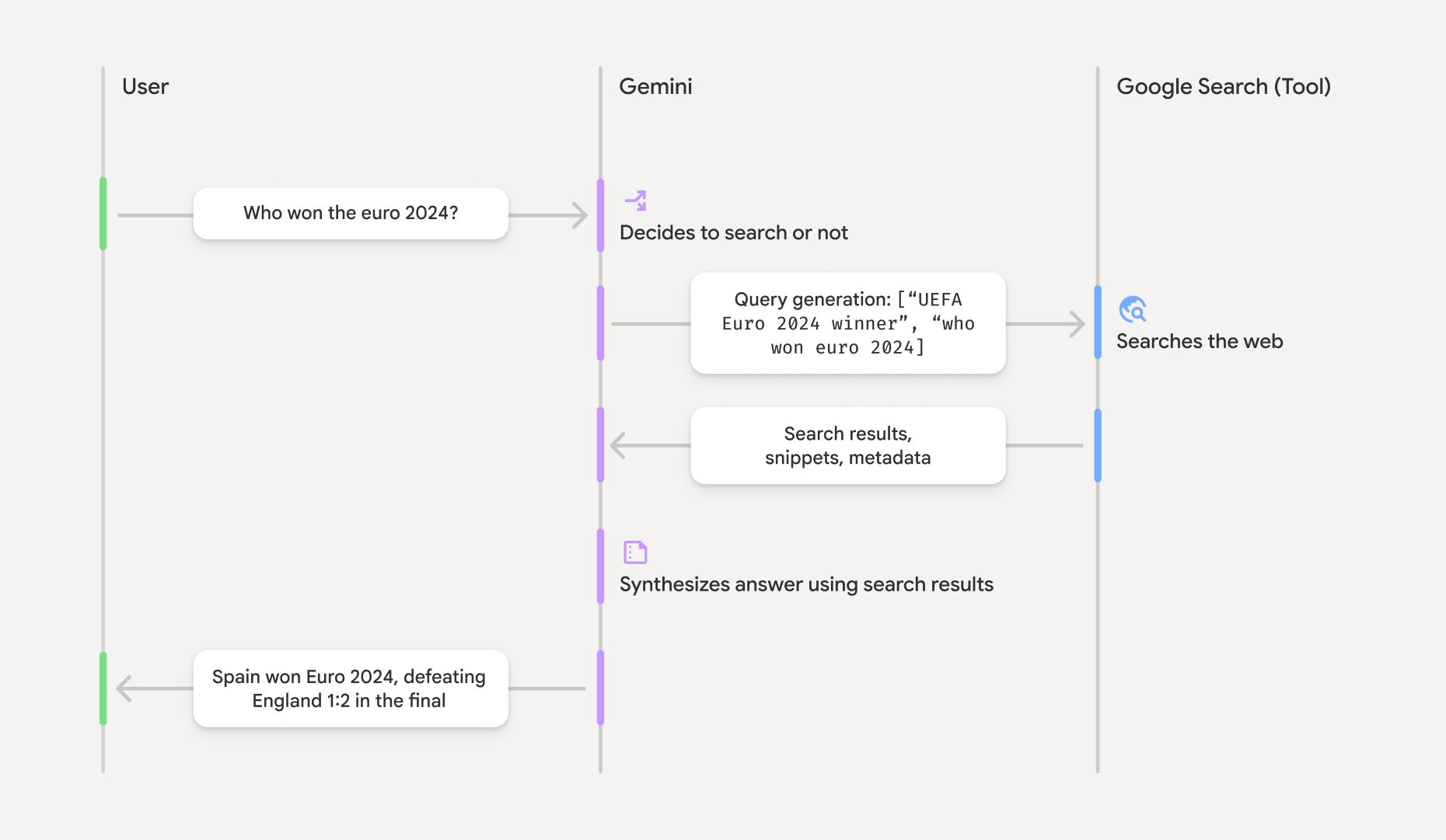
Cuando usas la herramienta GoogleSearch, el modelo controla todo el flujo de trabajo de búsqueda, procesamiento y citación de información de forma automática.
Este es el flujo de trabajo del modelo:
- Recibir instrucción: Tu app envía una instrucción al modelo Gemini con la herramienta
GoogleSearchhabilitada. - Analizar instrucción: El modelo analiza la instrucción y determina si
Google Search puede mejorar su respuesta. - Enviar preguntas a
Google Search : Si es necesario, el modelo genera automáticamente una o varias preguntas de búsqueda y las ejecuta. - Procesa los resultados de la Búsqueda: El modelo procesa los resultados de
Google Search y formula una respuesta a la instrucción original. - Devuelve un "resultado fundamentado": El modelo devuelve una respuesta final y fácil de usar que se fundamenta en los resultados de
Google Search . Esta respuesta incluye la respuesta de texto del modelo ygroundingMetadatacon las búsquedas, los resultados web y las fuentes.
Ten en cuenta que proporcionar groundingMetadata y, por lo tanto, no será un "resultado fundamentado".
Comprende el resultado fundamentado
Si el modelo fundamenta su respuesta en los resultados de groundingMetadata que contiene datos estructurados esenciales para verificar las afirmaciones y crear una experiencia de fuente enriquecida en tu aplicación.
El objeto groundingMetadata en un "resultado fundamentado" contiene la siguiente información:
webSearchQueries: Es un array de las búsquedas enviadas aGoogle Search . Esta información es útil para depurar y comprender el proceso de razonamiento del modelo.searchEntryPoint: Contiene el código HTML y CSS para renderizar las "sugerencias deGoogle Search " requeridas. Debes cumplir con los requisitos de uso de "Fundamentación conGoogle Search " para el proveedor de la API que elijas: Gemini Developer API o Agent Platform Gemini API (formerly Vertex AI) (consulta la sección de las Condiciones del Servicio en las Condiciones Específicas del Servicio). Obtén más información para usar y mostrar un resultado fundamentado más adelante en esta página.groundingChunks: Es un array de objetos que contiene las fuentes web (uriytitle).groundingSupports: Es un array de fragmentos para conectar la respuesta del modelotexta las fuentes engroundingChunks. Cada fragmento vincula un textosegment(definido porstartIndexyendIndex) a uno o másgroundingChunkIndices. Este campo te ayuda a crear vínculos a la fuente intercalados. Obtén más información para usar y mostrar un resultado fundamentado más adelante en esta página.
Este es un ejemplo de respuesta que incluye un objeto groundingMetadata:
{
  "candidates": [
    {
      "content": {
        "parts": [
          {
            "text": "Spain won Euro 2024, defeating England 2-1 in the final. This victory marks Spain's record fourth European Championship title."
          }
        ],
        "role": "model"
      },
      "groundingMetadata": {
        "webSearchQueries": [
          "UEFA Euro 2024 winner",
          "who won euro 2024"
        ],
        "searchEntryPoint": {
          "renderedContent": "<!-- HTML and CSS for the search widget -->"
        },
        "groundingChunks": [
          {"web": {"uri": "https://vertexaisearch.cloud.google.com.....", "title": "aljazeera.com"}},
          {"web": {"uri": "https://vertexaisearch.cloud.google.com.....", "title": "uefa.com"}}
        ],
        "groundingSupports": [
          {
            "segment": {"startIndex": 0, "endIndex": 85, "text": "Spain won Euro 2024, defeatin..."},
            "groundingChunkIndices": [0]
          },
          {
            "segment": {"startIndex": 86, "endIndex": 210, "text": "This victory marks Spain's..."},
            "groundingChunkIndices": [0, 1]
          }
        ]
      }
    }
  ]
}
Cómo usar y mostrar un resultado fundamentado
Si el modelo usa la herramienta groundingMetadata en la respuesta.
Es obligatorio mostrar
Además de cumplir con los requisitos para usar la herramienta
(Obligatorio) Mostrar sugerencias de Google Search
Si una respuesta contiene "sugerencias de
El objeto groundingMetadata contiene "sugerencias de searchEntryPoint, que tiene un campo renderedContent que proporciona un diseño compatible con HTML y CSS, que debes implementar para mostrar sugerencias de la Búsqueda en tu app.
Revisa la información detallada sobre los requisitos de visualización y comportamiento para las sugerencias de
Consulta los ejemplos de código más adelante en esta sección.
(Obligatorio) Fuentes de visualización
El objeto groundingMetadata contiene datos de origen estructurados, específicamente los campos groundingSupports y groundingChunks. Usa esta información para vincular las declaraciones del modelo directamente a sus fuentes dentro de tu IU (de forma intercalada y agregada).
Consulta los ejemplos de código más adelante en esta sección.
Ejemplos de muestras de código
En estas muestras de código, se proporcionan patrones generalizados para usar y mostrar el resultado fundamentado. Sin embargo, es tu responsabilidad asegurarte de que tu implementación específica cumpla con los requisitos de cumplimiento.
Swift
// ...

// Get the model's response
let text = response.text

// Get the grounding metadata
if let candidate = response.candidates.first,
   let groundingMetadata = candidate.groundingMetadata {
  // REQUIRED - display Google Search suggestions
  // (renderedContent contains HTML and CSS for the search widget)
  if let renderedContent = groundingMetadata.searchEntryPoint?.renderedContent {
    // TODO(developer): Display Google Search suggestions using a WebView
  }

  // REQUIRED - display sources
  let groundingChunks = groundingMetadata.groundingChunks
  for chunk in groundingMetadata.groundingChunks {
    if let web = chunk.web {
      let title = web.title  // for example, "uefa.com"
      let uri = web.uri  // for example, "https://vertexaisearch.cloud.google.com..."
      // TODO(developer): show source in the UI
    }
  }
}
Kotlin
// ...

// Get the model's response
val text = response.text

// Get the grounding metadata
val groundingMetadata = response.candidates.firstOrNull()?.groundingMetadata

// REQUIRED - display Google Search suggestions
// (renderedContent contains HTML and CSS for the search widget)
val renderedContent = groundingMetadata?.searchEntryPoint?.renderedContent
if (renderedContent != null) {
    // TODO(developer): Display Google Search suggestions using a WebView
}

// REQUIRED - display sources
val groundingChunks = groundingMetadata?.groundingChunks
groundingChunks?.let { chunks ->
  for (chunk in chunks) {
  	val title = chunk.web?.title  // for example, "uefa.com"
	val uri = chunk.web?.uri  // for example, "https://vertexaisearch.cloud.google.com..."
// TODO(developer): show source in the UI
  }
}
Java
// ...

Futures.addCallback(response, new FutureCallback() {
  @Override
  public void onSuccess(GenerateContentResponse result) {
  // Get the model's response
  String text = result.getText();

  // Get the grounding metadata
  GroundingMetadata groundingMetadata =
  result.getCandidates()[0].getGroundingMetadata();

  if (groundingMetadata != null) {
    // REQUIRED - display Google Search suggestions
  // (renderedContent contains HTML and CSS for the search widget)
    String renderedContent =
  groundingMetadata.getSearchEntryPoint().getRenderedContent();
    if (renderedContent != null) {
      // TODO(developer): Display Google Search suggestions using a WebView
    }

    // REQUIRED - display sources
    List chunks = groundingMetadata.getGroundingChunks();
    if (chunks != null) {
      for(GroundingChunk chunk : chunks) {
        WebGroundingChunk web = chunk.getWeb();
        if (web != null) {
          String title = web.getTitle();  // for example, "uefa.com"
          String uri = web.getUri();  // for example, "https://vertexaisearch.cloud.google.com..."
          // TODO(developer): show sources in the UI
        }
      }
    }
  }
  }

  @Override
  public void onFailure(Throwable t) {
  t.printStackTrace();
  }
  }, executor);
Web
// ...

// Get the model's text response
const text = result.response.text();

// Get the grounding metadata
const groundingMetadata = result.response.candidates?.[0]?.groundingMetadata;

// REQUIRED - display Google Search suggestions
// (renderedContent contains HTML and CSS for the search widget)
const renderedContent = groundingMetadata?.searchEntryPoint?.renderedContent;
if (renderedContent) {
  // TODO(developer): render this HTML and CSS in the UI
}

// REQUIRED - display sources
const groundingChunks = groundingMetadata?.groundingChunks;
if (groundingChunks) {
  for (const chunk of groundingChunks) {
    const title = chunk.web?.title;  // for example, "uefa.com"
    const uri = chunk.web?.uri;  // for example, "https://vertexaisearch.cloud.google.com..."
    // TODO(developer): show sources in the UI
  }
}
Dart
// ...

// Get the model's response
final text = response.text;

// Get the grounding metadata
final groundingMetadata = response.candidates.first.groundingMetadata;

// REQUIRED - display Google Search suggestions
// (renderedContent contains HTML and CSS for the search widget)
final renderedContent = groundingMetadata?.searchEntryPoint?.renderedContent;
if (renderedContent != null) {
    // TODO(developer): Display Google Search suggestions using a WebView
}

// REQUIRED - display sources
final groundingChunks = groundingMetadata?.groundingChunks;
if (groundingChunks != null) {
  for (var chunk in groundingChunks) {
    final title = chunk.web?.title;  // for example, "uefa.com"
    final uri = chunk.web?.uri;  // for example, "https://vertexaisearch.cloud.google.com..."
    // TODO(developer): show sources in the UI
  }
}
Unity
// ...

// Get the model's response.
var text = response.Text;

// Get the grounding metadata.
var groundingMetadata = response.Candidates.First().GroundingMetadata.Value;

// REQUIRED - display Google Search suggestions
// (renderedContent contains HTML and CSS for the search widget)
if (groundingMetadata.SearchEntryPoint.HasValue) {
    var renderedContent = groundingMetadata.SearchEntryPoint.Value.RenderedContent;
    // TODO(developer): Display Google Search suggestions using a WebView
}

// REQUIRED - display sources
foreach(GroundingChunk chunk in groundingMetadata.GroundingChunks) {
    var title = chunk.Web.Value.Title;  // for example, "uefa.com"
    var uri = chunk.Web.Value.Uri;  // for example, "https://vertexaisearch.cloud.google.com..."
    // TODO(developer): show sources in the UI
}
Resultados fundamentados y supervisión de la IA en la consola de Firebase
Si habilitaste la supervisión de la IA en la consola de Firebase, las respuestas se almacenan en Cloud Logging. De forma predeterminada, estos datos tienen un período de retención de 30 días.
Es tu responsabilidad asegurarte de que este período de retención, o cualquier período personalizado que establezcas, se alinee por completo con tu caso de uso específico y con cualquier requisito de cumplimiento adicional para el proveedor de Gemini API que elijas: Gemini Developer API o Agent Platform Gemini API (formerly Vertex AI) (consulta la sección de Condiciones del Servicio en las Condiciones Específicas del Servicio). Es posible que debas ajustar el período de retención en Cloud Logging para cumplir con estos requisitos.
Precios y límites
Asegúrate de revisar los precios, la disponibilidad del modelo y los límites de la fundamentación con