

การเชื่อมต่อแหล่งข้อมูลกับ
การเชื่อมต่อแหล่งข้อมูลกับ
- เพิ่มความแม่นยำของข้อเท็จจริง: ลดอาการหลอนของ AI ในโมเดลโดยอิงตามข้อมูลในโลกแห่งความเป็นจริง
- เข้าถึงข้อมูลแบบเรียลไทม์: ตอบคำถามเกี่ยวกับเหตุการณ์ล่าสุด และหัวข้อ
- ระบุแหล่งที่มา: สร้างความไว้วางใจจากผู้ใช้หรืออนุญาตให้ผู้ใช้เรียกดู เว็บไซต์ที่เกี่ยวข้องโดยแสดงแหล่งที่มาของข้อมูลที่โมเดลอ้าง
- ทำงานที่ซับซ้อนมากขึ้น: ดึงข้อมูลอาร์ติแฟกต์ รูปภาพ วิดีโอ หรือสื่ออื่นๆ ที่เกี่ยวข้องเพื่อช่วยในงานที่ต้องใช้เหตุผล
- ปรับปรุงคำตอบที่เฉพาะเจาะจงตามภูมิภาคหรือภาษา: ค้นหาข้อมูลที่เฉพาะเจาะจงตามภูมิภาค หรือช่วยแปลเนื้อหาได้อย่างถูกต้อง
โมเดลที่รองรับ
gemini-4-argongemini-3.8-flash(และgemini-3.7-flash,gemini-3.6-flashและgemini-3.5-flashเวอร์ชันเก่ากว่า)gemini-3.5-flash-lite(และgemini-3.1-flash-liteเวอร์ชันเก่ากว่า)gemini-3-pro-image(หรือที่เรียกว่า "Nano Banana Pro")gemini-3.1-flash-image(หรือที่เรียกว่า "Nano Banana 2")
โมเดล gemini-3.1-pro-preview และโมเดล Gemini 2.5 ที่ใช้ทั่วไป (ซึ่ง
เลิกใช้งานแล้ว) ก็รองรับความสามารถนี้เช่นกัน
โมเดล Gemini Live APIก็รองรับความสามารถนี้เช่นกัน แต่ตัวอย่างโค้ดทั้งหมดในคู่มือนี้เป็นโมเดล ที่ใช้ทั่วไปGemini
ภาษาที่รองรับ
ดูภาษาที่รองรับสำหรับGemini โมเดล
เชื่อมต่อแหล่งข้อมูลของโมเดลกับ Google Search
|
คลิกผู้ให้บริการ Gemini API เพื่อดูเนื้อหาที่เฉพาะเจาะจงของผู้ให้บริการ และโค้ดในหน้านี้ |
เมื่อสร้างอินสแตนซ์ GenerativeModel ให้ระบุ GoogleSearch เป็น tool ที่โมเดลใช้สร้างคำตอบได้
Swift
import FirebaseAILogic

// Initialize the Gemini Developer API backend service.
let ai = FirebaseAI.firebaseAI(backend: .googleAI())

// Create a `GenerativeModel` instance with a model that supports your use case.
let model = ai.generativeModel(
    modelName: "GEMINI_MODEL_NAME",
    // Provide Google Search as a tool that the model can use to generate its response.
    tools: [.googleSearch()]
)

let response = try await model.generateContent("Who won the euro 2024?")
print(response.text ?? "No text in response.")

// Make sure to comply with the "Grounding with Google Search" usage requirements,
// which includes how you use and display the grounded result
Kotlin
// Initialize the Gemini Developer API backend service.
// Create a `GenerativeModel` instance with a model that supports your use case.
val model = Firebase.ai(backend = GenerativeBackend.googleAI()).generativeModel(
    modelName = "GEMINI_MODEL_NAME",
    // Provide Google Search as a tool that the model can use to generate its response
    tools = listOf(Tool.googleSearch())
)

val response = model.generateContent("Who won the euro 2024?")
print(response.text)

// Make sure to comply with the "Grounding with Google Search" usage requirements,
// which includes how you use and display the grounded result
Java
// Initialize the Gemini Developer API backend service.
// Create a `GenerativeModel` instance with a model that supports your use case.
GenerativeModel ai = FirebaseAI.getInstance(GenerativeBackend.googleAI())
                .generativeModel("GEMINI_MODEL_NAME",
                        null,
                        null,
                        // Provide Google Search as a tool that the model can use to generate its response
                        List.of(Tool.GoogleSearch()));

// Use the GenerativeModelFutures Java compatibility layer which offers
// support for ListenableFuture and Publisher APIs
GenerativeModelFutures model = GenerativeModelFutures.from(ai);

ListenableFuture response = model.generateContent("Who won the euro 2024?");
  Futures.addCallback(response, new FutureCallback() {
      @Override
      public void onSuccess(GenerateContentResponse result) {
          String resultText = result.getText();
          System.out.println(resultText);
      }

      @Override
      public void onFailure(Throwable t) {
          t.printStackTrace();
      }
  }, executor);

// Make sure to comply with the "Grounding with Google Search" usage requirements,
// which includes how you use and display the grounded result
Web
import { initializeApp } from "firebase/app";
import { getAI, getGenerativeModel, GoogleAIBackend } from "firebase/ai";

// TODO(developer): Replace the following with your app's Firebase configuration
// See: https://firebase.google.com/docs/web/learn-more#config-object
const firebaseConfig = {
  // ...
};

// Initialize FirebaseApp
const firebaseApp = initializeApp(firebaseConfig);

// Initialize the Gemini Developer API backend service.
const ai = getAI(firebaseApp, { backend: new GoogleAIBackend() });

// Create a `GenerativeModel` instance with a model that supports your use case.
const model = getGenerativeModel(
  ai,
  {
    model: "GEMINI_MODEL_NAME",
    // Provide Google Search as a tool that the model can use to generate its response
    tools: [{ googleSearch: {} }]
  }
);

const result = await model.generateContent("Who won the euro 2024?");

console.log(result.response.text());

// Make sure to comply with the "Grounding with Google Search" usage requirements,
// which includes how you use and display the grounded result
Dart
import 'package:firebase_core/firebase_core.dart';
import 'package:firebase_ai/firebase_ai.dart';
import 'firebase_options.dart';

// Initialize FirebaseApp.
await Firebase.initializeApp(
  options: DefaultFirebaseOptions.currentPlatform,
);

// Initialize the Gemini Developer API backend service.
// Create a `GenerativeModel` instance with a model that supports your use case.
final model = FirebaseAI.googleAI().generativeModel(
  model: 'GEMINI_MODEL_NAME',
  // Provide Google Search as a tool that the model can use to generate its response.
  tools: [
    Tool.googleSearch(),
  ],
);

final response = await model.generateContent([Content.text("Who won the euro 2024?")]);
print(response.text);

// Make sure to comply with the "Grounding with Google Search" usage requirements,
// which includes how you use and display the grounded result
Unity
using Firebase;
using Firebase.AI;

// Initialize the Gemini Developer API backend service.
var ai = FirebaseAI.GetInstance(FirebaseAI.Backend.GoogleAI());

// Create a `GenerativeModel` instance with a model that supports your use case.
var model = ai.GetGenerativeModel(
  modelName: "GEMINI_MODEL_NAME",
  // Provide Google Search as a tool that the model can use to generate its response.
  tools: new[] { new Tool(new GoogleSearch()) }
);

var response = await model.GenerateContentAsync("Who won the euro 2024?");
UnityEngine.Debug.Log(response.Text ?? "No text in response.");

// Make sure to comply with the "Grounding with Google Search" usage requirements,
// which includes how you use and display the grounded result
ดูวิธีเลือกโมเดล (ไม่บังคับ) ที่เหมาะสมกับกรณีการใช้งานและแอปของคุณ
วิธีการทำงานของการเชื่อมต่อแหล่งข้อมูลกับ Google Search
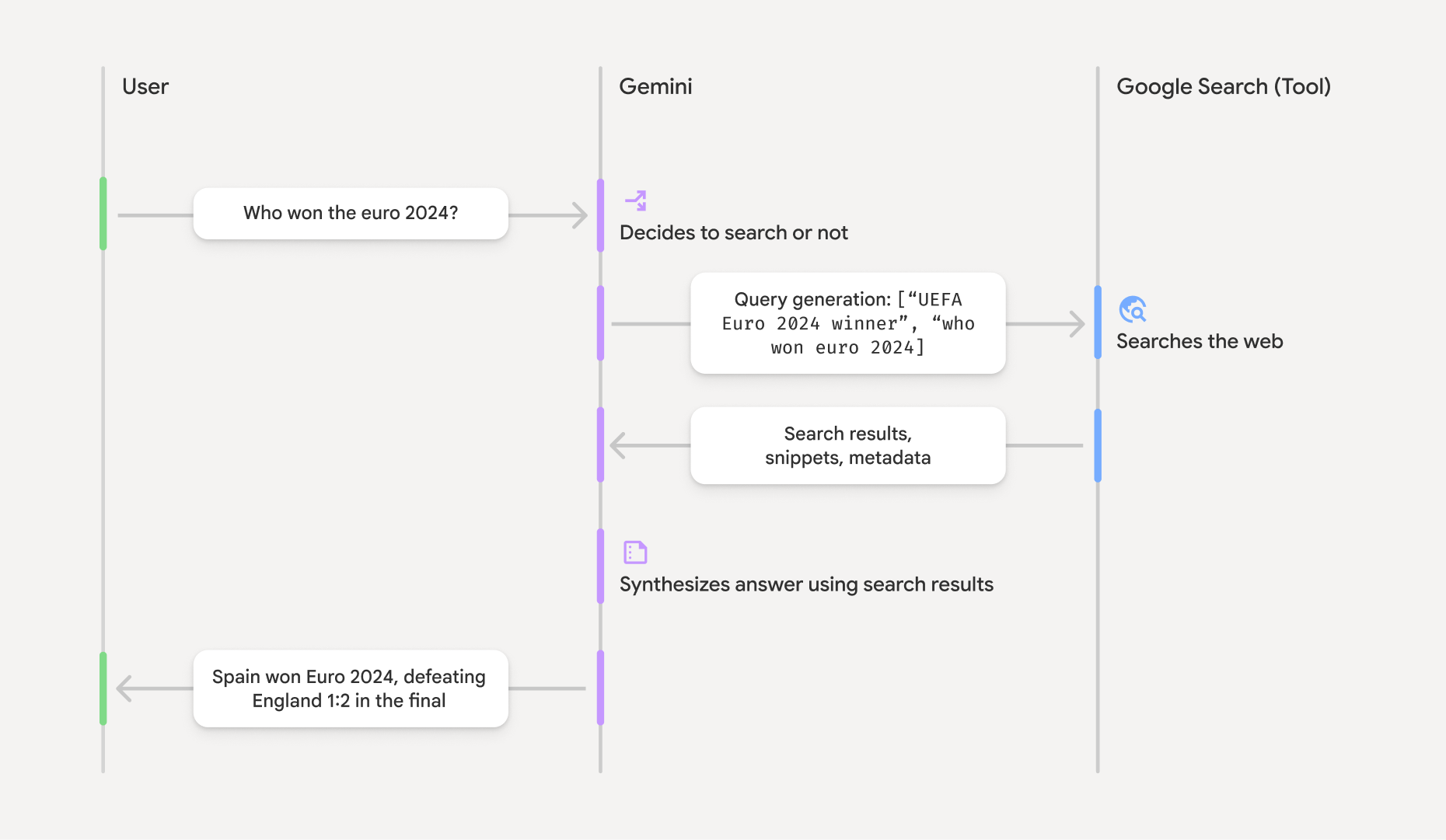
เมื่อคุณใช้เครื่องมือ GoogleSearch โมเดลจะจัดการเวิร์กโฟลว์ทั้งหมดของการค้นหา การประมวลผล และการอ้างอิงข้อมูลโดยอัตโนมัติ
เวิร์กโฟลว์ของโมเดลมีดังนี้
- รับพรอมต์: แอปของคุณส่งพรอมต์ไปยังโมเดล Gemini
โดยเปิดใช้เครื่องมือ
GoogleSearch - วิเคราะห์พรอมต์: โมเดลจะวิเคราะห์พรอมต์และพิจารณาว่า
Google Search จะช่วยปรับปรุงคำตอบได้หรือไม่ - ส่งคําค้นหาไปยัง
Google Search : หากจําเป็น โมเดลจะสร้างคําค้นหาอย่างน้อย 1 รายการโดยอัตโนมัติและเรียกใช้คําค้นหาเหล่านั้น - ประมวลผลผลการค้นหา: โมเดลจะประมวลผลผลการค้นหา
Google Search และสร้างคำตอบสำหรับพรอมต์เดิม - แสดง "ผลการค้นหาที่เชื่อมต่อแหล่งข้อมูล": โมเดลจะแสดงคำตอบสุดท้ายที่ใช้งานง่าย
ซึ่งอิงตามผลการค้นหา
Google Search คำตอบนี้ประกอบด้วยคำตอบที่เป็นข้อความของโมเดลและgroundingMetadataพร้อมคำค้นหา ผลลัพธ์จากเว็บ และแหล่งที่มา
โปรดทราบว่าการระบุ groundingMetadata จึง ไม่ใช่ "ผลการค้นหาที่เชื่อมต่อแหล่งข้อมูล"
ทำความเข้าใจผลการค้นหาที่เชื่อมต่อแหล่งข้อมูล
หากโมเดลเชื่อมต่อแหล่งข้อมูลของคำตอบกับผลการค้นหา groundingMetadata ซึ่งมี Structured Data ที่จำเป็นสำหรับการยืนยันข้อมูลที่อ้างและสร้างประสบการณ์การใช้งานแหล่งที่มาที่สมบูรณ์ในแอปพลิเคชัน
ออบเจ็กต์ groundingMetadata ใน "ผลการค้นหาที่เชื่อมต่อแหล่งข้อมูล" มีข้อมูลต่อไปนี้
webSearchQueries: อาร์เรย์ของคำค้นหาที่ส่งไปยังGoogle Search ข้อมูลนี้มีประโยชน์สำหรับการแก้ไขข้อบกพร่องและทำความเข้าใจกระบวนการให้เหตุผลของโมเดลsearchEntryPoint: มี HTML และ CSS สำหรับแสดง "Google Search คำแนะนำ" ที่จำเป็น คุณต้องปฏิบัติตามข้อกำหนดการใช้งาน "การเชื่อมต่อแหล่งข้อมูลกับGoogle Search " สำหรับผู้ให้บริการ API ที่คุณเลือก ได้แก่ Gemini Developer API หรือ Agent Platform Gemini API (formerly Vertex AI) (ดู ข้อกำหนดในการให้บริการ ส่วนภายในข้อกำหนดเฉพาะของบริการ) ดูวิธี ใช้และแสดงผลการค้นหาที่เชื่อมต่อแหล่งข้อมูล ในภายหลังในหน้านี้groundingChunks: อาร์เรย์ของออบเจ็กต์ที่มีแหล่งที่มาของเว็บ (uriและtitle)groundingSupports: อาร์เรย์ของ Chunk เพื่อเชื่อมต่อtextคำตอบของโมเดลกับแหล่งที่มาในgroundingChunksแต่ละ Chunk จะลิงก์segmentข้อความ (กำหนดโดยstartIndexและendIndex) กับgroundingChunkIndicesอย่างน้อย 1 รายการ ฟิลด์นี้ช่วยให้คุณสร้างลิงก์แหล่งที่มาแบบอินไลน์ได้ ดูวิธี ใช้และแสดงผลการค้นหาที่เชื่อมต่อแหล่งข้อมูล ในภายหลังในหน้านี้
นี่คือตัวอย่างคำตอบที่มีออบเจ็กต์ groundingMetadata
{
  "candidates": [
    {
      "content": {
        "parts": [
          {
            "text": "Spain won Euro 2024, defeating England 2-1 in the final. This victory marks Spain's record fourth European Championship title."
          }
        ],
        "role": "model"
      },
      "groundingMetadata": {
        "webSearchQueries": [
          "UEFA Euro 2024 winner",
          "who won euro 2024"
        ],
        "searchEntryPoint": {
          "renderedContent": "<!-- HTML and CSS for the search widget -->"
        },
        "groundingChunks": [
          {"web": {"uri": "https://vertexaisearch.cloud.google.com.....", "title": "aljazeera.com"}},
          {"web": {"uri": "https://vertexaisearch.cloud.google.com.....", "title": "uefa.com"}}
        ],
        "groundingSupports": [
          {
            "segment": {"startIndex": 0, "endIndex": 85, "text": "Spain won Euro 2024, defeatin..."},
            "groundingChunkIndices": [0]
          },
          {
            "segment": {"startIndex": 86, "endIndex": 210, "text": "This victory marks Spain's..."},
            "groundingChunkIndices": [0, 1]
          }
        ]
      }
    }
  ]
}
ใช้และแสดงผลการค้นหาที่เชื่อมต่อแหล่งข้อมูล
หากโมเดลใช้เครื่องมือ groundingMetadataใน
คำตอบ
คุณ ต้อง แสดง
คำแนะนำ
นอกเหนือจากการปฏิบัติตามข้อกำหนดในการใช้เครื่องมือ
(ต้องระบุ) แสดงคำแนะนำGoogle Search
หากคำตอบมี "คำแนะนำจาก
ออบเจ็กต์ groundingMetadata มี "การแนะนำการค้นหาจาก searchEntryPoint ซึ่งมีฟิลด์ renderedContent
ที่มี HTML และ CSS ที่เป็นไปตามข้อกำหนดสำหรับการจัดรูปแบบ ซึ่งคุณต้องนำไปใช้เพื่อ
แสดงการแนะนำการค้นหาในแอป
อ่านข้อมูลโดยละเอียดเกี่ยวกับ
ข้อกำหนดการแสดงผลและลักษณะการทำงานสำหรับ
ดูตัวอย่างโค้ดในส่วนนี้
(ต้องระบุ) แสดงแหล่งที่มา
ออบเจ็กต์ groundingMetadata มีข้อมูลแหล่งที่มาที่มีโครงสร้าง โดยเฉพาะฟิลด์ groundingSupports และ groundingChunks ใช้ข้อมูลนี้เพื่อลิงก์คำกล่าวของโมเดลกับแหล่งที่มาโดยตรงภายใน UI (แบบอินไลน์และแบบรวม)
ดูตัวอย่างโค้ดในส่วนนี้
ตัวอย่างโค้ด
ตัวอย่างโค้ดเหล่านี้แสดงรูปแบบ ทั่วไป สำหรับการใช้และแสดงผลการค้นหาที่เชื่อมต่อแหล่งข้อมูล อย่างไรก็ตาม คุณมีหน้าที่ตรวจสอบว่าการใช้งานเฉพาะของคุณเป็นไปตามข้อกำหนดด้านการปฏิบัติตามข้อกำหนด
Swift
// ...

// Get the model's response
let text = response.text

// Get the grounding metadata
if let candidate = response.candidates.first,
   let groundingMetadata = candidate.groundingMetadata {
  // REQUIRED - display Google Search suggestions
  // (renderedContent contains HTML and CSS for the search widget)
  if let renderedContent = groundingMetadata.searchEntryPoint?.renderedContent {
    // TODO(developer): Display Google Search suggestions using a WebView
  }

  // REQUIRED - display sources
  let groundingChunks = groundingMetadata.groundingChunks
  for chunk in groundingMetadata.groundingChunks {
    if let web = chunk.web {
      let title = web.title  // for example, "uefa.com"
      let uri = web.uri  // for example, "https://vertexaisearch.cloud.google.com..."
      // TODO(developer): show source in the UI
    }
  }
}
Kotlin
// ...

// Get the model's response
val text = response.text

// Get the grounding metadata
val groundingMetadata = response.candidates.firstOrNull()?.groundingMetadata

// REQUIRED - display Google Search suggestions
// (renderedContent contains HTML and CSS for the search widget)
val renderedContent = groundingMetadata?.searchEntryPoint?.renderedContent
if (renderedContent != null) {
    // TODO(developer): Display Google Search suggestions using a WebView
}

// REQUIRED - display sources
val groundingChunks = groundingMetadata?.groundingChunks
groundingChunks?.let { chunks ->
  for (chunk in chunks) {
  	val title = chunk.web?.title  // for example, "uefa.com"
	val uri = chunk.web?.uri  // for example, "https://vertexaisearch.cloud.google.com..."
// TODO(developer): show source in the UI
  }
}
Java
// ...

Futures.addCallback(response, new FutureCallback() {
  @Override
  public void onSuccess(GenerateContentResponse result) {
  // Get the model's response
  String text = result.getText();

  // Get the grounding metadata
  GroundingMetadata groundingMetadata =
  result.getCandidates()[0].getGroundingMetadata();

  if (groundingMetadata != null) {
    // REQUIRED - display Google Search suggestions
  // (renderedContent contains HTML and CSS for the search widget)
    String renderedContent =
  groundingMetadata.getSearchEntryPoint().getRenderedContent();
    if (renderedContent != null) {
      // TODO(developer): Display Google Search suggestions using a WebView
    }

    // REQUIRED - display sources
    List chunks = groundingMetadata.getGroundingChunks();
    if (chunks != null) {
      for(GroundingChunk chunk : chunks) {
        WebGroundingChunk web = chunk.getWeb();
        if (web != null) {
          String title = web.getTitle();  // for example, "uefa.com"
          String uri = web.getUri();  // for example, "https://vertexaisearch.cloud.google.com..."
          // TODO(developer): show sources in the UI
        }
      }
    }
  }
  }

  @Override
  public void onFailure(Throwable t) {
  t.printStackTrace();
  }
  }, executor);
Web
// ...

// Get the model's text response
const text = result.response.text();

// Get the grounding metadata
const groundingMetadata = result.response.candidates?.[0]?.groundingMetadata;

// REQUIRED - display Google Search suggestions
// (renderedContent contains HTML and CSS for the search widget)
const renderedContent = groundingMetadata?.searchEntryPoint?.renderedContent;
if (renderedContent) {
  // TODO(developer): render this HTML and CSS in the UI
}

// REQUIRED - display sources
const groundingChunks = groundingMetadata?.groundingChunks;
if (groundingChunks) {
  for (const chunk of groundingChunks) {
    const title = chunk.web?.title;  // for example, "uefa.com"
    const uri = chunk.web?.uri;  // for example, "https://vertexaisearch.cloud.google.com..."
    // TODO(developer): show sources in the UI
  }
}
Dart
// ...

// Get the model's response
final text = response.text;

// Get the grounding metadata
final groundingMetadata = response.candidates.first.groundingMetadata;

// REQUIRED - display Google Search suggestions
// (renderedContent contains HTML and CSS for the search widget)
final renderedContent = groundingMetadata?.searchEntryPoint?.renderedContent;
if (renderedContent != null) {
    // TODO(developer): Display Google Search suggestions using a WebView
}

// REQUIRED - display sources
final groundingChunks = groundingMetadata?.groundingChunks;
if (groundingChunks != null) {
  for (var chunk in groundingChunks) {
    final title = chunk.web?.title;  // for example, "uefa.com"
    final uri = chunk.web?.uri;  // for example, "https://vertexaisearch.cloud.google.com..."
    // TODO(developer): show sources in the UI
  }
}
Unity
// ...

// Get the model's response.
var text = response.Text;

// Get the grounding metadata.
var groundingMetadata = response.Candidates.First().GroundingMetadata.Value;

// REQUIRED - display Google Search suggestions
// (renderedContent contains HTML and CSS for the search widget)
if (groundingMetadata.SearchEntryPoint.HasValue) {
    var renderedContent = groundingMetadata.SearchEntryPoint.Value.RenderedContent;
    // TODO(developer): Display Google Search suggestions using a WebView
}

// REQUIRED - display sources
foreach(GroundingChunk chunk in groundingMetadata.GroundingChunks) {
    var title = chunk.Web.Value.Title;  // for example, "uefa.com"
    var uri = chunk.Web.Value.Uri;  // for example, "https://vertexaisearch.cloud.google.com..."
    // TODO(developer): show sources in the UI
}
ผลการค้นหาที่เชื่อมต่อแหล่งข้อมูลและการตรวจสอบ AI ในคอนโซล Firebase
หากคุณเปิดใช้ การตรวจสอบ AI ในคอนโซลFirebaseระบบจะจัดเก็บคำตอบไว้ใน Cloud Logging โดยค่าเริ่มต้น ข้อมูลนี้จะมีระยะเวลาเก็บรักษา 30 วัน
คุณมีหน้าที่ตรวจสอบว่าระยะเวลาเก็บรักษานี้หรือระยะเวลาที่กำหนดเอง ที่คุณตั้งค่าไว้สอดคล้องกับกรณีการใช้งานเฉพาะของคุณและข้อกำหนดด้านการปฏิบัติตามข้อกำหนดเพิ่มเติมสำหรับผู้ให้บริการGemini APIที่คุณเลือก: Gemini Developer API หรือAgent Platform Gemini API (formerly Vertex AI) (ดู ข้อกำหนดในการให้บริการ ส่วนภายในข้อกำหนดเฉพาะของบริการ) คุณอาจต้อง ปรับระยะเวลาเก็บรักษาใน Cloud Logging ให้เป็นไปตามข้อกำหนดเหล่านี้
ราคาและข้อจำกัด
โปรดตรวจสอบราคา ความพร้อมให้บริการของโมเดล และข้อจำกัดสำหรับการเชื่อมต่อแหล่งข้อมูลกับ