

- Doğruluğu artırma: Yanıtları gerçek dünyadaki bilgilere dayandırarak model halüsinasyonlarını azaltın.
- Gerçek zamanlı bilgilere erişme: Yakın zamandaki olaylar ve konularla ilgili soruları yanıtlama
- Kaynakları belirtme: Modelin iddialarının kaynaklarını göstererek kullanıcıların güvenini kazanın veya alakalı sitelere göz atmalarına izin verin.
- Daha karmaşık görevleri tamamlama: Muhakeme görevlerine yardımcı olmak için yapay nesneleri ve alakalı resimleri, videoları veya diğer medyaları alma.
- Bölgeye veya dile özgü yanıtları iyileştirme: Bölgeye özgü bilgileri bulabilir veya içeriğin doğru şekilde çevrilmesine yardımcı olabilirsiniz.
Desteklenen modeller
gemini-4-argongemini-3.8-flash(ve daha eskigemini-3.7-flash,gemini-3.6-flashvegemini-3.5-flash)gemini-3.5-flash-lite(ve eskigemini-3.1-flash-lite)gemini-3-pro-image(diğer adıyla "Nano Banana Pro")gemini-3.1-flash-image("Nano Banana 2" olarak da bilinir)
gemini-3.1-pro-preview ve genel kullanıma yönelik Gemini 2.5 modelleri de (desteği sonlandırılmıştır) bu özelliği destekler.
Gemini Live API modelleri de bu özelliği destekler ancak bu kılavuzdaki tüm kod örnekleri genel kullanıma yönelik Gemini modelleri içindir.
Desteklenen diller
Gemini modelleri için desteklenen dilleri inceleyin.
Google Search ile modeli temellendirme
|
Bu sayfada sağlayıcıya özel içerikleri ve kodları görüntülemek için Gemini API sağlayıcınızı tıklayın. |
GenerativeModel örneğini oluşturduğunuzda, modelin yanıtını oluşturmak için kullanabileceği bir tool olarak GoogleSearch değerini sağlayın.
Swift
import FirebaseAILogic

// Initialize the Gemini Developer API backend service.
let ai = FirebaseAI.firebaseAI(backend: .googleAI())

// Create a `GenerativeModel` instance with a model that supports your use case.
let model = ai.generativeModel(
    modelName: "GEMINI_MODEL_NAME",
    // Provide Google Search as a tool that the model can use to generate its response.
    tools: [.googleSearch()]
)

let response = try await model.generateContent("Who won the euro 2024?")
print(response.text ?? "No text in response.")

// Make sure to comply with the "Grounding with Google Search" usage requirements,
// which includes how you use and display the grounded result
Kotlin
// Initialize the Gemini Developer API backend service.
// Create a `GenerativeModel` instance with a model that supports your use case.
val model = Firebase.ai(backend = GenerativeBackend.googleAI()).generativeModel(
    modelName = "GEMINI_MODEL_NAME",
    // Provide Google Search as a tool that the model can use to generate its response
    tools = listOf(Tool.googleSearch())
)

val response = model.generateContent("Who won the euro 2024?")
print(response.text)

// Make sure to comply with the "Grounding with Google Search" usage requirements,
// which includes how you use and display the grounded result
Java
// Initialize the Gemini Developer API backend service.
// Create a `GenerativeModel` instance with a model that supports your use case.
GenerativeModel ai = FirebaseAI.getInstance(GenerativeBackend.googleAI())
                .generativeModel("GEMINI_MODEL_NAME",
                        null,
                        null,
                        // Provide Google Search as a tool that the model can use to generate its response
                        List.of(Tool.GoogleSearch()));

// Use the GenerativeModelFutures Java compatibility layer which offers
// support for ListenableFuture and Publisher APIs
GenerativeModelFutures model = GenerativeModelFutures.from(ai);

ListenableFuture response = model.generateContent("Who won the euro 2024?");
  Futures.addCallback(response, new FutureCallback() {
      @Override
      public void onSuccess(GenerateContentResponse result) {
          String resultText = result.getText();
          System.out.println(resultText);
      }

      @Override
      public void onFailure(Throwable t) {
          t.printStackTrace();
      }
  }, executor);

// Make sure to comply with the "Grounding with Google Search" usage requirements,
// which includes how you use and display the grounded result
Web
import { initializeApp } from "firebase/app";
import { getAI, getGenerativeModel, GoogleAIBackend } from "firebase/ai";

// TODO(developer): Replace the following with your app's Firebase configuration
// See: https://firebase.google.com/docs/web/learn-more#config-object
const firebaseConfig = {
  // ...
};

// Initialize FirebaseApp
const firebaseApp = initializeApp(firebaseConfig);

// Initialize the Gemini Developer API backend service.
const ai = getAI(firebaseApp, { backend: new GoogleAIBackend() });

// Create a `GenerativeModel` instance with a model that supports your use case.
const model = getGenerativeModel(
  ai,
  {
    model: "GEMINI_MODEL_NAME",
    // Provide Google Search as a tool that the model can use to generate its response
    tools: [{ googleSearch: {} }]
  }
);

const result = await model.generateContent("Who won the euro 2024?");

console.log(result.response.text());

// Make sure to comply with the "Grounding with Google Search" usage requirements,
// which includes how you use and display the grounded result
Dart
import 'package:firebase_core/firebase_core.dart';
import 'package:firebase_ai/firebase_ai.dart';
import 'firebase_options.dart';

// Initialize FirebaseApp.
await Firebase.initializeApp(
  options: DefaultFirebaseOptions.currentPlatform,
);

// Initialize the Gemini Developer API backend service.
// Create a `GenerativeModel` instance with a model that supports your use case.
final model = FirebaseAI.googleAI().generativeModel(
  model: 'GEMINI_MODEL_NAME',
  // Provide Google Search as a tool that the model can use to generate its response.
  tools: [
    Tool.googleSearch(),
  ],
);

final response = await model.generateContent([Content.text("Who won the euro 2024?")]);
print(response.text);

// Make sure to comply with the "Grounding with Google Search" usage requirements,
// which includes how you use and display the grounded result
Unity
using Firebase;
using Firebase.AI;

// Initialize the Gemini Developer API backend service.
var ai = FirebaseAI.GetInstance(FirebaseAI.Backend.GoogleAI());

// Create a `GenerativeModel` instance with a model that supports your use case.
var model = ai.GetGenerativeModel(
  modelName: "GEMINI_MODEL_NAME",
  // Provide Google Search as a tool that the model can use to generate its response.
  tools: new[] { new Tool(new GoogleSearch()) }
);

var response = await model.GenerateContentAsync("Who won the euro 2024?");
UnityEngine.Debug.Log(response.Text ?? "No text in response.");

// Make sure to comply with the "Grounding with Google Search" usage requirements,
// which includes how you use and display the grounded result
Kullanım alanınıza ve uygulamanıza uygun bir model seçmeyi öğrenin.
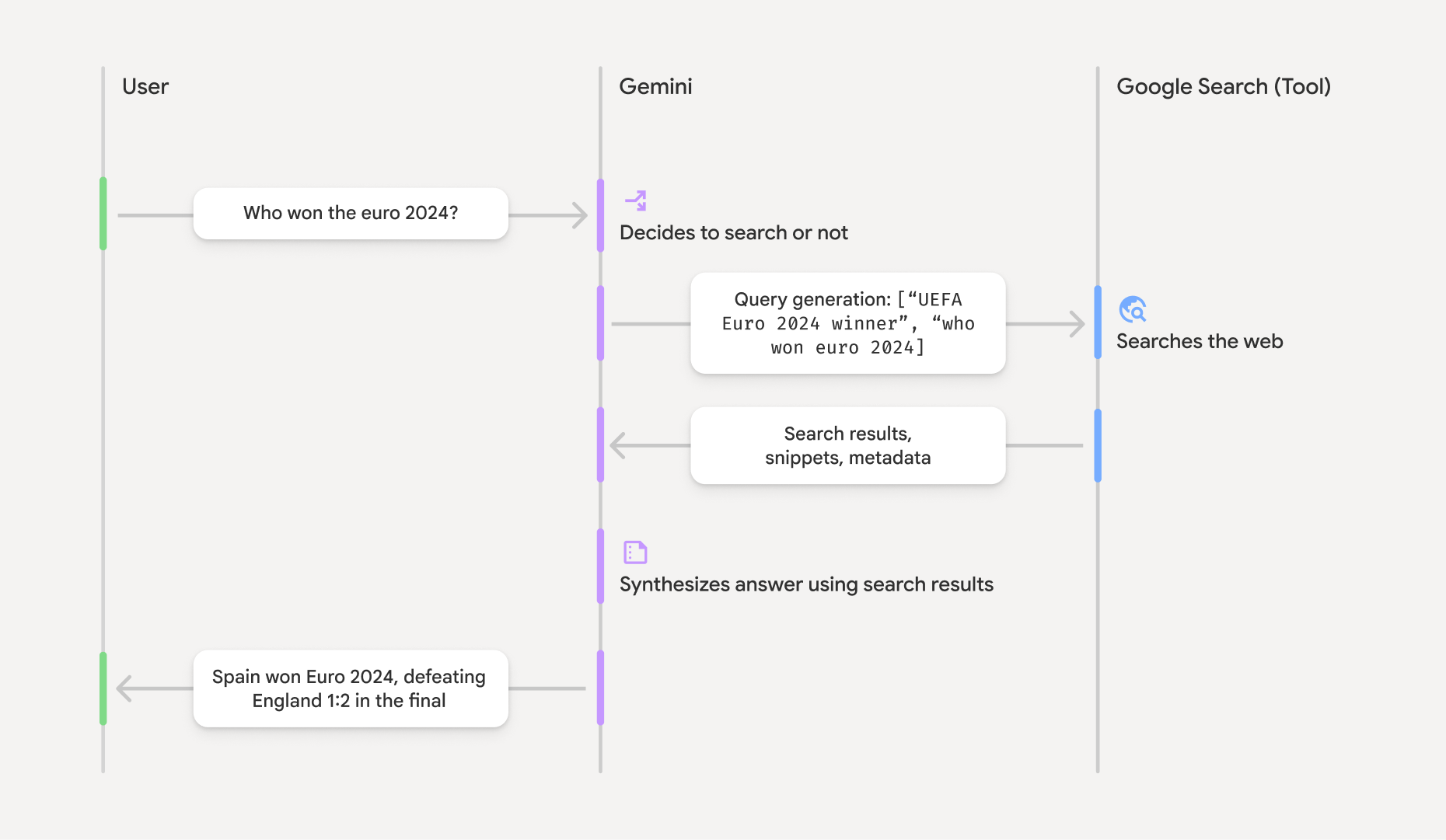
Google Search ile temellendirmenin işleyiş şekli
GoogleSearch aracını kullandığınızda model; bilgi arama, işleme ve alıntı yapma iş akışının tamamını otomatik olarak gerçekleştirir.
Modelin iş akışı şu şekildedir:
- İstem alma: Uygulamanız,
GoogleSearcharacı etkinleştirilmiş şekilde Gemini modeline bir istem gönderir. - İstemi analiz etme: Model, istemi analiz eder ve
Google Search 'ın yanıtını iyileştirip iyileştiremeyeceğini belirler. Google Search sorgu gönderme: Gerekirse model, otomatik olarak bir veya daha fazla arama sorgusu oluşturur ve bunları yürütür.- Arama sonuçlarını işleme: Model,
Google Search sonuçlarını işler ve orijinal isteme yanıt oluşturur. - "Temellendirilmiş sonuç" döndürme: Model,
Google Search sonuçlarına dayalı, kullanıcı dostu nihai bir yanıt döndürür. Bu yanıtta, modelin metin yanıtı ve arama sorguları, web sonuçları ve kaynakları içerengroundingMetadatayer alır.
Modele groundingMetadata nesnesi içermez ve bu nedenle "temellendirilmiş sonuç" değildir.
Temellendirilmiş sonucu anlama
Model, yanıtını groundingMetadata nesnesi içerir.
"Temellendirilmiş sonuç"taki groundingMetadata nesnesi aşağıdaki bilgileri içerir:
webSearchQueries:Google Search adresine gönderilen arama sorgularının dizisi. Bu bilgiler, hataları ayıklamak ve modelin muhakeme sürecini anlamak için yararlıdır.searchEntryPoint: Gerekli "Google Search önerilerini" oluşturmak için HTML ve CSS'yi içerir. Seçtiğiniz API sağlayıcısı için "Google Search ile temellendirme" kullanım şartlarına uymanız gerekir: Gemini Developer API veya Agent Platform Gemini API (formerly Vertex AI) (Hizmete Özel Şartlar'daki Hizmet Şartları bölümüne bakın). Temellendirilmiş sonuçları kullanma ve görüntüleme hakkında bilgi edinmek için bu sayfanın ilerleyen bölümlerini inceleyin.groundingChunks: Web kaynaklarını içeren bir nesne dizisi (urivetitle).groundingSupports: Model yanıtınıgroundingChunksiçindeki kaynaklara bağlamak için kullanılan bir parça dizisi.textHer parça, bir metnisegment(startIndexveendIndexile tanımlanır) bir veya daha fazlagroundingChunkIndicesile bağlar. Bu alan, satır içi kaynak bağlantıları oluşturmanıza yardımcı olur. Temellendirilmiş sonuçları kullanma ve görüntüleme hakkında bilgi edinmek için bu sayfanın ilerleyen bölümlerini inceleyin.
groundingMetadata nesnesi içeren örnek bir yanıtı aşağıda bulabilirsiniz:
{
  "candidates": [
    {
      "content": {
        "parts": [
          {
            "text": "Spain won Euro 2024, defeating England 2-1 in the final. This victory marks Spain's record fourth European Championship title."
          }
        ],
        "role": "model"
      },
      "groundingMetadata": {
        "webSearchQueries": [
          "UEFA Euro 2024 winner",
          "who won euro 2024"
        ],
        "searchEntryPoint": {
          "renderedContent": "<!-- HTML and CSS for the search widget -->"
        },
        "groundingChunks": [
          {"web": {"uri": "https://vertexaisearch.cloud.google.com.....", "title": "aljazeera.com"}},
          {"web": {"uri": "https://vertexaisearch.cloud.google.com.....", "title": "uefa.com"}}
        ],
        "groundingSupports": [
          {
            "segment": {"startIndex": 0, "endIndex": 85, "text": "Spain won Euro 2024, defeatin..."},
            "groundingChunkIndices": [0]
          },
          {
            "segment": {"startIndex": 86, "endIndex": 210, "text": "This victory marks Spain's..."},
            "groundingChunkIndices": [0, 1]
          }
        ]
      }
    }
  ]
}
Temellendirilmiş sonuçları kullanma ve gösterme
Model, yanıt oluşturmak için groundingMetadata nesnesi sağlar.
(Zorunlu) Google Search öneri göster
Bir yanıt "
groundingMetadata nesnesi, "searchEntryPoint alanını içerir. Bu alan, renderedContent alanına sahiptir. Bu alan, arama önerilerini uygulamanızda göstermek için uygulamanız gereken, uyumlu HTML ve CSS stilini sağlar.
Google Cloud dokümanındaki
Bu bölümün ilerleyen kısımlarında örnek kod örneklerine bakın.
(Zorunlu) Görüntülü Reklam Ağı kaynakları
groundingMetadata nesnesi, yapılandırılmış kaynak verileri (özellikle groundingSupports ve groundingChunks alanları) içerir. Bu bilgileri kullanarak modelin ifadelerini doğrudan kullanıcı arayüzünüzdeki kaynaklarına bağlayın (satır içi ve toplu olarak).
Bu bölümün ilerleyen kısımlarında örnek kod örneklerine bakın.
Örnek kod örnekleri
Bu kod örnekleri, temellendirilmiş sonucu kullanmak ve görüntülemek için genelleştirilmiş kalıplar sağlar. Ancak uygulamanızın uyumluluk şartlarına uygun olmasını sağlamak sizin sorumluluğunuzdadır.
Swift
// ...

// Get the model's response
let text = response.text

// Get the grounding metadata
if let candidate = response.candidates.first,
   let groundingMetadata = candidate.groundingMetadata {
  // REQUIRED - display Google Search suggestions
  // (renderedContent contains HTML and CSS for the search widget)
  if let renderedContent = groundingMetadata.searchEntryPoint?.renderedContent {
    // TODO(developer): Display Google Search suggestions using a WebView
  }

  // REQUIRED - display sources
  let groundingChunks = groundingMetadata.groundingChunks
  for chunk in groundingMetadata.groundingChunks {
    if let web = chunk.web {
      let title = web.title  // for example, "uefa.com"
      let uri = web.uri  // for example, "https://vertexaisearch.cloud.google.com..."
      // TODO(developer): show source in the UI
    }
  }
}
Kotlin
// ...

// Get the model's response
val text = response.text

// Get the grounding metadata
val groundingMetadata = response.candidates.firstOrNull()?.groundingMetadata

// REQUIRED - display Google Search suggestions
// (renderedContent contains HTML and CSS for the search widget)
val renderedContent = groundingMetadata?.searchEntryPoint?.renderedContent
if (renderedContent != null) {
    // TODO(developer): Display Google Search suggestions using a WebView
}

// REQUIRED - display sources
val groundingChunks = groundingMetadata?.groundingChunks
groundingChunks?.let { chunks ->
  for (chunk in chunks) {
  	val title = chunk.web?.title  // for example, "uefa.com"
	val uri = chunk.web?.uri  // for example, "https://vertexaisearch.cloud.google.com..."
// TODO(developer): show source in the UI
  }
}
Java
// ...

Futures.addCallback(response, new FutureCallback() {
  @Override
  public void onSuccess(GenerateContentResponse result) {
  // Get the model's response
  String text = result.getText();

  // Get the grounding metadata
  GroundingMetadata groundingMetadata =
  result.getCandidates()[0].getGroundingMetadata();

  if (groundingMetadata != null) {
    // REQUIRED - display Google Search suggestions
  // (renderedContent contains HTML and CSS for the search widget)
    String renderedContent =
  groundingMetadata.getSearchEntryPoint().getRenderedContent();
    if (renderedContent != null) {
      // TODO(developer): Display Google Search suggestions using a WebView
    }

    // REQUIRED - display sources
    List chunks = groundingMetadata.getGroundingChunks();
    if (chunks != null) {
      for(GroundingChunk chunk : chunks) {
        WebGroundingChunk web = chunk.getWeb();
        if (web != null) {
          String title = web.getTitle();  // for example, "uefa.com"
          String uri = web.getUri();  // for example, "https://vertexaisearch.cloud.google.com..."
          // TODO(developer): show sources in the UI
        }
      }
    }
  }
  }

  @Override
  public void onFailure(Throwable t) {
  t.printStackTrace();
  }
  }, executor);
Web
// ...

// Get the model's text response
const text = result.response.text();

// Get the grounding metadata
const groundingMetadata = result.response.candidates?.[0]?.groundingMetadata;

// REQUIRED - display Google Search suggestions
// (renderedContent contains HTML and CSS for the search widget)
const renderedContent = groundingMetadata?.searchEntryPoint?.renderedContent;
if (renderedContent) {
  // TODO(developer): render this HTML and CSS in the UI
}

// REQUIRED - display sources
const groundingChunks = groundingMetadata?.groundingChunks;
if (groundingChunks) {
  for (const chunk of groundingChunks) {
    const title = chunk.web?.title;  // for example, "uefa.com"
    const uri = chunk.web?.uri;  // for example, "https://vertexaisearch.cloud.google.com..."
    // TODO(developer): show sources in the UI
  }
}
Dart
// ...

// Get the model's response
final text = response.text;

// Get the grounding metadata
final groundingMetadata = response.candidates.first.groundingMetadata;

// REQUIRED - display Google Search suggestions
// (renderedContent contains HTML and CSS for the search widget)
final renderedContent = groundingMetadata?.searchEntryPoint?.renderedContent;
if (renderedContent != null) {
    // TODO(developer): Display Google Search suggestions using a WebView
}

// REQUIRED - display sources
final groundingChunks = groundingMetadata?.groundingChunks;
if (groundingChunks != null) {
  for (var chunk in groundingChunks) {
    final title = chunk.web?.title;  // for example, "uefa.com"
    final uri = chunk.web?.uri;  // for example, "https://vertexaisearch.cloud.google.com..."
    // TODO(developer): show sources in the UI
  }
}
Unity
// ...

// Get the model's response.
var text = response.Text;

// Get the grounding metadata.
var groundingMetadata = response.Candidates.First().GroundingMetadata.Value;

// REQUIRED - display Google Search suggestions
// (renderedContent contains HTML and CSS for the search widget)
if (groundingMetadata.SearchEntryPoint.HasValue) {
    var renderedContent = groundingMetadata.SearchEntryPoint.Value.RenderedContent;
    // TODO(developer): Display Google Search suggestions using a WebView
}

// REQUIRED - display sources
foreach(GroundingChunk chunk in groundingMetadata.GroundingChunks) {
    var title = chunk.Web.Value.Title;  // for example, "uefa.com"
    var uri = chunk.Web.Value.Uri;  // for example, "https://vertexaisearch.cloud.google.com..."
    // TODO(developer): show sources in the UI
}
Firebase konsolunda temellendirilmiş sonuçlar ve yapay zeka kullanımı
Firebase konsolunda yapay zeka kullanım takibini etkinleştirdiyseniz yanıtlar Cloud Logging içinde depolanır. Varsayılan olarak bu verilerin saklama süresi 30 gündür.
Bu saklama süresinin veya belirlediğiniz özel bir sürenin, kullanım alanınıza ve seçtiğiniz Gemini API sağlayıcısına yönelik ek uygunluk şartlarına tamamen uygun olmasını sağlamak sizin sorumluluğunuzdadır: Gemini Developer API veya Agent Platform Gemini API (formerly Vertex AI) (Hizmete Özel Şartlar'daki Hizmet Şartları bölümüne bakın). Bu şartları karşılamak için Cloud Logging uygulamasında saklama süresini ayarlamanız gerekebilir.
Fiyatlandırma ve sınırlar
Seçtiğiniz Gemini API sağlayıcı belgelerinde