

O embasamento com
O embasamento com
- Aumentar a precisão factual: reduza as alucinações do modelo baseando as respostas em informações do mundo real.
- Acessar informações em tempo real: responda a perguntas sobre eventos e temas recentes.
- Fornecer fontes: conquiste a confiança do usuário ou permita que ele navegue em sites relevantes mostrando as fontes das declarações do modelo.
- Concluir tarefas mais complexas: recuperar artefatos e imagens, vídeos ou outras mídias relevantes para ajudar nas tarefas de raciocínio.
- Melhorar as respostas específicas de uma região ou idioma: encontre informações específicas de uma região ou ajude a traduzir conteúdo com precisão.
Modelos compatíveis
gemini-4-argongemini-3.8-flash(e as versões mais antigasgemini-3.7-flash,gemini-3.6-flashegemini-3.5-flash)gemini-3.5-flash-lite(e ogemini-3.1-flash-litemais antigo)gemini-nano-banana-2.1(Nano Banana 2.1)gemini-3.1-flash-image(Nano Banana 2)gemini-3-pro-image(Nano Banana Pro)
Os modelos gemini-3.1-pro-preview e Gemini 2.5 de uso geral (que
foram descontinuados) também são compatíveis com esse recurso.
Os modelos Gemini Live API também são compatíveis com esse recurso, mas todos os exemplos de código neste guia são para os modelos Gemini de uso geral.
Idiomas compatíveis
Consulte os idiomas disponíveis para modelos Gemini.
Embasar o modelo com Google Search
|
Clique no seu provedor de Gemini API para conferir o conteúdo e o código específicos do provedor nesta página. |
Ao criar a instância GenerativeModel, forneça GoogleSearch como um
tool que o modelo pode usar para gerar a resposta.
Swift
import FirebaseAILogic

// Initialize the Gemini Developer API backend service.
let ai = FirebaseAI.firebaseAI(backend: .googleAI())

// Create a `GenerativeModel` instance with a model that supports your use case.
let model = ai.generativeModel(
    modelName: "GEMINI_MODEL_NAME",
    // Provide Google Search as a tool that the model can use to generate its response.
    tools: [.googleSearch()]
)

let response = try await model.generateContent("Who won the euro 2024?")
print(response.text ?? "No text in response.")

// Make sure to comply with the "Grounding with Google Search" usage requirements,
// which includes how you use and display the grounded result
Kotlin
// Initialize the Gemini Developer API backend service.
// Create a `GenerativeModel` instance with a model that supports your use case.
val model = Firebase.ai(backend = GenerativeBackend.googleAI()).generativeModel(
    modelName = "GEMINI_MODEL_NAME",
    // Provide Google Search as a tool that the model can use to generate its response
    tools = listOf(Tool.googleSearch())
)

val response = model.generateContent("Who won the euro 2024?")
print(response.text)

// Make sure to comply with the "Grounding with Google Search" usage requirements,
// which includes how you use and display the grounded result
Java
// Initialize the Gemini Developer API backend service.
// Create a `GenerativeModel` instance with a model that supports your use case.
GenerativeModel ai = FirebaseAI.getInstance(GenerativeBackend.googleAI())
                .generativeModel("GEMINI_MODEL_NAME",
                        null,
                        null,
                        // Provide Google Search as a tool that the model can use to generate its response
                        List.of(Tool.GoogleSearch()));

// Use the GenerativeModelFutures Java compatibility layer which offers
// support for ListenableFuture and Publisher APIs
GenerativeModelFutures model = GenerativeModelFutures.from(ai);

ListenableFuture response = model.generateContent("Who won the euro 2024?");
  Futures.addCallback(response, new FutureCallback() {
      @Override
      public void onSuccess(GenerateContentResponse result) {
          String resultText = result.getText();
          System.out.println(resultText);
      }

      @Override
      public void onFailure(Throwable t) {
          t.printStackTrace();
      }
  }, executor);

// Make sure to comply with the "Grounding with Google Search" usage requirements,
// which includes how you use and display the grounded result
Web
import { initializeApp } from "firebase/app";
import { getAI, getGenerativeModel, GoogleAIBackend } from "firebase/ai";

// TODO(developer): Replace the following with your app's Firebase configuration
// See: https://firebase.google.com/docs/web/learn-more#config-object
const firebaseConfig = {
  // ...
};

// Initialize FirebaseApp
const firebaseApp = initializeApp(firebaseConfig);

// Initialize the Gemini Developer API backend service.
const ai = getAI(firebaseApp, { backend: new GoogleAIBackend() });

// Create a `GenerativeModel` instance with a model that supports your use case.
const model = getGenerativeModel(
  ai,
  {
    model: "GEMINI_MODEL_NAME",
    // Provide Google Search as a tool that the model can use to generate its response
    tools: [{ googleSearch: {} }]
  }
);

const result = await model.generateContent("Who won the euro 2024?");

console.log(result.response.text());

// Make sure to comply with the "Grounding with Google Search" usage requirements,
// which includes how you use and display the grounded result
Dart
import 'package:firebase_core/firebase_core.dart';
import 'package:firebase_ai/firebase_ai.dart';
import 'firebase_options.dart';

// Initialize FirebaseApp.
await Firebase.initializeApp(
  options: DefaultFirebaseOptions.currentPlatform,
);

// Initialize the Gemini Developer API backend service.
// Create a `GenerativeModel` instance with a model that supports your use case.
final model = FirebaseAI.googleAI().generativeModel(
  model: 'GEMINI_MODEL_NAME',
  // Provide Google Search as a tool that the model can use to generate its response.
  tools: [
    Tool.googleSearch(),
  ],
);

final response = await model.generateContent([Content.text("Who won the euro 2024?")]);
print(response.text);

// Make sure to comply with the "Grounding with Google Search" usage requirements,
// which includes how you use and display the grounded result
Unity
using Firebase;
using Firebase.AI;

// Initialize the Gemini Developer API backend service.
var ai = FirebaseAI.GetInstance(FirebaseAI.Backend.GoogleAI());

// Create a `GenerativeModel` instance with a model that supports your use case.
var model = ai.GetGenerativeModel(
  modelName: "GEMINI_MODEL_NAME",
  // Provide Google Search as a tool that the model can use to generate its response.
  tools: new[] { new Tool(new GoogleSearch()) }
);

var response = await model.GenerateContentAsync("Who won the euro 2024?");
UnityEngine.Debug.Log(response.Text ?? "No text in response.");

// Make sure to comply with the "Grounding with Google Search" usage requirements,
// which includes how you use and display the grounded result
Saiba como escolher um modelo adequado para seu caso de uso e app.
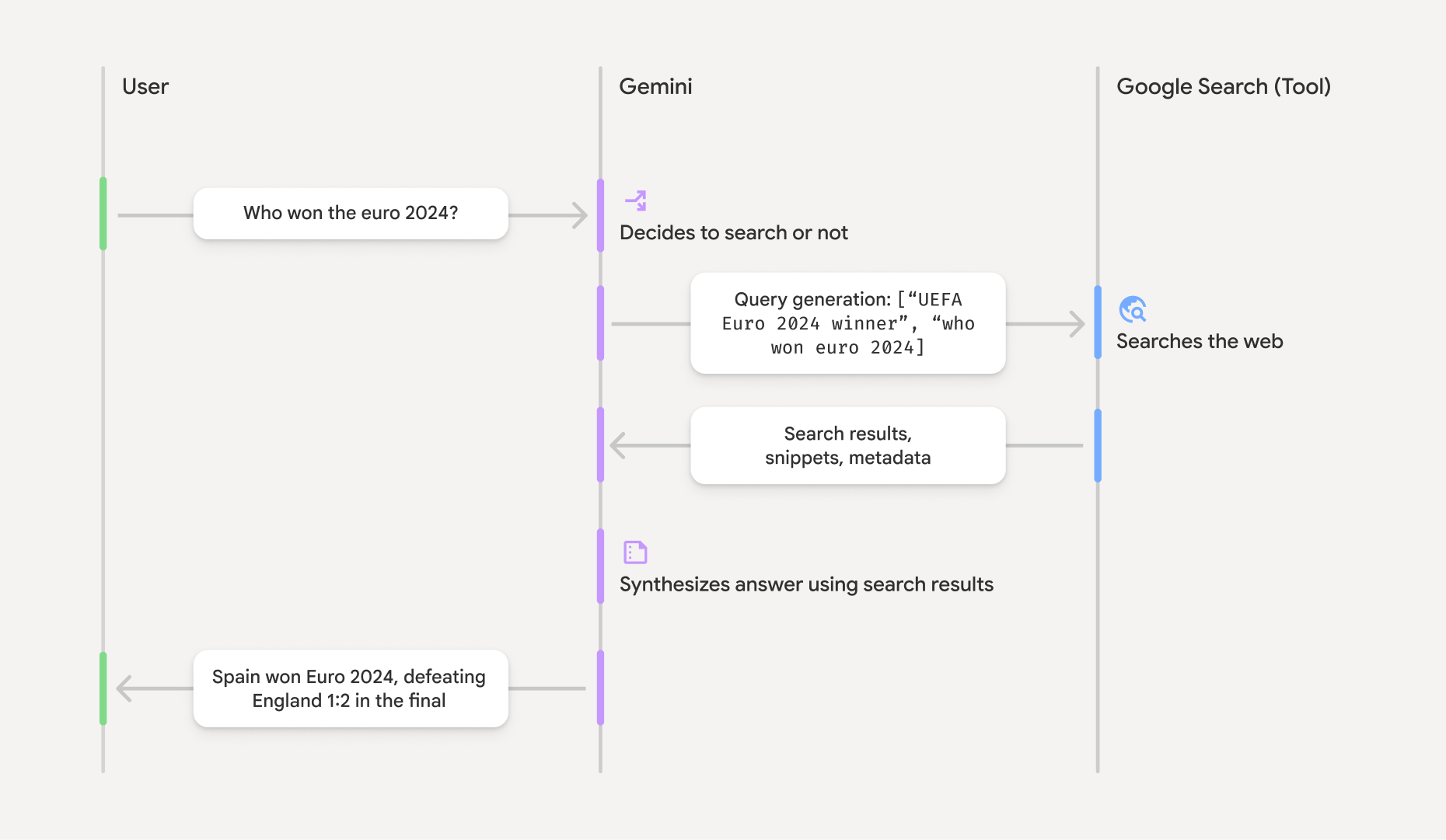
Como funciona o embasamento com Google Search
Quando você usa a ferramenta GoogleSearch, o modelo processa todo o fluxo de trabalho de
pesquisa, processamento e citação de informações automaticamente.
Este é o fluxo de trabalho do modelo:
- Receber comando: o app envia um comando para o modelo Gemini
com a ferramenta
GoogleSearchativada. - Analisar o comando: o modelo analisa o comando e determina se o
Google Search pode melhorar a resposta. - Enviar consultas para
Google Search : se necessário, o modelo gera automaticamente uma ou várias consultas de pesquisa e as executa. - Processar os resultados da pesquisa: o modelo processa os resultados do
Google Search e formula uma resposta ao comando original. - Retornar um "resultado embasado": o modelo retorna uma resposta final, fácil de usar
e embasada nos resultados do
Google Search . Essa resposta inclui a resposta em texto do modelo egroundingMetadatacom as consultas de pesquisa, os resultados da web e as fontes.
Fornecer groundingMetadata
e, portanto, não será um "resultado embasado".
Entender o resultado embasado
Se o modelo embasar a resposta em resultados de groundingMetadata que contém dados estruturados essenciais para verificar declarações e criar uma experiência de fonte rica no seu aplicativo.
O objeto groundingMetadata em um "resultado embasado" contém as seguintes
informações:
webSearchQueries: uma matriz das consultas de pesquisa enviadas paraGoogle Search . Essas informações são úteis para depurar e entender o processo de raciocínio do modelo.searchEntryPoint: contém o HTML e o CSS para renderizar as "sugestões deGoogle Search " necessárias. Você precisa obedecer aos requisitos de uso do "Embasamento comGoogle Search " para o provedor de API escolhido: Gemini Developer API ou Agent Platform Gemini API (formerly Vertex AI) (consulte a seção Termos de Serviço nos Termos Específicos de Serviço). Saiba como usar e exibir um resultado embasado mais adiante nesta página.groundingChunks: uma matriz de objetos que contém as fontes da Web (urietitle).groundingSupports: uma matriz de fragmentos para conectar a resposta do modelotextàs fontes emgroundingChunks. Cada bloco vincula um textosegment(definido porstartIndexeendIndex) a um ou maisgroundingChunkIndices. Esse campo ajuda a criar links de origem inline. Saiba como usar e exibir um resultado embasado mais adiante nesta página.
Veja um exemplo de resposta que inclui um objeto groundingMetadata:
{
  "candidates": [
    {
      "content": {
        "parts": [
          {
            "text": "Spain won Euro 2024, defeating England 2-1 in the final. This victory marks Spain's record fourth European Championship title."
          }
        ],
        "role": "model"
      },
      "groundingMetadata": {
        "webSearchQueries": [
          "UEFA Euro 2024 winner",
          "who won euro 2024"
        ],
        "searchEntryPoint": {
          "renderedContent": "<!-- HTML and CSS for the search widget -->"
        },
        "groundingChunks": [
          {"web": {"uri": "https://vertexaisearch.cloud.google.com.....", "title": "aljazeera.com"}},
          {"web": {"uri": "https://vertexaisearch.cloud.google.com.....", "title": "uefa.com"}}
        ],
        "groundingSupports": [
          {
            "segment": {"startIndex": 0, "endIndex": 85, "text": "Spain won Euro 2024, defeatin..."},
            "groundingChunkIndices": [0]
          },
          {
            "segment": {"startIndex": 86, "endIndex": 210, "text": "This victory marks Spain's..."},
            "groundingChunkIndices": [0, 1]
          }
        ]
      }
    }
  ]
}
Usar e exibir um resultado embasado
Se o modelo usar a ferramenta groundingMetadata na
resposta.
É obrigatório
mostrar sugestões do
Além de cumprir os requisitos de uso da ferramenta
(Obrigatório) Mostrar sugestões de Google Search
Se uma resposta tiver "sugestões do
O objeto groundingMetadata contém "sugestões de searchEntryPoint, que tem um campo renderedContent
que fornece estilo HTML e CSS compatível, que você precisa implementar para
mostrar sugestões de pesquisa no seu app.
Consulte as informações detalhadas sobre os
requisitos de exibição e comportamento para sugestões do
Consulte exemplos de código mais adiante nesta seção.
(Obrigatório) Mostrar fontes
O objeto groundingMetadata contém dados de origem estruturados, especificamente
os campos groundingSupports e groundingChunks. Use essas informações para
vincular as declarações do modelo diretamente às fontes na interface (inline
e agregadas).
Consulte exemplos de código mais adiante nesta seção.
Exemplos de código
Esses exemplos de código fornecem padrões generalizados para usar e exibir o resultado embasado. No entanto, é sua responsabilidade garantir que sua implementação específica esteja alinhada aos requisitos de compliance.
Swift
// ...

// Get the model's response
let text = response.text

// Get the grounding metadata
if let candidate = response.candidates.first,
   let groundingMetadata = candidate.groundingMetadata {
  // REQUIRED - display Google Search suggestions
  // (renderedContent contains HTML and CSS for the search widget)
  if let renderedContent = groundingMetadata.searchEntryPoint?.renderedContent {
    // TODO(developer): Display Google Search suggestions using a WebView
  }

  // REQUIRED - display sources
  let groundingChunks = groundingMetadata.groundingChunks
  for chunk in groundingMetadata.groundingChunks {
    if let web = chunk.web {
      let title = web.title  // for example, "uefa.com"
      let uri = web.uri  // for example, "https://vertexaisearch.cloud.google.com..."
      // TODO(developer): show source in the UI
    }
  }
}
Kotlin
// ...

// Get the model's response
val text = response.text

// Get the grounding metadata
val groundingMetadata = response.candidates.firstOrNull()?.groundingMetadata

// REQUIRED - display Google Search suggestions
// (renderedContent contains HTML and CSS for the search widget)
val renderedContent = groundingMetadata?.searchEntryPoint?.renderedContent
if (renderedContent != null) {
    // TODO(developer): Display Google Search suggestions using a WebView
}

// REQUIRED - display sources
val groundingChunks = groundingMetadata?.groundingChunks
groundingChunks?.let { chunks ->
  for (chunk in chunks) {
  	val title = chunk.web?.title  // for example, "uefa.com"
	val uri = chunk.web?.uri  // for example, "https://vertexaisearch.cloud.google.com..."
// TODO(developer): show source in the UI
  }
}
Java
// ...

Futures.addCallback(response, new FutureCallback() {
  @Override
  public void onSuccess(GenerateContentResponse result) {
  // Get the model's response
  String text = result.getText();

  // Get the grounding metadata
  GroundingMetadata groundingMetadata =
  result.getCandidates()[0].getGroundingMetadata();

  if (groundingMetadata != null) {
    // REQUIRED - display Google Search suggestions
  // (renderedContent contains HTML and CSS for the search widget)
    String renderedContent =
  groundingMetadata.getSearchEntryPoint().getRenderedContent();
    if (renderedContent != null) {
      // TODO(developer): Display Google Search suggestions using a WebView
    }

    // REQUIRED - display sources
    List chunks = groundingMetadata.getGroundingChunks();
    if (chunks != null) {
      for(GroundingChunk chunk : chunks) {
        WebGroundingChunk web = chunk.getWeb();
        if (web != null) {
          String title = web.getTitle();  // for example, "uefa.com"
          String uri = web.getUri();  // for example, "https://vertexaisearch.cloud.google.com..."
          // TODO(developer): show sources in the UI
        }
      }
    }
  }
  }

  @Override
  public void onFailure(Throwable t) {
  t.printStackTrace();
  }
  }, executor);
Web
// ...

// Get the model's text response
const text = result.response.text();

// Get the grounding metadata
const groundingMetadata = result.response.candidates?.[0]?.groundingMetadata;

// REQUIRED - display Google Search suggestions
// (renderedContent contains HTML and CSS for the search widget)
const renderedContent = groundingMetadata?.searchEntryPoint?.renderedContent;
if (renderedContent) {
  // TODO(developer): render this HTML and CSS in the UI
}

// REQUIRED - display sources
const groundingChunks = groundingMetadata?.groundingChunks;
if (groundingChunks) {
  for (const chunk of groundingChunks) {
    const title = chunk.web?.title;  // for example, "uefa.com"
    const uri = chunk.web?.uri;  // for example, "https://vertexaisearch.cloud.google.com..."
    // TODO(developer): show sources in the UI
  }
}
Dart
// ...

// Get the model's response
final text = response.text;

// Get the grounding metadata
final groundingMetadata = response.candidates.first.groundingMetadata;

// REQUIRED - display Google Search suggestions
// (renderedContent contains HTML and CSS for the search widget)
final renderedContent = groundingMetadata?.searchEntryPoint?.renderedContent;
if (renderedContent != null) {
    // TODO(developer): Display Google Search suggestions using a WebView
}

// REQUIRED - display sources
final groundingChunks = groundingMetadata?.groundingChunks;
if (groundingChunks != null) {
  for (var chunk in groundingChunks) {
    final title = chunk.web?.title;  // for example, "uefa.com"
    final uri = chunk.web?.uri;  // for example, "https://vertexaisearch.cloud.google.com..."
    // TODO(developer): show sources in the UI
  }
}
Unity
// ...

// Get the model's response.
var text = response.Text;

// Get the grounding metadata.
var groundingMetadata = response.Candidates.First().GroundingMetadata.Value;

// REQUIRED - display Google Search suggestions
// (renderedContent contains HTML and CSS for the search widget)
if (groundingMetadata.SearchEntryPoint.HasValue) {
    var renderedContent = groundingMetadata.SearchEntryPoint.Value.RenderedContent;
    // TODO(developer): Display Google Search suggestions using a WebView
}

// REQUIRED - display sources
foreach(GroundingChunk chunk in groundingMetadata.GroundingChunks) {
    var title = chunk.Web.Value.Title;  // for example, "uefa.com"
    var uri = chunk.Web.Value.Uri;  // for example, "https://vertexaisearch.cloud.google.com..."
    // TODO(developer): show sources in the UI
}
Resultados embasados e monitoramento de IA no console do Firebase
Se você ativou o AI monitoring no console do Firebase, as respostas são armazenadas no Cloud Logging. Por padrão, esses dados têm um período de retenção de 30 dias.
É sua responsabilidade garantir que esse período de armazenamento, ou qualquer período personalizado definido por você, esteja totalmente alinhado ao seu caso de uso específico e a todos os requisitos de conformidade adicionais do provedor de Gemini API escolhido: Gemini Developer API ou Agent Platform Gemini API (formerly Vertex AI) (consulte a seção Termos de Serviço nos Termos Específicos de Serviço). Talvez seja necessário ajustar o período de armazenamento no Cloud Logging para atender a esses requisitos.
Preços e limites
Confira os preços, a disponibilidade do modelo e os limites do embasamento com o