

การอ้างอิงด้วย
การอ้างอิงกับ
- เพิ่มความแม่นยำตามข้อเท็จจริง: ลดอาการหลอนของ AI โดยอิงคำตอบตามข้อมูลในโลกแห่งความเป็นจริง
- เข้าถึงข้อมูลแบบเรียลไทม์: ตอบคำถามเกี่ยวกับเหตุการณ์และหัวข้อล่าสุด
- ระบุแหล่งที่มา: สร้างความไว้วางใจจากผู้ใช้หรืออนุญาตให้ผู้ใช้เรียกดู เว็บไซต์ที่เกี่ยวข้องโดยแสดงแหล่งที่มาของคำกล่าวอ้างของโมเดล
- ทำงานที่ซับซ้อนมากขึ้น: ดึงข้อมูลอาร์ติแฟกต์และรูปภาพ วิดีโอ หรือสื่ออื่นๆ ที่เกี่ยวข้องเพื่อช่วยในงานการให้เหตุผล
- ปรับปรุงคำตอบเฉพาะภูมิภาคหรือภาษา: ค้นหาข้อมูลเฉพาะภูมิภาค หรือช่วยแปลเนื้อหาได้อย่างถูกต้อง
รุ่นที่รองรับ
gemini-3.1-pro-previewgemini-3.8-flash(และรุ่นเก่ากว่าอย่างgemini-3.7-flash,gemini-3.6-flashและgemini-3.5-flash)gemini-3.5-flash-lite(และgemini-3.1-flash-liteรุ่นเก่า)gemini-3-pro-image(หรือที่รู้จักในชื่อ "Nano Banana Pro")gemini-3.1-flash-image(หรือที่เรียกว่า "Nano Banana 2")
โมเดล Gemini 2.5 แบบใช้งานทั่วไปรองรับความสามารถนี้ แต่โมเดลทั้งหมดถูกเลิกใช้งานแล้ว
Gemini Live API โมเดล ยังรองรับความสามารถนี้ด้วย แต่ตัวอย่างโค้ดทั้งหมดในคู่มือนี้เป็นของโมเดล Gemini สำหรับการใช้งานทั่วไป
ภาษาที่สนับสนุน
ดูภาษาที่รองรับสำหรับโมเดล Gemini
อ้างอิงโมเดลด้วย Google Search
|
คลิกผู้ให้บริการ Gemini API เพื่อดูเนื้อหาและโค้ดเฉพาะของผู้ให้บริการ ในหน้านี้ |
เมื่อสร้างอินสแตนซ์ GenerativeModel ให้ระบุ GoogleSearch เป็นtoolที่โมเดลใช้สร้างคำตอบได้
Swift
import FirebaseAILogic

// Initialize the Gemini Developer API backend service.
let ai = FirebaseAI.firebaseAI(backend: .googleAI())

// Create a `GenerativeModel` instance with a model that supports your use case.
let model = ai.generativeModel(
    modelName: "GEMINI_MODEL_NAME",
    // Provide Google Search as a tool that the model can use to generate its response.
    tools: [Tool.googleSearch()]
)

let response = try await model.generateContent("Who won the euro 2024?")
print(response.text ?? "No text in response.")

// Make sure to comply with the "Grounding with Google Search" usage requirements,
// which includes how you use and display the grounded result
Kotlin
// Initialize the Gemini Developer API backend service.
// Create a `GenerativeModel` instance with a model that supports your use case.
val model = Firebase.ai(backend = GenerativeBackend.googleAI()).generativeModel(
    modelName = "GEMINI_MODEL_NAME",
    // Provide Google Search as a tool that the model can use to generate its response
    tools = listOf(Tool.googleSearch())
)

val response = model.generateContent("Who won the euro 2024?")
print(response.text)

// Make sure to comply with the "Grounding with Google Search" usage requirements,
// which includes how you use and display the grounded result
Java
// Initialize the Gemini Developer API backend service.
// Create a `GenerativeModel` instance with a model that supports your use case.
GenerativeModel ai = FirebaseAI.getInstance(GenerativeBackend.googleAI())
                .generativeModel("GEMINI_MODEL_NAME",
                        null,
                        null,
                        // Provide Google Search as a tool that the model can use to generate its response
                        List.of(Tool.GoogleSearch()));

// Use the GenerativeModelFutures Java compatibility layer which offers
// support for ListenableFuture and Publisher APIs
GenerativeModelFutures model = GenerativeModelFutures.from(ai);

ListenableFuture response = model.generateContent("Who won the euro 2024?");
  Futures.addCallback(response, new FutureCallback() {
      @Override
      public void onSuccess(GenerateContentResponse result) {
          String resultText = result.getText();
          System.out.println(resultText);
      }

      @Override
      public void onFailure(Throwable t) {
          t.printStackTrace();
      }
  }, executor);

// Make sure to comply with the "Grounding with Google Search" usage requirements,
// which includes how you use and display the grounded result
Web
import { initializeApp } from "firebase/app";
import { getAI, getGenerativeModel, GoogleAIBackend } from "firebase/ai";

// TODO(developer): Replace the following with your app's Firebase configuration
// See: https://firebase.google.com/docs/web/learn-more#config-object
const firebaseConfig = {
  // ...
};

// Initialize FirebaseApp
const firebaseApp = initializeApp(firebaseConfig);

// Initialize the Gemini Developer API backend service.
const ai = getAI(firebaseApp, { backend: new GoogleAIBackend() });

// Create a `GenerativeModel` instance with a model that supports your use case.
const model = getGenerativeModel(
  ai,
  {
    model: "GEMINI_MODEL_NAME",
    // Provide Google Search as a tool that the model can use to generate its response
    tools: [{ googleSearch: {} }]
  }
);

const result = await model.generateContent("Who won the euro 2024?");

console.log(result.response.text());

// Make sure to comply with the "Grounding with Google Search" usage requirements,
// which includes how you use and display the grounded result
Dart
import 'package:firebase_core/firebase_core.dart';
import 'package:firebase_ai/firebase_ai.dart';
import 'firebase_options.dart';

// Initialize FirebaseApp.
await Firebase.initializeApp(
  options: DefaultFirebaseOptions.currentPlatform,
);

// Initialize the Gemini Developer API backend service.
// Create a `GenerativeModel` instance with a model that supports your use case.
final model = FirebaseAI.googleAI().generativeModel(
  model: 'GEMINI_MODEL_NAME',
  // Provide Google Search as a tool that the model can use to generate its response.
  tools: [
    Tool.googleSearch(),
  ],
);

final response = await model.generateContent([Content.text("Who won the euro 2024?")]);
print(response.text);

// Make sure to comply with the "Grounding with Google Search" usage requirements,
// which includes how you use and display the grounded result
Unity
using Firebase;
using Firebase.AI;

// Initialize the Gemini Developer API backend service.
var ai = FirebaseAI.GetInstance(FirebaseAI.Backend.GoogleAI());

// Create a `GenerativeModel` instance with a model that supports your use case.
var model = ai.GetGenerativeModel(
  modelName: "GEMINI_MODEL_NAME",
  // Provide Google Search as a tool that the model can use to generate its response.
  tools: new[] { new Tool(new GoogleSearch()) }
);

var response = await model.GenerateContentAsync("Who won the euro 2024?");
UnityEngine.Debug.Log(response.Text ?? "No text in response.");

// Make sure to comply with the "Grounding with Google Search" usage requirements,
// which includes how you use and display the grounded result
ดูวิธีเลือกโมเดล (ไม่บังคับ) ที่เหมาะสมกับกรณีการใช้งานและแอปของคุณ
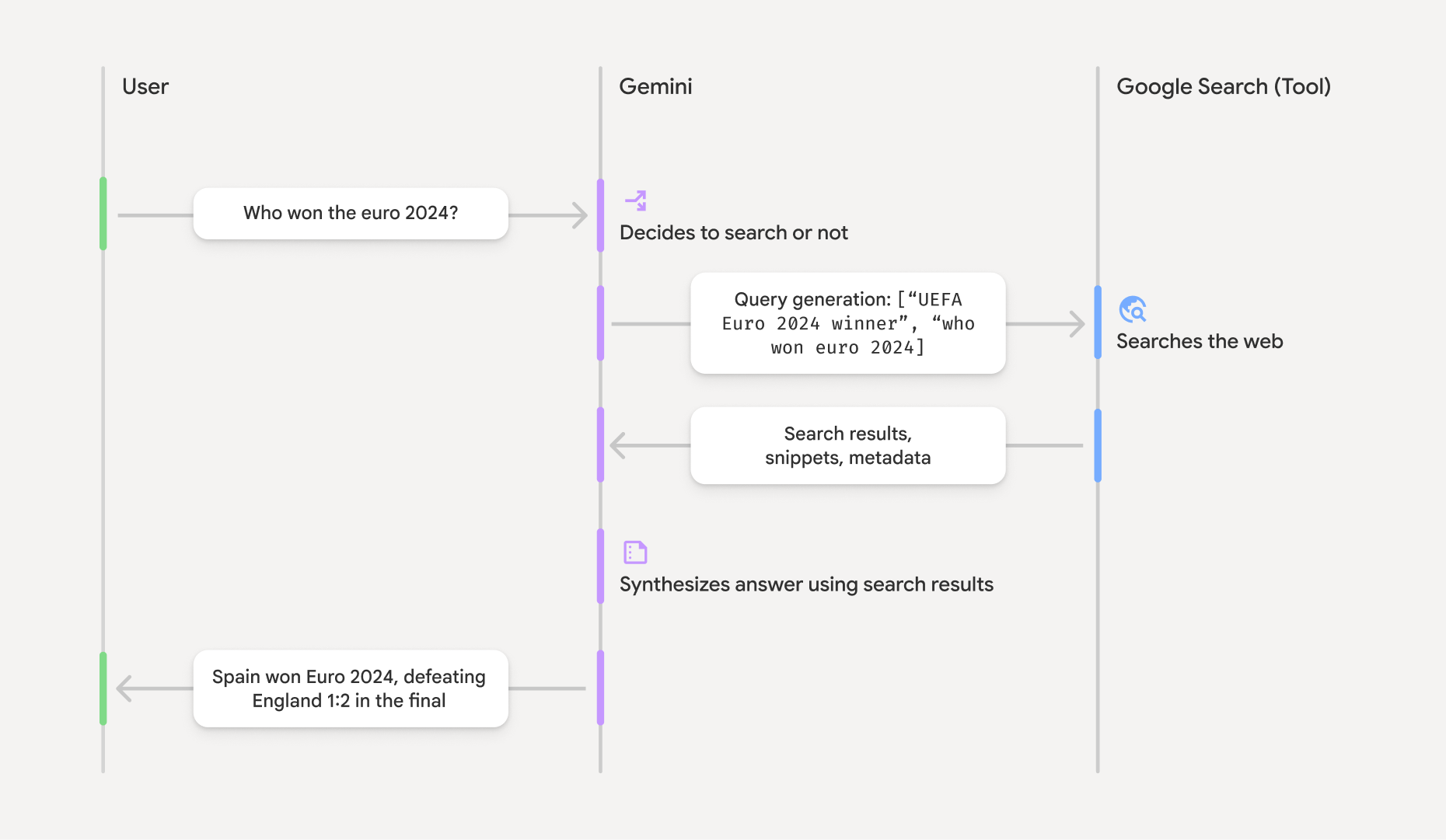
วิธีการทำงานของฟีเจอร์การพักใจด้วย Google Search
เมื่อคุณใช้เครื่องมือ GoogleSearch โมเดลจะจัดการเวิร์กโฟลว์ทั้งหมดของ
การค้นหา การประมวลผล และการอ้างอิงข้อมูลโดยอัตโนมัติ
ขั้นตอนการทำงานของโมเดลมีดังนี้
- รับพรอมต์: แอปของคุณจะส่งพรอมต์ไปยังโมเดล Gemini
โดยเปิดใช้เครื่องมือ
GoogleSearch - วิเคราะห์พรอมต์: โมเดลจะวิเคราะห์พรอมต์และพิจารณาว่า
Google Search สามารถปรับปรุงคำตอบได้หรือไม่ - ส่งคำค้นหาไปยัง
Google Search : หากจำเป็น โมเดลจะสร้างคำค้นหาอย่างน้อย 1 รายการโดยอัตโนมัติและดำเนินการ - ประมวลผลผลการค้นหา: โมเดลจะประมวลผล
Google Search ผลลัพธ์และสร้างคำตอบสำหรับพรอมต์ต้นฉบับ - แสดง "ผลลัพธ์ที่อิงตามข้อมูล": โมเดลจะแสดงคำตอบสุดท้ายที่ใช้งานง่าย
ซึ่งอิงตาม
Google Search ผลลัพธ์ คำตอบนี้มีคำตอบที่เป็นข้อความของโมเดลและgroundingMetadataพร้อมด้วย คำค้นหา ผลการค้นหาเว็บ และแหล่งที่มา
โปรดทราบว่าการระบุ groundingMetadata
จึงไม่ใช่ "ผลลัพธ์ที่อิงตามข้อมูล"
ทำความเข้าใจผลลัพธ์ที่อิงตามข้อมูล
หากโมเดลอิงตามgroundingMetadata ซึ่งมี Structured Data
ที่จำเป็นต่อการยืนยันคำกล่าวอ้างและสร้างประสบการณ์การใช้งานแหล่งข้อมูลที่สมบูรณ์ในแอปพลิเคชันของคุณ
ออบเจ็กต์ groundingMetadata ใน "ผลการค้นหาที่อิงตามข้อมูล" มีข้อมูลต่อไปนี้
webSearchQueries: อาร์เรย์ของคำค้นหาที่ส่งไปยังGoogle Search ข้อมูลนี้มีประโยชน์สำหรับการแก้ไขข้อบกพร่องและ ทำความเข้าใจกระบวนการให้เหตุผลของโมเดลsearchEntryPoint: มี HTML และ CSS เพื่อแสดงผล "Google Search คำแนะนำ" ที่จำเป็น คุณต้องปฏิบัติตามข้อกำหนดการใช้งาน "การอ้างอิงด้วยGoogle Search " สำหรับผู้ให้บริการ API ที่คุณเลือก Gemini Developer API หรือ Agent Platform Gemini API (formerly Vertex AI) (ดูส่วนข้อกำหนดในการให้บริการ ภายในข้อกำหนดเฉพาะของบริการ) ดูวิธี ใช้และแสดงผลการค้นหาที่อิงตามข้อมูลพื้นฐาน ในภายหลังในหน้านี้groundingChunks: อาร์เรย์ของออบเจ็กต์ที่มีแหล่งข้อมูลบนเว็บ (uriและtitle)groundingSupports: อาร์เรย์ของก้อนข้อมูลเพื่อเชื่อมต่อคำตอบของโมเดลtextกับแหล่งที่มาในgroundingChunksแต่ละก้อนจะลิงก์ข้อความsegment(กำหนดโดยstartIndexและendIndex) กับgroundingChunkIndicesอย่างน้อย 1 รายการ ฟิลด์นี้ช่วยคุณสร้างลิงก์แหล่งที่มาในบรรทัด ดูวิธี ใช้และแสดงผลการค้นหาที่อิงตามข้อมูลพื้นฐาน ในภายหลังในหน้านี้
นี่คือตัวอย่างการตอบกลับที่มีออบเจ็กต์ groundingMetadata
{
  "candidates": [
    {
      "content": {
        "parts": [
          {
            "text": "Spain won Euro 2024, defeating England 2-1 in the final. This victory marks Spain's record fourth European Championship title."
          }
        ],
        "role": "model"
      },
      "groundingMetadata": {
        "webSearchQueries": [
          "UEFA Euro 2024 winner",
          "who won euro 2024"
        ],
        "searchEntryPoint": {
          "renderedContent": "<!-- HTML and CSS for the search widget -->"
        },
        "groundingChunks": [
          {"web": {"uri": "https://vertexaisearch.cloud.google.com.....", "title": "aljazeera.com"}},
          {"web": {"uri": "https://vertexaisearch.cloud.google.com.....", "title": "uefa.com"}}
        ],
        "groundingSupports": [
          {
            "segment": {"startIndex": 0, "endIndex": 85, "text": "Spain won Euro 2024, defeatin..."},
            "groundingChunkIndices": [0]
          },
          {
            "segment": {"startIndex": 86, "endIndex": 210, "text": "This victory marks Spain's..."},
            "groundingChunkIndices": [0, 1]
          }
        ]
      }
    }
  ]
}
ใช้และแสดงผลลัพธ์ที่อิงตามข้อมูล
หากโมเดลใช้เครื่องมือ groundingMetadata ในคำตอบ
จำเป็นต้อง
แสดง
นอกเหนือจากการปฏิบัติตามข้อกำหนดในการใช้
(ต้องระบุ) แสดงGoogle Search คำแนะนำ
หากการตอบกลับมี "คำแนะนำของ
ออบเจ็กต์ groundingMetadata มี "searchEntryPoint ซึ่งมีฟิลด์ renderedContent
ที่ให้การจัดรูปแบบ HTML และ CSS ที่เป็นไปตามข้อกำหนด ซึ่งคุณต้องนำไปใช้เพื่อ
แสดงคำแนะนำการค้นหาในแอป
ดูข้อมูลโดยละเอียดเกี่ยวกับ
ข้อกำหนดในการแสดงผลและลักษณะการทำงานสำหรับ
ดูตัวอย่างโค้ดในส่วนนี้ในภายหลัง
(ต้องระบุ) แหล่งที่มาของจอแสดงผล
ออบเจ็กต์ groundingMetadata มีข้อมูลต้นฉบับที่มีโครงสร้าง ซึ่งได้แก่ฟิลด์ groundingSupports และ groundingChunks ใช้ข้อมูลนี้เพื่อ
ลิงก์ข้อความของโมเดลกับแหล่งที่มาโดยตรงภายใน UI (ในบรรทัด
และแบบรวม)
ดูตัวอย่างโค้ดในส่วนนี้ในภายหลัง
ตัวอย่างโค้ด
ตัวอย่างโค้ดเหล่านี้แสดงรูปแบบทั่วไปสำหรับการใช้และแสดงผล ผลลัพธ์ที่อิงตามข้อมูลพื้นฐาน อย่างไรก็ตาม คุณมีหน้าที่ตรวจสอบว่าการติดตั้งใช้งานเฉพาะของคุณเป็นไปตามข้อกำหนดด้านการปฏิบัติตามข้อกำหนด
Swift
// ...

// Get the model's response
let text = response.text

// Get the grounding metadata
if let candidate = response.candidates.first,
   let groundingMetadata = candidate.groundingMetadata {
  // REQUIRED - display Google Search suggestions
  // (renderedContent contains HTML and CSS for the search widget)
  if let renderedContent = groundingMetadata.searchEntryPoint?.renderedContent {
    // TODO(developer): Display Google Search suggestions using a WebView
  }

  // REQUIRED - display sources
  let groundingChunks = groundingMetadata.groundingChunks
  for chunk in groundingMetadata.groundingChunks {
    if let web = chunk.web {
      let title = web.title  // for example, "uefa.com"
      let uri = web.uri  // for example, "https://vertexaisearch.cloud.google.com..."
      // TODO(developer): show source in the UI
    }
  }
}
Kotlin
// ...

// Get the model's response
val text = response.text

// Get the grounding metadata
val groundingMetadata = response.candidates.firstOrNull()?.groundingMetadata

// REQUIRED - display Google Search suggestions
// (renderedContent contains HTML and CSS for the search widget)
val renderedContent = groundingMetadata?.searchEntryPoint?.renderedContent
if (renderedContent != null) {
    // TODO(developer): Display Google Search suggestions using a WebView
}

// REQUIRED - display sources
val groundingChunks = groundingMetadata?.groundingChunks
groundingChunks?.let { chunks ->
  for (chunk in chunks) {
  	val title = chunk.web?.title  // for example, "uefa.com"
	val uri = chunk.web?.uri  // for example, "https://vertexaisearch.cloud.google.com..."
// TODO(developer): show source in the UI
  }
}
Java
// ...

Futures.addCallback(response, new FutureCallback() {
  @Override
  public void onSuccess(GenerateContentResponse result) {
  // Get the model's response
  String text = result.getText();

  // Get the grounding metadata
  GroundingMetadata groundingMetadata =
  result.getCandidates()[0].getGroundingMetadata();

  if (groundingMetadata != null) {
    // REQUIRED - display Google Search suggestions
  // (renderedContent contains HTML and CSS for the search widget)
    String renderedContent =
  groundingMetadata.getSearchEntryPoint().getRenderedContent();
    if (renderedContent != null) {
      // TODO(developer): Display Google Search suggestions using a WebView
    }

    // REQUIRED - display sources
    List chunks = groundingMetadata.getGroundingChunks();
    if (chunks != null) {
      for(GroundingChunk chunk : chunks) {
        WebGroundingChunk web = chunk.getWeb();
        if (web != null) {
          String title = web.getTitle();  // for example, "uefa.com"
          String uri = web.getUri();  // for example, "https://vertexaisearch.cloud.google.com..."
          // TODO(developer): show sources in the UI
        }
      }
    }
  }
  }

  @Override
  public void onFailure(Throwable t) {
  t.printStackTrace();
  }
  }, executor);
Web
// ...

// Get the model's text response
const text = result.response.text();

// Get the grounding metadata
const groundingMetadata = result.response.candidates?.[0]?.groundingMetadata;

// REQUIRED - display Google Search suggestions
// (renderedContent contains HTML and CSS for the search widget)
const renderedContent = groundingMetadata?.searchEntryPoint?.renderedContent;
if (renderedContent) {
  // TODO(developer): render this HTML and CSS in the UI
}

// REQUIRED - display sources
const groundingChunks = groundingMetadata?.groundingChunks;
if (groundingChunks) {
  for (const chunk of groundingChunks) {
    const title = chunk.web?.title;  // for example, "uefa.com"
    const uri = chunk.web?.uri;  // for example, "https://vertexaisearch.cloud.google.com..."
    // TODO(developer): show sources in the UI
  }
}
Dart
// ...

// Get the model's response
final text = response.text;

// Get the grounding metadata
final groundingMetadata = response.candidates.first.groundingMetadata;

// REQUIRED - display Google Search suggestions
// (renderedContent contains HTML and CSS for the search widget)
final renderedContent = groundingMetadata?.searchEntryPoint?.renderedContent;
if (renderedContent != null) {
    // TODO(developer): Display Google Search suggestions using a WebView
}

// REQUIRED - display sources
final groundingChunks = groundingMetadata?.groundingChunks;
if (groundingChunks != null) {
  for (var chunk in groundingChunks) {
    final title = chunk.web?.title;  // for example, "uefa.com"
    final uri = chunk.web?.uri;  // for example, "https://vertexaisearch.cloud.google.com..."
    // TODO(developer): show sources in the UI
  }
}
Unity
// ...

// Get the model's response.
var text = response.Text;

// Get the grounding metadata.
var groundingMetadata = response.Candidates.First().GroundingMetadata.Value;

// REQUIRED - display Google Search suggestions
// (renderedContent contains HTML and CSS for the search widget)
if (groundingMetadata.SearchEntryPoint.HasValue) {
    var renderedContent = groundingMetadata.SearchEntryPoint.Value.RenderedContent;
    // TODO(developer): Display Google Search suggestions using a WebView
}

// REQUIRED - display sources
foreach(GroundingChunk chunk in groundingMetadata.GroundingChunks) {
    var title = chunk.Web.Value.Title;  // for example, "uefa.com"
    var uri = chunk.Web.Value.Uri;  // for example, "https://vertexaisearch.cloud.google.com..."
    // TODO(developer): show sources in the UI
}
ผลการค้นหาที่อิงตามข้อมูลจริงและการตรวจสอบ AI ในFirebaseคอนโซล
หากเปิดใช้การตรวจสอบ AI ในFirebaseคอนโซล ระบบจะจัดเก็บคำตอบไว้ใน Cloud Logging โดยค่าเริ่มต้น ข้อมูลนี้จะมีระยะเวลาเก็บรักษา 30 วัน
คุณมีหน้าที่ตรวจสอบว่าระยะเวลาเก็บรักษานี้หรือระยะเวลาที่กำหนดเองใดๆ ที่คุณตั้งค่าไว้สอดคล้องกับกรณีการใช้งานเฉพาะของคุณและข้อกำหนดด้านการปฏิบัติตามข้อกำหนดเพิ่มเติมสำหรับผู้ให้บริการGemini APIที่คุณเลือกอย่างครบถ้วน Gemini Developer API หรือ Agent Platform Gemini API (formerly Vertex AI) (ดูส่วนข้อกำหนดในการให้บริการ ภายในข้อกำหนดเฉพาะของบริการ) คุณอาจต้องปรับระยะเวลาเก็บรักษาใน Cloud Logging เพื่อให้เป็นไปตามข้อกำหนดเหล่านี้
ราคาและขีดจำกัด
โปรดตรวจสอบราคา ความพร้อมใช้งานของโมเดล และขีดจำกัดสำหรับการกราวด์ด้วย