

Powiązanie ze źródłem informacji z użyciem
Uziemienie za pomocą
- Zwiększanie dokładności: zmniejsz skłonność modelu do halucynowania, opierając odpowiedzi na informacjach ze świata rzeczywistego.
- Dostęp do informacji w czasie rzeczywistym: odpowiadaj na pytania dotyczące ostatnich wydarzeń i tematów.
- Podawanie źródeł: budowanie zaufania użytkowników lub umożliwianie im przeglądania odpowiednich witryn przez wyświetlanie źródeł twierdzeń modelu.
- Wykonywanie bardziej złożonych zadań: pobieranie artefaktów i odpowiednich obrazów, filmów lub innych multimediów, które pomagają w wykonywaniu zadań wymagających rozumowania.
- Ulepszanie odpowiedzi w określonych regionach lub językach: znajdowanie informacji dotyczących konkretnych regionów lub pomoc w dokładnym tłumaczeniu treści.
Obsługiwane modele
gemini-3.1-pro-previewgemini-3.8-flash(oraz starszegemini-3.7-flash,gemini-3.6-flashigemini-3.5-flash)gemini-3.5-flash-lite(i starszygemini-3.1-flash-lite)gemini-3-pro-image(znany też jako „Nano Banana Pro”)gemini-3.1-flash-image(znany też jako „Nano Banana 2”)
Ogólne modele Gemini 2.5 obsługują tę funkcję, ale wszystkie zostały wycofane.
Ta funkcja jest też obsługiwana przez Gemini Live API modele, ale wszystkie przykłady kodu w tym przewodniku dotyczą modeli Gemini ogólnego zastosowania.
Obsługiwane języki
Zobacz obsługiwane języki w przypadku modeli Gemini.
Ugruntuj model za pomocą Google Search
|
Kliknij Gemini API dostawcę, aby wyświetlić na tej stronie treści i kod dostawcy. |
Podczas tworzenia instancji GenerativeModel podaj GoogleSearch jako tool, którego model może użyć do wygenerowania odpowiedzi.
Swift
import FirebaseAILogic

// Initialize the Gemini Developer API backend service.
let ai = FirebaseAI.firebaseAI(backend: .googleAI())

// Create a `GenerativeModel` instance with a model that supports your use case.
let model = ai.generativeModel(
    modelName: "GEMINI_MODEL_NAME",
    // Provide Google Search as a tool that the model can use to generate its response.
    tools: [Tool.googleSearch()]
)

let response = try await model.generateContent("Who won the euro 2024?")
print(response.text ?? "No text in response.")

// Make sure to comply with the "Grounding with Google Search" usage requirements,
// which includes how you use and display the grounded result
Kotlin
// Initialize the Gemini Developer API backend service.
// Create a `GenerativeModel` instance with a model that supports your use case.
val model = Firebase.ai(backend = GenerativeBackend.googleAI()).generativeModel(
    modelName = "GEMINI_MODEL_NAME",
    // Provide Google Search as a tool that the model can use to generate its response
    tools = listOf(Tool.googleSearch())
)

val response = model.generateContent("Who won the euro 2024?")
print(response.text)

// Make sure to comply with the "Grounding with Google Search" usage requirements,
// which includes how you use and display the grounded result
Java
// Initialize the Gemini Developer API backend service.
// Create a `GenerativeModel` instance with a model that supports your use case.
GenerativeModel ai = FirebaseAI.getInstance(GenerativeBackend.googleAI())
                .generativeModel("GEMINI_MODEL_NAME",
                        null,
                        null,
                        // Provide Google Search as a tool that the model can use to generate its response
                        List.of(Tool.GoogleSearch()));

// Use the GenerativeModelFutures Java compatibility layer which offers
// support for ListenableFuture and Publisher APIs
GenerativeModelFutures model = GenerativeModelFutures.from(ai);

ListenableFuture response = model.generateContent("Who won the euro 2024?");
  Futures.addCallback(response, new FutureCallback() {
      @Override
      public void onSuccess(GenerateContentResponse result) {
          String resultText = result.getText();
          System.out.println(resultText);
      }

      @Override
      public void onFailure(Throwable t) {
          t.printStackTrace();
      }
  }, executor);

// Make sure to comply with the "Grounding with Google Search" usage requirements,
// which includes how you use and display the grounded result
Web
import { initializeApp } from "firebase/app";
import { getAI, getGenerativeModel, GoogleAIBackend } from "firebase/ai";

// TODO(developer): Replace the following with your app's Firebase configuration
// See: https://firebase.google.com/docs/web/learn-more#config-object
const firebaseConfig = {
  // ...
};

// Initialize FirebaseApp
const firebaseApp = initializeApp(firebaseConfig);

// Initialize the Gemini Developer API backend service.
const ai = getAI(firebaseApp, { backend: new GoogleAIBackend() });

// Create a `GenerativeModel` instance with a model that supports your use case.
const model = getGenerativeModel(
  ai,
  {
    model: "GEMINI_MODEL_NAME",
    // Provide Google Search as a tool that the model can use to generate its response
    tools: [{ googleSearch: {} }]
  }
);

const result = await model.generateContent("Who won the euro 2024?");

console.log(result.response.text());

// Make sure to comply with the "Grounding with Google Search" usage requirements,
// which includes how you use and display the grounded result
Dart
import 'package:firebase_core/firebase_core.dart';
import 'package:firebase_ai/firebase_ai.dart';
import 'firebase_options.dart';

// Initialize FirebaseApp.
await Firebase.initializeApp(
  options: DefaultFirebaseOptions.currentPlatform,
);

// Initialize the Gemini Developer API backend service.
// Create a `GenerativeModel` instance with a model that supports your use case.
final model = FirebaseAI.googleAI().generativeModel(
  model: 'GEMINI_MODEL_NAME',
  // Provide Google Search as a tool that the model can use to generate its response.
  tools: [
    Tool.googleSearch(),
  ],
);

final response = await model.generateContent([Content.text("Who won the euro 2024?")]);
print(response.text);

// Make sure to comply with the "Grounding with Google Search" usage requirements,
// which includes how you use and display the grounded result
Unity
using Firebase;
using Firebase.AI;

// Initialize the Gemini Developer API backend service.
var ai = FirebaseAI.GetInstance(FirebaseAI.Backend.GoogleAI());

// Create a `GenerativeModel` instance with a model that supports your use case.
var model = ai.GetGenerativeModel(
  modelName: "GEMINI_MODEL_NAME",
  // Provide Google Search as a tool that the model can use to generate its response.
  tools: new[] { new Tool(new GoogleSearch()) }
);

var response = await model.GenerateContentAsync("Who won the euro 2024?");
UnityEngine.Debug.Log(response.Text ?? "No text in response.");

// Make sure to comply with the "Grounding with Google Search" usage requirements,
// which includes how you use and display the grounded result
Dowiedz się, jak wybrać model odpowiednie do Twojego przypadku użycia i aplikacji.
Jak działa uziemienie za pomocą Google Search
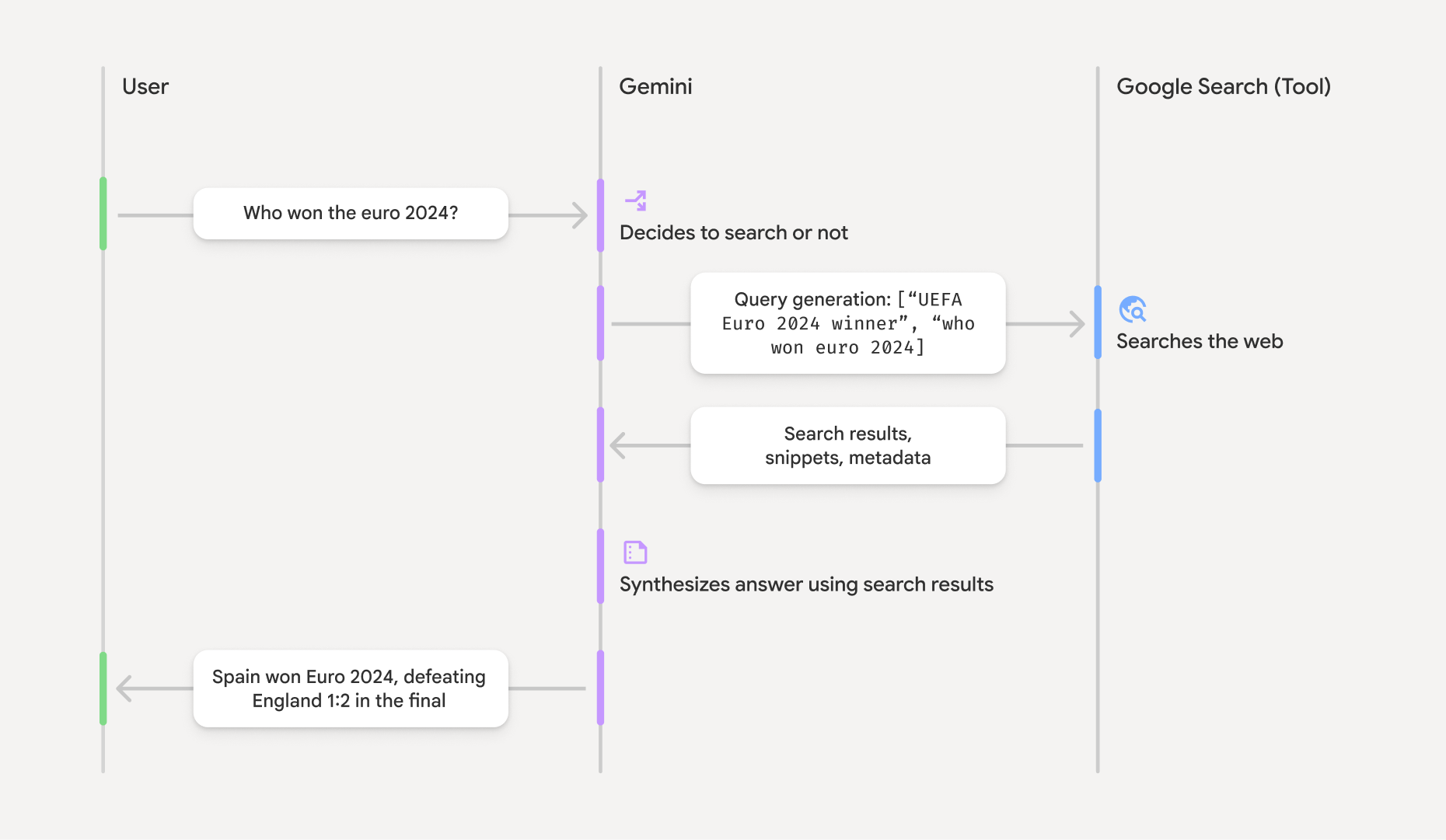
Gdy używasz narzędzia GoogleSearch, model automatycznie obsługuje cały proces wyszukiwania, przetwarzania i cytowania informacji.
Model działa w ten sposób:
- Otrzymywanie prompta: aplikacja wysyła prompta do modelu Gemini z włączonym narzędziem
GoogleSearch. - Analizowanie promptu: model analizuje prompt i sprawdza, czy
Google Search może ulepszyć swoją odpowiedź. - Wysyłanie zapytań do
Google Search : w razie potrzeby model automatycznie generuje i wykonuje jedno lub kilka zapytań. - Przetwarzanie wyników wyszukiwania: model przetwarza wyniki
Google Search i formułuje odpowiedź na pierwotny prompt. - Zwróć „uzasadniony wynik”: model zwraca ostateczną, przyjazną dla użytkownika odpowiedź, która jest oparta na wynikach
Google Search . Ta odpowiedź zawiera tekstową odpowiedź modelu igroundingMetadataz wyszukiwanymi hasłami, wynikami wyszukiwania i źródłami.
Pamiętaj, że udostępnienie modelu narzędzia groundingMetadata, a więc nie będzie „wynikiem opartym na źródłach”.
Interpretowanie wyniku opartego na informacjach
Jeśli model opiera swoją odpowiedź na groundingMetadata, który zawiera uporządkowane dane niezbędne do weryfikacji twierdzeń i tworzenia w aplikacji bogatego źródła informacji.
Obiekt groundingMetadata w „wyniku z uzasadnieniem” zawiera te informacje:
webSearchQueries: tablica z zapytaniami wysłanymi doGoogle Search . Te informacje są przydatne do debugowania i zrozumienia procesu rozumowania modelu.searchEntryPoint: zawiera kod HTML i CSS do renderowania wymaganych „Google Search sugestii”. Musisz przestrzegać wymagań dotyczących korzystania z „Uziemienia za pomocąGoogle Search ” w przypadku wybranego dostawcy interfejsu API:Gemini Developer API lub Agent Platform Gemini API (formerly Vertex AI) (patrz sekcja Warunki korzystania z usługi w Szczegółowych warunkach korzystania z usługi). Dowiedz się, jak używać i wyświetlać wynik oparty na źródłach (poniżej).groundingChunks: tablica obiektów zawierających źródła internetowe (uriititle).groundingSupports: tablica fragmentów, które łączą odpowiedź modelutextze źródłami wgroundingChunks. Każdy fragment łączy tekstsegment(zdefiniowany przezstartIndexiendIndex) z co najmniej 1groundingChunkIndices. To pole pomaga tworzyć wbudowane linki do źródeł. Dowiedz się, jak używać i wyświetlać wynik oparty na źródłach (poniżej).
Oto przykładowa odpowiedź zawierająca obiekt groundingMetadata:
{
  "candidates": [
    {
      "content": {
        "parts": [
          {
            "text": "Spain won Euro 2024, defeating England 2-1 in the final. This victory marks Spain's record fourth European Championship title."
          }
        ],
        "role": "model"
      },
      "groundingMetadata": {
        "webSearchQueries": [
          "UEFA Euro 2024 winner",
          "who won euro 2024"
        ],
        "searchEntryPoint": {
          "renderedContent": "<!-- HTML and CSS for the search widget -->"
        },
        "groundingChunks": [
          {"web": {"uri": "https://vertexaisearch.cloud.google.com.....", "title": "aljazeera.com"}},
          {"web": {"uri": "https://vertexaisearch.cloud.google.com.....", "title": "uefa.com"}}
        ],
        "groundingSupports": [
          {
            "segment": {"startIndex": 0, "endIndex": 85, "text": "Spain won Euro 2024, defeatin..."},
            "groundingChunkIndices": [0]
          },
          {
            "segment": {"startIndex": 86, "endIndex": 210, "text": "This victory marks Spain's..."},
            "groundingChunkIndices": [0, 1]
          }
        ]
      }
    }
  ]
}
Używanie i wyświetlanie wyniku opartego na informacjach
Jeśli model użyje narzędzia groundingMetadata obiekt.
Jest to wymagane, aby wyświetlać
Wyświetlanie tych informacji, oprócz spełniania wymagań dotyczących korzystania z
(Wymagane) Wyświetlaj Google Search sugestie
Jeśli odpowiedź zawiera „
Obiekt groundingMetadata zawiera „searchEntryPoint, które ma pole renderedContent zawierające zgodne style HTML i CSS. Musisz je wdrożyć, aby wyświetlać sugestie wyszukiwania w aplikacji.
Szczegółowe informacje o wymaganiach dotyczących wyświetlania i działania sugestii
Przykładowe fragmenty kodu znajdziesz w dalszej części tej sekcji.
(Wymagane) Źródła wyświetlania
Obiekt groundingMetadata zawiera strukturalne dane źródłowe, a w szczególności pola groundingSupports i groundingChunks. Użyj tych informacji, aby połączyć stwierdzenia modelu bezpośrednio z ich źródłami w interfejsie (w tekście i w formie zbiorczej).
Przykładowe fragmenty kodu znajdziesz w dalszej części tej sekcji.
Przykładowe fragmenty kodu
Te przykłady kodu zawierają ogólne wzorce używania i wyświetlania wyniku opartego na wiedzy. Twoim obowiązkiem jest jednak dopilnowanie, aby wdrożone przez Ciebie rozwiązanie było zgodne z wymaganiami.
Swift
// ...

// Get the model's response
let text = response.text

// Get the grounding metadata
if let candidate = response.candidates.first,
   let groundingMetadata = candidate.groundingMetadata {
  // REQUIRED - display Google Search suggestions
  // (renderedContent contains HTML and CSS for the search widget)
  if let renderedContent = groundingMetadata.searchEntryPoint?.renderedContent {
    // TODO(developer): Display Google Search suggestions using a WebView
  }

  // REQUIRED - display sources
  let groundingChunks = groundingMetadata.groundingChunks
  for chunk in groundingMetadata.groundingChunks {
    if let web = chunk.web {
      let title = web.title  // for example, "uefa.com"
      let uri = web.uri  // for example, "https://vertexaisearch.cloud.google.com..."
      // TODO(developer): show source in the UI
    }
  }
}
Kotlin
// ...

// Get the model's response
val text = response.text

// Get the grounding metadata
val groundingMetadata = response.candidates.firstOrNull()?.groundingMetadata

// REQUIRED - display Google Search suggestions
// (renderedContent contains HTML and CSS for the search widget)
val renderedContent = groundingMetadata?.searchEntryPoint?.renderedContent
if (renderedContent != null) {
    // TODO(developer): Display Google Search suggestions using a WebView
}

// REQUIRED - display sources
val groundingChunks = groundingMetadata?.groundingChunks
groundingChunks?.let { chunks ->
  for (chunk in chunks) {
  	val title = chunk.web?.title  // for example, "uefa.com"
	val uri = chunk.web?.uri  // for example, "https://vertexaisearch.cloud.google.com..."
// TODO(developer): show source in the UI
  }
}
Java
// ...

Futures.addCallback(response, new FutureCallback() {
  @Override
  public void onSuccess(GenerateContentResponse result) {
  // Get the model's response
  String text = result.getText();

  // Get the grounding metadata
  GroundingMetadata groundingMetadata =
  result.getCandidates()[0].getGroundingMetadata();

  if (groundingMetadata != null) {
    // REQUIRED - display Google Search suggestions
  // (renderedContent contains HTML and CSS for the search widget)
    String renderedContent =
  groundingMetadata.getSearchEntryPoint().getRenderedContent();
    if (renderedContent != null) {
      // TODO(developer): Display Google Search suggestions using a WebView
    }

    // REQUIRED - display sources
    List chunks = groundingMetadata.getGroundingChunks();
    if (chunks != null) {
      for(GroundingChunk chunk : chunks) {
        WebGroundingChunk web = chunk.getWeb();
        if (web != null) {
          String title = web.getTitle();  // for example, "uefa.com"
          String uri = web.getUri();  // for example, "https://vertexaisearch.cloud.google.com..."
          // TODO(developer): show sources in the UI
        }
      }
    }
  }
  }

  @Override
  public void onFailure(Throwable t) {
  t.printStackTrace();
  }
  }, executor);
Web
// ...

// Get the model's text response
const text = result.response.text();

// Get the grounding metadata
const groundingMetadata = result.response.candidates?.[0]?.groundingMetadata;

// REQUIRED - display Google Search suggestions
// (renderedContent contains HTML and CSS for the search widget)
const renderedContent = groundingMetadata?.searchEntryPoint?.renderedContent;
if (renderedContent) {
  // TODO(developer): render this HTML and CSS in the UI
}

// REQUIRED - display sources
const groundingChunks = groundingMetadata?.groundingChunks;
if (groundingChunks) {
  for (const chunk of groundingChunks) {
    const title = chunk.web?.title;  // for example, "uefa.com"
    const uri = chunk.web?.uri;  // for example, "https://vertexaisearch.cloud.google.com..."
    // TODO(developer): show sources in the UI
  }
}
Dart
// ...

// Get the model's response
final text = response.text;

// Get the grounding metadata
final groundingMetadata = response.candidates.first.groundingMetadata;

// REQUIRED - display Google Search suggestions
// (renderedContent contains HTML and CSS for the search widget)
final renderedContent = groundingMetadata?.searchEntryPoint?.renderedContent;
if (renderedContent != null) {
    // TODO(developer): Display Google Search suggestions using a WebView
}

// REQUIRED - display sources
final groundingChunks = groundingMetadata?.groundingChunks;
if (groundingChunks != null) {
  for (var chunk in groundingChunks) {
    final title = chunk.web?.title;  // for example, "uefa.com"
    final uri = chunk.web?.uri;  // for example, "https://vertexaisearch.cloud.google.com..."
    // TODO(developer): show sources in the UI
  }
}
Unity
// ...

// Get the model's response.
var text = response.Text;

// Get the grounding metadata.
var groundingMetadata = response.Candidates.First().GroundingMetadata.Value;

// REQUIRED - display Google Search suggestions
// (renderedContent contains HTML and CSS for the search widget)
if (groundingMetadata.SearchEntryPoint.HasValue) {
    var renderedContent = groundingMetadata.SearchEntryPoint.Value.RenderedContent;
    // TODO(developer): Display Google Search suggestions using a WebView
}

// REQUIRED - display sources
foreach(GroundingChunk chunk in groundingMetadata.GroundingChunks) {
    var title = chunk.Web.Value.Title;  // for example, "uefa.com"
    var uri = chunk.Web.Value.Uri;  // for example, "https://vertexaisearch.cloud.google.com..."
    // TODO(developer): show sources in the UI
}
Wyniki oparte na faktach i monitorowanie wykorzystania AI w Firebasekonsoli
Jeśli włączysz monitorowanie AI w Firebasekonsoli, odpowiedzi będą przechowywane w Cloud Logging. Domyślnie te dane mają 30-dniowy okres przechowywania.
Twoim obowiązkiem jest zapewnienie, że ten okres przechowywania lub dowolny ustawiony przez Ciebie okres niestandardowy jest w pełni zgodny z Twoim konkretnym przypadkiem użycia i wszelkimi dodatkowymi wymaganiami dotyczącymi zgodności w przypadku wybranego Gemini APIdostawcy:Gemini Developer API lub Agent Platform Gemini API (formerly Vertex AI) (patrz sekcja Warunki korzystania z usługi w Szczegółowych warunkach korzystania z usługi). Aby spełnić te wymagania, może być konieczne dostosowanie okresu przechowywania w Cloud Logging.
Ceny i limity
Zapoznaj się z cennikiem, dostępnością modelu i limitami dotyczącymi ugruntowania z