

- 사실 정확성 향상: 실제 정보를 기반으로 대답하여 모델 할루시네이션을 줄입니다.
- 실시간 정보 액세스: 최근 이벤트 및 주제에 관한 질문에 대답합니다.
- 출처 제공: 모델의 주장에 대한 출처를 표시하여 사용자 신뢰를 구축하거나 사용자가 관련 사이트를 탐색하도록 허용합니다.
- 더 복잡한 작업 완료: 추론 작업을 지원하기 위해 아티팩트와 관련 이미지, 동영상 또는 기타 미디어를 가져옵니다.
- 지역 또는 언어별 대답 개선: 지역별 정보를 찾거나 콘텐츠를 정확하게 번역하는 데 도움을 줍니다.
지원되는 모델
gemini-4-argongemini-3.8-flash(이전 버전인gemini-3.7-flash,gemini-3.6-flash,gemini-3.5-flash포함)gemini-3.5-flash-lite(이전 버전인gemini-3.1-flash-lite포함)gemini-3-pro-image(일명 'Nano Banana Pro')gemini-3.1-flash-image(일명 'Nano Banana 2')
gemini-3.1-pro-preview 및 일반용 Gemini 2.5 모델 (지원 중단됨)도 이 기능을 지원합니다.
Gemini Live API 모델 도 이 기능을 지원하지만 이 가이드의 모든 코드 샘플은 일반용 Gemini 모델을 위한 것입니다.
지원되는 언어
지원되는 언어를 Gemini 모델에서 참고하세요.
Google Search 으로 모델 그라운딩
|
Gemini API 제공업체를 클릭하여 이 페이지에서 제공업체별 콘텐츠 및 코드를 확인합니다. |
GenerativeModel 인스턴스를 만들 때 모델이 대답을 생성하는 데 사용할 수 있는 tool로 GoogleSearch를 제공합니다.
Swift
import FirebaseAILogic

// Initialize the Gemini Developer API backend service.
let ai = FirebaseAI.firebaseAI(backend: .googleAI())

// Create a `GenerativeModel` instance with a model that supports your use case.
let model = ai.generativeModel(
    modelName: "GEMINI_MODEL_NAME",
    // Provide Google Search as a tool that the model can use to generate its response.
    tools: [.googleSearch()]
)

let response = try await model.generateContent("Who won the euro 2024?")
print(response.text ?? "No text in response.")

// Make sure to comply with the "Grounding with Google Search" usage requirements,
// which includes how you use and display the grounded result
Kotlin
// Initialize the Gemini Developer API backend service.
// Create a `GenerativeModel` instance with a model that supports your use case.
val model = Firebase.ai(backend = GenerativeBackend.googleAI()).generativeModel(
    modelName = "GEMINI_MODEL_NAME",
    // Provide Google Search as a tool that the model can use to generate its response
    tools = listOf(Tool.googleSearch())
)

val response = model.generateContent("Who won the euro 2024?")
print(response.text)

// Make sure to comply with the "Grounding with Google Search" usage requirements,
// which includes how you use and display the grounded result
Java
// Initialize the Gemini Developer API backend service.
// Create a `GenerativeModel` instance with a model that supports your use case.
GenerativeModel ai = FirebaseAI.getInstance(GenerativeBackend.googleAI())
                .generativeModel("GEMINI_MODEL_NAME",
                        null,
                        null,
                        // Provide Google Search as a tool that the model can use to generate its response
                        List.of(Tool.GoogleSearch()));

// Use the GenerativeModelFutures Java compatibility layer which offers
// support for ListenableFuture and Publisher APIs
GenerativeModelFutures model = GenerativeModelFutures.from(ai);

ListenableFuture response = model.generateContent("Who won the euro 2024?");
  Futures.addCallback(response, new FutureCallback() {
      @Override
      public void onSuccess(GenerateContentResponse result) {
          String resultText = result.getText();
          System.out.println(resultText);
      }

      @Override
      public void onFailure(Throwable t) {
          t.printStackTrace();
      }
  }, executor);

// Make sure to comply with the "Grounding with Google Search" usage requirements,
// which includes how you use and display the grounded result
Web
import { initializeApp } from "firebase/app";
import { getAI, getGenerativeModel, GoogleAIBackend } from "firebase/ai";

// TODO(developer): Replace the following with your app's Firebase configuration
// See: https://firebase.google.com/docs/web/learn-more#config-object
const firebaseConfig = {
  // ...
};

// Initialize FirebaseApp
const firebaseApp = initializeApp(firebaseConfig);

// Initialize the Gemini Developer API backend service.
const ai = getAI(firebaseApp, { backend: new GoogleAIBackend() });

// Create a `GenerativeModel` instance with a model that supports your use case.
const model = getGenerativeModel(
  ai,
  {
    model: "GEMINI_MODEL_NAME",
    // Provide Google Search as a tool that the model can use to generate its response
    tools: [{ googleSearch: {} }]
  }
);

const result = await model.generateContent("Who won the euro 2024?");

console.log(result.response.text());

// Make sure to comply with the "Grounding with Google Search" usage requirements,
// which includes how you use and display the grounded result
Dart
import 'package:firebase_core/firebase_core.dart';
import 'package:firebase_ai/firebase_ai.dart';
import 'firebase_options.dart';

// Initialize FirebaseApp.
await Firebase.initializeApp(
  options: DefaultFirebaseOptions.currentPlatform,
);

// Initialize the Gemini Developer API backend service.
// Create a `GenerativeModel` instance with a model that supports your use case.
final model = FirebaseAI.googleAI().generativeModel(
  model: 'GEMINI_MODEL_NAME',
  // Provide Google Search as a tool that the model can use to generate its response.
  tools: [
    Tool.googleSearch(),
  ],
);

final response = await model.generateContent([Content.text("Who won the euro 2024?")]);
print(response.text);

// Make sure to comply with the "Grounding with Google Search" usage requirements,
// which includes how you use and display the grounded result
Unity
using Firebase;
using Firebase.AI;

// Initialize the Gemini Developer API backend service.
var ai = FirebaseAI.GetInstance(FirebaseAI.Backend.GoogleAI());

// Create a `GenerativeModel` instance with a model that supports your use case.
var model = ai.GetGenerativeModel(
  modelName: "GEMINI_MODEL_NAME",
  // Provide Google Search as a tool that the model can use to generate its response.
  tools: new[] { new Tool(new GoogleSearch()) }
);

var response = await model.GenerateContentAsync("Who won the euro 2024?");
UnityEngine.Debug.Log(response.Text ?? "No text in response.");

// Make sure to comply with the "Grounding with Google Search" usage requirements,
// which includes how you use and display the grounded result
사용 사례 및 앱에 적합한 모델 를 선택하는 방법을 알아보세요.
그라운딩Google Search 의 작동 방식
GoogleSearch 도구를 사용하면 모델이 정보 검색, 처리, 인용의 전체 워크플로를 자동으로 처리합니다.
모델의 워크플로는 다음과 같습니다.
- 프롬프트 수신: 앱이 Gemini 모델
에
GoogleSearch도구가 사용 설정된 프롬프트를 전송합니다. - 프롬프트 분석: 모델이 프롬프트를 분석하고
Google Search 이(가) 대답을 개선할 수 있는지 확인합니다. - 에 쿼리 전송
Google Search : 필요한 경우 모델이 하나 이상의 검색어를 자동으로 생성하고 실행합니다. - 검색 결과 처리: 모델이
Google Search 결과를 처리하고 원래 프롬프트에 대한 대답을 작성합니다. - '그라운딩된 결과' 반환: 모델이
Google Search 결과에 그라운딩된 최종 사용자 친화적인 대답을 반환합니다. 이 대답에는 모델의 텍스트 대답과 검색어, 웹 검색 결과, 출처가 포함된groundingMetadata가 포함됩니다.
모델에 groundingMetadata 객체가 포함되지 않으므로 '그라운딩된 결과'가 아닙니다.
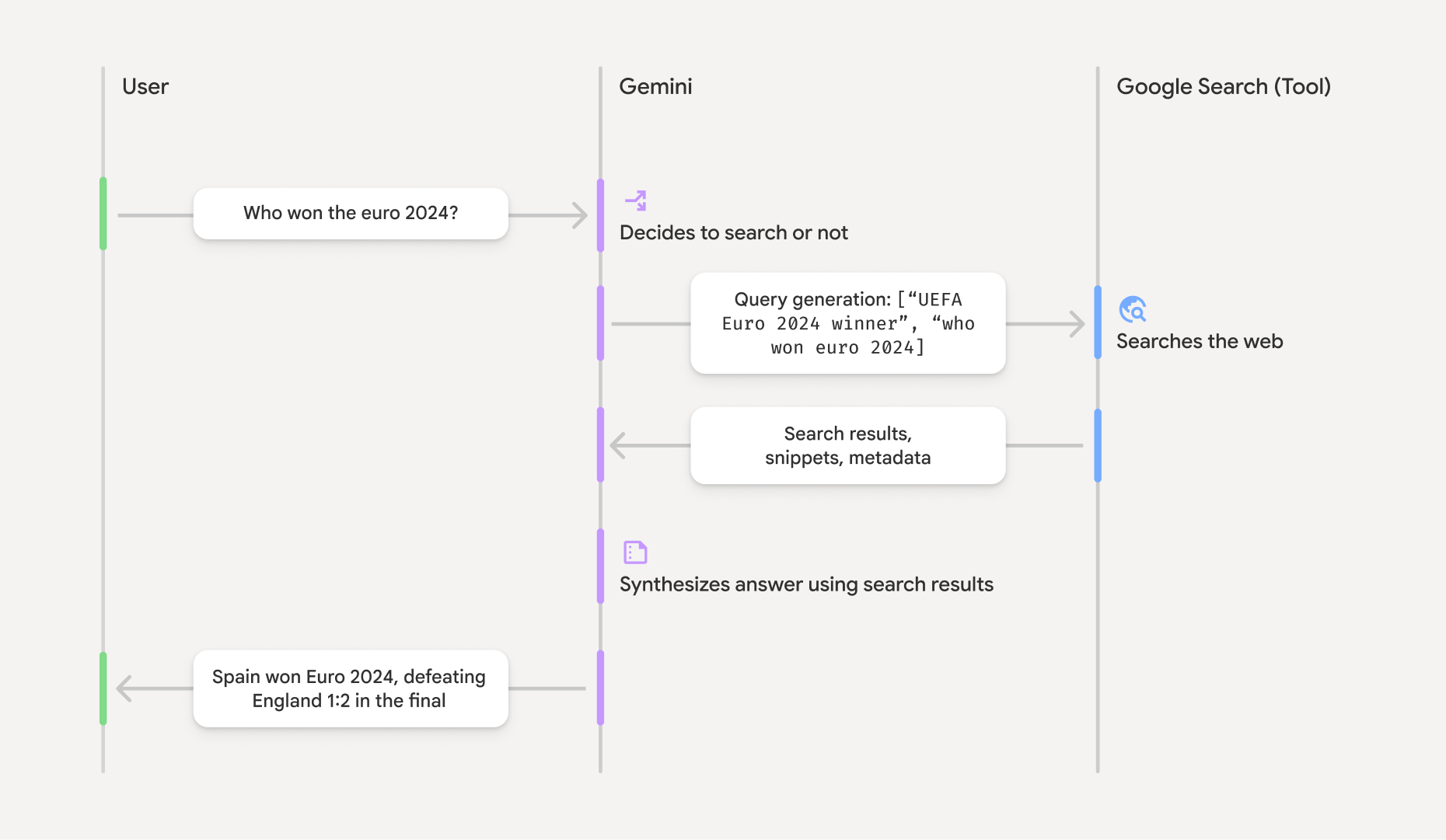
그라운딩된 결과 이해
모델이 groundingMetadata 객체가 포함됩니다.
'그라운딩된 결과'의 groundingMetadata 객체에는 다음 정보가 포함됩니다.
webSearchQueries: 에 전송된 검색어의 배열입니다.Google Search 이 정보는 모델의 추론 프로세스를 디버깅하고 이해하는 데 유용합니다.searchEntryPoint: 필요한 "Google Search 추천"을 렌더링하는 HTML 및 CSS가 포함되어 있습니다. 선택한 API 제공업체인 Gemini Developer API 또는 Agent Platform Gemini API (formerly Vertex AI) (서비스 약관 섹션 내 서비스별 약관 참고)에 대한 "Google Search 을 사용한 그라운딩" 사용 요구사항을 준수해야 합니다. 이 페이지 뒷부분에서 그라운딩된 결과를 사용하고 표시하는 방법 을 알아보세요.groundingChunks: 웹 출처(uri및title)가 포함된 객체의 배열입니다.groundingSupports: 모델 대답text를groundingChunks의 출처에 연결하는 청크의 배열입니다. 각 청크는 텍스트segment(startIndex및endIndex로 정의됨)를 하나 이상의groundingChunkIndices에 연결합니다. 이 필드를 사용하면 인라인 출처 링크를 빌드할 수 있습니다. 이 페이지 뒷부분에서 그라운딩된 결과를 사용하고 표시하는 방법 을 알아보세요.
groundingMetadata 객체가 포함된 대답의 예는 다음과 같습니다.
{
  "candidates": [
    {
      "content": {
        "parts": [
          {
            "text": "Spain won Euro 2024, defeating England 2-1 in the final. This victory marks Spain's record fourth European Championship title."
          }
        ],
        "role": "model"
      },
      "groundingMetadata": {
        "webSearchQueries": [
          "UEFA Euro 2024 winner",
          "who won euro 2024"
        ],
        "searchEntryPoint": {
          "renderedContent": "<!-- HTML and CSS for the search widget -->"
        },
        "groundingChunks": [
          {"web": {"uri": "https://vertexaisearch.cloud.google.com.....", "title": "aljazeera.com"}},
          {"web": {"uri": "https://vertexaisearch.cloud.google.com.....", "title": "uefa.com"}}
        ],
        "groundingSupports": [
          {
            "segment": {"startIndex": 0, "endIndex": 85, "text": "Spain won Euro 2024, defeatin..."},
            "groundingChunkIndices": [0]
          },
          {
            "segment": {"startIndex": 86, "endIndex": 210, "text": "This victory marks Spain's..."},
            "groundingChunkIndices": [0, 1]
          }
        ]
      }
    }
  ]
}
그라운딩된 결과 사용 및 표시
모델이 groundingMetadata 객체를 제공합니다.
Google
검색 추천을 표시
(필수) Google Search 추천 표시
대답에 "
groundingMetadata 객체에는 "renderedContent 필드가 있는 searchEntryPoint 필드가 포함되어 있습니다.
표시 및 동작 요구사항에 관한 자세한 정보를 검토하세요.
이 섹션의 뒷부분에서 코드 샘플 예를 참고하세요.
(필수) 출처 표시
groundingMetadata 객체에는 정형 출처 데이터, 특히 groundingSupports 및 groundingChunks 필드가 포함되어 있습니다. 이 정보를 사용하여 모델의 문장을 UI 내 출처 (인라인 및 집계)에 직접 연결합니다.
이 섹션의 뒷부분에서 코드 샘플 예를 참고하세요.
코드 샘플 예
이 코드 샘플은 그라운딩된 결과를 사용하고 표시하기 위한 일반화된 패턴을 제공합니다. 하지만 특정 구현이 규정 준수 요구사항을 준수하는지 확인하는 것은 사용자의 책임입니다.
Swift
// ...

// Get the model's response
let text = response.text

// Get the grounding metadata
if let candidate = response.candidates.first,
   let groundingMetadata = candidate.groundingMetadata {
  // REQUIRED - display Google Search suggestions
  // (renderedContent contains HTML and CSS for the search widget)
  if let renderedContent = groundingMetadata.searchEntryPoint?.renderedContent {
    // TODO(developer): Display Google Search suggestions using a WebView
  }

  // REQUIRED - display sources
  let groundingChunks = groundingMetadata.groundingChunks
  for chunk in groundingMetadata.groundingChunks {
    if let web = chunk.web {
      let title = web.title  // for example, "uefa.com"
      let uri = web.uri  // for example, "https://vertexaisearch.cloud.google.com..."
      // TODO(developer): show source in the UI
    }
  }
}
Kotlin
// ...

// Get the model's response
val text = response.text

// Get the grounding metadata
val groundingMetadata = response.candidates.firstOrNull()?.groundingMetadata

// REQUIRED - display Google Search suggestions
// (renderedContent contains HTML and CSS for the search widget)
val renderedContent = groundingMetadata?.searchEntryPoint?.renderedContent
if (renderedContent != null) {
    // TODO(developer): Display Google Search suggestions using a WebView
}

// REQUIRED - display sources
val groundingChunks = groundingMetadata?.groundingChunks
groundingChunks?.let { chunks ->
  for (chunk in chunks) {
  	val title = chunk.web?.title  // for example, "uefa.com"
	val uri = chunk.web?.uri  // for example, "https://vertexaisearch.cloud.google.com..."
// TODO(developer): show source in the UI
  }
}
Java
// ...

Futures.addCallback(response, new FutureCallback() {
  @Override
  public void onSuccess(GenerateContentResponse result) {
  // Get the model's response
  String text = result.getText();

  // Get the grounding metadata
  GroundingMetadata groundingMetadata =
  result.getCandidates()[0].getGroundingMetadata();

  if (groundingMetadata != null) {
    // REQUIRED - display Google Search suggestions
  // (renderedContent contains HTML and CSS for the search widget)
    String renderedContent =
  groundingMetadata.getSearchEntryPoint().getRenderedContent();
    if (renderedContent != null) {
      // TODO(developer): Display Google Search suggestions using a WebView
    }

    // REQUIRED - display sources
    List chunks = groundingMetadata.getGroundingChunks();
    if (chunks != null) {
      for(GroundingChunk chunk : chunks) {
        WebGroundingChunk web = chunk.getWeb();
        if (web != null) {
          String title = web.getTitle();  // for example, "uefa.com"
          String uri = web.getUri();  // for example, "https://vertexaisearch.cloud.google.com..."
          // TODO(developer): show sources in the UI
        }
      }
    }
  }
  }

  @Override
  public void onFailure(Throwable t) {
  t.printStackTrace();
  }
  }, executor);
Web
// ...

// Get the model's text response
const text = result.response.text();

// Get the grounding metadata
const groundingMetadata = result.response.candidates?.[0]?.groundingMetadata;

// REQUIRED - display Google Search suggestions
// (renderedContent contains HTML and CSS for the search widget)
const renderedContent = groundingMetadata?.searchEntryPoint?.renderedContent;
if (renderedContent) {
  // TODO(developer): render this HTML and CSS in the UI
}

// REQUIRED - display sources
const groundingChunks = groundingMetadata?.groundingChunks;
if (groundingChunks) {
  for (const chunk of groundingChunks) {
    const title = chunk.web?.title;  // for example, "uefa.com"
    const uri = chunk.web?.uri;  // for example, "https://vertexaisearch.cloud.google.com..."
    // TODO(developer): show sources in the UI
  }
}
Dart
// ...

// Get the model's response
final text = response.text;

// Get the grounding metadata
final groundingMetadata = response.candidates.first.groundingMetadata;

// REQUIRED - display Google Search suggestions
// (renderedContent contains HTML and CSS for the search widget)
final renderedContent = groundingMetadata?.searchEntryPoint?.renderedContent;
if (renderedContent != null) {
    // TODO(developer): Display Google Search suggestions using a WebView
}

// REQUIRED - display sources
final groundingChunks = groundingMetadata?.groundingChunks;
if (groundingChunks != null) {
  for (var chunk in groundingChunks) {
    final title = chunk.web?.title;  // for example, "uefa.com"
    final uri = chunk.web?.uri;  // for example, "https://vertexaisearch.cloud.google.com..."
    // TODO(developer): show sources in the UI
  }
}
Unity
// ...

// Get the model's response.
var text = response.Text;

// Get the grounding metadata.
var groundingMetadata = response.Candidates.First().GroundingMetadata.Value;

// REQUIRED - display Google Search suggestions
// (renderedContent contains HTML and CSS for the search widget)
if (groundingMetadata.SearchEntryPoint.HasValue) {
    var renderedContent = groundingMetadata.SearchEntryPoint.Value.RenderedContent;
    // TODO(developer): Display Google Search suggestions using a WebView
}

// REQUIRED - display sources
foreach(GroundingChunk chunk in groundingMetadata.GroundingChunks) {
    var title = chunk.Web.Value.Title;  // for example, "uefa.com"
    var uri = chunk.Web.Value.Uri;  // for example, "https://vertexaisearch.cloud.google.com..."
    // TODO(developer): show sources in the UI
}
Firebase 콘솔의 그라운딩된 결과 및 AI 모니터링
Firebase 콘솔에서 AI 모니터링을 사용 설정한Firebase 경우, 대답은 Cloud LoggingCloud Logging에 저장됩니다. 기본적으로 이 데이터의 보관 기간은 30일입니다.
이 보관 기간 또는 설정한 모든 맞춤 기간이 특정 사용 사례 및 선택한 Gemini API 제공업체인 Gemini Developer API 또는 Agent Platform Gemini API (formerly Vertex AI) (서비스 약관 섹션 내 서비스별 약관 참고)의 추가 규정 준수 요구사항을 완전히 준수하는지 확인하는 것은 사용자의 책임입니다. 이러한 요구사항을 충족하려면 Cloud Logging에서 보관 기간을 조정해야 할 수 있습니다.
가격 및 제한
선택한 Gemini API 제공업체 문서(
Gemini Developer API
|
Agent Platform Gemini API (formerly Vertex AI))에서