

- 사실 정확성 향상: 2억 5천만 개가 넘는 실제 장소와 비즈니스에 관한 Google 데이터베이스를 기반으로 대답하여 모델 할루시네이션을 줄입니다.
- 실시간 정보 액세스: 현재 영업시간, 전기자동차 충전소의 실시간 상태와 같은 실시간 데이터를 사용하여 질문에 답변합니다.
- 소스 제공: 모델의 위치 기반 주장 옆에
Google Maps 장소 소스와 링크를 직접 표시하여 사용자 신뢰도를 높입니다.
지원되는 모델
gemini-3.1-pro-previewgemini-3.8-flash(이전 버전인gemini-3.7-flash,gemini-3.6-flash,gemini-3.5-flash포함)gemini-3.5-flash-lite(이전gemini-3.1-flash-lite)
일반용 Gemini 2.5 모델은 이 기능을 지원하지만 모두 지원 중단되었습니다.
지원 언어
Gemini 모델의 경우 지원되는 언어를 참고하세요.
Google Maps 으로 모델 그라운딩
|
Gemini API 제공업체를 클릭하여 이 페이지에서 제공업체별 콘텐츠와 코드를 확인합니다. |
GenerativeModel 인스턴스를 만들 때 모델이 대답을 생성하는 데 사용할 수 있는 tool로 GoogleMaps을 제공합니다.
Swift
import FirebaseAILogic
// Initialize the Gemini Developer API backend service.
let ai = FirebaseAI.firebaseAI(backend: .googleAI())
// Example: Coordinates for New York City
let latAndLong = CLLocationCoordinate2D(latitude: 40.7128, longitude: -74.0060)
// (Optional) Define a RetrievalConfig to configure the Grounding with Google Maps tool.
// You can optionally provide a location's coordinates and/or a language code
// for more relevant and personalized Google Maps results.
let retrievalConfig = RetrievalConfig(
location: latAndLong,
// Example: Language code for English (US).
languageCode: "en-US"
)
// Wrap the RetrievalConfig inside a ToolConfig.
let toolConfig = ToolConfig(retrievalConfig: retrievalConfig)
// Create a `GenerativeModel` instance with a model that supports your use case.
let model = ai.generativeModel(
modelName: "GEMINI_MODEL_NAME",
// Provide Google Maps as a tool that the model can use to generate its response.
tools: [Tool.googleMaps()],
// Add the configuration for the Grounding with Google Maps tool
// (if this optional config was defined above).
toolConfig: toolConfig
)
let response = try await model.generateContent("restaurants near me?")
print(response.text ?? "No text in response.")
// Make sure to comply with the "Grounding with Google Maps " usage requirements,
// which includes how you meet service usage requirements
Kotlin
// (Optional) Define a RetrievalConfig to configure the Grounding with Google Maps tool.
// You can optionally provide a location's coordinates and/or a language code
// for more relevant and personalized Google Maps results.
val retrievalConfig = RetrievalConfig(
// Example: Coordinates for New York City
latLng = LatLng(latitude = 40.7128, longitude = -74.0060),
// Example: Language code for English (US)
languageCode = "en-US"
)
// Wrap the RetrievalConfig inside a ToolConfig.
val toolConfig = ToolConfig(
retrievalConfig = retrievalConfig
)
// Initialize the Gemini Developer API backend service.
// Create a `GenerativeModel` instance with a model that supports your use case.
val model = Firebase.ai(backend = GenerativeBackend.googleAI()).generativeModel(
modelName = "GEMINI_MODEL_NAME",
// Add the configuration for the Grounding with Google Maps tool
// (if this optional config was defined above).
toolConfig = toolConfig,
// Provide Google Maps as a tool that the model can use to generate its response.
tools = listOf(Tool.googleMaps())
)
val response = model.generateContent("restaurants near me?")
print(response.text)
// Make sure to comply with the "Grounding with Google Maps " usage requirements,
// which includes how you meet service usage requirements
Java
// (Optional) Define a ToolConfig to configure the Grounding with Google Maps tool.
// You can optionally provide a location's coordinates and/or a language code
// for more relevant and personalized Google Maps results.
ToolConfig toolConfig = new ToolConfig(
null,
new RetrievalConfig(
// Example: Coordinates for New York City.
new LatLng(40.7128, -74.0060),
// Example: Language code for English (US).
"en-US"
)
);
// Initialize the Gemini Developer API backend service.
// Create a `GenerativeModel` instance with a model that supports your use case.
GenerativeModel ai = FirebaseAI.getInstance(GenerativeBackend.googleAI())
.generativeModel("GEMINI_MODEL_NAME",
null,
null,
// Provide Google Maps as a tool that the model can use to generate its response.
List.of(Tool.googleMaps()),
// Add the configuration for the Grounding with Google Maps tool
// (if this optional config was defined above).
toolConfig);
// Use the GenerativeModelFutures Java compatibility layer which offers
// support for ListenableFuture and Publisher APIs.
GenerativeModelFutures model = GenerativeModelFutures.from(ai);
ListenableFuture response = model.generateContent("restaurants near me?");
Futures.addCallback(response, new FutureCallback() {
@Override
public void onSuccess(GenerateContentResponse result) {
String resultText = result.getText();
System.out.println(resultText);
}
@Override
public void onFailure(Throwable t) {
t.printStackTrace();
}
}, executor);
// Make sure to comply with the "Grounding with Google Maps " usage requirements,
// which includes how you meet service usage requirements
Web
import { initializeApp } from "firebase/app";
import { getAI, getGenerativeModel, GoogleAIBackend } from "firebase/ai";
// TODO(developer): Replace the following with your app's Firebase configuration
// See: https://firebase.google.com/docs/web/learn-more#config-object
const firebaseConfig = {
// ...
};
// Initialize FirebaseApp
const firebaseApp = initializeApp(firebaseConfig);
// Initialize the Gemini Developer API backend service.
const ai = getAI(firebaseApp, { backend: new GoogleAIBackend() });
// (Optional) Define a toolConfig to configure the Grounding with Google Maps tool.
// You can optionally provide a location's coordinates and/or a language code
// for more relevant and personalized Google Maps results.
const toolConfig = {
retrievalConfig: {
// Example: Coordinates for New York City
latLng: {
latitude: 40.7128,
longitude: -74.0060
},
// Example: Language code for English (US)
languageCode: 'en-US'
}
};
// Create a `GenerativeModel` instance with a model that supports your use case
const model = getGenerativeModel(
ai,
{
model: "GEMINI_MODEL_NAME",
// Provide Google Maps as a tool that the model can use to generate its response.
tools: [ { googleMaps: {} } ],
// Add the configuration for the Grounding with Google Maps tool
// (if this optional config was defined above).
toolConfig
}
);
const result = await model.generateContent("restaurants near me?");
console.log(result.response.text());
// Make sure to comply with the "Grounding with Google Maps " usage requirements,
// which includes how you meet service usage requirements
Dart
import 'package:firebase_core/firebase_core.dart';
import 'package:firebase_ai/firebase_ai.dart';
import 'firebase_options.dart';
// Initialize FirebaseApp.
await Firebase.initializeApp(
options: DefaultFirebaseOptions.currentPlatform,
);
// (Optional) Define a ToolConfig to configure the Grounding with Google Maps tool.
// You can optionally provide a location's coordinates and/or a language code
// for more relevant and personalized Google Maps results.
final toolConfig = ToolConfig(
retrievalConfig: RetrievalConfig(
// Example: Coordinates for New York City.
latLng: LatLng(latitude: 40.712728, longitude: -74.006015),
// Example: Language code for English (US).
languageCode: 'en-US',
),
);
// Initialize the Gemini Developer API backend service.
// Create a `GenerativeModel` instance with a model that supports your use case.
final model = FirebaseAI.googleAI().generativeModel(
model: 'GEMINI_MODEL_NAME',
// Provide Google Maps as a tool that the model can use to generate its response.
tools: [
Tool.googleMaps(),
],
// Add the configuration for the Grounding with Google Maps tool
// (if this optional config was defined above).
toolConfig: toolConfig,
);
final response = await model.generateContent([Content.text("restaurants near me?")]);
print(response.text);
// Make sure to comply with the "Grounding with Google Maps " usage requirements,
// which includes how you meet service usage requirements
Unity
using Firebase;
using Firebase.AI;
// Initialize the Gemini Developer API backend service.
var ai = FirebaseAI.GetInstance(FirebaseAI.Backend.GoogleAI());
// Example: Coordinates for New York City
var latLng = new LatLng(40.7128, -74.0060);
// (Optional) Define a RetrievalConfig to configure the Grounding with Google Maps tool.
// You can optionally provide a location's coordinates and/or a language code
// for more relevant and personalized Google Maps results.
var retrievalConfig = new RetrievalConfig(latLng, languageCode: "en");
// Wrap the RetrievalConfig inside a ToolConfig.
var toolConfig = new ToolConfig(retrievalConfig: retrievalConfig);
// Create a `GenerativeModel` instance with a model that supports your use case.
var model = ai.GetGenerativeModel(
modelName: "GEMINI_MODEL_NAME",
// Provide Google Maps as a tool that the model can use to generate its response.
tools: new[] { new Tool(new GoogleMaps()) },
// Add the configuration for the Grounding with Google Maps tool
// (if this optional config was defined above).
toolConfig: toolConfig
);
var response = await model.GenerateContentAsync("restaurants near me?");
UnityEngine.Debug.Log(response.Text ?? "No text in response.");
// Make sure to comply with the "Grounding with Google Maps " usage requirements,
// which includes how you meet service usage requirements
사용 사례 및 앱에 적합한 모델 를 선택하는 방법을 알아보세요.
결과 개선을 위한 권장사항 및 도움말
이 섹션에서는
일반 권장사항
필요한 경우에만 도구 제공: 성능과 비용을 최적화하려면 사용 사례에 명확한 지리적 컨텍스트가 있는 경우에만
Google Maps 도구를 사용한 그라운딩에 대한 액세스 권한을 모델에 제공하세요.사용자 위치 제공: 가장 관련성 있고 맞춤화된 대답을 위해(그리고 사용자의 위치를 알고 있는 경우)
Google Maps 도구 구성의 그라운딩에latLng를 통해 위도와 경도를 사용하여 사용자의 위치를 포함합니다.최종 사용자에게 알림:
Google Maps 데이터가 질문에 답변하는 데 사용되고 있음을 최종 사용자에게 명확하게 알립니다. 최종 사용자에게Google Maps 의 소스를 제공하는 것은Google Maps 를 사용한 그라운딩 도구의 서비스 사용 요구사항입니다.
프롬프트에서 장소 속성 사용
이 섹션에서는 위치를 설명하는 데 사용되고,
샘플 장소 속성
아래는 모델이 응답을 생성하는 데 사용할 수 있는 장소에 관한 속성을 알파벳순으로 샘플링한 예시입니다.
- 주소
- 매장 밖 수령
- 체크카드
- 거리
- 무료 주차장
- 라이브 음악
- 어린이 메뉴
- 영업시간
- 결제 옵션(예: 현금 또는 신용카드)
- 장소 답변
- 반려동물 동반 가능
- 맥주 제공
- 채식 음식 제공
- 휠체어 이용 가능
- Wi-Fi
장소 답변은
장소 속성을 사용하는 프롬프트의 예
다음 예에서는 다양한 유형의 장소에 대한 프롬프트에서 장소 속성을 사용합니다.
가족 저녁 식사 계획하기: 식당이 가족 외식에 적합한지, 편리한 서비스를 제공하는지 확인합니다.
- 프롬프트 예시: 'The Italian Place'는 아이들에게 좋은가요? 테이크아웃도 가능한가요? 평점은 어떻게 되나요?와 같이 물을 수 있습니다.
친구의 접근성 확인: 특정 접근성 요구사항을 충족하는지 확인합니다.
- 프롬프트 예시: 휠체어 이용 가능한 입구가 있는 음식점이 필요합니다.
야식 장소 찾기: 특정 시간대에 특정 식사를 제공하는 영업 중인 식당을 찾습니다.
- 프롬프트 예시: 'Burger Joint'가 지금 영업 중인가요? 저녁 식사 가능한가요? 금요일 영업시간은 어떻게 되나요?와 같이 물을 수 있습니다.
고객과 커피 미팅하기: 카페의 편의시설, 제공 메뉴, 결제 옵션을 기준으로 비즈니스 미팅 장소로 적합한지 평가합니다.
- 프롬프트 예시: 'Cafe Central'에 Wi-Fi가 있나요? 커피를 제공하나요? 가격대는 어떤가요? 신용카드를 받나요?와 같이 물을 수 있습니다.
Google Maps 를 사용한 그라운딩의 작동 방식
GoogleMaps 도구를 사용하여 모델에 정보를 제공하면 모델이 정보 검색, 처리, 인용의 전체 워크플로를 자동으로 처리합니다.
모델의 워크플로는 다음과 같습니다.
프롬프트 수신: 앱이
GoogleMaps도구가 사용 설정된 프롬프트를 Gemini 모델에 전송합니다.프롬프트 분석: 모델이 프롬프트를 분석하고
Google Maps 가 대답을 개선할 수 있는지 확인합니다. 예를 들어 프롬프트에 지리적 맥락('내 주변 커피숍', '샌프란시스코 박물관' 등)이 포함되어 있는지 확인합니다.도구 호출: 지리적 의도를 인식한 모델이
Google Maps 도구를 사용하여 그라운딩을 호출합니다.Google Maps 에 쿼리 전송:Google Maps 를 사용한 그라운딩 서비스는 관련 정보 (예: 장소, 리뷰, 사진, 주소, 영업시간)를Google Maps 에 쿼리합니다.원하는 경우 도구의 구성에(또는 프롬프트에 직접) 위도와 경도를 포함하여 관련성이 높고 맞춤화된
Google Maps 결과를 얻을 수 있습니다. 이 도구는 텍스트 검색 도구이며Google Maps 에서 검색하는 것과 유사하게 작동합니다. 즉, 로컬 검색 ('내 주변')은 좌표를 사용하는 반면, 구체적이거나 비로컬 검색은 명시적 위치의 영향을 받지 않을 수 있습니다.Google Maps 결과 처리: 모델이Google Maps 결과를 처리하고 원래 프롬프트에 대한 대답을 구성합니다.Google Maps 그라운딩된 결과 반환: 모델이Google Maps 결과를 기반으로 하는 최종적이고 사용자 친화적인 대답을 반환합니다. 이 응답에는 다음이 포함됩니다.- 모델의 텍스트 답변입니다.
Google Maps 결과와 소스가 있는groundingMetadata객체
groundingMetadata 객체가 포함되지 않으므로
그라운딩된 결과 이해하기
모델이 groundingMetadata 객체가 포함됩니다.
groundingMetadata 객체에는 다음 정보가 포함됩니다.
groundingChunks:maps소스(uri,placeId,title)가 포함된 객체의 배열입니다.groundingSupports: 모델 응답text을groundingChunks의 소스에 연결하는 청크 배열입니다. 각 청크는 텍스트segment(startIndex및endIndex로 정의됨)를 하나 이상의groundingChunkIndices에 연결합니다. 이 필드를 사용하면 인라인 소스 링크를 빌드할 수 있습니다. 이 페이지의 뒷부분에서 서비스 사용 요구사항을 충족하는 방법을 알아보세요.
다음은 groundingMetadata 객체를 포함하는 응답의 예입니다.
{
  "candidates": [
    {
      "content": {
        "parts": [
          {
            "text": "CanteenM is an American restaurant with..."
          }
        ],
        "role": "model"
      },
      "groundingMetadata": {
        "groundingChunks": [
          {
            "maps": {
              "uri": "https://maps.google.com/?cid=13100894621228039586",
              "title": "Heaven on 7th Marketplace",
              "placeId": "places/ChIJ0-zA1vBZwokRon0fGj-6z7U"
            }
          }
        ],
        "groundingSupports": [
          {
            "segment": {
              "startIndex": 0,
              "endIndex": 79,
              "text": "CanteenM is an American restaurant with a 4.6-star rating and is open 24 hours."
            },
            "groundingChunkIndices": [0]
          }
        ]
      }
    }
  ]
}
서비스 사용 요구사항
이 섹션에서는 선택한 Gemini API 제공업체(Gemini Developer API 또는 Agent Platform Gemini API (formerly Vertex AI))에 대한
사용자에게 Google Maps 소스 알림
각 groundingChunks에 수신됩니다. 다음 메타데이터도 반환됩니다.
- 소스 URI
- 제목
- ID
앱에서
Google Maps 소스는 해당 소스를 뒷받침하는 생성된 콘텐츠 직후에 따라와야 합니다. 이렇게 생성된 콘텐츠를Google Maps 그라운딩 결과라고도 합니다.Google Maps 소스는 단일 사용자 상호작용 내에서 확인 가능해야 합니다.
Swift
// ...

// Get the model's response
let text = response.text

// Get the grounding metadata
if let candidate = response.candidates.first,
   let groundingMetadata = candidate.groundingMetadata {

  // Get sources
  let groundingChunks = groundingMetadata.groundingChunks
  for chunk in groundingChunks {
    if let maps = chunk.maps {
      let title = maps.title  // for example, "Heaven on 7th Marketplace"
      let url = maps.url  // for example, "https://maps.google.com/?cid=13100894621228039586"
      let placeId = maps.placeId  // for example, "places/ChIJ0-zA1vBZwokRon0fGj-6z7U"
      // TODO(developer): show source in the UI
    }
  }
}
Kotlin
// ...

// Get the model's response
val text = response.text

// Get the grounding metadata
val groundingMetadata = response.candidates.firstOrNull()?.groundingMetadata

// Get sources
val groundingChunks = groundingMetadata?.groundingChunks
groundingChunks?.let { chunks ->
  for (chunk in chunks) {
    val title = chunk.maps?.title  // for example, "Heaven on 7th Marketplace"
    val uri = chunk.maps?.uri  // for example, "https://maps.google.com/?cid=13100894621228039586"
    val placeId = chunk.maps?.placeId  // for example, "places/ChIJ0-zA1vBZwokRon0fGj-6z7U"
    // TODO(developer): show source in the UI
  }
}
Java
// ...

Futures.addCallback(response, new FutureCallback() {
  @Override
  public void onSuccess(GenerateContentResponse result) {
    // Get the model's response
    String text = result.getText();

    // Get the grounding metadata
    GroundingMetadata groundingMetadata =
        result.getCandidates()[0].getGroundingMetadata();

    if (groundingMetadata != null) {
      // Get sources
      List chunks = groundingMetadata.getGroundingChunks();
      if (chunks != null) {
        for(GroundingChunk chunk : chunks) {
          GoogleMapsGroundingChunk maps = chunk.getMaps();
          if (maps != null) {
            String title = maps.getTitle();  // for example, "Heaven on 7th Marketplace"
            String uri = maps.getUri();  // for example, "https://maps.google.com/?cid=13100894621228039586"
            String placeId = maps.getPlaceId();  // for example, "places/ChIJ0-zA1vBZwokRon0fGj-6z7U"
            // TODO(developer): show sources in the UI
          }
        }
      }
    }
  }

  @Override
  public void onFailure(Throwable t) {
    t.printStackTrace();
  }
}, executor);
Web
// ...

// Get the model's text response
const text = result.response.text();

// Get the grounding metadata
const groundingMetadata = result.response.candidates?.[0]?.groundingMetadata;

// Get sources
const groundingChunks = groundingMetadata?.groundingChunks;
if (groundingChunks) {
  for (const chunk of groundingChunks) {
    const title = chunk.maps?.title;  // for example, "Heaven on 7th Marketplace"
    const uri = chunk.maps?.uri;  // for example, "https://maps.google.com/?cid=13100894621228039586"
    const placeId = chunk.maps?.placeId;  // for example, "places/ChIJ0-zA1vBZwokRon0fGj-6z7U"
    // TODO(developer): show sources in the UI
  }
}
Dart
// ...

// Get the model's response
final text = response.text;

// Get the grounding metadata
final groundingMetadata = response.candidates.first.groundingMetadata;

// Get sources
final groundingChunks = groundingMetadata?.groundingChunks;
if (groundingChunks != null) {
  for (var chunk in groundingChunks) {
    final title = chunk.maps?.title;  // for example, "Heaven on 7th Marketplace"
    final uri = chunk.maps?.uri;  // for example, "https://maps.google.com/?cid=13100894621228039586"
    final placeId = chunk.maps?.placeId;  // for example, "places/ChIJ0-zA1vBZwokRon0fGj-6z7U"
    // TODO(developer): show sources in the UI
  }
}
Unity
// ...

// Get the model's response.
var text = response.Text;

// Get the grounding metadata.
var groundingMetadata = response.Candidates.First().GroundingMetadata;

// Get sources.
if (groundingMetadata != null) {
  foreach(GroundingChunk chunk in groundingMetadata?.GroundingChunks) {
    if (chunk.Maps != null) {
      var title = chunk.Maps?.Title;  // for example, "Heaven on 7th Marketplace"
      var uri = chunk.Maps?.Uri;  // for example, "https://maps.google.com/?cid=13100894621228039586"
      var placeId = chunk.Maps?.PlaceId;  // for example, "places/ChIJ0-zA1vBZwokRon0fGj-6z7U"
      // TODO(developer): show sources in the UI
    }
  }
}
Google Maps 링크와 함께 Google Maps 소스 표시
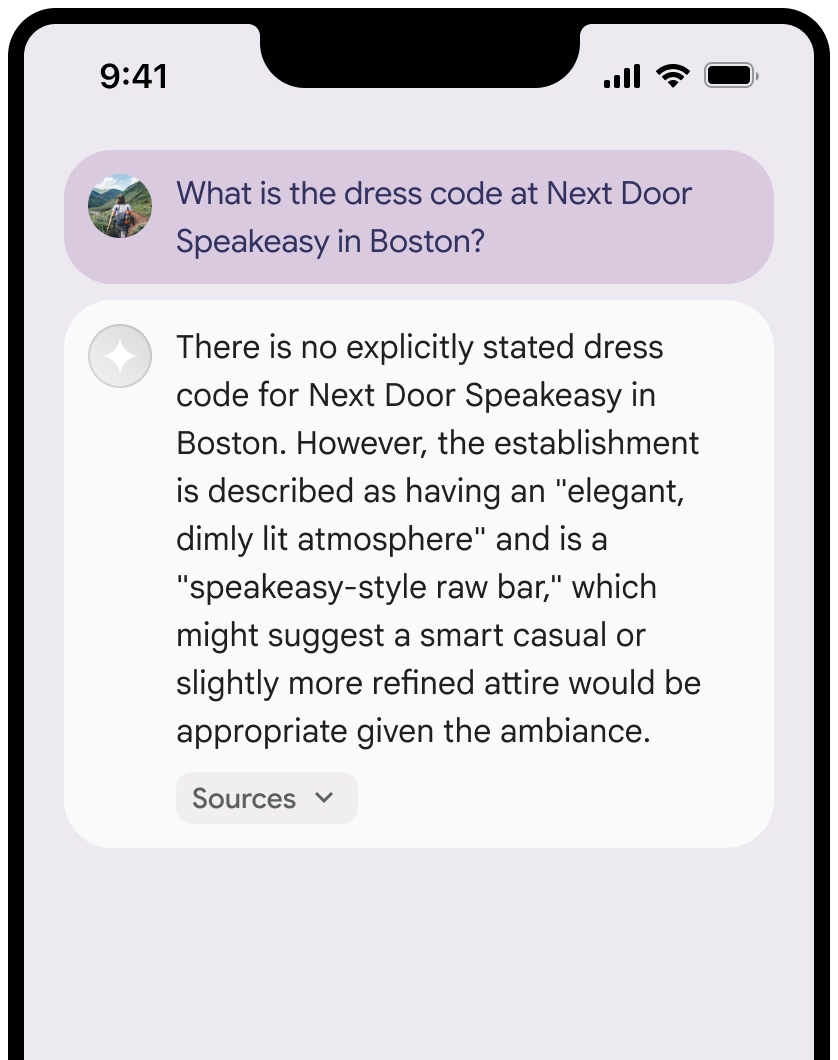
groundingChunks의 각 소스에 대해 다음 요구사항에 따라 링크 미리보기를 생성해야 합니다.
Google Maps 텍스트 저작자 표시 가이드라인에 따라 각 소스의 저작자를Google Maps 로 표시합니다.- 응답에 포함된 소스 제목을 표시해야 합니다.
- 응답에 제공된
uri를 사용하여 소스에 연결해야 합니다.
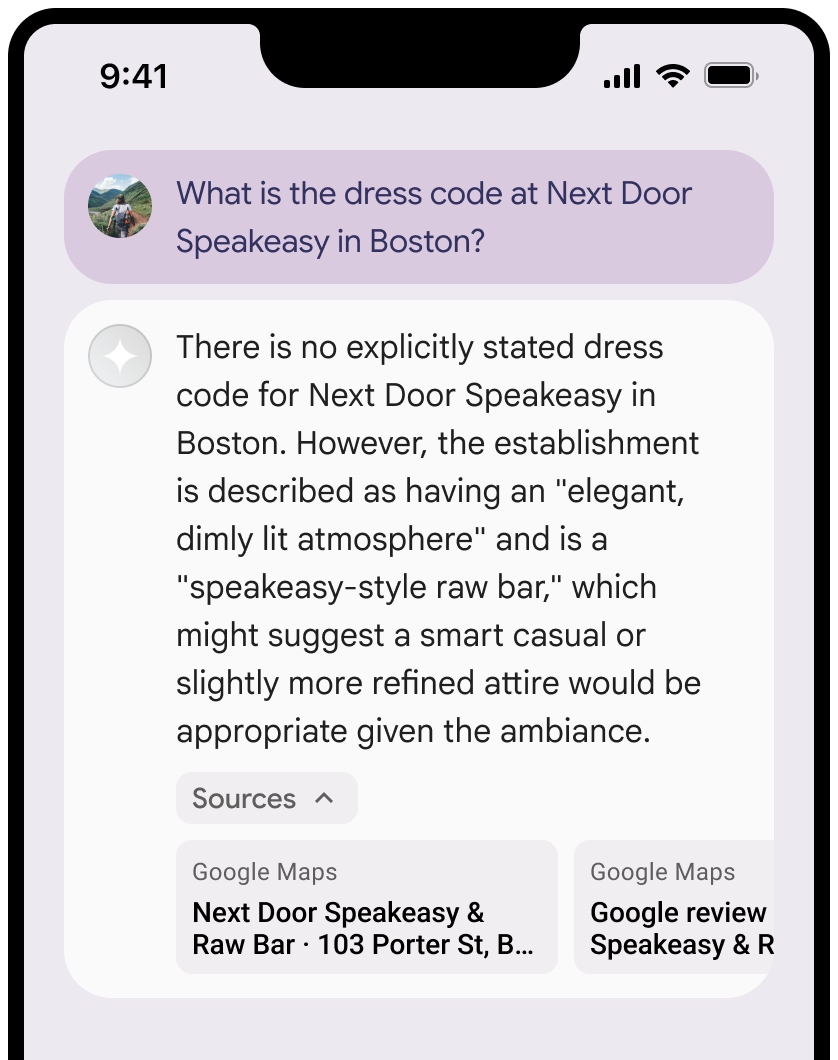
또한 소스 보기 영역은 접을 수 있습니다.
원하는 경우 다음과 같은 추가 콘텐츠로 링크 미리보기를 보강할 수 있습니다.
Google Maps 텍스트 저작자 표시 앞에 삽입된Google Maps 파비콘- 소스 URL에서 제공되는 사진(예:
og:image)을 표시합니다.
일부
Google Maps 텍스트 저작자 표시 가이드라인
텍스트 내에서
Google Maps텍스트를 어떤 식으로든 수정하지 마세요.Google Maps텍스트의 대소문자를 변경하지 마세요.- 텍스트
Google Maps를 여러 줄로 나누어 표시하지 마세요. Google Maps텍스트를 다른 언어로 현지화하지 마세요.- 브라우저가 텍스트
Google Maps를 번역하지 못하도록 HTML 속성translate="no"를 사용해야 합니다.
다음 표에 설명된 대로
Google Maps텍스트 스타일을 지정합니다.속성 스타일 글꼴 모음 Roboto. 글꼴 로드는 선택사항입니다. 대체 글꼴 모음 제품에서 이미 사용 중인 sans serif 본문 글꼴 또는 'Sans-Serif'를 지정해 기본 시스템 글꼴을 호출합니다. 글꼴 스타일 보통 글꼴 두께 400 글꼴 색상 흰색, 검정(#1F1F1F) 또는 회색(#5E5E5E). 배경 대비를 고려해 접근성 비율(4.5:1)을 유지해야 합니다. 글꼴 크기 최소 글꼴 크기: 12sp
최대 글꼴 크기: 16sp
sp에 대해 자세히 알아보려면 Material Design 웹사이트의 글꼴 크기 단위를 참고하세요.간격 보통
예시 CSS
다음 CSS는 흰색 또는 밝은 배경에서 Google Maps 텍스트를 적절한 타이포그래픽 스타일과 색상으로 렌더링합니다.
@import url('https://fonts.googleapis.com/css2?family=Roboto&display=swap');

.GMP-attribution {
  font-family: Roboto, Sans-Serif;
  font-style: normal;
  font-weight: 400;
  font-size: 1rem;
  letter-spacing: normal;
  white-space: nowrap;
  color: #5e5e5e;
}
장소 ID 캐싱
placeId
Google 지도 기반 그라운딩 약관에 명시된 캐싱 제한사항은 이 데이터에 적용되지 않습니다.
금지된 활동 및 지역
응급 대응 서비스와 같은 고위험 활동에
Google Maps 를 사용한 그라운딩을 사용하지 않습니다.제한 지역에서
Google Maps 을 사용한 그라운딩을 제공하는 애플리케이션을 배포하거나 마케팅할 수 없습니다. 자세한 내용은 Google Maps Platform 금지 지역을 참고하세요. 금지된 지역 목록은 경우에 따라 업데이트될 수 있습니다.
Firebase 콘솔의 그라운딩된 결과 및 AI 모니터링
Firebase 콘솔에서 AI 모니터링을 사용 설정한 경우 대답이 Cloud Logging에 저장됩니다. 기본적으로 이 데이터의 보관 기간은 30일입니다.
이 보관 기간 또는 설정한 맞춤 기간이 특정 사용 사례 및 선택한 Gemini API 제공업체(Gemini Developer API 또는 Agent Platform Gemini API (formerly Vertex AI))의 추가 규정 준수 요구사항과 완전히 일치하는지 확인해야 합니다(서비스별 약관의 서비스 약관 섹션 참고). 이러한 요구사항을 충족하려면 Cloud Logging에서 보관 기간을 조정해야 할 수 있습니다.
가격 및 비율 제한
선택한 Gemini API 제공업체 문서(Gemini Developer API 또는 Agent Platform Gemini API (formerly Vertex AI))에서