

通过
使用
- 提高事实准确性:依托 Google 超过 2.5 亿个真实世界地点和商家的数据库来生成回答,减少模型产生幻觉的情况。
- 获取实时信息:使用实时数据回答问题,例如当前营业时间和电动汽车充电站的实时状态。
- 提供来源:通过在模型基于位置的声明旁边直接显示
Google Maps 地点来源和链接,赢得用户信任。
支持的模型
gemini-3.1-pro-previewgemini-3.8-flash(以及旧版gemini-3.7-flash、gemini-3.6-flash和gemini-3.5-flash)gemini-3.5-flash-lite(以及旧版gemini-3.1-flash-lite)
通用 Gemini 2.5 模型支持此功能,但它们均已弃用。
支持的语言
如需了解 Gemini 型号支持的语言,请参阅支持的语言。
借助 Google Maps 让模型接地
|
点击您的 Gemini API 提供商,以查看此页面上特定于提供商的内容和代码。 |
创建 GenerativeModel 实例时,请提供 GoogleMaps 作为模型可用于生成回答的 tool。
Swift
import FirebaseAILogic
// Initialize the Gemini Developer API backend service.
let ai = FirebaseAI.firebaseAI(backend: .googleAI())
// Example: Coordinates for New York City
let latAndLong = CLLocationCoordinate2D(latitude: 40.7128, longitude: -74.0060)
// (Optional) Define a RetrievalConfig to configure the Grounding with Google Maps tool.
// You can optionally provide a location's coordinates and/or a language code
// for more relevant and personalized Google Maps results.
let retrievalConfig = RetrievalConfig(
location: latAndLong,
// Example: Language code for English (US).
languageCode: "en-US"
)
// Wrap the RetrievalConfig inside a ToolConfig.
let toolConfig = ToolConfig(retrievalConfig: retrievalConfig)
// Create a `GenerativeModel` instance with a model that supports your use case.
let model = ai.generativeModel(
modelName: "GEMINI_MODEL_NAME",
// Provide Google Maps as a tool that the model can use to generate its response.
tools: [Tool.googleMaps()],
// Add the configuration for the Grounding with Google Maps tool
// (if this optional config was defined above).
toolConfig: toolConfig
)
let response = try await model.generateContent("restaurants near me?")
print(response.text ?? "No text in response.")
// Make sure to comply with the "Grounding with Google Maps " usage requirements,
// which includes how you meet service usage requirements
Kotlin
// (Optional) Define a RetrievalConfig to configure the Grounding with Google Maps tool.
// You can optionally provide a location's coordinates and/or a language code
// for more relevant and personalized Google Maps results.
val retrievalConfig = RetrievalConfig(
// Example: Coordinates for New York City
latLng = LatLng(latitude = 40.7128, longitude = -74.0060),
// Example: Language code for English (US)
languageCode = "en-US"
)
// Wrap the RetrievalConfig inside a ToolConfig.
val toolConfig = ToolConfig(
retrievalConfig = retrievalConfig
)
// Initialize the Gemini Developer API backend service.
// Create a `GenerativeModel` instance with a model that supports your use case.
val model = Firebase.ai(backend = GenerativeBackend.googleAI()).generativeModel(
modelName = "GEMINI_MODEL_NAME",
// Add the configuration for the Grounding with Google Maps tool
// (if this optional config was defined above).
toolConfig = toolConfig,
// Provide Google Maps as a tool that the model can use to generate its response.
tools = listOf(Tool.googleMaps())
)
val response = model.generateContent("restaurants near me?")
print(response.text)
// Make sure to comply with the "Grounding with Google Maps " usage requirements,
// which includes how you meet service usage requirements
Java
// (Optional) Define a ToolConfig to configure the Grounding with Google Maps tool.
// You can optionally provide a location's coordinates and/or a language code
// for more relevant and personalized Google Maps results.
ToolConfig toolConfig = new ToolConfig(
null,
new RetrievalConfig(
// Example: Coordinates for New York City.
new LatLng(40.7128, -74.0060),
// Example: Language code for English (US).
"en-US"
)
);
// Initialize the Gemini Developer API backend service.
// Create a `GenerativeModel` instance with a model that supports your use case.
GenerativeModel ai = FirebaseAI.getInstance(GenerativeBackend.googleAI())
.generativeModel("GEMINI_MODEL_NAME",
null,
null,
// Provide Google Maps as a tool that the model can use to generate its response.
List.of(Tool.googleMaps()),
// Add the configuration for the Grounding with Google Maps tool
// (if this optional config was defined above).
toolConfig);
// Use the GenerativeModelFutures Java compatibility layer which offers
// support for ListenableFuture and Publisher APIs.
GenerativeModelFutures model = GenerativeModelFutures.from(ai);
ListenableFuture response = model.generateContent("restaurants near me?");
Futures.addCallback(response, new FutureCallback() {
@Override
public void onSuccess(GenerateContentResponse result) {
String resultText = result.getText();
System.out.println(resultText);
}
@Override
public void onFailure(Throwable t) {
t.printStackTrace();
}
}, executor);
// Make sure to comply with the "Grounding with Google Maps " usage requirements,
// which includes how you meet service usage requirements
Web
import { initializeApp } from "firebase/app";
import { getAI, getGenerativeModel, GoogleAIBackend } from "firebase/ai";
// TODO(developer): Replace the following with your app's Firebase configuration
// See: https://firebase.google.com/docs/web/learn-more#config-object
const firebaseConfig = {
// ...
};
// Initialize FirebaseApp
const firebaseApp = initializeApp(firebaseConfig);
// Initialize the Gemini Developer API backend service.
const ai = getAI(firebaseApp, { backend: new GoogleAIBackend() });
// (Optional) Define a toolConfig to configure the Grounding with Google Maps tool.
// You can optionally provide a location's coordinates and/or a language code
// for more relevant and personalized Google Maps results.
const toolConfig = {
retrievalConfig: {
// Example: Coordinates for New York City
latLng: {
latitude: 40.7128,
longitude: -74.0060
},
// Example: Language code for English (US)
languageCode: 'en-US'
}
};
// Create a `GenerativeModel` instance with a model that supports your use case
const model = getGenerativeModel(
ai,
{
model: "GEMINI_MODEL_NAME",
// Provide Google Maps as a tool that the model can use to generate its response.
tools: [ { googleMaps: {} } ],
// Add the configuration for the Grounding with Google Maps tool
// (if this optional config was defined above).
toolConfig
}
);
const result = await model.generateContent("restaurants near me?");
console.log(result.response.text());
// Make sure to comply with the "Grounding with Google Maps " usage requirements,
// which includes how you meet service usage requirements
Dart
import 'package:firebase_core/firebase_core.dart';
import 'package:firebase_ai/firebase_ai.dart';
import 'firebase_options.dart';
// Initialize FirebaseApp.
await Firebase.initializeApp(
options: DefaultFirebaseOptions.currentPlatform,
);
// (Optional) Define a ToolConfig to configure the Grounding with Google Maps tool.
// You can optionally provide a location's coordinates and/or a language code
// for more relevant and personalized Google Maps results.
final toolConfig = ToolConfig(
retrievalConfig: RetrievalConfig(
// Example: Coordinates for New York City.
latLng: LatLng(latitude: 40.712728, longitude: -74.006015),
// Example: Language code for English (US).
languageCode: 'en-US',
),
);
// Initialize the Gemini Developer API backend service.
// Create a `GenerativeModel` instance with a model that supports your use case.
final model = FirebaseAI.googleAI().generativeModel(
model: 'GEMINI_MODEL_NAME',
// Provide Google Maps as a tool that the model can use to generate its response.
tools: [
Tool.googleMaps(),
],
// Add the configuration for the Grounding with Google Maps tool
// (if this optional config was defined above).
toolConfig: toolConfig,
);
final response = await model.generateContent([Content.text("restaurants near me?")]);
print(response.text);
// Make sure to comply with the "Grounding with Google Maps " usage requirements,
// which includes how you meet service usage requirements
Unity
using Firebase;
using Firebase.AI;
// Initialize the Gemini Developer API backend service.
var ai = FirebaseAI.GetInstance(FirebaseAI.Backend.GoogleAI());
// Example: Coordinates for New York City
var latLng = new LatLng(40.7128, -74.0060);
// (Optional) Define a RetrievalConfig to configure the Grounding with Google Maps tool.
// You can optionally provide a location's coordinates and/or a language code
// for more relevant and personalized Google Maps results.
var retrievalConfig = new RetrievalConfig(latLng, languageCode: "en");
// Wrap the RetrievalConfig inside a ToolConfig.
var toolConfig = new ToolConfig(retrievalConfig: retrievalConfig);
// Create a `GenerativeModel` instance with a model that supports your use case.
var model = ai.GetGenerativeModel(
modelName: "GEMINI_MODEL_NAME",
// Provide Google Maps as a tool that the model can use to generate its response.
tools: new[] { new Tool(new GoogleMaps()) },
// Add the configuration for the Grounding with Google Maps tool
// (if this optional config was defined above).
toolConfig: toolConfig
);
var response = await model.GenerateContentAsync("restaurants near me?");
UnityEngine.Debug.Log(response.Text ?? "No text in response.");
// Make sure to comply with the "Grounding with Google Maps " usage requirements,
// which includes how you meet service usage requirements
了解如何选择适合您的应用场景和应用的模型 。
可帮助您获得更理想效果的最佳实践和提示
本部分介绍了一些有关将“依托
一般最佳实践
仅在需要时提供工具:为了优化性能和成本,仅当使用情形具有明确的地理位置背景信息时,才向模型提供对“Grounding with
Google Maps ”工具的访问权限。提供用户位置信息:为了获得最相关且个性化的回答(以及在已知用户位置信息的情况下),请在“使用
Google Maps 的 Grounding”工具配置中添加用户位置信息(使用经纬度通过latLng)。告知最终用户:明确告知最终用户,
Google Maps 数据正用于回答他们的问题。向最终用户提供来自Google Maps 的来源是“依托Google Maps 进行接地”工具的服务使用要求。
在提示中使用地点属性
本部分列出了用于描述地点并由“依托
地点属性示例
此列表按字母顺序提供了有关地点的属性样本,您的模型可以使用这些属性来生成回答。
- 地址
- 路边自提
- 借记卡
- 距离
- 免费停车场
- 现场音乐表演
- 儿童菜单
- 营业时间
- 付款方式(例如现金或信用卡)
- 地点回答
- 允许带宠物
- 供应啤酒
- 供应素食
- 有无障碍设施
- Wifi
地点回答是“依托
使用地点属性的提示示例
以下示例在有关不同类型地点的提示中使用了地点属性。借助“依托
计划家庭晚餐:确定餐厅是否适合家庭用餐,以及餐厅是否提供便捷的服务。
- 提示示例:“The Italian Place”适合带孩子去吗?他们提供外卖服务吗?他们的评分是多少?
为好友查询无障碍设施:确定相应地点是否满足特定的无障碍需求。
- 提示示例:我需要一家有轮椅无障碍入口的餐厅。
寻找可以吃夜宵的地方:找到在特定时间段内提供特定餐点的营业场所。
- 提示示例:“Burger Joint”现在营业吗?他们提供晚餐吗? 他们周五的营业时间是几点?
与客户相约喝咖啡:根据咖啡馆的设施、产品和服务以及付款方式来评估其是否适合举办商务会议。
- 提示示例:“Cafe Central”有 Wi-Fi 吗?他们提供咖啡吗? 这些餐厅的价位如何?是否接受信用卡?
请注意,
Google Maps 的接地功能如何运作
当您为模型提供 GoogleMaps 工具时,模型会自动处理搜索、处理和引用信息的整个工作流程。
以下是模型的工作流程:
接收提示:您的应用在启用
GoogleMaps工具的情况下向 Gemini 模型发送提示。分析提示:模型会分析提示,并确定
Google Maps 是否可以改进其回答,例如,提示是否包含地理位置背景信息(如“我附近的咖啡馆”“旧金山的博物馆”)。调用工具:模型识别出地理位置意图,并调用
Google Maps 工具进行 Grounding。向
Google Maps 发送查询:使用Google Maps 的 Grounding 服务会向Google Maps 查询相关信息(例如地点、评价、照片、地址、营业时间)。您可以选择在工具的配置中(甚至直接在提示中)添加纬度和经度,以获得更相关且更个性化的
Google Maps 结果。该工具是一款文本搜索工具,其行为与在Google Maps 上搜索类似,即本地查询(例如“我附近”)会使用坐标,而具体或非本地查询不太可能受到明确位置的影响。处理
Google Maps 结果:模型处理Google Maps 结果,并针对原始提示生成回答。返回
Google Maps 基于事实依据的结果:模型会返回最终的、用户友好的响应,该响应基于Google Maps 结果。此响应包括:- 模型的文本回答。
- 包含
Google Maps 结果和来源的groundingMetadata对象。
请注意,向模型提供 groundingMetadata 对象,因此
不是
了解基于事实依据的结果
如果模型基于 groundingMetadata 对象,其中包含结构化数据,这些数据对于验证声明和在应用中打造丰富的来源体验至关重要。
groundingMetadata 对象包含以下信息:
groundingChunks:一个对象数组,包含maps来源(uri、placeId和title)。groundingSupports:一个块数组,用于将模型回答text连接到groundingChunks中的来源。每个块都将文本segment(由startIndex和endIndex定义)与一个或多个groundingChunkIndices相关联。此字段可帮助您构建内嵌来源链接。 本页面的后面部分会介绍如何满足服务使用要求。
以下是包含 groundingMetadata 对象的响应示例:
{
  "candidates": [
    {
      "content": {
        "parts": [
          {
            "text": "CanteenM is an American restaurant with..."
          }
        ],
        "role": "model"
      },
      "groundingMetadata": {
        "groundingChunks": [
          {
            "maps": {
              "uri": "https://maps.google.com/?cid=13100894621228039586",
              "title": "Heaven on 7th Marketplace",
              "placeId": "places/ChIJ0-zA1vBZwokRon0fGj-6z7U"
            }
          }
        ],
        "groundingSupports": [
          {
            "segment": {
              "startIndex": 0,
              "endIndex": 79,
              "text": "CanteenM is an American restaurant with a 4.6-star rating and is open 24 hours."
            },
            "groundingChunkIndices": [0]
          }
        ]
      }
    }
  ]
}
服务使用要求
本部分介绍了将
告知用户 Google Maps 来源
对于每个groundingChunks中支持相应回答的来源。系统还会返回以下元数据:
- 源 URI
- 标题
- ID
在应用中,当呈现依托
Google Maps 来源必须紧跟在来源支持的生成内容之后。此类生成的内容也称为Google Maps 接地结果。Google Maps 来源必须在一次用户互动中可见。
以下是如何从
Swift
// ...

// Get the model's response
let text = response.text

// Get the grounding metadata
if let candidate = response.candidates.first,
   let groundingMetadata = candidate.groundingMetadata {

  // Get sources
  let groundingChunks = groundingMetadata.groundingChunks
  for chunk in groundingChunks {
    if let maps = chunk.maps {
      let title = maps.title  // for example, "Heaven on 7th Marketplace"
      let url = maps.url  // for example, "https://maps.google.com/?cid=13100894621228039586"
      let placeId = maps.placeId  // for example, "places/ChIJ0-zA1vBZwokRon0fGj-6z7U"
      // TODO(developer): show source in the UI
    }
  }
}
Kotlin
// ...

// Get the model's response
val text = response.text

// Get the grounding metadata
val groundingMetadata = response.candidates.firstOrNull()?.groundingMetadata

// Get sources
val groundingChunks = groundingMetadata?.groundingChunks
groundingChunks?.let { chunks ->
  for (chunk in chunks) {
    val title = chunk.maps?.title  // for example, "Heaven on 7th Marketplace"
    val uri = chunk.maps?.uri  // for example, "https://maps.google.com/?cid=13100894621228039586"
    val placeId = chunk.maps?.placeId  // for example, "places/ChIJ0-zA1vBZwokRon0fGj-6z7U"
    // TODO(developer): show source in the UI
  }
}
Java
// ...

Futures.addCallback(response, new FutureCallback() {
  @Override
  public void onSuccess(GenerateContentResponse result) {
    // Get the model's response
    String text = result.getText();

    // Get the grounding metadata
    GroundingMetadata groundingMetadata =
        result.getCandidates()[0].getGroundingMetadata();

    if (groundingMetadata != null) {
      // Get sources
      List chunks = groundingMetadata.getGroundingChunks();
      if (chunks != null) {
        for(GroundingChunk chunk : chunks) {
          GoogleMapsGroundingChunk maps = chunk.getMaps();
          if (maps != null) {
            String title = maps.getTitle();  // for example, "Heaven on 7th Marketplace"
            String uri = maps.getUri();  // for example, "https://maps.google.com/?cid=13100894621228039586"
            String placeId = maps.getPlaceId();  // for example, "places/ChIJ0-zA1vBZwokRon0fGj-6z7U"
            // TODO(developer): show sources in the UI
          }
        }
      }
    }
  }

  @Override
  public void onFailure(Throwable t) {
    t.printStackTrace();
  }
}, executor);
Web
// ...

// Get the model's text response
const text = result.response.text();

// Get the grounding metadata
const groundingMetadata = result.response.candidates?.[0]?.groundingMetadata;

// Get sources
const groundingChunks = groundingMetadata?.groundingChunks;
if (groundingChunks) {
  for (const chunk of groundingChunks) {
    const title = chunk.maps?.title;  // for example, "Heaven on 7th Marketplace"
    const uri = chunk.maps?.uri;  // for example, "https://maps.google.com/?cid=13100894621228039586"
    const placeId = chunk.maps?.placeId;  // for example, "places/ChIJ0-zA1vBZwokRon0fGj-6z7U"
    // TODO(developer): show sources in the UI
  }
}
Dart
// ...

// Get the model's response
final text = response.text;

// Get the grounding metadata
final groundingMetadata = response.candidates.first.groundingMetadata;

// Get sources
final groundingChunks = groundingMetadata?.groundingChunks;
if (groundingChunks != null) {
  for (var chunk in groundingChunks) {
    final title = chunk.maps?.title;  // for example, "Heaven on 7th Marketplace"
    final uri = chunk.maps?.uri;  // for example, "https://maps.google.com/?cid=13100894621228039586"
    final placeId = chunk.maps?.placeId;  // for example, "places/ChIJ0-zA1vBZwokRon0fGj-6z7U"
    // TODO(developer): show sources in the UI
  }
}
Unity
// ...

// Get the model's response.
var text = response.Text;

// Get the grounding metadata.
var groundingMetadata = response.Candidates.First().GroundingMetadata;

// Get sources.
if (groundingMetadata != null) {
  foreach(GroundingChunk chunk in groundingMetadata?.GroundingChunks) {
    if (chunk.Maps != null) {
      var title = chunk.Maps?.Title;  // for example, "Heaven on 7th Marketplace"
      var uri = chunk.Maps?.Uri;  // for example, "https://maps.google.com/?cid=13100894621228039586"
      var placeId = chunk.Maps?.PlaceId;  // for example, "places/ChIJ0-zA1vBZwokRon0fGj-6z7U"
      // TODO(developer): show sources in the UI
    }
  }
}
显示 Google Maps 个包含 Google Maps 个链接的来源
对于 groundingChunks 中的每个来源,必须按照以下要求生成链接预览:
- 请按照
Google Maps 文字提供方指南,将每项来源归属至Google Maps 。 - 显示回答中提供的来源标题。
- 使用响应中的
uri链接到来源。
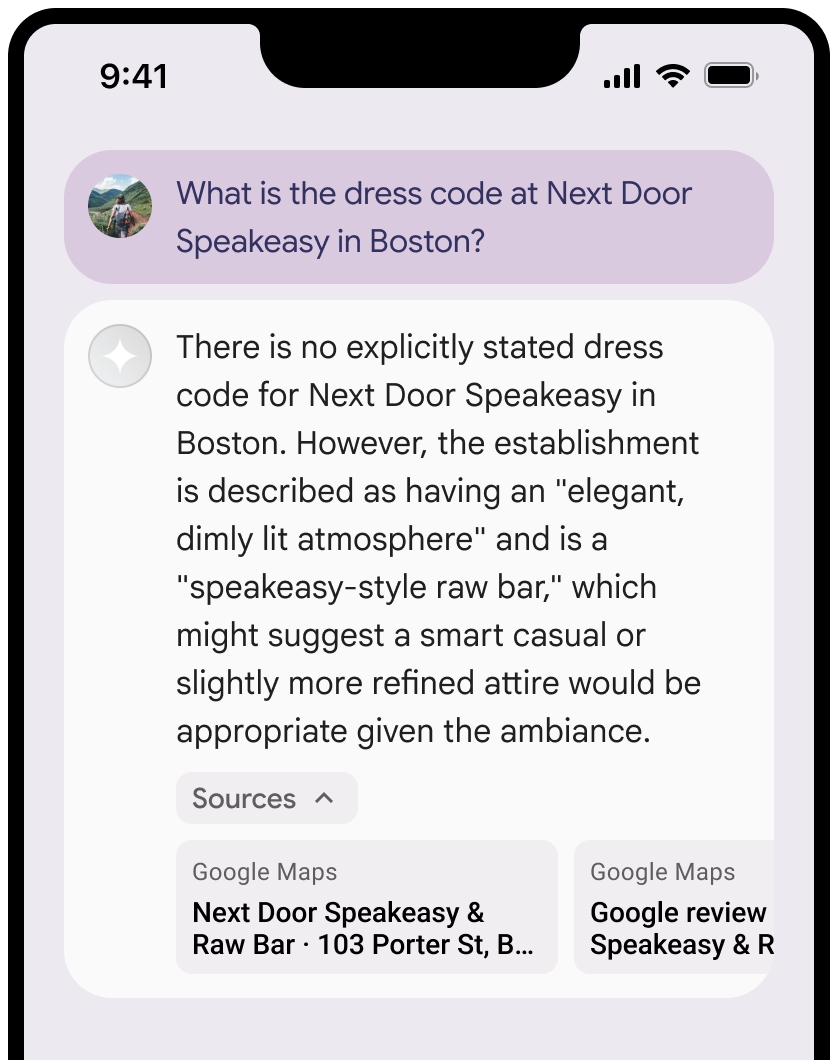
您可以收起“来源”视图。
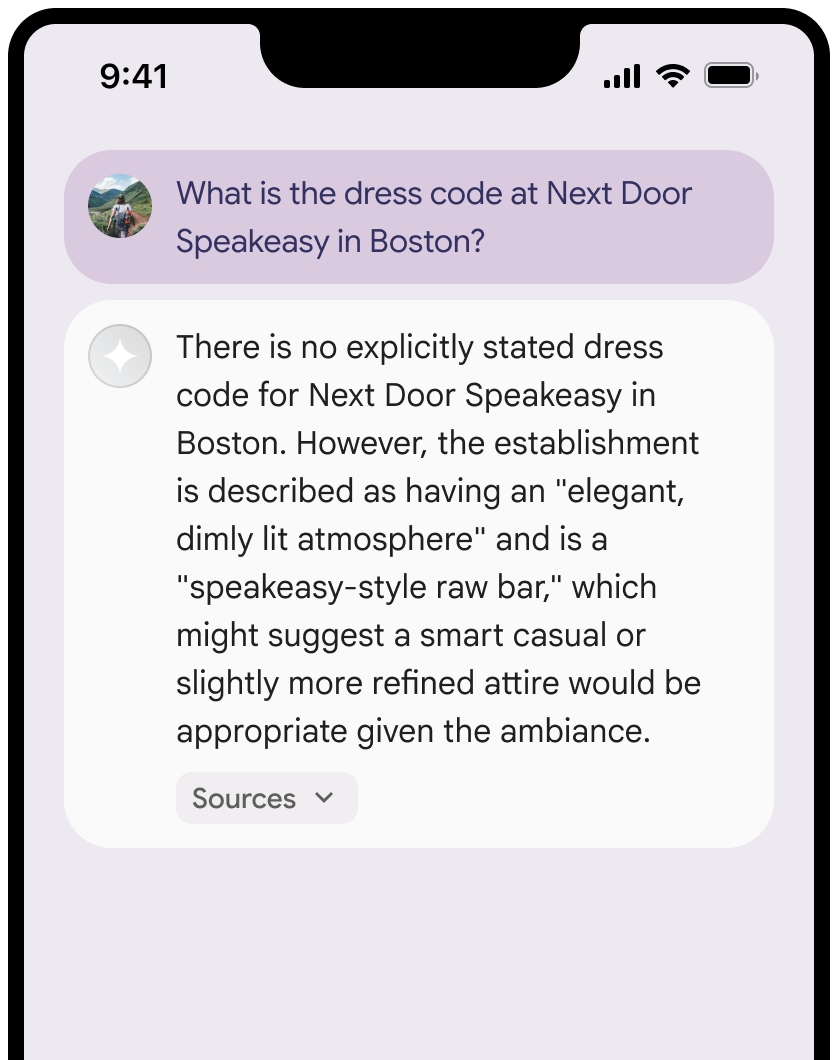
您可以选择使用其他内容(例如以下内容)增强链接预览:
- 在
Google Maps 文字提供方信息之前插入的Google Maps favicon。 - 来源网址 (
og:image) 中的照片。
如需详细了解部分
Google Maps 条文字署名准则
在文本中将来源归因于
请勿以任何方式修改文本
Google Maps:- 请勿更改文本
Google Maps的大小写。 - 请勿将文本
Google Maps换行到多行。 - 不要将文本
Google Maps本地化为其他语言。 - 使用 HTML 属性
translate="no"阻止浏览器翻译文本Google Maps。
- 请勿更改文本
按照下表中的说明设置文本
Google Maps的样式:属性 样式 字体系列 Roboto加载字体是可选的。 后备字体系列 产品中已使用的任何无衬线正文字体,或“Sans-Serif”以调用默认系统字体 字体样式 正常 字体粗细 400 字体颜色 白色、黑色 (#1F1F1F) 或灰色 (#5E5E5E)。 保持与背景的对比度达到易辨认的程度 (4.5:1)。 字号 字体大小下限:12sp
字体大小上限:16sp
如需了解 sp,请参阅 Material Design 网站上的“字体大小单位”。间距 正常
示例 CSS
以下 CSS 代码段可让文字 Google Maps 以适当的排版样式和颜色显示在白色或浅色背景上。
@import url('https://fonts.googleapis.com/css2?family=Roboto&display=swap');

.GMP-attribution {
  font-family: Roboto, Sans-Serif;
  font-style: normal;
  font-weight: 400;
  font-size: 1rem;
  letter-spacing: normal;
  white-space: nowrap;
  color: #5e5e5e;
}
地点 ID 缓存
placeId
Grounding with Google Maps 条款中针对缓存的限制不适用于此数据。
禁止的活动和地区
使用
您不会将 Grounding 与
Google Maps 搭配使用,以进行高风险活动(包括应急响应服务)。您不会在禁止的地区分发或营销提供 Grounding 功能且包含
Google Maps 的应用。如需了解详情,请参阅 Google Maps Platform 禁止地区。 禁止的地区列表可能会不时更新。
Firebase 控制台中的有根结果和 AI 监控
如果您已在 Firebase 控制台中启用 AI 监控,则回答会存储在 Cloud Logging 中。默认情况下,此数据的保留期限为 30 天。
您有责任确保此保留期限或您设置的任何自定义期限完全符合您的特定使用情形以及您所选Gemini API提供商Gemini Developer API或 Agent Platform Gemini API (formerly Vertex AI) 的任何其他合规性要求(请参阅“服务特定条款”中的“服务条款”部分)。您可能需要调整 Cloud Logging 中的保留期限,以满足这些要求。
价格和速率限制
使用
请务必查看所选 Gemini API 提供方 的文档,了解有关