

- 사실에 기반한 정확성 향상: 실제 정보를 기반으로 대답하여 모델 할루시네이션을 줄입니다.
- 실시간 정보 액세스: 최근 이벤트 및 주제에 관한 질문에 답합니다.
- 소스 제공: 모델의 주장에 대한 소스를 표시하여 사용자 신뢰를 구축하거나 사용자가 관련 사이트를 탐색하도록 허용합니다.
- 더 복잡한 작업 완료: 추론 작업을 지원하기 위해 아티팩트와 관련 이미지, 동영상 또는 기타 미디어를 가져옵니다.
- 지역 또는 언어별 대답 개선: 지역별 정보를 찾거나 콘텐츠를 정확하게 번역하는 데 도움을 받을 수 있습니다.
지원되는 모델
gemini-3.1-pro-previewgemini-3.8-flash(이전 버전인gemini-3.7-flash,gemini-3.6-flash,gemini-3.5-flash포함)gemini-3.5-flash-lite(및 이전gemini-3.1-flash-lite)gemini-3-pro-image('Nano Banana Pro')gemini-3.1-flash-image('Nano Banana 2'라고도 함)
일반용 Gemini 2.5 모델은 이 기능을 지원하지만 모두 지원 중단되었습니다.
Gemini Live API 모델도 이 기능을 지원하지만 이 가이드의 모든 코드 샘플은 범용 Gemini 모델용입니다.
지원 언어
Gemini 모델의 경우 지원되는 언어를 참고하세요.
Google Search 으로 모델 그라운딩
|
Gemini API 제공업체를 클릭하여 이 페이지에서 제공업체별 콘텐츠와 코드를 확인합니다. |
GenerativeModel 인스턴스를 만들 때 모델이 대답을 생성하는 데 사용할 수 있는 tool로 GoogleSearch를 제공합니다.
Swift
import FirebaseAILogic

// Initialize the Gemini Developer API backend service.
let ai = FirebaseAI.firebaseAI(backend: .googleAI())

// Create a `GenerativeModel` instance with a model that supports your use case.
let model = ai.generativeModel(
    modelName: "GEMINI_MODEL_NAME",
    // Provide Google Search as a tool that the model can use to generate its response.
    tools: [Tool.googleSearch()]
)

let response = try await model.generateContent("Who won the euro 2024?")
print(response.text ?? "No text in response.")

// Make sure to comply with the "Grounding with Google Search" usage requirements,
// which includes how you use and display the grounded result
Kotlin
// Initialize the Gemini Developer API backend service.
// Create a `GenerativeModel` instance with a model that supports your use case.
val model = Firebase.ai(backend = GenerativeBackend.googleAI()).generativeModel(
    modelName = "GEMINI_MODEL_NAME",
    // Provide Google Search as a tool that the model can use to generate its response
    tools = listOf(Tool.googleSearch())
)

val response = model.generateContent("Who won the euro 2024?")
print(response.text)

// Make sure to comply with the "Grounding with Google Search" usage requirements,
// which includes how you use and display the grounded result
Java
// Initialize the Gemini Developer API backend service.
// Create a `GenerativeModel` instance with a model that supports your use case.
GenerativeModel ai = FirebaseAI.getInstance(GenerativeBackend.googleAI())
                .generativeModel("GEMINI_MODEL_NAME",
                        null,
                        null,
                        // Provide Google Search as a tool that the model can use to generate its response
                        List.of(Tool.GoogleSearch()));

// Use the GenerativeModelFutures Java compatibility layer which offers
// support for ListenableFuture and Publisher APIs
GenerativeModelFutures model = GenerativeModelFutures.from(ai);

ListenableFuture response = model.generateContent("Who won the euro 2024?");
  Futures.addCallback(response, new FutureCallback() {
      @Override
      public void onSuccess(GenerateContentResponse result) {
          String resultText = result.getText();
          System.out.println(resultText);
      }

      @Override
      public void onFailure(Throwable t) {
          t.printStackTrace();
      }
  }, executor);

// Make sure to comply with the "Grounding with Google Search" usage requirements,
// which includes how you use and display the grounded result
Web
import { initializeApp } from "firebase/app";
import { getAI, getGenerativeModel, GoogleAIBackend } from "firebase/ai";

// TODO(developer): Replace the following with your app's Firebase configuration
// See: https://firebase.google.com/docs/web/learn-more#config-object
const firebaseConfig = {
  // ...
};

// Initialize FirebaseApp
const firebaseApp = initializeApp(firebaseConfig);

// Initialize the Gemini Developer API backend service.
const ai = getAI(firebaseApp, { backend: new GoogleAIBackend() });

// Create a `GenerativeModel` instance with a model that supports your use case.
const model = getGenerativeModel(
  ai,
  {
    model: "GEMINI_MODEL_NAME",
    // Provide Google Search as a tool that the model can use to generate its response
    tools: [{ googleSearch: {} }]
  }
);

const result = await model.generateContent("Who won the euro 2024?");

console.log(result.response.text());

// Make sure to comply with the "Grounding with Google Search" usage requirements,
// which includes how you use and display the grounded result
Dart
import 'package:firebase_core/firebase_core.dart';
import 'package:firebase_ai/firebase_ai.dart';
import 'firebase_options.dart';

// Initialize FirebaseApp.
await Firebase.initializeApp(
  options: DefaultFirebaseOptions.currentPlatform,
);

// Initialize the Gemini Developer API backend service.
// Create a `GenerativeModel` instance with a model that supports your use case.
final model = FirebaseAI.googleAI().generativeModel(
  model: 'GEMINI_MODEL_NAME',
  // Provide Google Search as a tool that the model can use to generate its response.
  tools: [
    Tool.googleSearch(),
  ],
);

final response = await model.generateContent([Content.text("Who won the euro 2024?")]);
print(response.text);

// Make sure to comply with the "Grounding with Google Search" usage requirements,
// which includes how you use and display the grounded result
Unity
using Firebase;
using Firebase.AI;

// Initialize the Gemini Developer API backend service.
var ai = FirebaseAI.GetInstance(FirebaseAI.Backend.GoogleAI());

// Create a `GenerativeModel` instance with a model that supports your use case.
var model = ai.GetGenerativeModel(
  modelName: "GEMINI_MODEL_NAME",
  // Provide Google Search as a tool that the model can use to generate its response.
  tools: new[] { new Tool(new GoogleSearch()) }
);

var response = await model.GenerateContentAsync("Who won the euro 2024?");
UnityEngine.Debug.Log(response.Text ?? "No text in response.");

// Make sure to comply with the "Grounding with Google Search" usage requirements,
// which includes how you use and display the grounded result
사용 사례 및 앱에 적합한 모델 를 선택하는 방법을 알아보세요.
Google Search 를 사용한 그라운딩의 작동 방식
GoogleSearch 도구를 사용하면 모델이 정보 검색, 처리, 인용의 전체 워크플로를 자동으로 처리합니다.
모델의 워크플로는 다음과 같습니다.
- 프롬프트 수신: 앱이
GoogleSearch도구가 사용 설정된 상태로 Gemini 모델에 프롬프트를 전송합니다. - 프롬프트 분석: 모델이 프롬프트를 분석하고
Google Search 로 대답을 개선할 수 있는지 확인합니다. Google Search 에 쿼리 보내기: 필요한 경우 모델이 하나 이상의 검색어를 자동으로 생성하고 실행합니다.- 검색 결과 처리: 모델이
Google Search 결과를 처리하고 원래 프롬프트에 대한 대답을 구성합니다. - '그라운딩된 결과' 반환: 모델은
Google Search 결과를 기반으로 그라운딩된 최종적이고 사용자 친화적인 대답을 반환합니다. 이 대답에는 모델의 텍스트 대답과 검색어, 웹 결과, 소스가 포함된groundingMetadata가 포함됩니다.
groundingMetadata 객체가 포함되지 않으므로 '그라운딩된 결과'가 아닙니다.
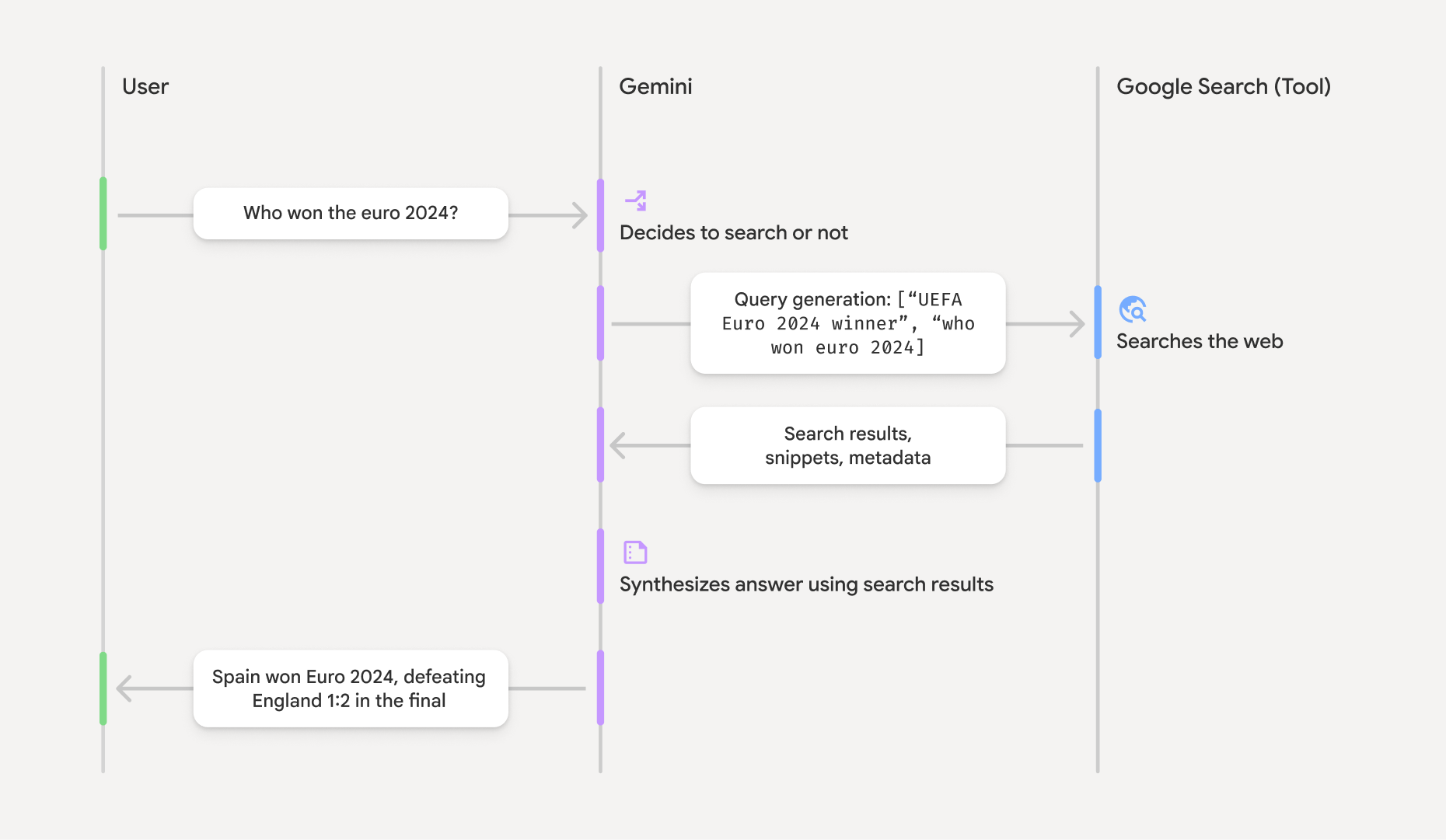
그라운딩된 결과 이해하기
모델이 groundingMetadata 객체가 포함됩니다.
'그라운딩된 결과'의 groundingMetadata 객체에는 다음 정보가 포함됩니다.
webSearchQueries:Google Search 에 전송된 검색어의 배열입니다. 이 정보는 디버깅하고 모델의 추론 과정을 이해하는 데 유용합니다.searchEntryPoint: 필수 'Google Search 추천'을 렌더링하는 HTML과 CSS가 포함되어 있습니다. 선택한 API 제공업체(Gemini Developer API 또는 Agent Platform Gemini API (formerly Vertex AI))의 'Google Search 를 사용한 그라운딩' 사용 요구사항을 준수해야 합니다(서비스별 약관의 서비스 약관 섹션 참고). 이 페이지 뒷부분에서 그라운딩된 결과를 사용하고 표시하는 방법을 알아보세요.groundingChunks: 웹 소스(uri및title)가 포함된 객체의 배열입니다.groundingSupports: 모델 응답text을groundingChunks의 소스에 연결하는 청크 배열입니다. 각 청크는 텍스트segment(startIndex및endIndex로 정의됨)를 하나 이상의groundingChunkIndices에 연결합니다. 이 필드는 인라인 소스 링크를 빌드하는 데 도움이 됩니다. 이 페이지 뒷부분에서 그라운딩된 결과를 사용하고 표시하는 방법을 알아보세요.
groundingMetadata 객체가 포함된 응답의 예는 다음과 같습니다.
{
  "candidates": [
    {
      "content": {
        "parts": [
          {
            "text": "Spain won Euro 2024, defeating England 2-1 in the final. This victory marks Spain's record fourth European Championship title."
          }
        ],
        "role": "model"
      },
      "groundingMetadata": {
        "webSearchQueries": [
          "UEFA Euro 2024 winner",
          "who won euro 2024"
        ],
        "searchEntryPoint": {
          "renderedContent": "<!-- HTML and CSS for the search widget -->"
        },
        "groundingChunks": [
          {"web": {"uri": "https://vertexaisearch.cloud.google.com.....", "title": "aljazeera.com"}},
          {"web": {"uri": "https://vertexaisearch.cloud.google.com.....", "title": "uefa.com"}}
        ],
        "groundingSupports": [
          {
            "segment": {"startIndex": 0, "endIndex": 85, "text": "Spain won Euro 2024, defeatin..."},
            "groundingChunkIndices": [0]
          },
          {
            "segment": {"startIndex": 86, "endIndex": 210, "text": "This victory marks Spain's..."},
            "groundingChunkIndices": [0, 1]
          }
        ]
      }
    }
  ]
}
그라운딩된 결과 사용 및 표시
모델이 groundingMetadata 객체가 제공됩니다.
(필수) Google Search 제안 표시
대답에 '
groundingMetadata 객체에는 'searchEntryPoint 필드에는 호환되는 HTML 및 CSS 스타일을 제공하는 renderedContent 필드가 있습니다. 이 스타일은 앱에서 추천 검색어를 표시하기 위해 구현해야 합니다.
Google Cloud 문서에서
이 섹션의 뒷부분에 나오는 예시 코드 샘플을 참고하세요.
(필수) 디스플레이 소스
groundingMetadata 객체에는 구조화된 소스 데이터, 특히 groundingSupports 및 groundingChunks 필드가 포함됩니다. 이 정보를 사용하여 UI 내에서 모델의 설명을 소스에 직접 연결합니다 (인라인 및 집계).
이 섹션의 뒷부분에 나오는 예시 코드 샘플을 참고하세요.
예시 코드 샘플
이 코드 샘플은 그라운딩된 결과를 사용하고 표시하기 위한 일반화된 패턴을 제공합니다. 하지만 특정 구현이 규정 준수 요구사항을 충족하는지 확인할 책임은 사용자에게 있습니다.
Swift
// ...

// Get the model's response
let text = response.text

// Get the grounding metadata
if let candidate = response.candidates.first,
   let groundingMetadata = candidate.groundingMetadata {
  // REQUIRED - display Google Search suggestions
  // (renderedContent contains HTML and CSS for the search widget)
  if let renderedContent = groundingMetadata.searchEntryPoint?.renderedContent {
    // TODO(developer): Display Google Search suggestions using a WebView
  }

  // REQUIRED - display sources
  let groundingChunks = groundingMetadata.groundingChunks
  for chunk in groundingMetadata.groundingChunks {
    if let web = chunk.web {
      let title = web.title  // for example, "uefa.com"
      let uri = web.uri  // for example, "https://vertexaisearch.cloud.google.com..."
      // TODO(developer): show source in the UI
    }
  }
}
Kotlin
// ...

// Get the model's response
val text = response.text

// Get the grounding metadata
val groundingMetadata = response.candidates.firstOrNull()?.groundingMetadata

// REQUIRED - display Google Search suggestions
// (renderedContent contains HTML and CSS for the search widget)
val renderedContent = groundingMetadata?.searchEntryPoint?.renderedContent
if (renderedContent != null) {
    // TODO(developer): Display Google Search suggestions using a WebView
}

// REQUIRED - display sources
val groundingChunks = groundingMetadata?.groundingChunks
groundingChunks?.let { chunks ->
  for (chunk in chunks) {
  	val title = chunk.web?.title  // for example, "uefa.com"
	val uri = chunk.web?.uri  // for example, "https://vertexaisearch.cloud.google.com..."
// TODO(developer): show source in the UI
  }
}
Java
// ...

Futures.addCallback(response, new FutureCallback() {
  @Override
  public void onSuccess(GenerateContentResponse result) {
  // Get the model's response
  String text = result.getText();

  // Get the grounding metadata
  GroundingMetadata groundingMetadata =
  result.getCandidates()[0].getGroundingMetadata();

  if (groundingMetadata != null) {
    // REQUIRED - display Google Search suggestions
  // (renderedContent contains HTML and CSS for the search widget)
    String renderedContent =
  groundingMetadata.getSearchEntryPoint().getRenderedContent();
    if (renderedContent != null) {
      // TODO(developer): Display Google Search suggestions using a WebView
    }

    // REQUIRED - display sources
    List chunks = groundingMetadata.getGroundingChunks();
    if (chunks != null) {
      for(GroundingChunk chunk : chunks) {
        WebGroundingChunk web = chunk.getWeb();
        if (web != null) {
          String title = web.getTitle();  // for example, "uefa.com"
          String uri = web.getUri();  // for example, "https://vertexaisearch.cloud.google.com..."
          // TODO(developer): show sources in the UI
        }
      }
    }
  }
  }

  @Override
  public void onFailure(Throwable t) {
  t.printStackTrace();
  }
  }, executor);
Web
// ...

// Get the model's text response
const text = result.response.text();

// Get the grounding metadata
const groundingMetadata = result.response.candidates?.[0]?.groundingMetadata;

// REQUIRED - display Google Search suggestions
// (renderedContent contains HTML and CSS for the search widget)
const renderedContent = groundingMetadata?.searchEntryPoint?.renderedContent;
if (renderedContent) {
  // TODO(developer): render this HTML and CSS in the UI
}

// REQUIRED - display sources
const groundingChunks = groundingMetadata?.groundingChunks;
if (groundingChunks) {
  for (const chunk of groundingChunks) {
    const title = chunk.web?.title;  // for example, "uefa.com"
    const uri = chunk.web?.uri;  // for example, "https://vertexaisearch.cloud.google.com..."
    // TODO(developer): show sources in the UI
  }
}
Dart
// ...

// Get the model's response
final text = response.text;

// Get the grounding metadata
final groundingMetadata = response.candidates.first.groundingMetadata;

// REQUIRED - display Google Search suggestions
// (renderedContent contains HTML and CSS for the search widget)
final renderedContent = groundingMetadata?.searchEntryPoint?.renderedContent;
if (renderedContent != null) {
    // TODO(developer): Display Google Search suggestions using a WebView
}

// REQUIRED - display sources
final groundingChunks = groundingMetadata?.groundingChunks;
if (groundingChunks != null) {
  for (var chunk in groundingChunks) {
    final title = chunk.web?.title;  // for example, "uefa.com"
    final uri = chunk.web?.uri;  // for example, "https://vertexaisearch.cloud.google.com..."
    // TODO(developer): show sources in the UI
  }
}
Unity
// ...

// Get the model's response.
var text = response.Text;

// Get the grounding metadata.
var groundingMetadata = response.Candidates.First().GroundingMetadata.Value;

// REQUIRED - display Google Search suggestions
// (renderedContent contains HTML and CSS for the search widget)
if (groundingMetadata.SearchEntryPoint.HasValue) {
    var renderedContent = groundingMetadata.SearchEntryPoint.Value.RenderedContent;
    // TODO(developer): Display Google Search suggestions using a WebView
}

// REQUIRED - display sources
foreach(GroundingChunk chunk in groundingMetadata.GroundingChunks) {
    var title = chunk.Web.Value.Title;  // for example, "uefa.com"
    var uri = chunk.Web.Value.Uri;  // for example, "https://vertexaisearch.cloud.google.com..."
    // TODO(developer): show sources in the UI
}
Firebase 콘솔의 그라운딩된 결과 및 AI 모니터링
Firebase 콘솔에서 AI 모니터링을 사용 설정한 경우 대답이 Cloud Logging에 저장됩니다. 기본적으로 이 데이터의 보관 기간은 30일입니다.
이 보관 기간 또는 설정한 맞춤 기간이 특정 사용 사례 및 선택한 Gemini API 제공업체(Gemini Developer API 또는 Agent Platform Gemini API (formerly Vertex AI))의 추가 규정 준수 요구사항과 완전히 일치하는지 확인해야 합니다(서비스별 약관의 서비스 약관 섹션 참고). 이러한 요구사항을 충족하려면 Cloud Logging에서 보관 기간을 조정해야 할 수 있습니다.
가격 및 제한
선택한 Gemini API 제공업체 문서(Gemini Developer API, Agent Platform Gemini API (formerly Vertex AI))에서