

پایهمندسازی با
پایهسازی با
- افزایش دقت واقعی: کاهش توهمات مدل با پایهگذاری پاسخها بر اطلاعات دنیای واقعی.
- دسترسی به اطلاعات همزمان: پاسخ دادن به سؤالات درباره رویدادها و موضوعات اخیر.
- ارائه منابع: با نشان دادن منابع ادعاهای مدل، اعتماد کاربر را جلب کنید یا به کاربران اجازه دهید سایتهای مرتبط را مرور کنند.
- تکالیف پیچیدهتری را تکمیل کنید: بازیابی آرتیفکتها و تصاویر مرتبط، ویدیوها، یا رسانههای دیگر برای کمک به تکالیف استدلالی.
- بهبود پاسخهای مختص منطقه یا زبان: اطلاعات مختص منطقه را پیدا کنید یا به ترجمه دقیق محتوا کمک کنید.
مدلهای پشتیبانیشده
gemini-4-carbongemini-4-argongemini-3.8-flash-
gemini-3.5-flash-lite(وgemini-3.1-flash-liteقدیمیتر) -
gemini-nano-banana-2.1 (Nano Banana 2.1) -
gemini-3.1-flash-image (Nano Banana 2) -
gemini-3-pro-image (Nano Banana Pro)
مدلهای قدیمیتر Gemini 3.x Flash با کاربرد عمومی از این قابلیت پشتیبانی میکنند، اما بهدلیل تاریخهای توقف آتی و/یا مسیریابی خودکار به مدلهای جدیدتر، دیگر برای استفاده توصیه نمیشوند.
مدلهای Gemini Live API نیز از این قابلیت پشتیبانی میکنند، اما همه نمونه کدهای این راهنما برای مدلهای Gemini با کاربرد عمومی هستند.
زبانهای پشتیبانیشده
زبانهای پشتیبانیشده برای مدلهای Gemini را ببینید.
مستندسازی مدل با Google Search
|
روی ارائهدهنده Gemini API کلیک کنید تا محتوا و کد مختص ارائهدهنده را در این صفحه ببینید. |
وقتی نمونه GenerativeModel را ایجاد میکنید، GoogleSearch را بهعنوان
tool ارائه دهید تا مدل بتواند از آن برای تولید پاسخ خود استفاده کند.
Swift
import FirebaseAILogic

// Initialize the Gemini Developer API backend service.
let ai = FirebaseAI.firebaseAI(backend: .googleAI())

// Create a `GenerativeModel` instance with a model that supports your use case.
let model = ai.generativeModel(
    modelName: "GEMINI_MODEL_NAME",
    // Provide Google Search as a tool that the model can use to generate its response.
    tools: [.googleSearch()]
)

let response = try await model.generateContent("Who won the euro 2024?")
print(response.text ?? "No text in response.")

// Make sure to comply with the "Grounding with Google Search" usage requirements,
// which includes how you use and display the grounded result
Kotlin
// Initialize the Gemini Developer API backend service.
// Create a `GenerativeModel` instance with a model that supports your use case.
val model = Firebase.ai(backend = GenerativeBackend.googleAI()).generativeModel(
    modelName = "GEMINI_MODEL_NAME",
    // Provide Google Search as a tool that the model can use to generate its response
    tools = listOf(Tool.googleSearch())
)

val response = model.generateContent("Who won the euro 2024?")
print(response.text)

// Make sure to comply with the "Grounding with Google Search" usage requirements,
// which includes how you use and display the grounded result
Java
// Initialize the Gemini Developer API backend service.
// Create a `GenerativeModel` instance with a model that supports your use case.
GenerativeModel ai = FirebaseAI.getInstance(GenerativeBackend.googleAI())
                .generativeModel("GEMINI_MODEL_NAME",
                        null,
                        null,
                        // Provide Google Search as a tool that the model can use to generate its response
                        List.of(Tool.GoogleSearch()));

// Use the GenerativeModelFutures Java compatibility layer which offers
// support for ListenableFuture and Publisher APIs
GenerativeModelFutures model = GenerativeModelFutures.from(ai);

ListenableFuture response = model.generateContent("Who won the euro 2024?");
  Futures.addCallback(response, new FutureCallback() {
      @Override
      public void onSuccess(GenerateContentResponse result) {
          String resultText = result.getText();
          System.out.println(resultText);
      }

      @Override
      public void onFailure(Throwable t) {
          t.printStackTrace();
      }
  }, executor);

// Make sure to comply with the "Grounding with Google Search" usage requirements,
// which includes how you use and display the grounded result
Web
import { initializeApp } from "firebase/app";
import { getAI, getGenerativeModel, GoogleAIBackend } from "firebase/ai";

// TODO(developer): Replace the following with your app's Firebase configuration
// See: https://firebase.google.com/docs/web/learn-more#config-object
const firebaseConfig = {
  // ...
};

// Initialize FirebaseApp
const firebaseApp = initializeApp(firebaseConfig);

// Initialize the Gemini Developer API backend service.
const ai = getAI(firebaseApp, { backend: new GoogleAIBackend() });

// Create a `GenerativeModel` instance with a model that supports your use case.
const model = getGenerativeModel(
  ai,
  {
    model: "GEMINI_MODEL_NAME",
    // Provide Google Search as a tool that the model can use to generate its response
    tools: [{ googleSearch: {} }]
  }
);

const result = await model.generateContent("Who won the euro 2024?");

console.log(result.response.text());

// Make sure to comply with the "Grounding with Google Search" usage requirements,
// which includes how you use and display the grounded result
Dart
import 'package:firebase_core/firebase_core.dart';
import 'package:firebase_ai/firebase_ai.dart';
import 'firebase_options.dart';

// Initialize FirebaseApp.
await Firebase.initializeApp(
  options: DefaultFirebaseOptions.currentPlatform,
);

// Initialize the Gemini Developer API backend service.
// Create a `GenerativeModel` instance with a model that supports your use case.
final model = FirebaseAI.googleAI().generativeModel(
  model: 'GEMINI_MODEL_NAME',
  // Provide Google Search as a tool that the model can use to generate its response.
  tools: [
    Tool.googleSearch(),
  ],
);

final response = await model.generateContent([Content.text("Who won the euro 2024?")]);
print(response.text);

// Make sure to comply with the "Grounding with Google Search" usage requirements,
// which includes how you use and display the grounded result
Unity
using Firebase;
using Firebase.AI;

// Initialize the Gemini Developer API backend service.
var ai = FirebaseAI.GetInstance(FirebaseAI.Backend.GoogleAI());

// Create a `GenerativeModel` instance with a model that supports your use case.
var model = ai.GetGenerativeModel(
  modelName: "GEMINI_MODEL_NAME",
  // Provide Google Search as a tool that the model can use to generate its response.
  tools: new[] { new Tool(new GoogleSearch()) }
);

var response = await model.GenerateContentAsync("Who won the euro 2024?");
UnityEngine.Debug.Log(response.Text ?? "No text in response.");

// Make sure to comply with the "Grounding with Google Search" usage requirements,
// which includes how you use and display the grounded result
با نحوه انتخاب مدل مناسب برای مورد استفاده و برنامه خود آشنا شوید.
نحوه کار «پایهگذاری با Google Search »
وقتی از ابزار GoogleSearch استفاده میکنید، مدل کل گردش کار جستجو، پردازش، و ارجاع اطلاعات را بهطور خودکار انجام میدهد.
گردش کار مدل در اینجا آمده است:
- دریافت پیامواره: برنامه شما پیاموارهای به مدل Gemini
با ابزار
GoogleSearchفعالشده ارسال میکند. - تجزیهوتحلیل پیامواره: مدل پیامواره را تجزیهوتحلیل میکند و تعیین میکند که آیا
Google Search میتواند پاسخ آن را بهبود بخشد یا نه. - ارسال پُرسمان به
Google Search : درصورت نیاز، مدل بهطور خودکار یک یا چند پُرسمان جستجو تولید و آنها را اجرا میکند. - پردازش نتایج «جستجو»: مدل نتایج
Google Search را پردازش میکند و پاسخی برای پیامواره اصلی تدوین میکند. - برگرداندن «نتیجه مستند»: مدل یک پاسخ نهایی و کاربرپسند را برمیگرداند که براساس نتایج
Google Search است. این پاسخ شامل پاسخ نوشتاری مدل وgroundingMetadataبا پرسمانهای جستجو، نتایج وب، و منابع است.
توجه داشته باشید که ارائه groundingMetadata نخواهد بود و بنابراین «نتیجه مستند» نیست.
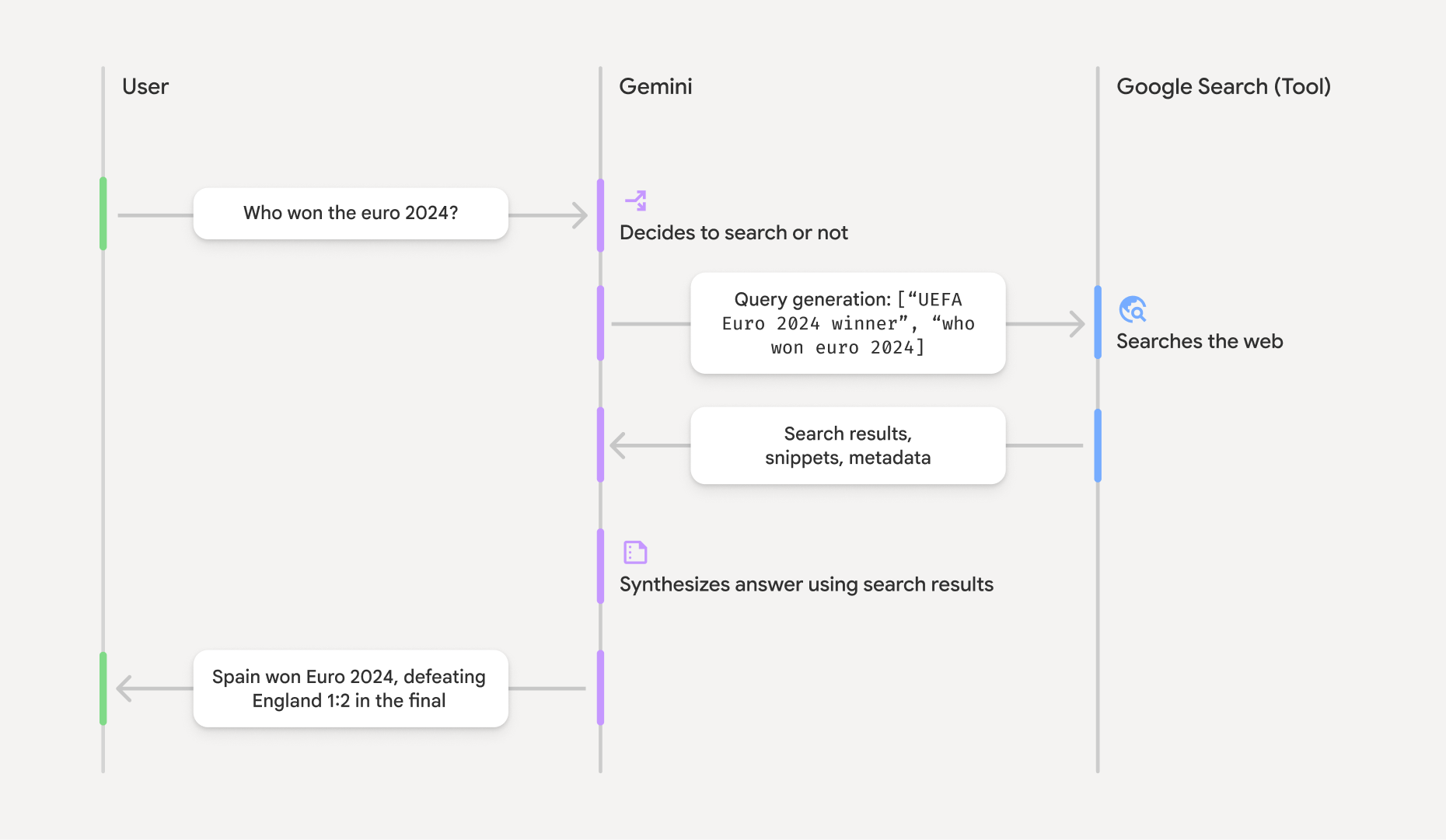
درک نتیجه مستندشده
اگر مدل پاسخ خود را براساس نتایج groundingMetadata خواهد بود که حاوی دادههای ساختاریافتهای است که برای تأیید ادعاها و ایجاد یک تجربه منبع غنی در برنامه شما ضروری است.
شیء groundingMetadata در «نتیجه مستدل» حاوی اطلاعات زیر است:
webSearchQueries: آرایهای از پرسمانهای جستجو که بهGoogle Search ارسال شده است. این اطلاعات برای اشکالزدایی و درک فرایند استدلال مدل مفید است.searchEntryPoint: حاوی HTML و CSS برای ارائه «پیشنهادهایGoogle Search » لازم است. شما ملزم به رعایت الزامات استفاده از «اتصال به واقعیت باGoogle Search » برای ارائهدهنده API انتخابی خود هستید: Gemini Developer API یا Agent Platform Gemini API (formerly Vertex AI) (به بخش شرایط خدمات در «شرایط خاص سرویس» مراجعه کنید). در ادامه این صفحه، با نحوه استفاده و نمایش نتیجه مستند آشنا شوید.
groundingChunks: آرایهای از اشیاء حاوی منابع وب (uriوtitle).groundingSupports: آرایهای از بخشها برای متصل کردن پاسخ مدلtextبه منابع درgroundingChunks. هر بخش، نوشتاریsegment(تعریفشده باstartIndexوendIndex) را به یک یا چندgroundingChunkIndicesپیوند میدهد. این فیلد به شما کمک میکند پیوندهای منبع درونخطی بسازید. در ادامه این صفحه، با نحوه استفاده و نمایش نتیجه مستند آشنا شوید.
در اینجا نمونهای از پاسخ حاوی شیء groundingMetadata آورده شده است:
{
  "candidates": [
    {
      "content": {
        "parts": [
          {
            "text": "Spain won Euro 2024, defeating England 2-1 in the final. This victory marks Spain's record fourth European Championship title."
          }
        ],
        "role": "model"
      },
      "groundingMetadata": {
        "webSearchQueries": [
          "UEFA Euro 2024 winner",
          "who won euro 2024"
        ],
        "searchEntryPoint": {
          "renderedContent": "<!-- HTML and CSS for the search widget -->"
        },
        "groundingChunks": [
          {"web": {"uri": "https://vertexaisearch.cloud.google.com.....", "title": "aljazeera.com"}},
          {"web": {"uri": "https://vertexaisearch.cloud.google.com.....", "title": "uefa.com"}}
        ],
        "groundingSupports": [
          {
            "segment": {"startIndex": 0, "endIndex": 85, "text": "Spain won Euro 2024, defeatin..."},
            "groundingChunkIndices": [0]
          },
          {
            "segment": {"startIndex": 86, "endIndex": 210, "text": "This victory marks Spain's..."},
            "groundingChunkIndices": [0, 1]
          }
        ]
      }
    }
  ]
}
استفاده و نمایش نتیجه مستند
اگر مدل از ابزار groundingMetadata در پاسخ
ارائه خواهد داد.
الزامی است که
پیشنهادهای
علاوهبر رعایت الزامات استفاده از ابزار
(الزامی) نمایش Google Search پیشنهاد
اگر پاسخی حاوی «پیشنهادهای
شیء groundingMetadata حاوی «searchEntryPoint که فیلد renderedContent دارد
که سبک HTML و CSS منطبق را ارائه میدهد، که باید آن را پیادهسازی کنید تا
پیشنهادهای «جستجو» را در برنامهتان نمایش دهید.
اطلاعات دقیق درباره
الزامات نمایش و رفتار برای پیشنهادهای
نمونه کدهای مثال را در ادامه این بخش ببینید.
(الزامی) نمایش منابع
شیء groundingMetadata حاوی دادههای منبع ساختاریافته است، بهویژه
فیلدهای groundingSupports و groundingChunks. از این اطلاعات برای پیوند دادن مستقیم بیانیههای مدل به منابع آنها در میانای کاربر (درونخطی و بهصورت انبوه) استفاده کنید.
نمونه کدهای مثال را در ادامه این بخش ببینید.
نمونههای کد مثال
این نمونه کدها الگوهای تعمیمیافتهای برای استفاده و نمایش نتیجه مستند ارائه میدهند. بااینحال، مسئولیت اطمینان از اینکه پیادهسازی خاص شما با الزامات رعایت مطابقت دارد برعهده شما است.
Swift
// ...

// Get the model's response
let text = response.text

// Get the grounding metadata
if let candidate = response.candidates.first,
   let groundingMetadata = candidate.groundingMetadata {
  // REQUIRED - display Google Search suggestions
  // (renderedContent contains HTML and CSS for the search widget)
  if let renderedContent = groundingMetadata.searchEntryPoint?.renderedContent {
    // TODO(developer): Display Google Search suggestions using a WebView
  }

  // REQUIRED - display sources
  let groundingChunks = groundingMetadata.groundingChunks
  for chunk in groundingMetadata.groundingChunks {
    if let web = chunk.web {
      let title = web.title  // for example, "uefa.com"
      let uri = web.uri  // for example, "https://vertexaisearch.cloud.google.com..."
      // TODO(developer): show source in the UI
    }
  }
}
Kotlin
// ...

// Get the model's response
val text = response.text

// Get the grounding metadata
val groundingMetadata = response.candidates.firstOrNull()?.groundingMetadata

// REQUIRED - display Google Search suggestions
// (renderedContent contains HTML and CSS for the search widget)
val renderedContent = groundingMetadata?.searchEntryPoint?.renderedContent
if (renderedContent != null) {
    // TODO(developer): Display Google Search suggestions using a WebView
}

// REQUIRED - display sources
val groundingChunks = groundingMetadata?.groundingChunks
groundingChunks?.let { chunks ->
  for (chunk in chunks) {
  	val title = chunk.web?.title  // for example, "uefa.com"
	val uri = chunk.web?.uri  // for example, "https://vertexaisearch.cloud.google.com..."
// TODO(developer): show source in the UI
  }
}
Java
// ...

Futures.addCallback(response, new FutureCallback() {
  @Override
  public void onSuccess(GenerateContentResponse result) {
  // Get the model's response
  String text = result.getText();

  // Get the grounding metadata
  GroundingMetadata groundingMetadata =
  result.getCandidates()[0].getGroundingMetadata();

  if (groundingMetadata != null) {
    // REQUIRED - display Google Search suggestions
  // (renderedContent contains HTML and CSS for the search widget)
    String renderedContent =
  groundingMetadata.getSearchEntryPoint().getRenderedContent();
    if (renderedContent != null) {
      // TODO(developer): Display Google Search suggestions using a WebView
    }

    // REQUIRED - display sources
    List chunks = groundingMetadata.getGroundingChunks();
    if (chunks != null) {
      for(GroundingChunk chunk : chunks) {
        WebGroundingChunk web = chunk.getWeb();
        if (web != null) {
          String title = web.getTitle();  // for example, "uefa.com"
          String uri = web.getUri();  // for example, "https://vertexaisearch.cloud.google.com..."
          // TODO(developer): show sources in the UI
        }
      }
    }
  }
  }

  @Override
  public void onFailure(Throwable t) {
  t.printStackTrace();
  }
  }, executor);
Web
// ...

// Get the model's text response
const text = result.response.text();

// Get the grounding metadata
const groundingMetadata = result.response.candidates?.[0]?.groundingMetadata;

// REQUIRED - display Google Search suggestions
// (renderedContent contains HTML and CSS for the search widget)
const renderedContent = groundingMetadata?.searchEntryPoint?.renderedContent;
if (renderedContent) {
  // TODO(developer): render this HTML and CSS in the UI
}

// REQUIRED - display sources
const groundingChunks = groundingMetadata?.groundingChunks;
if (groundingChunks) {
  for (const chunk of groundingChunks) {
    const title = chunk.web?.title;  // for example, "uefa.com"
    const uri = chunk.web?.uri;  // for example, "https://vertexaisearch.cloud.google.com..."
    // TODO(developer): show sources in the UI
  }
}
Dart
// ...

// Get the model's response
final text = response.text;

// Get the grounding metadata
final groundingMetadata = response.candidates.first.groundingMetadata;

// REQUIRED - display Google Search suggestions
// (renderedContent contains HTML and CSS for the search widget)
final renderedContent = groundingMetadata?.searchEntryPoint?.renderedContent;
if (renderedContent != null) {
    // TODO(developer): Display Google Search suggestions using a WebView
}

// REQUIRED - display sources
final groundingChunks = groundingMetadata?.groundingChunks;
if (groundingChunks != null) {
  for (var chunk in groundingChunks) {
    final title = chunk.web?.title;  // for example, "uefa.com"
    final uri = chunk.web?.uri;  // for example, "https://vertexaisearch.cloud.google.com..."
    // TODO(developer): show sources in the UI
  }
}
Unity
// ...

// Get the model's response.
var text = response.Text;

// Get the grounding metadata.
var groundingMetadata = response.Candidates.First().GroundingMetadata.Value;

// REQUIRED - display Google Search suggestions
// (renderedContent contains HTML and CSS for the search widget)
if (groundingMetadata.SearchEntryPoint.HasValue) {
    var renderedContent = groundingMetadata.SearchEntryPoint.Value.RenderedContent;
    // TODO(developer): Display Google Search suggestions using a WebView
}

// REQUIRED - display sources
foreach(GroundingChunk chunk in groundingMetadata.GroundingChunks) {
    var title = chunk.Web.Value.Title;  // for example, "uefa.com"
    var uri = chunk.Web.Value.Uri;  // for example, "https://vertexaisearch.cloud.google.com..."
    // TODO(developer): show sources in the UI
}
نتایج مستدل و پایش هوش مصنوعی در کنسول Firebase
اگر پایش هوش مصنوعی را در کنسول Firebase فعال کرده باشید، پاسخها در Cloud Logging ذخیره میشوند. بهطور پیشفرض، این دادهها دوره نگهداری ۳۰ روزه دارند.
مسئولیت اطمینان از اینکه این دوره نگهداری یا هر دوره سفارشی که تنظیم میکنید کاملاً با مورد استفاده خاص شما و هرگونه الزامات رعایت اضافی برای ارائهدهنده Gemini API انتخابی شما مطابقت داشته باشد برعهده شما است: Gemini Developer API یا Agent Platform Gemini API (formerly Vertex AI) (بخش شرایط خدمات را در «شرایط مختص سرویس» ببینید). برای برآورده کردن این الزامات، ممکن است لازم باشد دوره نگهداری را در Cloud Logging تغییر دهید.
قیمتگذاری و محدودیتها
حتماً قیمتگذاری، دردسترس بودن مدل، و محدودیتهای «پایهسازی» با