

Powiązanie ze źródłem informacji za pomocą
Korzyści z używania bazy danych
- Zwiększanie zgodności z prawdą: zmniejszanie skłonności modelu do halucynowania dzięki opieraniu odpowiedzi na informacjach ze świata rzeczywistego.
- Dostęp do informacji w czasie rzeczywistym: odpowiadanie na pytania dotyczące ostatnich wydarzeń i tematów.
- Podawanie źródeł: buduj zaufanie użytkowników lub umożliwiaj im przeglądanie odpowiednich witryn, pokazując źródła twierdzeń modelu.
- Wykonywanie bardziej złożonych zadań: pobieranie artefaktów i odpowiednich obrazów, filmów lub innych multimediów, aby ułatwić wykonywanie zadań związanych z rozumowaniem.
- Ulepszanie odpowiedzi dotyczących konkretnego regionu lub języka: znajdowanie informacji dotyczących konkretnego regionu lub pomoc w dokładnym tłumaczeniu treści.
Obsługiwane modele
gemini-4-hydrogengemini-4-argongemini-4-carbongemini-3.8-flashgemini-3.5-flash-lite(oraz starszygemini-3.1-flash-lite)gemini-nano-banana-2.1(Nano Banana 2.1)gemini-3.1-flash-image(Nano Banana 2)gemini-3-pro-image(Nano Banana Pro)
Starsze modele Gemini 3.x Flash ogólnego zastosowania obsługują tę funkcję, ale nie zalecamy ich używania ze względu na zbliżające się daty wyłączenia lub automatyczne przekierowywanie do nowszych modeli.
Modele Gemini Live API również obsługują tę funkcję, ale wszystkie przykładowe kody w tym przewodniku dotyczą modeli Gemini ogólnego zastosowania.
Obsługiwane języki
Sprawdź obsługiwane języki modeli Gemini.
Opartość modelu na Google Search
|
Kliknij dostawcę Gemini API, aby wyświetlić na tej stronie treści i kod dotyczące tego dostawcy. |
Podczas tworzenia instancji GenerativeModel podaj GoogleSearch jako tool, którego model może użyć do wygenerowania odpowiedzi.
Swift
import FirebaseAILogic

// Initialize the Gemini Developer API backend service.
let ai = FirebaseAI.firebaseAI(backend: .googleAI())

// Create a `GenerativeModel` instance with a model that supports your use case.
let model = ai.generativeModel(
    modelName: "GEMINI_MODEL_NAME",
    // Provide Google Search as a tool that the model can use to generate its response.
    tools: [.googleSearch()]
)

let response = try await model.generateContent("Who won the euro 2024?")
print(response.text ?? "No text in response.")

// Make sure to comply with the "Grounding with Google Search" usage requirements,
// which includes how you use and display the grounded result
Kotlin
// Initialize the Gemini Developer API backend service.
// Create a `GenerativeModel` instance with a model that supports your use case.
val model = Firebase.ai(backend = GenerativeBackend.googleAI()).generativeModel(
    modelName = "GEMINI_MODEL_NAME",
    // Provide Google Search as a tool that the model can use to generate its response
    tools = listOf(Tool.googleSearch())
)

val response = model.generateContent("Who won the euro 2024?")
print(response.text)

// Make sure to comply with the "Grounding with Google Search" usage requirements,
// which includes how you use and display the grounded result
Java
// Initialize the Gemini Developer API backend service.
// Create a `GenerativeModel` instance with a model that supports your use case.
GenerativeModel ai = FirebaseAI.getInstance(GenerativeBackend.googleAI())
                .generativeModel("GEMINI_MODEL_NAME",
                        null,
                        null,
                        // Provide Google Search as a tool that the model can use to generate its response
                        List.of(Tool.GoogleSearch()));

// Use the GenerativeModelFutures Java compatibility layer which offers
// support for ListenableFuture and Publisher APIs
GenerativeModelFutures model = GenerativeModelFutures.from(ai);

ListenableFuture response = model.generateContent("Who won the euro 2024?");
  Futures.addCallback(response, new FutureCallback() {
      @Override
      public void onSuccess(GenerateContentResponse result) {
          String resultText = result.getText();
          System.out.println(resultText);
      }

      @Override
      public void onFailure(Throwable t) {
          t.printStackTrace();
      }
  }, executor);

// Make sure to comply with the "Grounding with Google Search" usage requirements,
// which includes how you use and display the grounded result
Web
import { initializeApp } from "firebase/app";
import { getAI, getGenerativeModel, GoogleAIBackend } from "firebase/ai";

// TODO(developer): Replace the following with your app's Firebase configuration
// See: https://firebase.google.com/docs/web/learn-more#config-object
const firebaseConfig = {
  // ...
};

// Initialize FirebaseApp
const firebaseApp = initializeApp(firebaseConfig);

// Initialize the Gemini Developer API backend service.
const ai = getAI(firebaseApp, { backend: new GoogleAIBackend() });

// Create a `GenerativeModel` instance with a model that supports your use case.
const model = getGenerativeModel(
  ai,
  {
    model: "GEMINI_MODEL_NAME",
    // Provide Google Search as a tool that the model can use to generate its response
    tools: [{ googleSearch: {} }]
  }
);

const result = await model.generateContent("Who won the euro 2024?");

console.log(result.response.text());

// Make sure to comply with the "Grounding with Google Search" usage requirements,
// which includes how you use and display the grounded result
Dart
import 'package:firebase_core/firebase_core.dart';
import 'package:firebase_ai/firebase_ai.dart';
import 'firebase_options.dart';

// Initialize FirebaseApp.
await Firebase.initializeApp(
  options: DefaultFirebaseOptions.currentPlatform,
);

// Initialize the Gemini Developer API backend service.
// Create a `GenerativeModel` instance with a model that supports your use case.
final model = FirebaseAI.googleAI().generativeModel(
  model: 'GEMINI_MODEL_NAME',
  // Provide Google Search as a tool that the model can use to generate its response.
  tools: [
    Tool.googleSearch(),
  ],
);

final response = await model.generateContent([Content.text("Who won the euro 2024?")]);
print(response.text);

// Make sure to comply with the "Grounding with Google Search" usage requirements,
// which includes how you use and display the grounded result
Unity
using Firebase;
using Firebase.AI;

// Initialize the Gemini Developer API backend service.
var ai = FirebaseAI.GetInstance(FirebaseAI.Backend.GoogleAI());

// Create a `GenerativeModel` instance with a model that supports your use case.
var model = ai.GetGenerativeModel(
  modelName: "GEMINI_MODEL_NAME",
  // Provide Google Search as a tool that the model can use to generate its response.
  tools: new[] { new Tool(new GoogleSearch()) }
);

var response = await model.GenerateContentAsync("Who won the euro 2024?");
UnityEngine.Debug.Log(response.Text ?? "No text in response.");

// Make sure to comply with the "Grounding with Google Search" usage requirements,
// which includes how you use and display the grounded result
Dowiedz się, jak wybrać modelodpowiednie do Twojego przypadku użycia i aplikacji.
Jak działa Grounding with Google Search
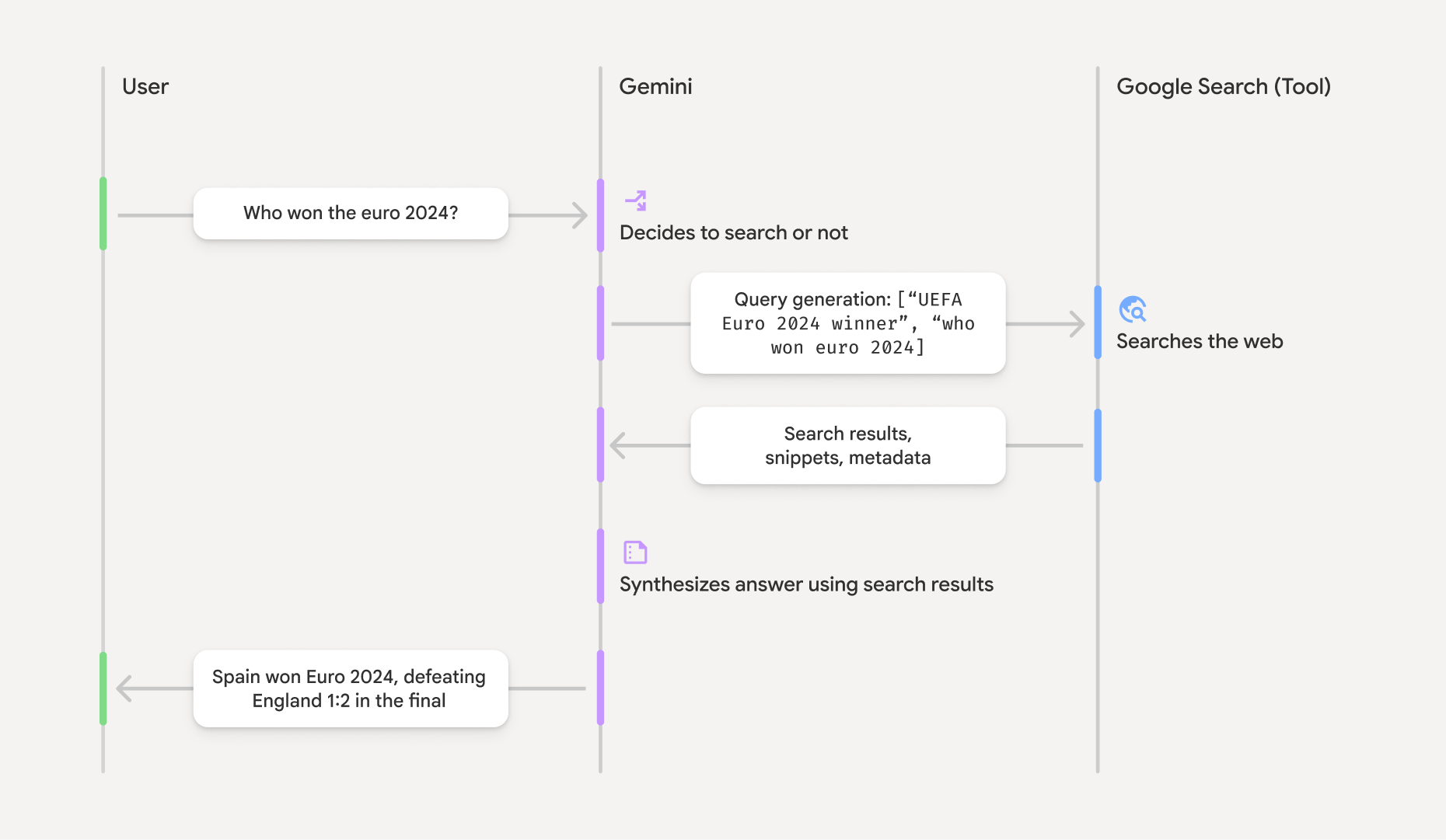
Gdy używasz narzędzia GoogleSearch, model automatycznie obsługuje cały proces wyszukiwania, przetwarzania i cytowania informacji.
Oto przepływ pracy modelu:
- Odbieranie prompta: aplikacja wysyła prompta do modelu Gemini z włączonym narzędziem
GoogleSearch. - Analiza prompta: model analizuje prompta i określa, czy
Google Search może ulepszyć odpowiedź. - Wysyłanie zapytań do
Google Search : w razie potrzeby model automatycznie generuje jedno lub kilka zapytań i je wykonuje. - Przetwarzanie wyników wyszukiwania: model przetwarza wyniki z
Google Search i formułuje odpowiedź na pierwotny prompt. - Zwrócenie „uzasadnionego wyniku”: model zwraca ostateczną, przyjazną dla użytkownika odpowiedź, która jest uzasadniona wynikami z
Google Search . Odpowiedź zawiera tekstową odpowiedź modelu igroundingMetadataz wyszukiwanymi hasłami, wynikami z internetu i źródłami.
Pamiętaj, że udostępnienie modelowi narzędzia groundingMetadata, więc nie będzie „wynikiem opartym na źródłach”.
Interpretowanie wyniku opartego na źródłach
Jeśli model opiera swoją odpowiedź na wynikach z groundingMetadata z uporządkowanymi danymi, które są niezbędne do weryfikacji twierdzeń i tworzenia bogatych źródeł w aplikacji.
Obiekt groundingMetadata w „uziemionym wyniku” zawiera te informacje:
webSearchQueries: tablica zapytań wysłanych doGoogle Search . Te informacje są przydatne do debugowania i zrozumienia procesu wnioskowania modelu.searchEntryPoint: zawiera kod HTML i CSS do renderowania wymaganych „sugestiiGoogle Search ”. Musisz przestrzegać wymagań dotyczących korzystania z funkcji „Grounding withGoogle Search ” w przypadku wybranego dostawcy interfejsu API: Gemini Developer API lub Agent Platform Gemini API (formerly Vertex AI) (patrz sekcja Warunki korzystania z usługi w Szczegółowych warunkach korzystania z usługi). W dalszej części tej strony dowiesz się, jak używać i wyświetlać wyniki oparte na źródłach.groundingChunks: tablica obiektów zawierających źródła internetowe (uriititle).groundingSupports: tablica fragmentów, które łączą odpowiedź modelutextze źródłami wgroundingChunks. Każdy fragment łączy tekstsegment(zdefiniowany przezstartIndexiendIndex) z co najmniej jednym elementemgroundingChunkIndices. To pole pomaga tworzyć linki do źródeł w tekście. W dalszej części tej strony dowiesz się, jak używać i wyświetlać wyniki oparte na źródłach.
Oto przykładowa odpowiedź zawierająca obiekt groundingMetadata:
{
  "candidates": [
    {
      "content": {
        "parts": [
          {
            "text": "Spain won Euro 2024, defeating England 2-1 in the final. This victory marks Spain's record fourth European Championship title."
          }
        ],
        "role": "model"
      },
      "groundingMetadata": {
        "webSearchQueries": [
          "UEFA Euro 2024 winner",
          "who won euro 2024"
        ],
        "searchEntryPoint": {
          "renderedContent": "<!-- HTML and CSS for the search widget -->"
        },
        "groundingChunks": [
          {"web": {"uri": "https://vertexaisearch.cloud.google.com.....", "title": "aljazeera.com"}},
          {"web": {"uri": "https://vertexaisearch.cloud.google.com.....", "title": "uefa.com"}}
        ],
        "groundingSupports": [
          {
            "segment": {"startIndex": 0, "endIndex": 85, "text": "Spain won Euro 2024, defeatin..."},
            "groundingChunkIndices": [0]
          },
          {
            "segment": {"startIndex": 86, "endIndex": 210, "text": "This victory marks Spain's..."},
            "groundingChunkIndices": [0, 1]
          }
        ]
      }
    }
  ]
}
Używanie i wyświetlanie wyników opartych na źródłach
Jeśli model używa narzędzia groundingMetadata.
Jest wymagany do wyświetlania sugestii
Oprócz spełnienia wymagań dotyczących korzystania z narzędzia
(Wymagane) Wyświetlaj sugestie dotyczące Google Search
Jeśli odpowiedź zawiera „sugestie
Obiekt groundingMetadata zawiera „sugestie searchEntryPoint, które ma pole renderedContent dostarczające zgodne style HTML i CSS. Musisz je zaimplementować, aby wyświetlać sugestie wyszukiwania w aplikacji.
Szczegółowe informacje o wymaganiach dotyczących wyświetlania i zachowania sugestii
Przykładowe fragmenty kodu znajdziesz w dalszej części tej sekcji.
(Wymagane) Wyświetlanie źródeł
Obiekt groundingMetadata zawiera uporządkowane dane źródłowe, a konkretnie pola groundingSupports i groundingChunks. Użyj tych informacji, aby połączyć stwierdzenia modelu bezpośrednio z ich źródłami w interfejsie (w tekście i w podsumowaniu).
Przykładowe fragmenty kodu znajdziesz w dalszej części tej sekcji.
Przykładowe kody
Te przykłady kodu zawierają uogólnione wzorce używania i wyświetlania ugruntowanych wyników. Twoim obowiązkiem jest jednak dopilnowanie, aby konkretne wdrożenie było zgodne z wymaganiami.
Swift
// ...

// Get the model's response
let text = response.text

// Get the grounding metadata
if let candidate = response.candidates.first,
   let groundingMetadata = candidate.groundingMetadata {
  // REQUIRED - display Google Search suggestions
  // (renderedContent contains HTML and CSS for the search widget)
  if let renderedContent = groundingMetadata.searchEntryPoint?.renderedContent {
    // TODO(developer): Display Google Search suggestions using a WebView
  }

  // REQUIRED - display sources
  let groundingChunks = groundingMetadata.groundingChunks
  for chunk in groundingMetadata.groundingChunks {
    if let web = chunk.web {
      let title = web.title  // for example, "uefa.com"
      let uri = web.uri  // for example, "https://vertexaisearch.cloud.google.com..."
      // TODO(developer): show source in the UI
    }
  }
}
Kotlin
// ...

// Get the model's response
val text = response.text

// Get the grounding metadata
val groundingMetadata = response.candidates.firstOrNull()?.groundingMetadata

// REQUIRED - display Google Search suggestions
// (renderedContent contains HTML and CSS for the search widget)
val renderedContent = groundingMetadata?.searchEntryPoint?.renderedContent
if (renderedContent != null) {
    // TODO(developer): Display Google Search suggestions using a WebView
}

// REQUIRED - display sources
val groundingChunks = groundingMetadata?.groundingChunks
groundingChunks?.let { chunks ->
  for (chunk in chunks) {
  	val title = chunk.web?.title  // for example, "uefa.com"
	val uri = chunk.web?.uri  // for example, "https://vertexaisearch.cloud.google.com..."
// TODO(developer): show source in the UI
  }
}
Java
// ...

Futures.addCallback(response, new FutureCallback() {
  @Override
  public void onSuccess(GenerateContentResponse result) {
  // Get the model's response
  String text = result.getText();

  // Get the grounding metadata
  GroundingMetadata groundingMetadata =
  result.getCandidates()[0].getGroundingMetadata();

  if (groundingMetadata != null) {
    // REQUIRED - display Google Search suggestions
  // (renderedContent contains HTML and CSS for the search widget)
    String renderedContent =
  groundingMetadata.getSearchEntryPoint().getRenderedContent();
    if (renderedContent != null) {
      // TODO(developer): Display Google Search suggestions using a WebView
    }

    // REQUIRED - display sources
    List chunks = groundingMetadata.getGroundingChunks();
    if (chunks != null) {
      for(GroundingChunk chunk : chunks) {
        WebGroundingChunk web = chunk.getWeb();
        if (web != null) {
          String title = web.getTitle();  // for example, "uefa.com"
          String uri = web.getUri();  // for example, "https://vertexaisearch.cloud.google.com..."
          // TODO(developer): show sources in the UI
        }
      }
    }
  }
  }

  @Override
  public void onFailure(Throwable t) {
  t.printStackTrace();
  }
  }, executor);
Web
// ...

// Get the model's text response
const text = result.response.text();

// Get the grounding metadata
const groundingMetadata = result.response.candidates?.[0]?.groundingMetadata;

// REQUIRED - display Google Search suggestions
// (renderedContent contains HTML and CSS for the search widget)
const renderedContent = groundingMetadata?.searchEntryPoint?.renderedContent;
if (renderedContent) {
  // TODO(developer): render this HTML and CSS in the UI
}

// REQUIRED - display sources
const groundingChunks = groundingMetadata?.groundingChunks;
if (groundingChunks) {
  for (const chunk of groundingChunks) {
    const title = chunk.web?.title;  // for example, "uefa.com"
    const uri = chunk.web?.uri;  // for example, "https://vertexaisearch.cloud.google.com..."
    // TODO(developer): show sources in the UI
  }
}
Dart
// ...

// Get the model's response
final text = response.text;

// Get the grounding metadata
final groundingMetadata = response.candidates.first.groundingMetadata;

// REQUIRED - display Google Search suggestions
// (renderedContent contains HTML and CSS for the search widget)
final renderedContent = groundingMetadata?.searchEntryPoint?.renderedContent;
if (renderedContent != null) {
    // TODO(developer): Display Google Search suggestions using a WebView
}

// REQUIRED - display sources
final groundingChunks = groundingMetadata?.groundingChunks;
if (groundingChunks != null) {
  for (var chunk in groundingChunks) {
    final title = chunk.web?.title;  // for example, "uefa.com"
    final uri = chunk.web?.uri;  // for example, "https://vertexaisearch.cloud.google.com..."
    // TODO(developer): show sources in the UI
  }
}
Unity
// ...

// Get the model's response.
var text = response.Text;

// Get the grounding metadata.
var groundingMetadata = response.Candidates.First().GroundingMetadata.Value;

// REQUIRED - display Google Search suggestions
// (renderedContent contains HTML and CSS for the search widget)
if (groundingMetadata.SearchEntryPoint.HasValue) {
    var renderedContent = groundingMetadata.SearchEntryPoint.Value.RenderedContent;
    // TODO(developer): Display Google Search suggestions using a WebView
}

// REQUIRED - display sources
foreach(GroundingChunk chunk in groundingMetadata.GroundingChunks) {
    var title = chunk.Web.Value.Title;  // for example, "uefa.com"
    var uri = chunk.Web.Value.Uri;  // for example, "https://vertexaisearch.cloud.google.com..."
    // TODO(developer): show sources in the UI
}
Wyniki oparte na źródłach i monitorowanie wykorzystania AI w konsoli Firebase
Jeśli masz włączone monitorowanie wykorzystania AI w konsoli Firebase, odpowiedzi są przechowywane w Cloud Logging. Domyślnie te dane są przechowywane przez 30 dni.
Musisz zadbać o to, aby ten okres przechowywania lub dowolny ustawiony przez Ciebie okres niestandardowy był w pełni zgodny z Twoim konkretnym przypadkiem użycia i wszelkimi dodatkowymi wymaganiami dotyczącymi zgodności wybranego dostawcy Gemini API: Gemini Developer API lub Agent Platform Gemini API (formerly Vertex AI) (patrz sekcja Warunki korzystania z usługi w Szczegółowych warunkach korzystania z usługi). Aby spełnić te wymagania, konieczne może być dostosowanie okresu przechowywania w Cloud Logging.
Ceny i limity
Sprawdź ceny, dostępność modeli i limity dotyczące Grounding with