
This page provides answers to frequently asked questions (FAQs) and troubleshooting information about Firebase AI Logic and using it with the Gemini API.
As needed, here are some additional resources:
Troubleshoot error codes.
Learn about billing setup, pricing, and payments.
Learn about rate limits and quotas.
Status dashboards
Agent Platform Gemini API (formerly Vertex AI) (
Vertex Gemini API)
General FAQ
The following table lists important differences between the two "Gemini API" providers in general regardless of how you access them:
| Gemini Developer API | Agent Platform Gemini API (formerly Vertex AI) | |
|---|---|---|
| Pricing | Available on both the no-cost Spark pricing plan and the pay-as-you-go Blaze pricing plan1 | Always requires the pay-as-you-go Blaze pricing plan1 (when used with Firebase AI Logic) |
| Rate limits (quota) | Explicit rate limits | Uses dynamic shared quota (DSQ) that everyone using that model in that region shares. Provisioned throughput (PT) is available. |
| Specifying the location for accessing the model | not supported by the API | supported by the API |
| Support for Cloud Storage URLs | not supported by the API 2 |
Public files and files protected by Firebase Security Rules |
| Support for YouTube URLs and Browser URLs | YouTube URLs only | YouTube URLs and Browser URLs |
1 The two API providers have different pay-as-you-go pricing (learn more in their respective documentation).
2 The Files API for the Gemini Developer API is not supported through the Firebase AI Logic SDKs.
The following table lists the availability of commonly asked about features for the two "Gemini API" providers. This table applies specifically when using the Firebase AI Logic client SDKs.
| Feature | Gemini Developer API | Agent Platform Gemini API (formerly Vertex AI) |
|---|---|---|
| Support for Gemini models | supported | supported |
| Support for the Gemini Live API | supported | supported |
| Integration with Firebase App Check | supported | supported |
| Compatible with Firebase Remote Config | supported | supported |
| Support for AI monitoring in Firebase console | supported | supported |
Yes, you can have both "Gemini API" providers enabled in your Firebase project, and you can use both APIs in your app itself.
To switch between API providers in your code, just make sure that you've set the backend service appropriately in your code.
In mid-2026, Google Cloud rebranded "Vertex AI" to "Gemini Enterprise Agent Platform" (or "Agent Platform"). In the Firebase ecosystem, we refer to this service as the "Agent Platform Gemini API".
For Google Cloud, this rebranding included the following. Note that there were other changes, but they aren't applicable to Firebase AI Logic.
Rebranding the product from "Vertex AI" to "Gemini Enterprise Agent Platform" (or "Agent Platform"), which includes new URLs for the Google Cloud console and documentation.
Changing the display name of the API from "Vertex AI API" to "Agent Platform API". Note that the service name has stayed the same:
aiplatform.googleapis.com.Rebranding "Vertex AI Studio" to "Agent Studio".
No changes to the capabilities of the underlying APIs or supported models.
For the Firebase AI Logic SDKs, we accommodated this rebranding by updating the initialization syntax for the "Gemini API" backend service and updating the default location for accessing the model when using this new syntax.
New initialization syntax for the "Gemini API" backend service:
Swift
Change
vertexaitoagentPlatform.
Available starting with Firebase SDK for Apple platforms v12.17.0+.BEFORE
// ...

// Initialize the Agent Platform Gemini API backend service (formerly branded Vertex AI).
// For the legacy `vertexai` syntax, the default location is `us-central`, so
// specifying a location is usually required since most models are *not* supported in `us-central`.
let ai = FirebaseAI.firebaseAI(backend: .vertexai(location: "LOCATION"))

// ...
AFTER
// ...

// Initialize the Agent Platform Gemini API backend service (formerly branded Vertex AI).
// For the `agentPlatform` syntax, the default location is `global`, so
// specifying a location is usually optional since most models are supported in `global`.
let ai = FirebaseAI.firebaseAI(backend: .agentPlatform(location: "LOCATION"))

// ...
Kotlin
Change
vertexAItoagentPlatform.
Available starting with Firebase AI Logic SDK for Android v17.15.0+ (Firebase Android BoM v34.17.0+).BEFORE
// ...

// Initialize the Agent Platform Gemini API backend service (formerly branded Vertex AI).
// For the legacy `vertexAI` syntax, the default location is `us-central`, so
// specifying a location is usually required since most models are *not* supported in `us-central`.
val ai = Firebase.ai(backend = GenerativeBackend.vertexAI(location = "LOCATION"))

// ...
AFTER
// ...

// Initialize the Agent Platform Gemini API backend service (formerly branded Vertex AI).
// For the `agentPlatform` syntax, the default location is `global`, so
// specifying a location is usually optional since most models are supported in `global`.
val ai = Firebase.ai(backend = GenerativeBackend.agentPlatform(location = "LOCATION"))

// ...
Java
Change
vertexAItoagentPlatform.
Available starting with Firebase AI Logic SDK for Android v17.15.0+ (Firebase Android BoM v34.17.0+).BEFORE
// ...

// Initialize the Agent Platform Gemini API backend service (formerly branded Vertex AI).
// For the legacy `vertexAI` syntax, the default location is `us-central`, so
// specifying a location is usually required since most models are *not* supported in `us-central`.
GenerativeModel ai = FirebaseAI.getInstance(GenerativeBackend.vertexAI("LOCATION"));

// ...
AFTER
// ...

// Initialize the Agent Platform Gemini API backend service (formerly branded Vertex AI).
// For the `agentPlatform` syntax, the default location is `global`, so
// specifying a location is usually optional since most models are supported in `global`.
GenerativeModel ai = FirebaseAI.getInstance(GenerativeBackend.agentPlatform("LOCATION"));

// ...
Web
Change
VertexAIBackendtoAgentPlatformBackend.
Available starting with Firebase JS SDK v12.17.0+.BEFORE
import { getAI, getGenerativeModel, VertexAIBackend } from "firebase/ai";

// ...

// Initialize FirebaseApp

// Initialize the Agent Platform Gemini API backend service (formerly branded Vertex AI).
// For the legacy `VertexAIBackend` syntax, the default location is `us-central`, so
// specifying a location is usually required since most models are *not* supported in `us-central`.
const ai = getAI(firebaseApp, { backend: new VertexAIBackend('LOCATION') });

// ...
AFTER
import { getAI, getGenerativeModel, AgentPlatformBackend } from "firebase/ai";

// ...

// Initialize FirebaseApp

// Initialize the Agent Platform Gemini API backend service (formerly branded Vertex AI).
// For the `AgentPlatformBackend` syntax, the default location is `global`, so
// specifying a location is usually optional since most models are supported in `global`.
const ai = getAI(firebaseApp, { backend: new AgentPlatformBackend('LOCATION') });

// ...
Dart
Change
vertexAItoagentPlatform.
Available starting with Firebase AI Logic plugin for Flutter v3.15.0+ (Firebase Flutter BoM v4.18.0+).BEFORE
// ...

// Initialize the Agent Platform Gemini API backend service (formerly branded Vertex AI).
// For the legacy `vertexAI` syntax, the default location is `us-central`, so
// specifying a location is usually required since most models are *not* supported in `us-central`.
final ai = await FirebaseAI.vertexAI(location: 'LOCATION');

// ...
AFTER
// ...

// Initialize the Agent Platform Gemini API backend service (formerly branded Vertex AI).
// For the `agentPlatform` syntax, the default location is `global`, so
// specifying a location is usually optional since most models are supported in `global`.
final ai = await FirebaseAI.agentPlatform(location: 'LOCATION');

// ...
Unity
Change
VertexAItoAgentPlatform.
Available starting with Firebase SDK for Unity v13.15.0+.BEFORE
// ...

// Initialize the Agent Platform Gemini API backend service (formerly branded Vertex AI).
// For the legacy `VertexAI` syntax, the default location is `us-central`, so
// specifying a location is usually required since most models are *not* supported in `us-central`.
var ai = FirebaseAI.GetInstance(FirebaseAI.Backend.VertexAI(location: "LOCATION"));

// ...
AFTER
// ...

// Initialize the Agent Platform Gemini API backend service (formerly Vertex AI).
// For the `AgentPlatform` syntax, the default location is `global`, so
// specifying a location is usually optional since most models are supported in `global`.
var ai = FirebaseAI.GetInstance(FirebaseAI.Backend.AgentPlatform(location: "LOCATION"));

// ...
New default location for accessing the model when using the new initialization syntax:
When using the new "Agent Platform" initialization syntax, the location defaults to
global.This change was made because almost all Gemini models are supported in
global, and Google Cloud is no longer supporting theus-central1location for new releases of most Gemini models.
|
Select your Gemini API provider to view provider-specific content |
To use the Firebase AI Logic SDKs with the Agent Platform Gemini API (formerly Vertex AI), your project must have the following two APIs enabled:
- Agent Platform API (
aiplatform.googleapis.com) - Firebase AI Logic API (
firebasevertexai.googleapis.com)
You can enable these APIs using either of the following options:
Option 1 (recommended): Enable the APIs with a few clicks in the Firebase console:
In the Firebase console, go to the AI Services > Firebase AI Logic page.
Click Get started.
Select to get started with the Agent Platform Gemini API (formerly Vertex AI).
This launches a guided workflow that enables the two APIs for you. Firebase will also provision a Google-managed service account (P4SA) for authorizing use of the Gemini API, as well as add the Firebase AI Logic API to the allowlist for your Firebase API key.
Option 2 (manual; not recommended): Enable the APIs in the Google Cloud console:
Click each API link at the top of this FAQ entry, and then click Enable in each API's page.
Add the Firebase AI Logic API to the allowlist of your Firebase API key.
For Firebase AI Logic, we try to make setup of your Firebase project to use your chosen Gemini API provider as easy as possible. This includes enabling the required APIs in your Firebase project during specific journeys, like the guided workflow in the Firebase console.
However, if you decide to not use Firebase AI Logic or one of the Gemini API providers, you can disable the associated APIs in your Firebase project.
To use the Firebase AI Logic SDKs with the Gemini Developer API, your project must have the following two APIs enabled:
- Gemini Developer API (
generativelanguage.googleapis.com) - Firebase AI Logic API (
firebasevertexai.googleapis.com)
If you want to stop using Firebase AI Logic completely:
Click each API link above to go to the respective API pages in the Google Cloud console, then click Manage.
View the Metrics tab to verify that there's no usage of the API.
If you still want to disable the API, click Disable API at the top of the page.
Remove the Firebase AI Logic API from the list of selected APIs that can be called using your Firebase API keys. Review this FAQ about the allowlist for Firebase API keys to learn about modifying this list.
If you want to continue using Firebase AI Logic, but with the Agent Platform Gemini API (formerly Vertex AI) instead:
Go to the Gemini Developer API page in the Google Cloud console, then click Manage.
View the Metrics tab to verify that there's no usage of the API.
If you still want to disable the API, click Disable API at the top of the page.
Make sure that your project has the required APIs enabled for the Agent Platform Gemini API (formerly Vertex AI).
To use the Firebase AI Logic SDKs with the Agent Platform Gemini API (formerly Vertex AI), your project must have the following two APIs enabled:
- Agent Platform API (
aiplatform.googleapis.com) - Firebase AI Logic API (
firebasevertexai.googleapis.com)
If you want to stop using Firebase AI Logic completely:
Click each API link above to go to the respective API pages in the Google Cloud console, then click Manage.
View the Metrics tab to verify that there's no usage of the API.
If you still want to disable the API, click Disable API at the top of the page.
Remove the Firebase AI Logic API from the list of selected APIs that can be called using your Firebase API keys. Review this FAQ about the allowlist for Firebase API keys to learn about modifying this list.
If you want to continue using Firebase AI Logic, but with the Gemini Developer API instead:
Go to the Agent Platform API page in the Google Cloud console, then click Manage.
View the Metrics tab to verify that there's no usage of the API.
If you still want to disable the API, click Disable API at the top of the page.
Make sure that your project has the required APIs enabled for the Gemini Developer API.
| Action | Required IAM permissions | IAM role(s) that include required permissions by default |
|---|---|---|
| Upgrade billing to pay-as-you-go (Blaze) pricing plan | firebase.billingPlans.updateresourcemanager.projects.createBillingAssignmentresourcemanager.projects.deleteBillingAssignment
|
Owner |
| Enable APIs in project | serviceusage.services.enable |
Editor Owner |
| Create Firebase app | firebase.clients.create |
Firebase Admin Editor Owner |
See the list of supported models. We frequently add new capabilities to the SDKs, so check back on this FAQ for updates (as well as in release notes, blogs, and social posts).
Firebase AI Logic supports the following models:
Gemini Developer API
- Most of the Gemini foundation models
Agent Platform Gemini API (formerly Vertex AI)
- Most of the Gemini foundation models
Firebase AI Logic does not support the following models (regardless of your chosen Gemini API provider):
Fine-tuned models
Embedding models, Veo models, Lyria models, robotics models, computer use models, Gemini Omni models, or Gemini Flash Cyber models
When Google releases a stable model version, we strive to ensure that it's available for at minimum 12 months before we shut down (retire) the model. However, note that for Agent Platform Gemini API (formerly Vertex AI), some stable models only have short-term availability, which means that they may be shut down (retired) as early as 45 days after a replacement model is released.
Where to find the shutdown date of a model?
Here are some ways you can find the shutdown date of a model:
At the time of release: We list each model's expected shutdown date several places in the Gemini API provider documentation as well as in the Firebase documentation (see the supported models page).
As the shutdown date approaches: Google sends emails to appropriate project members, and we post reminders in the release notes and other channels about any upcoming shutdowns (for example, reminder of shutdown dates for the Gemini 1.5 and 1.0 stable models).
What to do if the model you're using is about to be shut down?
Find a suitable currently supported model and its model name.
Update the model name used by your app before the shutdown date; otherwise, any requests to that model will fail with a 404 error.
You set the model name during initialization when you create a
GenerativeModel,LiveModel, orImagenModelinstance. Make sure to review the critical recommendation below about using Firebase Remote Config or server prompt templates.When using Firebase AI Logic, you usually don't need to modify any of the code which actually calls the model.
Be aware that for the latest Gemini 3.x models, several parameters are unsupported (specifically temperature, top-K, top-P, frequency penalty, presence penalty, and candidate count).
Test your app to ensure that responses are still as expected.
Gemini 2.5 stable models - shutdown dates & replacements
Gemini 2.5 Pro, Gemini 2.5 Flash, and Gemini 2.5 Flash‑Lite
gemini-2.5-pro
gemini-2.5-flash
gemini-2.5-flash-lite
gemini-2.5-flash-image(aka "Nano Banana")For the general-use models, the date for shutdown depends on your chosen Gemini API provider:
- Gemini Developer API (Google AI): October 16, 2026
- Agent Platform Gemini API (formerly Vertex AI): October 20, 2026
For the image-generating model (Nano Banana), the date for shutdown is the same regardless of your chosen Gemini API provider: October 02, 2026
Note that other "Nano Banana" models and any stable Gemini Live API 2.5 models are not impacted.
Replacement: Migrate to use one of the new Gemini 3.x models
(like gemini-3.8-flash or gemini-3.1-flash-image).
Imagen stable models - shutdown dates & replacements
- All Imagen models will shut down as early as August 17, 2026 (note that this shutdown date has been extended from the previous June 30, 2026).
Replacement: Migrate your apps to use Gemini Image models (the "Nano Banana" models).
Gemini 2.0 stable models - shutdown dates & replacements
Gemini 2.0 Flash and Gemini 2.0 Flash‑Lite:
gemini-2.0-flash-001(and its auto-updated aliasgemini-2.0-flash)
gemini-2.0-flash-lite-001(and its auto-updated aliasgemini-2.0-flash-lite)February 6, 2026: These models will no longer be available for use in projects that had no prior usage of the model.
March 31, 2026: These models will shut down.
Note that stable Gemini Live API 2.0 models are not impacted.
Replacement: Migrate to use one of the new Gemini 3.x models
(like gemini-3.1-flash-lite).
Gemini 1.5 and 1.0 stable models - shutdown dates & replacements
Gemini 1.5 Pro models:
gemini-1.5-pro-002(andgemini-1.5-pro): September 24, 2025gemini-1.5-pro-001: May 24, 2025
Gemini 1.5 Flash models:
gemini-1.5-flash-002(andgemini-1.5-flash): September 24, 2025gemini-1.5-flash-001: May 24, 2025
Gemini 1.0 Pro Vision models: April 21, 2025 (previously scheduled for April 09, 2025)
Gemini 1.0 Pro models: April 21, 2025 (previously scheduled for April 09, 2025)
Replacement: Migrate to use one of the new Gemini 3.x models
(like gemini-3.1-flash-lite).
See Data governance & Responsible AI.
By default, Firebase AI Logic sets the request limit per user at 100 requests per minute (RPM).
If you want to adjust your per-user rate limit, you need to adjust the quota settings for the Firebase AI Logic API.
Learn more about the Firebase AI Logic API quota. On that page, you can also learn how to view and edit your quota.
If you're experiencing high latency or high token usage, it's likely due to the thinking level configuration for the model you're using.
Gemini 3 and later models always use an internal "thinking process" that significantly improves their reasoning and multi-step planning abilities, making them highly effective for complex tasks such as coding, advanced mathematics, and data analysis.
However, depending on the task, higher levels of thinking aren't always needed, and you can configure the model to use a lower thinking level. A lower thinking level will help reduce latency and token usage. To help you decide how much a model might need its thinking capability, review the comparison of task difficulties.
Note that for most Gemini 3 and later models, the
default thinking level
is set to HIGH.
Yes, in each multimodal request, you must always provide the following:
The file's
mimeType. See an exception below.The file. You can either provide the file as inline data or provide the file using its URL.
Learn about supported input file types, how to specify MIME type, and the two options for providing the file in Supported input files and requirements.
Exception to including MIME type in your request
An exception to providing the MIME type is inline image inputs for requests from native Android and Apple platform apps.
The Firebase AI Logic SDKs for Android and Apple platforms provide a simplified and platform-friendly way to handle images in requests — all images (no matter their format) are converted client-side to JPEG at 80% quality before being sent to the server. This means that when you provide images as inline data using the Android and Apple platforms SDKs, you don't need to specify the MIME type in the request.
This simplified handling is shown in the Firebase AI Logic documentation in the examples for sending base64-encoded images in requests.
Here's some additional platform-specific information about this feature:
For Android:
You can take advantage of the simplified way to handle platform-native image types (
Bitmap) in multimodal prompts that contain images as inline data (see example).For more control over image formats and conversions, you may provide the images as an
InlineDataPartand supply the specific MIME type. For example:content { inlineData(/* PNG as byte array */, "image/png") }
For Apple platforms:
You can take advantage of the simplified way to handle platform-native image types (
UIImage,NSImage,CIImage, andCGImage) in multimodal prompts that contain images as inline data (see example).For more control over image formats and conversions, you may provide the images as an
InlineDataPartand supply the specific MIME type. For example:InlineDataPart(data: Data(/* PNG Data */), mimeType: "image/png")
The following features are supported by various models and the API providers, but they are not available when using Firebase AI Logic:
- Grounding with Google Image Search
- Fine tuning a model
- Embeddings generation
- Semantic retrieval
If you would like to add these as feature requests or vote on an existing feature request, visit Firebase UserVoice.
Back in 2024, we launched a set of Firebase client SDKs that could use the Agent Platform Gemini API (formerly Vertex AI) as well as a Firebase proxy gateway to protect that API from abuse and to enable integrations with other Firebase products. We called our product "Vertex AI in Firebase", and this product name accurately described our product's available use cases at that time.
Since then, though, we've expanded the capabilities of our product. For example, as of May 2025, we now offer support for the Gemini Developer API, including the ability to protect the Gemini Developer API from abuse using our integration with Firebase App Check.
As a result, the name "Vertex AI in Firebase" no longer accurately represents the expanded scope of our product. Thus, a new name — Firebase AI Logic — better reflects our evolving feature set and allows us to continue to expand our offerings in the future!
Check out the migration guide to make sure you get all the latest features from Firebase AI Logic (and optionally start using the Gemini Developer API).
For Apple platform apps, starting with Firebase SDK v12.5.0,
Firebase AI Logic is now distributed under the FirebaseAILogic module.
We've made this change non-breaking and backwards-compatible.
Why did we make this change?
We formerly distributed this service under the FirebaseAI module. However, we
needed to rename it to FirebaseAILogic for the following reasons:
Avoid a name collision between module and class that causes issues in binary distributions.
Enable us to use Swift macros for future feature development.
What to do if you're upgrading to v12.5.0+?
The module name change to FirebaseAILogic is non-breaking and
backward-compatible in Firebase 12. However, in Firebase 13, this old module
will be removed. Transition your dependencies and imports before updating to
Firebase 13.
There are no required changes for this module name change, but we recommend that you do the following:
When choosing Swift PM dependencies, choose
FirebaseAILogic(instead ofFirebaseAI).Change import statements to
FirebaseAILogic(instead ofFirebaseAI).
Security FAQ
The following sections contain FAQs related to security, for example about App Check or about Gemini API keys.
FAQs about Firebase App Check
Yes, App Check needs to be enforced for all versions of your app that use Firebase AI Logic.
It's critical that App Check is enforced as early as possible — especially before you commit your app to a publicly available source code control system, share your app, or make your app publicly available.
If you implement App Check in your app's codebase right away, then all your app versions can send valid App Check tokens. A request that doesn't send a valid token is considered unverified and will be blocked when App Check is enforced.
If you've already released a version of your app to end-users that does not have App Check implemented, see the FAQ about how to implement and enforce App Check for an already released app.
For app versions that don't have App Check implemented, requests to Firebase AI Logic from those versions don't have valid App Check tokens and are considered unverified. These requests will be blocked when App Check is enforced for Firebase AI Logic.
The following instructions help you migrate your app so that you can enforce App Check in a way that avoids service disruptions for an already released app that doesn't have App Check.
Implement a production attestation provider in your app as soon as possible.
- Apple platforms: DeviceCheck or App Attest or reCAPTCHA Enterprise
- Android: Play Integrity or reCAPTCHA Enterprise
- Web: reCAPTCHA Enterprise
- Flutter: Supports all the providers above, including reCAPTCHA Enterprise
- Unity: Supports all the providers above (support for reCAPTCHA Enterprise is coming soon)
Monitor the requests from your app to help you decide when it's safe to enforce App Check.
For example, if almost all of the recent requests are from verified clients, then you should consider enforcing App Check.
For local development when App Check is enforced, you can set up the App Check debug provider and still keep App Check enforced for Firebase AI Logic.
FAQs about the Gemini API key
Historically, the Gemini Developer API relied on standard
Gemini API keys for authorizing use of the
Gemini Developer API
(generativelanguage.googleapis.com).
If you enabled Firebase AI Logic and chose to use the
Gemini Developer API, then Firebase created a Gemini API key
for you that was restricted to the Gemini Developer API.
This key was named
Gemini Developer API key (auto created by Firebase)
Starting in mid-2026, the Gemini Developer API is upgrading to a more
secure alternative called
"Authorization (auth) keys"
(which are essentially service accounts). Firebase AI Logic has upgraded in
tandem. Instead of using a standard Gemini API key,
Firebase AI Logic now handles authorization for the
Gemini Developer API using a Google-managed service account (P4SA) that
we automatically provision for you:
Firebase AI Logic Service Agent
(service-PROJECT_ID@
For both existing and new projects, if you access the Gemini Developer API via Firebase AI Logic, no action is needed on your part to take advantage of these security upgrades from mid-2026.
For both existing and new projects, if you access the Gemini Developer API via Firebase AI Logic, no action is needed on your part to take advantage of security upgrades from mid-2026 (including migrating to an "Authorization (auth) key").
On behalf of our developers, Firebase AI Logic is automatically handling all the required security changes to accommodate the transition of the Gemini Developer API to require "Authorization (auth) keys".
Starting in mid-2026, Firebase AI Logic no longer provisions or uses
standard Gemini API keys. Instead, Firebase AI Logic now handles
authorization for the Gemini Developer API using a
Google-managed service account (P4SA) that we automatically provision for you in
your Firebase project:
Firebase AI Logic Service Agent
(service-PROJECT_ID@
Given this change, you can review and delete any API key named
Gemini Developer API key (auto created by Firebase)
-
This Gemini API key was created by Firebase for the sole purpose
of using with Firebase AI Logic, so it should be safe to delete.
However, before you delete this key, you should still check to make sure
that you haven't erroneously used the key with other tools that can give
access to the Gemini Developer API, like the GenAI server SDKs or
Genkit. Here's how to check the usage:
- In the Google Cloud console, go to the page for the Gemini Developer API, then click Manage.
-
In the Metrics tab, in the Credentials dropdown, select
the key named
Gemini Developer API key (auto created by Firebase) -
If the displayed graphs show no usage since early July 2026 (which
was when Firebase AI Logic stopped using these API keys), then the
key is safe to delete.
However, if the graphs show usage, then you're using the key with another tool and you should rename the key so that it's clear that it's being used with that tool (and not with Firebase AI Logic).
-
Make sure that you do not delete any other API key with a
name that contains the segment
(auto created by Firebase)
When using the Firebase AI Logic SDKs, you do not need a Gemini API key for authorizing use of the Gemini Developer API, and you should not add a Gemini API key into your app's codebase.
No — you should not use your "Firebase API key" as a Gemini API key. We strongly recommend that you do not add the Gemini Developer API to the allowlist for your Firebase API key.
Your Firebase API key is the API key that's listed in your Firebase configuration file or object that you add into your app's codebase to connect your app to Firebase. It's OK to include your Firebase API key in your code when you use the key only with Firebase-related APIs (like Firebase AI Logic). Learn important information about Firebase API keys.
In the APIs & Services > Credentials panel of the Google Cloud console, this is what Firebase API keys look like:
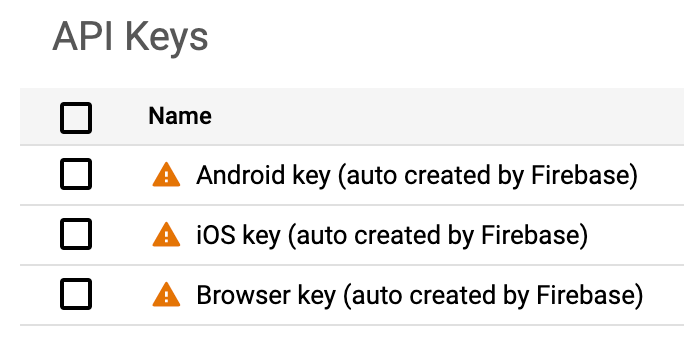
Because you need to add your Firebase API key into your app's codebase for Firebase-related APIs to work, and because the Gemini Developer API can be authorized via API key, we strongly recommend that you do NOT add the Gemini Developer API (called the "Generative Language API" in the Google Cloud console) to the API allowlist for your Firebase API key. If you do, then you're exposing the Gemini Developer API to potential abuse.
Give feedback about your experience with Firebase AI Logic