

باستخدام FCM AndroidConfigV2، يمكنك إرسال رسائل تستند إلى intent إلى أجهزة Android مع تسليم الإشعارات في الوقت المناسب وواجهة برمجة تطبيقات مبسطة.
يتناول هذا الدليل كيفية نقل طلبات الإرسال في الخلفية من AndroidConfig إلى AndroidConfigV2 وكيفية تحديث برامج تطبيق Android من معالجة onMessageReceived القديمة إلى عمليات الاستدعاء الجديدة للعميل في الإصدار 2 من خلال onNotificationReceived وonBackgroundSyncReceived.
الميزات الجديدة في AndroidConfigV2
تسهّل واجهة برمجة التطبيقات FCM AndroidConfigV2 تجربة المطوّرين من خلال تقديم نوعَين من الرسائل:
-
RemoteNotification: يُنصح به لجميع رسائل FCM التي تعرض إشعارًا عاجلاً وحسّاسًا للوقت يظهر للمستخدم. تتجاوز هذه الرسائل أي إجراءات لتوفير شحن البطارية ويتم تسليمها بدون تأخير. على الجهاز، تتولّى حزمة تطوير البرامج (SDK) لـ "FCM" و"خدمات Google Play" مسؤولية نشر الإشعار فيNotificationManagerعلى Android. BackgroundSync: رسائل بيانات غير عاجلة مخصّصة للمزامنة في الخلفية وتحديثات حالة التطبيق يمكن تجميع الإشعارات أو تأخيرها لتحسين عمر البطارية.
| الميزة | الإصدار القديم (الإصدار 1 من AndroidConfig) |
جديد (AndroidConfigV2) |
|---|---|---|
| حقل الإعداد | message.android |
message.android_v2 |
| تعريف الأولوية | محتوى فاضح priority: "high" أو priority: "normal" |
يتم استنتاجه من نوع الاتحاد (remote_notification للتنبيهات العاجلة مقابل background_sync للمزامنة غير العاجلة) |
| نشر الإشعارات | يتصل التطبيق يدويًا بالرقم NotificationManager.notify() |
FCM SDK and GMS Core posts directly or using NotificationResponse |
| عمليات معاودة الاتصال بالعملاء | • onMessageReceived(RemoteMessage)• onDeletedMessages() |
• onNotificationReceived(RemoteMessage)• onBackgroundSyncReceived(RemoteMessage)• onDeletedMessages() |
| إمكانية التصغير | متفاوتة، ويجب ضبطها بشكل صريح | يمكن أن يكون كلا نوعَي الرسائل قابلَين للتصغير أو غير قابلَين للتصغير (غير قابلَين للتصغير تلقائيًا) |
السماح لـ AndroidConfigV2 بإرسال الطلبات
يمكنك مواصلة استخدام رموز الوصول OAuth 2.0 المستمَدة من حساب الخدمة في Firebase باستخدام "بيانات الاعتماد التلقائية للتطبيق" من Google أو "مدير SDK"، وإرسال طلبات POST إلى نقطة نهاية الإصدار 1 من واجهة برمجة تطبيقات HTTP لمراسلة Firebase السحابية (messages:send).
إذا لم تكن تستخدم حساب خدمة Firebase، تأكَّد من منح حسابك المخصّص دور مشرف واجهة برمجة التطبيقات لمراسلة Firebase السحابية (roles/firebase.messagingAdmin)
وطلب نطاق OAuth 2.0 https://www.googleapis.com/auth/firebase.messaging عند إنشاء رموز الدخول:
POST https://fcm.googleapis.com/v1/projects/YOUR_PROJECT_ID/messages:send HTTP/1.1
Authorization: Bearer YOUR_OAUTH_ACCESS_TOKEN
Content-Type: application/json
تعديل طلبات الإرسال من الخادم (REST)
لإرسال طلب AndroidConfigV2 باستخدام REST API، استبدِل العنصر android في نص الطلب بـ android_v2. ضمن android_v2، حدِّد المَعلمات الشائعة (مثل ttl وcollapse_key وdata وrestricted_package_name)، وقدِّم أحد حقول الاتحاد التالية: remote_notification أو background_sync.
إرسال رسالة RemoteNotification
لإرسال إشعار عاجل موجّه للمستخدمين، يجب تضمين العنصر remote_notification وحمولة notification المقترَحة. يتم ضبط mutable_content تلقائيًا
على "خطأ". يعرض GMS Core الإشعار وينشره على الفور في لوحة الإشعارات بدون تنفيذ رمز التطبيق في الخلفية.
نموذج JSON لطلب HTTP الكامل (إشعار يتم عرضه تلقائيًا)
POST https://fcm.googleapis.com/v1/projects/myproject-b5ae1/messages:send HTTP/1.1
Content-Type: application/json
Authorization: Bearer ya29.ElqKBGN2Ri_Uz...HnS_uNreA

{
  "message": {
    "token": "bk3RNwTe3H0:CI2k_HHwgIpoDKCIZvvDMExUdFQ3P1...",
    "notification": {
      "title": "FCM Message",
      "body": "This is an FCM notification message!"
    },
    "android_v2": {
      "ttl": "3600s",
      "remote_notification": {
        "mutable_content": false,
        "notification": {
          "title": "Order update",
          "body": "Your order has been shipped!",
          "icon": "ic_notification_custom",
          "sound": "default",
          "tag": "alert_tag_1",
          "id": 100
        }
      }
    }
  }
}
إرسال RemoteNotification مع محتوى قابل للتغيير
إذا كان تطبيقك يحتاج إلى تعديل الإشعار على الجهاز قبل عرضه، اضبط mutable_content: true داخل remote_notification. يؤدي ذلك إلى توجيه "خدمات Google للأجهزة الجوّالة" الأساسية للربط بتطبيق العميل واستدعاء onNotificationReceived(). ويكون ذلك مفيدًا عندما تريد فك تشفير حمولة مشفّرة تشفيرًا تامًا بين الأطراف أو إرفاق صور رمزية للمستخدمين أو ترجمة السلاسل.
احرص على تضمين عنصر notification داخل remote_notification حتى عندما تكون قيمة mutable_content هي true. تستخدم خدمات GMS Core عنصر notification هذا
كإشعار احتياطي في حال انتهاء مهلة معاودة الاتصال بالعميل أو تجاوز
حدود الإيقاف.
إذا كنت تنقل البيانات من رسائل بيانات الإصدار 1 القديمة وتريد من FCM
تسليم الحمولة إلى عمليات تثبيت عميل الإصدار 1 القديمة كرسالة بيانات خالصة، اضبط
use_as_v1_data_message: true داخل remote_notification.
نموذج JSON لطلب HTTP كامل
POST https://fcm.googleapis.com/v1/projects/myproject-b5ae1/messages:send HTTP/1.1
Content-Type: application/json
Authorization: Bearer ya29.ElqKBGN2Ri_Uz...HnS_uNreA

{
  "message": {
    "token": "bk3RNwTe3H0:CI2k_HHwgIpoDKCIZvvDMExUdFQ3P1...",
    "data": {
      "encrypted_content": "U2FsdGVkX19vN2m+",
      "sender_id": "user_98124"
    },
    "android_v2": {
      "ttl": "3600s",
      "remote_notification": {
        "mutable_content": true,
        "use_as_v1_data_message": true,
        "notification": {
          "title": "New message",
          "body": "You have a new message",
          "tag": "chat_alert",
          "id": 1001
        }
      }
    }
  }
}
إرسال رسالة BackgroundSync
لإرسال رسالة غير عاجلة لمزامنة البيانات في الخلفية أو تحديثات الحالة الصامتة أو تحديث شارة تطبيق أو تطبيق مصغّر، استخدِم العنصر background_sync.
لا تستخدم هذه الرسائل لنشر الإشعارات التي تظهر للمستخدم، حيث يمكن تجميعها أو تأخيرها لتحسين عمر بطارية الجهاز.
نموذج JSON لطلب HTTP كامل
POST https://fcm.googleapis.com/v1/projects/myproject-b5ae1/messages:send HTTP/1.1
Content-Type: application/json
Authorization: Bearer ya29.ElqKBGN2Ri_Uz...HnS_uNreA

{
  "message": {
    "token": "bk3RNwTe3H0:CI2k_HHwgIpoDKCIZvvDMExUdFQ3P1...",
    "data": {
      "score": "FETCH_UPDATES",
      "sync_action": "FETCH_UPDATES"
    },
    "android_v2": {
      "ttl": "86400s",
      "collapse_key": "app_state_sync",
      "background_sync": {}
    }
  }
}
تعديل عمليات معاودة الاتصال لعميل Android
لتلقّي رسائل AndroidConfigV2 على Android، عليك ترقية تطبيقك لاستخدام أحدث إصدار من حزمة تطوير البرامج (SDK) لـ "firebase-messaging". عدِّل الخدمة التي تمدّد FirebaseMessagingService من خلال تنفيذ onNotificationReceived() وonBackgroundSyncReceived().
تثبيت حزمة تطوير البرامج (SDK) لبرنامج الاستخدام المبكر
خلال برنامج استخدام المنتج قبل إطلاقه (EAP)، يتم توزيع الإصدار الثاني من حزمة تطوير البرامج (SDK) لـ firebase-messaging كأرشيف محلي لمستودع Maven بدلاً من مستودع Maven العام من Google.
أضِف دليل
m2repositoryالذي يحتوي علىfirebase-messaging:26.1.0-eap01إلى الدليل الجذري لمشروع Android (<project-root>/m2repository) باستخدام أحد الخيارات التالية:- الخيار "أ": تنزيل الأرشيف المُعدّ مسبقًا: نزِّل الملف
FirebaseMessaging_26.1.0-eap01.zip
واستخرِج الدليل
m2repositoryإلى الدليل الجذري لمشروع Android (<project-root>/m2repository). الخيار (ب): الإنشاء من GitHub باستخدام Gradle: استنسِخ الفرع
feature/fcm-android-config-v2-eapمنfirebase/firebase-android-sdk، وأنشئ مستودع Maven المحلي، وانسخ دليلbuild/m2repositoryالذي تم إنشاؤه إلى جذر مشروع Android:git clone --branch feature/fcm-android-config-v2-eap --single-branch \ https://github.com/firebase/firebase-android-sdk.git cd firebase-android-sdk ./gradlew -PprojectsToPublish="firebase-messaging" firebasePublish cp -R build/m2repository /path/to/your/android-project/m2repository
- الخيار "أ": تنزيل الأرشيف المُعدّ مسبقًا: نزِّل الملف
FirebaseMessaging_26.1.0-eap01.zip
واستخرِج الدليل
في ملف
settings.gradle.kts(أوsettings.gradle) على مستوى المشروع، أضِف دليلm2repositoryالمحلي إلى أعلى حزمةrepositories، فوقgoogle():Kotlin
dependencyResolutionManagement {
    repositoriesMode.set(RepositoriesMode.FAIL_ON_PROJECT_REPOS)
    repositories {
        maven { url = uri("${rootDir}/m2repository") }
        google()
        mavenCentral()
    }
}
Groovy
dependencyResolutionManagement {
    repositoriesMode.set(RepositoriesMode.FAIL_ON_PROJECT_REPOS)
    repositories {
        maven { url "${rootDir}/m2repository" }
        google()
        mavenCentral()
    }
}
في ملف
app/build.gradle.kts(أوapp/build.gradle) على مستوى الوحدة، عدِّل تبعيةfirebase-messagingإلى26.1.0-eap01:Kotlin
dependencies {
    implementation("com.google.firebase:firebase-messaging:26.1.0-eap01")
}
Groovy
dependencies { implementation 'com.google.firebase:firebase-messaging:26.1.0-eap01' }مزامنة مشروعك مع ملفات Gradle
التعامل مع RemoteNotifications باستخدام onNotificationReceived
عند ضبط السياسة AndroidConfigV2، يتم عرض رسائل RemoteNotification ما لم يتم ضبط السياسة mutable_content على "صحيح" أو يتم كتم صوتها صراحةً في السياسة onNotificationReceived().
عند وصول RemoteNotification مع mutable_content: true، ترتبط "خدمات Google للأجهزة الجوّالة" الأساسية
بتطبيقك وتستدعي onNotificationReceived(). يجب أن تعرض الطريقة
NotificationResponse خلال 20 ثانية.
إرسال إشعار معدَّل
يحلّ عنصر Notification الذي يتم تمريره إلى NotificationResponse.create محلّ خصائص الحمولة الاحتياطية remote_notification.notification للخادم المحدّدة في طلب الإرسال. للاحتفاظ بالقيم من طلب الإرسال، يمكنك قراءتها من
message.notification (message.getNotification() في Java) أثناء تطبيق
التعديلات على الجهاز:
Kotlin
import androidx.core.app.NotificationCompat
import com.google.firebase.messaging.FirebaseMessagingService
import com.google.firebase.messaging.NotificationResponse
import com.google.firebase.messaging.RemoteMessage

class MyFirebaseMessagingService : FirebaseMessagingService() {

    override fun onNotificationReceived(message: RemoteMessage): NotificationResponse {
        val serverNotif = message.notification
        val channelId = serverNotif?.channelId ?: "default_channel"
        // Keep the server-defined title unchanged, or fall back to default
        val title = serverNotif?.title ?: "New message"
        // Modify the notification body on-device (for example, decrypting data)
        val decryptedBody = decryptPayload(message.data["encrypted_content"])

        val builder = NotificationCompat.Builder(this, channelId)
            .setSmallIcon(R.drawable.ic_stat_notification)
            .setContentTitle(title)
            .setContentText(decryptedBody)
            .setPriority(NotificationCompat.PRIORITY_HIGH)
            .setAutoCancel(true)

        // Return the response for the open-source FCM SDK to post to the Android platform
        return NotificationResponse.create("optional_tag", 100, builder.build())
    }
}
Java
import com.google.firebase.messaging.FirebaseMessagingService;
import com.google.firebase.messaging.RemoteMessage;
import com.google.firebase.messaging.NotificationResponse;
import androidx.core.app.NotificationCompat;

public class MyFirebaseMessagingService extends FirebaseMessagingService {

    @Override
    public NotificationResponse onNotificationReceived(RemoteMessage message) {
        RemoteMessage.Notification serverNotif = message.getNotification();
        String channelId = (serverNotif != null && serverNotif.getChannelId() != null)
                ? serverNotif.getChannelId()
                : "default_channel";
        // Keep the server-defined title unchanged, or fall back to default
        String title = (serverNotif != null && serverNotif.getTitle() != null)
                ? serverNotif.getTitle()
                : "New message";
        // Modify the notification body on-device (for example, decrypting data)
        String decryptedBody = decryptPayload(message.getData().get("encrypted_content"));

        NotificationCompat.Builder builder = new NotificationCompat.Builder(this, channelId)
                .setSmallIcon(R.drawable.ic_stat_notification)
                .setContentTitle(title)
                .setContentText(decryptedBody)
                .setPriority(NotificationCompat.PRIORITY_HIGH)
                .setAutoCancel(true);

        // Return the response for the open-source FCM SDK to post to the Android platform
        return NotificationResponse.create("optional_tag", 100, builder.build());
    }
}
إيقاف إشعار
إذا كانت الشاشة أو المحادثة ذات الصلة نشطة لدى المستخدم في الوقت الحالي، يمكنك منع
الإشعار من خلال عرض NotificationResponse.suppress():
Kotlin
import androidx.lifecycle.Lifecycle
import androidx.lifecycle.ProcessLifecycleOwner

override fun onNotificationReceived(message: RemoteMessage): NotificationResponse {
    val chatId = message.data["chat_id"]
    val isAppForeground = ProcessLifecycleOwner.get()
        .lifecycle
        .currentState
        .isAtLeast(Lifecycle.State.STARTED)

    if (isAppForeground && chatRepository.isConversationActive(chatId)) {
        // Suppress notification display because the user is actively viewing this chat
        return NotificationResponse.suppress()
    }

    val builder = buildNotificationForChat(message)
    return NotificationResponse.create("chat_tag", 101, builder.build())
}
Java
import androidx.lifecycle.Lifecycle;
import androidx.lifecycle.ProcessLifecycleOwner;

@Override
public NotificationResponse onNotificationReceived(RemoteMessage message) {
    String chatId = message.getData().get("chat_id");
    boolean isAppForeground = ProcessLifecycleOwner.get()
            .getLifecycle()
            .getCurrentState()
            .isAtLeast(Lifecycle.State.STARTED);

    if (isAppForeground && chatRepository.isConversationActive(chatId)) {
        // Suppress notification display because the user is actively viewing this chat
        return NotificationResponse.suppress();
    }

    NotificationCompat.Builder builder = buildNotificationForChat(message);
    return NotificationResponse.create("chat_tag", 101, builder.build());
}
إرسال إشعارات بشأن البث أو إلغاء التنبيهات القديمة (FcmNotificationManager)
إذا كنت بحاجة إلى نشر إشعارات متعددة لإشعار وارد واحد، أو إلغاء إشعار قديم قبل عرض إشعار جديد، استخدِم FcmNotificationManager:
Kotlin
override fun onNotificationReceived(message: RemoteMessage): NotificationResponse {
    // Retrieve the scoped manager for this message execution
    val manager = getFcmNotificationManager(message)

    // 1. Cancel an outdated notification right away
    manager.cancelNow("message_tag", 50)

    // 2. Post the item notification immediately
    val itemNotif = NotificationCompat.Builder(this, "chat_channel")
        .setSmallIcon(R.drawable.ic_message)
        .setContentTitle("Alex")
        .setContentText(message.data["text"])
    manager.postNow("item_tag", 51, itemNotif.build())

    // 3. Post a group summary notification
    val summaryNotif = NotificationCompat.Builder(this, "chat_channel")
        .setSmallIcon(R.drawable.ic_message)
        .setContentTitle("New Conversations")
        .setGroupSummary(true)
    manager.postNow("summary_tag", 52, summaryNotif.build())

    // 4. Return finished() to complete the streaming workflow
    return manager.finished()
}
Java
@Override
public NotificationResponse onNotificationReceived(RemoteMessage message) {
    // Retrieve the scoped manager for this message execution
    FcmNotificationManager manager = getFcmNotificationManager(message);

    // 1. Cancel an outdated notification right away
    manager.cancelNow("message_tag", 50);

    // 2. Post the item notification immediately
    NotificationCompat.Builder itemNotif = new NotificationCompat.Builder(this, "chat_channel")
            .setSmallIcon(R.drawable.ic_message)
            .setContentTitle("Alex")
            .setContentText(message.getData().get("text"));
    manager.postNow("item_tag", 51, itemNotif.build());

    // 3. Post a group summary notification
    NotificationCompat.Builder summaryNotif = new NotificationCompat.Builder(this, "chat_channel")
            .setSmallIcon(R.drawable.ic_message)
            .setContentTitle("New Conversations")
            .setGroupSummary(true);
    manager.postNow("summary_tag", 52, summaryNotif.build());

    // 4. Return finished() to complete the streaming workflow
    return manager.finished();
}
معالجة رسائل BackgroundSync باستخدام onBackgroundSyncReceived
لمعالجة رسائل BackgroundSync على Android، استخدِم
onBackgroundSyncReceived():
Kotlin
override fun onBackgroundSyncReceived(message: RemoteMessage) {
    val syncCommand = message.data["sync_action"]

    try {
        // Perform local database synchronization or cache refresh
        AppDataRepository.getInstance(applicationContext).syncWithServer(syncCommand)
    } catch (e: Exception) {
        Log.e("FCM", "Background sync operation failed", e)
    }
    // Execution completes -> GMS Core marks the message as handled and unbinds.
}
Java
@Override
public void onBackgroundSyncReceived(RemoteMessage message) {
    String syncCommand = message.getData().get("sync_action");

    try {
        // Perform local database synchronization or cache refresh
        AppDataRepository.getInstance(getApplicationContext()).syncWithServer(syncCommand);
    } catch (Exception e) {
        Log.e("FCM", "Background sync operation failed", e);
    }
    // Execution completes -> GMS Core marks the message as handled and unbinds.
}
التعامل مع عمليات حذف الرسائل المعلّقة باستخدام onDeletedMessages
في بعض الحالات، مثل عدم اتصال الجهاز بخدمة FCM لفترة طويلة أو عندما تكون قائمة انتظار الخادم ممتلئة، قد تحذف خدمة FCM الرسائل في انتظار المراجعة قبل تسليمها. في هذه الحالات، يمكنك إلغاء
onDeletedMessages():
Kotlin
override fun onDeletedMessages() {
    // Perform a full state synchronization with your app server
    AppDataRepository.getInstance(applicationContext).scheduleFullSync()
}
Java
@Override
public void onDeletedMessages() {
    // Perform a full state synchronization with your app server
    AppDataRepository.getInstance(getApplicationContext()).scheduleFullSync();
}
نقل تطبيقات معيّنة
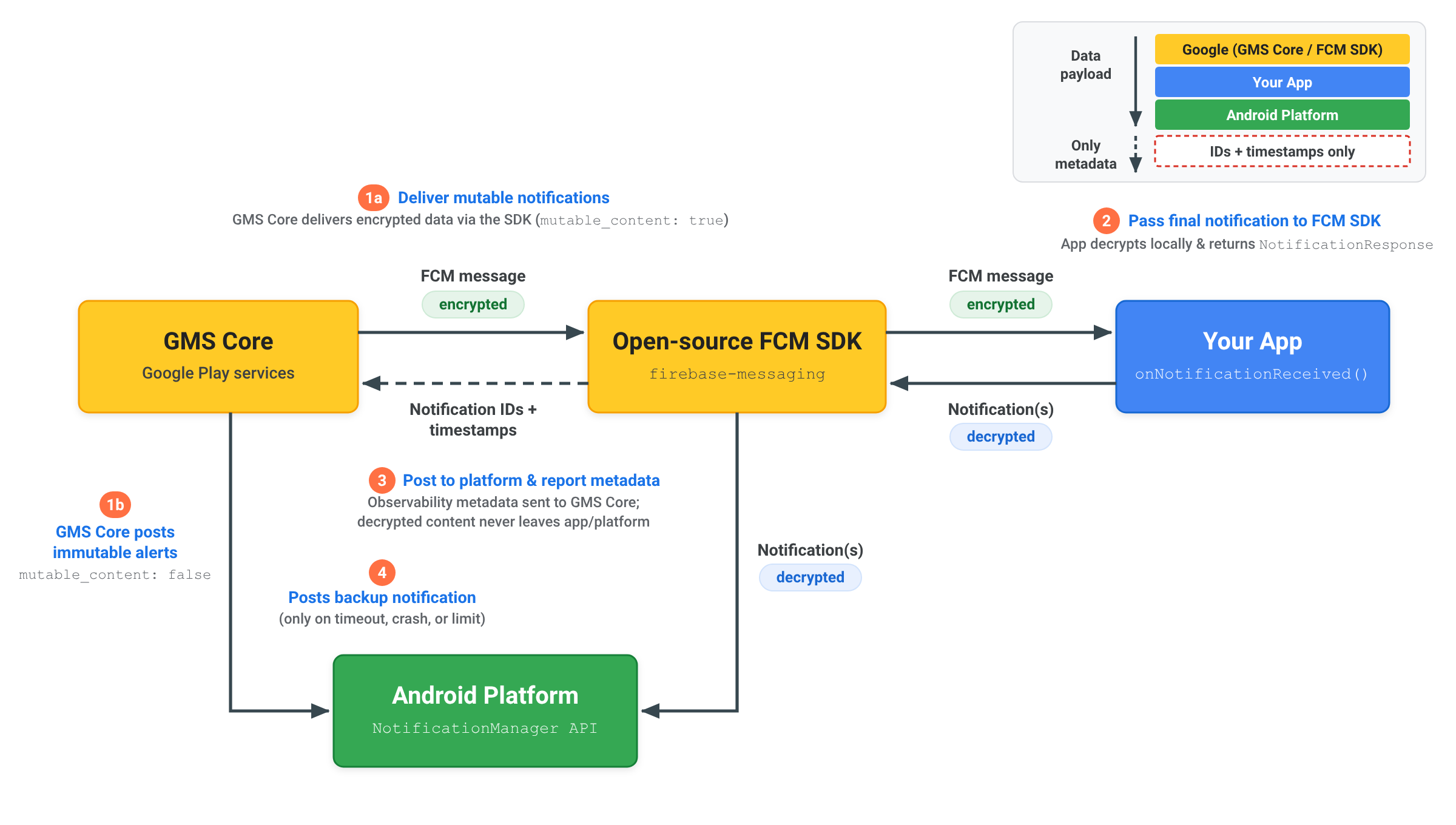
إرسال إشعارات مشفّرة بشكل تام بين الأطراف (E2EE)
عند إرسال إشعار مشفَّر بشكل تام بين الأطراف باستخدام
RemoteNotification، يبقى محتوى الإشعار الذي تم فك تشفيره
ضمن تطبيقك ونظام Android الأساسي:
- إرسال إشعار قابل للتغيير:
يرسل الخادم
RemoteNotificationمعmutable_content: true، والحمولة المشفّرة فيdata، ونسخة احتياطية عامة غير مشفّرةnotification. تُرسل المجموعة الرئيسية من خدمات Google للأجهزة الجوّالة الرسالة المشفّرة إلى حزمة تطوير البرامج (SDK) المفتوحة المصدر لـ "FCM" داخل تطبيقك. - فك تشفير الإشعار وإرجاعه: تستدعي حزمة تطوير البرامج (SDK) لـ FCM واجهة برمجة التطبيقات
onNotificationReceived(). يفكّ تطبيقك تشفير الحمولة محليًا، وينشئNotificationAndroid النهائي الذي تم فك تشفيره، ثم يمرّره مرة أخرى إلى حزمة تطوير البرامج (SDK) المفتوحة المصدر FCM باستخدامNotificationResponseأوFcmNotificationManager. - نشر البيانات الوصفية على النظام الأساسي وإعداد تقارير بشأنها: تنشر حزمة تطوير البرامج (SDK) المفتوحة المصدر FCM الإشعارات التي تم فك تشفيرها مباشرةً على واجهة برمجة التطبيقات
NotificationManagerلنظام Android الأساسي، وترسل فقط البيانات الوصفية للإشعارات، مثل معرّفات الإشعارات والطوابع الزمنية، إلى GMS Core لتتبُّع عملية التسليم. ولا يتم إرسال المحتوى الذي تم فك تشفيره إلى GMS Core مطلقًا. - نشر إشعار النسخ الاحتياطي إذا لزم الأمر: لا تنشر خدمات GMS Core النسخة الاحتياطية العامة
notificationمباشرةً على نظام Android الأساسي إلا إذا لم يستجب تطبيقك خلال مهلة الـ 20 ثانية أو تجاوز حدود الإيقاف في الخلفية.
فهم ميزتَي "إيقاف الإشعارات" و"المهلة"
للحفاظ على موثوقية تسليم الرسائل في منظومة Android المتكاملة، تطبّق خدمات GMS الأساسية
مهلات المعالجة وحدود حظر الإشعارات عند التعامل مع
رسائل RemoteNotification:
انتهت مهلة المعالجة
عند ضبط mutable_content على true، يجب أن تعرض طريقة onNotificationReceived() قيمة NotificationResponse خلال 20 ثانية. إذا تجاوز التنفيذ هذا الحدّ، يتم إلغاء طلب معاودة الاتصال، وتنشر خدمات GMS Core تلقائيًا إشعارًا احتياطيًا يتم عرضه من حمولة remote_notification.notification.
معدّل حظر الإشعارات
بما أنّ رسائل RemoteNotification تتجاوز قيود وضع "الاستراحة" لتنبيه المستخدمين
على الفور ويتم تسليمها بدون تأخير، من المتوقّع أن تعرض التطبيقات
إشعارات لرسائل RemoteNotification التي تم تلقّيها.
يُسمح لكل تطبيق بحجب ما يصل إلى% 25 من زيارات RemoteNotification أثناء تشغيله
في الخلفية. إذا تجاوز معدّل الإيقاف المؤقت للإشعارات في أحد التطبيقات
%25، يعرض GMS Core تلقائيًا إشعارًا احتياطيًا
ويعرضه من حمولة بيانات remote_notification.notification.
ولا يتم احتساب عمليات الإيقاف التي يتم إجراؤها عندما يكون التطبيق نشطًا في المقدّمة ضمن هذا الحدّ. وتُعفى أيضًا التطبيقات التي تم منحها أذونات استخدام غير مقيَّدة في الخلفية من حدود الإيقاف في الخلفية.