

เมื่อใช้ FCM AndroidConfigV2 คุณจะส่งข้อความที่ขับเคลื่อนด้วย Intent ไปยังอุปกรณ์ Android ได้ด้วยการส่งการแจ้งเตือนที่ทันท่วงทีและ API ที่เรียบง่าย
คู่มือนี้จะอธิบายวิธีย้ายข้อมูลคำขอส่งแบ็กเอนด์จาก AndroidConfig ไปยัง AndroidConfigV2 และวิธีอัปเดตไคลเอ็นต์แอปพลิเคชัน Android จากการจัดการ onMessageReceived เดิมเป็น Callback ของไคลเอ็นต์ v2 ใหม่ onNotificationReceived และ onBackgroundSyncReceived
มีอะไรใหม่ใน AndroidConfigV2
FCM AndroidConfigV2 API ช่วยลดความซับซ้อนของประสบการณ์การใช้งานของนักพัฒนาแอปด้วยการเปิดตัวข้อความ 2 ประเภท ได้แก่
RemoteNotification: แนะนำสำหรับข้อความ FCM ทั้งหมดที่แสดงการแจ้งเตือนที่ผู้ใช้มองเห็นได้ซึ่งมีความเร่งด่วนและมีเวลาจำกัด ข้อความเหล่านี้จะข้ามมาตรการประหยัดแบตเตอรี่และส่งถึงผู้ใช้โดยไม่ล่าช้า ในอุปกรณ์ SDK ของ FCM และบริการ Google Play จะเป็นเจ้าของในการโพสต์การแจ้งเตือนไปยังNotificationManagerของ AndroidBackgroundSync: ข้อความข้อมูลที่ไม่เร่งด่วนซึ่งมีไว้สำหรับการซิงค์ในเบื้องหลังและการอัปเดตสถานะแอป การส่งอาจรวมเป็นกลุ่มหรือล่าช้าเพื่อยืดอายุการใช้งานแบตเตอรี่
| ฟีเจอร์ | เดิม (AndroidConfig v1) |
ใหม่ (AndroidConfigV2) |
|---|---|---|
| ฟิลด์กำหนดค่า | message.android |
message.android_v2 |
| คำจำกัดความของรายการสำคัญ | priority: "high" หรือ priority: "normal" ที่โจ่งแจ้ง |
โดยนัยตามประเภทการรวม (remote_notification สำหรับการแจ้งเตือนด่วนเทียบกับ background_sync สำหรับการซิงค์ที่ไม่ด่วน) |
| การโพสต์การแจ้งเตือน | แอปโทรหา NotificationManager.notify() ด้วยตนเอง |
FCM SDK และ GMS Core จะโพสต์โดยตรงหรือใช้ NotificationResponse |
| Callback ของไคลเอ็นต์ | • onMessageReceived(RemoteMessage)• onDeletedMessages() |
• onNotificationReceived(RemoteMessage)• onBackgroundSyncReceived(RemoteMessage)• onDeletedMessages() |
| ความสามารถในการยุบ | แตกต่างกันไป ต้องมีการตั้งค่าที่ชัดเจน | ข้อความทั้ง 2 ประเภทอาจเป็นแบบยุบได้หรือยุบไม่ได้ (ยุบไม่ได้โดยค่าเริ่มต้น) |
ให้สิทธิ์คำขอส่ง AndroidConfigV2
คุณสามารถใช้โทเค็นเพื่อการเข้าถึง OAuth 2.0 ที่ได้จากบัญชีบริการ Firebase ต่อไปได้โดยใช้ข้อมูลรับรองเริ่มต้นของแอปพลิเคชัน Google หรือ Admin SDK และส่งคำขอ POST ไปยังปลายทาง HTTP v1 messages:send
หากไม่ได้ใช้บัญชีบริการ Firebase โปรดตรวจสอบว่าได้มอบหมายบัญชีเฉพาะให้กับบทบาทผู้ดูแลระบบ Firebase Cloud Messaging API (roles/firebase.messagingAdmin)
และขอขอบเขต OAuth 2.0 https://www.googleapis.com/auth/firebase.messaging เมื่อสร้างโทเค็นเพื่อการเข้าถึง
POST https://fcm.googleapis.com/v1/projects/YOUR_PROJECT_ID/messages:send HTTP/1.1
Authorization: Bearer YOUR_OAUTH_ACCESS_TOKEN
Content-Type: application/json
อัปเดตคำขอส่งของเซิร์ฟเวอร์ (REST)
หากต้องการส่งคำขอ AndroidConfigV2 โดยใช้ REST API ให้แทนที่ออบเจ็กต์ android ในเนื้อหาคำขอด้วย android_v2 ภายใน android_v2 ให้ระบุพารามิเตอร์ทั่วไป (เช่น ttl, collapse_key, data และ restricted_package_name) และระบุฟิลด์ Union อย่างใดอย่างหนึ่งต่อไปนี้ remote_notification หรือ background_sync
ส่งข้อความ RemoteNotification
หากต้องการส่งการแจ้งเตือนด่วนที่แสดงต่อผู้ใช้ ให้ใส่ออบเจ็กต์ remote_notification และเพย์โหลด notification ที่แนะนำ โดยค่าเริ่มต้น mutable_content จะตั้งค่าเป็นเท็จ GMS Core จะแสดงผลและโพสต์การแจ้งเตือนไปยังถาดระบบทันทีโดยไม่ต้องเรียกใช้โค้ดแอปในเบื้องหลัง
ตัวอย่าง JSON ของคำขอ HTTP ที่สมบูรณ์ (การแจ้งเตือนที่แสดงผลโดยอัตโนมัติ)
POST https://fcm.googleapis.com/v1/projects/myproject-b5ae1/messages:send HTTP/1.1
Content-Type: application/json
Authorization: Bearer ya29.ElqKBGN2Ri_Uz...HnS_uNreA

{
  "message": {
    "token": "bk3RNwTe3H0:CI2k_HHwgIpoDKCIZvvDMExUdFQ3P1...",
    "notification": {
      "title": "FCM Message",
      "body": "This is an FCM notification message!"
    },
    "android_v2": {
      "ttl": "3600s",
      "remote_notification": {
        "mutable_content": false,
        "notification": {
          "title": "Order update",
          "body": "Your order has been shipped!",
          "icon": "ic_notification_custom",
          "sound": "default",
          "tag": "alert_tag_1",
          "id": 100
        }
      }
    }
  }
}
ส่ง RemoteNotification ที่มีเนื้อหาที่เปลี่ยนแปลงได้
หากแอปพลิเคชันของคุณจำเป็นต้องแก้ไขการแจ้งเตือนในอุปกรณ์ก่อนที่จะแสดง ให้ตั้งค่า mutable_content: true ภายใน remote_notification ซึ่งจะสั่งให้ GMS Core เชื่อมโยงกับแอปพลิเคชันไคลเอ็นต์และเรียกใช้ onNotificationReceived() ซึ่งจะเป็นประโยชน์เมื่อคุณต้องการถอดรหัสเพย์โหลดที่เข้ารหัสจากต้นทางถึงปลายทาง แนบรูปโปรไฟล์ของผู้ใช้ หรือแปลสตริง
อย่าลืมใส่ออบเจ็กต์ notification ไว้ใน remote_notification แม้ว่า mutable_content จะเป็น true ก็ตาม GMS Core จะใช้ออบเจ็กต์ notification นี้เป็นการแจ้งเตือนสำรองหาก Callback ของไคลเอ็นต์หมดเวลาหรือเกินขีดจำกัดการระงับ
หากคุณกำลังย้ายข้อมูลจากข้อความข้อมูล v1 เดิมและต้องการให้ FCM ส่งเพย์โหลดไปยังการติดตั้งไคลเอ็นต์ v1 รุ่นเก่าเป็นข้อความข้อมูลล้วน ให้ตั้งค่า use_as_v1_data_message: true ภายใน remote_notification
ตัวอย่าง JSON ของคำขอ HTTP ที่สมบูรณ์
POST https://fcm.googleapis.com/v1/projects/myproject-b5ae1/messages:send HTTP/1.1
Content-Type: application/json
Authorization: Bearer ya29.ElqKBGN2Ri_Uz...HnS_uNreA

{
  "message": {
    "token": "bk3RNwTe3H0:CI2k_HHwgIpoDKCIZvvDMExUdFQ3P1...",
    "data": {
      "encrypted_content": "U2FsdGVkX19vN2m+",
      "sender_id": "user_98124"
    },
    "android_v2": {
      "ttl": "3600s",
      "remote_notification": {
        "mutable_content": true,
        "use_as_v1_data_message": true,
        "notification": {
          "title": "New message",
          "body": "You have a new message",
          "tag": "chat_alert",
          "id": 1001
        }
      }
    }
  }
}
ส่งข้อความ BackgroundSync
หากต้องการส่งข้อความที่ไม่เร่งด่วนสำหรับการซิงค์ข้อมูลในเบื้องหลัง การอัปเดตสถานะแบบไม่มีเสียง หรือการอัปเดตป้ายหรือวิดเจ็ตของแอป ให้ใช้ออบเจ็กต์ background_sync
อย่าใช้ข้อความเหล่านี้เพื่อโพสต์การแจ้งเตือนที่ผู้ใช้มองเห็นได้ เนื่องจากข้อความเหล่านี้อาจได้รับการรวมเป็นชุดหรือล่าช้าเพื่อเพิ่มประสิทธิภาพอายุการใช้งานแบตเตอรี่ของอุปกรณ์
ตัวอย่าง JSON ของคำขอ HTTP ที่สมบูรณ์
POST https://fcm.googleapis.com/v1/projects/myproject-b5ae1/messages:send HTTP/1.1
Content-Type: application/json
Authorization: Bearer ya29.ElqKBGN2Ri_Uz...HnS_uNreA

{
  "message": {
    "token": "bk3RNwTe3H0:CI2k_HHwgIpoDKCIZvvDMExUdFQ3P1...",
    "data": {
      "score": "FETCH_UPDATES",
      "sync_action": "FETCH_UPDATES"
    },
    "android_v2": {
      "ttl": "86400s",
      "collapse_key": "app_state_sync",
      "background_sync": {}
    }
  }
}
อัปเดต Callback ของไคลเอ็นต์ Android
หากต้องการรับข้อความ AndroidConfigV2 ใน Android ให้อัปเกรดแอปเพื่อใช้ SDK firebase-messaging เวอร์ชันล่าสุด อัปเดตบริการที่ขยาย FirebaseMessagingService โดยใช้ onNotificationReceived() และ onBackgroundSyncReceived()
ติดตั้ง EAP SDK
ในระหว่างช่วง EAP ระบบจะเผยแพร่ SDK v2 ของ firebase-messaging เป็นที่เก็บถาวรของที่เก็บ Maven ในเครื่องแทนที่จะเผยแพร่ผ่านที่เก็บ Maven สาธารณะของ Google
เพิ่มไดเรกทอรี
m2repositoryที่มีfirebase-messaging:26.1.0-eap01ลงในไดเรกทอรีรากของโปรเจ็กต์ Android (<project-root>/m2repository) โดยใช้ตัวเลือกใดตัวเลือกหนึ่งต่อไปนี้- ตัวเลือก ก: ดาวน์โหลดที่เก็บถาวรที่สร้างไว้ล่วงหน้า: ดาวน์โหลด FirebaseMessaging_26.1.0-eap01.zip และแตกไดเรกทอรี
m2repositoryลงในไดเรกทอรีรากของโปรเจ็กต์ Android (<project-root>/m2repository) ตัวเลือก ข: สร้างจาก GitHub ด้วย Gradle: โคลนสาขา
feature/fcm-android-config-v2-eapของfirebase/firebase-android-sdk, สร้างที่เก็บ Maven ในเครื่อง และคัดลอกไดเรกทอรีbuild/m2repositoryที่สร้างขึ้นไปยังรูทโปรเจ็กต์ Android ดังนี้git clone --branch feature/fcm-android-config-v2-eap --single-branch \ https://github.com/firebase/firebase-android-sdk.git cd firebase-android-sdk ./gradlew -PprojectsToPublish="firebase-messaging" firebasePublish cp -R build/m2repository /path/to/your/android-project/m2repository
- ตัวเลือก ก: ดาวน์โหลดที่เก็บถาวรที่สร้างไว้ล่วงหน้า: ดาวน์โหลด FirebaseMessaging_26.1.0-eap01.zip และแตกไดเรกทอรี
ใน
settings.gradle.kts(หรือsettings.gradle) ระดับโปรเจ็กต์ ให้เพิ่มไดเรกทอรีm2repositoryในเครื่องไว้ที่ด้านบนของบล็อกrepositoriesเหนือgoogle()ดังนี้Kotlin
dependencyResolutionManagement {
    repositoriesMode.set(RepositoriesMode.FAIL_ON_PROJECT_REPOS)
    repositories {
        maven { url = uri("${rootDir}/m2repository") }
        google()
        mavenCentral()
    }
}
Groovy
dependencyResolutionManagement {
    repositoriesMode.set(RepositoriesMode.FAIL_ON_PROJECT_REPOS)
    repositories {
        maven { url "${rootDir}/m2repository" }
        google()
        mavenCentral()
    }
}
ใน
app/build.gradle.kts(หรือapp/build.gradle) ระดับโมดูล ให้อัปเดตทรัพยากร Dependencyfirebase-messagingเป็น26.1.0-eap01ดังนี้Kotlin
dependencies {
    implementation("com.google.firebase:firebase-messaging:26.1.0-eap01")
}
Groovy
dependencies { implementation 'com.google.firebase:firebase-messaging:26.1.0-eap01' }ซิงค์โปรเจ็กต์กับไฟล์ Gradle
จัดการ RemoteNotifications ด้วย onNotificationReceived
เมื่อใช้ AndroidConfigV2 ระบบจะแสดงข้อความ RemoteNotification เว้นแต่จะตั้งค่า mutable_content เป็น "จริง" หรือปิดเสียงไว้อย่างชัดเจนใน onNotificationReceived()
เมื่อ RemoteNotification มาถึงพร้อมกับ mutable_content: true, GMS Core จะเชื่อมโยงกับแอปพลิเคชันของคุณและเรียกใช้ onNotificationReceived() เมธอดของคุณต้องแสดงผล NotificationResponse ภายใน 20 วินาที
แสดงผลการแจ้งเตือนที่แก้ไขแล้ว
ออบเจ็กต์ Notification ที่คุณส่งไปยัง NotificationResponse.create จะแทนที่พร็อพเพอร์ตี้เพย์โหลดสำรอง remote_notification.notification ของเซิร์ฟเวอร์ที่กำหนดไว้ในคำขอส่ง หากต้องการเก็บค่าจากคำขอส่ง ให้อ่านค่าจาก message.notification (message.getNotification() ใน Java) ขณะใช้การแก้ไขในอุปกรณ์
Kotlin
import androidx.core.app.NotificationCompat
import com.google.firebase.messaging.FirebaseMessagingService
import com.google.firebase.messaging.NotificationResponse
import com.google.firebase.messaging.RemoteMessage

class MyFirebaseMessagingService : FirebaseMessagingService() {

    override fun onNotificationReceived(message: RemoteMessage): NotificationResponse {
        val serverNotif = message.notification
        val channelId = serverNotif?.channelId ?: "default_channel"
        // Keep the server-defined title unchanged, or fall back to default
        val title = serverNotif?.title ?: "New message"
        // Modify the notification body on-device (for example, decrypting data)
        val decryptedBody = decryptPayload(message.data["encrypted_content"])

        val builder = NotificationCompat.Builder(this, channelId)
            .setSmallIcon(R.drawable.ic_stat_notification)
            .setContentTitle(title)
            .setContentText(decryptedBody)
            .setPriority(NotificationCompat.PRIORITY_HIGH)
            .setAutoCancel(true)

        // Return the response for the open-source FCM SDK to post to the Android platform
        return NotificationResponse.create("optional_tag", 100, builder.build())
    }
}
Java
import com.google.firebase.messaging.FirebaseMessagingService;
import com.google.firebase.messaging.RemoteMessage;
import com.google.firebase.messaging.NotificationResponse;
import androidx.core.app.NotificationCompat;

public class MyFirebaseMessagingService extends FirebaseMessagingService {

    @Override
    public NotificationResponse onNotificationReceived(RemoteMessage message) {
        RemoteMessage.Notification serverNotif = message.getNotification();
        String channelId = (serverNotif != null && serverNotif.getChannelId() != null)
                ? serverNotif.getChannelId()
                : "default_channel";
        // Keep the server-defined title unchanged, or fall back to default
        String title = (serverNotif != null && serverNotif.getTitle() != null)
                ? serverNotif.getTitle()
                : "New message";
        // Modify the notification body on-device (for example, decrypting data)
        String decryptedBody = decryptPayload(message.getData().get("encrypted_content"));

        NotificationCompat.Builder builder = new NotificationCompat.Builder(this, channelId)
                .setSmallIcon(R.drawable.ic_stat_notification)
                .setContentTitle(title)
                .setContentText(decryptedBody)
                .setPriority(NotificationCompat.PRIORITY_HIGH)
                .setAutoCancel(true);

        // Return the response for the open-source FCM SDK to post to the Android platform
        return NotificationResponse.create("optional_tag", 100, builder.build());
    }
}
ระงับการแจ้งเตือน
หากผู้ใช้เปิดหน้าจอหรือแชทที่เกี่ยวข้องอยู่ คุณสามารถระงับการแจ้งเตือนได้โดยแสดงผล NotificationResponse.suppress() ดังนี้
Kotlin
import androidx.lifecycle.Lifecycle
import androidx.lifecycle.ProcessLifecycleOwner

override fun onNotificationReceived(message: RemoteMessage): NotificationResponse {
    val chatId = message.data["chat_id"]
    val isAppForeground = ProcessLifecycleOwner.get()
        .lifecycle
        .currentState
        .isAtLeast(Lifecycle.State.STARTED)

    if (isAppForeground && chatRepository.isConversationActive(chatId)) {
        // Suppress notification display because the user is actively viewing this chat
        return NotificationResponse.suppress()
    }

    val builder = buildNotificationForChat(message)
    return NotificationResponse.create("chat_tag", 101, builder.build())
}
Java
import androidx.lifecycle.Lifecycle;
import androidx.lifecycle.ProcessLifecycleOwner;

@Override
public NotificationResponse onNotificationReceived(RemoteMessage message) {
    String chatId = message.getData().get("chat_id");
    boolean isAppForeground = ProcessLifecycleOwner.get()
            .getLifecycle()
            .getCurrentState()
            .isAtLeast(Lifecycle.State.STARTED);

    if (isAppForeground && chatRepository.isConversationActive(chatId)) {
        // Suppress notification display because the user is actively viewing this chat
        return NotificationResponse.suppress();
    }

    NotificationCompat.Builder builder = buildNotificationForChat(message);
    return NotificationResponse.create("chat_tag", 101, builder.build());
}
สตรีมการแจ้งเตือนหรือยกเลิกการแจ้งเตือนที่เก่ากว่า (FcmNotificationManager)
หากต้องการโพสต์การแจ้งเตือนหลายรายการสำหรับข้อความพุชขาเข้าเดียว หรือยกเลิกการแจ้งเตือนที่ล้าสมัยก่อนแสดงการแจ้งเตือนใหม่ ให้ใช้ FcmNotificationManager ดังนี้
Kotlin
override fun onNotificationReceived(message: RemoteMessage): NotificationResponse {
    // Retrieve the scoped manager for this message execution
    val manager = getFcmNotificationManager(message)

    // 1. Cancel an outdated notification right away
    manager.cancelNow("message_tag", 50)

    // 2. Post the item notification immediately
    val itemNotif = NotificationCompat.Builder(this, "chat_channel")
        .setSmallIcon(R.drawable.ic_message)
        .setContentTitle("Alex")
        .setContentText(message.data["text"])
    manager.postNow("item_tag", 51, itemNotif.build())

    // 3. Post a group summary notification
    val summaryNotif = NotificationCompat.Builder(this, "chat_channel")
        .setSmallIcon(R.drawable.ic_message)
        .setContentTitle("New Conversations")
        .setGroupSummary(true)
    manager.postNow("summary_tag", 52, summaryNotif.build())

    // 4. Return finished() to complete the streaming workflow
    return manager.finished()
}
Java
@Override
public NotificationResponse onNotificationReceived(RemoteMessage message) {
    // Retrieve the scoped manager for this message execution
    FcmNotificationManager manager = getFcmNotificationManager(message);

    // 1. Cancel an outdated notification right away
    manager.cancelNow("message_tag", 50);

    // 2. Post the item notification immediately
    NotificationCompat.Builder itemNotif = new NotificationCompat.Builder(this, "chat_channel")
            .setSmallIcon(R.drawable.ic_message)
            .setContentTitle("Alex")
            .setContentText(message.getData().get("text"));
    manager.postNow("item_tag", 51, itemNotif.build());

    // 3. Post a group summary notification
    NotificationCompat.Builder summaryNotif = new NotificationCompat.Builder(this, "chat_channel")
            .setSmallIcon(R.drawable.ic_message)
            .setContentTitle("New Conversations")
            .setGroupSummary(true);
    manager.postNow("summary_tag", 52, summaryNotif.build());

    // 4. Return finished() to complete the streaming workflow
    return manager.finished();
}
จัดการข้อความ BackgroundSync โดยใช้ onBackgroundSyncReceived
หากต้องการประมวลผลข้อความ BackgroundSync ใน Android ให้ใช้ onBackgroundSyncReceived() ดังนี้
Kotlin
override fun onBackgroundSyncReceived(message: RemoteMessage) {
    val syncCommand = message.data["sync_action"]

    try {
        // Perform local database synchronization or cache refresh
        AppDataRepository.getInstance(applicationContext).syncWithServer(syncCommand)
    } catch (e: Exception) {
        Log.e("FCM", "Background sync operation failed", e)
    }
    // Execution completes -> GMS Core marks the message as handled and unbinds.
}
Java
@Override
public void onBackgroundSyncReceived(RemoteMessage message) {
    String syncCommand = message.getData().get("sync_action");

    try {
        // Perform local database synchronization or cache refresh
        AppDataRepository.getInstance(getApplicationContext()).syncWithServer(syncCommand);
    } catch (Exception e) {
        Log.e("FCM", "Background sync operation failed", e);
    }
    // Execution completes -> GMS Core marks the message as handled and unbinds.
}
จัดการการลบข้อความที่รอดำเนินการโดยใช้ onDeletedMessages
ในบางสถานการณ์ เช่น เมื่ออุปกรณ์ไม่ได้เชื่อมต่อกับ FCM เป็นเวลานานหรือเมื่อคิวของเซิร์ฟเวอร์เต็ม FCM อาจลบข้อความที่รอดำเนินการก่อนนำส่ง ในกรณีเหล่านี้ ให้ลบล้าง
onDeletedMessages():
Kotlin
override fun onDeletedMessages() {
    // Perform a full state synchronization with your app server
    AppDataRepository.getInstance(applicationContext).scheduleFullSync()
}
Java
@Override
public void onDeletedMessages() {
    // Perform a full state synchronization with your app server
    AppDataRepository.getInstance(getApplicationContext()).scheduleFullSync();
}
ย้ายข้อมูลแอปที่เฉพาะเจาะจง
ส่งการแจ้งเตือนที่เข้ารหัสจากต้นทางถึงปลายทาง (E2EE)
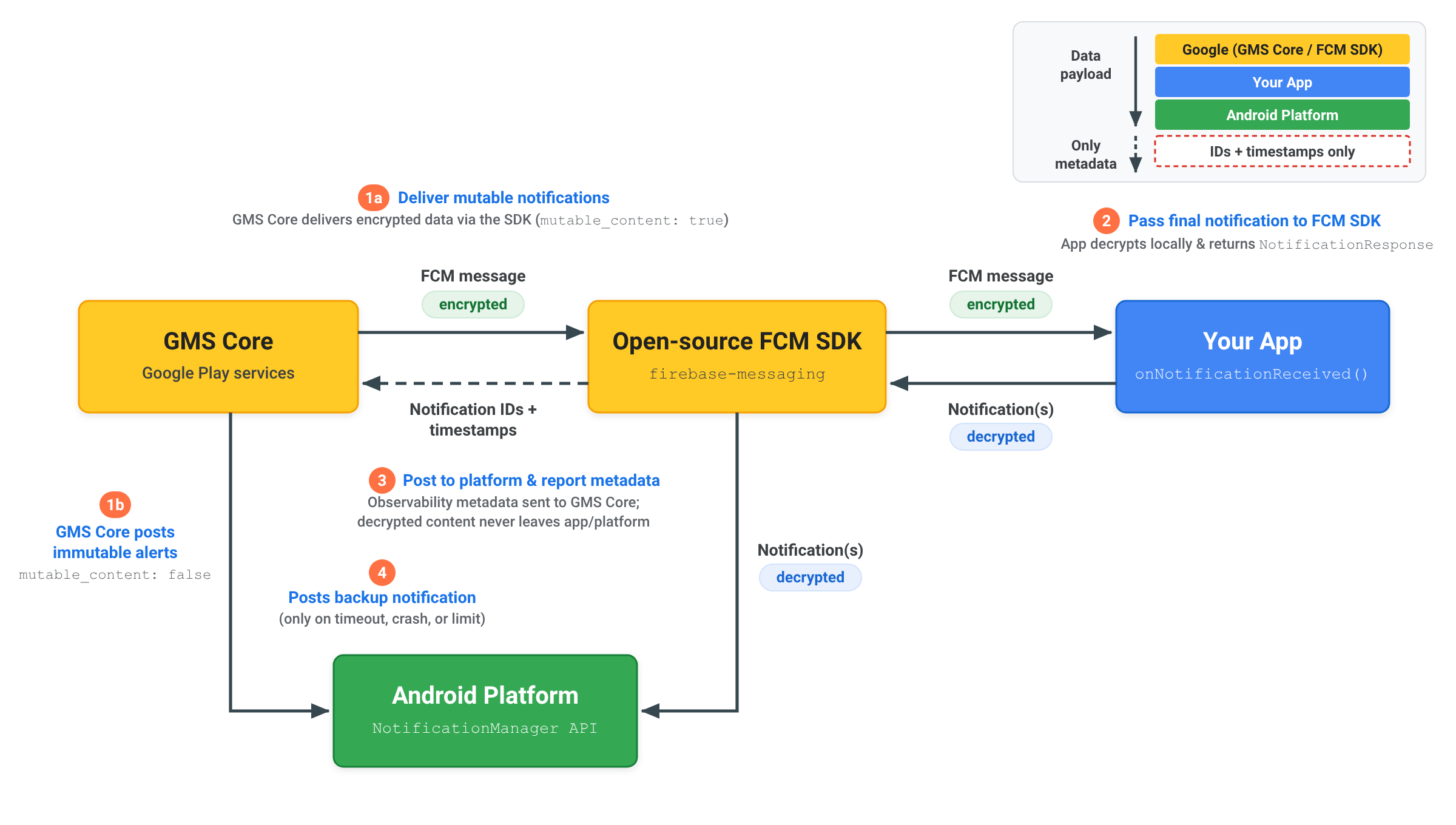
เมื่อส่งการแจ้งเตือนที่เข้ารหัสจากต้นทางถึงปลายทางโดยใช้ RemoteNotification เนื้อหาการแจ้งเตือนที่ถอดรหัสแล้วจะยังคงอยู่ในแอปและแพลตฟอร์ม Android ดังนี้
- ส่งการแจ้งเตือนที่เปลี่ยนแปลงได้:
เซิร์ฟเวอร์จะส่ง
RemoteNotificationพร้อมmutable_content: true, เพย์โหลดที่เข้ารหัสในdataและข้อมูลสำรองnotificationทั่วไปที่ไม่ได้เข้ารหัส GMS Core จะส่งข้อความที่เข้ารหัสไปยัง SDK FCM แบบโอเพนซอร์สภายในแอปของคุณ - ถอดรหัสและแสดงผลการแจ้งเตือน: SDK ของ FCM จะเรียกใช้
onNotificationReceived()แอปของคุณจะถอดรหัสเพย์โหลดในเครื่อง สร้างNotificationของ Android ที่ถอดรหัสขั้นสุดท้าย และส่งกลับไปยัง SDK FCM แบบโอเพนซอร์สโดยใช้NotificationResponseหรือFcmNotificationManager - โพสต์ไปยังแพลตฟอร์มและรายงานข้อมูลเมตา: SDK FCM โอเพนซอร์สจะโพสต์การแจ้งเตือนที่ถอดรหัสแล้วไปยัง API
NotificationManagerของแพลตฟอร์ม Android โดยตรง และส่งเฉพาะข้อมูลเมตาของการแจ้งเตือน เช่น รหัสการแจ้งเตือนและการประทับเวลา กลับไปยัง GMS Core เพื่อให้สังเกตการณ์การนำส่งได้ ระบบจะไม่ส่งเนื้อหาที่ถอดรหัสแล้วไปยัง GMS Core - โพสต์การแจ้งเตือนสำรองหากจำเป็น: GMS Core จะโพสต์
notificationสำรองทั่วไปไปยังแพลตฟอร์ม Android โดยตรงก็ต่อเมื่อแอปของคุณไม่ตอบสนองภายในระยะหมดเวลา 20 วินาทีหรือเกินขีดจำกัดการระงับในเบื้องหลังเท่านั้น
ทำความเข้าใจการระงับการแจ้งเตือนและการหมดเวลา
GMS Core จะใช้การหมดเวลาในการประมวลผลและขีดจำกัดการระงับการแจ้งเตือนเมื่อจัดการข้อความ RemoteNotification เพื่อรักษาการนำส่งที่เชื่อถือได้ทั่วทั้งระบบนิเวศของ Android
หมดเวลาในการประมวลผล
เมื่อตั้งค่า mutable_content เป็น true เมธอด onNotificationReceived() ต้องแสดงผล NotificationResponse ภายใน 20 วินาที หากการดำเนินการเกินเกณฑ์นี้ ระบบจะยกเลิก Callback และ GMS Core จะโพสต์การแจ้งเตือนสำรองที่แสดงผลจากเพย์โหลด remote_notification.notification โดยอัตโนมัติ
อัตราการระงับการแจ้งเตือน
เนื่องจากข้อความ RemoteNotification จะข้ามข้อจำกัดของโหมด Doze เพื่อแจ้งเตือนผู้ใช้ทันทีและส่งโดยไม่ล่าช้า แอปพลิเคชันจึงควรแสดงการแจ้งเตือนสำหรับข้อความ RemoteNotification ที่ได้รับ
แอปพลิเคชันทุกแอปได้รับอนุญาตให้ระงับการเข้าชม RemoteNotification ได้สูงสุด 25% ขณะทำงานอยู่เบื้องหลัง หากอัตราการระงับของแอปพลิเคชันเกิน 25% GMS Core จะแสดงผลและโพสต์การแจ้งเตือนสำรองที่แสดงผลจากเพย์โหลด remote_notification.notification โดยอัตโนมัติ
การระงับที่ดำเนินการเมื่อแอปพลิเคชันทำงานอยู่เบื้องหน้าจะไม่นับรวมในเกณฑ์นี้ แอปพลิเคชันที่ได้รับสิทธิ์การใช้งานในเบื้องหลังแบบไม่จำกัดจะได้รับการยกเว้นจากขีดจำกัดการระงับการทำงานในเบื้องหลังด้วย