

באמצעות FCM AndroidConfigV2, אתם יכולים לשלוח הודעות מבוססות-כוונה למכשירי Android עם מסירת התראות בזמן ו-API פשוט.
במדריך הזה מוסבר איך להעביר את בקשות השליחה של הקצה העורפי מ-AndroidConfig ל-AndroidConfigV2, ואיך לעדכן את לקוחות האפליקציה ל-Android מהטיפול הקודם ב-onMessageReceived לקריאות החוזרות החדשות של לקוח v2, onNotificationReceived ו-onBackgroundSyncReceived.
מה חדש ב-AndroidConfigV2
FCM AndroidConfigV2 API מפשט את חוויית המפתחים על ידי הוספת שני סוגי הודעות:
-
RemoteNotification: מומלץ לכל ההודעות ב-FCM שמוצגות בהן התראות דחופות ורגישות לזמן שגלויות למשתמשים. ההודעות האלה עוקפות את כל אמצעי החיסכון בסוללה ונשלחות ללא עיכוב. במכשיר, ה-SDK של FCM ו-Google Play Services אחראים על פרסום ההתראה ב-NotificationManagerשל Android. -
BackgroundSync: הודעות נתונים לא דחופות שמיועדות לסנכרון ברקע ולעדכונים של מצב האפליקציה. כדי לחסוך בחיי הסוללה, יכול להיות שההתראות יישלחו במרוכז או באיחור.
| תכונה | דור קודם (AndroidConfig גרסה 1) |
חדש (AndroidConfigV2) |
|---|---|---|
| שדה תצורה | message.android |
message.android_v2 |
| הגדרת העדיפות | בוטה priority: "high" או priority: "normal" |
משתמע מסוג האיחוד (remote_notification להתראות דחופות לעומת background_sync לסנכרון לא דחוף) |
| פרסום התראות | האפליקציה מתקשרת באופן ידני אל NotificationManager.notify() |
FCM SDK ו-GMS Core מפרסמים ישירות או באמצעות NotificationResponse |
| קריאות חוזרות (callbacks) של לקוחות | • onMessageReceived(RemoteMessage)• onDeletedMessages() |
• onNotificationReceived(RemoteMessage)• onBackgroundSyncReceived(RemoteMessage)• onDeletedMessages() |
| יכולת כיווץ | משתנה, נדרשת הגדרה מפורשת | שני סוגי ההודעות יכולים להיות ניתנים לכיווץ או לא ניתנים לכיווץ (לא ניתנים לכיווץ כברירת מחדל) |
אישור בקשות שליחה של AndroidConfigV2
אתם יכולים להמשיך להשתמש בטוקני גישה מסוג OAuth 2.0 שנוצרו מחשבון השירות של Firebase באמצעות Application Default Credentials (ADC) של Google או ה-SDK לאדמינים, ולשלוח בקשות POST לנקודת הקצה messages:send של HTTP v1.
אם אתם לא משתמשים בחשבון השירות של Firebase, הקפידו להקצות את החשבון הייעודי לתפקיד אדמין של העברת הודעות בענן ב-Firebase API (roles/firebase.messagingAdmin) ובקשו את היקף ההרשאות https://www.googleapis.com/auth/firebase.messaging של OAuth 2.0 כשאתם יוצרים טוקני גישה:
POST https://fcm.googleapis.com/v1/projects/YOUR_PROJECT_ID/messages:send HTTP/1.1
Authorization: Bearer YOUR_OAUTH_ACCESS_TOKEN
Content-Type: application/json
בקשות לשליחת עדכונים לשרת (REST)
כדי לשלוח בקשת AndroidConfigV2 באמצעות ה-API בארכיטקטורת REST, מחליפים את האובייקט android בגוף הבקשה ב-android_v2. בתוך android_v2, מציינים פרמטרים נפוצים (כמו ttl, collapse_key, data ו-restricted_package_name), ומספקים אחד משדות האיחוד הבאים: remote_notification או background_sync.
שליחת הודעת RemoteNotification
כדי לשלוח התראה דחופה שגלויה למשתמשים, צריך לכלול את האובייקט remote_notification ואת המטען הייעודי (payload) המומלץ שלו, notification. כברירת מחדל, הערך של mutable_content מוגדר כ-false. GMS Core מעבד מיד את ההתראה ומפרסם אותה במגש המערכת בלי להריץ את קוד האפליקציה ברקע.
דוגמה לקובץ JSON של בקשת HTTP מלאה (התראה שמוצגת באופן אוטומטי)
POST https://fcm.googleapis.com/v1/projects/myproject-b5ae1/messages:send HTTP/1.1
Content-Type: application/json
Authorization: Bearer ya29.ElqKBGN2Ri_Uz...HnS_uNreA

{
  "message": {
    "token": "bk3RNwTe3H0:CI2k_HHwgIpoDKCIZvvDMExUdFQ3P1...",
    "notification": {
      "title": "FCM Message",
      "body": "This is an FCM notification message!"
    },
    "android_v2": {
      "ttl": "3600s",
      "remote_notification": {
        "mutable_content": false,
        "notification": {
          "title": "Order update",
          "body": "Your order has been shipped!",
          "icon": "ic_notification_custom",
          "sound": "default",
          "tag": "alert_tag_1",
          "id": 100
        }
      }
    }
  }
}
שליחת RemoteNotification עם תוכן שניתן לשינוי
אם האפליקציה צריכה לשנות את ההתראה במכשיר לפני שהיא מוצגת, צריך להגדיר את mutable_content: true בתוך remote_notification. הפעולה הזו מורה ל-GMS Core להתחבר לאפליקציית הלקוח ולהפעיל את onNotificationReceived(). זה שימושי כשרוצים לפענח מטען ייעודי (payload) מוצפן מקצה לקצה, לצרף דמויות Avatar של משתמשים או להתאים מחרוזות לשוק המקומי.
חשוב לכלול אובייקט notification בתוך remote_notification גם כש-mutable_content הוא true. GMS Core משתמש באובייקט notification הזה כהתראה חלופית אם פג הזמן הקצוב לתפוגה של הקריאה החוזרת (callback) של הלקוח, או אם היא חורגת ממגבלות ההשתקה.
אם אתם עוברים מהודעות נתונים בגרסה 1 הקודמת ואתם רוצים ש-FCM יעביר את המטען הייעודי (payload) להתקנות של לקוחות בגרסה 1 הישנה יותר כהודעת נתונים טהורה, צריך להגדיר את use_as_v1_data_message: true בתוך remote_notification.
דוגמה לקובץ JSON של בקשת HTTP מלאה
POST https://fcm.googleapis.com/v1/projects/myproject-b5ae1/messages:send HTTP/1.1
Content-Type: application/json
Authorization: Bearer ya29.ElqKBGN2Ri_Uz...HnS_uNreA

{
  "message": {
    "token": "bk3RNwTe3H0:CI2k_HHwgIpoDKCIZvvDMExUdFQ3P1...",
    "data": {
      "encrypted_content": "U2FsdGVkX19vN2m+",
      "sender_id": "user_98124"
    },
    "android_v2": {
      "ttl": "3600s",
      "remote_notification": {
        "mutable_content": true,
        "use_as_v1_data_message": true,
        "notification": {
          "title": "New message",
          "body": "You have a new message",
          "tag": "chat_alert",
          "id": 1001
        }
      }
    }
  }
}
שליחת הודעת BackgroundSync
כדי לשלוח הודעה לא דחופה לסנכרון נתונים ברקע, עדכוני סטטוס שקטים או עדכון של תג או ווידג'ט של אפליקציה, צריך להשתמש באובייקט background_sync.
אל תשתמשו בהודעות האלה כדי לפרסם התראות שגלויות למשתמשים, כי יכול להיות שהן יקובצו או יתעכבו כדי לשפר את חיי הסוללה של המכשיר.
דוגמה לקובץ JSON של בקשת HTTP מלאה
POST https://fcm.googleapis.com/v1/projects/myproject-b5ae1/messages:send HTTP/1.1
Content-Type: application/json
Authorization: Bearer ya29.ElqKBGN2Ri_Uz...HnS_uNreA

{
  "message": {
    "token": "bk3RNwTe3H0:CI2k_HHwgIpoDKCIZvvDMExUdFQ3P1...",
    "data": {
      "score": "FETCH_UPDATES",
      "sync_action": "FETCH_UPDATES"
    },
    "android_v2": {
      "ttl": "86400s",
      "collapse_key": "app_state_sync",
      "background_sync": {}
    }
  }
}
עדכון של פונקציות ה-callback של לקוח Android
כדי לקבל הודעות AndroidConfigV2 ב-Android, צריך לשדרג את האפליקציה כך שתשתמש בגרסה האחרונה של ה-SDK של firebase-messaging. מעדכנים את השירות שמרחיב את FirebaseMessagingService על ידי הטמעה של onNotificationReceived() ו-onBackgroundSyncReceived().
התקנת ה-SDK של גרסת הבטא (EAP)
במהלך התוכנית במודל הצטרפות מוקדמת, גרסה 2 של ה-SDK של firebase-messaging מופצת כארכיון מאגר מקומי של Maven, ולא דרך מאגר Maven הציבורי של Google.
מוסיפים את הספרייה
m2repositoryשמכילה אתfirebase-messaging:26.1.0-eap01לתיקיית השורש של פרויקט Android (<project-root>/m2repository) באחת מהדרכים הבאות:- אפשרות א': הורדת הארכיון שנוצר מראש: מורידים את הקובץ FirebaseMessaging_26.1.0-eap01.zip ומחלצים את הספרייה
m2repositoryלתיקיית השורש של פרויקט Android (<project-root>/m2repository). אפשרות ב': בנייה מ-GitHub באמצעות Gradle: משכפלים את ההסתעפות
feature/fcm-android-config-v2-eapשלfirebase/firebase-android-sdk, בונים את מאגר Maven המקומי ומעתיקים את הספרייהbuild/m2repositoryשנוצרה אל ספריית הבסיס של פרויקט Android:git clone --branch feature/fcm-android-config-v2-eap --single-branch \ https://github.com/firebase/firebase-android-sdk.git cd firebase-android-sdk ./gradlew -PprojectsToPublish="firebase-messaging" firebasePublish cp -R build/m2repository /path/to/your/android-project/m2repository
- אפשרות א': הורדת הארכיון שנוצר מראש: מורידים את הקובץ FirebaseMessaging_26.1.0-eap01.zip ומחלצים את הספרייה
בקובץ
settings.gradle.kts(אוsettings.gradle) ברמת הפרויקט, מוסיפים את הספרייה המקומיתm2repositoryלחלק העליון של הבלוקrepositories, מעלgoogle():Kotlin
dependencyResolutionManagement {
    repositoriesMode.set(RepositoriesMode.FAIL_ON_PROJECT_REPOS)
    repositories {
        maven { url = uri("${rootDir}/m2repository") }
        google()
        mavenCentral()
    }
}
Groovy
dependencyResolutionManagement {
    repositoriesMode.set(RepositoriesMode.FAIL_ON_PROJECT_REPOS)
    repositories {
        maven { url "${rootDir}/m2repository" }
        google()
        mavenCentral()
    }
}
בקובץ
app/build.gradle.kts(אוapp/build.gradle) ברמת המודול, מעדכנים את יחסי התלות שלfirebase-messagingל-26.1.0-eap01:Kotlin
dependencies {
    implementation("com.google.firebase:firebase-messaging:26.1.0-eap01")
}
Groovy
dependencies { implementation 'com.google.firebase:firebase-messaging:26.1.0-eap01' }מסנכרנים את הפרויקט עם קובצי Gradle.
טיפול ב-RemoteNotifications באמצעות onNotificationReceived
עם AndroidConfigV2, מוצגות הודעות RemoteNotification, אלא אם mutable_content מוגדר כ-true או שהן מושתקות באופן מפורש ב-onNotificationReceived().
כשמגיעה הודעת RemoteNotification עם mutable_content: true, GMS Core נקשר לאפליקציה וקורא ל-onNotificationReceived(). השיטה צריכה להחזיר NotificationResponse תוך 20 שניות.
החזרת התראה ששונתה
האובייקט Notification שאתם מעבירים אל NotificationResponse.create מחליף את מאפייני המטען הייעודי (payload) החלופי של remote_notification.notification בשרת, שמוגדרים בבקשת השליחה. כדי לשמור ערכים מבקשת השליחה, קוראים אותם מ-message.notification (message.getNotification() ב-Java) ומחילים שינויים במכשיר:
Kotlin
import androidx.core.app.NotificationCompat
import com.google.firebase.messaging.FirebaseMessagingService
import com.google.firebase.messaging.NotificationResponse
import com.google.firebase.messaging.RemoteMessage

class MyFirebaseMessagingService : FirebaseMessagingService() {

    override fun onNotificationReceived(message: RemoteMessage): NotificationResponse {
        val serverNotif = message.notification
        val channelId = serverNotif?.channelId ?: "default_channel"
        // Keep the server-defined title unchanged, or fall back to default
        val title = serverNotif?.title ?: "New message"
        // Modify the notification body on-device (for example, decrypting data)
        val decryptedBody = decryptPayload(message.data["encrypted_content"])

        val builder = NotificationCompat.Builder(this, channelId)
            .setSmallIcon(R.drawable.ic_stat_notification)
            .setContentTitle(title)
            .setContentText(decryptedBody)
            .setPriority(NotificationCompat.PRIORITY_HIGH)
            .setAutoCancel(true)

        // Return the response for the open-source FCM SDK to post to the Android platform
        return NotificationResponse.create("optional_tag", 100, builder.build())
    }
}
Java
import com.google.firebase.messaging.FirebaseMessagingService;
import com.google.firebase.messaging.RemoteMessage;
import com.google.firebase.messaging.NotificationResponse;
import androidx.core.app.NotificationCompat;

public class MyFirebaseMessagingService extends FirebaseMessagingService {

    @Override
    public NotificationResponse onNotificationReceived(RemoteMessage message) {
        RemoteMessage.Notification serverNotif = message.getNotification();
        String channelId = (serverNotif != null && serverNotif.getChannelId() != null)
                ? serverNotif.getChannelId()
                : "default_channel";
        // Keep the server-defined title unchanged, or fall back to default
        String title = (serverNotif != null && serverNotif.getTitle() != null)
                ? serverNotif.getTitle()
                : "New message";
        // Modify the notification body on-device (for example, decrypting data)
        String decryptedBody = decryptPayload(message.getData().get("encrypted_content"));

        NotificationCompat.Builder builder = new NotificationCompat.Builder(this, channelId)
                .setSmallIcon(R.drawable.ic_stat_notification)
                .setContentTitle(title)
                .setContentText(decryptedBody)
                .setPriority(NotificationCompat.PRIORITY_HIGH)
                .setAutoCancel(true);

        // Return the response for the open-source FCM SDK to post to the Android platform
        return NotificationResponse.create("optional_tag", 100, builder.build());
    }
}
הסתרת התראה
אם המסך או הצ'אט הרלוונטיים פעילים כרגע אצל המשתמש, אפשר להסתיר את ההתראה על ידי החזרת הערך NotificationResponse.suppress():
Kotlin
import androidx.lifecycle.Lifecycle
import androidx.lifecycle.ProcessLifecycleOwner

override fun onNotificationReceived(message: RemoteMessage): NotificationResponse {
    val chatId = message.data["chat_id"]
    val isAppForeground = ProcessLifecycleOwner.get()
        .lifecycle
        .currentState
        .isAtLeast(Lifecycle.State.STARTED)

    if (isAppForeground && chatRepository.isConversationActive(chatId)) {
        // Suppress notification display because the user is actively viewing this chat
        return NotificationResponse.suppress()
    }

    val builder = buildNotificationForChat(message)
    return NotificationResponse.create("chat_tag", 101, builder.build())
}
Java
import androidx.lifecycle.Lifecycle;
import androidx.lifecycle.ProcessLifecycleOwner;

@Override
public NotificationResponse onNotificationReceived(RemoteMessage message) {
    String chatId = message.getData().get("chat_id");
    boolean isAppForeground = ProcessLifecycleOwner.get()
            .getLifecycle()
            .getCurrentState()
            .isAtLeast(Lifecycle.State.STARTED);

    if (isAppForeground && chatRepository.isConversationActive(chatId)) {
        // Suppress notification display because the user is actively viewing this chat
        return NotificationResponse.suppress();
    }

    NotificationCompat.Builder builder = buildNotificationForChat(message);
    return NotificationResponse.create("chat_tag", 101, builder.build());
}
התראות על סטרימינג או ביטול התראות ישנות יותר (FcmNotificationManager)
אם אתם צריכים לפרסם כמה התראות על התראת Push נכנסת אחת, או לבטל התראה ישנה לפני שמוצגת התראה חדשה, השתמשו ב-FcmNotificationManager:
Kotlin
override fun onNotificationReceived(message: RemoteMessage): NotificationResponse {
    // Retrieve the scoped manager for this message execution
    val manager = getFcmNotificationManager(message)

    // 1. Cancel an outdated notification right away
    manager.cancelNow("message_tag", 50)

    // 2. Post the item notification immediately
    val itemNotif = NotificationCompat.Builder(this, "chat_channel")
        .setSmallIcon(R.drawable.ic_message)
        .setContentTitle("Alex")
        .setContentText(message.data["text"])
    manager.postNow("item_tag", 51, itemNotif.build())

    // 3. Post a group summary notification
    val summaryNotif = NotificationCompat.Builder(this, "chat_channel")
        .setSmallIcon(R.drawable.ic_message)
        .setContentTitle("New Conversations")
        .setGroupSummary(true)
    manager.postNow("summary_tag", 52, summaryNotif.build())

    // 4. Return finished() to complete the streaming workflow
    return manager.finished()
}
Java
@Override
public NotificationResponse onNotificationReceived(RemoteMessage message) {
    // Retrieve the scoped manager for this message execution
    FcmNotificationManager manager = getFcmNotificationManager(message);

    // 1. Cancel an outdated notification right away
    manager.cancelNow("message_tag", 50);

    // 2. Post the item notification immediately
    NotificationCompat.Builder itemNotif = new NotificationCompat.Builder(this, "chat_channel")
            .setSmallIcon(R.drawable.ic_message)
            .setContentTitle("Alex")
            .setContentText(message.getData().get("text"));
    manager.postNow("item_tag", 51, itemNotif.build());

    // 3. Post a group summary notification
    NotificationCompat.Builder summaryNotif = new NotificationCompat.Builder(this, "chat_channel")
            .setSmallIcon(R.drawable.ic_message)
            .setContentTitle("New Conversations")
            .setGroupSummary(true);
    manager.postNow("summary_tag", 52, summaryNotif.build());

    // 4. Return finished() to complete the streaming workflow
    return manager.finished();
}
טיפול בהודעות BackgroundSync באמצעות onBackgroundSyncReceived
כדי לעבד הודעות BackgroundSync ב-Android, משתמשים ב-onBackgroundSyncReceived():
Kotlin
override fun onBackgroundSyncReceived(message: RemoteMessage) {
    val syncCommand = message.data["sync_action"]

    try {
        // Perform local database synchronization or cache refresh
        AppDataRepository.getInstance(applicationContext).syncWithServer(syncCommand)
    } catch (e: Exception) {
        Log.e("FCM", "Background sync operation failed", e)
    }
    // Execution completes -> GMS Core marks the message as handled and unbinds.
}
Java
@Override
public void onBackgroundSyncReceived(RemoteMessage message) {
    String syncCommand = message.getData().get("sync_action");

    try {
        // Perform local database synchronization or cache refresh
        AppDataRepository.getInstance(getApplicationContext()).syncWithServer(syncCommand);
    } catch (Exception e) {
        Log.e("FCM", "Background sync operation failed", e);
    }
    // Execution completes -> GMS Core marks the message as handled and unbinds.
}
טיפול בהודעות שממתינות למחיקה באמצעות onDeletedMessages
במצבים מסוימים, למשל כשמכשיר לא התחבר ל-FCM במשך תקופה ארוכה או כשהתור בשרת מלא, יכול להיות ש-FCM ימחק הודעות בהמתנה לפני שהן יישלחו. במקרים כאלה, צריך לשנות את הערך של onDeletedMessages():
Kotlin
override fun onDeletedMessages() {
    // Perform a full state synchronization with your app server
    AppDataRepository.getInstance(applicationContext).scheduleFullSync()
}
Java
@Override
public void onDeletedMessages() {
    // Perform a full state synchronization with your app server
    AppDataRepository.getInstance(getApplicationContext()).scheduleFullSync();
}
העברת אפליקציות ספציפיות
שליחת התראות מוצפנות מקצה לקצה (E2EE)
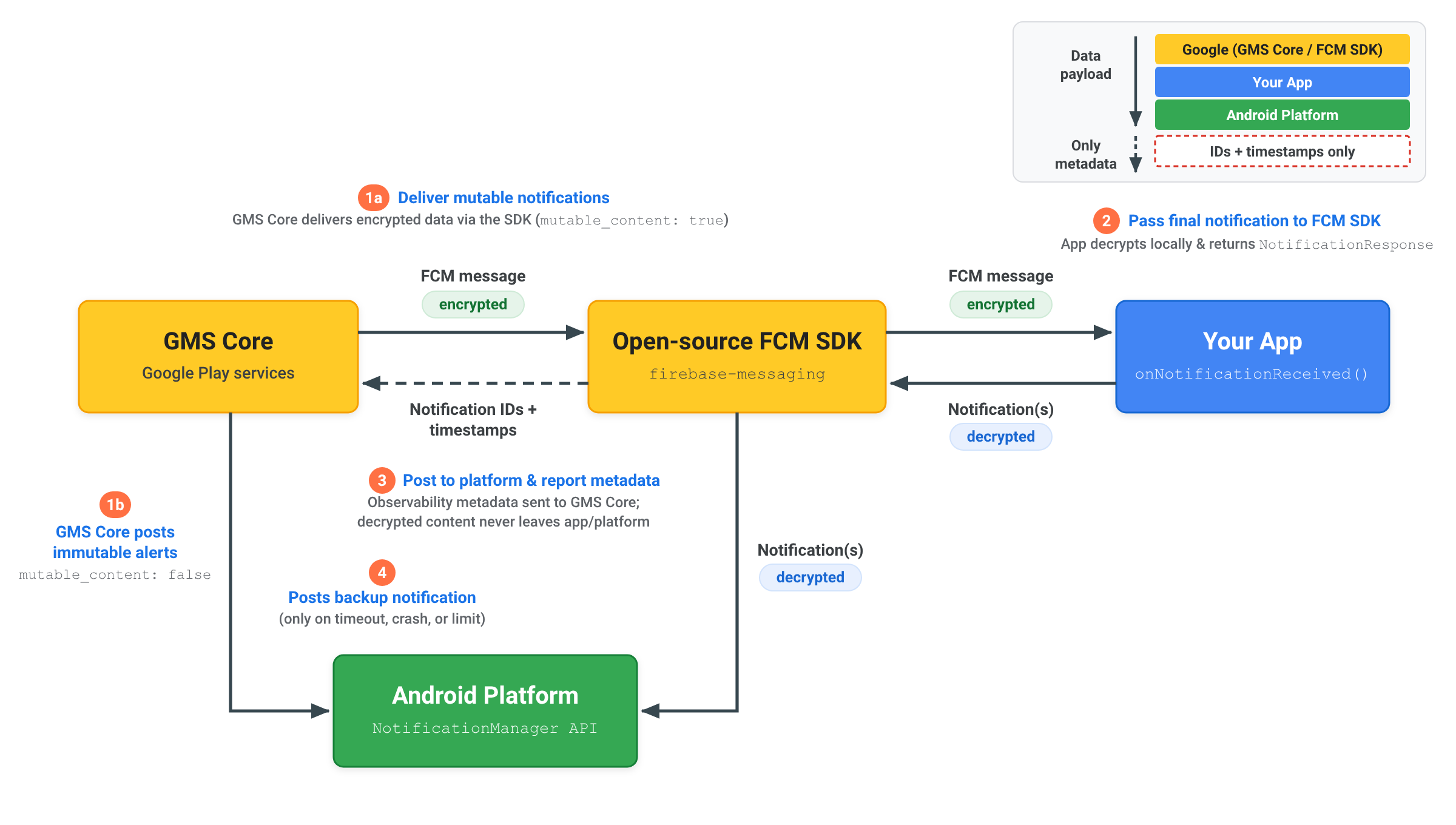
כששולחים התראה מוצפנת מקצה לקצה באמצעות RemoteNotification, תוכן ההתראה המפוענח נשאר באפליקציה ובפלטפורמת Android:
- שליחת התראה ניתנת לשינוי: השרת שולח
RemoteNotificationעםmutable_content: true, המטען הייעודי (payload) המוצפן ב-dataוגיבוי כללי לא מוצפןnotification. GMS Core מעביר את ההודעה המוצפנת ל-SDK של FCM בקוד פתוח באפליקציה. - פענוח והחזרת ההתראה: ה-SDK של FCM מפעיל את
onNotificationReceived(). האפליקציה מפענחת את המטען הייעודי (payload) באופן מקומי, יוצרת את ה-Notificationהסופי המפוענח של Android ומעבירה אותו בחזרה ל-SDK של FCM בקוד פתוח באמצעותNotificationResponseאוFcmNotificationManager. - פרסום בפלטפורמה ודיווח על מטא-נתונים: ערכת ה-SDK של FCM בקוד פתוח מפרסמת את ההתראה המפוענחת ישירות ל-API של פלטפורמת Android
NotificationManager, ושולחת רק מטא-נתונים של ההתראה, כמו מזהי התראות וחותמות זמן, בחזרה ל-GMS Core כדי לאפשר מעקב אחרי המסירה. תוכן מפוענח אף פעם לא נשלח אל GMS Core. - פרסום התראה חלופית במקרה הצורך: רק אם האפליקציה לא מגיבה תוך 20 שניות או חורגת ממגבלות ההשתקה ברקע, GMS Core מפרסם את ההתראה החלופית הגנרית
notificationישירות בפלטפורמת Android.
הסבר על השתקת התראות ועל הגבלת זמן
כדי לשמור על מסירה אמינה בסביבה העסקית של Android, GMS Core מחיל מגבלות על זמן קצוב לעיבוד ועל השתקת התראות כשמטפלים בהודעות RemoteNotification:
הזמן הקצוב לעיבוד פג
כשהערך של mutable_content מוגדר כ-true, השיטה onNotificationReceived() צריכה להחזיר NotificationResponse תוך 20 שניות. אם זמן הביצוע חורג מהסף הזה, הקריאה החוזרת מבוטלת ו-GMS Core מפרסם באופן אוטומטי התראה חלופית שנוצרה מהמטען הייעודי (payload) של remote_notification.notification.
שיעור ההתראות שהוסתרו
הודעות RemoteNotification עוקפות את ההגבלות של מצב Doze כדי להתריע למשתמשים באופן מיידי, והן נמסרות ללא עיכוב. לכן, האפליקציות אמורות להציג התראות על הודעות RemoteNotification שהתקבלו.
כל אפליקציה יכולה להפחית עד 25% מתעבורת הנתונים שלה ב-RemoteNotification בזמן שהיא פועלת ברקע. אם שיעור ההסתרה של אפליקציה מסוימת חורג מ-25%, GMS Core מעבד ומפרסם באופן אוטומטי התראה חלופית שמעובדת מהמטען הייעודי (payload) של remote_notification.notification.
הסתרות שבוצעו כשהאפליקציה פעילה בחזית לא נספרות במסגרת הסף הזה. אפליקציות שקיבלו הרשאות שימוש ברקע ללא הגבלה פטורות גם ממגבלות על דיכוי ברקע.