

FCM AndroidConfigV2 का इस्तेमाल करके, Android डिवाइसों पर इंटेंट के हिसाब से मैसेज भेजे जा सकते हैं. साथ ही, सूचनाएं समय पर डिलीवर की जा सकती हैं और एपीआई को आसानी से इस्तेमाल किया जा सकता है.
इस गाइड में, बैकएंड से भेजे जाने वाले अनुरोधों को AndroidConfig से AndroidConfigV2 पर माइग्रेट करने का तरीका बताया गया है. साथ ही, इसमें Android ऐप्लिकेशन क्लाइंट को पुराने onMessageReceived हैंडलिंग से नए v2 क्लाइंट कॉलबैक onNotificationReceived और onBackgroundSyncReceived पर अपडेट करने का तरीका बताया गया है.
AndroidConfigV2 में नया क्या है
FCM AndroidConfigV2 API, डेवलपर के अनुभव को आसान बनाता है. इसके लिए, यह दो तरह के मैसेज उपलब्ध कराता है:
RemoteNotification: यह उन सभी FCM मैसेज के लिए सुझाया जाता है जो उपयोगकर्ता को दिखने वाली ऐसी सूचना दिखाते हैं जो ज़रूरी और समय के हिसाब से संवेदनशील होती है. ये मैसेज, बैटरी बचाने के लिए किए गए किसी भी उपाय को बायपास करते हैं और बिना किसी देरी के डिलीवर होते हैं. डिवाइस पर, FCM SDK टूल और Google Play services, Android केNotificationManagerपर सूचना पोस्ट करने का मालिकाना हक लेते हैं.BackgroundSync: ऐसे डेटा मैसेज जो ज़रूरी नहीं हैं और जिनका मकसद बैकग्राउंड में सिंक करना और ऐप्लिकेशन की स्थिति को अपडेट करना है. बैटरी लाइफ़ को ऑप्टिमाइज़ करने के लिए, सूचनाओं को बैच में भेजा जा सकता है या उन्हें भेजने में देरी की जा सकती है.
| सुविधा | लेगसी (AndroidConfig v1) |
नया (AndroidConfigV2) |
|---|---|---|
| कॉन्फ़िगरेशन फ़ील्ड | message.android |
message.android_v2 |
| प्राथमिकता की परिभाषा | साफ़ तौर पर priority: "high" या priority: "normal" |
यूनियन टाइप से पता चलता है (ज़रूरी सूचनाओं के लिए remote_notification और सामान्य सिंक के लिए background_sync) |
| सूचना पोस्ट करना | ऐप्लिकेशन, मैन्युअल तरीके से NotificationManager.notify() को कॉल करता है |
FCM SDK और GMS Core, सीधे तौर पर या NotificationResponse का इस्तेमाल करके पोस्ट करता है |
| क्लाइंट कॉलबैक | • onMessageReceived(RemoteMessage)• onDeletedMessages() |
• onNotificationReceived(RemoteMessage)• onBackgroundSyncReceived(RemoteMessage)• onDeletedMessages() |
| छोटा किए जा सकने वाले विज्ञापन | अलग-अलग; साफ़ तौर पर सेटिंग करना ज़रूरी है | दोनों तरह के मैसेज, छोटा किए जा सकने वाले या छोटा न किए जा सकने वाले हो सकते हैं. हालांकि, डिफ़ॉल्ट रूप से ये छोटा न किए जा सकने वाले होते हैं |
AndroidConfigV2 के लिए, मैसेज भेजने के अनुरोधों को अनुमति देना
Google ऐप्लिकेशन के डिफ़ॉल्ट क्रेडेंशियल या Admin SDK का इस्तेमाल करके, अपने Firebase सेवा खाते से मिले OAuth 2.0 ऐक्सेस टोकन का इस्तेमाल जारी रखा जा सकता है. साथ ही, एचटीटीपी v1 messages:send एंडपॉइंट पर POST अनुरोध भेजे जा सकते हैं.
अगर Firebase सेवा खाते का इस्तेमाल नहीं किया जा रहा है, तो अपने खास खाते को Firebase क्लाउड से मैसेज API Admin भूमिका (roles/firebase.messagingAdmin) असाइन करें. साथ ही, ऐक्सेस टोकन बनाते समय https://www.googleapis.com/auth/firebase.messaging OAuth 2.0 के दायरे का अनुरोध करें:
POST https://fcm.googleapis.com/v1/projects/YOUR_PROJECT_ID/messages:send HTTP/1.1
Authorization: Bearer YOUR_OAUTH_ACCESS_TOKEN
Content-Type: application/json
सर्वर से अनुरोध भेजने की सुविधा को अपडेट करना (REST)
REST API का इस्तेमाल करके AndroidConfigV2 अनुरोध भेजने के लिए, अपने अनुरोध के मुख्य हिस्से में मौजूद android ऑब्जेक्ट को android_v2 से बदलें. android_v2 में, सामान्य पैरामीटर की जानकारी दें. जैसे, ttl, collapse_key, data, और restricted_package_name. साथ ही, इनमें से कोई एक यूनियन फ़ील्ड दें: remote_notification या background_sync.
RemoteNotification मैसेज भेजना
इस्तेमाल करने वाले लोगों के लिए ज़रूरी सूचना भेजने के लिए, remote_notification ऑब्जेक्ट और उसके लिए सुझाया गया notification पेलोड शामिल करें. डिफ़ॉल्ट रूप से, mutable_content
को 'गलत' पर सेट किया जाता है. जीएमएस कोर, बैकग्राउंड में ऐप्लिकेशन कोड को लागू किए बिना, सिस्टम ट्रे में सूचना को तुरंत रेंडर और पोस्ट करता है.
एचटीटीपी अनुरोध के JSON का पूरा सैंपल (अपने-आप रेंडर होने वाली सूचना)
POST https://fcm.googleapis.com/v1/projects/myproject-b5ae1/messages:send HTTP/1.1
Content-Type: application/json
Authorization: Bearer ya29.ElqKBGN2Ri_Uz...HnS_uNreA

{
  "message": {
    "token": "bk3RNwTe3H0:CI2k_HHwgIpoDKCIZvvDMExUdFQ3P1...",
    "notification": {
      "title": "FCM Message",
      "body": "This is an FCM notification message!"
    },
    "android_v2": {
      "ttl": "3600s",
      "remote_notification": {
        "mutable_content": false,
        "notification": {
          "title": "Order update",
          "body": "Your order has been shipped!",
          "icon": "ic_notification_custom",
          "sound": "default",
          "tag": "alert_tag_1",
          "id": 100
        }
      }
    }
  }
}
बदले जा सकने वाले कॉन्टेंट के साथ RemoteNotification भेजना
अगर आपके ऐप्लिकेशन को डिवाइस पर सूचना दिखाने से पहले उसमें बदलाव करना है, तो remote_notification में mutable_content: true सेट करें. इससे GMS Core को आपके क्लाइंट ऐप्लिकेशन से जुड़ने और onNotificationReceived() को शुरू करने का निर्देश मिलता है. यह तब मददगार होता है, जब आपको पूरी तरह सुरक्षित पेलोड को डिक्रिप्ट करना हो, उपयोगकर्ता के अवतार अटैच करने हों या स्ट्रिंग को स्थानीय भाषा में बदलना हो.
पक्का करें कि remote_notification में notification ऑब्जेक्ट शामिल हो. भले ही, mutable_content की वैल्यू true हो. अगर क्लाइंट कॉलबैक का टाइम आउट हो जाता है या सूचनाएं दिखाने की तय सीमा पार हो जाती है, तो GMS Core इस notification ऑब्जेक्ट का इस्तेमाल फ़ॉलबैक सूचना के तौर पर करता है.
अगर आपको v1 के लेगसी डेटा मैसेज से माइग्रेट करना है और FCM को पेलोड को v1 क्लाइंट के पुराने इंस्टॉलेशन पर, डेटा मैसेज के तौर पर डिलीवर करना है, तो remote_notification में use_as_v1_data_message: true सेट करें.
एचटीटीपी अनुरोध का पूरा JSON सैंपल
POST https://fcm.googleapis.com/v1/projects/myproject-b5ae1/messages:send HTTP/1.1
Content-Type: application/json
Authorization: Bearer ya29.ElqKBGN2Ri_Uz...HnS_uNreA

{
  "message": {
    "token": "bk3RNwTe3H0:CI2k_HHwgIpoDKCIZvvDMExUdFQ3P1...",
    "data": {
      "encrypted_content": "U2FsdGVkX19vN2m+",
      "sender_id": "user_98124"
    },
    "android_v2": {
      "ttl": "3600s",
      "remote_notification": {
        "mutable_content": true,
        "use_as_v1_data_message": true,
        "notification": {
          "title": "New message",
          "body": "You have a new message",
          "tag": "chat_alert",
          "id": 1001
        }
      }
    }
  }
}
बैकग्राउंड में सिंक करने का मैसेज भेजना
बैकग्राउंड में डेटा सिंक करने, साइलेंट स्टेट अपडेट करने या ऐप्लिकेशन बैज या विजेट को अपडेट करने के लिए, कोई ऐसा मैसेज भेजना जो ज़रूरी न हो, background_sync ऑब्जेक्ट का इस्तेमाल करें.
उपयोगकर्ता को दिखने वाली सूचनाएं पोस्ट करने के लिए, इन मैसेज का इस्तेमाल न करें. ऐसा इसलिए, क्योंकि डिवाइस की बैटरी लाइफ़ को ऑप्टिमाइज़ करने के लिए, इन्हें बैच में भेजा जा सकता है या इनमें देरी हो सकती है.
एचटीटीपी अनुरोध का पूरा JSON सैंपल
POST https://fcm.googleapis.com/v1/projects/myproject-b5ae1/messages:send HTTP/1.1
Content-Type: application/json
Authorization: Bearer ya29.ElqKBGN2Ri_Uz...HnS_uNreA

{
  "message": {
    "token": "bk3RNwTe3H0:CI2k_HHwgIpoDKCIZvvDMExUdFQ3P1...",
    "data": {
      "score": "FETCH_UPDATES",
      "sync_action": "FETCH_UPDATES"
    },
    "android_v2": {
      "ttl": "86400s",
      "collapse_key": "app_state_sync",
      "background_sync": {}
    }
  }
}
Android क्लाइंट कॉलबैक अपडेट करना
Android पर AndroidConfigV2 मैसेज पाने के लिए, अपने ऐप्लिकेशन को अपग्रेड करें, ताकि वह नए firebase-messaging SDK टूल का इस्तेमाल कर सके. onNotificationReceived() और onBackgroundSyncReceived() को लागू करके, FirebaseMessagingService को एक्सटेंड करने वाली अपनी सेवा को अपडेट करें.
ईएपी एसडीके इंस्टॉल करना
ईएपी के दौरान, firebase-messaging v2 SDK को Google की सार्वजनिक Maven रिपॉज़िटरी के बजाय, लोकल Maven रिपॉज़िटरी आर्काइव के तौर पर डिस्ट्रिब्यूट किया जाता है.
इनमें से किसी एक विकल्प का इस्तेमाल करके, अपने Android प्रोजेक्ट (
<project-root>/m2repository) की रूट डायरेक्ट्री में,firebase-messaging:26.1.0-eap01वालीm2repositoryडायरेक्ट्री जोड़ें:- विकल्प A: पहले से तैयार संग्रह डाउनलोड करें: FirebaseMessaging_26.1.0-eap01.zip डाउनलोड करें और
m2repositoryडायरेक्ट्री को अपने Android प्रोजेक्ट (<project-root>/m2repository) की रूट डायरेक्ट्री में एक्सट्रैक्ट करें. दूसरा विकल्प: Gradle की मदद से GitHub से बनाएं:
firebase/firebase-android-sdkकीfeature/fcm-android-config-v2-eapब्रांच को क्लोन करें, लोकल Maven रिपॉज़िटरी बनाएं, और जनरेट की गईbuild/m2repositoryडायरेक्ट्री को अपने Android प्रोजेक्ट रूट में कॉपी करें:git clone --branch feature/fcm-android-config-v2-eap --single-branch \ https://github.com/firebase/firebase-android-sdk.git cd firebase-android-sdk ./gradlew -PprojectsToPublish="firebase-messaging" firebasePublish cp -R build/m2repository /path/to/your/android-project/m2repository
- विकल्प A: पहले से तैयार संग्रह डाउनलोड करें: FirebaseMessaging_26.1.0-eap01.zip डाउनलोड करें और
अपने प्रोजेक्ट-लेवल
settings.gradle.kts(याsettings.gradle) में, लोकलm2repositoryडायरेक्ट्री को अपनेrepositoriesब्लॉक में सबसे ऊपर,google()के ऊपर जोड़ें:Kotlin
dependencyResolutionManagement {
    repositoriesMode.set(RepositoriesMode.FAIL_ON_PROJECT_REPOS)
    repositories {
        maven { url = uri("${rootDir}/m2repository") }
        google()
        mavenCentral()
    }
}
Groovy
dependencyResolutionManagement {
    repositoriesMode.set(RepositoriesMode.FAIL_ON_PROJECT_REPOS)
    repositories {
        maven { url "${rootDir}/m2repository" }
        google()
        mavenCentral()
    }
}
अपने मॉड्यूल-लेवल
app/build.gradle.kts(याapp/build.gradle) में,firebase-messagingडिपेंडेंसी को26.1.0-eap01पर अपडेट करें:Kotlin
dependencies {
    implementation("com.google.firebase:firebase-messaging:26.1.0-eap01")
}
Groovy
dependencies { implementation 'com.google.firebase:firebase-messaging:26.1.0-eap01' }अपने प्रोजेक्ट को Gradle फ़ाइलों के साथ सिंक करें.
onNotificationReceived की मदद से RemoteNotifications मैनेज करना
AndroidConfigV2 के साथ, RemoteNotification मैसेज तब तक दिखते हैं, जब तक mutable_content को 'सही है' पर सेट नहीं किया जाता या उन्हें onNotificationReceived() में सायलेंट नहीं किया जाता.
जब mutable_content: true के साथ RemoteNotification आता है, तब GMS Core आपके ऐप्लिकेशन से जुड़ जाता है और onNotificationReceived() को कॉल करता है. आपके तरीके को 20 सेकंड के अंदर NotificationResponse दिखाना होगा.
बदली गई सूचना को वापस करना
NotificationResponse.create को पास किया गया Notification ऑब्जेक्ट, सर्वर के remote_notification.notification फ़ॉलबैक पेलोड की उन प्रॉपर्टी को बदल देता है जिन्हें भेजने के अनुरोध में तय किया गया है. अनुरोध भेजने के दौरान वैल्यू को सेव रखने के लिए, उन्हें message.notification (Java में message.getNotification()) से पढ़ें. साथ ही, उपयोगकर्ता के डिवाइस पर बदलाव लागू करें:
Kotlin
import androidx.core.app.NotificationCompat
import com.google.firebase.messaging.FirebaseMessagingService
import com.google.firebase.messaging.NotificationResponse
import com.google.firebase.messaging.RemoteMessage

class MyFirebaseMessagingService : FirebaseMessagingService() {

    override fun onNotificationReceived(message: RemoteMessage): NotificationResponse {
        val serverNotif = message.notification
        val channelId = serverNotif?.channelId ?: "default_channel"
        // Keep the server-defined title unchanged, or fall back to default
        val title = serverNotif?.title ?: "New message"
        // Modify the notification body on-device (for example, decrypting data)
        val decryptedBody = decryptPayload(message.data["encrypted_content"])

        val builder = NotificationCompat.Builder(this, channelId)
            .setSmallIcon(R.drawable.ic_stat_notification)
            .setContentTitle(title)
            .setContentText(decryptedBody)
            .setPriority(NotificationCompat.PRIORITY_HIGH)
            .setAutoCancel(true)

        // Return the response for the open-source FCM SDK to post to the Android platform
        return NotificationResponse.create("optional_tag", 100, builder.build())
    }
}
Java
import com.google.firebase.messaging.FirebaseMessagingService;
import com.google.firebase.messaging.RemoteMessage;
import com.google.firebase.messaging.NotificationResponse;
import androidx.core.app.NotificationCompat;

public class MyFirebaseMessagingService extends FirebaseMessagingService {

    @Override
    public NotificationResponse onNotificationReceived(RemoteMessage message) {
        RemoteMessage.Notification serverNotif = message.getNotification();
        String channelId = (serverNotif != null && serverNotif.getChannelId() != null)
                ? serverNotif.getChannelId()
                : "default_channel";
        // Keep the server-defined title unchanged, or fall back to default
        String title = (serverNotif != null && serverNotif.getTitle() != null)
                ? serverNotif.getTitle()
                : "New message";
        // Modify the notification body on-device (for example, decrypting data)
        String decryptedBody = decryptPayload(message.getData().get("encrypted_content"));

        NotificationCompat.Builder builder = new NotificationCompat.Builder(this, channelId)
                .setSmallIcon(R.drawable.ic_stat_notification)
                .setContentTitle(title)
                .setContentText(decryptedBody)
                .setPriority(NotificationCompat.PRIORITY_HIGH)
                .setAutoCancel(true);

        // Return the response for the open-source FCM SDK to post to the Android platform
        return NotificationResponse.create("optional_tag", 100, builder.build());
    }
}
किसी सूचना को दबाना
अगर उपयोगकर्ता के पास फ़िलहाल काम की स्क्रीन या चैट चालू है, तो NotificationResponse.suppress() को वापस करके सूचना को दबाया जा सकता है:
Kotlin
import androidx.lifecycle.Lifecycle
import androidx.lifecycle.ProcessLifecycleOwner

override fun onNotificationReceived(message: RemoteMessage): NotificationResponse {
    val chatId = message.data["chat_id"]
    val isAppForeground = ProcessLifecycleOwner.get()
        .lifecycle
        .currentState
        .isAtLeast(Lifecycle.State.STARTED)

    if (isAppForeground && chatRepository.isConversationActive(chatId)) {
        // Suppress notification display because the user is actively viewing this chat
        return NotificationResponse.suppress()
    }

    val builder = buildNotificationForChat(message)
    return NotificationResponse.create("chat_tag", 101, builder.build())
}
Java
import androidx.lifecycle.Lifecycle;
import androidx.lifecycle.ProcessLifecycleOwner;

@Override
public NotificationResponse onNotificationReceived(RemoteMessage message) {
    String chatId = message.getData().get("chat_id");
    boolean isAppForeground = ProcessLifecycleOwner.get()
            .getLifecycle()
            .getCurrentState()
            .isAtLeast(Lifecycle.State.STARTED);

    if (isAppForeground && chatRepository.isConversationActive(chatId)) {
        // Suppress notification display because the user is actively viewing this chat
        return NotificationResponse.suppress();
    }

    NotificationCompat.Builder builder = buildNotificationForChat(message);
    return NotificationResponse.create("chat_tag", 101, builder.build());
}
सूचनाएं स्ट्रीम करना या पुरानी सूचनाएं रद्द करना (FcmNotificationManager)
अगर आपको एक ही पुश नोटिफ़िकेशन के लिए कई सूचनाएं पोस्ट करनी हैं या नई सूचना दिखाने से पहले पुरानी सूचना को रद्द करना है, तो FcmNotificationManager का इस्तेमाल करें:
Kotlin
override fun onNotificationReceived(message: RemoteMessage): NotificationResponse {
    // Retrieve the scoped manager for this message execution
    val manager = getFcmNotificationManager(message)

    // 1. Cancel an outdated notification right away
    manager.cancelNow("message_tag", 50)

    // 2. Post the item notification immediately
    val itemNotif = NotificationCompat.Builder(this, "chat_channel")
        .setSmallIcon(R.drawable.ic_message)
        .setContentTitle("Alex")
        .setContentText(message.data["text"])
    manager.postNow("item_tag", 51, itemNotif.build())

    // 3. Post a group summary notification
    val summaryNotif = NotificationCompat.Builder(this, "chat_channel")
        .setSmallIcon(R.drawable.ic_message)
        .setContentTitle("New Conversations")
        .setGroupSummary(true)
    manager.postNow("summary_tag", 52, summaryNotif.build())

    // 4. Return finished() to complete the streaming workflow
    return manager.finished()
}
Java
@Override
public NotificationResponse onNotificationReceived(RemoteMessage message) {
    // Retrieve the scoped manager for this message execution
    FcmNotificationManager manager = getFcmNotificationManager(message);

    // 1. Cancel an outdated notification right away
    manager.cancelNow("message_tag", 50);

    // 2. Post the item notification immediately
    NotificationCompat.Builder itemNotif = new NotificationCompat.Builder(this, "chat_channel")
            .setSmallIcon(R.drawable.ic_message)
            .setContentTitle("Alex")
            .setContentText(message.getData().get("text"));
    manager.postNow("item_tag", 51, itemNotif.build());

    // 3. Post a group summary notification
    NotificationCompat.Builder summaryNotif = new NotificationCompat.Builder(this, "chat_channel")
            .setSmallIcon(R.drawable.ic_message)
            .setContentTitle("New Conversations")
            .setGroupSummary(true);
    manager.postNow("summary_tag", 52, summaryNotif.build());

    // 4. Return finished() to complete the streaming workflow
    return manager.finished();
}
onBackgroundSyncReceived का इस्तेमाल करके, BackgroundSync मैसेज मैनेज करना
Android पर BackgroundSync मैसेज प्रोसेस करने के लिए, onBackgroundSyncReceived() का इस्तेमाल करें:
Kotlin
override fun onBackgroundSyncReceived(message: RemoteMessage) {
    val syncCommand = message.data["sync_action"]

    try {
        // Perform local database synchronization or cache refresh
        AppDataRepository.getInstance(applicationContext).syncWithServer(syncCommand)
    } catch (e: Exception) {
        Log.e("FCM", "Background sync operation failed", e)
    }
    // Execution completes -> GMS Core marks the message as handled and unbinds.
}
Java
@Override
public void onBackgroundSyncReceived(RemoteMessage message) {
    String syncCommand = message.getData().get("sync_action");

    try {
        // Perform local database synchronization or cache refresh
        AppDataRepository.getInstance(getApplicationContext()).syncWithServer(syncCommand);
    } catch (Exception e) {
        Log.e("FCM", "Background sync operation failed", e);
    }
    // Execution completes -> GMS Core marks the message as handled and unbinds.
}
onDeletedMessages का इस्तेमाल करके, मिटाए जाने के लिए बाकी बचे मैसेज मैनेज करना
कुछ मामलों में, FCM डिलीवर होने से पहले ही, बाकी बचे मैसेज मिटा सकता है. जैसे, जब कोई डिवाइस लंबे समय तक FCM से कनेक्ट न हो या सर्वर की सूची पूरी तरह से भर गई हो. ऐसे मामलों में, onDeletedMessages() को बदलें:
Kotlin
override fun onDeletedMessages() {
    // Perform a full state synchronization with your app server
    AppDataRepository.getInstance(applicationContext).scheduleFullSync()
}
Java
@Override
public void onDeletedMessages() {
    // Perform a full state synchronization with your app server
    AppDataRepository.getInstance(getApplicationContext()).scheduleFullSync();
}
चुनिंदा ऐप्लिकेशन माइग्रेट करना
पूरी तरह सुरक्षित (E2EE) सूचनाएं डिलीवर करना
RemoteNotification का इस्तेमाल करके, पूरी तरह सुरक्षित सूचना डिलीवर करते समय, डिक्रिप्ट की गई सूचना का कॉन्टेंट आपके ऐप्लिकेशन और Android प्लैटफ़ॉर्म में ही रहता है:
- बदलाव की जा सकने वाली सूचना डिलीवर करना:
आपका सर्वर
mutable_content: trueके साथRemoteNotification,dataमें एन्क्रिप्ट (सुरक्षित) किया गया पेलोड, और एन्क्रिप्ट (सुरक्षित) नहीं किया गया सामान्य बैकअपnotificationभेजता है. GMS Core, आपके ऐप्लिकेशन में मौजूद ओपन-सोर्स FCM SDK को एन्क्रिप्ट किया गया मैसेज भेजता है. - सूचना को डिक्रिप्ट करना और उसे वापस भेजना: FCM SDK,
onNotificationReceived()को शुरू करता है. आपका ऐप्लिकेशन, पेलोड को डिक्रिप्ट करता है और डिक्रिप्ट किए गए AndroidNotificationको बनाता है. इसके बाद, वहNotificationResponseयाFcmNotificationManagerका इस्तेमाल करके, इसे ओपन-सोर्स FCM SDK टूल को वापस भेजता है. - प्लैटफ़ॉर्म पर पोस्ट करना और मेटाडेटा की रिपोर्ट करना: ओपन सोर्स FCM एसडीके, डिक्रिप्ट की गई सूचना को सीधे Android प्लैटफ़ॉर्म
NotificationManagerएपीआई पर पोस्ट करता है. साथ ही, सूचना की डिलीवरी की जांच करने के लिए, GMS Core को सिर्फ़ सूचना का मेटाडेटा भेजता है. जैसे, सूचना आईडी और टाइमस्टैंप. डिक्रिप्ट किया गया कॉन्टेंट, कभी भी GMS Core को नहीं भेजा जाता. - ज़रूरत पड़ने पर, बैकअप की सूचना पोस्ट करना: अगर आपका ऐप्लिकेशन 20 सेकंड के टाइम आउट के अंदर जवाब नहीं देता है या बैकग्राउंड में काम करने की तय सीमा को पार कर जाता है, तो GMS Core, सामान्य बैकअप
notificationको सीधे Android प्लैटफ़ॉर्म पर पोस्ट करता है.
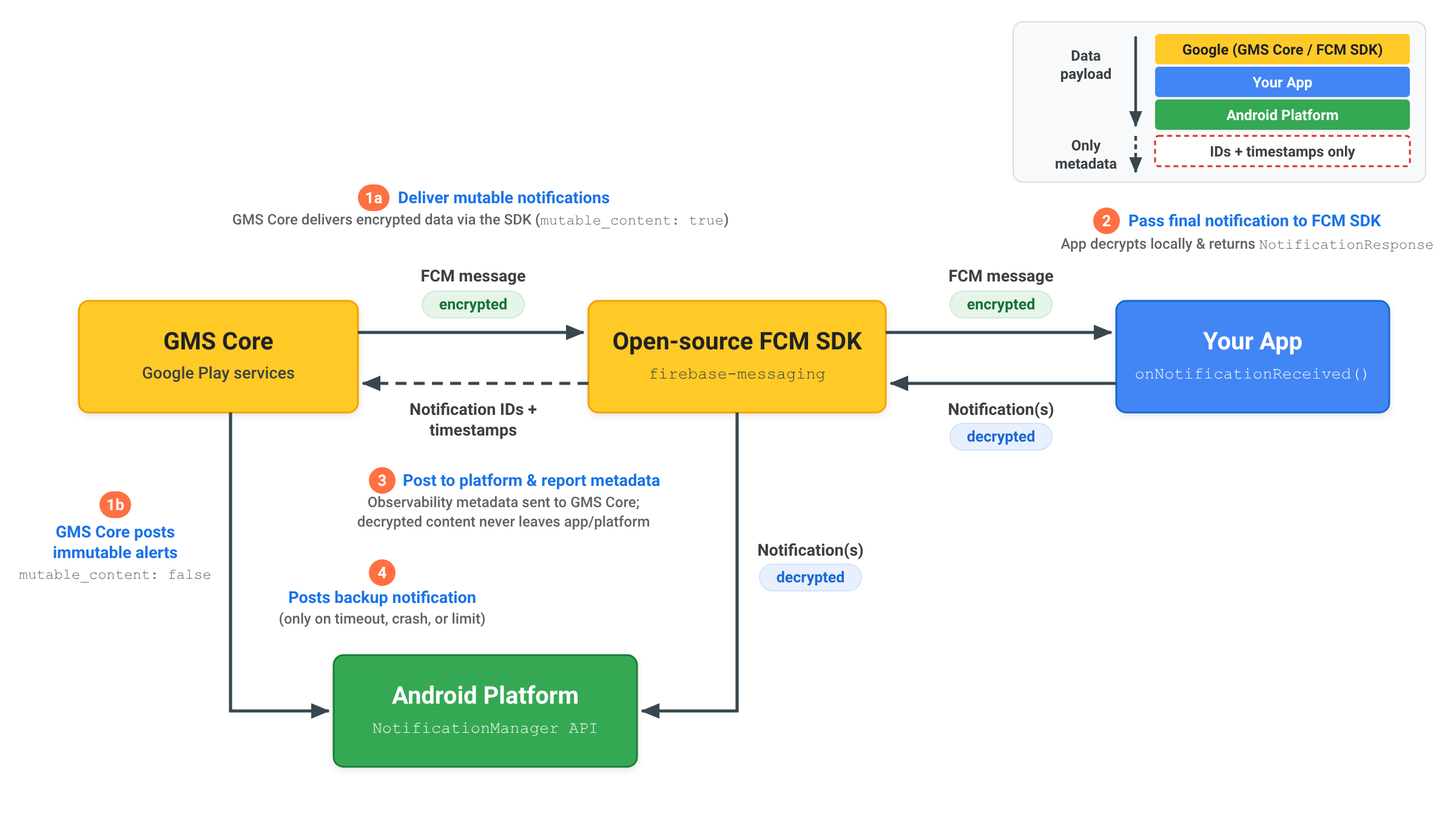
सूचनाओं को दबाने और टाइम आउट के बारे में जानकारी
Android ईकोसिस्टम पर भरोसेमंद तरीके से मैसेज डिलीवर करने के लिए, GMS Core, RemoteNotification मैसेज को हैंडल करते समय, प्रोसेसिंग टाइम आउट और सूचनाओं को दबाने की सीमाएं लागू करता है:
प्रोसेसिंग टाइम आउट
जब mutable_content को true पर सेट किया जाता है, तो आपके onNotificationReceived() तरीके को 20 सेकंड के अंदर NotificationResponse दिखाना चाहिए. अगर
एक्ज़ीक्यूशन इस थ्रेशोल्ड से ज़्यादा हो जाता है, तो कॉलबैक रद्द कर दिया जाता है. साथ ही, GMS Core
remote_notification.notification पेलोड से रेंडर की गई फ़ॉलबैक सूचना को
अपने-आप पोस्ट कर देता है.
सूचनाएं न दिखाने की दर
RemoteNotification मैसेज, बैटरी बचाने की सुविधा से जुड़ी पाबंदियों को बायपास करते हैं, ताकि उपयोगकर्ताओं को तुरंत सूचना दी जा सके और मैसेज बिना किसी देरी के डिलीवर किए जा सकें. इसलिए, ऐप्लिकेशन को मिले RemoteNotification मैसेज की सूचनाएं दिखानी चाहिए.
हर ऐप्लिकेशन को बैकग्राउंड में चलने के दौरान, अपने RemoteNotification ट्रैफ़िक का ज़्यादा से ज़्यादा 25% हिस्सा दबाने की अनुमति है. अगर किसी ऐप्लिकेशन के लिए सूचनाएं न दिखाने की दर 25% से ज़्यादा है, तो GMS Core, remote_notification.notification पेलोड से रेंडर की गई फ़ॉलबैक सूचना को अपने-आप रेंडर और पोस्ट करता है.
जब ऐप्लिकेशन फ़ोरग्राउंड में चालू होता है, तब सूचनाओं को दबाने की संख्या को इस थ्रेशोल्ड में नहीं गिना जाता. जिन ऐप्लिकेशन को बैकग्राउंड में बिना किसी पाबंदी के इस्तेमाल करने की अनुमति दी गई है उन्हें बैकग्राउंड में ऐप्लिकेशन को बंद करने की पाबंदियों से भी छूट दी गई है.